display KIA VENGA 2011 Workshop Manual
[x] Cancel search | Manufacturer: KIA, Model Year: 2011, Model line: VENGA, Model: KIA VENGA 2011Pages: 761, PDF Size: 34.65 MB
Page 744 of 761
4115
Features of your vehicle
Viewing Information of Audio Files
Short press the INFObutton.
Disk Title, Disk Artist, Track Title and
Track Artist can be displayed.
✎ If no information is available “NO
INFO” will be displayed, otherwise the
corresponding information will be dis-
played for 5 seconds.
To abort this mode: press one of the
following buttons - / , Fast
/ , RPT, RDM, LIST.
List Function Audio Files ✎ With this mode you can browse all
supported tracks on the CD.
The main menu of the LIST functionconsists of:
Short press LIST to enter track brows-ing.
Short press or button to
browse through the list of the selected
category.
Short press OK to playback of the
selected track.
To abort this mode: press one of the
following buttons / , Fast
/ , RPT, RDM, INFO, SOUND,
SETUP and LIST. Notes on WMA files
The following WMA files are supported:
Bit rate: Up to 192 kbit/s
Sampling frequency: Up to 44.1 kHz
WMA file names must have the
“.wma” extension.
Notes on MP3 files
The following MP3 files are supported by
the CD player:
Files conform with MPEG1/2 or 2.5-
Layer 3.
The format of the CD must be ISO
9660 Level 1 or Level 2 or Joliet with
sector format in Mode 1 or Mode 2
Form 1. Other formats cannot be
played reliably.
The maximum number of folders is99.
The Maximum number of folders and
number of files is 490. Additional files
and folders will be ignored.
Bit rate: Maximum of 320 kbit/s, con-
stant or variable.
Sampling frequency: Maximum of 48kHz.
Text display: ID3 tag V1 and ID3 tag
V2. MP3 tracks can contain addition
information such as artist, track and
album names (ID3 tags with maxi-
mum not more than 12 characters).
Characters other than upper
case/lower case letters (“Aa to Zz”)
and underscore (“_”) may not be dis-
played.
Only files with .mp3 extension are
recognized as MP3 files.
The unit may not play the first track in
the order that you wrote them to thedisc.
The unit plays only the first session ifthe disc contains both CD audio
tracks and MP3 files.
When playing a disc of 8 kbps or vari-
able bit rate (VBR), the elapsed play-
ing time in the display window maynot be correct.
Make sure that a MP3 CD-R/CD-RW
is burned that is formatted as a data
disc and NOT as an audio disc.
MP3 files are not compatible with
packet write data transfer.
Page 745 of 761
Features of your vehicle
116
4
Playing MP3/WMA files
Starting/Stopping playback
Press CD button to start playback.
Playback will stop when another source is selected.
Previous/Next Track
Press the or buttons to select
previous or next track.
Previous/Next Folder
Press the or button to select
the previous or next folder.
Fast Forward/Reverse
Press and hold the or button to
for fast reverse and fast forward.
✎ During fast forward and fast reverse
audio is audible at reduced volume.
Random
Short press the RDM button to select
the Random Folder option.
✎ All files in the Random Folder will be
played randomly.
Long press the RDM button to selectthe Random All option.
✎ All files on the CD will be played ran-
domly. Repeat
Short press the RPT button to select the Repeat file option.
✎ The current file will be repeated.
Long press the RPT button to select
the Repeat Folder option.
✎ All files in the current folder will berepeated.
Scan
Short press the SCAN button to select the Scan All option.
✎ All files in the CD will be scanned.
Long press the SCAN button to select
the Scan Folder option.
✎ The first file in each folder will bescanned.
CD plays the first 10 seconds of thesong.
When a folder ends: scanning contin-
ues with the first file of the next folder.
When a CD ends: scanning continues
with the first file of the first folder. Viewing Information of Compressed
Audio Files
Short press the INFObutton.
File name, Song title*, Album name,
Artist name, Directory name and Total
track can be displayed.
✎ If no ID3 Tag is available “NO INFO”
will be displayed, otherwise the corre-
sponding information will be displayed
for 5 seconds.
To abort this mode: press one of the
following buttons: or , Fast
or , RPT, RDM, INFO, SOUND,
SETUP and LIST.
List Function Compressed Audio Files ✎ With this mode you can browse fold-
ers and files located on the CD.
The main menu of the LIST functionconsists of:
Short press LIST to enter track brows-ing.
Short press or button to
browse through the list of the selected
category.
Short press OK to playback of the
selected track.
To abort this mode: press one of the
following buttons: or , Fast
or , RPT, RDM, INFO, SOUND,
SETUP and LIST.
Page 746 of 761
4117
Features of your vehicle
Using an iPod
Connecting the iPod ✎Use the supplied KIA iPod interface
cable to connect the iPod to the car’s
interface connector.
Insert the KIA iPod interface cable
into the connectors of the iPod and
the car.
When an iPod is connected and the
radio is on, the iPod will be detected
automatically. The iPod will be select-
ed as Source and the “iPod” icon will
be displayed.
The playing time, title and artist (if
available) of the current track will be
displayed.
If no supported file is detected on the
iPod, the iPod source will not be acti-
vated.
Disconnecting the iPod
Remove the KIA iPod interface cable
from iPod and car interface connector.
✎ The last used source will be activated. Previous/Next files (File Up/Down)
Short press to Seek Up or to
Seek Down.
✎ The next/previous file will be played.
Manual Seek – Fast-forward/
Fastbackward
Press and hold the or button
(Seek Down / Up).
Release the or button when the
desired time has been found.
✎ During manual seek audio is audible
at reduced volume.
Repeat File
Short press the RPTbutton.
✎ The current file will be repeated once the current file has ended.
To cancel the “Repeat File” mode,
short press the RPTbutton again. Random File/Album
Short press the RDMbutton for
Random Album playback.
✎ The albums of the current selection
will be played in random order (songs
in album remain in order).
Long press the RDMbutton for
Random File playback.
✎ All music files of the current selection
will be played in random order.
✎ With “Random File” on, the next file is
selected in the iPOD device in a non-
sequential, random order.
To cancel the “Random File/Album”
mode, short press the RDM buttonagain.
Viewing Information of iPod Music files
Short press the INFObutton.
✎ Song title, artist name and album
name can be displayed.
✎ File and directory name can not be
displayed.
To abort this mode: press one of the
following buttons - Seek Up / Down,
Fast Forward / Reverse, RPT, RDM,
LIST.
Page 747 of 761
Features of your vehicle
118
4
List Function
With this function you can navigate
through all tracks in the iPOD file sys-tem.
✎ The main menu of the LIST functionconsists of:
✎ PLAYLIST, ARTIST, ALBUM,GENRE, SONG and COMPOSER.
Short press the OKbutton to enter the
selected category or the sub-category.
Short press the button to go to the
previous category.
Short press or button to navi-gate through the list of the selected
category.
The songs in the selected play-list will
be displayed.
Artist : a list of albums of the selected
artist will displayed, the user can then
select an album from this list to view
the songs in the album selected.
Album : the songs in the selected
album will be displayed.
Genre : the list of artists for the select-
ed Genre will be displayed. After the
selection of an artist, a list of albums
for this artist is displayed. The user
can now select an album in this list to
view the songs in the selected album.
Song : all songs in the album will be
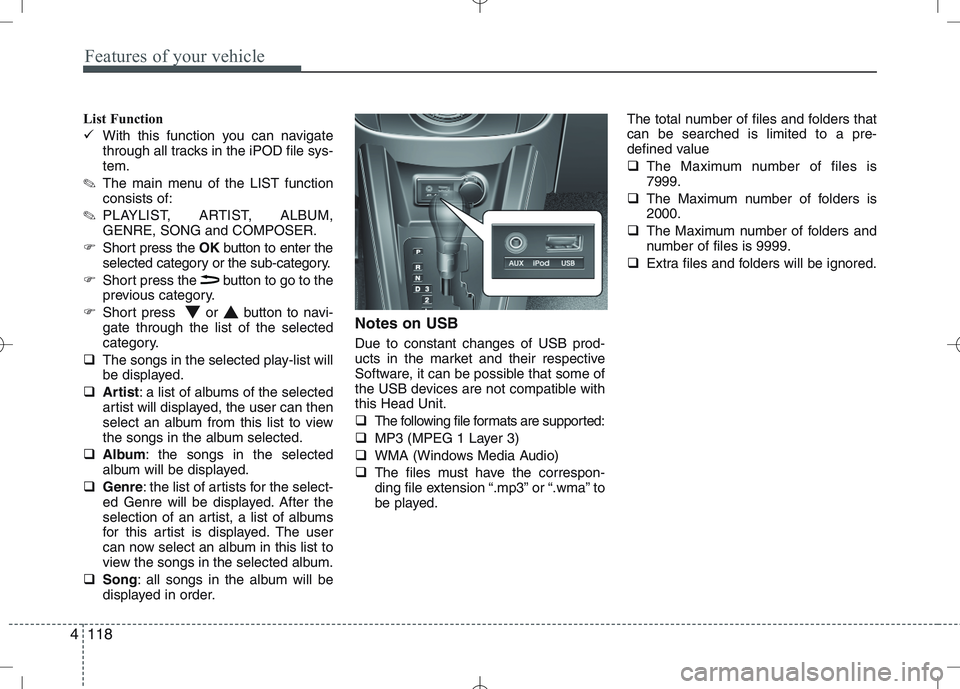
displayed in order. Notes on USB Due to constant changes of USB prod-
ucts in the market and their respective
Software, it can be possible that some of
the USB devices are not compatible withthis Head Unit.
The following file formats are supported:
MP3 (MPEG 1 Layer 3)
WMA (Windows Media Audio)
The files must have the correspon-
ding file extension “.mp3” or “.wma” to
be played. The total number of files and folders thatcan be searched is limited to a pre-
defined value
The Maximum number of files is 7999.
The Maximum number of folders is2000.
The Maximum number of folders and
number of files is 9999.
Extra files and folders will be ignored.
Page 749 of 761
Features of your vehicle
120
4
Manual Seek – Fast Forward/Fast back-
ward
Press and hold the or button to
go fast forward or fast backward.
During manual seek audio is audible
at reduced volume.
Repeat File/Folder
Short press the RPTbutton to select
Repeat File.
The current file will be repeated.
Long press the RPTbutton to select
Repeat Folder.
All files within the current folder will be repeated.
To cancel the “Repeat File/Folder”
mode, short press the RPTbutton
again. Random Folder/All Files
Short press the RDMbutton to acti-
vate the “Random Folder” option.
All files in the folder will be played at
random.
OR
Long press the RDMbutton to acti-
vate the “Random All” option.
All files on the USB device will be
played at random.
To deactivate the “Random Folder/All
Files” feature, press the RDMbutton
again.
Scan File/Folder
Long press the SCANbutton to acti-
vate the “Scan Folder” option.
✎ The first track of each folder will be
scanned, except the root directory.
OR
Short press the SCANbutton to acti-
vate the “Scan All” option.
All files on the USB device will be scanned.
To deactivate the “Scan Folder/All
Files” feature, short press the SCAN
button again to abort “Scan All” Viewing MP3 Information
With this function text information of the
MP3 files can displayed on the LCD-
Display.
Short press the press INFObutton.
The following information will be shown
in the following sequence.
Filename (“NO INFO” will appear if
the file name contains characters that
do not pertain to the ASCII characterset)
ID3 tag info – Song Title (“NO INFO”
will appear if there is no Song Title
available)
ID3 tag info – Artist name (“NO INFO”
will appear if there is no Artist Name
available)
ID3 tag info – Album name (“NO
INFO” will appear if will appear if there
is no Album Name available).
Directory name
Total no. of files on the USB device
The information will be visible on the
LCD-display for 5 seconds.
Page 750 of 761
4121
Features of your vehicle
Auxiliary In
Via the Auxiliary Input (3.5 mm plug)
you can connect your portable deviceto the Head Unit.
Insert the 3.5 mm plug (connected to
your portable device) into the Auxinput.
✎ Audio output from the auxiliary source
is directly audible when the device isplugged in.
✎ The Auxiliary Source is aborted when
another source becomes active.
To re-select the Auxiliary Sourcewhen it is plugged in already:
Short press the AUXbutton on the
Head Unit.
OR
Short press the Modebutton on the
Steering Wheel Remote Control.
✎ If no Auxiliary Source is detected,
“NO MEDIA” will be displayed for 5
seconds and the Head Unit will return
to the previous selected source.✽✽
NOTICE
The AUX source is not available if an
iPod is connected.
The volume setting of Auxiliary source
is independent of other sources. Any volume changes in Auxiliary source
is memorized and used whenever the
Auxiliary source is selected.
Page 757 of 761
Features of your vehicle
128
4
Regionalization (REG) This function controls the automatic sta-
tion follow-me in order to keep tuned to
the same regional station, or to switch
between regional stations which might
have different audio programs.
Enter the REG sub-menu as
described above.
Press the or buttons to select
REG Off, On or Auto.
Regionalization Off – This setting willignore the region setting.
Regionalization On – This setting willnot ignore the region setting.
Regionalization Auto – The tuner willtune to the station with the bestreception condition and with the same
regional characteristic. If none of the
stations satisfy the above condition,
the regional characteristic will beignored.
Standard setting: REG OFF Alternative Frequency (AF)
This function enables or disables the
Alternate Frequency function. With AF
enabled, the tuner will automatically tune
to the alternative frequency from the AF-list of the tuned station, with the bestreception signal.
Enter the AF sub-menu as described
above.
Press the or buttons to selectAF Off or AF On.
AF on: Automatic re-tuning to alterna-
tive frequencies for the same station.
AF off: No automatic re-tuning to
alternative frequencies. The tuner will
not leave the frequency set. MP3 Text Scrolling
Activating/ deactivating text display with
MP3 playback. The text appears in themiddle line of the screen.
Enter the “Text Scrolling” sub-menu
as described above.
Press the or buttons to select
Text scrolling On or Off.
The following settings are available:
Fixed: This allows to display one page
only (with a maximum of 12 charac-ters)
Scrolling: This allows to display two
pages (with a maximum of 12 charac-
ters per page, 24 characters in total).
Only one page is displayed at a time,
the pages will alternate every 5 sec-
onds.
Page 759 of 761
Features of your vehicle
130
4
Troubleshooting
In rare instances, your Head Unit may not be functioning the way you
expect it to do. Before calling the service department, please read the
operating instructions thoroughly and go through the following check
list; it may be possible to quickly solve the problem malfunction.
General
Status
The operating panel generates some heat.
The volume decreases automati-
cally. The volume can no longerbe increased.
Tuner
Status
“PI search” on the display
Stored radio stations disap- peared Explanation / How to check
No error. The unit feels warm.
An integrated safety circuit pre-
vents the temperature in the unit
from exceeding a certain value.
Allow the unit to cool down
(set low volume).
The volume and equalizer is self-
adjusted based on radio signal
intensity and its quality level withinfluence of region and location.
Explanation / How to check When recall is preset, the PI
information is not available (due
to very weak signal) or has been
changed (due to different region).
Meanwhile, check the REG set-
tings in Setup menu.
By switching the FM button, 3 dif-
ferent memory banks (FM1, FM2,
FMA) are able to store 6 differentstations each. Status
Increasing / decreasing volume Bad or no reception of the broad- cast signal The frequency instead of the sta-
tion name is displayed The required station cannot be tuned to using automatic search
No traffic announcements are
switched through (during iPod
playback)
Explanation / How to check
By switching the AM button, 2 dif-
ferent memory banks (MW, MWA)
are able to store 6 different sta-tions each.
Check SDVC setting (1-5 / off) in
Setup menu.
Check if the antenna is correctly connected.
Check whether the supply volt-
age‘s negative pole (brown cable)
is correctly connected to earth
(vehicle chassis). The unit is tuned to a station that
does not transmit RDS signals or
the transmitter is too weak.
The desired station is too weak.
Set desired station manually
(manual tuning)
Check whether the antenna is completely and correctly connect-ed.
Activate the traffic announcement
by pressing TA button.