instrument cluster KIA VENGA 2015 User Guide
[x] Cancel search | Manufacturer: KIA, Model Year: 2015, Model line: VENGA, Model: KIA VENGA 2015Pages: 480, PDF Size: 23.15 MB
Page 289 of 480
Driving your vehicle
12
5
3. Press the ENGINE START/STOP but-
ton whilst depressing the brake pedal.
4. Continue depressing the brake pedal until the illuminated glow indicator
goes off. (approximately 5 seconds)
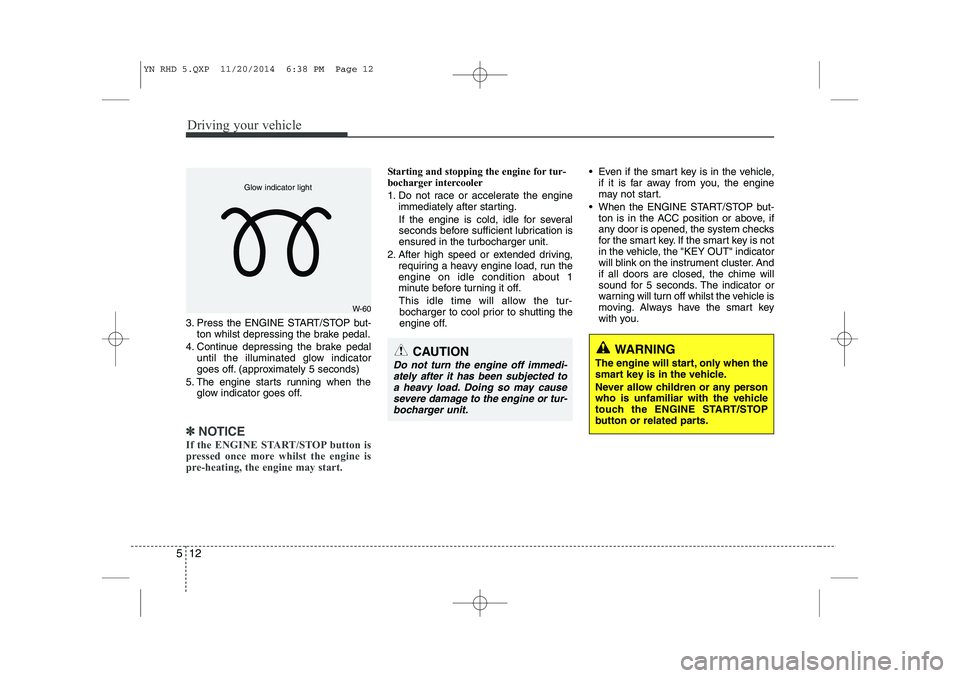
5. The engine starts running when the glow indicator goes off.
✽✽
NOTICE
If the ENGINE START/STOP button is
pressed once more whilst the engine is
pre-heating, the engine may start.
Starting and stopping the engine for tur-
bocharger intercooler
1. Do not race or accelerate the engine immediately after starting.
If the engine is cold, idle for several
seconds before sufficient lubrication isensured in the turbocharger unit.
2. After high speed or extended driving, requiring a heavy engine load, run theengine on idle condition about 1
minute before turning it off.
This idle time will allow the tur- bocharger to cool prior to shutting the
engine off. Even if the smart key is in the vehicle,
if it is far away from you, the engine
may not start.
When the ENGINE START/STOP but- ton is in the ACC position or above, if
any door is opened, the system checks
for the smart key. If the smart key is not
in the vehicle, the "KEY OUT" indicator
will blink on the instrument cluster. Andif all doors are closed, the chime will
sound for 5 seconds. The indicator or
warning will turn off whilst the vehicle is
moving. Always have the smart key
with you.
WARNING
The engine will start, only when the
smart key is in the vehicle.
Never allow children or any person
who is unfamiliar with the vehicle
touch the ENGINE START/STOP
button or related parts.
W-60
Glow indicator light
CAUTION
Do not turn the engine off immedi- ately after it has been subjected toa heavy load. Doing so may causesevere damage to the engine or tur-
bocharger unit.
YN RHD 5.QXP 11/20/2014 6:38 PM Page 12
Page 292 of 480
515
Driving your vehicle
The outside temperature is between2°C to 35°C
The engine coolant temperature is not too low
Battery charge status is adequately high
The driver's seat belt is fastened
The driver's door and bonnet are closed.
It could be different up to the vehicle con- dition.
When the engine automatically stops,
the "AUTO STOP" indicator on the clus-
ter panel will illuminate.
After you press the clutch pedal, the
engine will start automatically. The
"AUTO STOP" indicator on the cluster
panel will turn off. You can continue driv-ing.ISG auto-starting
Before and after the engine enters the
idle stop mode, the ISG system will auto-
matically check all the necessary items
such as the safety of the vehicle and pas-
senger comfort.
The engine will start automatically with-
out the driver's action if any of the follow-ing occurs:
If the brake vacuum pressure is low
If the fan speed of the manual climate control system is set above the 3rd position when the air conditioning is on
If the fan speed of the automatic cli- mate control system is set above the6th position when the air conditioningis on
When a certain amount of time has passed with the climate control systemon
When the defroster is ON
When the battery charge status is low
If the vehicle speed is over 5km/h by rolling down a hill
It could be different up to the vehicle con-dition.
When the automatic starting occurs, the
"AUTO STOP" indicator on the cluster
will blink for 5 seconds. ISG(Idle Stop and Go) system
deactivation
If you desire to deactivate the ISG sys-
tem, you can do it temporarily by press-
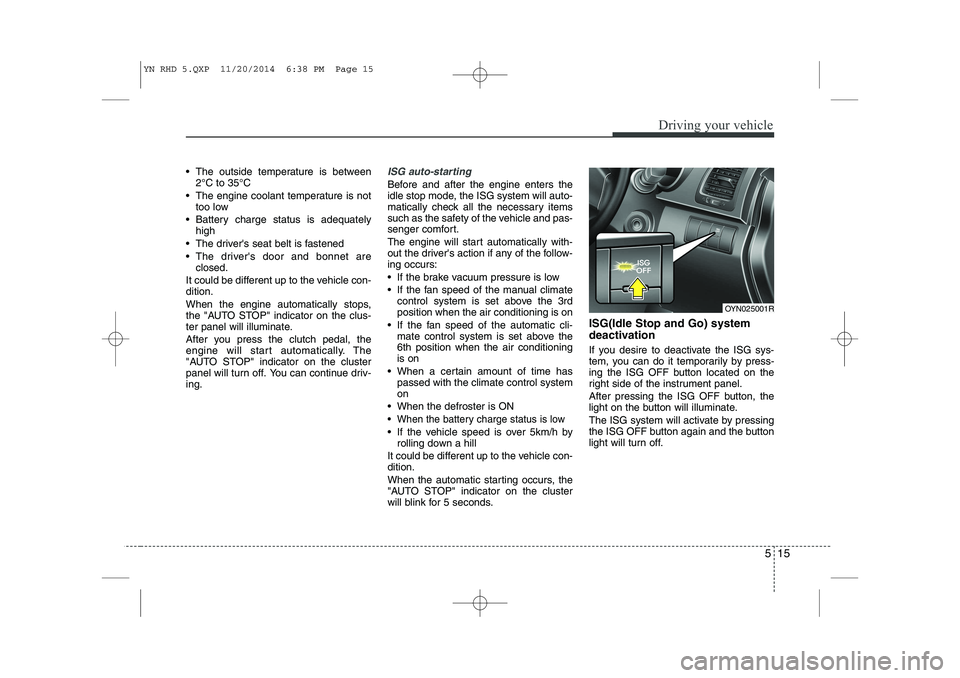
ing the ISG OFF button located on the
right side of the instrument panel.
After pressing the ISG OFF button, the
light on the button will illuminate.
The ISG system will activate by pressing
the ISG OFF button again and the button
light will turn off.
OYN025001R
YN RHD 5.QXP 11/20/2014 6:38 PM Page 15
Page 311 of 480
Driving your vehicle
34
5
Vehicle stability management (VSM) (if equipped)
This system provides further enhance-
ments to vehicle stability and steering
responses when a vehicle is driving on a
slippery road or a vehicle detected
changes in coefficient of friction between
right wheels and left wheels when brak-ing.
VSM operation
When the VSM is operating, the steering
wheel may be controlled.
When the vehicle stability management
is operating properly, you can feel a slight
pulsation in the vehicle. This is only the
effect of brake control and indicates noth-
ing unusual.
The VSM does not operate when:
Driving on bank road such as gradient
or incline
Driving rearward
ESP OFF indicator light ( ) remains on the instrument cluster
EPS indicator light remains on the instrument cluster
VSM operation off
If you press the ESP OFF button to turn
off the ESP, the VSM will also cancel and
the ESP OFF indicator light ( ) illumi-
nates.
To turn on the VSM, press the button
again. The ESP OFF indicator light goesout.
Malfunction indicator
The VSM can be deactivated even if you
don’t cancel the VSM operation by press-
ing the ESP OFF button. It indicates thata malfunction has been detected some-
where in the Electric Power Steering sys-
tem or VSM system. If the ESP indicator
light ( ) or EPS warning light remains
on, we recommend that you contact an
authorised Kia dealer.
✽✽ NOTICE
The VSM is designed to function above approximately 15 km/h (9 mph)
on curves.
The VSM is designed to function above approximately 30 km/h (18
mph) when a vehicle is braking on a
split-mu road. The split-mu road is
made of surfaces which have different
friction forces.
WARNING
The Vehicle Stability Management system is not a substitute for
safe driving practices but a sup-
plementary function only. It is theresponsibility of the driver to
always check the speed and the
distance to the vehicle ahead.
Always hold the steering wheel
firmly whilst driving.
Your vehicle is designed to acti- vate according to the driver’s
intention, even with installed
VSM. Always follow all the normal
precautions for driving at safe
speeds for the conditions –
including driving inclement
weather and on a slippery road.
Driving with varying tyre or wheel sizes may cause the VSM system
to malfunction. When replacing
tyres, make sure they are the
same size as your original tyres.
YN RHD 5.QXP 11/20/2014 6:38 PM Page 34
Page 313 of 480
Driving your vehicle
36
5
The cruise control system allows you to
program the vehicle to maintain a con-stant speed without pressing the acceler-ator pedal. This system is designed to function
above approximately 40 km/h (25 mph).
✽✽
NOTICE
During normal cruise control operation,
when the SET switch is activated or
reactivated after applying the brakes,
the cruise control will energize after
approximately 3 seconds. This delay is
normal.
✽
✽ NOTICE
To activate cruise control, depress the
brake pedal at least once after turning
the ignition switch to the ON position or
starting the engine. This is to check if
the brake switch which is important
part to cancel cruise control is in normal
condition.
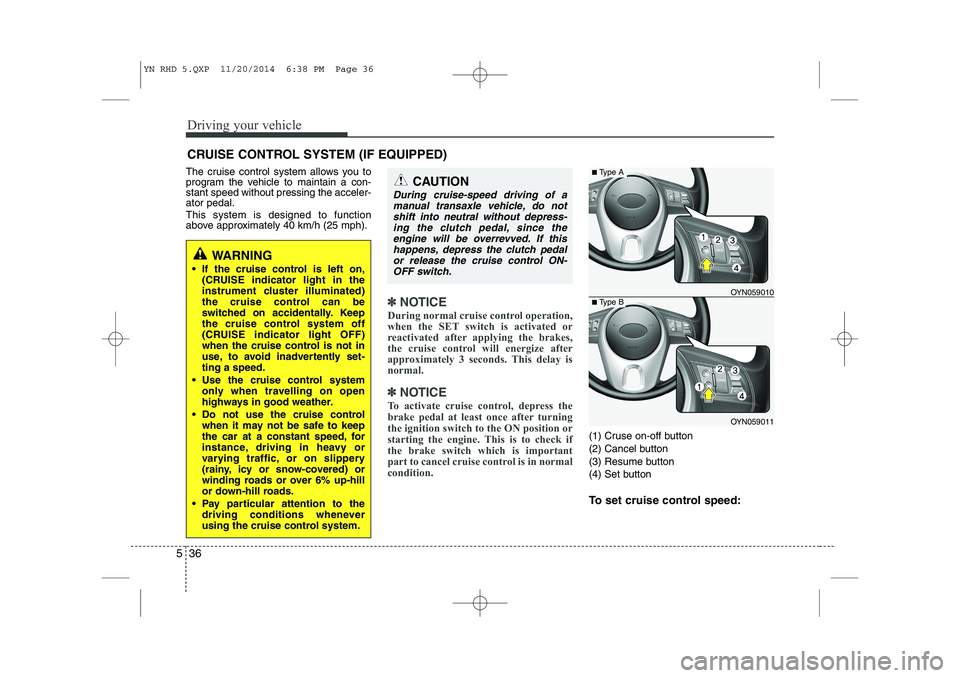
(1) Cruse on-off button
(2) Cancel button
(3) Resume button
(4) Set button
To set cruise control speed:
CRUISE CONTROL SYSTEM (IF EQUIPPED)
WARNING
If the cruise control is left on, (CRUISE indicator light in the
instrument cluster illuminated)
the cruise control can be
switched on accidentally. Keep
the cruise control system off
(CRUISE indicator light OFF)
when the cruise control is not in
use, to avoid inadvertently set-ting a speed.
Use the cruise control system only when travelling on open
highways in good weather.
Do not use the cruise control when it may not be safe to keep
the car at a constant speed, for
instance, driving in heavy or
varying traffic, or on slippery
(rainy, icy or snow-covered) or
winding roads or over 6% up-hill
or down-hill roads.
Pay particular attention to the driving conditions whenever
using the cruise control system.
CAUTION
During cruise-speed driving of a
manual transaxle vehicle, do notshift into neutral without depress- ing the clutch pedal, since the
engine will be overrevved. If thishappens, depress the clutch pedal or release the cruise control ON-OFF switch.
OYN059011
■ Type A
■Type BOYN059010
YN RHD 5.QXP 11/20/2014 6:38 PM Page 36
Page 314 of 480
537
Driving your vehicle
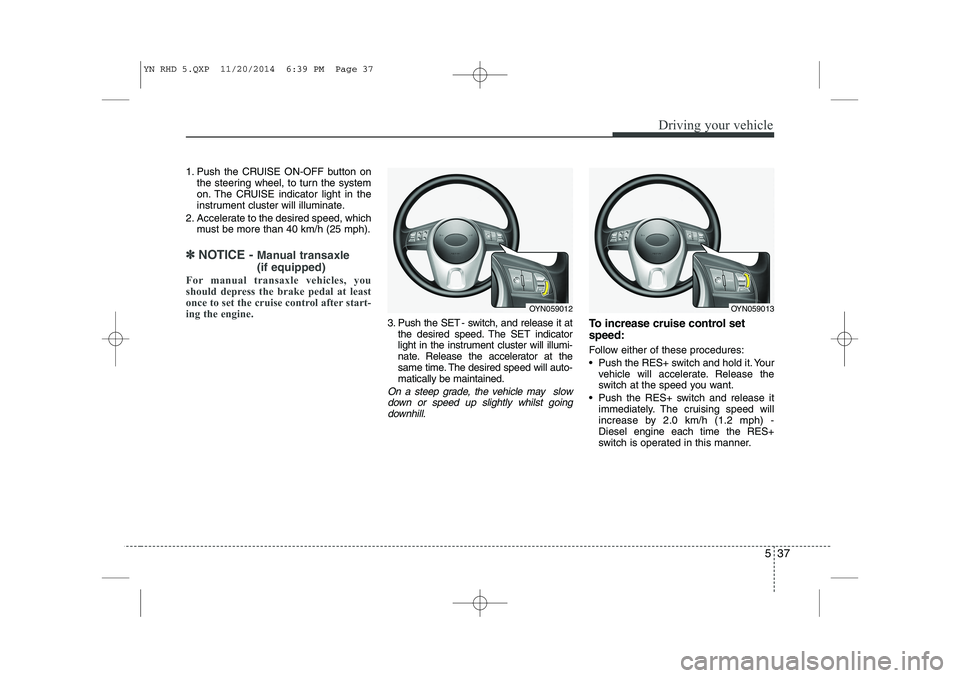
1. Push the CRUISE ON-OFF button onthe steering wheel, to turn the system
on. The CRUISE indicator light in the
instrument cluster will illuminate.
2. Accelerate to the desired speed, which must be more than 40 km/h (25 mph).
✽✽ NOTICE - Manual transaxle (if equipped)
For manual transaxle vehicles, you
should depress the brake pedal at least
once to set the cruise control after start-
ing the engine.
3. Push the SET - switch, and release it at the desired speed. The SET indicator
light in the instrument cluster will illumi-
nate. Release the accelerator at the
same time. The desired speed will auto-matically be maintained.
On a steep grade, the vehicle may slow
down or speed up slightly whilst goingdownhill.
To increase cruise control set speed:
Follow either of these procedures:
Push the RES+ switch and hold it. Your vehicle will accelerate. Release the
switch at the speed you want.
Push the RES+ switch and release it immediately. The cruising speed will
increase by 2.0 km/h (1.2 mph) -Diesel engine each time the RES+
switch is operated in this manner.
OYN059012OYN059013
YN RHD 5.QXP 11/20/2014 6:39 PM Page 37
Page 316 of 480
539
Driving your vehicle
Each of these actions will cancel cruisecontrol operation (the SET indicator lightin the instrument cluster will go off), but itwill not turn the system off. If you wish to
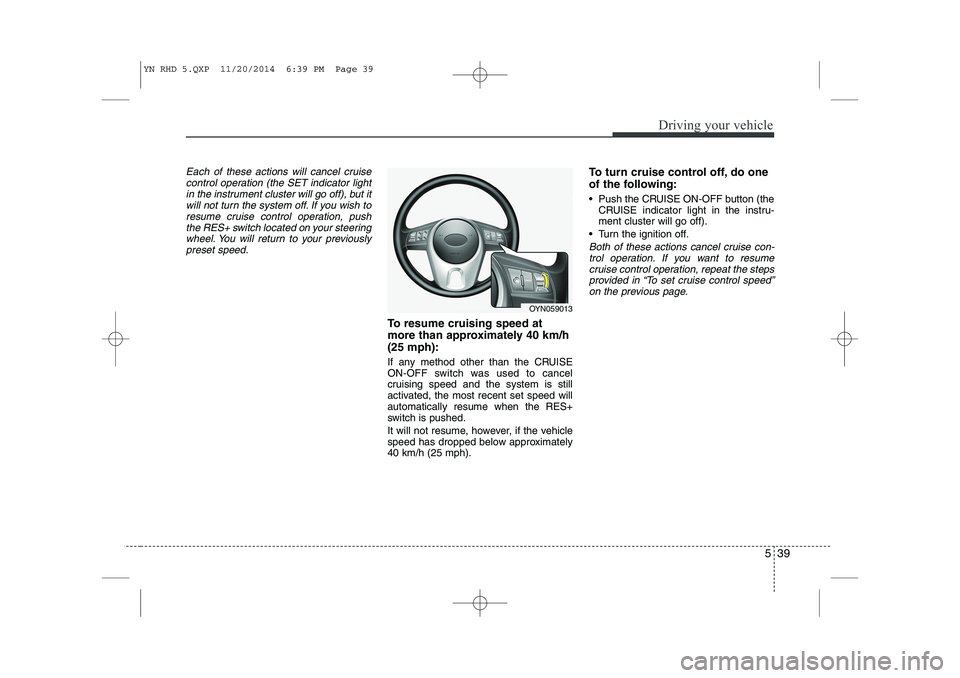
resume cruise control operation, pushthe RES+ switch located on your steeringwheel. You will return to your previously
preset speed.
To resume cruising speed at
more than approximately 40 km/h(25 mph):
If any method other than the CRUISE
ON-OFF switch was used to cancel
cruising speed and the system is still
activated, the most recent set speed willautomatically resume when the RES+
switch is pushed.
It will not resume, however, if the vehicle
speed has dropped below approximately40 km/h (25 mph). To turn cruise control off, do one
of the following:
Push the CRUISE ON-OFF button (the
CRUISE indicator light in the instru- ment cluster will go off).
Turn the ignition off.
Both of these actions cancel cruise con- trol operation. If you want to resume cruise control operation, repeat the stepsprovided in “To set cruise control speed” on the previous page.
OYN059013
YN RHD 5.QXP 11/20/2014 6:39 PM Page 39
Page 317 of 480
Driving your vehicle
40
5
You can set the speed limit when you
don’t want to drive over a specific speed.
If you drive over the preset speed limit,
the warning system operates (set speed
limit will blink and chime will sound) until
the vehicle speed returns within thespeed limit.
✽✽
NOTICE
Whilst speed limit control in operation,
the cruise control system cannot be acti-
vated.
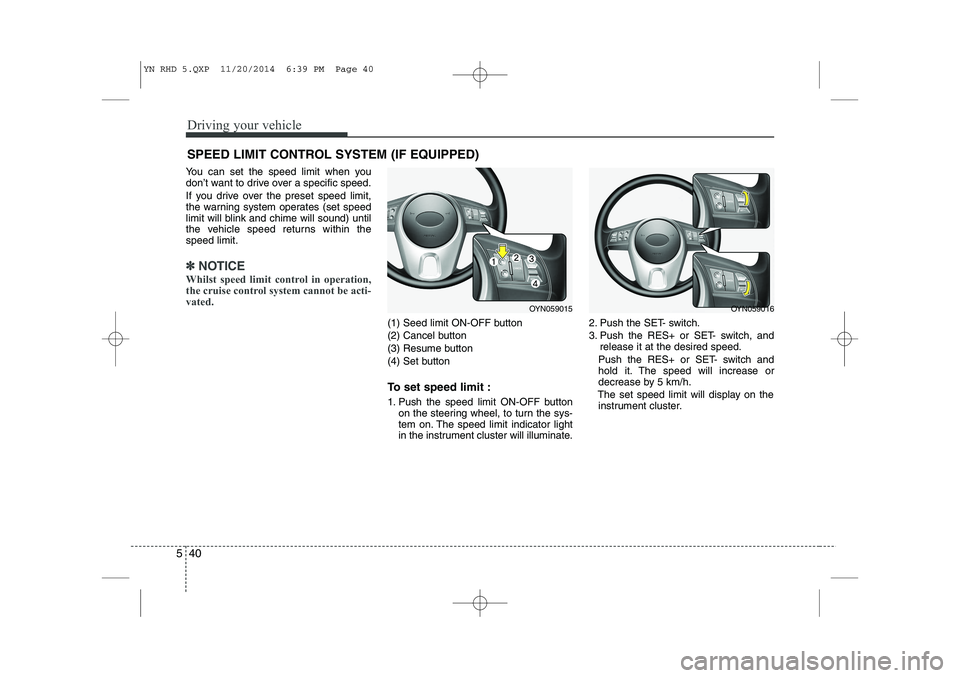
(1) Seed limit ON-OFF button
(2) Cancel button
(3) Resume button
(4) Set button
To set speed limit :
1. Push the speed limit ON-OFF button on the steering wheel, to turn the sys-
tem on. The speed limit indicator light
in the instrument cluster will illuminate. 2. Push the SET- switch.
3. Push the RES+ or SET- switch, and
release it at the desired speed.
Push the RES+ or SET- switch and
hold it. The speed will increase or
decrease by 5 km/h.
The set speed limit will display on the instrument cluster.
SPEED LIMIT CONTROL SYSTEM (IF EQUIPPED)
OYN059016OYN059015
YN RHD 5.QXP 11/20/2014 6:39 PM Page 40
Page 437 of 480
Maintenance
58
7
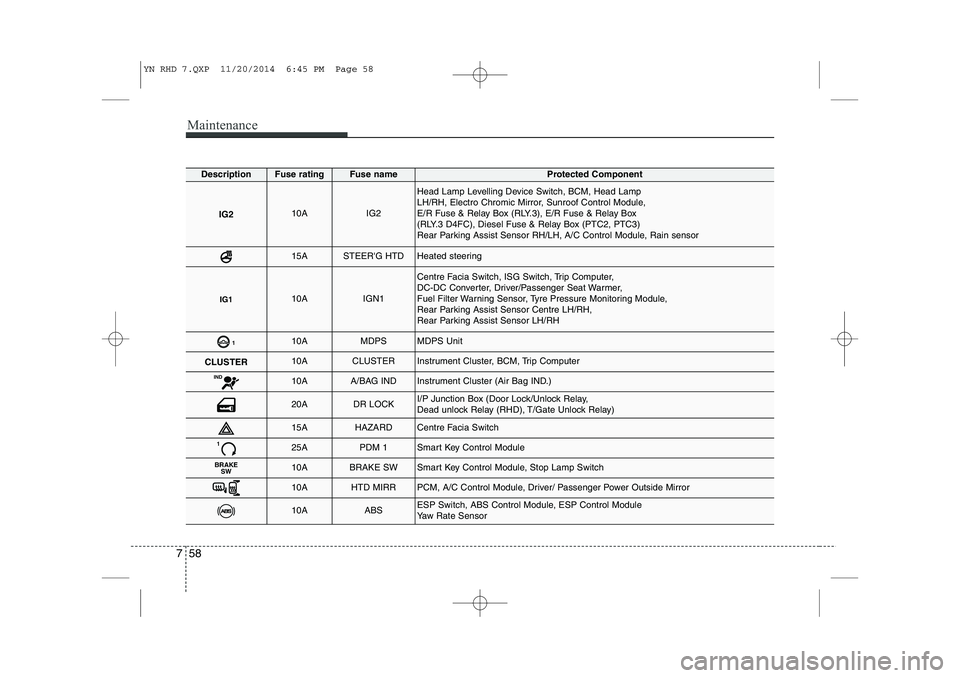
DescriptionFuse ratingFuse nameProtected Component
IG210AIG2
Head Lamp Levelling Device Switch, BCM, Head Lamp
LH/RH, Electro Chromic Mirror, Sunroof Control Module,
E/R Fuse & Relay Box (RLY.3), E/R Fuse & Relay Box
(RLY.3 D4FC), Diesel Fuse & Relay Box (PTC2, PTC3)
Rear Parking Assist Sensor RH/LH, A/C Control Module, Rain sensor
15ASTEER'G HTDHeated steering
IG110AIGN1
Centre Facia Switch, ISG Switch, Trip Computer,
DC-DC Converter, Driver/Passenger Seat Warmer,
Fuel Filter Warning Sensor, Tyre Pressure Monitoring Module,
Rear Parking Assist Sensor Centre LH/RH,
Rear Parking Assist Sensor LH/RH
110AMDPSMDPS Unit
CLUSTER10ACLUSTERInstrument Cluster, BCM, Trip Computer
IND10AA/BAG INDInstrument Cluster (Air Bag IND.)
20ADR LOCKI/P Junction Box (Door Lock/Unlock Relay,
Dead unlock Relay (RHD), T/Gate Unlock Relay)
15AHAZARDCentre Facia Switch
125APDM 1Smart Key Control Module
BRAKE
SW10ABRAKE SWSmart Key Control Module, Stop Lamp Switch
10AHTD MIRRPCM, A/C Control Module, Driver/ Passenger Power Outside Mirror
10AABSESP Switch, ABS Control Module, ESP Control Module
Yaw Rate Sensor
YN RHD 7.QXP 11/20/2014 6:45 PM Page 58
Page 438 of 480
759
Maintenance
DescriptionFuse ratingFuse nameProtected Component
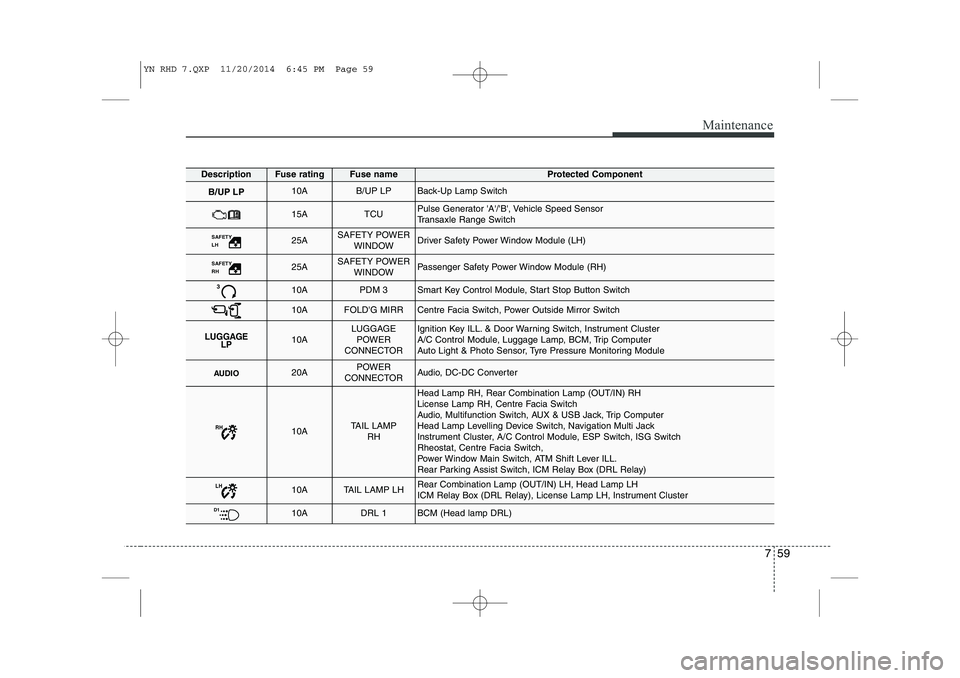
B/UP LP10AB/UP LPBack-Up Lamp Switch
15ATCUPulse Generator 'A'/'B', Vehicle Speed Sensor
Transaxle Range Switch
SAFETY LH 25ASAFETY POWERWINDOWDriver Safety Power Window Module (LH)
SAFETY RH 25ASAFETY POWERWINDOWPassenger Safety Power Window Module (RH)
310APDM 3Smart Key Control Module, Start Stop Button Switch
10AFOLD'G MIRRCentre Facia Switch, Power Outside Mirror Switch
LUGGAGE LP10ALUGGAGE
POWER
CONNECTORIgnition Key ILL. & Door Warning Switch, Instrument Cluster
A/C Control Module, Luggage Lamp, BCM, Trip Computer
Auto Light & Photo Sensor, Tyre Pressure Monitoring Module
AUDIO20APOWER
CONNECTORAudio, DC-DC Converter
RH10ATAIL LAMP RH
Head Lamp RH, Rear Combination Lamp (OUT/IN) RH
License Lamp RH, Centre Facia Switch
Audio, Multifunction Switch, AUX & USB Jack, Trip Computer
Head Lamp Levelling Device Switch, Navigation Multi Jack
Instrument Cluster, A/C Control Module, ESP Switch, ISG Switch
Rheostat, Centre Facia Switch,
Power Window Main Switch, ATM Shift Lever ILL.
Rear Parking Assist Switch, ICM Relay Box (DRL Relay)
LH10ATAIL LAMP LHRear Combination Lamp (OUT/IN) LH, Head Lamp LH
ICM Relay Box (DRL Relay), License Lamp LH, Instrument Cluster
D110ADRL 1BCM (Head lamp DRL)
YN RHD 7.QXP 11/20/2014 6:45 PM Page 59
Page 439 of 480
Maintenance
60
7
DescriptionFuse ratingFuse nameProtected Component
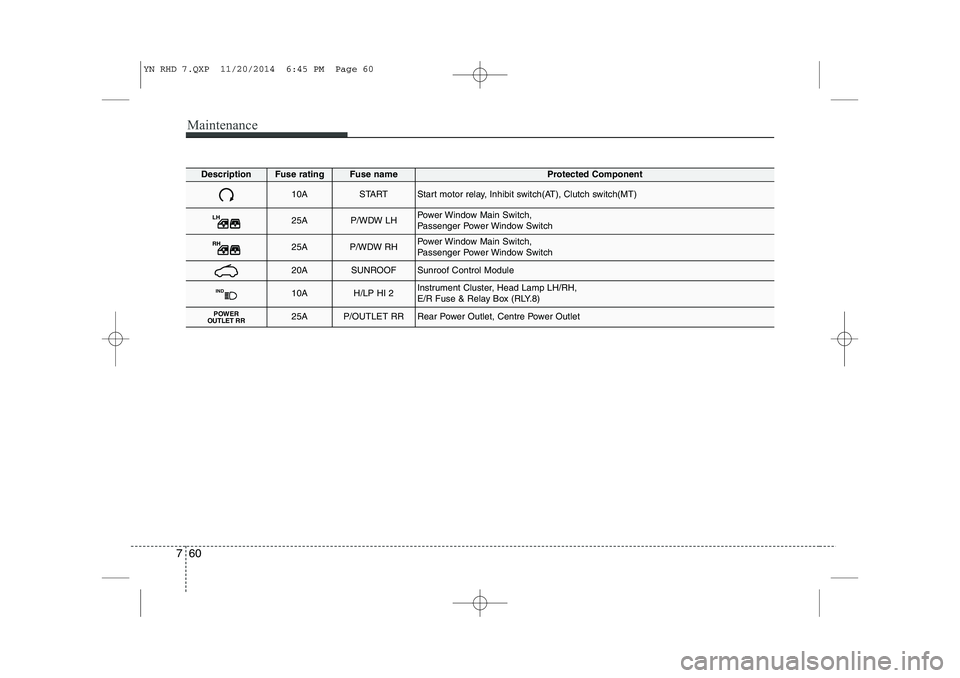
10ASTARTStart motor relay, Inhibit switch(AT), Clutch switch(MT)
LH25AP/WDW LHPower Window Main Switch,
Passenger Power Window Switch
RH25AP/WDW RHPower Window Main Switch,
Passenger Power Window Switch
20ASUNROOFSunroof Control Module
IND10AH/LP HI 2Instrument Cluster, Head Lamp LH/RH,
E/R Fuse & Relay Box (RLY.8)
POWER
OUTLET RR25AP/OUTLET RRRear Power Outlet, Centre Power Outlet
YN RHD 7.QXP 11/20/2014 6:45 PM Page 60