steering wheel KIA VENGA 2015 User Guide
[x] Cancel search | Manufacturer: KIA, Model Year: 2015, Model line: VENGA, Model: KIA VENGA 2015Pages: 480, PDF Size: 23.15 MB
Page 130 of 480
347
Safety features of your vehicle
(Continued)
No objects should be placed overor near the air bag modules on
the steering wheel, instrument
panel, and the front passenger's
panel above the glove box,
because any such object could
cause harm if the vehicle is in a
crash severe enough to cause
the air bags to deploy.
Do not tamper with or disconnect SRS wiring or other components
of the SRS system. Doing so
could result in injury, due to acci-
dental deployment of the air bags
or by rendering the SRS inopera-
tive.
If the SRS air bag warning light remains illuminated or blinks
whilst the vehicle is being driven,we recommend that the system
be inspected by an authorised
Kia dealer.
(Continued)(Continued)
Air bags can only be used once –we recommend that the system
be replaced by Kia dealer.
The SRS is designed to deploy the front air bags only when an
impact is sufficiently severe andwhen the impact angle is less
than 30° from the forward longitu-
dinal axis of the vehicle.
Additionally, the air bags will only
deploy once. Seat belts must be
worn at all times.
Front air bags are not intended to deploy in side-impact, rear-
impact or rollover crashes. In
addition, front air bags will not
deploy in frontal crashes below
the deployment threshold.
A child restraint system must never be placed in the front seat.
The infant or child could be
severely injured or killed by an air
bag deployment in case of anaccident.
(Continued)(Continued)
Children age 12 and under mustalways be properly restrained in
the rear seat. Never allow chil-
dren to ride in the front passen-
ger seat. If a child over 12 must
be seated in the front seat, he or
she must be properly belted and
the seat should be moved as far
back as possible.
For maximum safety protection in all types of crashes, all occu-
pants including the driver should
always wear their seat belts
whether or not an air bag is also
provided at their seating position
to minimise the risk of severe
injury or death in the event of a
crash. Do not sit or lean unneces-
sarily close to the air bag whilst
the vehicle is in motion.
(Continued)
YN RHD 3.QXP 11/20/2014 7:17 PM Page 47
Page 134 of 480
351
Safety features of your vehicle
The side air bags are designed to deploy
only during certain side-impact collisions,
depending on the crash severity, angle,
speed and point of impact. The side air
bags are not designed to deploy in all
side impact situations.(Continued)
Do not use any accessory seatcovers.
Use of seat covers could reduce or prevent the effectiveness of the system.
Do not install any accessories on the side or near the side air bag.
Do not place any objects over the air bag or between the air bag
and yourself.
Do not place any objects (an umbrella, bag, etc.) between the
front door and the front seat.
Such objects may become dan-
gerous projectiles and cause
injury if the supplemental side air
bag inflates.
To prevent unexpected deploy- ment of the side air bag that may
result in personal injury, avoidimpact to the side impact sensor
when the ignition switch is on.
If seat or seat cover is damaged, we recommend that the system
be serviced by an authorised Kia
dealer.WARNING
Do not allow the passengers to lean their heads or bodies onto
doors, put their arms on the doors,
stretch their arms out of the win-
dow, or place objects between the
doors and passengers when theyare seated on seats equipped with
side and/or curtain air bags.
The side air bag is supplemental to the driver's and the passen-
ger's seat belt systems and is not
a substitute for them. Therefore
your seat belts must be worn at
all times whilst the vehicle is in
motion. The air bags deploy only
in certain side impact conditions
severe enough to cause signifi-
cant injury to the vehicle occu-pants.
For best protection from the side air bag system and to avoid being
injured by the deploying side air
bag, both front seat occupantsshould sit in an upright position
with the seat belt properly fas-
tened. The driver's hands shouldbe placed on the steering wheelat the 9:00 and 3:00 positions.
The passenger's arms and handsshould be placed on their laps.
(Continued)
YN RHD 3.QXP 11/20/2014 7:17 PM Page 51
Page 141 of 480
Safety features of your vehicle
58
3
SRS Care
The SRS is virtually maintenance-free
and so there are no parts you can safely
service by yourself. If the SRS air bag
warning light does not illuminate, or con-
tinuously remains on, we recommend
that the system be inspected by an
authorised Kia dealer.
WARNING
Modification to SRS components or wiring, including the addition
of any kind of badges to the pad
covers or modifications to the
body structure, can adversely
affect SRS performance and lead
to possible injury.
For cleaning the air bag pad cov- ers, use only a soft, dry cloth or
one which has been moistened
with plain water. Solvents or
cleaners could adversely affect
the air bag covers and proper
deployment of the system.
No objects should be placed over
or near the air bag modules on the
steering wheel, instrument panel,
and the front passenger's panel
above the glove box, because any
such object could cause harm if the
vehicle is in a crash severe enough
to cause the air bags to inflate.
(Continued)
(Continued)
If the air bags inflate, we recom- mend that the system be replaced
by an authorised Kia dealer.
Do not tamper with or disconnect SRS wiring, or other components
of the SRS system. Doing so
could result in injury, due to acci-
dental inflation of the air bags or
by rendering the SRS inopera-
tive.
If components of the air bag sys- tem must be discarded, or if the
vehicle must be scrapped, certain
safety precautions must be
observed. An authorised Kia
dealer knows these precautions
and can give you the necessary
information. Failure to follow
these precautions and proce-dures could increase the risk of
personal injury.
If your car was flooded and has soaked carpeting or water on
flooring, you shouldn't try to start
the engine; we recommend that
you contact an authorised Kia
dealer.
YN RHD 3.QXP 11/20/2014 7:17 PM Page 58
Page 144 of 480
4
Keys / 4-2
Remote keyless entry / 4-5
Smart key / 4-8
Theft-alarm system / 4-11
Door locks / 4-13
Tailgate / 4-17
Windows / 4-19
Hood / 4-24
Fuel filler lid / 4-26
Panorama sunroof / 4-29
Steering wheel / 4-33
Mirrors / 4-35
Instrument cluster / 4-40
Rear parking assist system / 4-57
Rearview camera / 4-60
Hazard warning flasher / 4-61
Lighting / 4-61
Wipers and washers / 4-67
Interior light / 4-71
Defroster / 4-72
Manual climate control system / 4-73
Automatic climate control system / 4-82
Windshield defrosting and defogging / 4-90
Storage compartment / 4-92
Interior features / 4-94
Audio system / 4-102
Features of your vehicle
Page 176 of 480
433
Features of your vehicle
Electric power steering
Power steering uses the motor to assist
you in steering the vehicle. If the engine
is off or if the power steering system
becomes inoperative, the vehicle may
still be steered, but it will require
increased steering effort.
The motor driven power steering is con-
trolled by the power steering control unit
which senses the steering wheel torque
and vehicle speed to command the
motor.
The steering effort becomes heavier as
the vehicle’s speed increases and
becomes lighter as the vehicle’s speed
decreases for better control of the steer-ing wheel.
Should you notice any change in the
effort required to steer during normal
vehicle operation, we recommend that
the system be checked by an authorized
Kia dealer.
✽✽NOTICE
The following symptoms may occur dur-
ing normal vehicle operation:
The EPS warning light does not illu- minate. (Continued)(Continued)
The steering effort is high immediate-
ly after turning the ignition switch on.
This happens as the EPS system per-
forms the diagnostics. When the diag-
nostics is completed, the steering effort
will return to its normal condition.
A click noise may be heard from the EPS relay after the ignition switch is
turned to the ON or LOCK position.
Motor noise may be heard when the
vehicle is at a stop or at a low driving
speed.
If the Electric Power Steering System does not operate normally, the warn-
ing light will illuminate on the instru-
ment cluster. The steering wheel may
become difficult to control or operate
abnormally. We recommend that you
contact an authorized Kia dealer.
The steering effort increases if the steering wheel is rotated continuously
when the vehicle is not in motion.
However, after a few minutes, it will
return to its normal conditions.
When you operate the steering wheel
in low temperature, abnormal noise
could occur. If temperature rises, the
noise will disappear. This is a normal
condition.
Tilt steering
Tilt steering allows you to adjust the
steering wheel before you drive. You can
also raise it to give your legs more room
when you exit and enter the vehicle.
The steering wheel should be positioned
so that it is comfortable for you to drive,
while permitting you to see the instru-
ment panel warning lights and gauges.
STEERING WHEEL
WARNING
Never adjust the angle of the steering wheel while driving. You
may lose steering control and
cause severe personal injury,death or accidents.
After adjusting, push the steering wheel both up and down to be
certain it is locked in position.
Page 177 of 480
Features of your vehicle
34
4
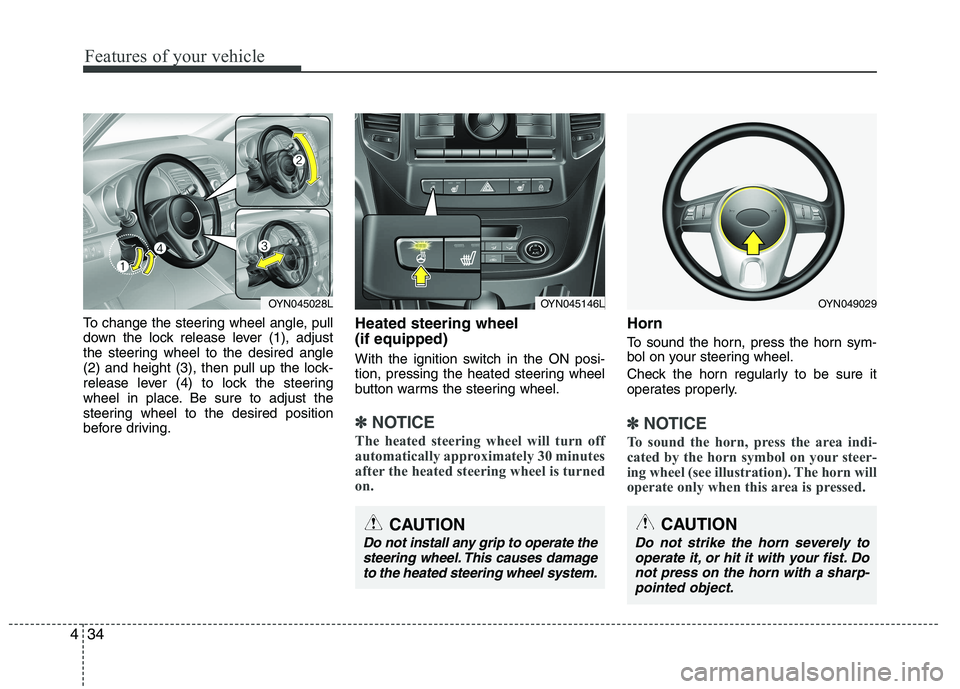
To change the steering wheel angle, pull
down the lock release lever (1), adjust
the steering wheel to the desired angle
(2) and height (3), then pull up the lock-
release lever (4) to lock the steering
wheel in place. Be sure to adjust the
steering wheel to the desired position
before driving. Heated steering wheel (if equipped)
With the ignition switch in the ON posi-
tion, pressing the heated steering wheel
button warms the steering wheel.
✽✽
NOTICE
The heated steering wheel will turn off
automatically approximately 30 minutes
after the heated steering wheel is turned
on.
Horn
To sound the horn, press the horn sym-
bol on your steering wheel.
Check the horn regularly to be sure it
operates properly.
✽✽ NOTICE
To sound the horn, press the area indi-
cated by the horn symbol on your steer-
ing wheel (see illustration). The horn will
operate only when this area is pressed.
CAUTION
Do not strike the horn severely to operate it, or hit it with your fist. Do not press on the horn with a sharp-pointed object.
OYN049029OYN045028LOYN045146L
CAUTION
Do not install any grip to operate the
steering wheel. This causes damageto the heated steering wheel system.
Page 197 of 480
Features of your vehicle
54
4
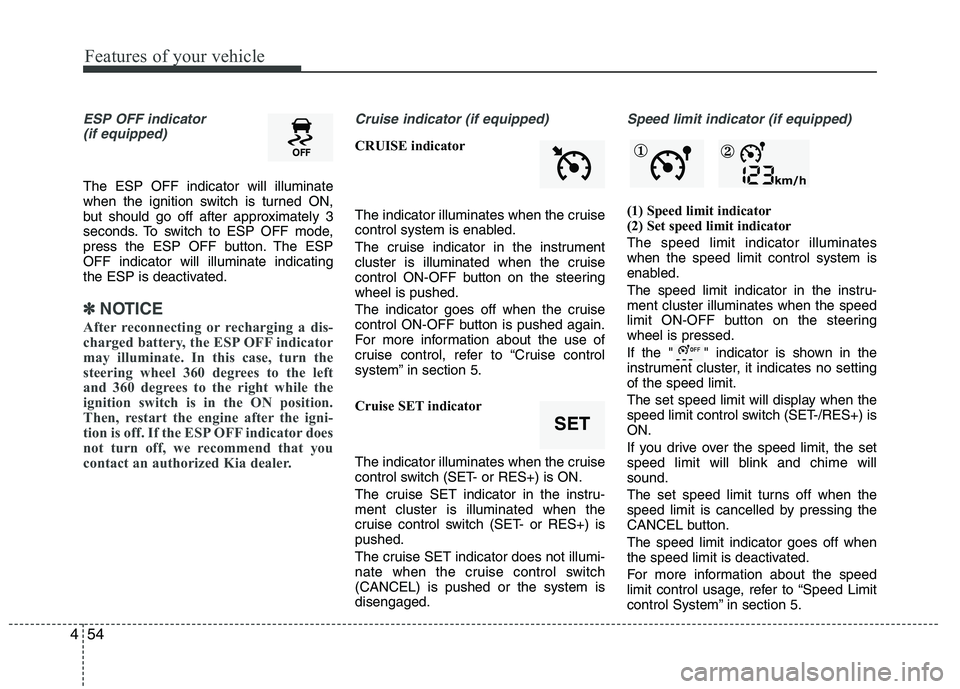
ESP OFF indicator
(if equipped)
The ESP OFF indicator will illuminate
when the ignition switch is turned ON,
but should go off after approximately 3
seconds. To switch to ESP OFF mode,
press the ESP OFF button. The ESPOFF indicator will illuminate indicating
the ESP is deactivated.
✽✽ NOTICE
After reconnecting or recharging a dis-
charged battery, the ESP OFF indicator
may illuminate. In this case, turn the
steering wheel 360 degrees to the left
and 360 degrees to the right while the
ignition switch is in the ON position.
Then, restart the engine after the igni-
tion is off. If the ESP OFF indicator does
not turn off, we recommend that you
contact an authorized Kia dealer.
Cruise indicator (if equipped)
CRUISE indicator
The indicator illuminates when the cruise
control system is enabled.
The cruise indicator in the instrument
cluster is illuminated when the cruise
control ON-OFF button on the steeringwheel is pushed.
The indicator goes off when the cruise
control ON-OFF button is pushed again.
For more information about the use of
cruise control, refer to “Cruise control
system” in section 5.
Cruise SET indicator
The indicator illuminates when the cruise
control switch (SET- or RES+) is ON.
The cruise SET indicator in the instru- ment cluster is illuminated when the
cruise control switch (SET- or RES+) ispushed.
The cruise SET indicator does not illumi-
nate when the cruise control switch(CANCEL) is pushed or the system isdisengaged.
Speed limit indicator (if equipped)
(1) Speed limit indicator
(2) Set speed limit indicator The speed limit indicator illuminates when the speed limit control system is
enabled.
The speed limit indicator in the instru- ment cluster illuminates when the speed
limit ON-OFF button on the steeringwheel is pressed.
If the " " indicator is shown in the
instrument cluster, it indicates no settingof the speed limit.
The set speed limit will display when the
speed limit control switch (SET-/RES+) isON.
If you drive over the speed limit, the set
speed limit will blink and chime willsound.
The set speed limit turns off when the
speed limit is cancelled by pressing the
CANCEL button. The speed limit indicator goes off when
the speed limit is deactivated.
For more information about the speed
limit control usage, refer to “Speed Limit
control System” in section 5.
SET
① ②
Page 266 of 480
Features of your vehicle
122
4
Auxiliary In
Via the Auxiliary Input (3.5 mm plug)
you can connect your portable deviceto the Head Unit.
Insert the 3.5 mm plug (connected to
your portable device) into the Auxinput.
✎ Audio output from the auxiliary source
is directly audible when the device isplugged in.
✎ The Auxiliary Source is aborted when
another source becomes active.
To re-select the Auxiliary Sourcewhen it is plugged in already:
Short press the AUXbutton on the
Head Unit.
OR
Short press the Modebutton on the
Steering Wheel Remote Control.
✎ If no Auxiliary Source is detected,
“NO MEDIA” will be displayed for 5
seconds and the Head Unit will return
to the previous selected source.✽✽
NOTICE
The AUX source is not available if an
iPod
®is connected.
The volume setting of Auxiliary source
is independent of other sources. Any volume changes in Auxiliary source
is memorized and used whenever the
Auxiliary source is selected.
YN RHD 4(101~AUDIO).QXP 11/20/2014 7:29 PM Page 122
Page 268 of 480
Features of your vehicle
124
4
When pairing is established, the ID of the Bluetooth®Wireless Technology
device and the service list info will bestored in the Head Unit
Bluetooth®
Wireless Technology Device List.
Device List
With this function you can browse through and select
Bluetooth®Wireless
Technology devices that are stored in theHead Unit
Bluetooth®Wireless
Technology Device List.
Short press the SETUPbutton to enter
the Setup menu.
Short press the or button to access the
Bluetooth®Wireless
Technology sub-menu.
Press the button to browse the
Device List to select the required
device.
Press the OKbutton to start pairing
between the selected device and theHead Unit.
✎ Note: Whenever there is at least one
connected device active, in the displaythe
Bluetooth®Wireless Technology
icon is visible. Delete Device
This function allows you to delete a
Bluetooth®Wireless Technology device
ID from the Head Unit Bluetooth®
Wireless Technology Device List.
Short press the SETUPbutton to
enter the Setup menu.
Short press the or button to access the
Bluetooth®Wireless
Technology sub-menu.
Press the button to select Delete
Device.
Press the OKbutton to delete the
selected device from the Head Unit
Bluetooth®Wireless Technology
Device List
Phone Volume
Short press the SETUPbutton to
enter the Setup menu.
Short press the or button to access the
Bluetooth®Wireless
Technology sub-menu.
Select the option “Phone Volume”.
Press the or button to decrease
or increase the phone volume setting.
Default setting: 12
Setting range: 0 ... 35
During an ongoing call, user is
allowed to adjust the BT Phone vol-
ume. The adjusted volume is memo-
rized into Phone Volume setting. Answering a Call
Press the Callbutton on the Steering
Wheel Remote Control to accept an incoming call.
Terminate / Reject Call
Press the End Callbutton on the
Steering Wheel Remote Control to
terminate or reject a call.
Last Call Re-dial
Short press the Callbutton on the
Steering Wheel Remote Control to re-
dial last dialled number (one attempt).
Long press the Callbutton on the
Steering Wheel Remote Control to re-
dial last dialled number (twoattempts).
Private Call
This function allows you to have a private
call even if the phone is connected to theHead Unit.
Press the Callbutton on your phone
to start a private call.
OR
Press the End Callbutton on your
phone to end a private call.
YN RHD 4(101~AUDIO).QXP 11/20/2014 7:29 PM Page 124
Page 269 of 480
4 125
Features of your vehicle
Transferring a Call
This function allows you to transfer a call
during an ongoing call.
From the tuner to the phone
From the phone to the tuner
Long press the Callbutton on the
Steering Wheel Remote Control to
transfer the ongoing call back to the
phone or back to the tuner again.
Audio Streaming
Start Audio Streaming
This function allows the Head Unit to
start streaming music from phone.
The
Bluetooth®Wireless Technology
device must be connected with the Head Unit.
Press the AUXbutton and select BT
AUDIO.
✎ The Head Unit starts streaming the
audio from the phone and will start
playing the audio files.
✎ The Head Unit has no control on the
sequence of track playback in phone. Next/Previous Track
This function allows you to select the
next/ previous track of phone‘s music
player by using the next/previous track
buttons on the Head Unit or SteeringWheel Remote Control.
Short press the or button on the
Head Unit or the Steering WheelRemote Control.
Suspend Audio Streaming
This function allows you to suspend
streaming music from the phone to theHead Unit.
Short press the Mutebutton on the
Steering Wheel Remote Control.
Press the AUXbutton and de-select
BT AUDIO.
YN RHD 4(101~AUDIO).QXP 11/20/2014 7:29 PM Page 125