fuel KIA VENGA 2015 Owner's Manual
[x] Cancel search | Manufacturer: KIA, Model Year: 2015, Model line: VENGA, Model: KIA VENGA 2015Pages: 480, PDF Size: 23.15 MB
Page 81 of 480
Your vehicle at a glance
4
2
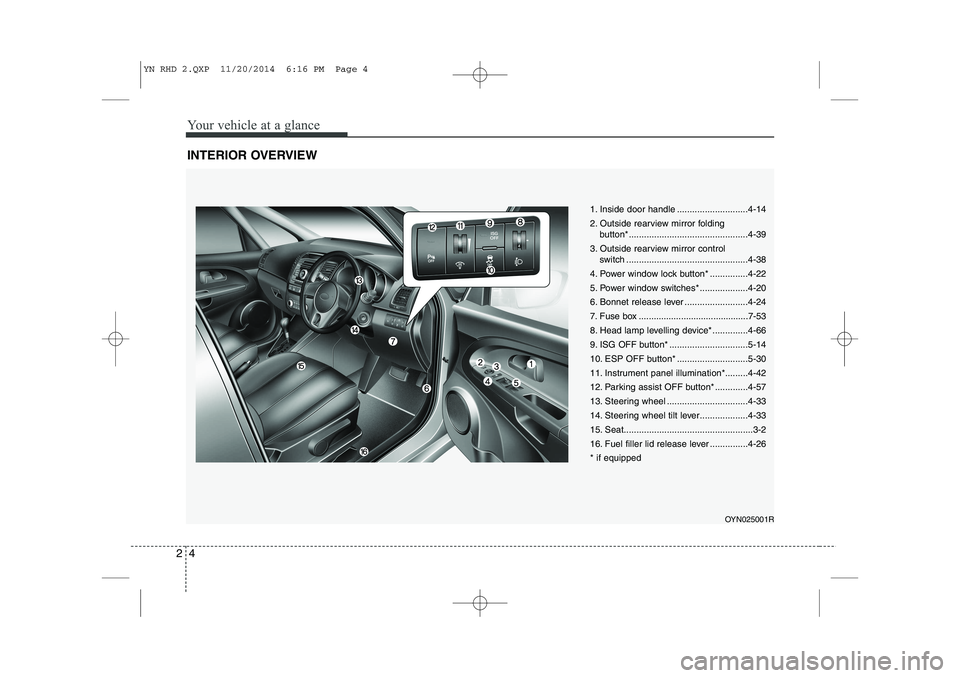
INTERIOR OVERVIEW
1. Inside door handle ............................4-14
2. Outside rearview mirror folding
button*...............................................4-39
3. Outside rearview mirror control switch ................................................4-38
4. Power window lock button* ...............4-22
5. Power window switches* ...................4-20
6. Bonnet release lever .........................4-24
7. Fuse box ............................................7-53
8. Head lamp levelling device* ..............4-66
9. ISG OFF button* ...............................5-14
10. ESP OFF button* ............................5-30
11. Instrument panel illumination*.........4-42
12. Parking assist OFF button* .............4-57
13. Steering wheel ................................4-33
14. Steering wheel tilt lever...................4-33
15. Seat...................................................3-2
16. Fuel filler lid release lever ...............4-26* if equipped
OYN025001R
YN RHD 2.QXP 11/20/2014 6:16 PM Page 4
Page 83 of 480
Your vehicle at a glance
6
2
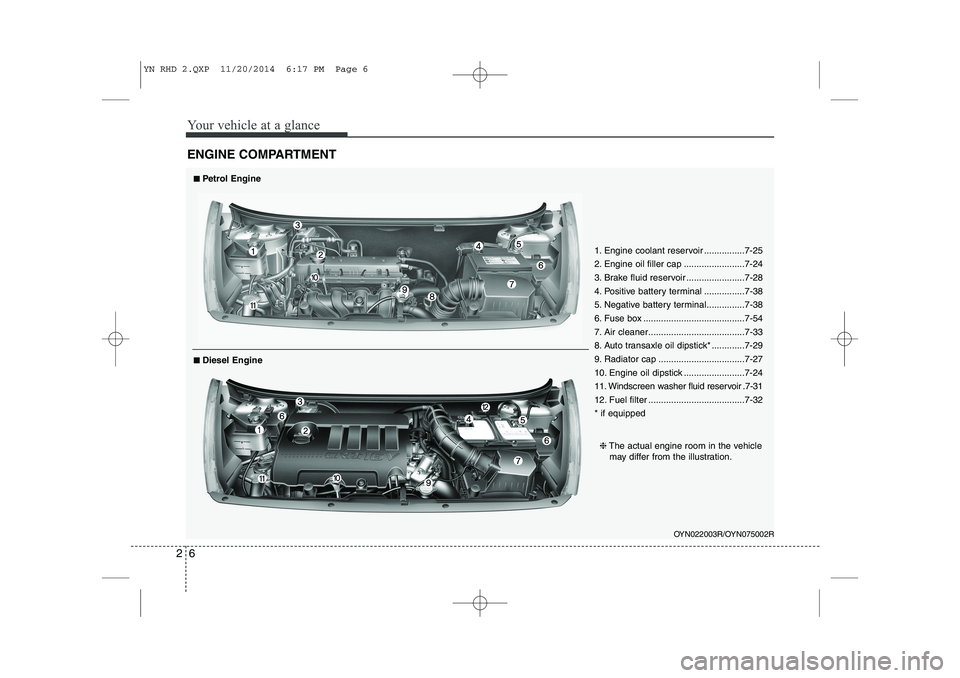
ENGINE COMPARTMENT
OYN022003R/OYN075002R
■■
Petrol Engine
❈ The actual engine room in the vehicle
may differ from the illustration.
■
■
Diesel Engine 1. Engine coolant reservoir ................7-25
2. Engine oil filler cap ........................7-24
3. Brake fluid reservoir .......................7-28
4. Positive battery terminal ................7-38
5. Negative battery terminal...............7-38
6. Fuse box ........................................7-54
7. Air cleaner......................................7-33
8. Auto transaxle oil dipstick* .............7-29
9. Radiator cap ..................................7-27
10. Engine oil dipstick ........................7-24
11. Windscreen washer fluid reservoir .7-31
12. Fuel filter ......................................7-32 * if equipped
YN RHD 2.QXP 11/20/2014 6:17 PM Page 6
Page 144 of 480
4
Keys / 4-2
Remote keyless entry / 4-5
Smart key / 4-8
Theft-alarm system / 4-11
Door locks / 4-13
Tailgate / 4-17
Windows / 4-19
Hood / 4-24
Fuel filler lid / 4-26
Panorama sunroof / 4-29
Steering wheel / 4-33
Mirrors / 4-35
Instrument cluster / 4-40
Rear parking assist system / 4-57
Rearview camera / 4-60
Hazard warning flasher / 4-61
Lighting / 4-61
Wipers and washers / 4-67
Interior light / 4-71
Defroster / 4-72
Manual climate control system / 4-73
Automatic climate control system / 4-82
Windshield defrosting and defogging / 4-90
Storage compartment / 4-92
Interior features / 4-94
Audio system / 4-102
Features of your vehicle
Page 169 of 480
Features of your vehicle
26
4
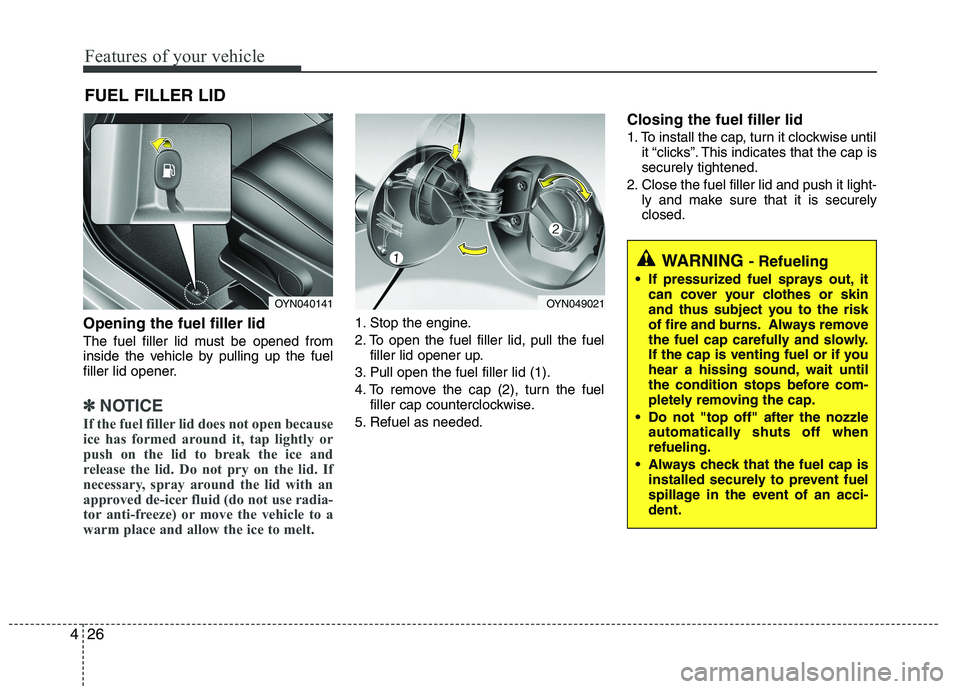
Opening the fuel filler lid
The fuel filler lid must be opened from
inside the vehicle by pulling up the fuel
filler lid opener.
✽✽
NOTICE
If the fuel filler lid does not open because
ice has formed around it, tap lightly or
push on the lid to break the ice and
release the lid. Do not pry on the lid. If
necessary, spray around the lid with an
approved de-icer fluid (do not use radia-
tor anti-freeze) or move the vehicle to a
warm place and allow the ice to melt.
1. Stop the engine.
2. To open the fuel filler lid, pull the fuel filler lid opener up.
3. Pull open the fuel filler lid (1).
4. To remove the cap (2), turn the fuel filler cap counterclockwise.
5. Refuel as needed. Closing the fuel filler lid
1. To install the cap, turn it clockwise until
it “clicks”. This indicates that the cap is securely tightened.
2. Close the fuel filler lid and push it light- ly and make sure that it is securelyclosed.
FUEL FILLER LID
WARNING
- Refueling
If pressurized fuel sprays out, it can cover your clothes or skin
and thus subject you to the risk
of fire and burns. Always remove
the fuel cap carefully and slowly.
If the cap is venting fuel or if you
hear a hissing sound, wait until
the condition stops before com-
pletely removing the cap.
Do not "top off" after the nozzle automatically shuts off whenrefueling.
Always check that the fuel cap is installed securely to prevent fuel
spillage in the event of an acci-dent.
OYN040141OYN049021
Page 170 of 480
427
Features of your vehicle
(Continued)Use only approved portable plas-
tic fuel containers designed to
carry and store gasoline.
Do not use cellular phones while refueling. Electric current and/or
electronic interference from cel-
lular phones can potentially
ignite fuel vapors causing a fire.
When refueling, always shut the engine off. Sparks produced byelectrical components related to
the engine can ignite fuel vapors
causing a fire. Once refueling is
complete, check to make sure thefiller cap and filler door are
securely closed, before starting
the engine.
DO NOT use matches or a lighter and DO NOT SMOKE or leave a lit
cigarette in your vehicle while at
a gas station especially during
refueling. Automotive fuel is
highly flammable and can, when
ignited, result in fire.
(Continued)(Continued)
Do not get back into a vehicleonce you have begun refueling
since you can generate static
electricity by touching, rubbing
or sliding against any item or fab-
ric (polyester, satin, nylon, etc.)
capable of producing static elec-
tricity. Static electricity discharge
can ignite fuel vapors resulting in
rapid burning. If you must re-
enter the vehicle, you should
once again eliminate potentially
dangerous static electricity dis-
charge by touching a metal part
of the vehicle, away from the fuel
filler neck, nozzle or other gaso-
line source.
When using an approved portable fuel container, be sure toplace the container on the
ground prior to refueling. Static
electricity discharge from the
container can ignite fuel vapors
causing a fire. Once refueling has
begun, contact with the vehicleshould be maintained until the
filling is complete.
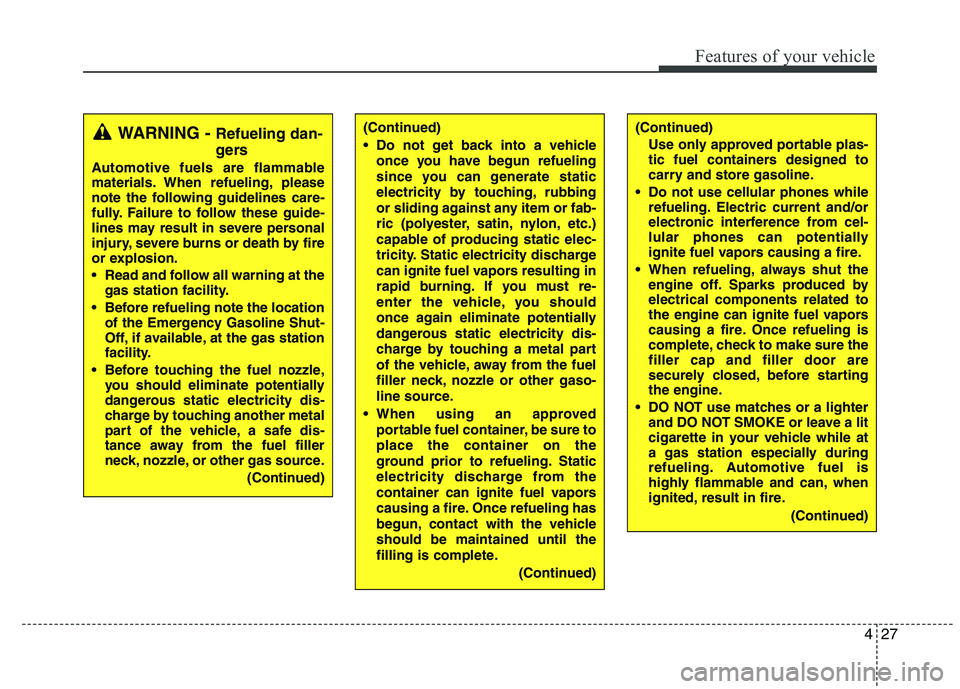
(Continued)WARNING - Refueling dan-
gers
Automotive fuels are flammable
materials. When refueling, please
note the following guidelines care-
fully. Failure to follow these guide-
lines may result in severe personal
injury, severe burns or death by fire
or explosion.
Read and follow all warning at the gas station facility.
Before refueling note the location of the Emergency Gasoline Shut-
Off, if available, at the gas station
facility.
Before touching the fuel nozzle, you should eliminate potentially
dangerous static electricity dis-
charge by touching another metal
part of the vehicle, a safe dis-
tance away from the fuel filler
neck, nozzle, or other gas source.
(Continued)
Page 171 of 480
Features of your vehicle
28
4
(Continued)
If a fire breaks out during refuel-
ing, leave the vicinity of the vehi-
cle, and immediately contact the
manager of the gas station and
then contact the local fire depart-
ment. Follow any safety instruc-
tions they provide.CAUTION
Make sure to refuel your vehicle
according to the “Fuel require-
ments” suggested in section 1.
If the fuel filler cap requires replacement, please make surethat you use parts designed for
replacement in your vehicle. An incorrect fuel filler cap can resultin a serious malfunction of thefuel system or emission control
system. For more detailed infor- mation, we recommend that youcontact an authorized Kia dealer.
Do not spill fuel on the exterior surfaces of the vehicle. Any type
of fuel spilled on painted surfacesmay damage the paint.
After refueling, make sure the fuel cap is installed securely to pre-vent fuel spillage in the event of
an accident.
Page 183 of 480
Features of your vehicle
40
4
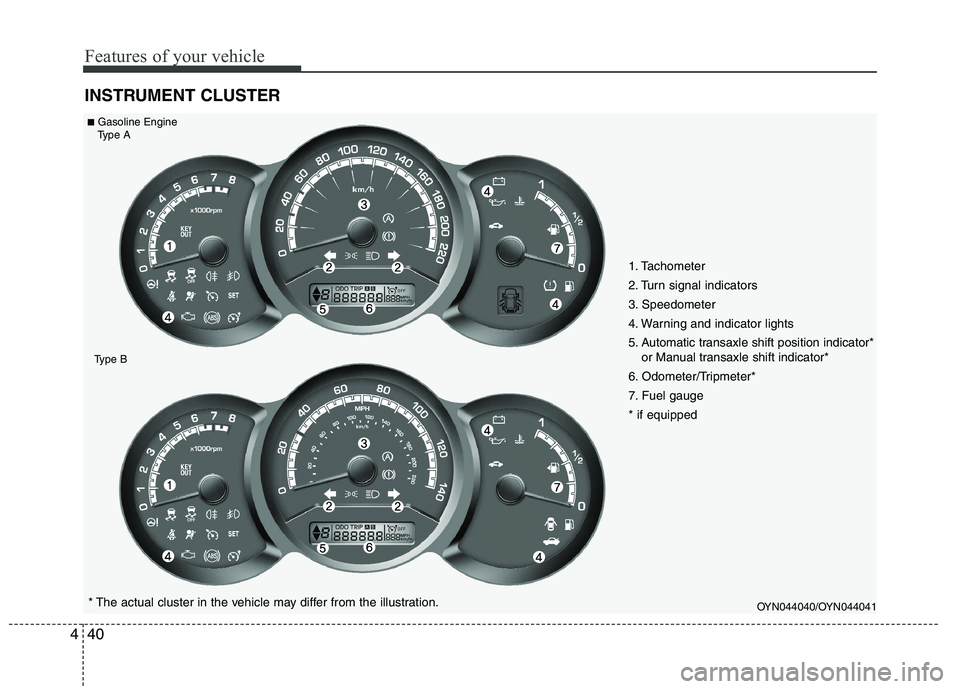
INSTRUMENT CLUSTER
OYN044040/OYN044041* The actual cluster in the vehicle may differ from the illustration.
■
Gasoline Engine
Type A
Type B
1. Tachometer
2. Turn signal indicators
3. Speedometer
4. Warning and indicator lights
5. Automatic transaxle shift position indicator* or Manual transaxle shift indicator*
6. Odometer/Tripmeter*
7. Fuel gauge* if equipped
Page 184 of 480
441
Features of your vehicle
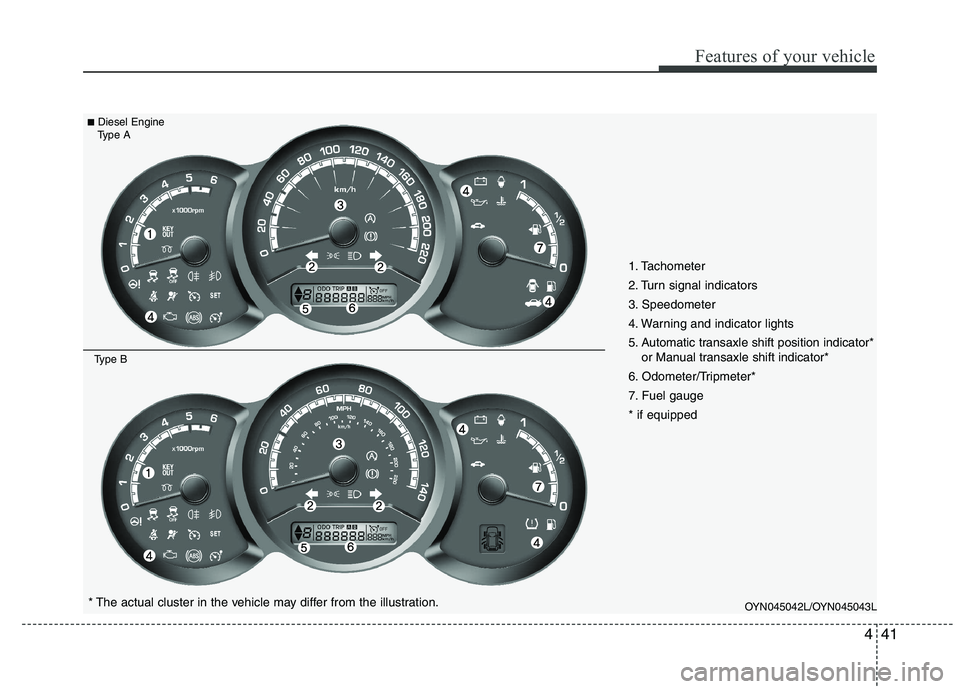
OYN045042L/OYN045043L* The actual cluster in the vehicle may differ from the illustration.
■
Diesel Engine
Type A
Type B
1. Tachometer
2. Turn signal indicators
3. Speedometer
4. Warning and indicator lights
5. Automatic transaxle shift position indicator* or Manual transaxle shift indicator*
6. Odometer/Tripmeter*
7. Fuel gauge* if equipped
Page 186 of 480
443
Features of your vehicle
Fuel gauge
The fuel gauge indicates the approxi- mate amount of fuel remaining in the fueltank.
The fuel tank capacity is given in sec-
tion 8.The fuel gauge is supplemented by
a low fuel warning light, which will illumi-
nate when the fuel tank is nearly empty.
On inclines or curves, the fuel gauge
pointer may fluctuate or the low fuel
warning light may come on earlier than
usual due to the movement of fuel in thetank.
: The arrow indicates the fuel filler lidis in the left side of the vehicle.
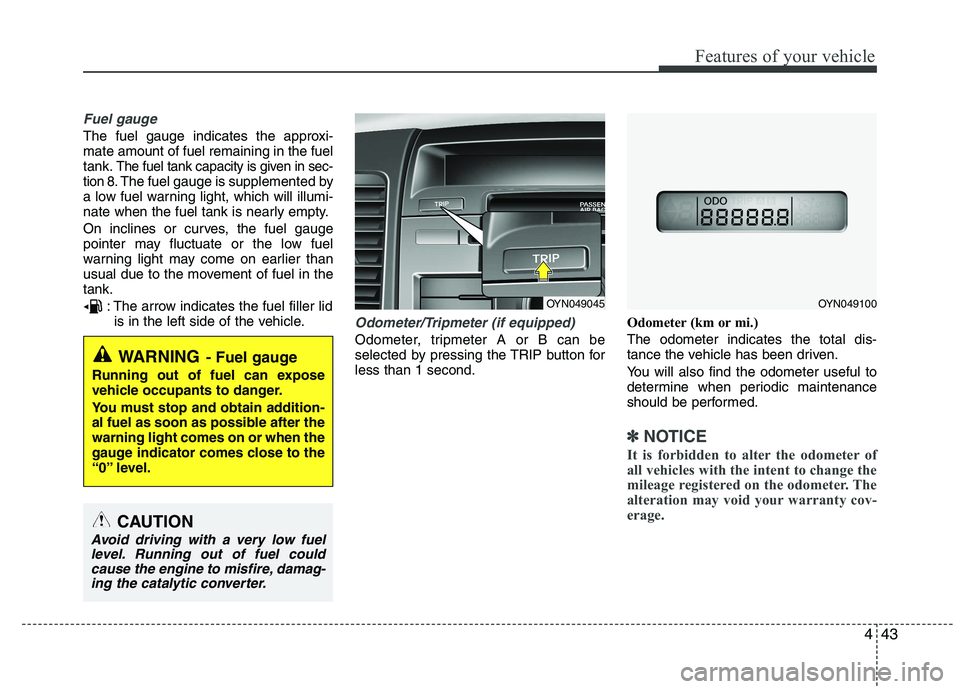
Odometer/Tripmeter (if equipped)
Odometer, tripmeter A or B can be
selected by pressing the TRIP button forless than 1 second. Odometer (km or mi.) The odometer indicates the total dis-
tance the vehicle has been driven.
You will also find the odometer useful to
determine when periodic maintenance
should be performed.
✽✽
NOTICE
It is forbidden to alter the odometer of
all vehicles with the intent to change the
mileage registered on the odometer. The
alteration may void your warranty cov-
erage.
WARNING - Fuel gauge
Running out of fuel can expose
vehicle occupants to danger.
You must stop and obtain addition-
al fuel as soon as possible after thewarning light comes on or when the
gauge indicator comes close to the
“0” level.
CAUTION
Avoid driving with a very low fuel level. Running out of fuel could cause the engine to misfire, damag-ing the catalytic converter.
OYN049045OYN049100
Page 187 of 480
Features of your vehicle
44
4
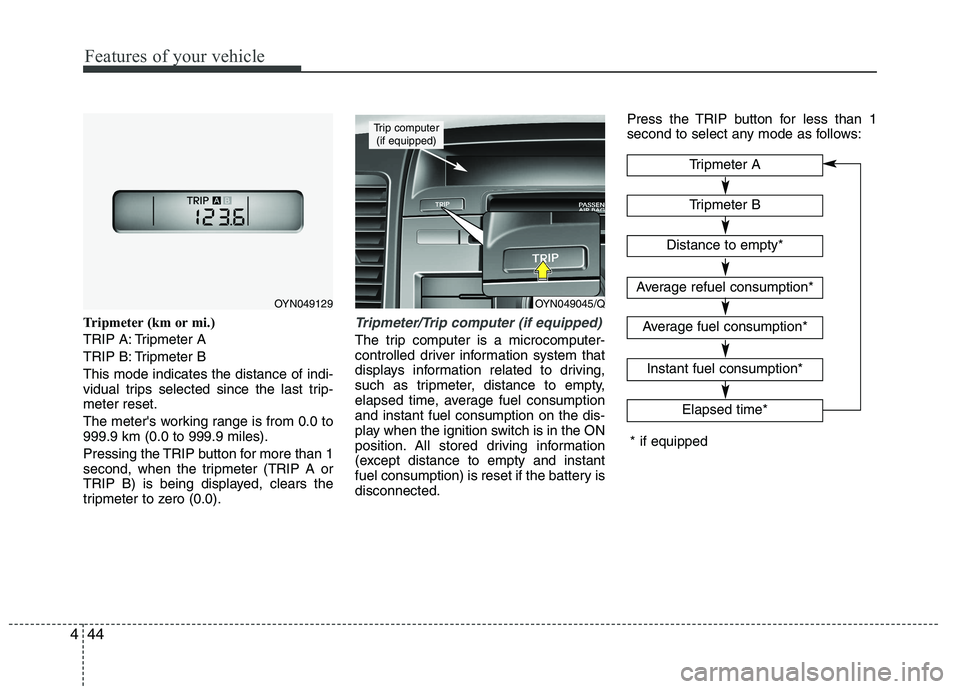
Tripmeter (km or mi.)
TRIP A: Tripmeter A
TRIP B: Tripmeter BThis mode indicates the distance of indi-
vidual trips selected since the last trip-meter reset.
The meter's working range is from 0.0 to 999.9 km (0.0 to 999.9 miles).
Pressing the TRIP button for more than 1
second, when the tripmeter (TRIP A or
TRIP B) is being displayed, clears the
tripmeter to zero (0.0).Tripmeter/Trip computer (if equipped)
The trip computer is a microcomputer-
controlled driver information system that
displays information related to driving,
such as tripmeter, distance to empty,
elapsed time, average fuel consumptionand instant fuel consumption on the dis-
play when the ignition switch is in the ON
position. All stored driving information
(except distance to empty and instant
fuel consumption) is reset if the battery isdisconnected. Press the TRIP button for less than 1
second to select any mode as follows:
Tripmeter B
Elapsed time*
Tripmeter A
Distance to empty*
Average refuel consumption*
Average fuel consumption*
Instant fuel consumption*
* if equipped
OYN049045/Q
Trip computer
(if equipped)
OYN049129