bluetooth KIA VENGA 2015 Owners Manual
[x] Cancel search | Manufacturer: KIA, Model Year: 2015, Model line: VENGA, Model: KIA VENGA 2015Pages: 480, PDF Size: 23.15 MB
Page 249 of 480
4 105
Features of your vehicle
Safety instructions Notes on USB stick (thumb drive)Notes on Bluetooth®Wireless
Technology devices
Notes on Bluetooth
®Wireless
Technology*
Bluetooth®Wireless Technology is a
short-range wireless radio connectivi-
ty technology used mainly for mobile
phones, hand-held PC’s and other
devices.
Bluetooth®Wireless Technology SIG
Inc. owns the Bluetooth®Wireless
Technology w ord, marking and logo;
and any use of such marks is under
license. Other trademarks and trade
names are those of their respective
owners.
Bluetooth®Wireless Technology oper-
ates in 2.4 GHz frequency range and
transmits voice and data at speeds of
up to 1 mbps within a range of up to10 m.
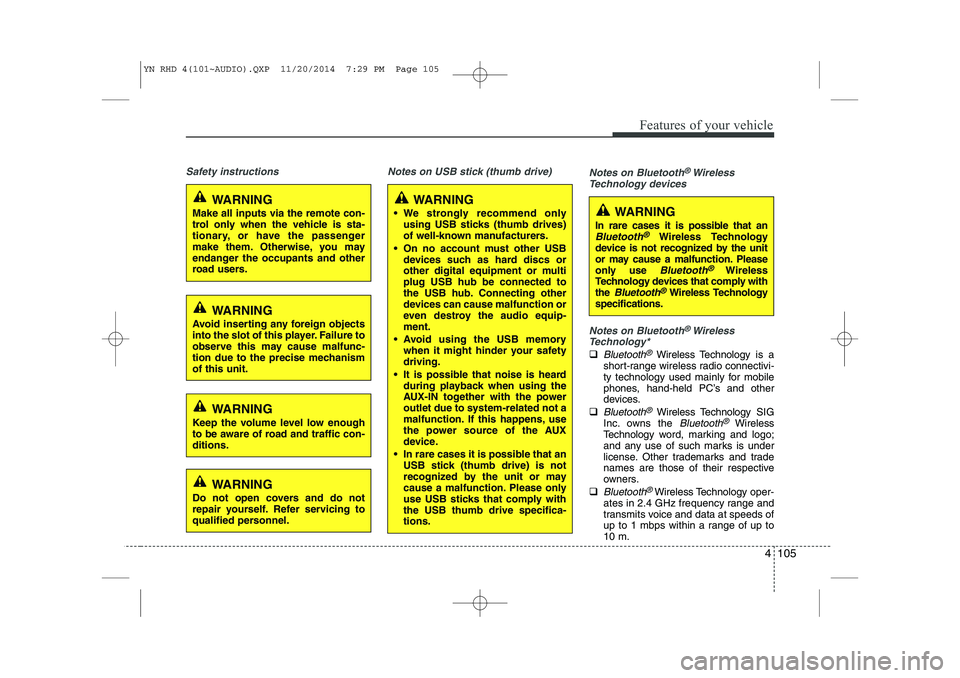
WARNING
Make all inputs via the remote con-
trol only when the vehicle is sta-
tionary, or have the passenger
make them. Otherwise, you may
endanger the occupants and other
road users.
WARNING
In rare cases it is possible that an
Bluetooth®Wireless Technology
device is not recognized by the unit
or may cause a malfunction. Please
only use
Bluetooth®Wireless
Technology devices that comply withthe
Bluetooth®Wireless Technology
specifications.
WARNING
We strongly recommend only using USB sticks (thumb drives)
of well-known manufacturers.
On no account must other USB devices such as hard discs or
other digital equipment or multiplug USB hub be connected to
the USB hub. Connecting other
devices can cause malfunction or
even destroy the audio equip-ment.
Avoid using the USB memory when it might hinder your safetydriving.
It is possible that noise is heard during playback when using the
AUX-IN together with the poweroutlet due to system-related not a
malfunction. If this happens, use
the power source of the AUX
device.
In rare cases it is possible that an USB stick (thumb drive) is not
recognized by the unit or may
cause a malfunction. Please only
use USB sticks that comply withthe USB thumb drive specifica-tions.
WARNING
Avoid inserting any foreign objects
into the slot of this player. Failure to
observe this may cause malfunc-
tion due to the precise mechanismof this unit.
WARNING
Keep the volume level low enough
to be aware of road and traffic con-ditions.
WARNING
Do not open covers and do not
repair yourself. Refer servicing to
qualified personnel.
YN RHD 4(101~AUDIO).QXP 11/20/2014 7:29 PM Page 105
Page 250 of 480
Features of your vehicle
106
4
The Head Unit supports the Hands
free Profile (HFP), the Advanced
Audio Distribution Profile (A2DP) and
the Audio Video Remote Control
Profile (AVRCP).
The Head Unit has been verified and
certified by the
Bluetooth®Wireless
Technology Qualification Program
(BQP) for compliance to the
Bluetooth®
Wireless Technology standards. For
more information, please check the
Bluetooth®Wireless Technology web site
(http://www.bluetooth.com/Bluetooth/
Connect/Products/) for the BQP productlisting.
* Only if this option is available on your Head Unit.
Notes on iPod®
Care of disc (if equipped)
If the temperature inside the car is too
high, open the car window for ventila-
tion before using your car audio.
It is illegal to copy and use MP3/WMA
files without permission. Use CDs that
are created only by lawful means.
Do not apply volatile agents such as
benzene and thinner, normal cleaners
and magnetic sprays made for ana-
logue disc onto CDs.
To prevent the disc surface from get-
ting damaged. Hold and carry CDs bythe edges or the edges of the centre
hole only.
Clean the disc surface with a piece of
clean soft cloth before playback (wipeit from the centre to the outside edge).
Do not damage the disc surface or
attach pieces of sticky tape or paperon it.
Make sure on undesirable matter
other than CDs are inserted into the
CD player.
Do not insert more than one CD at a
time. It is likely to block CD operation.
Keep CDs in their cases after use to
protect them from scratches or dirt.
Depending on the type of CD-R/CD-
RW CDs, certain CDs may not oper-
ate normally according to manufactur-ing companies or making and record-
ing methods. In such circumstances,
if you still continue to use those CDs,
they may cause the malfunction of
your car audio system.
Playing an incompatible Copy
Protected Audio CD
Some copy protected CDs which do not
comply with the international audio CD
standards (Red Book), may not play on
your car audio. Please note that if you try
to play copy protected CDs and the CD
player does not perform correctly the
CDs may be defective, not the CD player.
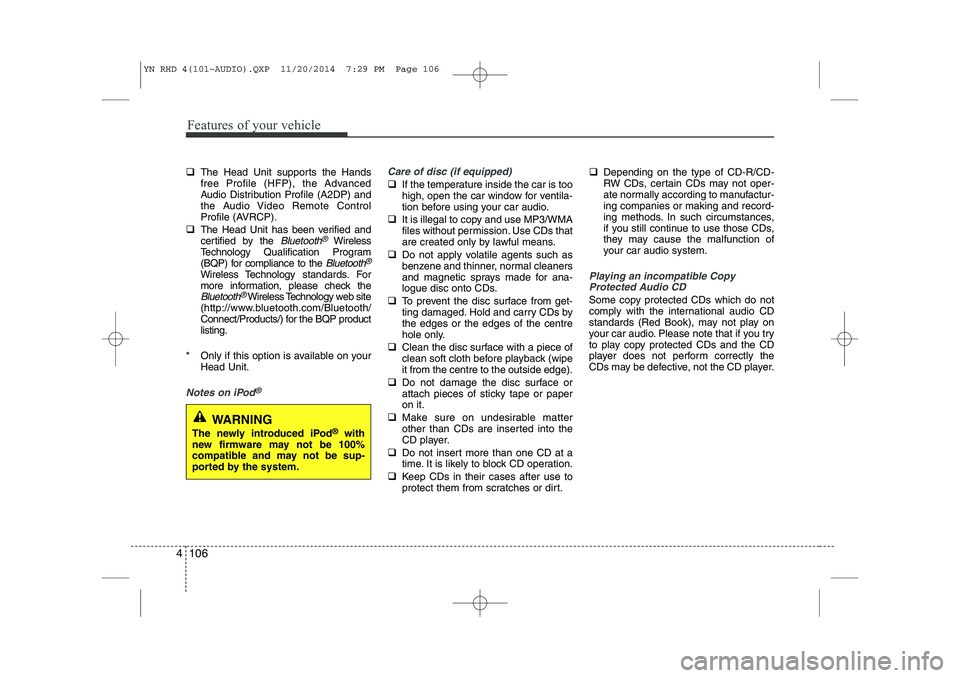
WARNING
The newly introduced iPod ®
with
new firmware may not be 100%
compatible and may not be sup-
ported by the system.
YN RHD 4(101~AUDIO).QXP 11/20/2014 7:29 PM Page 106
Page 252 of 480
Features of your vehicle
108
4
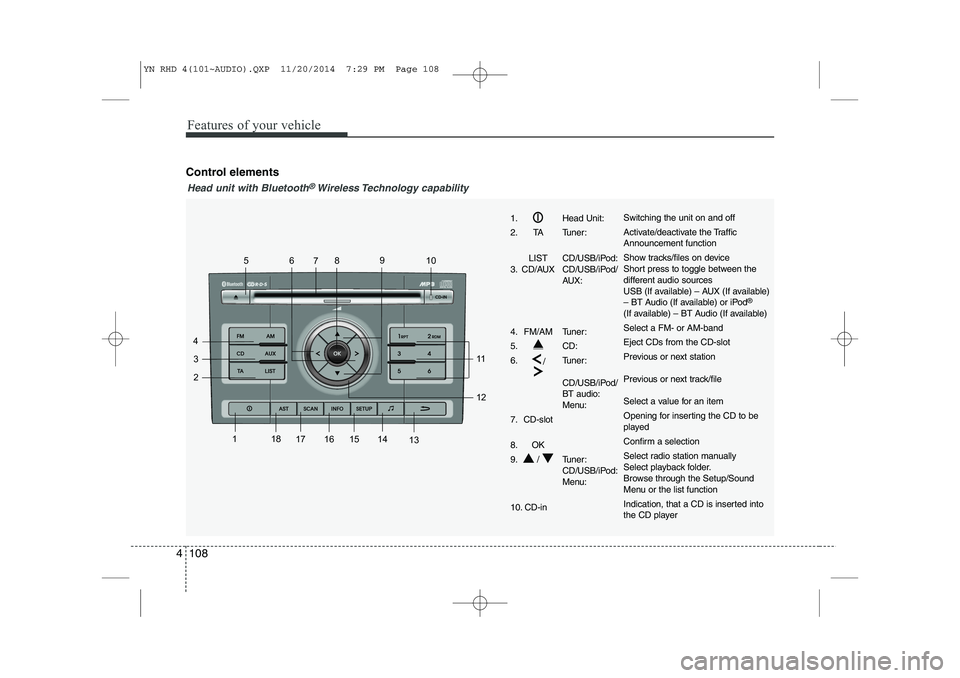
Control elements
1
2
3
4 56
78 9
10
11 12
13
14
15
161718
1. Head Unit:
2. TA Tuner:
LIST CD/USB/iPod:
3. CD/AUX CD/USB/iPod/ AUX:
4. FM/AM Tuner:
5. CD:6. /Tuner:
CD/USB/iPod/ BT audio:
Menu:
7. CD-slot
8. OK
9. / Tuner: CD/USB/iPod:
Menu:
10. CD-inSwitching the unit on and off
Activate/deactivate the Traffic Announcement function
Show tracks/files on device
Short press to toggle between the
different audio sources
USB (If available) – AUX (If available)
– BT Audio (If available) or iPod ®
(If available) – BT Audio (If available) Select a FM- or AM-bandEject CDs from the CD-slot
Previous or next station
Previous or next track/file
Select a value for an item
Opening for inserting the CD to be
played
Confirm a selection
Select radio station manually
Select playback folder.
Browse through the Setup/Sound
Menu or the list function
Indication, that a CD is inserted into
the CD player
Head unit with Bluetooth®Wireless Technology capability
YN RHD 4(101~AUDIO).QXP 11/20/2014 7:29 PM Page 108
Page 253 of 480
4 109
Features of your vehicle
1
2
3
4 56
78 9
10
11 12
13
14
15
1617
18
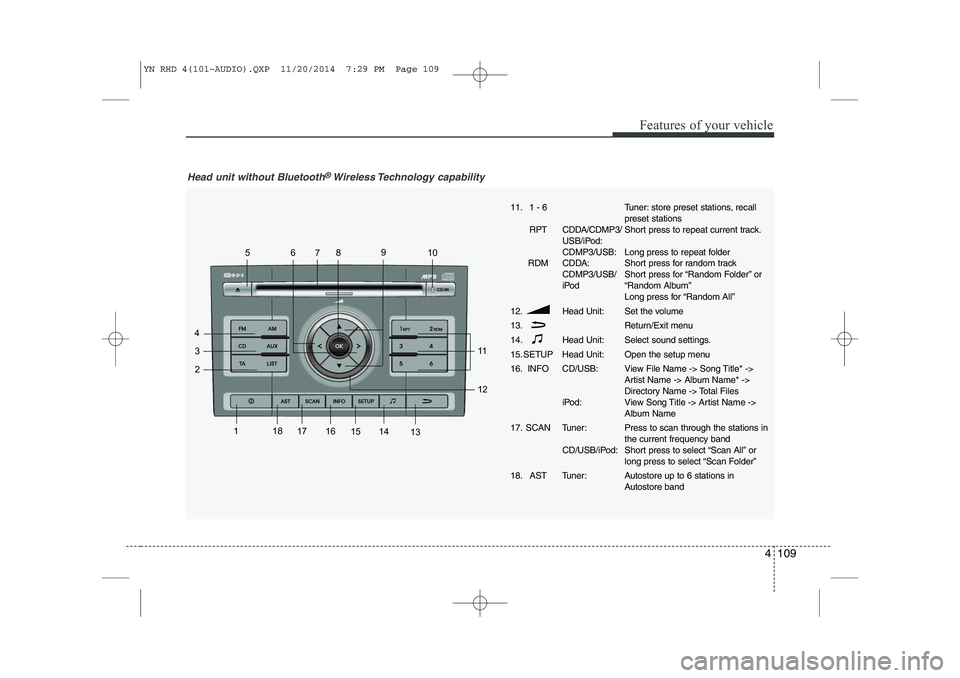
Head unit without Bluetooth®Wireless Technology capability
11. 1 - 6
RPT CDDA/CDMP3/ USB/iPod: CDMP3/USB:
RDM CDDA: CDMP3/USB/
iPod
12. Head Unit: 13.
14. Head Unit:
15. SETUP Head Unit:
16. INFO CD/USB:
iPod:
17. SCAN Tuner: CD/USB/iPod:
18. AST Tuner:Tuner: store preset stations, recall preset stations
Short press to repeat current track.
Long press to repeat folder
Short press for random track
Short press for “Random Folder” or
“Random Album”
Long press for “Random All”
Set the volume
Return/Exit menu
Select sound settings.
Open the setup menu
View File Name -> Song Title* ->
Artist Name -> Album Name* ->
Directory Name -> Total Files
View Song Title -> Artist Name ->
Album Name Press to scan through the stations in the current frequency band
Short press to select “Scan All” or
long press to select “Scan Folder”
Autostore up to 6 stations in
Autostore band
YN RHD 4(101~AUDIO).QXP 11/20/2014 7:29 PM Page 109
Page 267 of 480
4 123
Features of your vehicle
Bluetooth®Wireless Technology
You can use a
Bluetooth®Wireless
Technology device in your car to make a
hands-free phone call or to stream music
onto your in-car speakers (via this Head
Unit). This Head Unit supports HFP,
A2DP and AVRCP connection.
Advanced Audio Distribution Profile
(A2DP)
This profile defines how high quality audio (stereo or mono) can be streamed
from one device to another over a
Bluetooth®Wireless Technology connec-
tion. For example: music streamed from amobile phone to a wireless headset or
car audio.
Audio/Video Remote Control Profile
(AVRCP)
This profile is designed to provide a stan-
dard interface to control TVs, Hi-fi equip-
ment, etc. to allow a single remote con-
trol (or other device) to control all of theA/V equipment to which a user has
access. It may be used in concert with
Advanced Audio Distribution Profile. Hands-Free Profile (HFP)
This is commonly used to allow car
handsfree kits to communicate with
mobile phones in the car.
Notes for mobile phones
Some functions (e.g. starting of speech
recognition) are not supported by all
mobile phones. We cannot guarantee
that all functions described will be sup-
ported by all mobile phones with
Bluetooth®Wireless Technology.
New device
This function allows you to add a new phone to the Head Units
Bluetooth®
Wireless Technology Device List.
Maximum of 5 devices can be added to
the list. If the list is full, the oldest device
will be replaced by the newly added
Bluetooth®Wireless Technology device,
based on last pairing date. Pairing
To pair your
Bluetooth®Wireless
Technology-enabled device to this Head
Unit, make sure that no device is current-ly streaming to this Head Unit first.
Short press the SETUPbutton to
enter the Setup menu.
Short press the or button to access the
Bluetooth®Wireless
Technology sub-menu.
Now select “New Device”.
Press the or button to select
the number of the first digit.
Press the or button to select the
next digit.
Repeat the above steps for the other
three digits.
Press the OKbutton to confirm the 4-
digit PIN for authentication and acti-
vate the “Discoverable Mode”.
In “Discoverable Mode” the Head Unitbroadcasts a
Bluetooth®Wireless
Technology ID.
Look for the “Kia-BLUETOOTH” on
your
Bluetooth®Wireless Technology
device.
Enter identically the same PIN in your
Bluetooth®Wireless Technology
device and authenticate pairing on
your
Bluetooth®Wireless Technology
device.
YN RHD 4(101~AUDIO).QXP 11/20/2014 7:29 PM Page 123
Page 268 of 480
Features of your vehicle
124
4
When pairing is established, the ID of the Bluetooth®Wireless Technology
device and the service list info will bestored in the Head Unit
Bluetooth®
Wireless Technology Device List.
Device List
With this function you can browse through and select
Bluetooth®Wireless
Technology devices that are stored in theHead Unit
Bluetooth®Wireless
Technology Device List.
Short press the SETUPbutton to enter
the Setup menu.
Short press the or button to access the
Bluetooth®Wireless
Technology sub-menu.
Press the button to browse the
Device List to select the required
device.
Press the OKbutton to start pairing
between the selected device and theHead Unit.
✎ Note: Whenever there is at least one
connected device active, in the displaythe
Bluetooth®Wireless Technology
icon is visible. Delete Device
This function allows you to delete a
Bluetooth®Wireless Technology device
ID from the Head Unit Bluetooth®
Wireless Technology Device List.
Short press the SETUPbutton to
enter the Setup menu.
Short press the or button to access the
Bluetooth®Wireless
Technology sub-menu.
Press the button to select Delete
Device.
Press the OKbutton to delete the
selected device from the Head Unit
Bluetooth®Wireless Technology
Device List
Phone Volume
Short press the SETUPbutton to
enter the Setup menu.
Short press the or button to access the
Bluetooth®Wireless
Technology sub-menu.
Select the option “Phone Volume”.
Press the or button to decrease
or increase the phone volume setting.
Default setting: 12
Setting range: 0 ... 35
During an ongoing call, user is
allowed to adjust the BT Phone vol-
ume. The adjusted volume is memo-
rized into Phone Volume setting. Answering a Call
Press the Callbutton on the Steering
Wheel Remote Control to accept an incoming call.
Terminate / Reject Call
Press the End Callbutton on the
Steering Wheel Remote Control to
terminate or reject a call.
Last Call Re-dial
Short press the Callbutton on the
Steering Wheel Remote Control to re-
dial last dialled number (one attempt).
Long press the Callbutton on the
Steering Wheel Remote Control to re-
dial last dialled number (twoattempts).
Private Call
This function allows you to have a private
call even if the phone is connected to theHead Unit.
Press the Callbutton on your phone
to start a private call.
OR
Press the End Callbutton on your
phone to end a private call.
YN RHD 4(101~AUDIO).QXP 11/20/2014 7:29 PM Page 124
Page 269 of 480
4 125
Features of your vehicle
Transferring a Call
This function allows you to transfer a call
during an ongoing call.
From the tuner to the phone
From the phone to the tuner
Long press the Callbutton on the
Steering Wheel Remote Control to
transfer the ongoing call back to the
phone or back to the tuner again.
Audio Streaming
Start Audio Streaming
This function allows the Head Unit to
start streaming music from phone.
The
Bluetooth®Wireless Technology
device must be connected with the Head Unit.
Press the AUXbutton and select BT
AUDIO.
✎ The Head Unit starts streaming the
audio from the phone and will start
playing the audio files.
✎ The Head Unit has no control on the
sequence of track playback in phone. Next/Previous Track
This function allows you to select the
next/ previous track of phone‘s music
player by using the next/previous track
buttons on the Head Unit or SteeringWheel Remote Control.
Short press the or button on the
Head Unit or the Steering WheelRemote Control.
Suspend Audio Streaming
This function allows you to suspend
streaming music from the phone to theHead Unit.
Short press the Mutebutton on the
Steering Wheel Remote Control.
Press the AUXbutton and de-select
BT AUDIO.
YN RHD 4(101~AUDIO).QXP 11/20/2014 7:29 PM Page 125
Page 272 of 480
Features of your vehicle
128
4
The Setup menu
In the setup menu you can change to
your preferred settings.
Short press the SETUPbutton to
enter the Setup menu.
Short press the or button to
access the desired sub-menu.
To exit, press SETUP, CD, FM or AM
buttons.
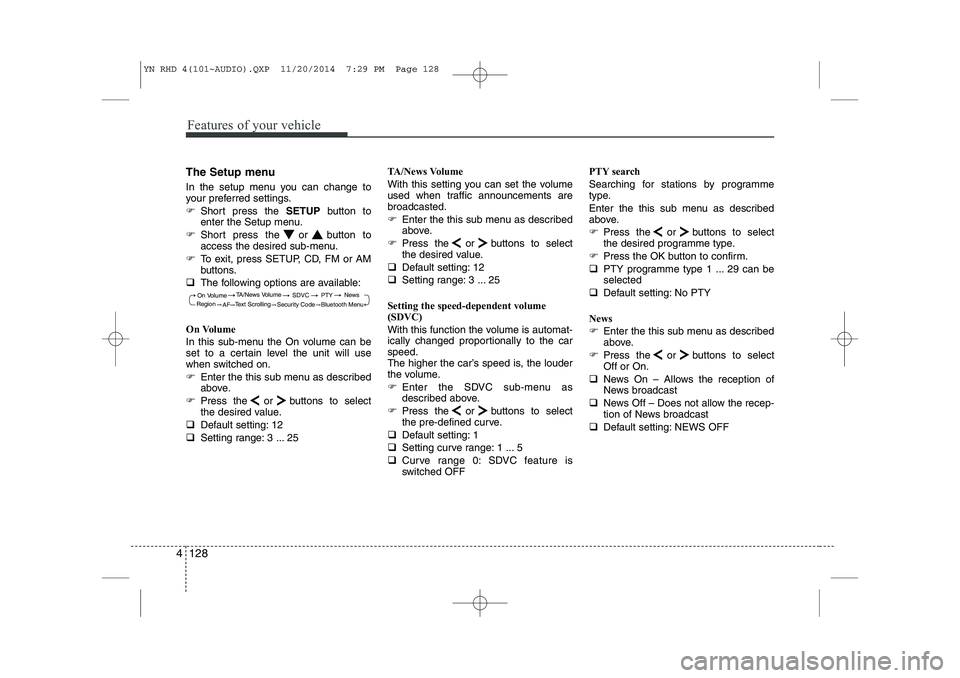
The following options are available:
On Volume
In this sub-menu the On volume can be
set to a certain level the unit will use
when switched on.
Enter the this sub menu as described
above.
Press the or buttons to select
the desired value.
Default setting: 12
Setting range: 3 ... 25 TA/News Volume
With this setting you can set the volume
used when traffic announcements arebroadcasted.
Enter the this sub menu as described
above.
Press the or buttons to select
the desired value.
Default setting: 12
Setting range: 3 ... 25
Setting the speed-dependent volume
(SDVC)
With this function the volume is automat-
ically changed proportionally to the carspeed.
The higher the car’s speed is, the louder
the volume.
Enter the SDVC sub-menu as
described above.
Press the or buttons to select
the pre-defined curve.
Default setting: 1
Setting curve range: 1 ... 5
Curve range 0: SDVC feature is
switched OFF PTY search
Searching for stations by programme
type.
Enter the this sub menu as described
above.
Press the or buttons to select
the desired programme type.
Press the OK button to confirm.
PTY programme type 1 ... 29 can beselected
Default setting: No PTY
News
Enter the this sub menu as described
above.
Press the or buttons to selectOff or On.
News On – Allows the reception of
News broadcast
News Off – Does not allow the recep-
tion of News broadcast
Default setting: NEWS OFF
On Volume
Text Scrolling SDVC
Region TA/News Volume
News
AF Security Code
Bluetooth Menu
PTY
YN RHD 4(101~AUDIO).QXP 11/20/2014 7:29 PM Page 128
Page 276 of 480
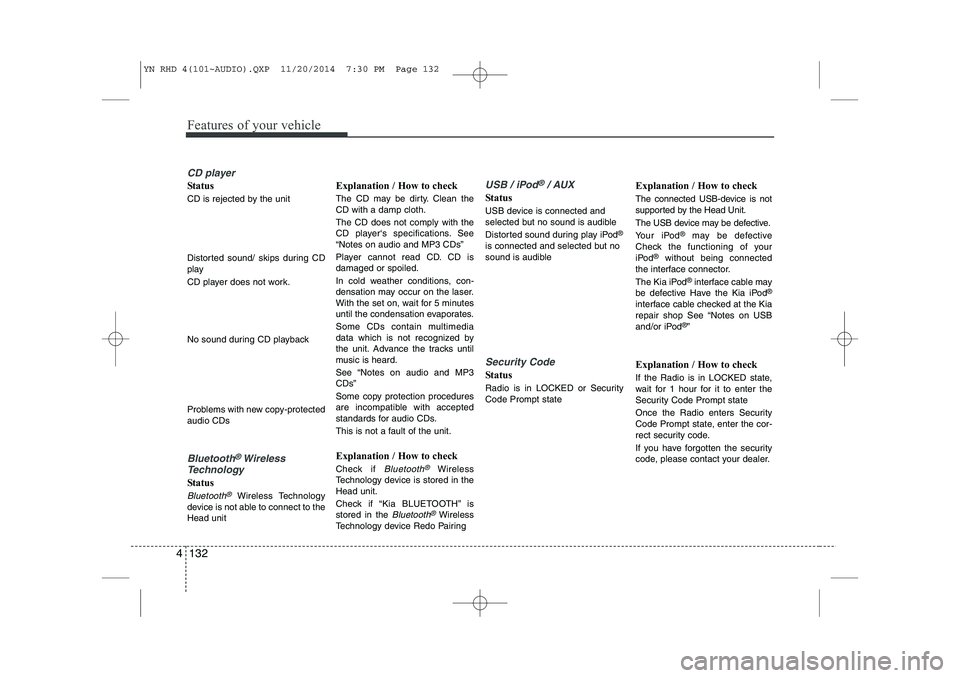
Features of your vehicle
132
4
CD player
Status
CD is rejected by the unit
Distorted sound/ skips during CD
play
CD player does not work.
No sound during CD playback
Problems with new copy-protected audio CDs
Bluetooth®Wireless
Technology
Status
Bluetooth®Wireless Technology
device is not able to connect to the Head unit Explanation / How to check
The CD may be dirty. Clean the CD with a damp cloth. The CD does not comply with the
CD player‘s specifications. See“Notes on audio and MP3 CDs”
Player cannot read CD. CD is damaged or spoiled.
In cold weather conditions, con-
densation may occur on the laser.
With the set on, wait for 5 minutes
until the condensation evaporates.
Some CDs contain multimedia
data which is not recognized by
the unit. Advance the tracks until
music is heard.
See “Notes on audio and MP3 CDs”
Some copy protection procedures
are incompatible with accepted
standards for audio CDs.
This is not a fault of the unit.
Explanation / How to check
Check if
Bluetooth®Wireless
Technology device is stored in the Head unit.
Check if “Kia BLUETOOTH” is stored in the
Bluetooth®Wireless
Technology device Redo Pairing
USB / iPod®/ AUX
Status
USB device is connected and
selected but no sound is audible
Distorted sound during play iPod ®
is connected and selected but no
sound is audible
Security Code
Status
Radio is in LOCKED or Security Code Prompt state Explanation / How to check
The connected USB-device is not
supported by the Head Unit.
The USB device may be defective.
Your iPod
®
may be defective
Check the functioning of your
iPod ®
without being connected
the interface connector.
The Kia iPod ®
interface cable may
be defective Have the Kia iPod ®
interface cable checked at the Kia
repair shop See “Notes on USB
and/or iPod ®
”
Explanation / How to check
If the Radio is in LOCKED state,
wait for 1 hour for it to enter the
Security Code Prompt state
Once the Radio enters Security
Code Prompt state, enter the cor-
rect security code.
If you have forgotten the security
code, please contact your dealer.
YN RHD 4(101~AUDIO).QXP 11/20/2014 7:30 PM Page 132
Page 277 of 480
4 133
Features of your vehicle
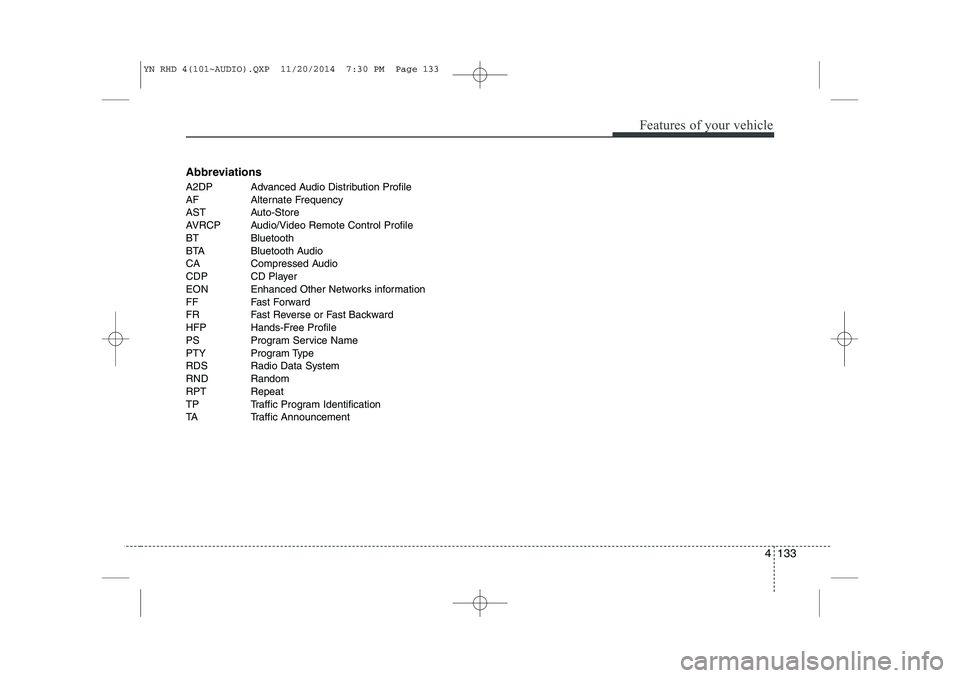
Abbreviations
A2DP Advanced Audio Distribution Profile
AF Alternate Frequency
AST Auto-Store
AVRCP Audio/Video Remote Control Profile
BT Bluetooth
BTA Bluetooth Audio
CA Compressed Audio
CDP CD Player
EON Enhanced Other Networks information
FF Fast Forward
FR Fast Reverse or Fast Backward
HFP Hands-Free Profile
PS Program Service Name
PTY Program Type
RDS Radio Data System
RND Random
RPT Repeat
TP Traffic Program Identification
TA Traffic Announcement
YN RHD 4(101~AUDIO).QXP 11/20/2014 7:30 PM Page 133