light KIA VENGA 2015 Owners Manual
[x] Cancel search | Manufacturer: KIA, Model Year: 2015, Model line: VENGA, Model: KIA VENGA 2015Pages: 480, PDF Size: 23.15 MB
Page 4 of 480
4
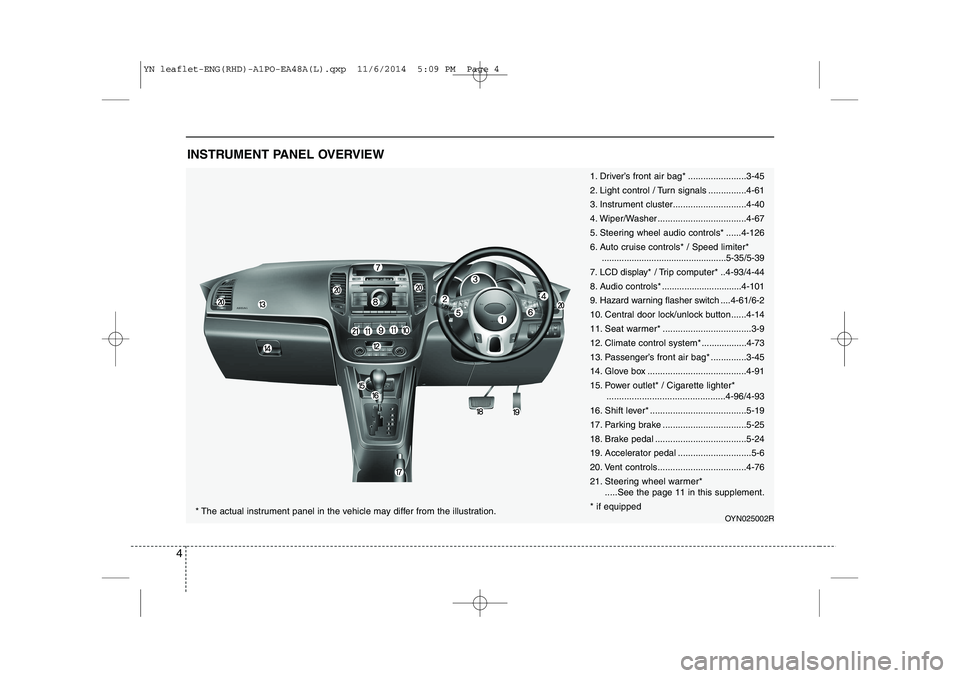
INSTRUMENT PANEL OVERVIEW
1. Driver’s front air bag* .......................3-45
2. Light control / Turn signals ...............4-61
3. Instrument cluster.............................4-40
4. Wiper/Washer ...................................4-67
5. Steering wheel audio controls* ......4-126
6. Auto cruise controls* / Speed limiter*..................................................5-35/5-39
7. LCD display* / Trip computer* ..4-93/4-44
8. Audio controls * ................................4-101
9. Hazard warning flasher switch ....4-61/6-2
10. Central door lock/unlock button......4-14
11. Seat warmer* ...................................3-9
12. Climate control system*..................4-73
13. Passenger’s front air bag* ..............3-45
14. Glove box .......................................4-91
15. Power outlet* / Cigarette lighter* ...............................................4-96/4-93
16. Shift lever* ......................................5-19
17. Parking brake .................................5-25
18. Brake pedal ....................................5-24
19. Accelerator pedal .............................5-6
20. Vent controls...................................4-7621.
Steering wheel warmer*
.....See the page 11 in this supplement.
* if equipped
OYN025002R* The actual instrument panel in the vehicle may differ from the illustration.
YN leaflet-ENG(RHD)-A1PO-EA48A(L).qxp 11/6/2014 5:09 PM Page 4
Page 8 of 480
❖❖Please see this page instead of page 4-5 in owner's manual.
8
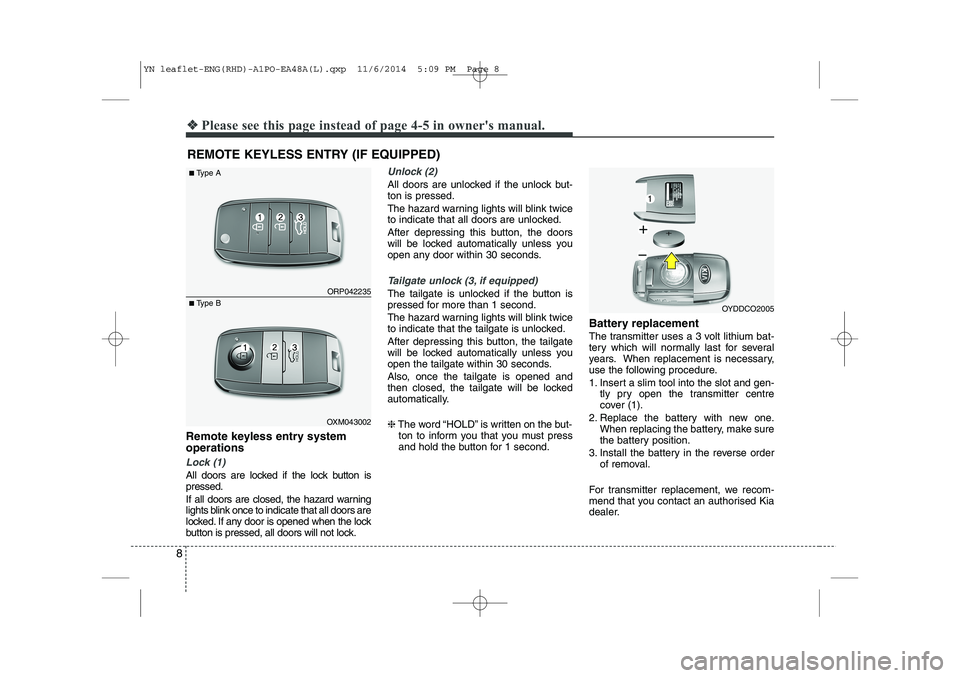
Remote keyless entry system operations
Lock (1)
All doors are locked if the lock button is pressed.
If all doors are closed, the hazard warning
lights blink once to indicate that all doors are
locked. If any door is opened when the lock
button is pressed, all doors will not lock.
Unlock (2)
All doors are unlocked if the unlock but- ton is pressed.
The hazard warning lights will blink twice
to indicate that all doors are unlocked.
After depressing this button, the doors
will be locked automatically unless you
open any door within 30 seconds.
Tailgate unlock (3, if equipped)
The tailgate is unlocked if the button is
pressed for more than 1 second.
The hazard warning lights will blink twice
to indicate that the tailgate is unlocked.
After depressing this button, the tailgate
will be locked automatically unless you
open the tailgate within 30 seconds.
Also, once the tailgate is opened and
then closed, the tailgate will be locked
automatically. ❈The word “HOLD” is written on the but-
ton to inform you that you must press
and hold the button for 1 second. Battery replacement
The transmitter uses a 3 volt lithium bat-
tery which will normally last for several
years. When replacement is necessary,
use the following procedure.
1. Insert a slim tool into the slot and gen-
tly pry open the transmitter centre
cover (1).
2. Replace the battery with new one. When replacing the battery, make sure
the battery position.
3. Install the battery in the reverse order of removal.
For transmitter replacement, we recom-
mend that you contact an authorised Kia
dealer.
REMOTE KEYLESS ENTRY (IF EQUIPPED) ORP042235
OXM043002
■
Type A
■ Type B
OYDDCO2005
YN leaflet-ENG(RHD)-A1PO-EA48A(L).qxp 11/6/2014 5:09 PM Page 8
Page 9 of 480
9
❖❖Please see this page instead of page 4-13 in owner's manual.
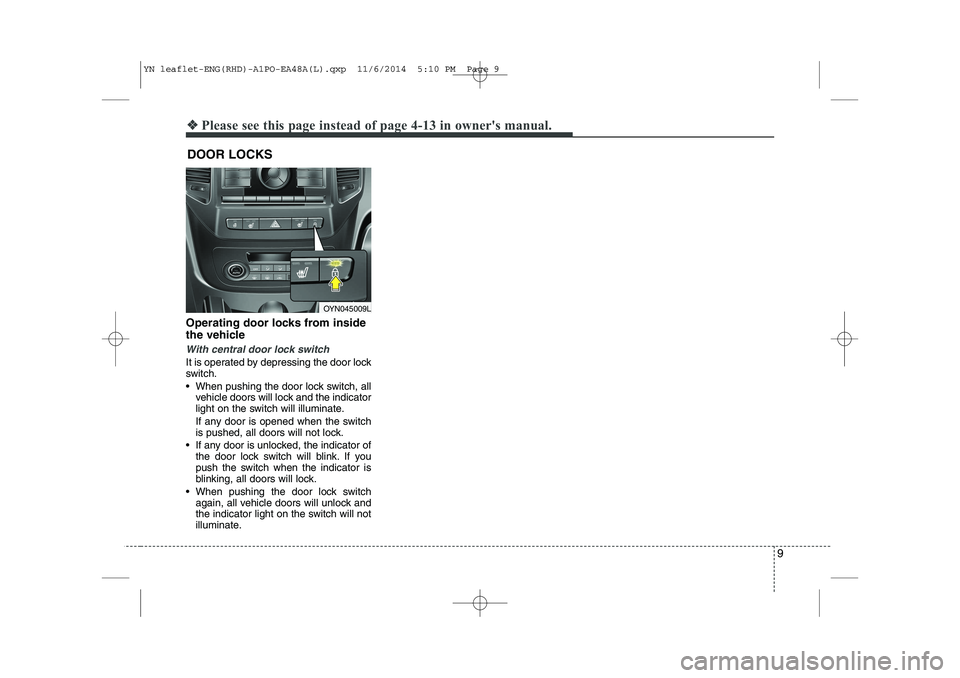
Operating door locks from inside
the vehicle
With central door lock switch
It is operated by depressing the door lock
switch.
When pushing the door lock switch, all
vehicle doors will lock and the indicator
light on the switch will illuminate.
If any door is opened when the switch
is pushed, all doors will not lock.
If any door is unlocked, the indicator of the door lock switch will blink. If you
push the switch when the indicator is
blinking, all doors will lock.
When pushing the door lock switch again, all vehicle doors will unlock and
the indicator light on the switch will not
illuminate.
DOOR LOCKS
OYN045009L
YN leaflet-ENG(RHD)-A1PO-EA48A(L).qxp 11/6/2014 5:10 PM Page 9
Page 12 of 480

12
❖❖Please see this page instead of page 4-40 in owner's manual.
INSTRUMENT CLUSTER
OYN045042L/OYN045043L* The actual cluster in the vehicle may differ from the illustration.
■
Diesel Engine
Type A
Type B
1. Tachometer
2. Turn signal indicators
3. Speedometer
4. Warning and indicator lights
5. Automatic transaxle shift position indicator* or Manual transaxle shift indicator*
6. Odometer/Tripmeter*
7. Fuel gauge* if equipped
YN leaflet-ENG(RHD)-A1PO-EA48A(L).qxp 11/6/2014 5:10 PM Page 12
Page 13 of 480
13
❖❖Please see this page instead of page 4-61 in owner's manual.
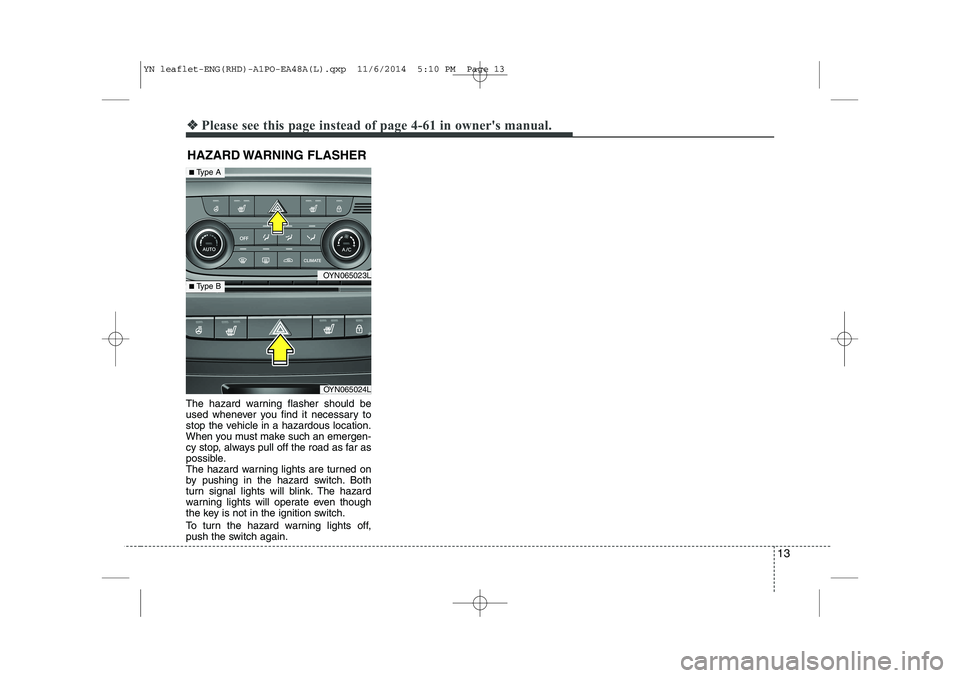
The hazard warning flasher should be
used whenever you find it necessary to
stop the vehicle in a hazardous location.
When you must make such an emergen-
cy stop, always pull off the road as far as
possible.
The hazard warning lights are turned on
by pushing in the hazard switch. Both
turn signal lights will blink. The hazard
warning lights will operate even though
the key is not in the ignition switch.
To turn the hazard warning lights off,
push the switch again.HAZARD WARNING FLASHER
OYN065023L
OYN065024L
■
Type A
■ Type B
YN leaflet-ENG(RHD)-A1PO-EA48A(L).qxp 11/6/2014 5:10 PM Page 13
Page 19 of 480

19
To turn off the blowers
To turn off the blowers, turn the fan
speed control knob to the “0” position.
Air conditioning (if equipped)
Press the A/C button to turn the air con- ditioning system on (indicator light will
illuminate) and set the fan speed control
knob to the first position or higher. Press
the button again to turn the air condition-
ing system off.
OYN045145LOYN045060L
YN leaflet-ENG(RHD)-A1PO-EA48A(L).qxp 11/6/2014 5:10 PM Page 19
Page 23 of 480
23
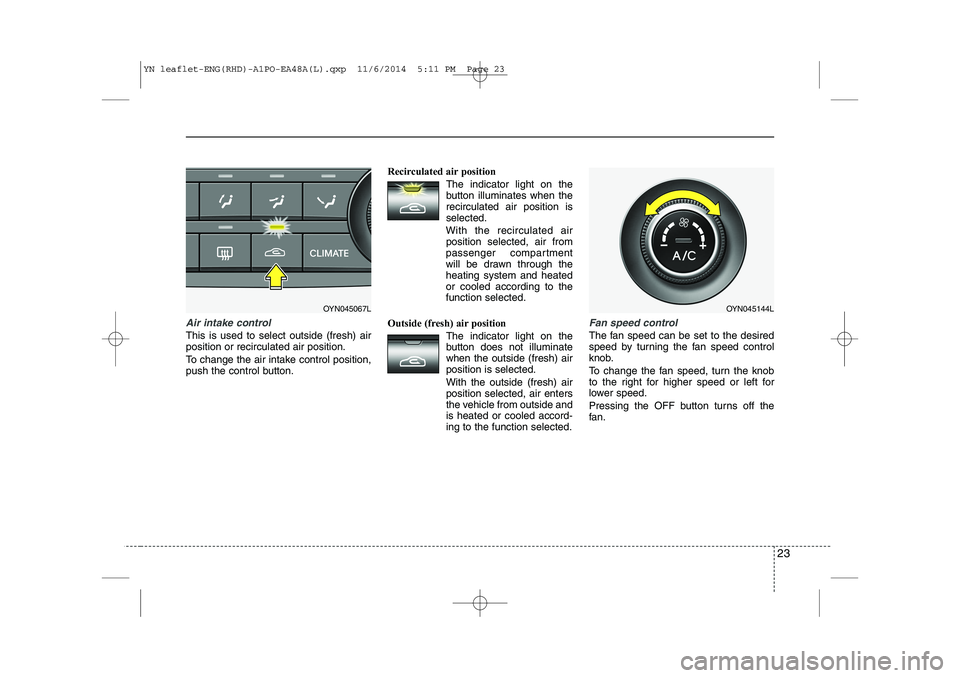
Air intake control
This is used to select outside (fresh) air position or recirculated air position.
To change the air intake control position,
push the control button.Recirculated air position
The indicator light on the
button illuminates when therecirculated air position isselected.
With the recirculated air position selected, air from
passenger compartment
will be drawn through theheating system and heatedor cooled according to thefunction selected.
Outside (fresh) air position The indicator light on the
button does not illuminatewhen the outside (fresh) airposition is selected. With the outside (fresh) air position selected, air enters
the vehicle from outside andis heated or cooled accord-ing to the function selected.
Fan speed control
The fan speed can be set to the desired
speed by turning the fan speed control
knob.
To change the fan speed, turn the knob
to the right for higher speed or left for
lower speed.
Pressing the OFF button turns off the
fan.
OYN045067LOYN045144L
YN leaflet-ENG(RHD)-A1PO-EA48A(L).qxp 11/6/2014 5:11 PM Page 23
Page 24 of 480
24
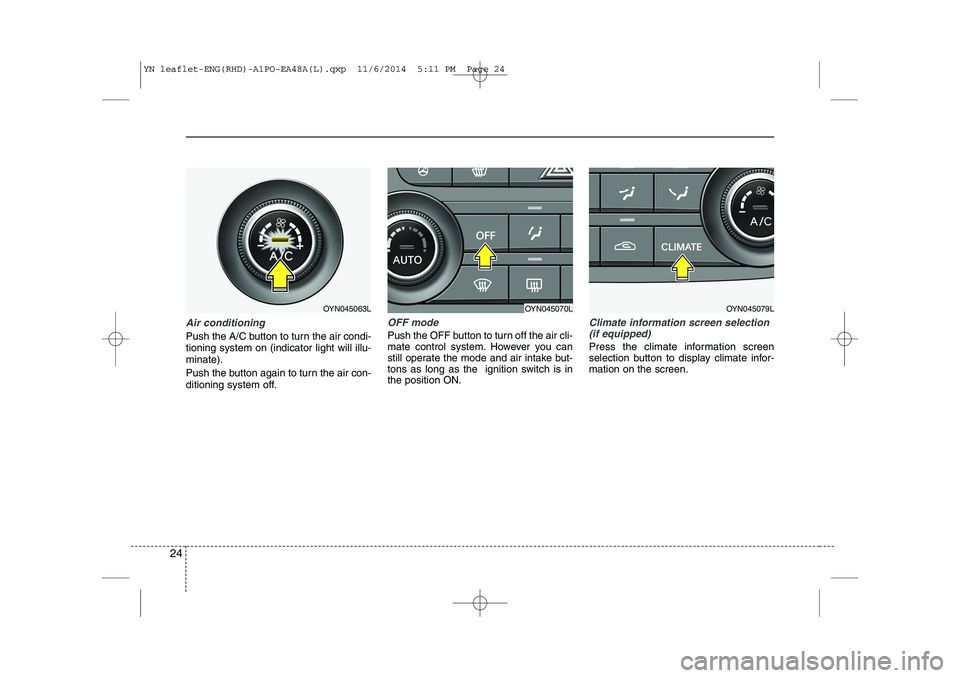
Air conditioning
Push the A/C button to turn the air condi- tioning system on (indicator light will illu-minate).
Push the button again to turn the air con-
ditioning system off.
OFF mode
Push the OFF button to turn off the air cli-
mate control system. However you can
still operate the mode and air intake but-
tons as long as the ignition switch is inthe position ON.
Climate information screen selection(if equipped)
Press the climate information screen
selection button to display climate infor-mation on the screen.
OYN045063LOYN045070LOYN045079L
YN leaflet-ENG(RHD)-A1PO-EA48A(L).qxp 11/6/2014 5:11 PM Page 24
Page 27 of 480
27
Press the SET button less than 1 second to select the mode and set the data usingthe UP(▲) and DOWN( ▼) button whilst
the selected setting mode blinks.
To cancel the SET UP mode, do one of
the following :
- Press the SET button less than 1 sec- ond in set-up temperature unit change mode
- Press the SET button more than 1 sec- ond in any set-up mode
- After 15 seconds without any key press
- Ignition is ON or OFF in set-up mode
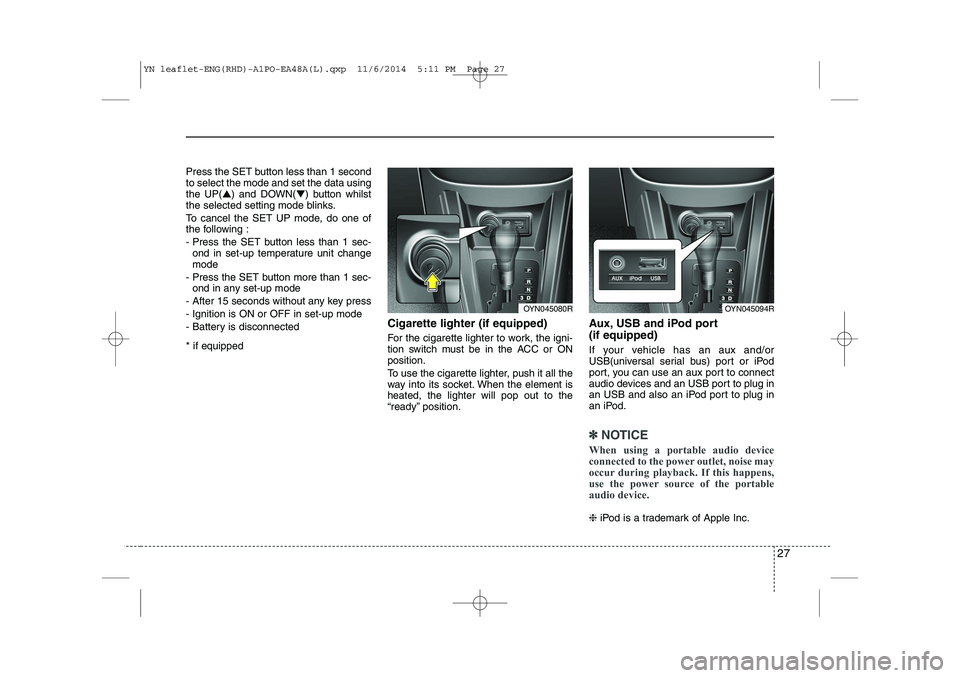
- Battery is disconnected * if equipped Cigarette lighter (if equipped)
For the cigarette lighter to work, the igni-
tion switch must be in the ACC or ONposition.
To use the cigarette lighter, push it all the
way into its socket. When the element isheated, the lighter will pop out to the
“ready” position.Aux, USB and iPod port (if equipped)
If your vehicle has an aux and/or
USB(universal serial bus) port or iPod
port, you can use an aux port to connect
audio devices and an USB port to plug in
an USB and also an iPod port to plug in
an iPod.
✽✽
NOTICE
When using a portable audio device
connected to the power outlet, noise may
occur during playback. If this happens,
use the power source of the portable
audio device.
❈ iPod is a trademark of Apple Inc.
OYN045080ROYN045094R
YN leaflet-ENG(RHD)-A1PO-EA48A(L).qxp 11/6/2014 5:11 PM Page 27
Page 28 of 480
28
❖❖Please see this page instead of page 5-14 in owner's manual.
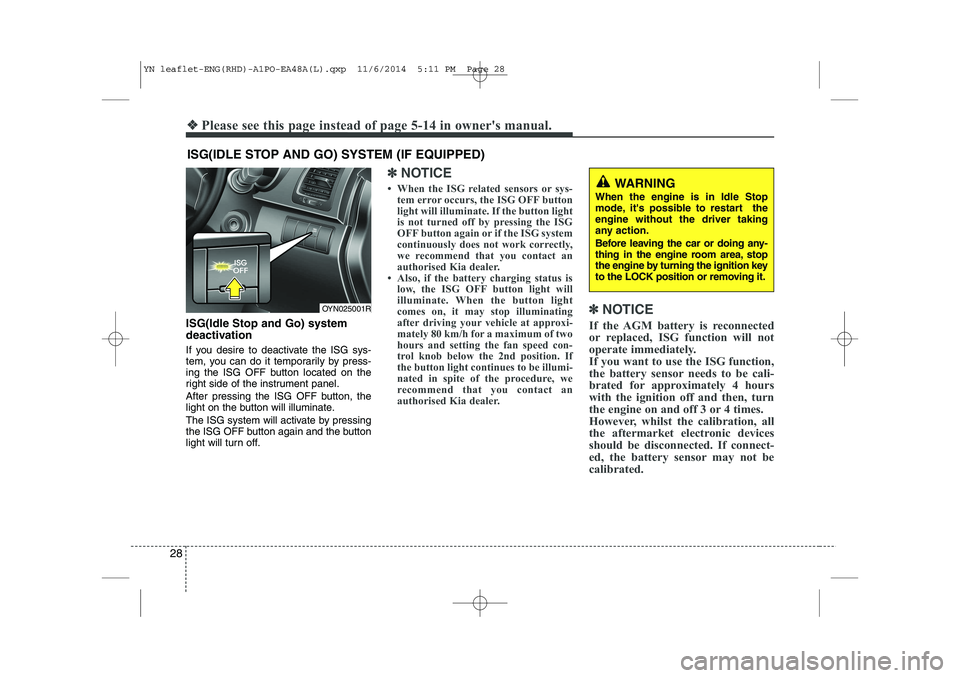
ISG(Idle Stop and Go) system
deactivation
If you desire to deactivate the ISG sys-
tem, you can do it temporarily by press-
ing the ISG OFF button located on the
right side of the instrument panel.
After pressing the ISG OFF button, the
light on the button will illuminate.
The ISG system will activate by pressing
the ISG OFF button again and the button
light will turn off.
✽✽NOTICE
When the ISG related sensors or sys- tem error occurs, the ISG OFF button
light will illuminate. If the button light
is not turned off by pressing the ISG
OFF button again or if the ISG system
continuously does not work correctly,
we recommend that you contact an
authorised Kia dealer.
Also, if the battery charging status is low, the ISG OFF button light will
illuminate. When the button light
comes on, it may stop illuminating
after driving your vehicle at approxi-
mately 80 km/h for a maximum of two
hours and setting the fan speed con-
trol knob below the 2nd position. If
the button light continues to be illumi-
nated in spite of the procedure, we
recommend that you contact an
authorised Kia dealer. ✽
✽
NOTICE
If the AGM battery is reconnected
or replaced, ISG function will not
operate immediately.
If you want to use the ISG function,
the battery sensor needs to be cali-
brated for approximately 4 hours
with the ignition off and then, turn
the engine on and off 3 or 4 times.
However, whilst the calibration, all
the aftermarket electronic devices
should be disconnected. If connect-
ed, the battery sensor may not be
calibrated.
ISG(IDLE STOP AND GO) SYSTEM (IF EQUIPPED)
OYN025001R
WARNING
When the engine is in Idle Stop
mode, it's possible to restart theengine without the driver taking
any action.
Before leaving the car or doing any-
thing in the engine room area, stop
the engine by turning the ignition key
to the LOCK position or removing it.
YN leaflet-ENG(RHD)-A1PO-EA48A(L).qxp 11/6/2014 5:11 PM Page 28