key battery KIA VENGA 2016 Owners Manual
[x] Cancel search | Manufacturer: KIA, Model Year: 2016, Model line: VENGA, Model: KIA VENGA 2016Pages: 404, PDF Size: 21.96 MB
Page 58 of 404
Safety features of your vehicle
44
3
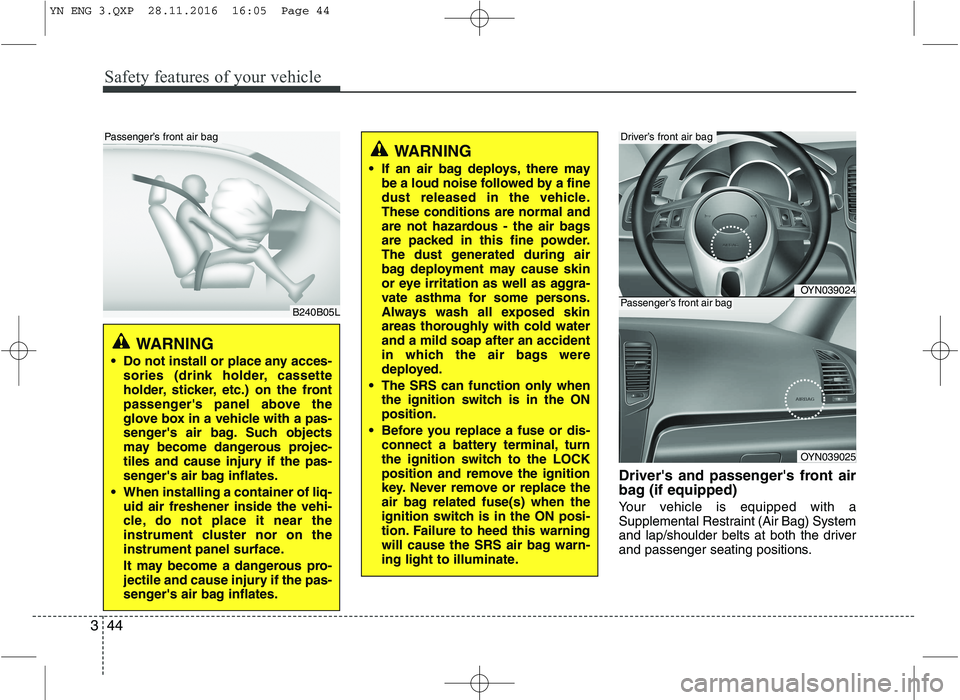
Driver's and passenger's front air
bag (if equipped)
Your vehicle is equipped with a
Supplemental Restraint (Air Bag) System
and lap/shoulder belts at both the driver
and passenger seating positions.
WARNING
If an air bag deploys, there may be a loud noise followed by a fine
dust released in the vehicle.These conditions are normal and
are not hazardous - the air bags
are packed in this fine powder.
The dust generated during air
bag deployment may cause skin
or eye irritation as well as aggra-
vate asthma for some persons.
Always wash all exposed skin
areas thoroughly with cold waterand a mild soap after an accident
in which the air bags were
deployed.
The SRS can function only when the ignition switch is in the ONposition.
Before you replace a fuse or dis- connect a battery terminal, turn
the ignition switch to the LOCK
position and remove the ignition
key. Never remove or replace the
air bag related fuse(s) when the
ignition switch is in the ON posi-
tion. Failure to heed this warning
will cause the SRS air bag warn-
ing light to illuminate.
OYN039024
OYN039025
Driver’s front air bag
Passenger’s front air bag
WARNING
Do not install or place any acces- sories (drink holder, cassette
holder, sticker, etc.) on the front
passenger's panel above the
glove box in a vehicle with a pas-
senger's air bag. Such objects
may become dangerous projec-
tiles and cause injury if the pas-
senger's air bag inflates.
When installing a container of liq- uid air freshener inside the vehi-
cle, do not place it near the
instrument cluster nor on the
instrument panel surface.
It may become a dangerous pro-
jectile and cause injury if the pas-
senger's air bag inflates.
B240B05L
Passenger’s front air bag
YN ENG 3.QXP 28.11.2016 16:05 Page 44
Page 79 of 404
45
Features of your vehicle
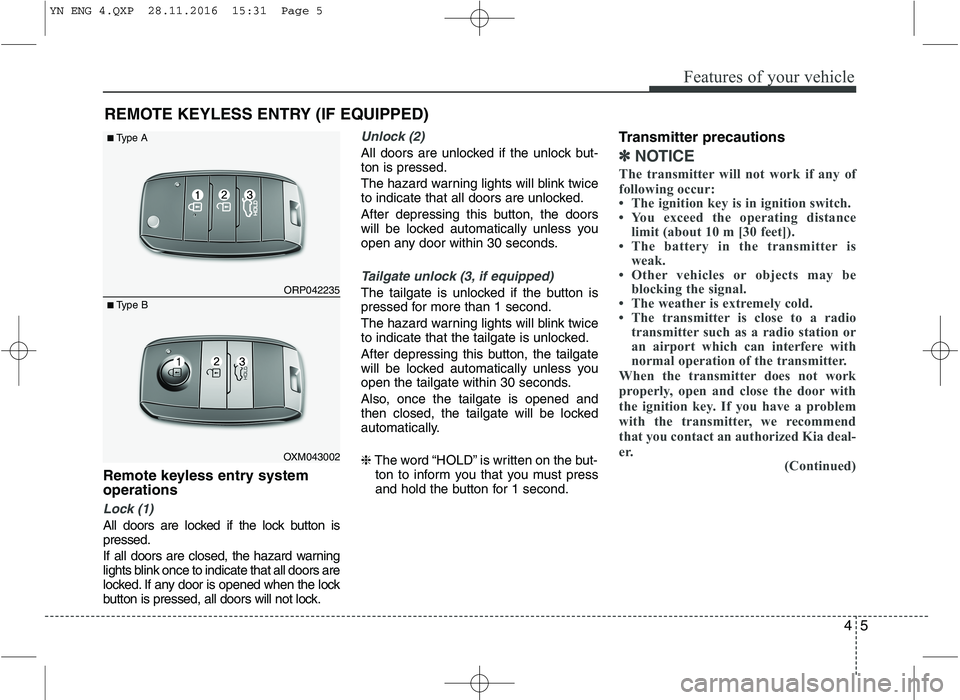
Remote keyless entry system operations
Lock (1)
All doors are locked if the lock button is pressed.
If all doors are closed, the hazard warning
lights blink once to indicate that all doors are
locked. If any door is opened when the lock
button is pressed, all doors will not lock.
Unlock (2)
All doors are unlocked if the unlock but- ton is pressed.
The hazard warning lights will blink twice
to indicate that all doors are unlocked.
After depressing this button, the doors
will be locked automatically unless you
open any door within 30 seconds.
Tailgate unlock (3, if equipped)
The tailgate is unlocked if the button is
pressed for more than 1 second.
The hazard warning lights will blink twice
to indicate that the tailgate is unlocked.
After depressing this button, the tailgate
will be locked automatically unless you
open the tailgate within 30 seconds.
Also, once the tailgate is opened and
then closed, the tailgate will be locked
automatically. ❈The word “HOLD” is written on the but-
ton to inform you that you must press
and hold the button for 1 second. Transmitter precautions
✽✽
NOTICE
The transmitter will not work if any of
following occur:
The ignition key is in ignition switch.
You exceed the operating distance limit (about 10 m [30 feet]).
The battery in the transmitter is weak.
Other vehicles or objects may be blocking the signal.
The weather is extremely cold.
The transmitter is close to a radio transmitter such as a radio station or
an airport which can interfere with
normal operation of the transmitter.
When the transmitter does not work
properly, open and close the door with
the ignition key. If you have a problem
with the transmitter, we recommend
that you contact an authorized Kia deal-
er. (Continued)
REMOTE KEYLESS ENTRY (IF EQUIPPED)
ORP042235
OXM043002
■
Type A
■ Type B
YN ENG 4.QXP 28.11.2016 15:31 Page 5
Page 80 of 404
Features of your vehicle
6
4
(Continued)
If the transmitter is in close proximity
to your cell phone or smart phone, the
signal from the transmitter could be
blocked by normal operation of your
cell phone or smart phone. This is
especially important when the phone
is active such as making call, receiving
calls, text messaging, and/or send-
ing/receiving emails. Avoid placing
the transmitter and your cell phone or
smart phone in the same pants or
jacket pocket and maintain adequate
distance between the two devices.
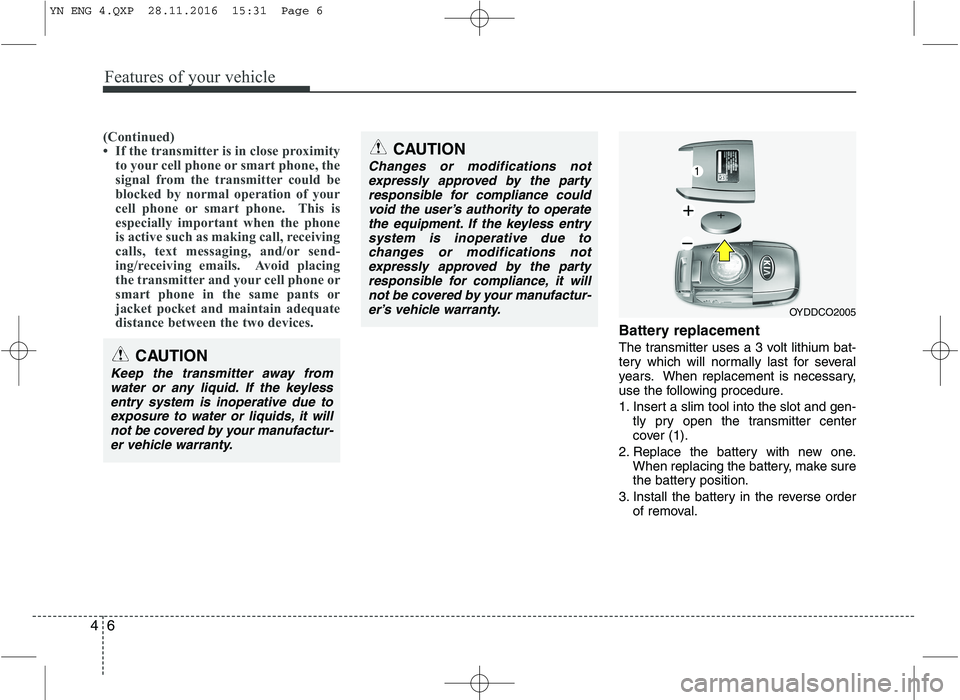
Battery replacement
The transmitter uses a 3 volt lithium bat-
tery which will normally last for several
years. When replacement is necessary,
use the following procedure.
1. Insert a slim tool into the slot and gen- tly pry open the transmitter center
cover (1).
2. Replace the battery with new one. When replacing the battery, make sure
the battery position.
3. Install the battery in the reverse order of removal.
OYDDCO2005
CAUTION
Keep the transmitter away from
water or any liquid. If the keylessentry system is inoperative due to
exposure to water or liquids, it willnot be covered by your manufactur- er vehicle warranty.
CAUTION
Changes or modifications not
expressly approved by the partyresponsible for compliance couldvoid the user’s authority to operate
the equipment. If the keyless entry system is inoperative due tochanges or modifications notexpressly approved by the party
responsible for compliance, it will not be covered by your manufactur-er’s vehicle warranty.
YN ENG 4.QXP 28.11.2016 15:31 Page 6
Page 81 of 404
47
Features of your vehicle
For transmitter replacement, we recom-
mend that you contact an authorized Kia
dealer.
CAUTION
The keyless entry system trans-mitter is designed to give youyears of trouble-free use, howev-
er it can malfunction if exposed tomoisture or static electricity. Ifyou are unsure how to use your transmitter or replace the battery,
we recommend that you contact an authorized Kia dealer.
Using the wrong battery can cause the transmitter to malfunc-
tion. Be sure to use the correctbattery.
To avoid damaging the transmit- ter, don't drop it, get it wet, orexpose it to heat or sunlight.
CAUTION
An inappropriately disposed bat-
tery can be harmful to the environ-ment and human health. Dispose the battery according to
your local law(s) or regulation.
YN ENG 4.QXP 28.11.2016 15:31 Page 7
Page 84 of 404
Features of your vehicle
10
4
Battery replacement
A smart key battery should last for sever-
al years, but if the smart key is not work-
ing properly, try replacing the battery with
a new one. If you are unsure how to use
your smart key or replace the battery, we
recommend that you contact an author-
ized Kia dealer.
✽✽
NOTICE
The circuit inside the smart key can have
a problem if exposed to moisture or stat-
ic electricity. If you are unsure how to
use your smart key or replace the bat-
tery, we recommend that you contact an
authorized Kia dealer.
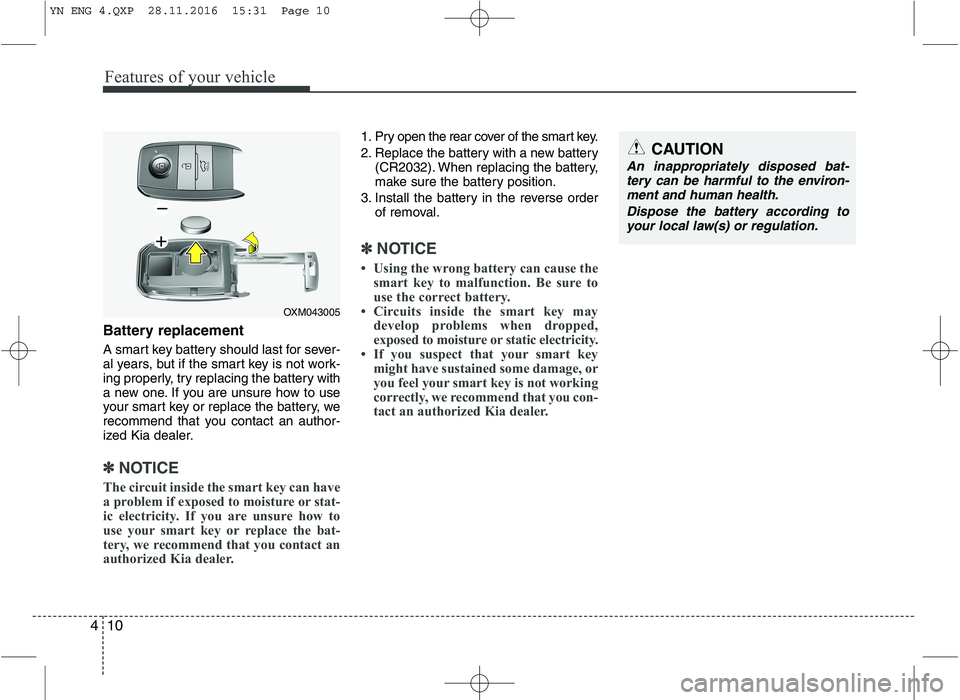
1. Pry open the rear cover of the smart key.
2. Replace the battery with a new battery (CR2032). When replacing the battery,
make sure the battery position.
3. Install the battery in the reverse order of removal.
✽✽ NOTICE
Using the wrong battery can cause the smart key to malfunction. Be sure to
use the correct battery.
Circuits inside the smart key may develop problems when dropped,
exposed to moisture or static electricity.
If you suspect that your smart key
might have sustained some damage, or
you feel your smart key is not working
correctly, we recommend that you con-
tact an authorized Kia dealer.
OXM043005
CAUTION
An inappropriately disposed bat-
tery can be harmful to the environ-ment and human health.
Dispose the battery according toyour local law(s) or regulation.
YN ENG 4.QXP 28.11.2016 15:31 Page 10
Page 130 of 404
Features of your vehicle
56
4
KEY OUT indicator
(if equipped)
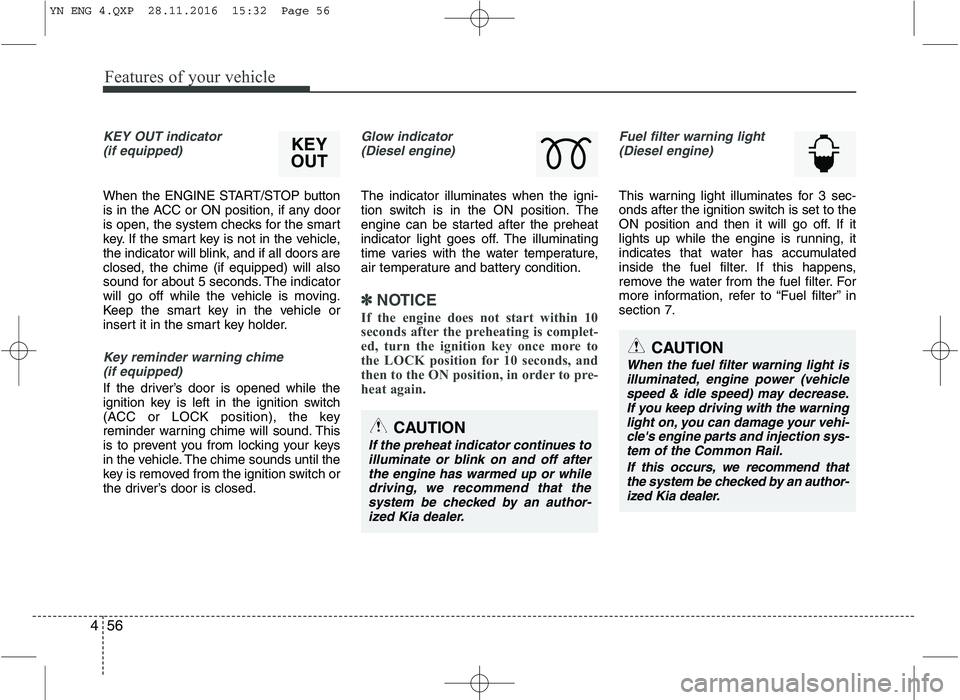
When the ENGINE START/STOP button
is in the ACC or ON position, if any door
is open, the system checks for the smart
key. If the smart key is not in the vehicle,
the indicator will blink, and if all doors areclosed, the chime (if equipped) will also
sound for about 5 seconds. The indicator
will go off while the vehicle is moving.
Keep the smart key in the vehicle or
insert it in the smart key holder.
Key reminder warning chime (if equipped)
If the driver’s door is opened while the
ignition key is left in the ignition switch
(ACC or LOCK position), the key
reminder warning chime will sound. This
is to prevent you from locking your keys
in the vehicle. The chime sounds until the
key is removed from the ignition switch or
the driver’s door is closed.
Glow indicator (Diesel engine)
The indicator illuminates when the igni-
tion switch is in the ON position. The
engine can be started after the preheat
indicator light goes off. The illuminating
time varies with the water temperature,
air temperature and battery condition.
✽✽ NOTICE
If the engine does not start within 10
seconds after the preheating is complet-
ed, turn the ignition key once more to
the LOCK position for 10 seconds, and
then to the ON position, in order to pre-
heat again.
Fuel filter warning light (Diesel engine)
This warning light illuminates for 3 sec-
onds after the ignition switch is set to the
ON position and then it will go off. If it
lights up while the engine is running, it
indicates that water has accumulated
inside the fuel filter. If this happens,
remove the water from the fuel filter. For
more information, refer to “Fuel filter” insection 7.
CAUTION
When the fuel filter warning light is
illuminated, engine power (vehicle speed & idle speed) may decrease.If you keep driving with the warning light on, you can damage your vehi-
cle's engine parts and injection sys- tem of the Common Rail.
If this occurs, we recommend thatthe system be checked by an author- ized Kia dealer.
CAUTION
If the preheat indicator continues toilluminate or blink on and off after
the engine has warmed up or while driving, we recommend that thesystem be checked by an author-ized Kia dealer.
KEY
OUT
YN ENG 4.QXP 28.11.2016 15:32 Page 56
Page 135 of 404
461
Features of your vehicle
The hazard warning flasher should be
used whenever you find it necessary to
stop the vehicle in a hazardous location.
When you must make such an emer-
gency stop, always pull off the road as far
as possible.
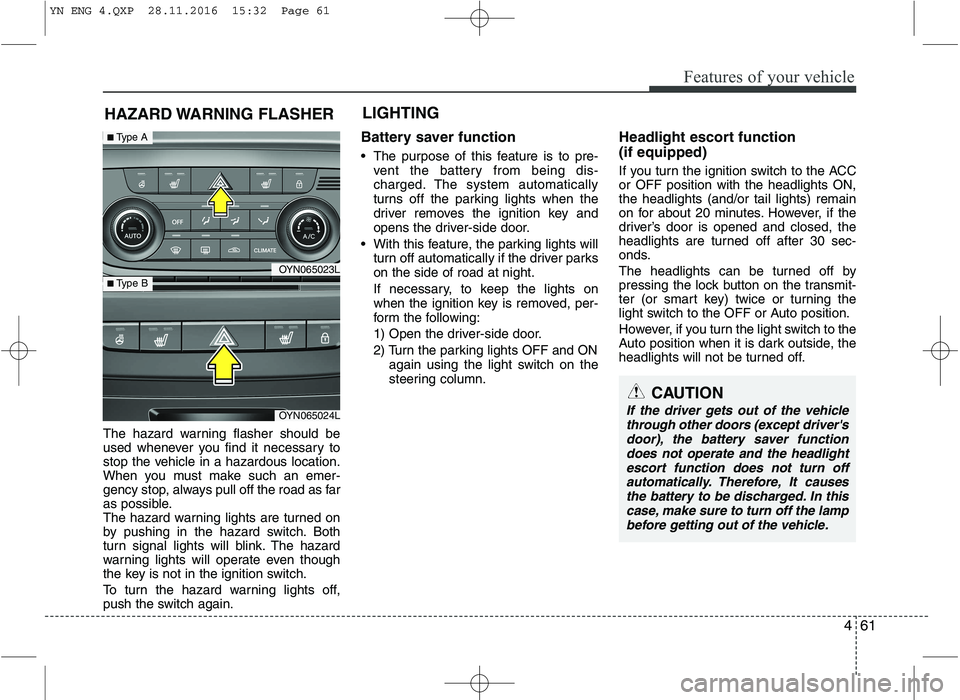
The hazard warning lights are turned on
by pushing in the hazard switch. Both
turn signal lights will blink. The hazard
warning lights will operate even though
the key is not in the ignition switch.
To turn the hazard warning lights off,
push the switch again.Battery saver function
The purpose of this feature is to pre-
vent the battery from being dis-
charged. The system automatically
turns off the parking lights when the
driver removes the ignition key and
opens the driver-side door.
With this feature, the parking lights will turn off automatically if the driver parkson the side of road at night.
If necessary, to keep the lights on
when the ignition key is removed, per-
form the following:
1) Open the driver-side door.
2) Turn the parking lights OFF and ON again using the light switch on the
steering column. Headlight escort function (if equipped)
If you turn the ignition switch to the ACC or OFF position with the headlights ON,the headlights (and/or tail lights) remain
on for about 20 minutes. However, if the
driver’s door is opened and closed, the
headlights are turned off after 30 sec-
onds.
The headlights can be turned off by
pressing the lock button on the transmit-
ter (or smart key) twice or turning the
light switch to the OFF or Auto position.
However, if you turn the light switch to the
Auto position when it is dark outside, the
headlights will not be turned off.
HAZARD WARNING FLASHER
CAUTION
If the driver gets out of the vehicle
through other doors (except driver'sdoor), the battery saver function
does not operate and the headlightescort function does not turn off automatically. Therefore, It causesthe battery to be discharged. In this case, make sure to turn off the lamp
before getting out of the vehicle.
LIGHTING
OYN065023L
OYN065024L
■ Type A
■ Type B
YN ENG 4.QXP 28.11.2016 15:32 Page 61
Page 145 of 404
471
Features of your vehicle
Room lamp
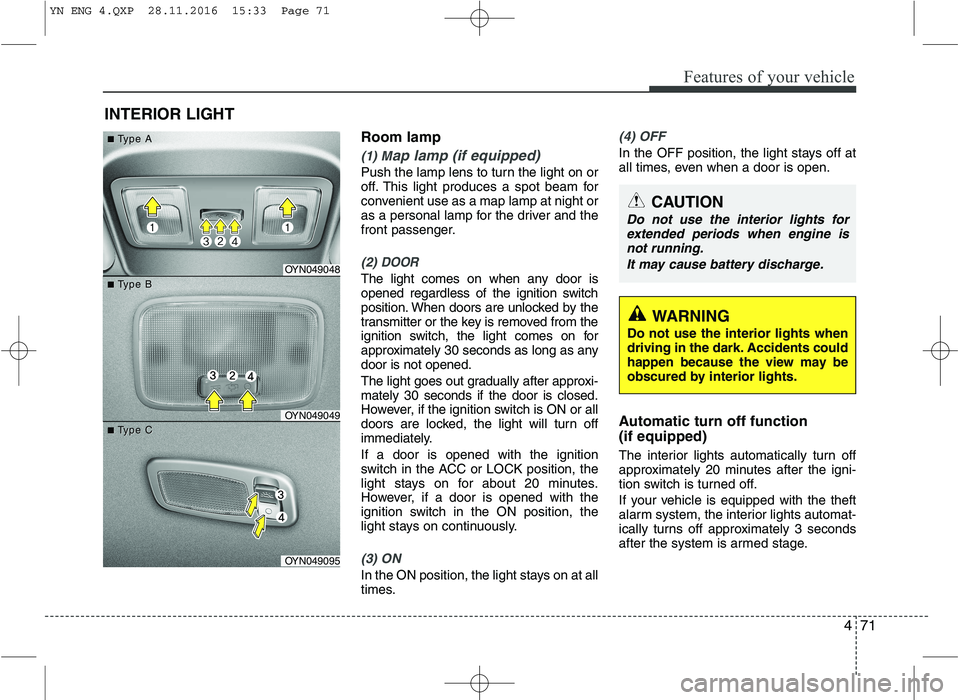
(1) Map lamp (if equipped)
Push the lamp lens to turn the light on or
off. This light produces a spot beam for
convenient use as a map lamp at night or
as a personal lamp for the driver and the
front passenger.
(2) DOOR
The light comes on when any door is
opened regardless of the ignition switch
position. When doors are unlocked by the
transmitter or the key is removed from the
ignition switch, the light comes on for
approximately 30 seconds as long as anydoor is not opened.
The light goes out gradually after approxi- mately 30 seconds if the door is closed.
However, if the ignition switch is ON or all
doors are locked, the light will turn off
immediately. If a door is opened with the ignition
switch in the ACC or LOCK position, the
light stays on for about 20 minutes.
However, if a door is opened with the
ignition switch in the ON position, the
light stays on continuously.
(3) ON
In the ON position, the light stays on at all
times.
(4) OFF
In the OFF position, the light stays off at
all times, even when a door is open.
Automatic turn off function (if equipped)
The interior lights automatically turn off
approximately 20 minutes after the igni-
tion switch is turned off.
If your vehicle is equipped with the theft
alarm system, the interior lights automat-
ically turns off approximately 3 seconds
after the system is armed stage.
INTERIOR LIGHT
CAUTION
Do not use the interior lights for
extended periods when engine is
not running.
It may cause battery discharge.
OYN049048
OYN049049
OYN049095
■■TType Aype A
■■TType Bype B
■■TType Cype C
WARNING
Do not use the interior lights when
driving in the dark. Accidents could
happen because the view may be
obscured by interior lights.
YN ENG 4.QXP 28.11.2016 15:33 Page 71
Page 169 of 404
495
Features of your vehicle
INTERIOR FEATURES
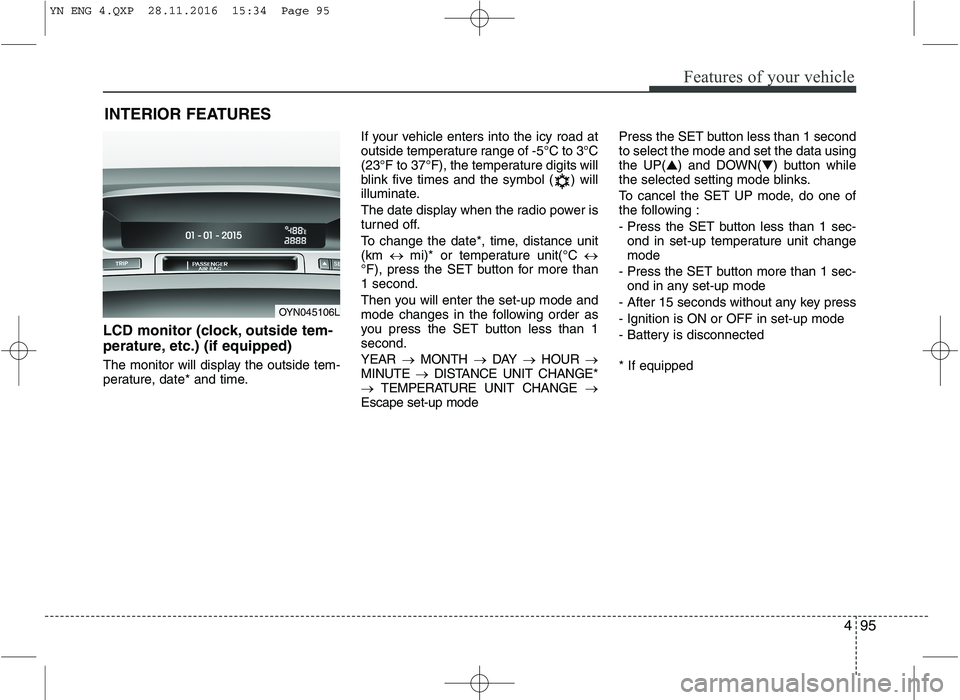
LCD monitor (clock, outside tem-
perature, etc.) (if equipped)
The monitor will display the outside tem-
perature, date* and time. If your vehicle enters into the icy road at
outside temperature range of -5°C to 3°C
(23°F to 37°F), the temperature digits will
blink five times and the symbol ( ) will
illuminate.
The date display when the radio power is
turned off.
To change the date*, time, distance unit (km
mi)* or temperature unit(°C
°F), press the SET button for more than1 second.
Then you will enter the set-up mode and
mode changes in the following order as
you press the SET button less than 1second. YEAR MONTH DAY HOUR
MINUTE DISTANCE UNIT CHANGE*
TEMPERATURE UNIT CHANGE
Escape set-up mode Press the SET button less than 1 second to select the mode and set the data usingthe UP(
▲) and DOWN( ▼) button while
the selected setting mode blinks.
To cancel the SET UP mode, do one of
the following :
- Press the SET button less than 1 sec-
ond in set-up temperature unit change mode
- Press the SET button more than 1 sec- ond in any set-up mode
- After 15 seconds without any key press
- Ignition is ON or OFF in set-up mode
- Battery is disconnected * If equipped
OYN045106L
YN ENG 4.QXP 28.11.2016 15:34 Page 95
Page 215 of 404
55
Driving your vehicle
ACC (Accessory)
The steering wheel is unlocked and elec-
trical accessories are operative.
✽✽NOTICE
If difficulty is experienced turning the
ignition switch to the ACC position, turn
the key while turning the steering wheel
right and left to release the tension.
ON
The warning lights can be checked
before the engine is started. This is the
normal running position after the engine
is started.
Do not leave the ignition switch ON if the engine is not running to prevent batterydischarge.
START
Turn the ignition switch to the START
position to start the engine. The engine
will crank until you release the key; then
it returns to the ON position. The brake
warning light can be checked in this posi-tion. Starting the engine
✽✽
NOTICE - Kick down mecha- nism (if equipped)
If your vehicle is equipped with a kick
down mechanism in the accelerator
pedal, it prevents you from driving at
full throttle unintentionally by making
the driver require increased effort to
depress the accelerator pedal. However,
if you depress the pedal more than
approximately 80%, the vehicle can be
at full throttle and the accelerator pedal
will be easier to depress. This is not a
malfunction but a normal condition.
WARNING - Ignition switch
Never turn the ignition switch to LOCK or ACC while the vehicle is
moving. This would result in loss
of directional control and braking
function, which could cause anaccident.
The anti-theft steering column lock is not a substitute for the parking
brake. Before leaving the driver’s
seat, always make sure the shift
lever is engaged in 1st gear for the
manual transaxle or P (Park) for
the automatic transaxle, set the
parking brake fully and shut the
engine off. Unexpected and sud-
den vehicle movement may occurif these precautions are not taken.
Never reach for the ignition switch, or any other controls through the
steering wheel while the vehicle is
in motion. The presence of yourhand or arm in this area could
cause a loss of vehicle control, an
accident and serious bodily injuryor death.
Do not place any movable objects around the driver’s seat as they
may move while driving, interferewith the driver and lead to an acci-dent.
WARNING
Always wear appropriate shoes
when operating your vehicle.
Unsuitable shoes (high heels, ski
boots,etc.) may interfere with yourability to use the brake and acceler-
ator pedal, and the clutch (ifequipped).
YN ENG 5.QXP 9/5/2016 4:31 PM Page 5