ECO mode Lancia Voyager 2012 Owner handbook (in English)
[x] Cancel search | Manufacturer: LANCIA, Model Year: 2012, Model line: Voyager, Model: Lancia Voyager 2012Pages: 344, PDF Size: 3.95 MB
Page 107 of 344
Radio Am (Or Radio Long Wave
Or Radio Medium Wave)
To switch to the AM band, say “AM”
or “Radio AM”. In this mode, you may
say the following commands:
“Frequency #” (to change the fre-quency)
“Next Station” (to select the next station)
“Previous Station” (to select the previous station)
“Menu Radio” (to switch to the ra- dio menu)
“Main Menu” (to switch to the main menu)
Radio FM
To switch to the FM band, say “FM”
or “Radio FM”. In this mode, you may
say the following commands:
“Frequency #” (to change the fre- quency)
“Next Station” (to select the next station)
“Previous Station” (to select the previous station) “Menu Radio” (to switch to the ra-
dio menu)
“Main Menu” (to switch to the main menu)
Disc
To switch to the disc mode, say
“Disc”. In this mode, you may say the
following commands:
“Track” (#) (to change the track)
“Next Track” (to play the next track)
“Previous Track” (to play the pre- vious track)
“Main Menu” (to switch to the main menu)
Memo
To switch to the voice recorder mode,
say “Memo”. In this mode, you may
say the following commands:
“New Memo” (to record a new memo) — During the recording,
you may press the Voice Command
button to stop recording. You
proceed by saying one of the follow-
ing commands:
“Save” (to save the memo) “Continue” (to continue recor
d-
ing)
“Delete” (to delete the recording)
“Play Memos” (to play previously recorded memos) — During the
playback you may press the Voice
Command
button to stop
playing memos. You proceed by
saying one of the following com-
mands:
“Repeat” (to repeat a memo)
“Next” (to play the next memo)
“Previous” (to play the previous memo)
“Delete” (to delete a memo)
“Delete All” (to delete all memos)
System Setup
To switch to system setup, you may
say on of the following:
“Change to system setup”
“Main menu system setup”
“Switch to system setup”
“Change to setup”
“Main menu setup” or
101
Page 108 of 344
“Switch to setup”
In this mode, you may say thefollow-
ing commands:
“Language English”
“Language French”
“Language Spanish”
“Language Dutch”
“Language Deutsch”
“Language Italian”
“Tutorial”
“Voice Training”
NOTE:
Keep in mind that you have to
press the Voice Commandbutton first and wait for the beep
before speaking the “Barge In”
commands.
VOICE TRAINING
For users experiencing difficulty with
the system recognizing their voice
commands or numbers the
Uconnect™ Voice “Voice Training”
feature may be used. 1. Press the Voice Command
button, say “System Setup” and once
you are in that menu then say “Voice
Training.” This will train your own
voice to the system and will improve
recognition.
2. Repeat the words and phrases
when prompted by Uconnect™ Voice.
For best results, the Voice Training
session should be completed when the
vehicle is parked, engine running, all
windows closed, and the blower fan
switched off. This procedure may be
repeated with a new user. The system
will adapt to the last trained voice
only.
SEATS
Seats are a part of the Occupant Re-
straint System of the vehicle.WARNING!
It is dangerous to ride in a cargo
area, inside or outside of a vehicle.
In a collision, people riding in
these areas are more likely to be
seriously injured or killed.
(Continued)
WARNING!(Continued)
Do not allow people to ride in any
area of your vehicle that is not
equipped with seats and seat
belts. In a collision, people riding
in these areas are more likely to be
seriously injured or killed.
Be sure everyone in your vehicle is
in a seat and using a seat belt
properly.
POWER SEATS (for
versions/markets, where
provided)
Some models may be equipped with
eight-way power seats for the driver
and front passenger. The power seat
switches are located on the outboard
side of the seat. The switches control
the movement of the seat cushion and
the seatback.
102
Page 110 of 344
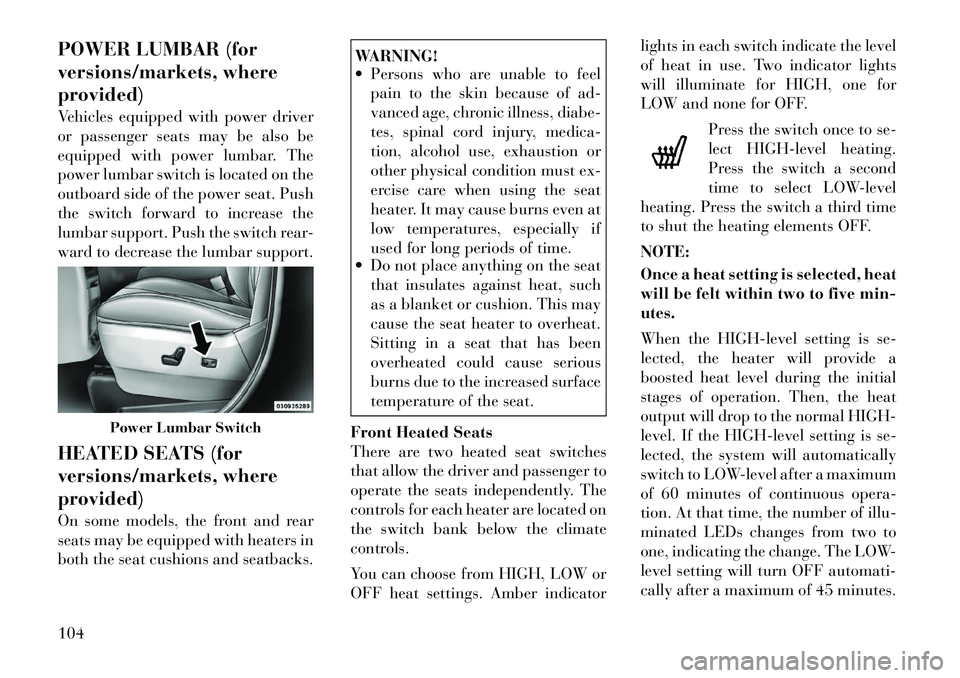
POWER LUMBAR (for
versions/markets, where
provided)
Vehicles equipped with power driver
or passenger seats may be also be
equipped with power lumbar. The
power lumbar switch is located on the
outboard side of the power seat. Push
the switch forward to increase the
lumbar support. Push the switch rear-
ward to decrease the lumbar support.
HEATED SEATS (for
versions/markets, where
provided)
On some models, the front and rear
seats may be equipped with heaters in
both the seat cushions and seatbacks.
WARNING!
Persons who are unable to feel pain to the skin because of ad-
vanced age, chronic illness, diabe-
tes, spinal cord injury, medica-
tion, alcohol use, exhaustion or
other physical condition must ex-
ercise care when using the seat
heater. It may cause burns even at
low temperatures, especially if
used for long periods of time.
Do not place anything on the seat
that insulates against heat, such
as a blanket or cushion. This may
cause the seat heater to overheat.
Sitting in a seat that has been
overheated could cause serious
burns due to the increased surface
temperature of the seat.
Front Heated Seats
There are two heated seat switches
that allow the driver and passenger to
operate the seats independently. The
controls for each heater are located on
the switch bank below the climate
controls.
You can choose from HIGH, LOW or
OFF heat settings. Amber indicator lights in each switch indicate the level
of heat in use. Two indicator lights
will illuminate for HIGH, one for
LOW and none for OFF.
Press the switch once to se-
lect HIGH-level heating.
Press the switch a second
time to select LOW-level
heating. Press the switch a third time
to shut the heating elements OFF.
NOTE:
Once a heat setting is selected, heat
will be felt within two to five min-
utes.
When the HIGH-level setting is se-
lected, the heater will provide a
boosted heat level during the initial
stages of operation. Then, the heat
output will drop to the normal HIGH-
level. If the HIGH-level setting is se-
lected, the system will automatically
switch to LOW-level after a maximum
of 60 minutes of continuous opera-
tion. At that time, the number of illu-
minated LEDs changes from two to
one, indicating the change. The LOW-
level setting will turn OFF automati-
cally after a maximum of 45 minutes.
Power Lumbar Switch
104
Page 111 of 344

Rear Heated Seats
On some models, the second row seats
are equipped with heaters. There are
two heated seat switches that allow
the second row passengers to operate
the seats independently. The heated
seat switches are located on the slid-
ing side door handle trim panels.
You can choose from HIGH, LOW or
OFF heat settings. Amber indicator
lights in each switch indicate the level
of heat in use. Two indicator lights
will illuminate for HIGH, one for
LOW and none for OFF.Press the switch once to se-
lect HIGH-level heating.
Press the switch a second
time to select LOW-level
heating. Press the switch a third time
to shut the heating elements OFF.
NOTE:
Once a heat setting is selected, heat
will be felt within two to five min-
utes.
When the HIGH-level setting is se-
lected, the heater will provide a
boosted heat level during the initial
stages of operation. Then, the heat
output will drop to the normal HIGH-
level. If the HIGH-level setting is se-
lected, the system will automatically
switch to LOW-level after a maximum
of 60 minutes of continuous opera-
tion. At that time, the number of illu-
minated LEDs changes from two to
one, indicating the change. The LOW-
level setting will turn OFF automati-
cally after a maximum of 45 minutes. MANUAL FRONT/SECOND
ROW SEAT ADJUSTER
Both front seats are adjustable for-
ward or rearward. The manual seat
adjustment handle is located under
the seat cushion at the front edge of
each seat.
While sitting in the seat, pull up on
the handle and slide the seat forward
or rearward. Release the bar once you
have reached the desired position.
Then, using body pressure, move for-
ward and rearward on the seat to be
sure that the seat adjusters have
latched.
Heated Seat Switch
Manual Seat Adjuster
105
Page 112 of 344

WARNING!
Adjusting a seat while drivingmay be dangerous. Moving a seat
while driving could result in loss
of control which could cause a
collision and serious injury or
death.
Seats should be adjusted before
fastening the seat belts and while
the vehicle is parked. Serious in-
jury or death could result from a
poorly adjusted seat belt.
MANUAL RECLINING
SEATS (for versions/
markets, where provided)
For models equipped with manual re-
clining seats, the recline lever is lo-
cated on the outboard side of the seat. To recline, lean forward slightly, lift
the lever, then push back to the de-
sired position and release the lever.
Lean forward and lift the lever to
return the seatback to its normal po-
sition. Using body pressure, lean for-
ward and rearward on the seat to be
sure the seatback has latched.
WARNING!
Do not ride with the seatback re-
clined so that the shoulder belt is no
longer resting against your chest. In
a collision you could slide under the
seat belt, which could result in seri-
ous injury or death.
HEAD RESTRAINTS
Head restraints are designed to reduce
the risk of injury by restricting head
movement in the event of a rear im-
pact. Head restraints should be ad-
justed so that the top of the head
restraint is located above the top of
your ear.
WARNING!
The head restraints for all occupants
must be properly adjusted prior to
operating the vehicle or occupying a
seat. Head restraints should never be
adjusted while the vehicle is in mo-
tion. Driving a vehicle with the head
restraints improperly adjusted or re-
moved could cause serious injury or
death in the event of a collision.
Active Head Restraints — Front
Seats
Active Head Restraints are passive,
deployable components, and vehicles
with this equipment can not be read-
ily identified by any markings, only
through visual inspection of the head
restraint. The head restraint will be
split in two halves, with the front half
being soft foam and trim, the back
half being decorative plastic.
When AHRs deploy during a rear im-
pact, the front half of the head re-
straint extends forward to minimize
the gap between the back of the occu-
pant’s head and the AHR. This system
is designed to help prevent or reduce
the extent of injuries to the driver and
Manual Recline Lever
106
Page 123 of 344

5. Turn on the radio and set the radio
station presets (up to 10 AM and
10 FM stations can be set).
6. Turn the ignition switch to the
OFF position and remove the key.
7. Press and release the SET (S) but-
ton located on thedriver's door.
8. Within five seconds, press and r e-
lease MEMORY button 1 or 2 on the
driver's door. The next step must be
performed within 5 seconds if you
desire to also use a RKE transmitter to
recall memory positions.
9. Press and release the LOCK button
on one of the RKE transmitters.
10. Insert the ignition key and turn
the ignition switch to the ON position.
11. Select “Remote Linked to
Memory” in the Electronic Vehicle In-
formation Center (EVIC) and enter
“Yes”. Refer to “Electronic Vehicle In-
formation Center (EVIC)/Customer-
Programmable Features” in “Under-
standing Your Instrument Panel” for
further information.
12. Repeat the above steps to set the
next Memory position using the other numbered Memory button or to link
another RKE transmitter to memory.
Memory Position Recall
NOTE:
The vehicle must be in PARK to
recall memory positions. If a recall
is attempted when the vehicle is
not in PARK, a message will be
displayed in the EVIC.
To recall the memory settings for
driver one, press MEMORY button 1
on the
driver's door or the UNLOCK
button on the RKE transmitter linked
to memory position 1.
To recall the memory setting for
driver two, press MEMORY button 2
on the driver's door or the UNLOCK
button on the RKE transmitter linked
to Memory Position 2.
A recall can be cancelled by pressing
any of the MEMORY buttons on the
driver's door during a recall (S, 1, or
2). When a recall is cancelled, the
driver's seat, driver's mirror, and the
pedals stop moving. A delay of one
second will occur before another r e-
call can be selected. To Disable RKE Transmitter
Linked To Memory
1. Turn the ignition switch to the
OFF position and remove the key.
2. Press and release MEMORY but-
ton 1. The system will recall any
memory settings stored in position 1.
Wait for the system to complete the
memory recall before continuing to
Step 3.
3. Press and release the memory SET
(S) button located on the
driver's
door. A chime will sound signaling
that you are in the memory set mode.
4. Within five seconds, press and r e-
lease MEMORY button 1 on the driv-
er's door. A chime will sound signal-
ing to you that the driver memory has
been set.
5. Within five seconds, press and re-
lease the UNLOCK button on the
RKE transmitter. A chime will sound
signaling to you that the RKE trans-
mitter link has been successfully dis-
abled.
117
Page 126 of 344

NOTE:
The key must be out of the ignition
switch or the ignition switch must
be in the OFF position for this fea-
ture to operate.
Dimmer Switch
The dimmer switch is located next to
the headlight switch.
Interior Lighting Off
Rotate the left dimmer control to the
off position (extreme bottom). The
interior lights will remain off when
the doors or liftgate are open.
Dimmer Control
With the parking lights or headlights
on, rotating the left dimmer control
for the interior lights on the instru-ment panel upward will increase the
brightness of the instrument panel
lights.
Parade Mode (Daytime Brightness
Feature)
Rotate the left dimmer control to the
first detent. This feature brightens the
odometer, radio and overhead dis-
plays when the parking lights or
headlights are on.
Interior Lights On
Rotate the left dimmer control com-
pletely upward to the second detent
(extreme top position) to turn on the
interior lights. The interior lights will
remain on when the dimmer control is
in this position.
Halo Lights (for versions/markets,
where provided)
Halo lights are strategically placed
soft lighting that help to illuminate
specific areas to aid the occupants in
locating specific features while driv-
ing at night.
The Halo control switch is located to
the right of the dimmer switch.
To activate the Halo lights,
rotate the Halo switch con-
trol upward or downward
to increase or decrease the
lighting.
PARKING LIGHTS
Turn the headlight switch knob
to the first detent to turn the
parking lights on. This also turns on
all instrument panel lighting.
HEADLIGHTS
Turn the headlight switch
knob to the second detent to
turn the headlights and
parking lights on. This also
turns on all instrument panel lighting.
Dimmer Switch
Halo Switch
120
Page 127 of 344
To change the brightness of the in-
strument panel lights, rotate the dim-
mer control up or down.
AUTOMATIC HEADLIGHTS
(for versions/markets,
where provided)
This system automatically turns your
headlights on or off based on ambient
light levels. To turn the system on,
turn the headlight switch to the ex-
treme counterclockwise position
aligning the indicator with AUTO on
the headlight switch. When the sys-
tem is on, the Headlight Time Delay
feature is also on. This means your
headlights will stay on for up to
90 seconds after you turn the ignition
switch OFF. To turn the Automatic
System off, turn the headlight switch
clockwise to the O (Off) position.
NOTE:
The engine must be running before
the headlights will come on in the
Automatic mode.HEADLIGHTS ON WITH
WIPERS (for versions/
markets, where provided)
When your headlights are in the Au-
tomatic mode and the engine is run-
ning, the headlights will automati-
cally turn on when the wiper system is
also turned on. Headlights on when
windshield wipers are on may be
found on vehicles equipped with an
automatic headlight system. Refer to
“Electronic Vehicle Information Cen-
ter (EVIC)/Customer-Programmable
Features” in “Understanding Your In-
strument Panel” for further informa-
tion.
HEADLIGHT DELAY (for
versions/markets, where
provided)
This feature provides the safety of
headlight illumination for up to
90 seconds after exiting your vehicle.
To activate the delay feature, turn
OFF the ignition switch while the
headlights are still on. Then turn off
the headlights within 45 seconds. The
90 second delay interval begins when
headlight switch is turned off. If theheadlights or parking lights are
turned back on or the ignition switch
is turned ON, the delay will be can-
celled.
When exiting the vehicle the driver
can choose to have the headlights re-
main on for 30, 60, or 90 seconds or
not remain on. To change the timer
setting, see your authorized dealer.
The headlight delay time is program-
mable on vehicles equipped with an
EVIC. Refer to “Electronic Vehicle In-
formation Center (EVIC)/Customer-
Programmable Features” in “Under-
standing Your Instrument Panel” for
further information.
If the headlights are turned off before
the ignition, they will turn off in the
normal manner.
NOTE:
The headlights must be turned off
within 45 seconds of turning the
ignition OFF to activate this fea-
ture.
121
Page 141 of 344

PARKVIEW® REAR
BACK UP CAMERA (for
versions/markets, where
provided)
Your vehicle may be equipped with
the ParkView® Rear Back Up Cam-
era that allows you to see an on-screen
image of the rear surroundings of
your vehicle whenever the shift lever
is put into REVERSE. The image will
be displayed on the Navigation/Multimedia radio display screen along
with a caution note to “check entire
surroundings” across the top of the
screen. After five seconds this note
will disappear. The ParkView® cam-
era is located on the rear of the vehicle
above the rear License plate.
When the vehicle is shifted out of RE-
VERSE, the rear camera mode is ex-
ited and the navigation or audio
screen appears again.
When displayed, static grid lines will
illustrate the width of the vehicle
while a dashed center-line will indi-
cate the center of the vehicle to assist
with aligning to a hitch/receiver. The
static grid lines will show separate
zones that will help indicate the dis-
tance to the rear of the vehicle. The
following table shows the approxi-
mate distances for each zone:
Zone
Distance to the rear of the vehicle
Red 0 - 30 cm
Yellow 30 cm - 1 m
Green 1 m or greater
135
Page 142 of 344

WARNING!
Drivers must be careful when back-
ing up even when using the
ParkView® Rear Back Up Camera.
Always check carefully behind your
vehicle, and be sure to check for
pedestrians, animals, other vehicles,
obstructions, or blind spots before
backing up. You are responsible for
the safety of your surroundings and
must continue to pay attention while
backing up. Failure to do so can
result in serious injury or death.CAUTION!
To avoid vehicle damage,ParkView® should only be used
as a parking aid. The camera is
unable to view every obstacle or
object in your drive path.
To avoid vehicle damage, the ve-
hicle must be driven slowly when
using ParkView® to be able to
stop in time when an obstacle is
seen. It is recommended that the
driver look frequently over his/
her shoulder when using
ParkView®. NOTE:
If snow, ice, mud, or any foreign
substance builds up on the camera
lens, clean the lens, rinse with wa-
ter, and dry with a soft cloth. Do
not cover the lens.
TURNING PARKVIEW® ON
OR OFF — WITH
NAVIGATION/
MULTIMEDIA RADIO
1. Press the “menu” hard-key.
2. Select “system setup” soft-key.
3. Press the “camera setup” soft-key.
4. Enable or disable the rear camera
feature by selecting “enable rear cam-
era in reverse” soft-key.
5. Press the “save” soft-key.
TURNING PARKVIEW® ON
OR OFF — WITHOUT
NAVIGATION/
MULTIMEDIA RADIO
1. Press the “menu” hard-key.
2. Select “system setup” soft-key.
3. Enable or disable the rear camera
feature by selecting “enable rear cam-
era in reverse” soft-key.
OVERHEAD CONSOLES
FRONT OVERHEAD
CONSOLE
Two versions of the overhead console
are available. The base front overhead
console model featured fixed incan-
descent courtesy/reading lights, flip-
down sunglass storage and conversa-
tion mirror. The premium front
overhead console model features a
LED focused light that illuminates
the instrument panel cupholders, two
swiveling LED lights, flip-down sun-
glass storage, conversation mirror,
optional power sliding door switches
and an optional power liftgate switch.
NOTE:
Premium sunroof console models
include all of above except sun-
glass storage.
136