tire type Lancia Voyager 2012 Owner handbook (in English)
[x] Cancel search | Manufacturer: LANCIA, Model Year: 2012, Model line: Voyager, Model: Lancia Voyager 2012Pages: 344, PDF Size: 3.95 MB
Page 172 of 344
CAUTION!
The TPMS has been optimized for
the original equipment tires and
wheels. TPMS pressures and warn-
ing have been established for the tire
size equipped on your vehicle. Un-
desirable system operation or sensor
damage may result when using re-
placement equipment that is not of
the same size, type, and/or style.
Aftermarket wheels can cause sensor
damage. Do not use tire sealant from
a can or balance beads if your ve-
hicle is equipped with a TPMS, as
damage to the sensors may result.
9. Malfunction Indicator Light
(MIL) The Malfunction Indicator
Light (MIL) is part of an on-
board diagnostic system,
called OBD, that monitors en-
gine and automatic transmission con-
trol systems. The light will illuminate
when the key is in the ON/RUN posi-
tion, before engine start. If the bulb
does not come on when turning the
key from OFF to ON/RUN, have the
condition checked promptly. Certain conditions, such as a loose or
missing gas cap, poor fuel quality,
etc., may illuminate the MIL after en-
gine start. The vehicle should be ser-
viced if the light stays on through
several of your typical driving cycles.
In most situations, the vehicle will
drive normally and will not require
towing.
CAUTION!
Prolonged driving with the MIL on
could cause damage to the engine
control system. It also could affect
fuel economy and drivability. If the
MIL is flashing, severe catalytic con-
verter damage and power loss will
soon occur. Immediate service is re-
quired.
WARNING!
A malfunctioning catalytic con-
verter, as referenced above, can
reach higher temperatures than in
normal operating conditions. This
can cause a fire if you drive slowly or
park over flammable substances
such as dry plants, wood, cardboard,
etc. This could result in death or
serious injury to the driver, occu-
pants or others.
10. Electronic Stability Control
(ESC) Activation/Malfunction
Indicator Light (for versions/
markets, where provided) The “ESC Activation/
Malfunction Indicator
Light” in the instrument
cluster will come on when
the ignition switch is turned to the
ON/RUN position. It should go out
with the engine running. If the “ESC
Activation/Malfunction Indicator
Light” comes on continuously with
the engine running, a malfunction has
been detected in the ESC system. If
this light remains on after several ig-
nition cycles, and the vehicle has been
driven several kilometers at speeds
166
Page 179 of 344

UP ButtonPress and release the UP
button to scroll upward
through the main menus
(Fuel Economy, Vehicle
Info, Tire BAR, Cruise, Messages,
Units, System Setup) and sub-menus.
DOWN Button Press and release the
DOWN button to scroll
downward through the
main menus and sub-
menus. SELECT Button
The SELECT button allows
access to information in
EVIC submenus, selects
some feature settings, and
resets some EVIC features. The EVIC
prompts the driver when the SELECT
button can be used by displaying the
right arrow graphic.
BACK Button
Press the BACK button to
scroll back to a previous
menu or sub-menu.
ELECTRONIC VEHICLE
INFORMATION CENTER
(EVIC) DISPLAYS
The EVIC display consists of three
sections:
1. The top line where compass direc-
tion, odometer line and outside tem-
perature are displayed.
2. The main display area where the
menus and pop up messages are dis-
played.
3. The reconfigurable telltales sec-
tion below the odometer line. The main display area will normally
display the main menu or the screens
of a selected feature of the main
menu. The main display area also dis-
plays "pop up" messages that consist
of approximately 60 possible warning
or information messages. These pop
up messages fall into several catego-
ries:
Five Second Stored Messages
When the appropriate conditions oc-
cur, this type of message takes control
of the main display area for five sec-
onds and then returns to the previous
screen. Most of the messages of this
type are then stored (as long as the
condition that activated it remains ac-
tive) and can be reviewed from the
"Messages" main menu item. As long
as there is a stored message, an "i"
will be displayed in the
EVIC's
compass/outside temp line. Examples
of this message type are "Right Front
Turn Signal Lamp Out" and "Low
Tire Pressure".
EVIC Steering Wheel Buttons
173
Page 180 of 344
Unstored Messages
This message type is displayedindefi-
nitely or until the condition that acti-
vated the message is cleared. Ex-
amples of this message type are "Turn
Signal On" (if a turn signal is left on)
and "Lights On" (if driver leaves the
vehicle).
Unstored Messages Until RUN
These messages deal primarily with
the Remote Start feature. This mes-
sage type is displayed until the igni-
tion is in the RUN state. Examples of
this message type are "Remote Start
Aborted - Door Ajar" and "Press
Brake Pedal and Push Button to
Start".
Five Second Unstored Messages
When the appropriate conditions oc-
cur, this type of message takes control
of the main display area for five sec-
onds and then returns to the previous
screen. Examples of this message type
are "Memory System Unavailable -
Not in Park" and "Automatic High
Beams On".
The Reconfigurable Telltales section
is divided into the white telltales area on the right, amber telltales in the
middle, and red telltales on the left.
When the appropriate conditions ex-
ist, the EVIC displays the following
messages:
Key in ignition
Ignition or Accessory On
Wrong Key
Damaged Key
Key not programmed
Vehicle Not in Park
Key Left Vehicle
Key Not Detected
Press Brake Pedal and Push Button
to Start
Liftgate Ajar (chime will sound when vehicle starts moving)
Low Tire Pressure
Service TPM System (refer to “Tire Pressure Monitoring System” in
“Starting And Operating”)
Turn Signal On
RKE Battery Low
Service Keyless System LOW WASHER FLUID
Oil Change Required
Check Gascap
Left Front Turn Signal Lamp Out
Left Rear Turn Signal Lamp Out
Right Front Turn Signal Lamp Out
Right Rear Turn Signal Lamp Out
Park Assist Disabled
Service Park Assist System
Personal Settings Not Available —
Vehicle Not in Park
Blind Spot System Off — This mes- sage is displayed when the ignition
is turned to ON to indicate the Blind
Spot System has been turned off.
Blind Spot System Not Available — This message is displayed to indi-
cate the Blind Spot Monitor (BSM)
system is temporarily unavailable
due to sensor blockage, electronic
interference, or other "temporary"
conditions. When this message is
displayed both outside rear view
icons will be illuminated. If elec-
tronic interference is present, the
BSM system will illuminate the icon
174
Page 209 of 344
tor is illuminated) and the headphone
selector switch is on the desired chan-
nel. If the headphones are turned on,
press the remote control’s power but-
ton to turn audio on. If audio is still
not heard, check that fully charged
batteries are installed in the head-
phones.
Disc Formats
The VES™ DVD player is capable of
playing the following types of discs
(120 mm or 80 mm diameter):
DVD-Video discs (MPEG-2 videocompression) (see notes about DVD
Region Codes)
DVD-Audio discs (2 channel audio output only)
Audio Compact Discs (CDs)
CD Data discs with MP3 and WMA compressed audio format files
Video CDs (MPEG-1 video com- pression)
DVD Region Codes
The VES™ DVD player and many
DVD discs are coded by geographic
region. These region codes must
match in order for the disc to play. If the region code for the DVD disc does
not match the region code for the
player, the disc will not play and will
be ejected.
DVD Audio Support
When a DVD-Audio disc is inserted in
the VES™ DVD player, the DVD-
Audio title on the disc is played by
default (most DVD-Audio discs also
have a Video title, but the Video title is
ignored). All multi-channel program
material is automatically mixed down
to two channels, which may result in a
lowered apparent volume level. If you
increase the volume level to account
for this change in level, remember to
lower the volume before changing the
disc or to another mode.
Recorded Discs
The VES™ DVD player will play
CD-R and CD-RW discs recorded in
CD-Audio or Video-CD format, or as
a CD-ROM containing MP3 or WMA
files. The player will also play DVD-
Video content recorded to a DVD-R or
DVD-RW disc. DVD-ROM discs (ei-
ther pressed or recorded) are not sup-
ported.
If you record a disc using a personal
computer, there may be cases where
the VES™ DVD player may not be
able to play some or the entire disc,
even if it is recorded in a compatible
format and is playable on other play-
ers. To help avoid playback problems,
use the following guidelines when re-
cording discs.
Open sessions are ignored. Only
sessions that are closed are play-
able.
For multi-session CDs that contain only multiple CD-Audio sessions,
the player will renumber the tracks
so each track number is unique.
For CD Data (or CD-ROM) discs, always use the ISO-9660 (Level 1
or Level 2), Joliet, or Romeo for-
mat. Other formats (such as UDF,
HFS, or others) are not supported.
The player recognizes a maximum of 512 files and 99 folders per
CD-R and CD-RW disc.
Mixed media recordable DVD for- mats will only play the Video_TS
portion of the disc.
203
Page 211 of 344
The DVD player may shut down dur-
ing extremely hot conditions, such as
when the vehicle’s interior tempera-
ture is above 48°C . When this occurs,
the DVD player will display "VES
High Temp" and will shut off the
VES™ displays until a safe tempera-
ture is reached. This shutdown is nec-
essary to protect the optics of the DVD
player.
Display
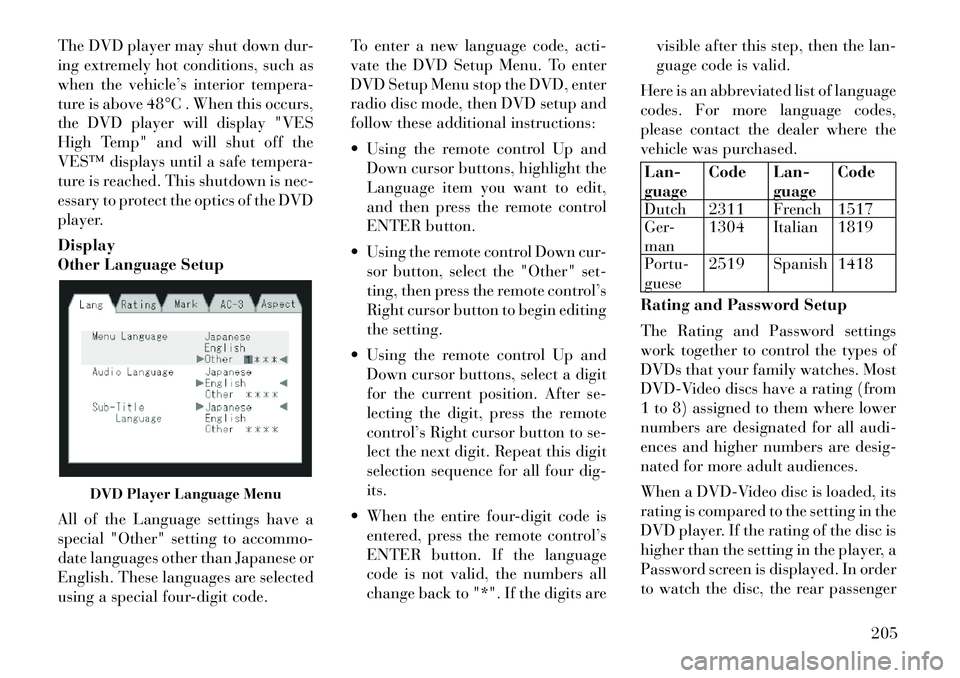
Other Language Setup
All of the Language settings have a
special "Other" setting to accommo-
date languages other than Japanese or
English. These languages are selected
using a special four-digit code.To enter a new language code, acti-
vate the DVD Setup Menu. To enter
DVD Setup Menu stop the DVD, enter
radio disc mode, then DVD setup and
follow these additional instructions:
Using the remote control Up and
Down cursor buttons, highlight the
Language item you want to edit,
and then press the remote control
ENTER button.
Using the remote control Down cur- sor button, select the "Other" set-
ting, then press the remote control’s
Right cursor button to begin editing
the setting.
Using the remote control Up and Down cursor buttons, select a digit
for the current position. After se-
lecting the digit, press the remote
control’s Right cursor button to se-
lect the next digit. Repeat this digit
selection sequence for all four dig-
its.
When the entire four-digit code is entered, press the remote control’s
ENTER button. If the language
code is not valid, the numbers all
change back to "*". If the digits are visible after this step, then the lan-
guage code is valid.
Here is an abbreviated list of language
codes. For more language codes,
please contact the dealer where the
vehicle was purchased.
Lan-
guage Code Lan-
guageCode
Dutch 2311 French 1517
Ger-
man 1304 Italian 1819
Portu-
guese 2519 Spanish 1418
Rating and Password Setup
The Rating and Password settings
work together to control the types of
DVDs that your family watches. Most
DVD-Video discs have a rating (from
1 to 8) assigned to them where lower
numbers are designated for all audi-
ences and higher numbers are desig-
nated for more adult audiences.
When a DVD-Video disc is loaded, its
rating is compared to the setting in the
DVD player. If the rating of the disc is
higher than the setting in the player, a
Password screen is displayed. In order
to watch the disc, the rear passenger
DVD Player Language Menu
205
Page 246 of 344

ANTI-LOCK BRAKE
SYSTEM (ABS)
The Anti-Lock Brake System (ABS)
provides increased vehicle stability
and brake performance under most
braking conditions. The system oper-
ates with a separate computer to
modulate hydraulic pressure to pre-
vent wheel lock-up and help avoid
skidding on slippery surfaces.
ABS is activated during braking un-
der certain road or stopping condi-
tions. ABS-inducing conditions can
include ice, snow, gravel, bumps, rail-
road tracks, loose debris, or panic
stops.
You may experience the following
when the brake system goes into anti-
lock:
The ABS motor running (it maycontinue to run for a short time
after the stop)
A clicking sound of solenoid valves
Brake pedal pulsations
A slight drop or fall away of the brake pedal at the end of the stop
WARNING!
The Anti-Lock Brake System con-tains sophisticated electronic
equipment that may be suscep-
tible to interference caused by im-
properly installed, or high output
radio transmitting equipment.
This interference can cause pos-
sible loss of anti-lock braking ca-
pability. Installation of such
equipment should be performed
by qualified professionals.
Pumping of the Anti-Lock Brakes
will diminish their effectiveness
and may lead to a collision.
Pumping makes the stopping dis-
tance longer. Just press firmly on
your brake pedal when you need
to slow down or stop.
The Anti-Lock Brake System can-
not prevent collisions, including
those resulting from excessive
speed in turns, following another
vehicle too closely, or hydroplan-
ing.
(Continued)
WARNING!(Continued)
The capabilities of an ABS-
equipped vehicle must never be
exploited in a reckless or danger-
ous manner, which could jeopar-
dize the user’s safety or the safety
of others.
All vehicle wheels and tires must be
the same size and type, and tires must
be properly inflated to produce accu-
rate signals for the computer.
ANTI-LOCK BRAKE
WARNING LIGHT The “Anti-Lock Brake
Warning Light” monitors
the anti-lock brake system.
The light will come on when
the ignition switch is turned to the ON
position and may stay on for as long
as four seconds.
If the “Anti-Lock Brake Warning
Light” remains on or comes on while
driving, it indicates that the anti-lock
portion of the brake system is not
functioning and that service is re-
quired. However, the conventional
240
Page 251 of 344
WARNING!(Continued)
Unequal tire pressures can cause
steering problems. You could lose
control of your vehicle.
Unequal tire pressures from one
side of the vehicle to the other can
cause the vehicle to drift to the
right or left.
Always drive with each tire in-
flated to the recommended cold
tire inflation pressure.
Economy
Improper inflation pressures can
cause uneven wear patterns to de-
velop across the tire tread. These ab-
normal wear patterns will reduce
tread life resulting in a need for earlier
tire replacement. Under-inflation,
also increases tire rolling resistance
resulting in higher fuel consumption.
Ride Comfort And Vehicle
Stability
Proper tire inflation contributes to a
comfortable ride. Over-inflation pro-
duces a jarring and uncomfortable
ride. TIRE INFLATION
PRESSURES
The proper cold tire inflation pressure
is listed on the
driver's side “B” Pillar
or rear edge of the driver's side door.
The tire pressure should be checked
and adjusted, and the tires inspected
for signs of wear or visible damage, at
least once a month. Use a good quality
pocket-type gauge to check tire pres-
sure. Do not make a visual judgement
when determining proper inflation.
Radial tires may look properly in-
flated, even when they are under-
inflated.
CAUTION!
After inspecting or adjusting the tire
pressure, always reinstall the valve
stem cap. This will prevent moisture
and dirt from entering the valve
stem, which could damage the valve
stem.
Inflation pressures specified on the
placard are always “cold tire inflation
pressure.” Cold tire inflation pressure
is defined as the tire pressure after the
vehicle has not been driven for at least three hours, or driven less than
1.6 km after a three-hour period. The
cold tire inflation pressure must not
exceed the maximum inflation pres-
sure molded into the tire sidewall.
Check tire pressures more often if
subject to a wide range of outdoor
temperatures, as tire pressures vary
with temperature changes.
Tire pressures change by approxi-
mately 0.07 BAR per 7° C of air tem-
perature change. Keep this in mind
when checking tire pressure inside a
garage, especially in the Winter.
Example: If garage temperature is
20°C and the outside temperature is
0°C, then the cold tire inflation pres-
sure should be increased by 0.21
BAR, which equals 0.07 BAR for ev-
ery 7°C for this outside temperature
condition.
Tire pressure may increase from 0.13
to 0.4 BAR during operation. Do not
reduce this normal pressure buildup
or your tire pressure will be too low.
245
Page 252 of 344
TIRE PRESSURES FOR
HIGH-SPEED OPERATION
The manufacturer advocates driving
at safe speeds within posted speed
limits. Where speed limits or condi-
tions are such that the vehicle can be
driven at high speeds, maintaining
correct tire inflation pressure is very
important. Increased tire pressure
and reduced vehicle loading may be
required for high-speed vehicle op-
eration. Refer to original-equipment
information, or an authorized tire
dealer, for recommended safe operat-
ing speeds, loading and cold tire infla-
tion pressures.WARNING!
High-speed driving, with your ve-
hicle at or above maximum load, is
dangerous. The added strain on your
tires could cause them to fail. You
could have a serious collision. Do not
drive a vehicle loaded to the maxi-
mum capacity at continuous speeds
above 120 km/h.RADIAL-PLY TIRES
WARNING!
Combining radial ply tires with
other types of tires on your vehicle
will cause your vehicle to handle
poorly. The instability could cause a
collision. Always use radial ply tires
in sets of four. Never combine them
with other types of tires.
Cuts and punctures in radial tires are
repairable only in the tread area be-
cause of sidewall flexing. Consult
your authorized tire dealer for radial
tire repairs.
SPARE TIRE MATCHING
ORIGINAL EQUIPPED
TIRE AND WHEEL (for
versions/markets, where
provided)
Your vehicle may be equivalent with a
spare tire and wheel in look and func-
tion as the original equipment tire and
wheel found on the front or rear axle
of your vehicle. This spare tire may be
used in the tire rotation for your ve-
hicle. If your vehicle has this option refer to an authorized tire dealer for
the recommended tire rotation pat-
tern.
If your vehicle is not equipped with an
original equipment tire and wheel as a
spare, a non-matching temporary
emergency use spare may be equipped
with your vehicle. Temporary use
spares are engineered to be used only
with your vehicle. Your vehicle may
be equipped with one of the following
types of non-matching temporary use
spares; compact, full size, or limited-
use. Do not install more than one non-
matching temporary use spare tire/
wheel on the vehicle at any given time.
CAUTION!
Because of the reduced ground clear-
ance, do not take your vehicle
through an automatic car wash with
a compact, full size or limited-use
temporary spare installed. Damage
to the vehicle may result.
246
Page 256 of 344
CAUTION!
To avoid damage to your vehicle or
tires, observe the following precau-
tions:
Use chains on P225/65R17 tiresonly.
Because of restricted chain clear-
ance between tires and other sus-
pension components, it is impor-
tant that only chains in good
condition are used. Broken chains
can cause serious damage. Stop
the vehicle immediately if noise
occurs that could indicate chain
breakage. Remove the damaged
parts of the chain before further
use.
Do not exceed 70 km/h.
Drive cautiously and avoid severe
turns and large bumps, especially
with a loaded vehicle.
Install chains on the front wheels
as tightly as possible and then re-
tighten after driving about
0.8 km.
Do not drive for prolonged periods
of time on dry pavement.
(Continued)
CAUTION!(Continued)
Observe the tire chain manufac-
tur er's instructions on the method
of installation, operating speed,
and conditions for use. Always use
the lower suggested operating
speed of the chain manufacturer,
if different from the speed r ecom-
mended by the vehicle manufac-
turer.
Always use the lower suggested oper-
ating speed if the chain manufacturer
and vehicle manufacturer suggest dif-
ferent maximum speeds. This notice
applies to all chain traction devices,
including link and cable (radial)
chains.
TIRE ROTATION
RECOMMENDATIONS
Tires on the front and rear axles of
vehicles operate at different loads and
perform different steering, driving,
and braking functions. For these rea-
sons, they wear at unequal rates.
These effects can be reduced by
timely rotation of tires. The benefits
of rotation are especially worthwhile with aggressive tread designs such as
those on all season type tires. Rotation
will increase tread life, help to main-
tain mud, snow and wet traction lev-
els, and contribute to a smooth, quiet
ride.
Refer to the “Maintenance Schedule”
for the proper maintenance intervals.
The reasons for any rapid or unusual
wear should be corrected prior to ro-
tation being performed.
TIRE PRESSURE
MONITOR SYSTEM
(TPMS)
The TPMS will warn the driver of a
low tire pressure based on the cold
inflation tire pressure requirements
found on the tire placard located on
the
driver's-side B-pillar.
The tire pressure will vary with tem-
perature by about 0.069 BAR for ev-
ery 6.5°C. This means that when the
outside temperature decreases, the
tire pressure will decrease. Tire pres-
sure should always be set based on
cold inflation tire pressure. This is
defined as the tire pressure after a
vehicle has not been driven for more
250
Page 257 of 344
than three hours - and in outside am-
bient temperature.Refer to “Tires –
General Information” in “Starting
and Operating” for information on
how to properly inflate the vehi-
cle’s tires. The tire pressure will also
increase as the vehicle is driven - this
is normal and there should be no ad-
justment for this increased pressure.
The TPMS will warn the driver of a
low tire pressure if the tire pressure
falls below the low pressure warning
threshold for any reason, including
low temperature effects, or natural air
pressure loss through the tire.
The TPMS will continue to warn the
driver of low tire pressure as long as
the condition exists, and will not turn
off until the tire pressure is at or above
recommended cold tire placard pres-
sure. Once the low tire pressure warn-
ing has been illuminated, the tire
pressure must be increased to the rec-
ommended cold tire placard pressure
in order for the “Tire Pressure Moni-
toring Telltale Light” to be turned off.
The system will automatically update
and the “Tire Pressure Monitoring
Telltale Light” will extinguish once the updated tire pressures have been
received. The vehicle may need to be
driven for up to 20 minutes above
24 km/h to receive this information.
For example, your vehicle may have a
recommended cold (parked for more
than three hours) tire pressure of 2.41
BAR. If the ambient temperature is
20°C and the measured tire pressure
is 2.07 BAR, a temperature drop to
7°C will decrease the tire pressure to
approximately 1.79 BAR. This tire
pressure is sufficiently low enough to
turn on the “Tire Pressure Monitoring
Telltale Light.” Driving the vehicle
may cause the tire pressure to rise to
approximately 2.07 BAR, but the
“Tire Pressure Monitoring Telltale
Light” will still be on. In this situa-
tion, the “Tire Pressure Monitoring
Telltale Light” will turn off only after
the tires have been inflated to the
vehicle’s recommended cold tire pres-
sure value.
CAUTION!
The TPMS has been optimized for
the original equipment tires and
wheels. TPMS pressures have
been established for the tire size
equipped on your vehicle. Unde-
sirable system operation or sensor
damage may result when using
replacement equipment that is not
of the same size, type, and/or
style. Aftermarket wheels can
cause sensor damage. Do not use
aftermarket sealants or balance
beads if your vehicle is equipped
with a TPMS, as damage to the
sensors may result.
After inspecting or adjusting the
tire pressure always reinstall the
valve stem cap. This will prevent
moisture and dirt from entering
the valve stem, which could dam-
age the TPMS sensor.
NOTE:
The TPMS is not intended to re- place normal tire care and
maintenance, or to provide
warning of a tire failure or con-
dition.
251