park assist Lancia Voyager 2013 Owner handbook (in English)
[x] Cancel search | Manufacturer: LANCIA, Model Year: 2013, Model line: Voyager, Model: Lancia Voyager 2013Pages: 360, PDF Size: 4.21 MB
Page 79 of 360
TO VARY THE SPEED SETTING . . . . . . . . . . .132
TO ACCELERATE FOR PASSING . . . . . . . . . . .132
PARKSENSE® REAR PARK ASSIST (for versions/markets, where provided) . . . . . . . .133
PARKSENSE® SENSORS . . . . . . . . . . . . . . . . .133
PARKSENSE® WARNING DISPLAY . . . . . . . . .133
PARKSENSE® DISPLAY . . . . . . . . . . . . . . . . .134
ENABLING/DISABLING PARKSENSE® . . . . . .135
SERVICE THE PARKSENSE® REAR PARK ASSIST SYSTEM . . . . . . . . . . . . . . . . . . . . . . .135
CLEANING THE PARKSENSE® SYSTEM . . . . .136
PARKSENSE® SYSTEM USAGE PRECAUTIONS. . . . . . . . . . . . . . . . . . . . . . . . .136
PARKVIEW® REAR BACK UP CAMERA (for versions/markets, where provided) . . . . . . . .138
TURNING PARKVIEW® ON OR OFF — WITH NAVIGATION/MULTIMEDIA RADIO. . . . . . . . .139
TURNING PARKVIEW® ON OR OFF — WITHOUT NAVIGATION/MULTIMEDIA
RADIO . . . . . . . . . . . . . . . . . . . . . . . . . . . . . . .139
OVERHEAD CONSOLES . . . . . . . . . . . . . . . . . . .139
FRONT OVERHEAD CONSOLE . . . . . . . . . . . .139
COURTESY/INTERIOR LIGHTING . . . . . . . . .139
SUNGLASS STORAGE(NON-SUNROOF ONLY) . . . . . . . . . . . . . . . . . .140
REAR COURTESY/READING LIGHTS (for versions/markets, where provided) . . . . . .140
73
Page 139 of 360
WARNING!
Electronic Speed Control can be
dangerous where the system cannot
maintain a constant speed. Your ve-
hicle could go too fast for the con-
ditions, and you could lose control
and have an accident. Do not use
Electronic Speed Control in heavy
traffic or on roads that are winding,
icy, snow-covered or slippery.
PARKSENSE® REAR
PARK ASSIST (for
versions/markets, where
provided)
The ParkSense® Rear Park Assist
system provides visual and audible
indications of the distance between
the rear fascia and a detected obstacle
when backing up, e.g. during a park-
ing maneuver. Refer to ParkSense®
System Usage Precautions for limita-
tions of this system and recommenda-
tions. ParkSense® will retain the last sys-
tem state (enabled or disabled) from
the last ignition cycle when the igni-
tion is changed to the ON/RUN posi-
tion.
ParkSense® can be active only when
the shift lever is in REVERSE. If
ParkSense® is enabled at this shift
lever position, the system will remain
active until the vehicle speed is in-
creased to approximately 18 km/h or
above. The system will become active
again if the vehicle speed is decreased
to speeds less than approximately
16 km/h.
PARKSENSE® SENSORS
The four ParkSense® sensors, located
in the rear fascia/bumper, monitor the
area behind the vehicle that is within
the sensors’ field of view. The sensors
can detect obstacles from approxi-
mately 30 cm up to 200 cm from the
rear fascia/bumper in the horizontal
direction, depending on the location,
type and orientation of the obstacle.PARKSENSE® WARNING
DISPLAY
The ParkSense® Warning screen will
only be displayed if Sound and Dis-
play is selected from the Customer-
Programmable Features section of the
Electronic Vehicle Information Center
(EVIC). Refer to “Electronic Vehicle
Information Center (EVIC)/Personal
Settings (Customer- Programmable
Features)” in “Understanding Your
Instrument Panel” for further infor-
mation.
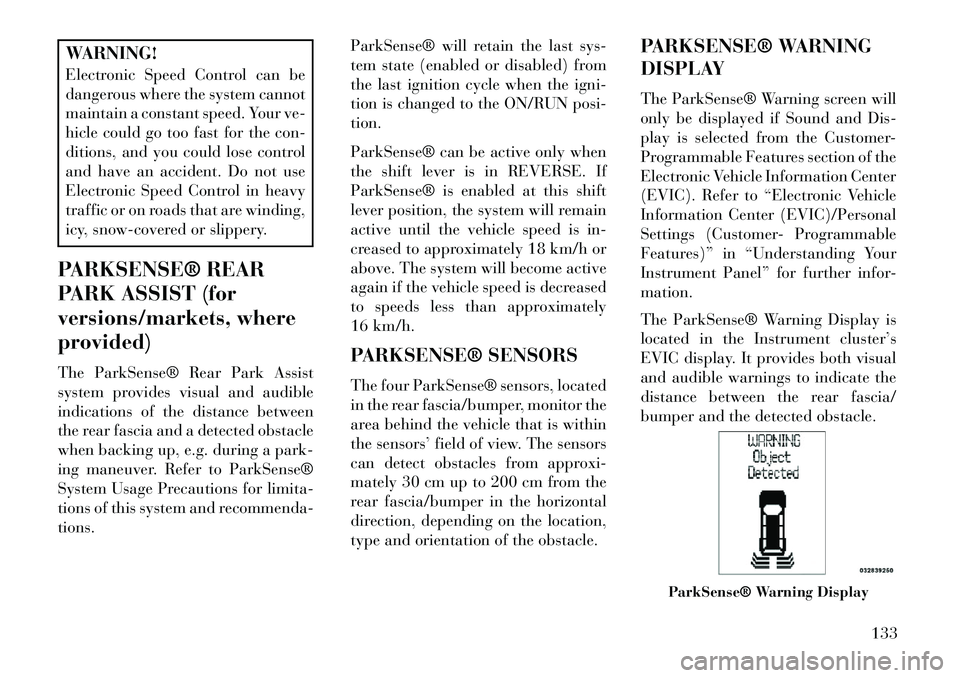
The ParkSense® Warning Display is
located in the Instrument cluster’s
EVIC display. It provides both visual
and audible warnings to indicate the
distance between the rear fascia/
bumper and the detected obstacle.
ParkSense® Warning Display
133
Page 140 of 360

PARKSENSE® DISPLAY
When the vehicle is in REVERSE, the
warning display will turn ON indicat-
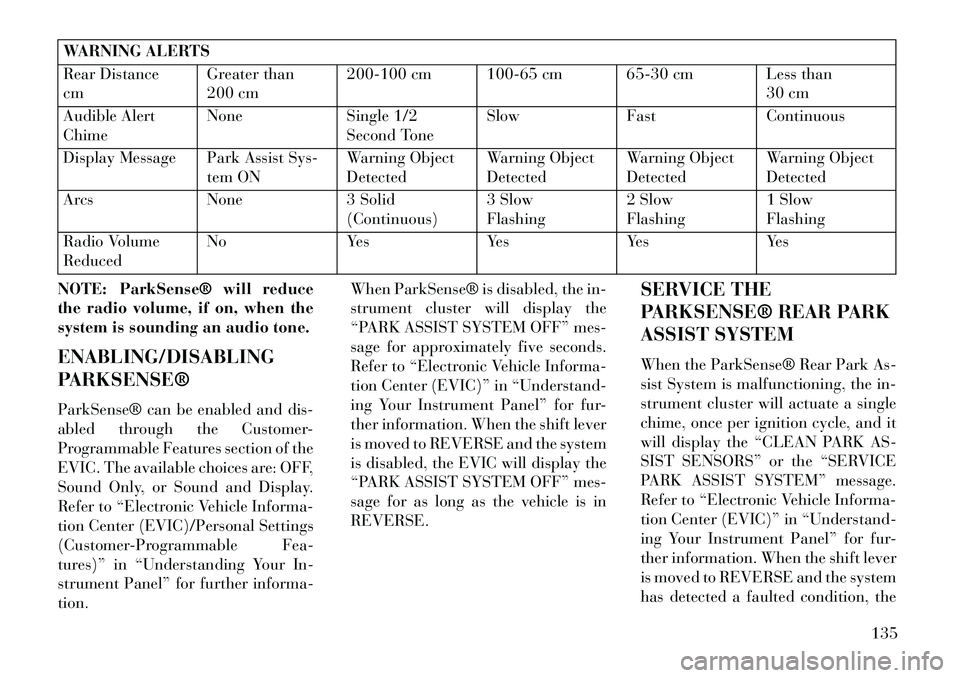
ing the system status.The system will indicate a detected
obstacle by showing three solid arcs
and will produce a one-half second
tone. As the vehicle moves closer to
the object the EVIC display will show
fewer arcs and the sound tone will
change from slow, to fast, to continu-
ous.
The vehicle is close to the obstacle
when the EVIC display shows one
flashing arc and sounds a continuous
tone. The following chart shows the
warning alert operation when the sys-
tem is detecting an obstacle:
Park Assist System ONPark Assist System OFF
Slow ToneFast Tone
Continuous Tone
134
Page 141 of 360
WARNING ALERTS
Rear Distance
cmGreater than
200 cm200-100 cm 100-65 cm 65-30 cm Less than
30 cm
Audible Alert
Chime None
Single 1/2
Second Tone Slow
FastContinuous
Display Message Park Assist Sys- tem ONWarning Object
DetectedWarning Object
DetectedWarning Object
DetectedWarning Object
Detected
Arcs None3 Solid
(Continuous) 3 Slow
Flashing2 Slow
Flashing1 Slow
Flashing
Radio Volume
Reduced No
YesYesYesYes
NOTE: ParkSense® will reduce
the radio volume, if on, when the
system is sounding an audio tone.
ENABLING/DISABLING
PARKSENSE®
ParkSense® can be enabled and dis-
abled through the Customer-
Programmable Features section of the
EVIC. The available choices are: OFF,
Sound Only, or Sound and Display.
Refer to “Electronic Vehicle Informa-
tion Center (EVIC)/Personal Settings
(Customer-Programmable Fea-
tures)” in “Understanding Your In-
strument Panel” for further informa-
tion. When ParkSense® is disabled, the in-
strument cluster will display the
“PARK ASSIST SYSTEM OFF” mes-
sage for approximately five seconds.
Refer to “Electronic Vehicle Informa-
tion Center (EVIC)” in “Understand-
ing Your Instrument Panel” for fur-
ther information. When the shift lever
is moved to REVERSE and the system
is disabled, the EVIC will display the
“PARK ASSIST SYSTEM OFF” mes-
sage for as long as the vehicle is in
REVERSE.
SERVICE THE
PARKSENSE® REAR PARK
ASSIST SYSTEM
When the ParkSense® Rear Park As-
sist System is malfunctioning, the in-
strument cluster will actuate a single
chime, once per ignition cycle, and it
will display the “CLEAN PARK AS-
SIST SENSORS” or the “SERVICE
PARK ASSIST SYSTEM” message.
Refer to “Electronic Vehicle Informa-
tion Center (EVIC)” in “Understand-
ing Your Instrument Panel” for fur-
ther information. When the shift lever
is moved to REVERSE and the system
has detected a faulted condition, the
135
Page 142 of 360
EVIC will display the “CLEAN PARK
ASSIST SENSORS” or the “SER-
VICE PARK ASSIST SYSTEM” mes-
sage for as long as the vehicle is in
REVERSE. Under this condition,
ParkSense® will not operate.
If “CLEAN PARK ASSIST SEN-
SORS” appears in the EVIC after
making sure the rear fascia/bumper is
free from snow, ice, mud, dirt or other
obstruction, see your authorized
dealer.
If “SERVICE PARK ASSIST SYS-
TEM” appears in the EVIC, see your
authorized dealer.
CLEANING THE
PARKSENSE® SYSTEM
Clean the ParkSense® sensors with
water, car wash soap and a soft cloth.
Do not use rough or hard cloths. Do
not scratch or poke the sensors. Oth-
erwise, you could damage the sensors.PARKSENSE® SYSTEM
USAGE PRECAUTIONS
NOTE:
Ensure that the rear bumper is
free of snow, ice, mud, dirt and
debris to keep the ParkSense®
system operating properly.
Jackhammers, large trucks, and other vibrations could affect the
performance of ParkSense®.
When you turn ParkSense® off, the instrument cluster will dis-
play “PARK ASSIST SYSTEM
OFF.” Furthermore, once you
turn ParkSense® off, it remains
off until you turn it on again,
even if you cycle the ignition key.
When you move the shift lever to the REVERSE position and
ParkSense® is turned off, the
EVIC will display “PARK AS-
SIST SYSTEM OFF” message for
as long as the vehicle is in
REVERSE. ParkSense®, when on, will re-
duce the radio volume when it is
sounding a tone.
Clean the ParkSense® sensors regularly, taking care not to
scratch or damage them. The
sensors must not be covered
with ice, snow, slush, mud, dirt
or debris. Failure to do so can
result in the system not working
properly. The ParkSense® sys-
tem might not detect an obstacle
behind the fascia/bumper, or it
could provide a false indication
that an obstacle is behind the
fascia/bumper.
Objects such as bicycle carriers, trailer hitches, etc., must not be
placed within 30 cm from the
rear fascia/bumper while driv-
ing the vehicle. Failure to do so
can result in the system misin-
terpreting a close object as a
sensor problem, causing the
“SERVICE PARK ASSIST SYS-
TEM” message to be displayed
in the EVIC.
136
Page 143 of 360

On vehicles equipped with atailgate, ParkSense® should be
disabled when the tailgate is in
the lowered or open position
and the vehicle is in REVERSE.
A lowered tailgate could provide
a false indication that an ob-
stacle is behind the vehicle.CAUTION!
ParkSense® is only a parking aidand it is unable to recognize every
obstacle, including small ob-
stacles. Parking curbs might be
temporarily detected or not de-
tected at all. Obstacles located
above or below the sensors will
not be detected when they are in
close proximity.
The vehicle must be driven slowly when using ParkSense® in order
to be able to stop in time when an
obstacle is detected. It is recom-
mended that the driver looks over
his/her shoulder when using
ParkSense®.
WARNING!
Drivers must be careful whenbacking up even when using the
Rear Park Assist system. Always
check carefully behind your ve-
hicle, look behind you, and be
sure to check for pedestrians, ani-
mals, other vehicles, obstruc-
tions, and blind spots before
backing up. You are responsible
for safety and must continue to
pay attention to your surround-
ings. Failure to do so can result in
serious injury or death.
(Continued)
WARNING!(Continued)
Before using the Rear Park Assist system, it is strongly recom-
mended that the ball mount and
hitch ball assembly is discon-
nected from the vehicle when the
vehicle is not used for towing.
Failure to do so can result in in-
jury or damage to vehicles or ob-
stacles because the hitch ball will
be much closer to the obstacle
than the rear fascia when the
loudspeaker sounds the continu-
ous tone. Also, the sensors could
detect the ball mount and hitch
ball assembly, depending on its
size and shape, giving a false in-
dication that an obstacle is be-
hind the vehicle.
137
Page 144 of 360

PARKVIEW® REAR
BACK UP CAMERA (for
versions/markets, where
provided)
Your vehicle may be equipped with
the ParkView® Rear Back Up Cam-
era that allows you to see an on-screen
image of the rear surroundings of
your vehicle whenever the shift lever
is put into REVERSE. The image will
be displayed on the Navigation/Multimedia radio display screen along
with a caution note to “check entire
surroundings” across the top of the
screen. After five seconds this note
will disappear. The ParkView® cam-
era is located on the rear of the vehicle
above the rear License plate.
When the vehicle is shifted out of RE-
VERSE, the rear camera mode is ex-
ited and the navigation or audio
screen appears again.
When displayed, static grid lines will
illustrate the width of the vehicle
while a dashed center-line will indi-
cate the center of the vehicle to assist
with aligning to a hitch/receiver. The
static grid lines will show separate
zones that will help indicate the dis-
tance to the rear of the vehicle. The
following table shows the approxi-
mate distances for each zone:Zone
Distance to the rear of the vehicle
Red 0 - 30 cm
Yellow 30 cm - 1 m
Green 1 m or greaterWARNING!
Drivers must be careful when back-
ing up even when using the
ParkView® Rear Back Up Camera.
Always check carefully behind your
vehicle, and be sure to check for
pedestrians, animals, other ve-
hicles, obstructions, or blind spots
(Continued)
WARNING!(Continued)
before backing up. You are respon-
sible for the safety of your sur-
roundings and must continue to
pay attention while backing up.
Failure to do so can result in serious
injury or death.
CAUTION!
To avoid vehicle damage,
ParkView® should only be used as
a parking aid. The camera is un-
able to view every obstacle or ob-
ject in your drive path.
(Continued)
138
Page 181 of 360

21. Rear Fog Light IndicatorThis indicator will illuminate
when the rear fog lights are
on. (Refer to “Lights” in “Un-
derstanding The Features Of Your Ve-
hicle” for further information).
COMPASS MINI-TRIP
COMPUTER (CMTC) (for
versions/markets, where
provided)
NOTE: If the vehicle is equipped
with a Global Positioning System
(GPS) Navigation Radio, the vari-
ance and calibration menu will be
eliminated.
The Compass Mini-Trip Computer is
located in the instrument cluster and
features a driver-interactive display
which provides outside temperature,
compass direction, and trip informa-
tion. NOTE: The system will display
the last known outside tempera-
ture when starting the vehicle and
may need to be driven several min-
utes before the updated tempera-
ture is displayed. Engine tempera-
ture can also affect the displayed
temperature; therefore, tempera-
ture readings are not updated
when the vehicle is not moving.
RESET BUTTONS
Reset Button
Pressing the STEP button located on
the steering wheel to scroll through
sub menus (i.e., Odometer, Trip A,
Trip B, DTE, Speed, AVG Fuel, Am-
bient Temp)
Pressing the reset button while in one
of the following menus (i.e., Trip A,
Trip B, AVG Fuel), will reset the dis-
played value.
When the appropriate conditions ex-
ist, the following messages will dis-
play:
NE
. . . . . . . Eight-point compass
headings are displayed
(N, S, E, W, NE,NW, SE, SW)
22°C . . . . . . . . . . . Temperature
(Fahrenheit or Celsius)
AVG . . . . Average Fuel Economy
(U.S. or Metric)
DTE . . . . . . . Distance to Empty
P . . . . . . . . . Park Assist On/Off
Should this wrench symbol
display with the letter P
next to it, your Park Assist
System needs servicing (for
versions/markets, where provided).
Contact an authorized dealer.
175
Page 186 of 360
Five Second Unstored Messages
When the appropriate conditions oc-
cur, this type of message takes control
of the main display area for five sec-
onds and then returns to the previous
screen. Examples of this message type
are "Memory System Unavailable -
Not in Park" and "Automatic High
Beams On".
The Reconfigurable Telltales section
is divided into the white telltales area
on the right, amber telltales in the
middle, and red telltales on the left.
When the appropriate conditions ex-
ist, the EVIC displays the following
messages:
Key in ignition
Ignition or Accessory On
Wrong Key
Damaged Key
Key not programmed
Vehicle Not in Park
Key Left Vehicle
Key Not Detected Press Brake Pedal and Push Button
to Start
Liftgate Ajar (chime will sound when vehicle starts moving)
Low Tire Pressure
Service TPM System (refer to “Tire Pressure Monitoring System” in
“Starting And Operating”)
Turn Signal On
RKE Battery Low
Service Keyless System
LOW WASHER FLUID
Oil Change Required
Check Gascap
Left Front Turn Signal Lamp Out
Left Rear Turn Signal Lamp Out
Right Front Turn Signal Lamp Out
Right Rear Turn Signal Lamp Out
Park Assist Disabled
Service Park Assist System Personal Settings Not Available —
Vehicle Not in Park
Blind Spot System Off — This mes- sage is displayed when the ignition
is turned to ON to indicate the Blind
Spot System has been turned off.
Blind Spot System Not Available — This message is displayed to indi-
cate the Blind Spot Monitor (BSM)
system is temporarily unavailable
due to sensor blockage, electronic
interference, or other "temporary"
conditions. When this message is
displayed both outside rear view
icons will be illuminated. If elec-
tronic interference is present, the
BSM system will illuminate the icon
only on the side of interference as
long as interference is present.
Service Blind Spot System — This message is displayed to indicate the
Blind Spot Monitor (BSM) system is
permanently unavailable. The
driver will receive an EVIC mes-
sage and the BSM display warning
in both mirrors will be permanently
illuminated. If this message is pres-
ent see an authorized dealer.
180
Page 195 of 360
CUSTOMER-
PROGRAMMABLE
FEATURES (SYSTEM
SETUP)
Personal Settings allows you to set
and recall features when the transmis-
sion is in PARK. If the transmission is
out of PARK or the vehicle begins
moving, a warning messageSYSTEM
SETUP NOT AVAILABLE VE-
HICLE NOT IN PARK displays when
you try to select “System Setup” from
the main menu.
Press and release the UP or DOWN
button until "System Setup" is high-
lighted in the main menu of the EVIC.
Then press the SELECT button to
enter the System Setup sub-menu.
Press and release the UP or DOWN
button to select a feature form the
following choices:
Language
When in this display you may select
one of five languages for all display
nomenclature, including the trip
functions and the navigation system (for versions/markets, where pro-
vided). Press the UP or DOWN button
while in this display and scroll
through the language choices. Press
the SELECT button to select English,
Spanish (Español), French (Fran-
çais). Then, as you continue, the in-
formation will display in the selected
language.
Nav–Turn By Turn (for
versions/markets, where
provided)
When this feature is selected, the
navigation system utilizes voice com-
mands, guiding through the drive
route, mile by mile, turn-by-turn un-
til the final destination is reached. To
make your selection, press and release
the SELECT button until a check-
mark appears next to the feature
showing the system has been acti-
vated or the check-mark is removed
showing the system has been deacti-
vated.
Enable/Disable the Rear Park
Assist System (for versions/
markets, where provided)
The Rear Park Assist system will scan
for objects behind the vehicle when
the transmission is in the REVERSE
position and the vehicle speed is less
than 18 km/h. The system can be
enabled with Sound Only, Sound and
Display, or turned OFF through the
EVIC. To make your selection, press
and release the SELECT button until
a check-mark appears next to the fea-
ture showing the system has been ac-
tivated or the check-mark is removed
showing the system has been deacti-
vated. Refer to “Rear Park Assist Sys-
tem” in “Understanding The Features
Of Your Vehicle” for system function
and operating information.
Auto Unlock Doors
When ON is selected, all doors will
unlock when the vehicle is stopped
and the transmission is in the PARK
or NEUTRAL position and the driv-
er's door is opened. To make your
189