CD player LAND ROVER FRELANDER 2 2006 User Guide
[x] Cancel search | Manufacturer: LAND ROVER, Model Year: 2006, Model line: FRELANDER 2, Model: LAND ROVER FRELANDER 2 2006Pages: 3229, PDF Size: 78.5 MB
Page 2966 of 3229
Compact disc player
246
L
EJECTING COMPACT DISCS
It is only possible to eject a single disc, if it is
currently selected or playing.
To eject a disc, press and release the eject
button. A confirmation message will be shown
on the information display. After a short pause,
the disc will be presente d. The disc should then
be removed.
Note: If the disc is not removed from the slot
within fifteen seconds, it will be drawn back
into the player.
EJECTING MULTIPLE COMPACT
DISCS
All the discs loaded in the player can be ejected
in sequence. To eject all of the discs, press and
hold the eject button. A confirmation message
will be shown on the information display. After
a short pause, the first disc will be presented.
The disc should then be removed.
The discs will be ejected one at a time with a
short pause in between each.
To stop the process, press any CD number
button ( 1 to 6).
COMPACT DISC SELECTION
To select one of the loaded discs, briefly press
the disc number required ( 1 to 6). If the
position selected does not contain a disc, there
will be a pause and a message will appear on
the information display.
Once a disc has been inserted, there will be a
pause while the player reads the disc
information. Playback will then begin at the
start of track one.
COMPACT DISC PLAYBACK
To start compact disc pl ayback, briefly press
the CD mode button, followed by the disc
number required. If no di sc number is selected,
playback will begin at one of two places:
• If the discs have not been removed since
their last use, playback will begin from the
point at which it wa s stopped previously.
• If the discs have not been used since they
were inserted, playback will begin at the
start of the first loaded disc.
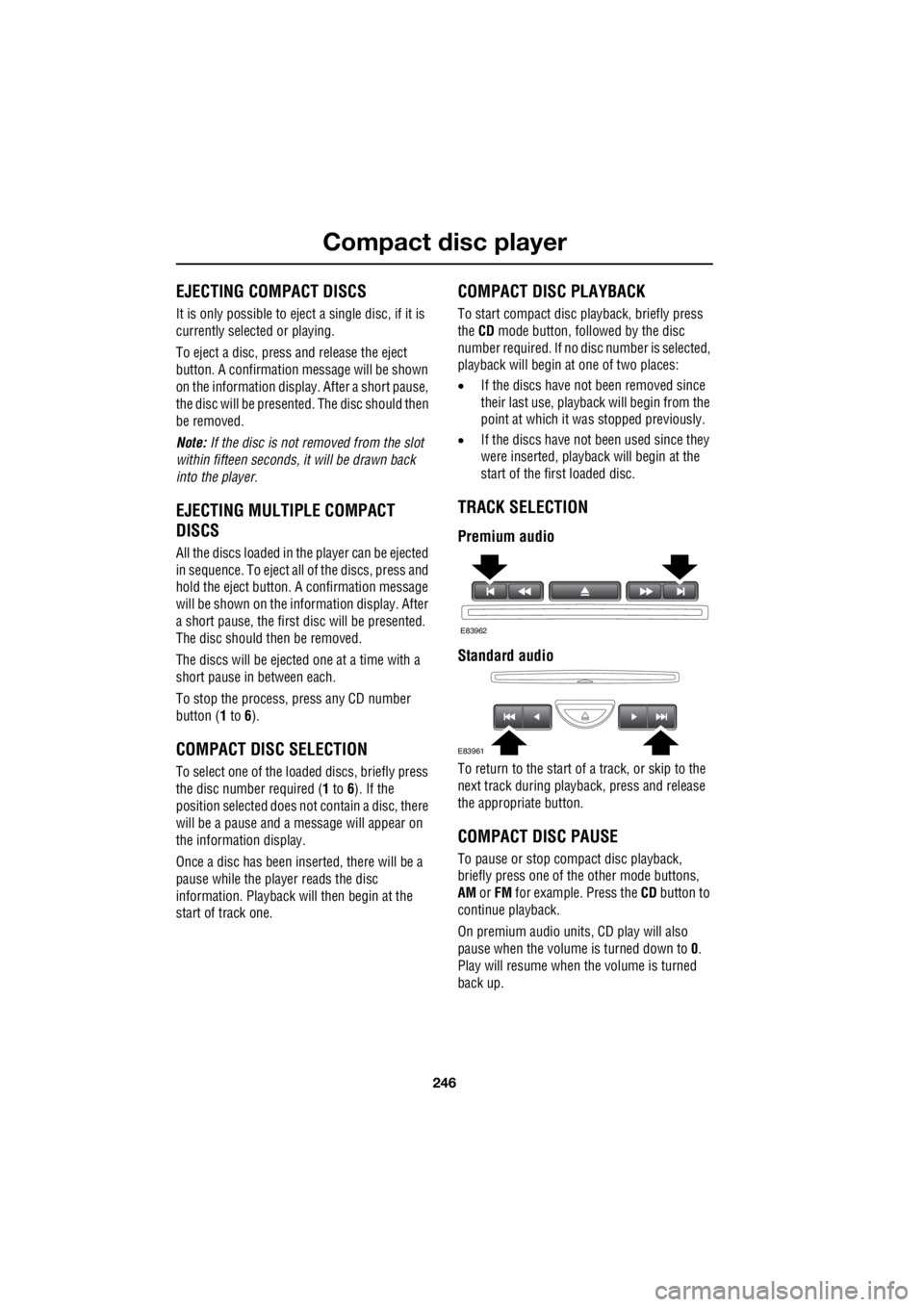
TRACK SELECTION
Premium audio
Standard audio
To return to the start of a track, or skip to the
next track during playba ck, press and release
the appropriate button.
COMPACT DISC PAUSE
To pause or stop compact disc playback,
briefly press one of th e other mode buttons,
AM or FM for example. Press the CD button to
continue playback.
On premium audio units, CD play will also
pause when the volume is turned down to 0.
Play will resume when the volume is turned
back up.
E83962
E83961
Page 2967 of 3229
247
Compact disc player
R
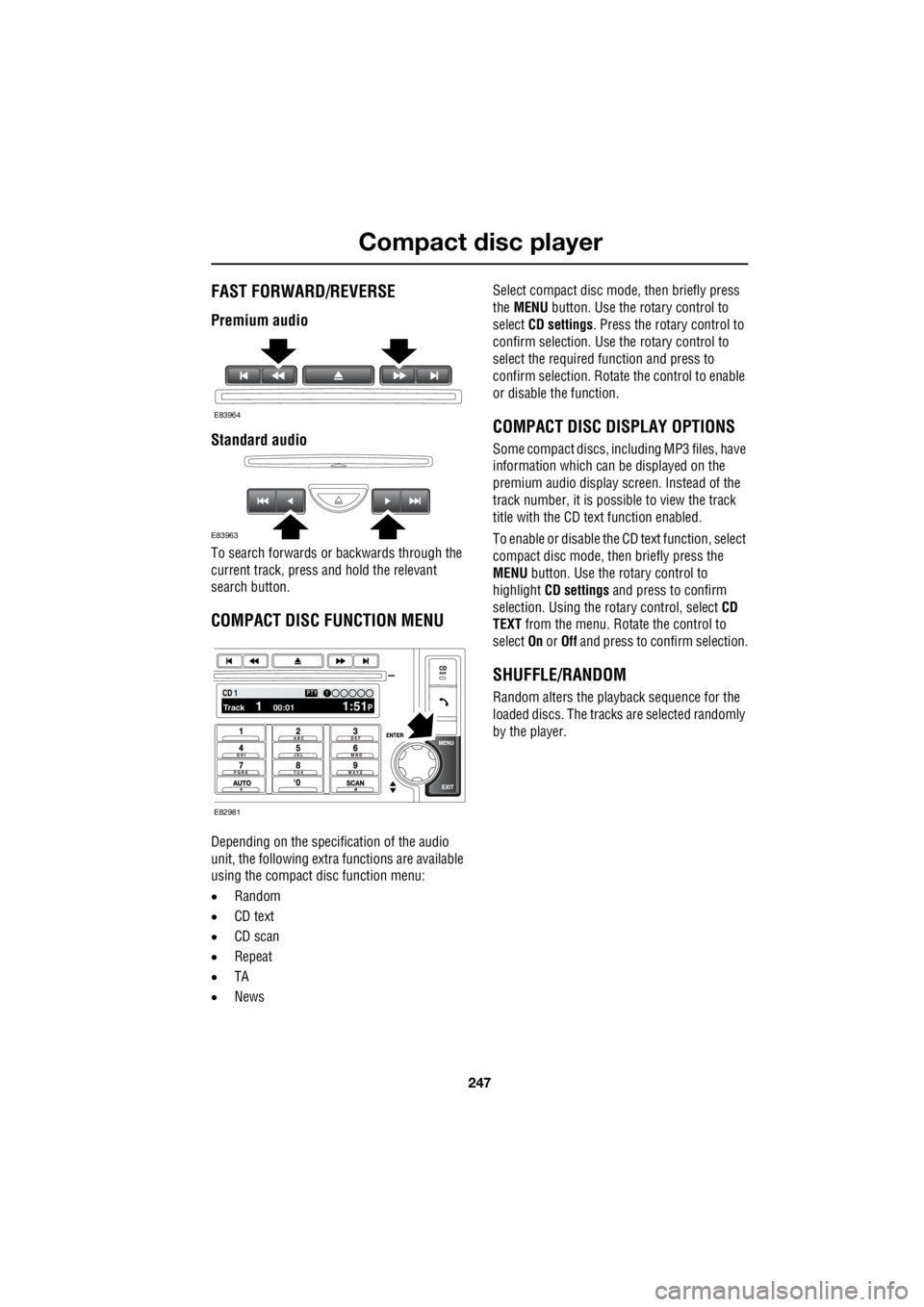
FAST FORWARD/REVERSE
Premium audio
Standard audio
To search forwards or backwards through the
current track, press and hold the relevant
search button.
COMPACT DISC FUNCTION MENU
Depending on the specific ation of the audio
unit, the following extra functions are available
using the compact disc function menu:
• Random
• CD text
• CD scan
• Repeat
• TA
• News Select compact disc mode, then briefly press
the MENU button. Use the rotary control to
select CD settings . Press the rotary control to
confirm selection. Use the rotary control to
select the required function and press to
confirm selection. Rotate the control to enable
or disable the function.
COMPACT DISC DISPLAY OPTIONS
Some compact discs, in cluding MP3 files, have
information which can be displayed on the
premium audio display screen. Instead of the
track number, it is possi ble to view the track
title with the CD text function enabled.
To enable or disable the CD text function, select
compact disc mode, then briefly press the
MENU button. Use the rotary control to
highlight CD settings and press to confirm
selection. Using the ro tary control, select CD
TEXT from the menu. Rotate the control to
select On or Off and press to confirm selection.
SHUFFLE/RANDOM
Random alters the play back sequence for the
loaded discs. The trac ks are selected randomly
by the player.
E83964
E83963
100.71 12 3 4 6CD 1Track 1 00:01 1:51P
PTY1
E82981
Page 2968 of 3229
Compact disc player
248
L
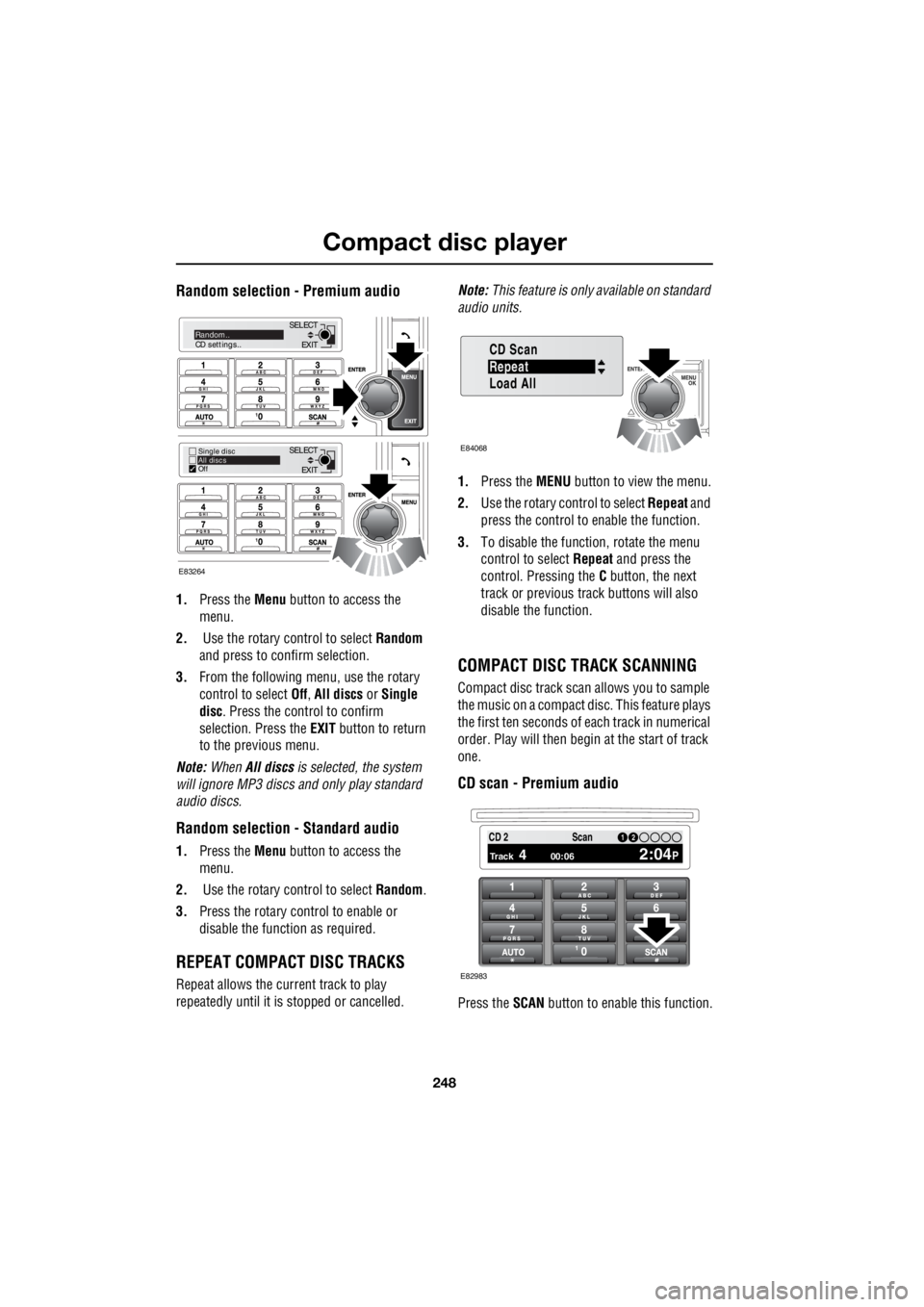
Random selection - Premium audio
1. Press the Menu button to access the
menu.
2. Use the rotary control to select Random
and press to confirm selection.
3. From the following menu, use the rotary
control to select Off, All discs or Single
disc . Press the control to confirm
selection. Press the EXIT button to return
to the previous menu.
Note: When All discs is selected, the system
will ignore MP3 discs and only play standard
audio discs.
Random selection - Standard audio
1. Press the Menu button to access the
menu.
2. Use the rotary control to select Random.
3. Press the rotary control to enable or
disable the function as required.
REPEAT COMPACT DISC TRACKS
Repeat allows the current track to play
repeatedly until it is stopped or cancelled. Note:
This feature is only available on standard
audio units.
1. Press the MENU button to view the menu.
2. Use the rotary control to select Repeat and
press the control to enable the function.
3. To disable the function, rotate the menu
control to select Repeat and press the
control. Pressing the C button, the next
track or previous track buttons will also
disable the function.
COMPACT DISC TRACK SCANNING
Compact disc track scan allows you to sample
the music on a compact disc. This feature plays
the first ten seconds of each track in numerical
order. Play will then begin at the start of track
one.
CD scan - Premium audio
Press the SCAN button to enable this function.
EXIT
SELECT
EXIT
SELECTRandom..
CD settings..
Single disc
All discs
Off
E83264
Repeat
CD Scan
Load All
E84068
PTY1 12 3 4 6CD 2
Track 4 00:06 2:04P
12Scan
E82983
Page 2969 of 3229
249
Compact disc player
R
To disable the function, and to continue the
currently playing track, press the SCAN or EXIT
button again.
Note: While in CD scan mode, pressing the
previous track button w ill resume normal play
at the current track. Pressing the next track
button will move to the next track and resume
normal play.
CD Scan - Standard audio
1. Press the MENU button to access the
functions menu.
2. Use the rotary control to select CD Scan.
3. Press the rotary control to enable or
disable the function.
Note: While in CD scan mode, pressing the
previous track button w ill resume normal play
at the current track. Pressing the next track
button will move to the next track and resume
normal play.
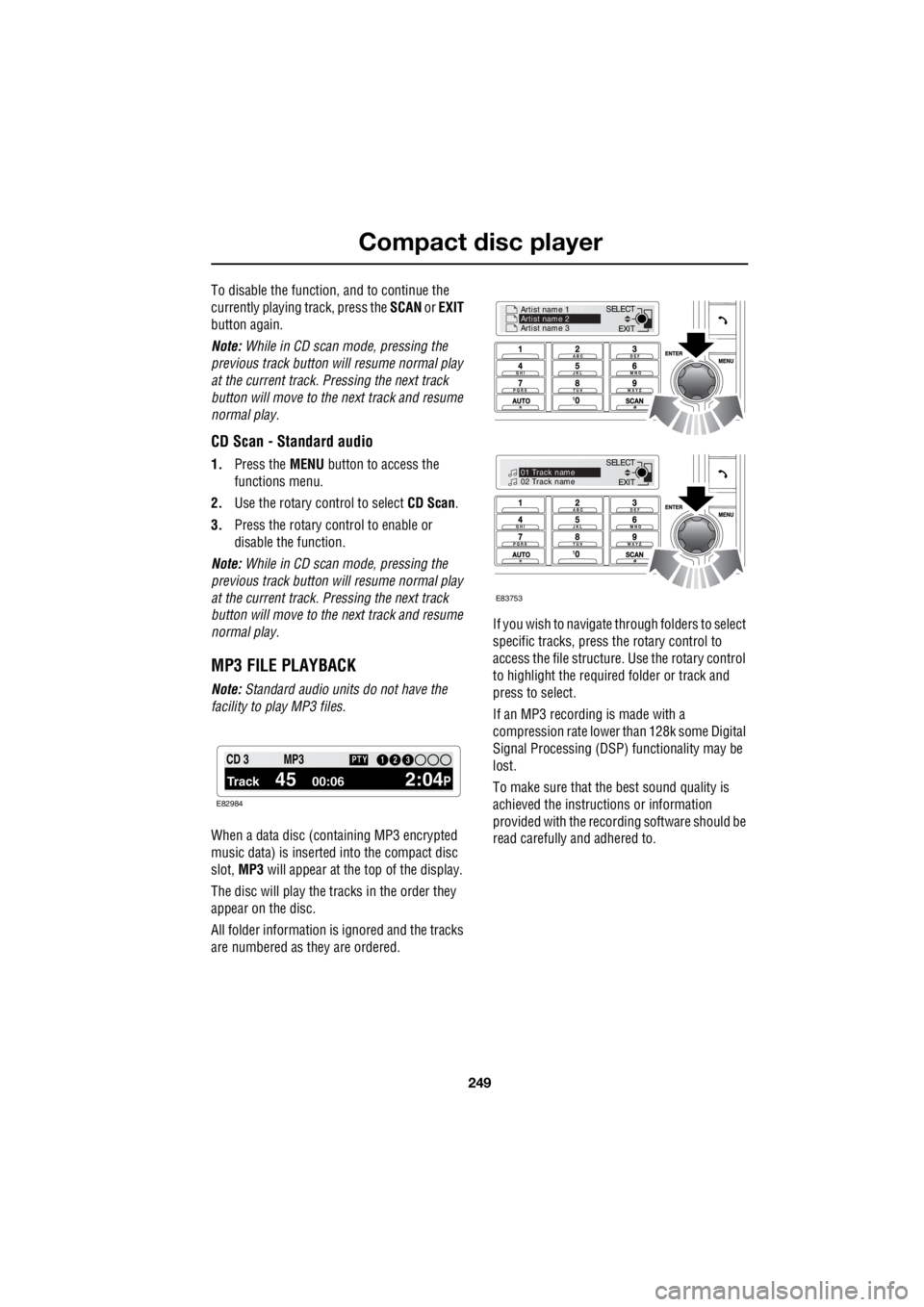
MP3 FILE PLAYBACK
Note: Standard audio units do not have the
facility to play MP3 files.
When a data disc (containing MP3 encrypted
music data) is inserted into the compact disc
slot, MP3 will appear at the top of the display.
The disc will play the tracks in the order they
appear on the disc.
All folder information is ignored and the tracks
are numbered as they are ordered. If you wish to navigate through folders to select
specific tracks, press the rotary control to
access the file structure. Use the rotary control
to highlight the required folder or track and
press to select.
If an MP3 recording is made with a
compression rate lower than 128k some Digital
Signal Processing (DSP) functionality may be
lost.
To make sure that the best sound quality is
achieved the instructions or information
provided with the recording software should be
read carefully and adhered to.
1 12 3 4 6CD 3
Track 45 00:06 2:04P
PTY13 2MP3
E82984
EXIT
SELECT
Artist name 1
PTY..
Artist name 2
Artist name 3
EXIT
SELECT
PTY..
01 Track name
02 Track name
E83753
Page 2970 of 3229
Auxiliary input (AUX IN) socket
250
L
Auxiliary input (AUX IN) socketAUXILIARY INPUT (AUX IN) SOCKET
AUX (Auxiliary Input) mode allows extra
equipment to be connect ed to the vehicle's
audio system. Items such as a personal stereo,
MP3 player, hand-held n avigation unit etc., can
be plugged in to the vehicle's audio system.
Note: The volume levels and sound quality
available from devices connected to the
auxiliary inputs may vary widely. If the
connected audio device is equipped with a line
out socket as well as a headphone socket, the
line out socket should be used. The auxiliary connector is
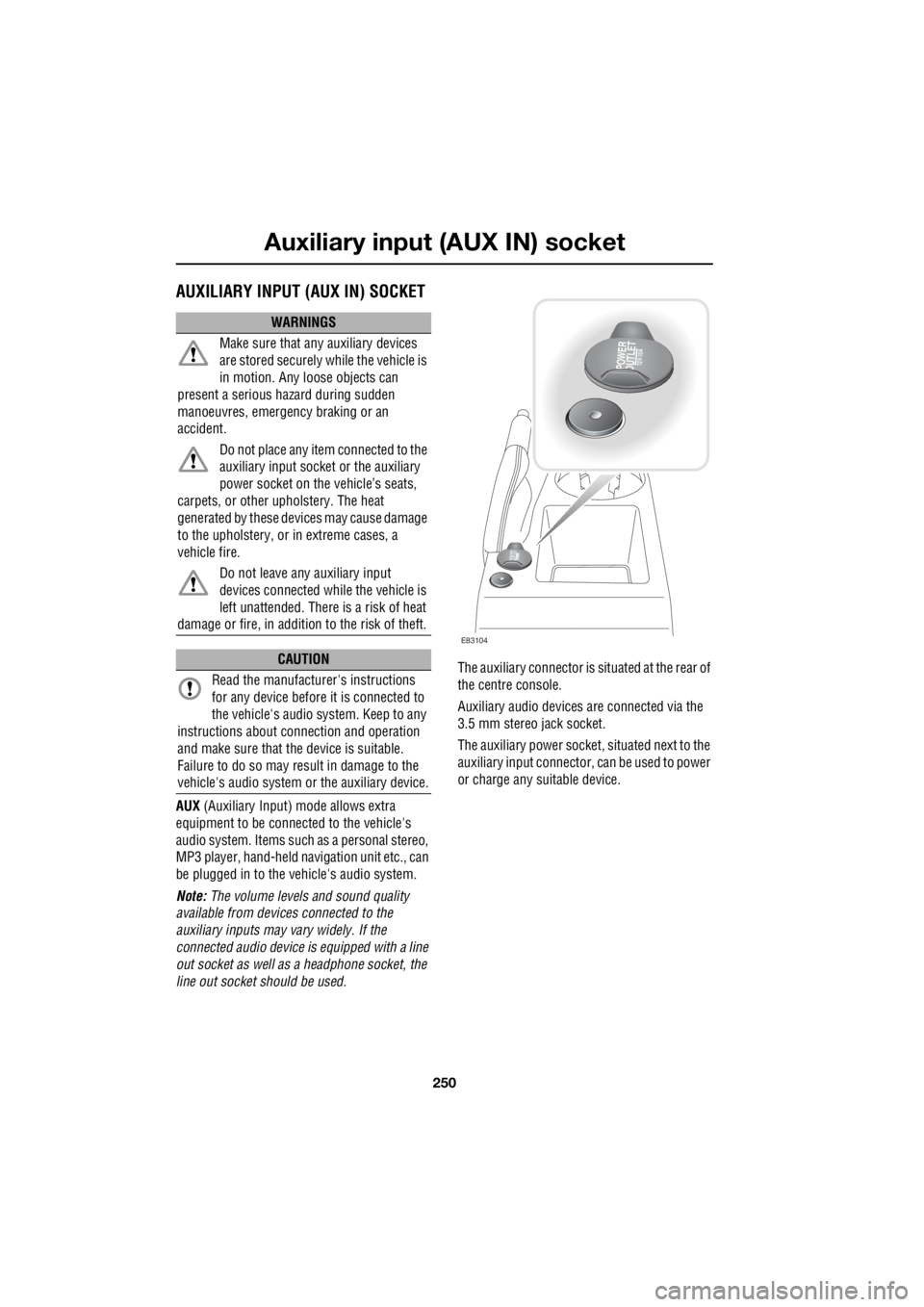
situated at the rear of
the centre console.
Auxiliary audio devices are connected via the
3.5 mm stereo jack socket.
The auxiliary power socket , situated next to the
auxiliary input connector, can be used to power
or charge any suitable device.
WARNINGS
Make sure that any auxiliary devices
are stored securely while the vehicle is
in motion. Any loose objects can
present a serious hazard during sudden
manoeuvres, emergency braking or an
accident.
Do not place any item connected to the
auxiliary input socket or the auxiliary
power socket on the vehicle’s seats,
carpets, or other upholstery. The heat
generated by these devi ces may cause damage
to the upholstery, or in extreme cases, a
vehicle fire.
Do not leave any auxiliary input
devices connected while the vehicle is
left unattended. There is a risk of heat
damage or fire, in additi on to the risk of theft.
CAUTION
Read the manufacturer's instructions
for any device before it is connected to
the vehicle's audio system. Keep to any
instructions about c onnection and operation
and make sure that the device is suitable.
Failure to do so may result in damage to the
vehicle's audio system or the auxiliary device.
POWER
OUTLET12V-10A
POWER
OUTLET12 V -1
0 A
E83104
Page 2994 of 3229

Index
274
L
Heated seats . . . . . . . . . . . . . . . . . . . . . . . 53
Heated windows and mirrors. . . . . . . . . . 104
Hill descent control . . . . . . . . . . . . . . . . . 137
Hill descent control (HDC)
Principle of operation . . . . . . . . . . . . . 136
Hints on driving with ABS . . . . . . . . . . . . 123
ABS and off-road driving. . . . . . . . . . . 124
ABS warning indicator . . . . . . . . . . . . 123
Electronic Brake Distribution (EBD) . . 124
Emergency Brake Assist (EBA) . . . . . . 124
I
Information messages . . . . . . . . . . . . . . . . 99 Main message centre . . . . . . . . . . . . . . 99
Messages . . . . . . . . . . . . . . . . . . . . . . 100
Inspecting safety system components . . 206
Instrument panel overview . . . . . . . . . . . . 97 Instrument panel . . . . . . . . . . . . . . . . . . 97
Interior lamps . . . . . . . . . . . . . . . . . . . . . . 76
Interior mirror . . . . . . . . . . . . . . . . . . . . . . 96 Auto dimming . . . . . . . . . . . . . . . . . . . . 96
Manual dimming . . . . . . . . . . . . . . . . . . 96
ISOFIX anchor points . . . . . . . . . . . . . . . . 67 Installing an ISOFIX child seat . . . . . . . 68
Tether anchorages . . . . . . . . . . . . . . . . 68
J
Jump starting . . . . . . . . . . . . . . . . . . . . . 173
K
Keys . . . . . . . . . . . . . . . . . . . . . . . . . . . . . 40
L
Lashing points . . . . . . . . . . . . . . . . . . . . . 208
Front . . . . . . . . . . . . . . . . . . . . . . . . . . 208
Rear . . . . . . . . . . . . . . . . . . . . . . . . . . 208
Levelling . . . . . . . . . . . . . . . . . . . . . . . . . 151
Lighting control . . . . . . . . . . . . . . . . . . . . . 72 Headlamp courtesy delay . . . . . . . . . . . 72
Main beam . . . . . . . . . . . . . . . . . . . . . . 72
Main switch panel . . . . . . . . . . . . . . . . . 72
Load carrying General information . . . . . . . . . . . . . . 147
Loading compact discs . . . . . . . . . . . . . . 245 Load all . . . . . . . . . . . . . . . . . . . . . . . . 245
Loading a CD - Single disc player . . . . 245
Loading a CD - Six disc player . . . . . . 245 Locking and unlocking . . . . . . . . . . . . . . . . 44
Drive-away locking . . . . . . . . . . . . . . . . . 44
Locking and unlocking from inside the vehicle . . . . . . . . . . . . . . . . . . . . . . . . 44
Mis-lock . . . . . . . . . . . . . . . . . . . . . . . . . 44
Luggage anchor points . . . . . . . . . . . . . . . 148
Reversible floor . . . . . . . . . . . . . . . . . . 148
Luggage covers . . . . . . . . . . . . . . . . . . . . 149 Fitting the luggage cover . . . . . . . . . . . 149
Operating the luggage cover. . . . . . . . . 149
M
Maintenance General information . . . . . . . . . . . . . . . 157
Technical specifications . . . . . . . . . . . . 169
Manual climate control . . . . . . . . . . . . . . . 102
Controls . . . . . . . . . . . . . . . . . . . . . . . . 102
Manual seats. . . . . . . . . . . . . . . . . . . . . . . . 48
Manual transmission . . . . . . . . . . . . . . . . 118
Mirrors . . . . . . . . . . . . . . . . . . . . . . . . . . . 104
MP3 file playback . . . . . . . . . . . . . . . . . . . 249
N
News broadcasts . . . . . . . . . . . . . . . . . . . 230 News station preference . . . . . . . . . . . . 230
O
Oil check . . . . . . . . . . . . . . . . . . . . . . . . . . 162
On or off control . . . . . . . . . . . . . . . . . . . . 223
Opening and closing the bonnet . . . . . . . . 160
Closing the bonnet . . . . . . . . . . . . . . . . 160
Opening the bonnet . . . . . . . . . . . . . . . 160
P
Parking aid . . . . . . . . . . . . . . . . . . . . . . . . 127 Principle of operation . . . . . . . . . . . . . . 126
Parking brake . . . . . . . . . . . . . . . . . . . . . . 124
Applying the parking brake . . . . . . . . . . 125
Parking on a slope . . . . . . . . . . . . . . . . 124
Releasing the parking brake . . . . . . . . . 125
Phonebook . . . . . . . . . . . . . . . . . . . . . . . . 266 Phonebook menu . . . . . . . . . . . . . . . . . 267
Power steering fluid check . . . . . . . . . . . . 166
Checking the fluid level. . . . . . . . . . . . . 166
Topping up the fluid . . . . . . . . . . . . . . . 167
Page 2995 of 3229

Index
275
R
Preset buttons . . . . . . . . . . . . . . . . . . . . . 238 Recalling a preset channel . . . . . . . . . 239
Scrolling through presets . . . . . . . . . . 239
Storing channels as presets . . . . . . . . 238
Principle of operation Airbag deployment effects . . . . . . . . . . 61
Airbag operation . . . . . . . . . . . . . . . . . . 60
Airbags . . . . . . . . . . . . . . . . . . . . . . . . . 59
Before driving off-road . . . . . . . . . . . . 136
Brake pads . . . . . . . . . . . . . . . . . . . . . 123
Deployment and deflation . . . . . . . . . . . 60
Dynamic Stability Control (DSC) . . . . . 140
Gradient release control (GRC) . . . . . . 136
Introduction . . . . . . . . . . . . . . . . . . . . . 58
Roll stability control (RSC) . . . . . . . . . 140
Seat belt checks . . . . . . . . . . . . . . . . . . 55
Seat belt safety . . . . . . . . . . . . . . . . . . . 54
Seat belts . . . . . . . . . . . . . . . . . . . . . . . 54
Wet conditions . . . . . . . . . . . . . . . . . . 123
Priority programme type (PTY) . . . . . . . . 231 PTY search - Premium audio . . . . . . . 232
PTY seek - Standard audio . . . . . . . . . 233
PTY selection - Premium audio . . . . . 231Q
Quick start . . . . . . . . . . . . . . . . . . . . . . . . . . 7 Audio system . . . . . . . . . . . . . . . . . . . . . 27
Automatic transmission . . . . . . . . . . . . . 23
Bonnet . . . . . . . . . . . . . . . . . . . . . . . . . . . 9
CD autochanger . . . . . . . . . . . . . . . . . . . 30
CD OPERATION . . . . . . . . . . . . . . . . . . . 30
Clock setting . . . . . . . . . . . . . . . . . . . . . 31
Cruise control . . . . . . . . . . . . . . . . . . . . 24
DAB radio. . . . . . . . . . . . . . . . . . . . . . . . 29
Driving position memory . . . . . . . . . . . . 10
Engine starting . . . . . . . . . . . . . . . . . . . . . 8
Exterior lighting . . . . . . . . . . . . . . . . . . . 22
Facia. . . . . . . . . . . . . . . . . . . . . . . . . . . . 17
Gearshift interlocks . . . . . . . . . . . . . . . . 23
Heating and ventilation. . . . . . . . . . . . . . 14
Hill Descent Control (HDC) . . . . . . . . . . 25
Instrument pack . . . . . . . . . . . . . . . . . . . 19
Manual seat adjustment . . . . . . . . . . . . . 11
Master lock and unlock switches . . . . . . . 9
Overhead console . . . . . . . . . . . . . . . . . 12
Parking aid . . . . . . . . . . . . . . . . . . . . . . . 26
Passenger airbag deactivation . . . . . . . . 13
Power operated seat adjustment . . . . . . 10
Radio operation . . . . . . . . . . . . . . . . . . . 29
Remote control . . . . . . . . . . . . . . . . . . . . 7
Seat belts and Child restraints . . . . . . . . 13
Single CD player. . . . . . . . . . . . . . . . . . . 30
Steering column adjustment . . . . . . . . . 12
Steering column lock . . . . . . . . . . . . . . . 12
Tailgate . . . . . . . . . . . . . . . . . . . . . . . . . . 9
Telephone - Bluetooth system . . . . . . . . 31
Terrain Response system. . . . . . . . . . . . 25
Warning indicators (attention) . . . . . . . . 21
Warning indicators (information) . . . . . . 21
Windows and Door mirrors . . . . . . . . . . 11
Wipers and washers. . . . . . . . . . . . . . . . 22
R
Radio data system (RDS) . . . . . . . . . . . . . 228 Selecting RDS . . . . . . . . . . . . . . . . . . . 228
Radio reception . . . . . . . . . . . . . . . . . . . . 218
Rain sensor . . . . . . . . . . . . . . . . . . . . . . . . 87
Operation . . . . . . . . . . . . . . . . . . . . . . . . 88
Rear fog lamps . . . . . . . . . . . . . . . . . . . . . . 73