bluetooth LAND ROVER FRELANDER 2 2006 User Guide
[x] Cancel search | Manufacturer: LAND ROVER, Model Year: 2006, Model line: FRELANDER 2, Model: LAND ROVER FRELANDER 2 2006Pages: 3229, PDF Size: 78.5 MB
Page 2974 of 3229
Telephone
254
L
TelephoneGENERAL INFORMATION
Note: The vehicle tele phone system is
designed to function with a wide variety of
Bluetooth telephones. As these telephones
have a wide range of audio and echo
performance characteristics, it may take a few
seconds for the vehicl e telephone system to
adapt and deliver optimum audio performance.
It may be necessary to reduce the in-vehicle
volume slightly to fully optimise audio
performance and reduce echo. Note:
The vehicle's Bluetooth telephone
system can be used with an appropriate
Bluetooth-equipped mobile telephone.
Note: Please refer to your Land Rover
Dealer/Authorised Repairer for a list of
compatible telephones.
Telephone networks
The Telephone netw ork standard allows you to
use your telephone in many countries.
However, telephone reception may be poor or
unavailable in remote re gions. This may be due
to the inadequate power of the transmitter,
which results in a weak signal or incomplete
coverage.
WARNINGS
Using the telephone ne ar the car: do not
telephone inside a garage or near an
open car bonnet. The air may contain fuel
vapours and the tele phone could produce
sparks and start a fire.
Unusual ambient conditions: Switch off
the telephone in areas where high
explosives are being used. High frequency
remote controls could be interfered with and
cause an explosion. Switch off your telephone
in areas with a high explosion risk. This
includes filling stations, fuel storage areas or
chemical factories, as well as places where the
air contains fuel vapour, chemicals or metal
dust. The telephone might possibly produce
sparks and cause a fire or explosion.
Medical equipment: The functioning of
cardiac pacemakers or hearing aids
may be impaired when the phone is in use.
Check with a doctor or manufacturer whether
any such devices you or your passengers are
using are sufficiently protected against
high-frequency energy.
Always stow your mobile phone
securely. In an accident loose items can
cause injury.
Page 2976 of 3229
Telephone
256
L
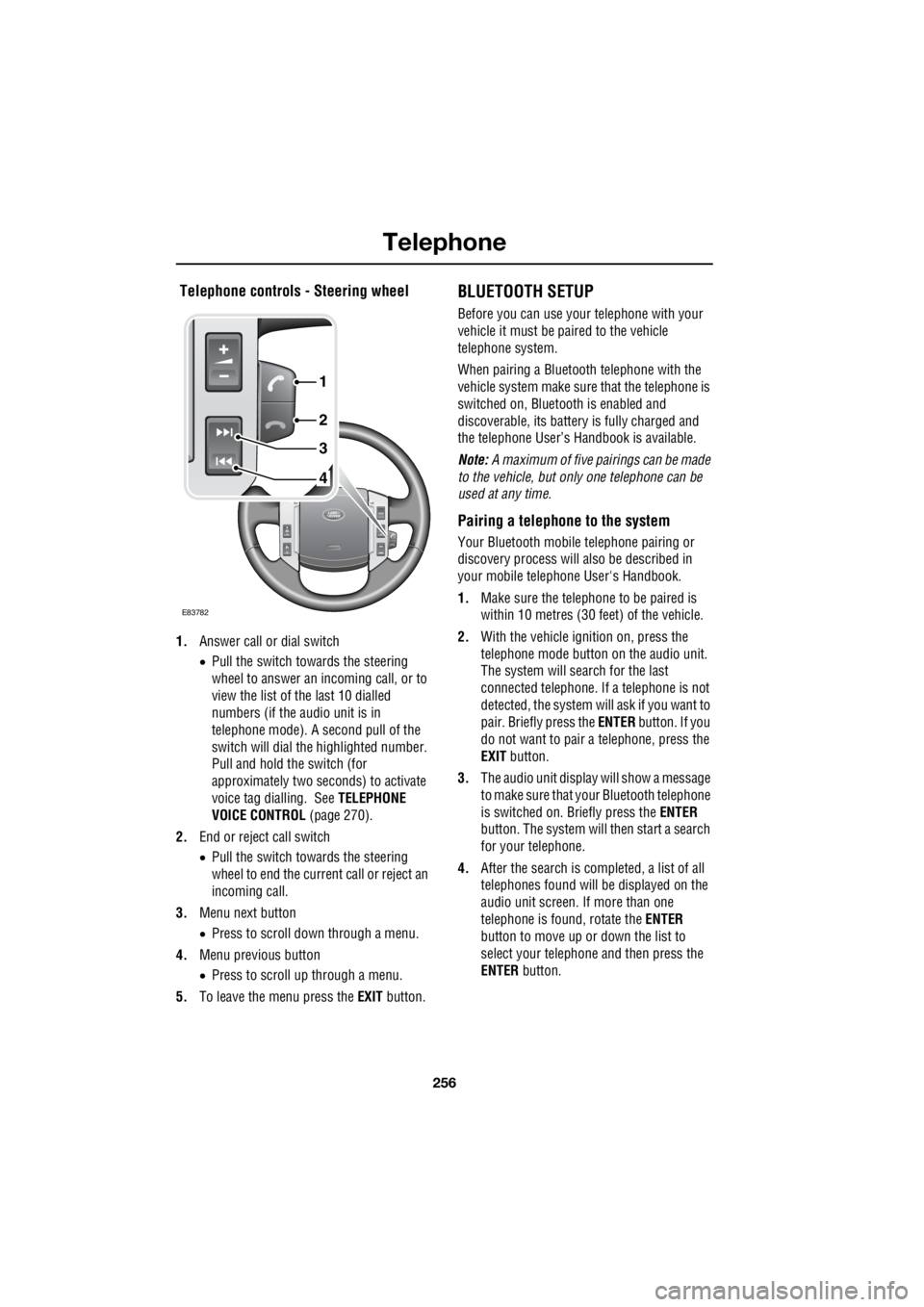
Telephone controls - Steering wheel
1. Answer call or dial switch
• Pull the switch towards the steering
wheel to answer an incoming call, or to
view the list of the last 10 dialled
numbers (if the audio unit is in
telephone mode). A second pull of the
switch will dial th e highlighted number.
Pull and hold the switch (for
approximately two seconds) to activate
voice tag dialling. See TELEPHONE
VOICE CONTROL (page 270).
2. End or reject call switch
• Pull the switch towards the steering
wheel to end the current call or reject an
incoming call.
3. Menu next button
• Press to scroll down through a menu.
4. Menu previous button
• Press to scroll up through a menu.
5. To leave the menu press the EXIT button.
BLUETOOTH SETUP
Before you can use your telephone with your
vehicle it must be paired to the vehicle
telephone system.
When pairing a Bluet ooth telephone with the
vehicle system ma ke sure that the telephone is
switched on, Bluetooth is enabled and
discoverable, its battery is fully charged and
the telephone User’s Handbook is available.
Note: A maximum of five pairings can be made
to the vehicle, but only one telephone can be
used at any time.
Pairing a telephone to the system
Your Bluetooth mobile telephone pairing or
discovery process will al so be described in
your mobile telephone User's Handbook.
1. Make sure the telephone to be paired is
within 10 metres (30 feet) of the vehicle.
2. With the vehicle ignition on, press the
telephone mode button on the audio unit.
The system will search for the last
connected tele phone. If a telephone is not
detected, the system w ill ask if you want to
pair. Briefly press the ENTER button. If you
do not want to pair a telephone, press the
EXIT button.
3. The audio unit display will show a message
to make sure that yo ur Bluetooth telephone
is switched on. Briefly press the ENTER
button. The system will then start a search
for your telephone.
4. After the search is completed, a list of all
telephones found will be displayed on the
audio unit screen. If more than one
telephone is found, rotate the ENTER
button to move up or down the list to
select your telephone and then press the
ENTER button.
4
3
2
1
E83782
Page 2977 of 3229

257
Telephone
R
5. The audio unit will now display a Bluetooth
access code numbe r which must be
entered into your telephone.
6. A message on the audio unit display will
confirm the system is connecting with
your telephone. When it is successfully
connected, the telephone will be paired
and connected with the vehicle and can
now be used with the vehicle telephone
system.
7. If the pairing fails, a message will appear
on the audio unit di splay; press the ENTER
button to retry or press the EXIT button
and restart the process.
8. The last connected telephone will be
available for use when the system and
telephone are switched on again.
9. If you wish to pair additional telephones,
repeat the process.
Adding or changing a telephone
1. Select the te lephone main menu. See
TELEPHONE SETUP (page 258).
2. Select Bluetooth , then select the option to
change a telephone .
3. Add new phone will appear at the top of
the list. Repeat the procedure for pairing a
telephone to the system.
If the maximum number of telephones are
already paired to the system, a message will be
displayed and you are given the option to
remove one. This must be carried out before a
new telephone can be paired.
Removing a telephone from the system
1.Select the te lephone main menu. See
TELEPHONE SETUP (page 258).
2. Select Bluetooth , then select the option to
remove a telephone . 3.
Select a telephone by rotating the ENTER
button, highlight the telephone to be
removed then press the ENTER button. A
confirmation message to remove a
telephone will appear on the audio unit
display, press the ENTER button.
4. The remove telephone screen will be
displayed, and if no further telephones are
to be removed, press the EXIT button.
Loss of Bluetooth link
If the link between the telephone and the
vehicle is lost, you have the choice to
reconnect or to exit fr om the telephone system.
To reconnect press the ENTER button. There
will be a short delay whilst the connection is
established and then y our telephone name will
be shown in the display.
Alternatively, press the EXIT button if you do
not wish to reconne ct your telephone.
Page 2978 of 3229
Telephone
258
L
TELEPHONE SETUP
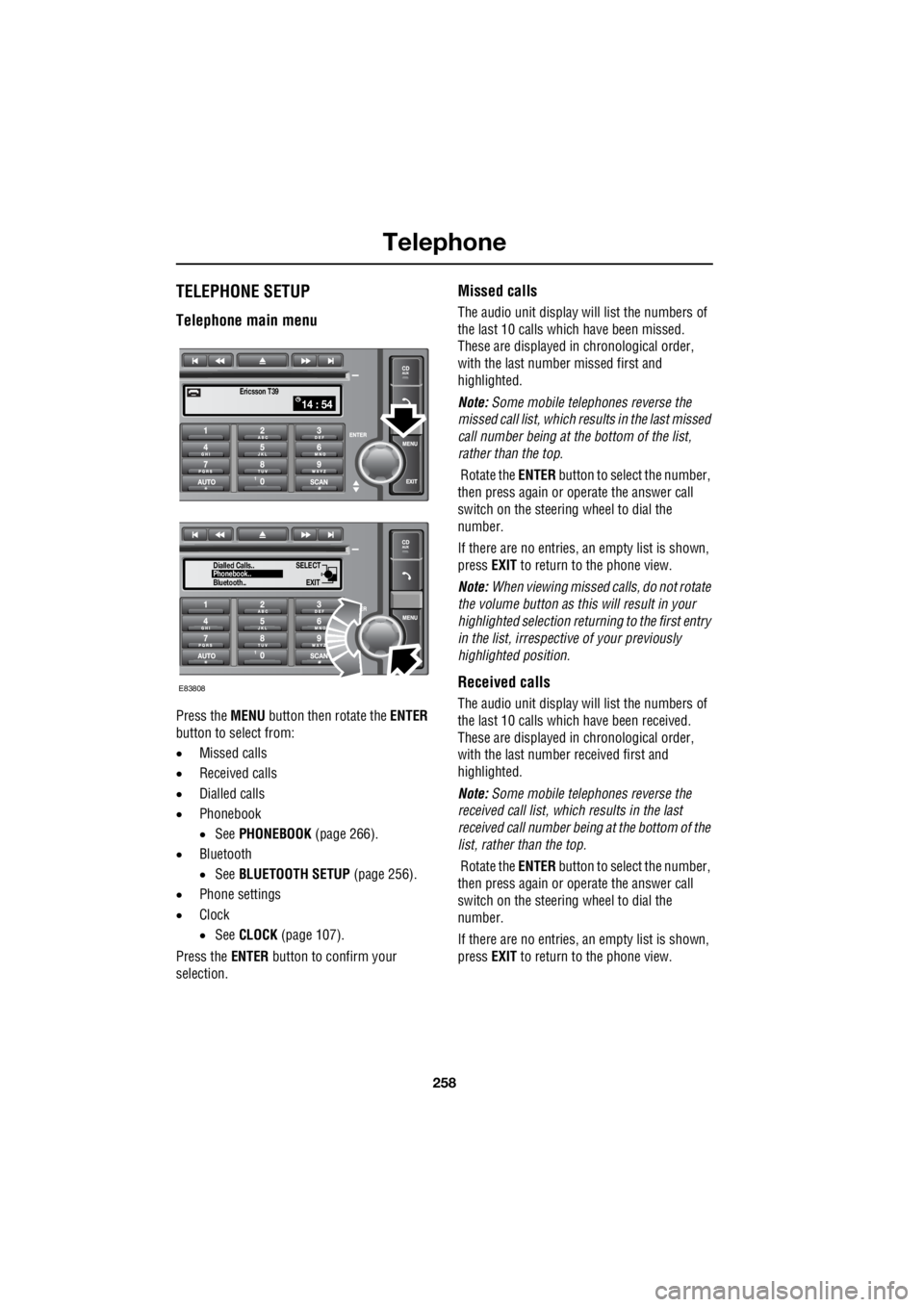
Telephone main menu
Press the MENU button then rotate the ENTER
button to select from:
• Missed calls
• Received calls
• Dialled calls
• Phonebook
• See PHONEBOOK (page 266).
• Bluetooth
• See BLUETOOTH SETUP (page 256).
• Phone settings
• Clock
• See CLOCK (page 107).
Press the ENTER button to confirm your
selection.
Missed calls
The audio unit display wi ll list the numbers of
the last 10 calls which have been missed.
These are displayed in chronological order,
with the last number missed first and
highlighted.
Note: Some mobile telephones reverse the
missed call list, which results in the last missed
call number being at the bottom of the list,
rather than the top.
Rotate the ENTER button to select the number,
then press again or operate the answer call
switch on the steering wheel to dial the
number.
If there are no entries, an empty list is shown,
press EXIT to return to the phone view.
Note: When viewing missed calls, do not rotate
the volume button as this will result in your
highlighted select ion returning to the first entry
in the list, irrespective of your previously
highlighted position.
Received calls
The audio unit display wi ll list the numbers of
the last 10 calls which have been received.
These are displayed in chronological order,
with the last number received first and
highlighted.
Note: Some mobile telephones reverse the
received call list, which results in the last
received call number be ing at the bottom of the
list, rather than the top.
Rotate the ENTER button to select the number,
then press again or operate the answer call
switch on the steering wheel to dial the
number.
If there are no entries, an empty list is shown,
press EXIT to return to the phone view.
14 : 54Ericsson T39
SELECT
EXITPhonebook..
Dialled Calls..
Bluetooth..
E83808
Page 2981 of 3229
261
Telephone
R
Another brief press of the ENTER button will
store the tone. If you press the EXIT button the
tone will not be stored and the ring tone menu
will remain visible. Press the EXIT button again
to return to the main menu or to the function
previously selected.
Note: Not all mobile telephones support
Mobile ring tone , in this case it will not be
possible to select and store the Mobile ring
tone setting in the vehicle system.
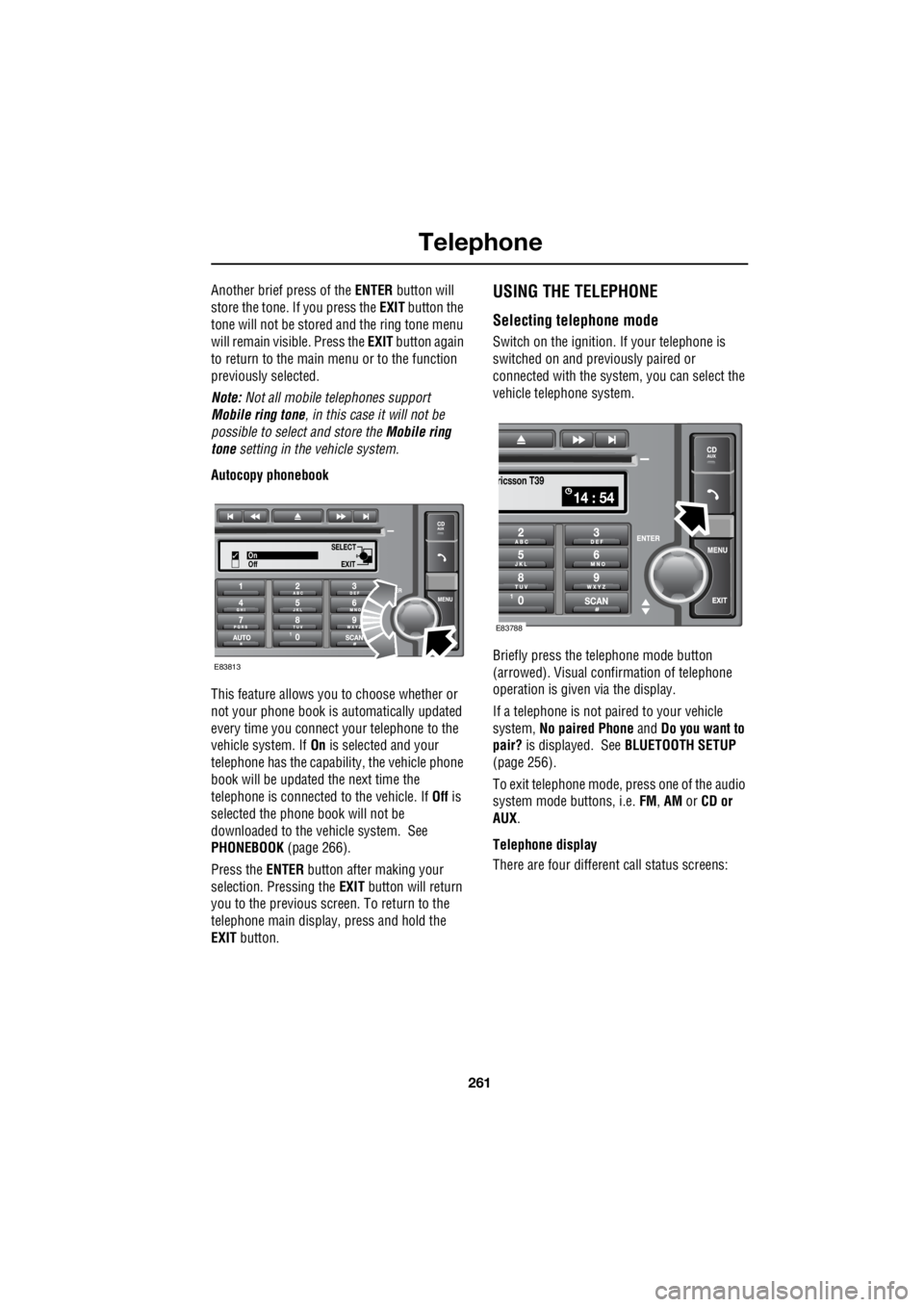
Autocopy phonebook
This feature allows you to choose whether or
not your phone book is automatically updated
every time you connect your telephone to the
vehicle system. If On is selected and your
telephone has the capabili ty, the vehicle phone
book will be updated the next time the
telephone is connected to the vehicle. If Off is
selected the phone book will not be
downloaded to the vehicle system. See
PHONEBOOK (page 266).
Press the ENTER button after making your
selection. Pressing the EXIT button will return
you to the previous screen. To return to the
telephone main display, press and hold the
EXIT button.USING THE TELEPHONE
Selecting telephone mode
Switch on the ignition. If your telephone is
switched on and previously paired or
connected with the system, you can select the
vehicle telephone system.
Briefly press the te lephone mode button
(arrowed). Visual conf irmation of telephone
operation is given via the display.
If a telephone is not paired to your vehicle
system, No paired Phone and Do you want to
pair? is displayed. See BLUETOOTH SETUP
(page 256).
To exit telephone mode, press one of the audio
system mode buttons, i.e. FM, AM or CD or
AUX .
Telephone display
There are four different call status screens:
SELECT
EXITOn
Off
E83813
14 : 54
ricsson T39
E83788
Page 2985 of 3229
265
Telephone
R
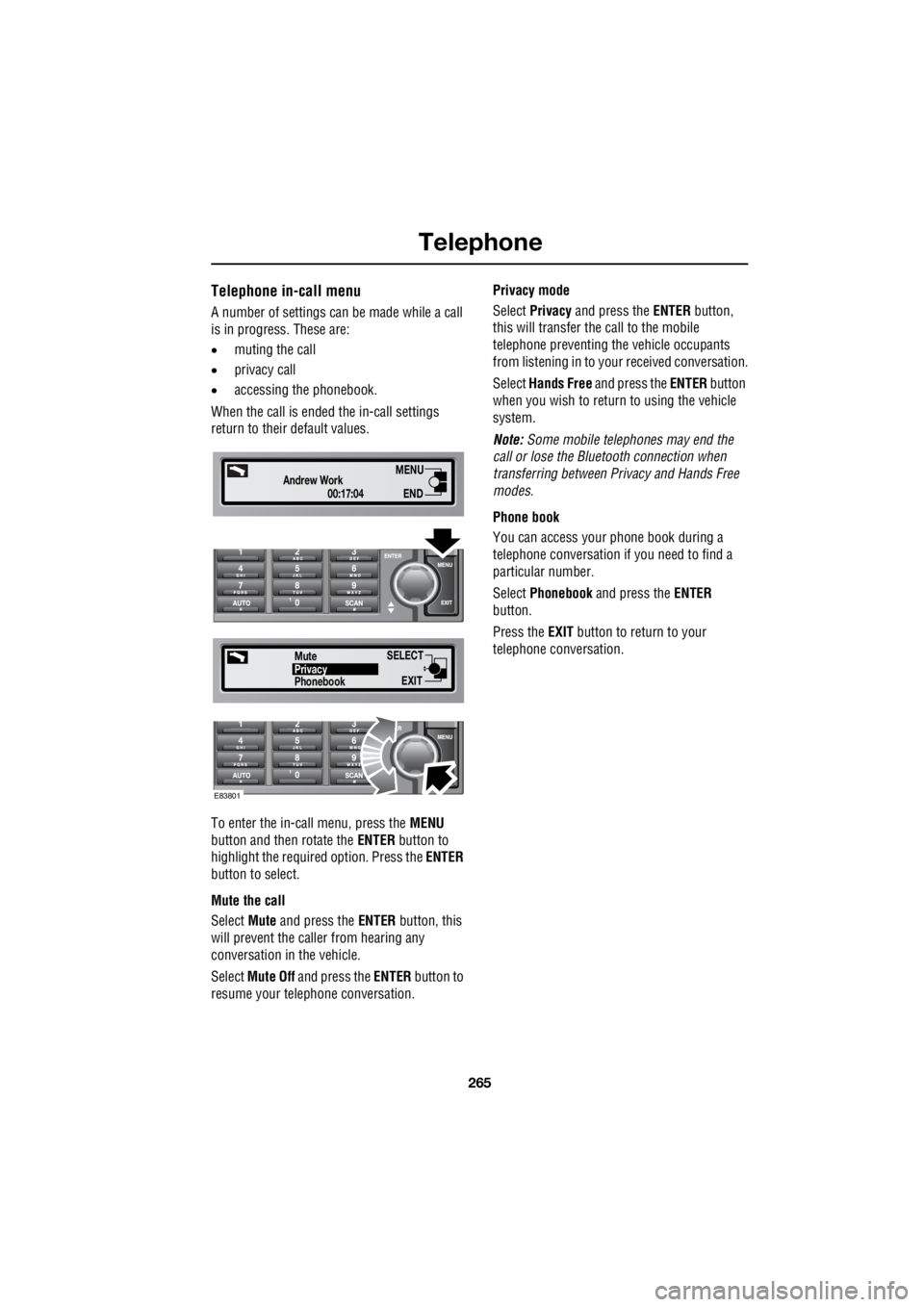
Telephone in-call menu
A number of settings can be made while a call
is in progress. These are:
• muting the call
• privacy call
• accessing the phonebook.
When the call is ende d the in-call settings
return to their default values.
To enter the in-call menu, press the MENU
button and then rotate the ENTER button to
highlight the required option. Press the ENTER
button to select.
Mute the call
Select Mute and press the ENTER button, this
will prevent the caller from hearing any
conversation in the vehicle.
Select Mute Off and press the ENTER button to
resume your telephone conversation. Privacy mode
Select Privacy and press the ENTER button,
this will transfer the call to the mobile
telephone preventing th e vehicle occupants
from listening in to your received conversation.
Select Hands Free and press the ENTER button
when you wish to return to using the vehicle
system.
Note: Some mobile tele phones may end the
call or lose the Bluetooth connection when
transferring between Pr ivacy and Hands Free
modes.
Phone book
You can access your phone book during a
telephone conversation if you need to find a
particular number.
Select Phonebook and press the ENTER
button.
Press the EXIT button to return to your
telephone conversation.
00:17:04
Andrew WorkEND
MENU
SELECT
EXITPhonebookPrivacy
Mute
E83801
Page 2987 of 3229
267
Telephone
R
Once downloaded, the phonebook can be
accessed through the telephone main menu.
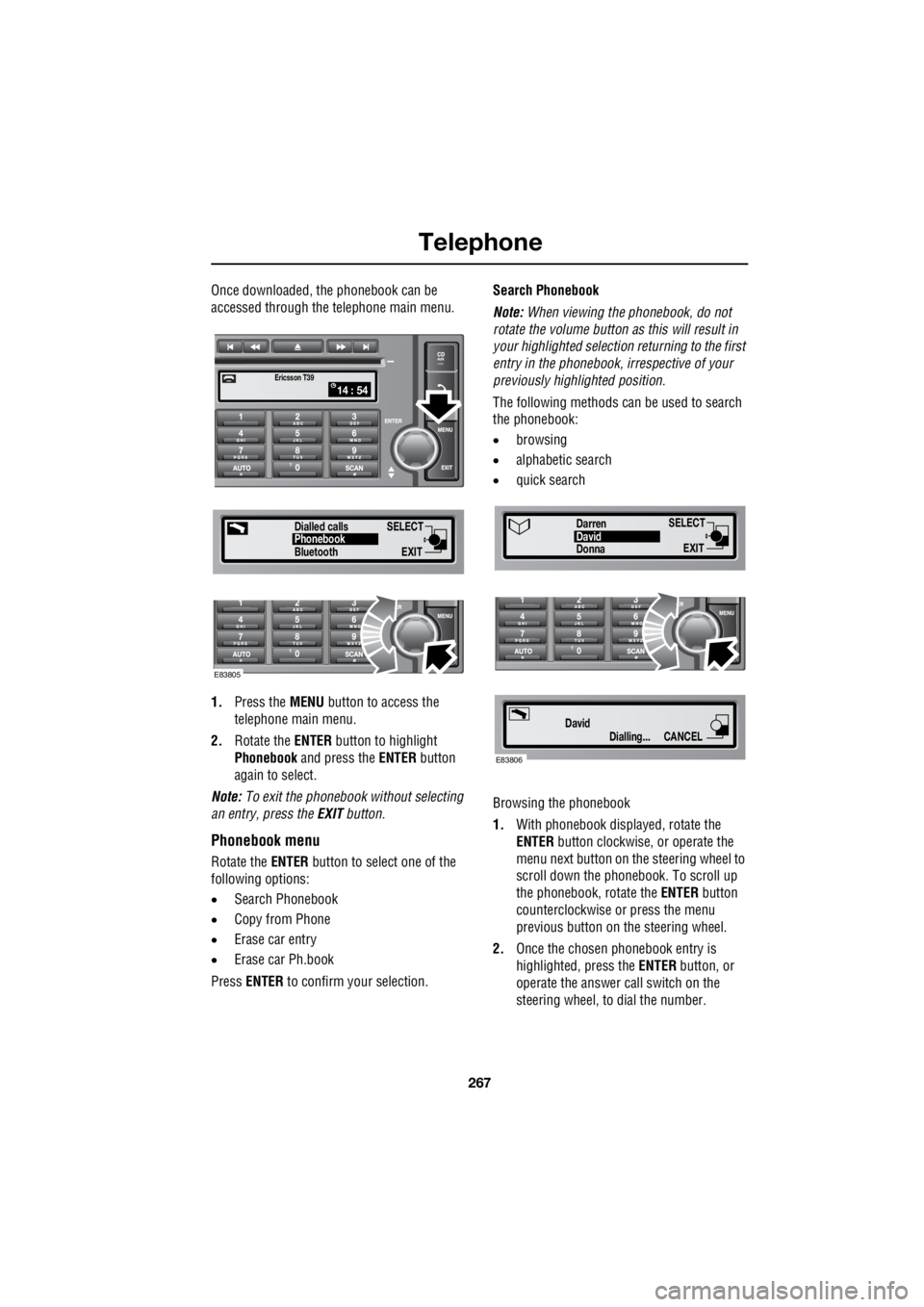
1. Press the MENU button to access the
telephone main menu.
2. Rotate the ENTER button to highlight
Phonebook and press the ENTER button
again to select.
Note: To exit the phonebook without selecting
an entry, press the EXIT button.
Phonebook menu
Rotate the ENTER button to select one of the
following options:
• Search Phonebook
• Copy from Phone
• Erase car entry
• Erase car Ph.book
Press ENTER to confirm your selection. Search Phonebook
Note: When viewing the phonebook, do not
rotate the volume button as this will result in
your highlighted selection returning to the first
entry in the phonebook, i rrespective of your
previously highlighted position.
The following methods can be used to search
the phonebook:
• browsing
• alphabetic search
• quick search
Browsing the phonebook
1. With phonebook displa yed, rotate the
ENTER button clockwise, or operate the
menu next button on th e steering wheel to
scroll down the phonebook. To scroll up
the phonebook, rotate the ENTER button
counterclockwise or press the menu
previous button on the steering wheel.
2. Once the chosen phonebook entry is
highlighted, press the ENTER button, or
operate the answer call switch on the
steering wheel, to dial the number.
SELECT
EXITPhonebook
Dialled calls
14 : 54Ericsson T39
Bluetooth
E83805
SELECT
EXITDonnaDavid
Darren
Dialling...
DavidCANCEL
E83806
Page 2991 of 3229

Index
271
R
A
ABS driving hints . . . . . . . . . . . . . . . . . . 123
Accessories . . . . . . . . . . . . . . . . . . . . . . . . 37
Adaptive front lighting system (AFS). . . . . 74
Adjusting the headlamps . . . . . . . . . . . . . . 73
Adjusting the steering wheel . . . . . . . . . . . 70
Adjusting the windscreen washer jets . . . . 89 Blocked jets . . . . . . . . . . . . . . . . . . . . . 90
Front . . . . . . . . . . . . . . . . . . . . . . . . . . . 89
Rear . . . . . . . . . . . . . . . . . . . . . . . . . . . 89
AFS . . . . . . . . . . . . . . . . . . . . . . . . . . . . . . 74
Air vents . . . . . . . . . . . . . . . . . . . . . . . . . 101
Airbag service information . . . . . . . . . . . . 63
Airbag warning lamp . . . . . . . . . . . . . . . . . 61
Alternative frequencies . . . . . . . . . . . . . . 229
Alternative Frequency (AF) - Premium audio 230
Alternative Frequency (A F) - Standard audio
230
Approach lamps . . . . . . . . . . . . . . . . . . . . 76
Arming the alarm . . . . . . . . . . . . . . . . . . . 45
Alarm indicator . . . . . . . . . . . . . . . . . . . 45
Full alarm . . . . . . . . . . . . . . . . . . . . . . . 45
Partial alarm . . . . . . . . . . . . . . . . . . . . . 45
Ashtray . . . . . . . . . . . . . . . . . . . . . . . . . . 109
Audio control. . . . . . . . . . . . . . . . . . . 70, 223 Audio control using the telephone buttons .
71
Balance adjustment. . . . . . . . . . . . . . . 224
Bass response adjustment . . . . . . . . . 223
Centre speaker settings . . . . . . . . . . . 224
Fader adjustment . . . . . . . . . . . . . . . . 224
Resetting tone values . . . . . . . . . . . . . 224
Subwoofer settings . . . . . . . . . . . . . . . 224
Surround sound settings . . . . . . . . . . 223
Treble response adjustment . . . . . . . . 223
Audio controls . . . . . . . . . . . . . . . . . . . . . 235
Audio unit overview. . . . . . . . . . . . . . . . . 219 Basic audio functions . . . . . . . . . . . . . 222
Premium audio overview . . . . . . . . . . 219
Standard audio overview . . . . . . . . . . 221
Automatic climate control . . . . . . . . . . . . 103
Controls . . . . . . . . . . . . . . . . . . . . . . . 103 Automatic transmission . . . . . . . . . . . . . . 118
Automatic mode. . . . . . . . . . . . . . . . . . 119
Electronic gear change strategies . . . . 120
Sport mode and CommandShift™ . . . . 120
Autostore control . . . . . . . . . . . . . . . . . . . 225 Autostoring radio stat ions - Premium audio
225
Autostoring radio stati ons - Standard audio
225
Auxiliary heater. . . . . . . . . . . . . . . . . . . . . 104
Auxiliary input (AUX IN) socket . . . . . . . . 250 Auxiliary mode . . . . . . . . . . . . . . . . . . . 251
Auxiliary power sockets . . . . . . . . . . . . . . 110
B
Battery care . . . . . . . . . . . . . . . . . . . . . . . 171
Battery charging . . . . . . . . . . . . . . . . . . . . 174
Battery warning symbols . . . . . . . . . . . . . 171
Bluetooth setup . . . . . . . . . . . . . . . . . . . . 256
Adding or changing a telephone. . . . . . 257
Loss of Bluetooth link . . . . . . . . . . . . . 257
Pairing a telephone to the system . . . . 256
Removing a telephone fr om the system. . .
257
Bonnet lock . . . . . . . . . . . . . . . . . . . . . . . 160
Booster cables . . . . . . . . . . . . . . . . . . . . . 173
Booster cushions . . . . . . . . . . . . . . . . . . . . 66
Brake and clutch fluid check . . . . . . . . . . . 165
Checking the fluid level . . . . . . . . . . . . 165
Topping up the fluid . . . . . . . . . . . . . . . 166
Brakes
Principle of operation . . . . . . . . . . . . . . 123
Bulb changing . . . . . . . . . . . . . . . . . . . . . . 77
Bulb specification chart . . . . . . . . . . . . . . . 86
C
Car wash . . . . . . . . . . . . . . . . . . . . . . . . . 154
Page 2995 of 3229

Index
275
R
Preset buttons . . . . . . . . . . . . . . . . . . . . . 238 Recalling a preset channel . . . . . . . . . 239
Scrolling through presets . . . . . . . . . . 239
Storing channels as presets . . . . . . . . 238
Principle of operation Airbag deployment effects . . . . . . . . . . 61
Airbag operation . . . . . . . . . . . . . . . . . . 60
Airbags . . . . . . . . . . . . . . . . . . . . . . . . . 59
Before driving off-road . . . . . . . . . . . . 136
Brake pads . . . . . . . . . . . . . . . . . . . . . 123
Deployment and deflation . . . . . . . . . . . 60
Dynamic Stability Control (DSC) . . . . . 140
Gradient release control (GRC) . . . . . . 136
Introduction . . . . . . . . . . . . . . . . . . . . . 58
Roll stability control (RSC) . . . . . . . . . 140
Seat belt checks . . . . . . . . . . . . . . . . . . 55
Seat belt safety . . . . . . . . . . . . . . . . . . . 54
Seat belts . . . . . . . . . . . . . . . . . . . . . . . 54
Wet conditions . . . . . . . . . . . . . . . . . . 123
Priority programme type (PTY) . . . . . . . . 231 PTY search - Premium audio . . . . . . . 232
PTY seek - Standard audio . . . . . . . . . 233
PTY selection - Premium audio . . . . . 231Q
Quick start . . . . . . . . . . . . . . . . . . . . . . . . . . 7 Audio system . . . . . . . . . . . . . . . . . . . . . 27
Automatic transmission . . . . . . . . . . . . . 23
Bonnet . . . . . . . . . . . . . . . . . . . . . . . . . . . 9
CD autochanger . . . . . . . . . . . . . . . . . . . 30
CD OPERATION . . . . . . . . . . . . . . . . . . . 30
Clock setting . . . . . . . . . . . . . . . . . . . . . 31
Cruise control . . . . . . . . . . . . . . . . . . . . 24
DAB radio. . . . . . . . . . . . . . . . . . . . . . . . 29
Driving position memory . . . . . . . . . . . . 10
Engine starting . . . . . . . . . . . . . . . . . . . . . 8
Exterior lighting . . . . . . . . . . . . . . . . . . . 22
Facia. . . . . . . . . . . . . . . . . . . . . . . . . . . . 17
Gearshift interlocks . . . . . . . . . . . . . . . . 23
Heating and ventilation. . . . . . . . . . . . . . 14
Hill Descent Control (HDC) . . . . . . . . . . 25
Instrument pack . . . . . . . . . . . . . . . . . . . 19
Manual seat adjustment . . . . . . . . . . . . . 11
Master lock and unlock switches . . . . . . . 9
Overhead console . . . . . . . . . . . . . . . . . 12
Parking aid . . . . . . . . . . . . . . . . . . . . . . . 26
Passenger airbag deactivation . . . . . . . . 13
Power operated seat adjustment . . . . . . 10
Radio operation . . . . . . . . . . . . . . . . . . . 29
Remote control . . . . . . . . . . . . . . . . . . . . 7
Seat belts and Child restraints . . . . . . . . 13
Single CD player. . . . . . . . . . . . . . . . . . . 30
Steering column adjustment . . . . . . . . . 12
Steering column lock . . . . . . . . . . . . . . . 12
Tailgate . . . . . . . . . . . . . . . . . . . . . . . . . . 9
Telephone - Bluetooth system . . . . . . . . 31
Terrain Response system. . . . . . . . . . . . 25
Warning indicators (attention) . . . . . . . . 21
Warning indicators (information) . . . . . . 21
Windows and Door mirrors . . . . . . . . . . 11
Wipers and washers. . . . . . . . . . . . . . . . 22
R
Radio data system (RDS) . . . . . . . . . . . . . 228 Selecting RDS . . . . . . . . . . . . . . . . . . . 228
Radio reception . . . . . . . . . . . . . . . . . . . . 218
Rain sensor . . . . . . . . . . . . . . . . . . . . . . . . 87
Operation . . . . . . . . . . . . . . . . . . . . . . . . 88
Rear fog lamps . . . . . . . . . . . . . . . . . . . . . . 73