set clock LAND ROVER FRELANDER 2 2006 Repair Manual
[x] Cancel search | Manufacturer: LAND ROVER, Model Year: 2006, Model line: FRELANDER 2, Model: LAND ROVER FRELANDER 2 2006Pages: 3229, PDF Size: 78.5 MB
Page 585 of 3229
Publi s hed: 11-May-2011
Steering Column Switches - Steering Column Switches
Des cript ion and Operat ion
COMPONENT LOCATION
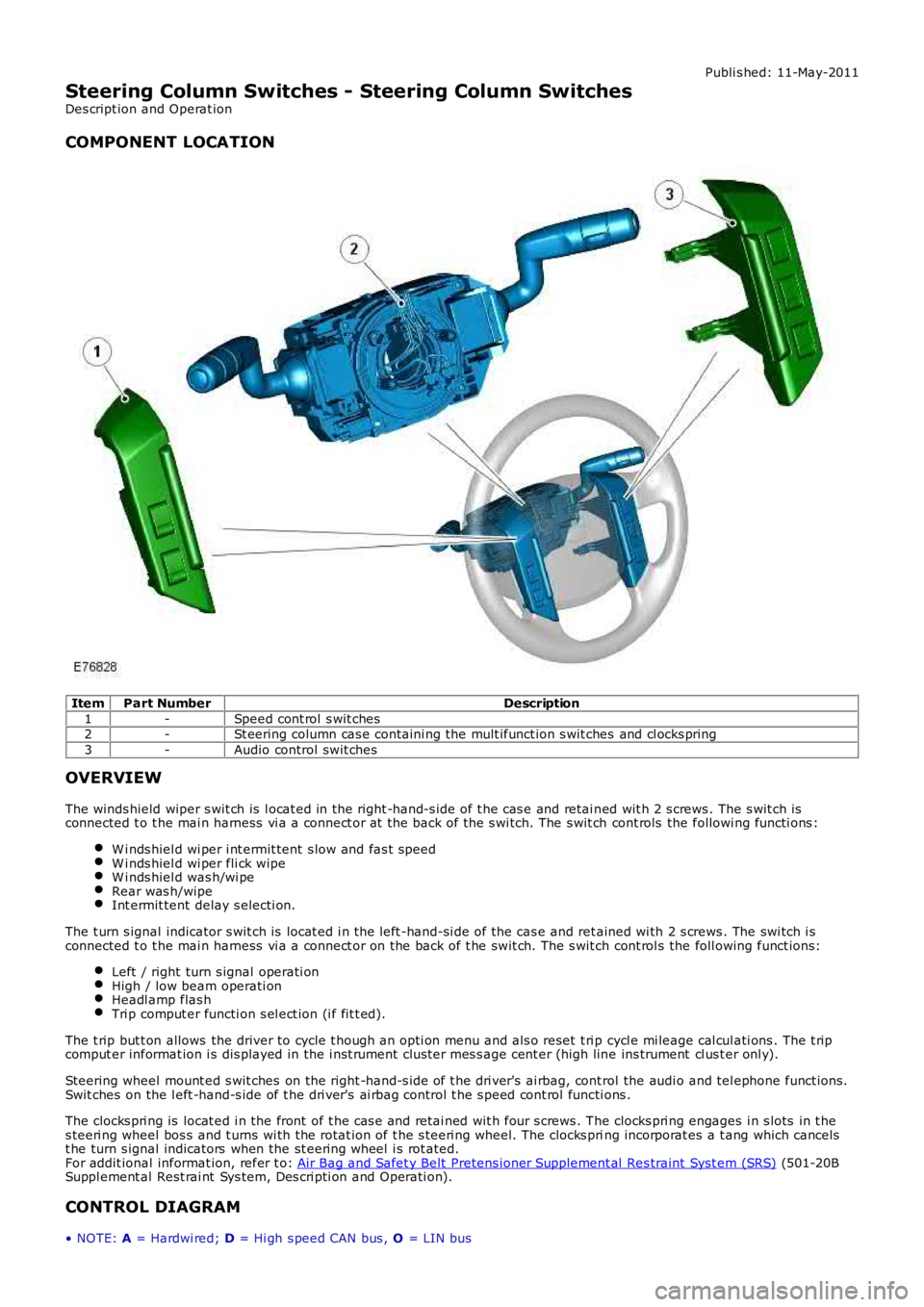
ItemPart NumberDescription
1-Speed cont rol s wit ches2-St eering column cas e containi ng the mult ifunct ion s wit ches and cl ocks pring
3-Audio control swit ches
OVERVIEW
The winds hield wiper s wit ch is l ocat ed in the right -hand-s ide of t he cas e and retai ned wit h 2 s crews . The s wit ch isconnected t o t he mai n harness vi a a connect or at the back of the s wi tch. The s wit ch cont rols the followi ng functi ons :
W i nds hiel d wi per i nt ermit tent s low and fas t speedW i nds hiel d wi per fli ck wipeW i nds hiel d was h/wi peRear was h/wipeInt ermit tent delay s electi on.
The t urn s ignal indicator s wit ch is locat ed i n t he left -hand-si de of the cas e and ret ained wi th 2 s crews . The swi tch i sconnected t o t he mai n harness vi a a connect or on the back of t he swit ch. The s wit ch cont rol s the foll owing funct ions:
Left / right turn s ignal operati onHigh / low beam operati onHeadl amp flas hTri p comput er functi on s el ect ion (i f fit t ed).
The t rip but t on allows the driver to cycle t hough an opti on menu and als o reset t ri p cycl e mi leage cal cul ati ons . The t ripcomput er informat ion i s dis played in the i nst rument clus ter mes s age cent er (high line ins trument cl us t er onl y).
Steering wheel mount ed s wit ches on the right -hand-s ide of t he dri ver's ai rbag, cont rol the audi o and tel ephone funct ions.Swit ches on the l eft -hand-s ide of t he dri ver's ai rbag control t he s peed cont rol functi ons .
The clocks pri ng is locat ed i n the front of t he cas e and retai ned wit h four s crews . The clocks pri ng engages i n s lots in t hes teeri ng wheel bos s and t urns wi th the rotat ion of t he s teeri ng wheel. The clocks pring incorporat es a t ang which cancelst he turn s ignal indicators when the st eering wheel i s rot ated.For addit ional informat ion, refer t o: Air Bag and Safet y Belt Pretens ioner Supplement al Res traint Syst em (SRS) (501-20BSuppl ement al Rest rai nt Sys tem, Des cri pti on and Operati on).
CONTROL DIAGRAM
• NOTE: A = Hardwi red; D = Hi gh s peed CAN bus , O = LIN bus
Page 589 of 3229
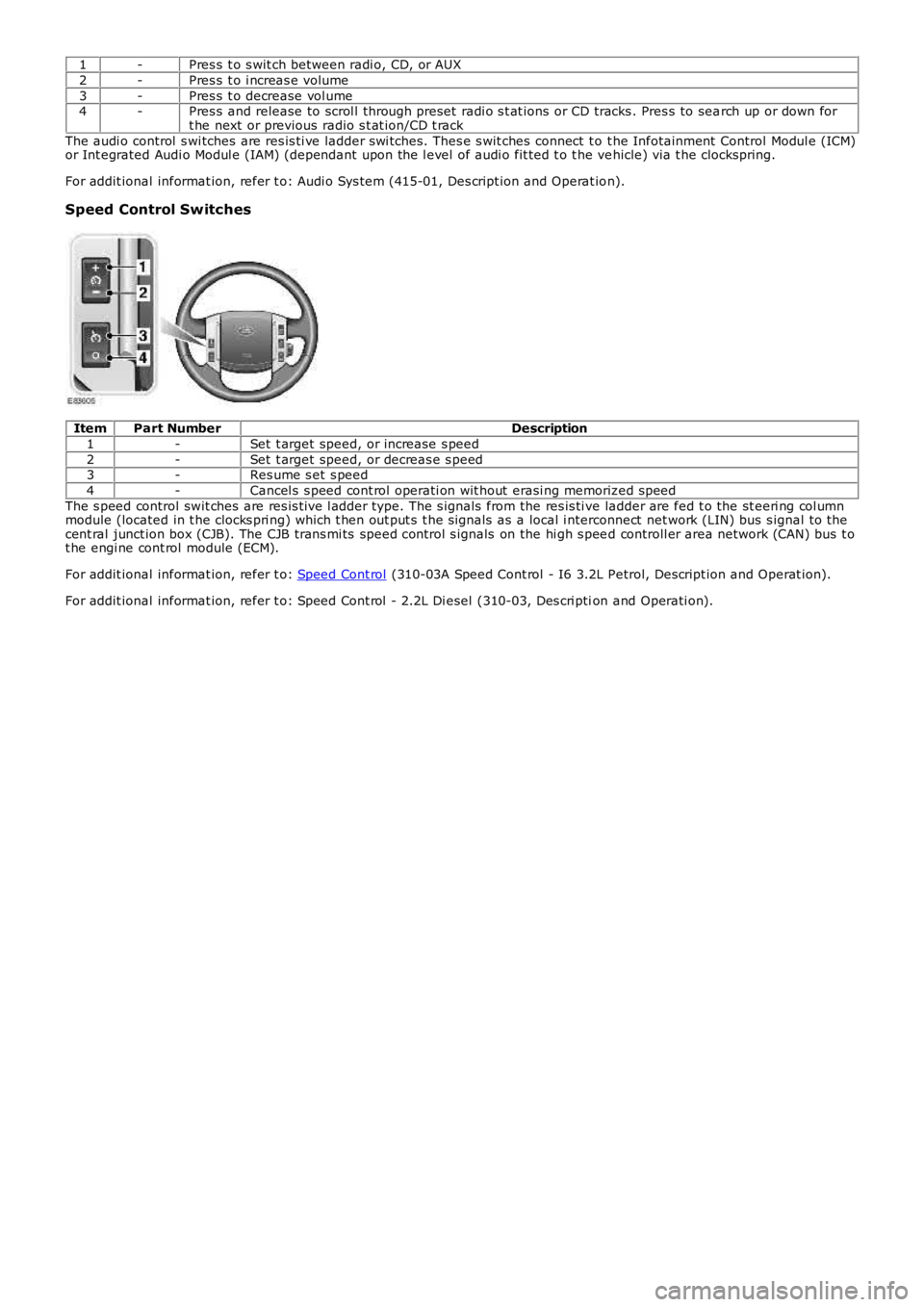
1-Pres s t o s wit ch between radi o, CD, or AUX
2-Pres s t o i ncreas e volume
3-Pres s t o decrease vol ume4-Pres s and release to scrol l through preset radi o s t at ions or CD tracks . Pres s to search up or down fort he next or previous radio s t at ion/CD t rack
The audi o control s wi tches are res is ti ve ladder swi tches. Thes e s wit ches connect t o t he Infotainment Control Modul e (ICM)or Int egrated Audi o Modul e (IAM) (dependant upon the l evel of audi o fit ted t o t he vehicle) via t he clockspring.
For addit ional informat ion, refer t o: Audi o Sys tem (415-01, Des cript ion and Operat ion).
Speed Control Switches
ItemPart NumberDescription
1-Set t arget speed, or increase s peed
2-Set t arget speed, or decreas e s peed3-Res ume s et s peed
4-Cancel s s peed cont rol operati on wit hout erasi ng memorized s peed
The s peed control swit ches are res is t ive l adder type. The s ignals from the res is ti ve ladder are fed t o the st eeri ng col umnmodule (located in t he clocks pri ng) which t hen out put s t he s ignals as a local i nterconnect net work (LIN) bus s ignal to thecent ral junct ion box (CJB). The CJB trans mi ts speed cont rol s ignals on the hi gh s peed controll er area network (CAN) bus t ot he engi ne cont rol module (ECM).
For addit ional informat ion, refer t o: Speed Cont rol (310-03A Speed Cont rol - I6 3.2L Petrol, Des cript ion and Operat ion).
For addit ional informat ion, refer t o: Speed Cont rol - 2.2L Di esel (310-03, Des cri ption and Operati on).
Page 1411 of 3229
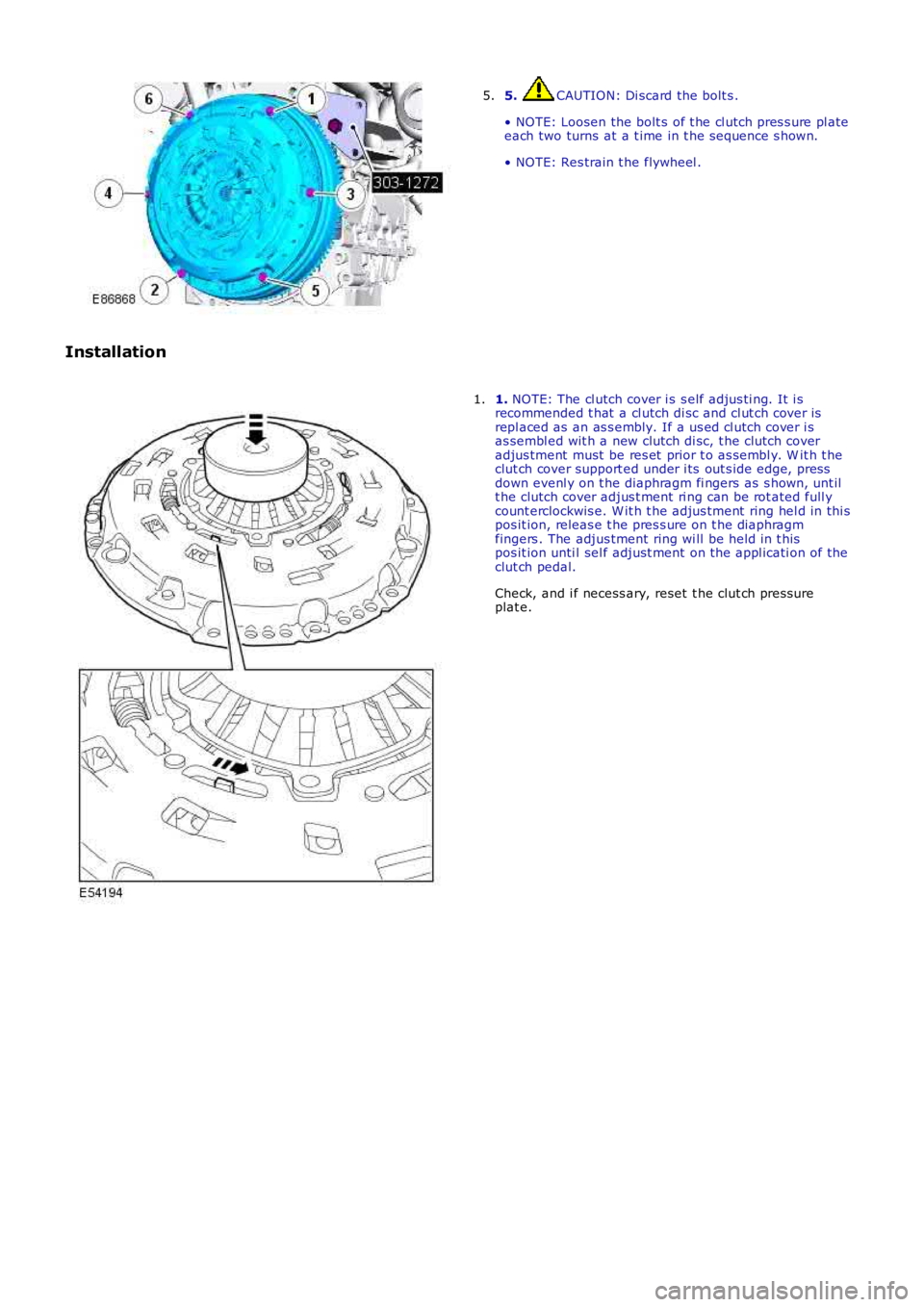
5. CAUTION: Di scard the bolt s .
• NOTE: Loosen the bolt s of t he cl utch pres s ure pl ateeach two turns at a t ime in t he s equence s hown.
• NOTE: Res train t he flywheel .
5.
Installation
1. NOTE: The cl utch cover i s s elf adjus ti ng. It i srecommended t hat a cl utch di sc and cl ut ch cover isrepl aced as an as s embly. If a us ed cl utch cover i sas sembl ed wit h a new clutch di sc, t he clutch coveradjus tment must be res et prior t o as sembl y. W it h t heclut ch cover support ed under i ts out s ide edge, pressdown evenl y on t he diaphragm fi ngers as s hown, unt ilt he clutch cover adjus t ment ri ng can be rot ated full ycount erclockwis e. W it h t he adjus tment ring hel d in thi spos it ion, releas e t he pres s ure on t he diaphragmfingers . The adjus tment ring wi ll be held in t hispos it ion unti l sel f adjust ment on t he appl icati on of theclut ch pedal.
Check, and i f necess ary, reset t he clut ch press ureplat e.
1.
Page 1612 of 3229
Publi s hed: 11-May-2011
Speed Control - I6 3.2L Petrol - Speed Control
Des cript ion and Operat ion
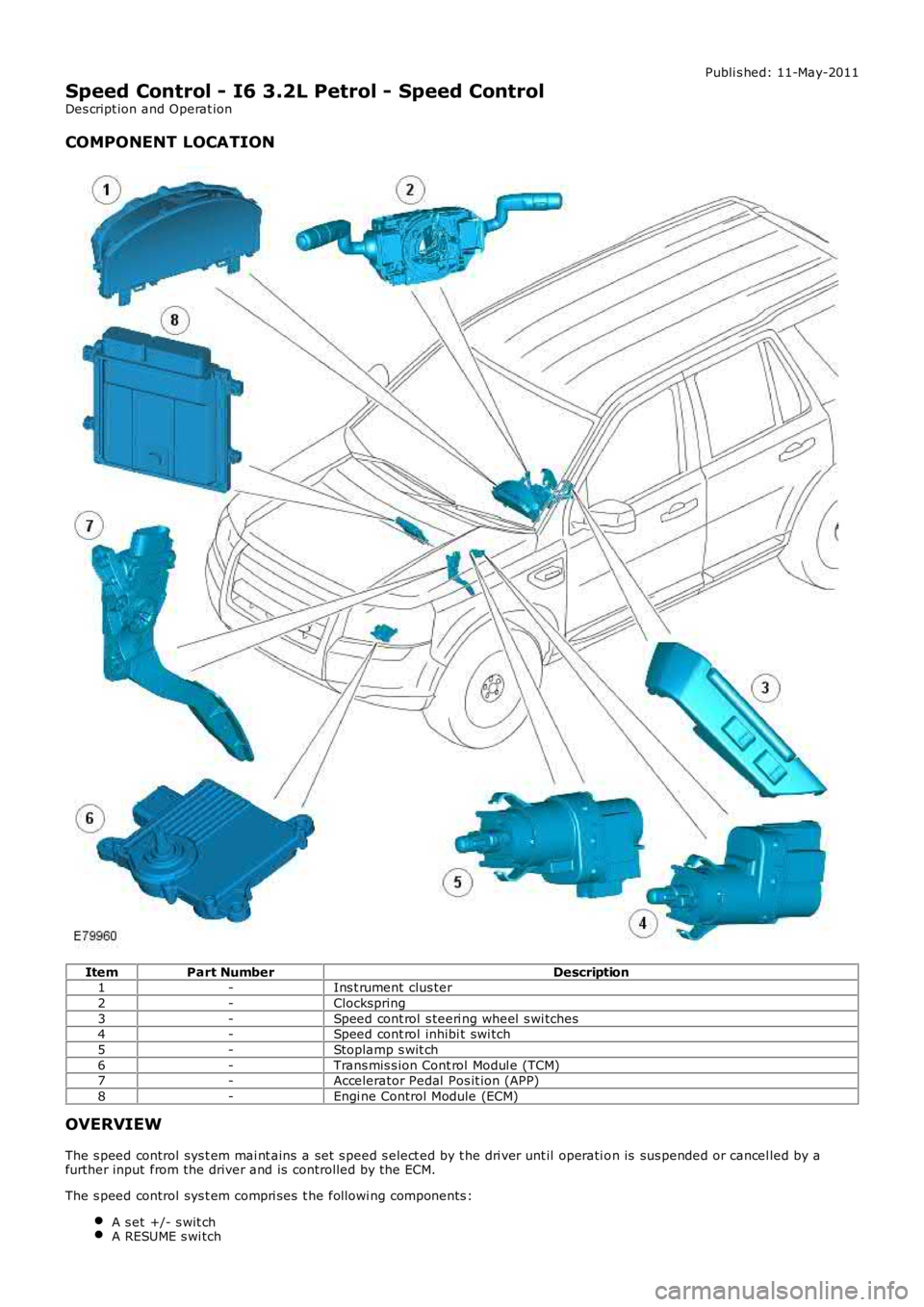
COMPONENT LOCATION
ItemPart NumberDescription1-Ins t rument clus ter
2-Clockspring
3-Speed cont rol s teeri ng wheel s wi tches4-Speed cont rol inhibi t swi tch
5-Stoplamp s wit ch
6-Trans mis s ion Cont rol Modul e (TCM)7-Accelerator Pedal Pos it ion (APP)
8-Engi ne Control Module (ECM)
OVERVIEW
The s peed control sys t em mai nt ains a set s peed s elect ed by t he dri ver unt il operati on is sus pended or cancel led by afurther input from the driver and is controlled by the ECM.
The s peed control sys t em compri ses t he followi ng components :
A s et +/- s wit chA RESUME s wi tch
Page 1613 of 3229
A CANCEL s wit ch.
The s ys t em al so uses t he fol lowi ng:
The ECMThe s toplamp s wit ch.The APP s ens or
The ECM controls t he s et speed by modi fying engine speed/t orque and reques ti ng gear changes from t he transmis si on(aut omati c variant s only).
The s peed control sys t em als o us es i nput s from t he brake pedal swit ch, t he APP s ens or, t he ECM and t he ABS controlmodule.
The s peed control is operat ed by t he dri ver us ing only the s t eering wheel s wit ches . W hen s peed is act ive, the ECMregulat es the PW M s i gnal s to the fuel injectors t o adjus t the fuel supply as required to maintai n t he s et s peed.
Duri ng s peed control operat ion, t he ECM control s vehicle s peed by adjus ti ng fuel inject ion durat ion and ti ming. W hen t heaccelerator pedal i s pres s ed wit h s peed cont rol act ive, t he ECM output s a calculated throt tl e angle s i gnal in place of theact ual throt t le angle si gnal s produced by the APP s ens or. The cal cul ated t hrot tl e angle i s deri ved from fuel demand.
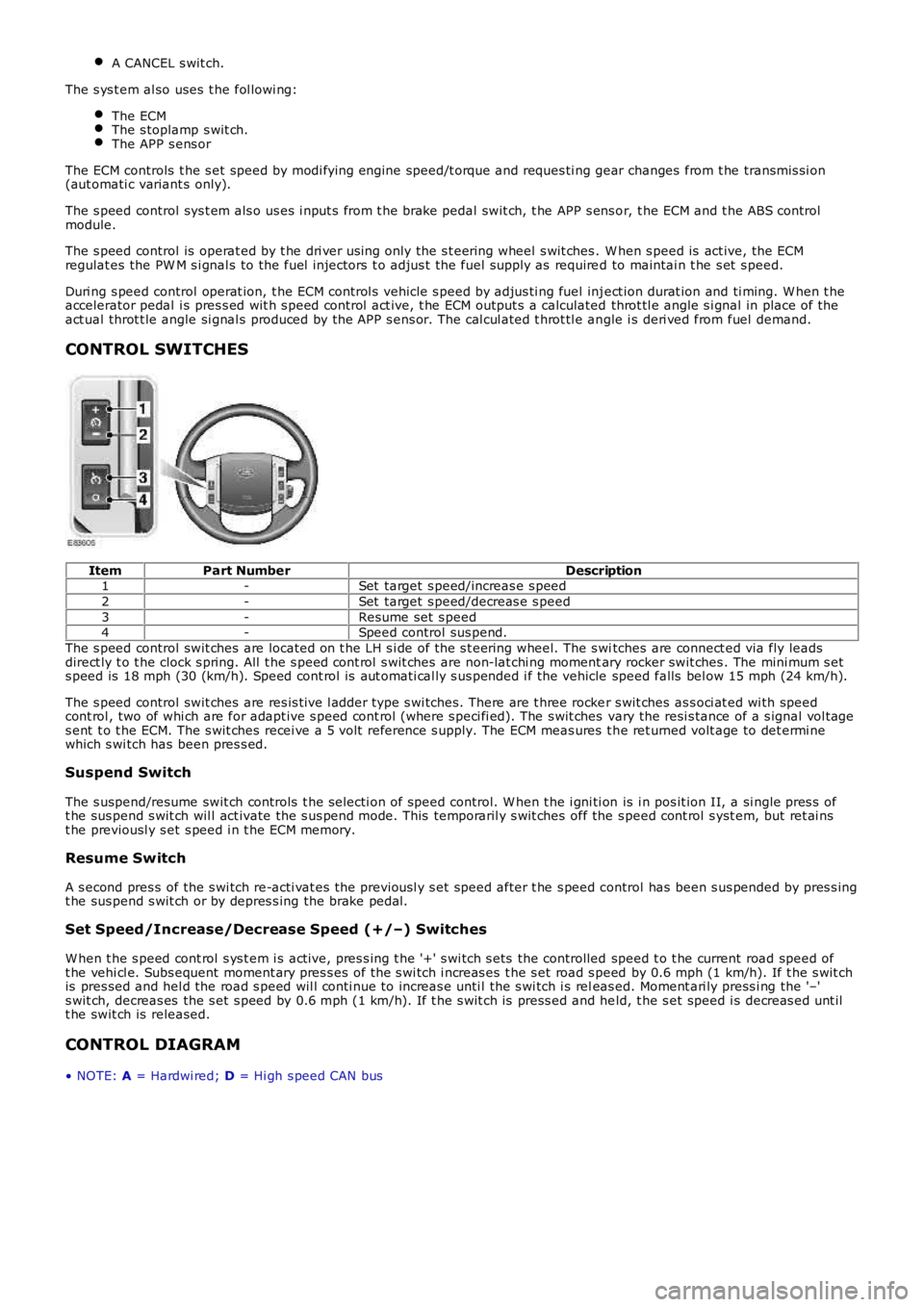
CONTROL SWITCHES
ItemPart NumberDescription1-Set target s peed/increas e s peed
2-Set target s peed/decreas e s peed
3-Resume set s peed4-Speed control sus pend.
The s peed control swit ches are located on t he LH s i de of the s t eering wheel. The s witches are connect ed via fly leadsdirect ly t o t he clock s pring. All t he s peed cont rol s wit ches are non-lat chi ng momentary rocker swit ches . The mini mum s ets peed is 18 mph (30 (km/h). Speed cont rol is aut omati cal ly s us pended i f the vehicle speed falls bel ow 15 mph (24 km/h).
The s peed control swit ches are res is t ive l adder type s wi tches. There are t hree rocker s wit ches as s oci at ed wi th speedcont rol , two of whi ch are for adapt ive s peed cont rol (where s peci fi ed). The s wit ches vary the resi s tance of a s ignal vol tages ent t o t he ECM. The s wit ches recei ve a 5 volt reference s upply. The ECM meas ures t he ret urned volt age to det ermi newhich s wi tch has been pres s ed.
Suspend Switch
The s uspend/resume swit ch controls t he s electi on of speed control. W hen t he i gni ti on is i n pos it ion II, a si ngle pres s oft he sus pend s wit ch wil l act ivate the s us pend mode. This temporaril y s wit ches off the s peed cont rol s yst em, but ret ai nst he previousl y s et s peed i n t he ECM memory.
Resume Switch
A s econd pres s of the s wi tch re-acti vat es the previousl y s et speed after t he s peed control has been s us pended by pres s ingt he sus pend s wit ch or by depres s ing the brake pedal.
Set Speed/Increase/Decrease Speed (+/–) Switches
W hen t he s peed cont rol s ys t em i s act ive, pres s ing t he '+' s wi tch s ets the controlled speed t o t he current road speed oft he vehi cl e. Subs equent moment ary pres s es of the s wi tch i ncreas es t he s et road s peed by 0.6 mph (1 km/h). If t he s wit chis pres sed and hel d the road s peed wil l conti nue to increas e unti l the s wi tch i s releas ed. Moment ari ly press i ng the '–'s wit ch, decreas es the s et s peed by 0.6 mph (1 km/h). If t he s wit ch is press ed and held, t he s et speed i s decreas ed unt ilt he swit ch is released.
CONTROL DIAGRAM
• NOTE: A = Hardwi red; D = Hi gh s peed CAN bus
Page 1623 of 3229
Publi s hed: 11-May-2011
Speed Control - TD4 2.2L Diesel - Speed Control2.2L Diesel
Des cript ion and Operat ion
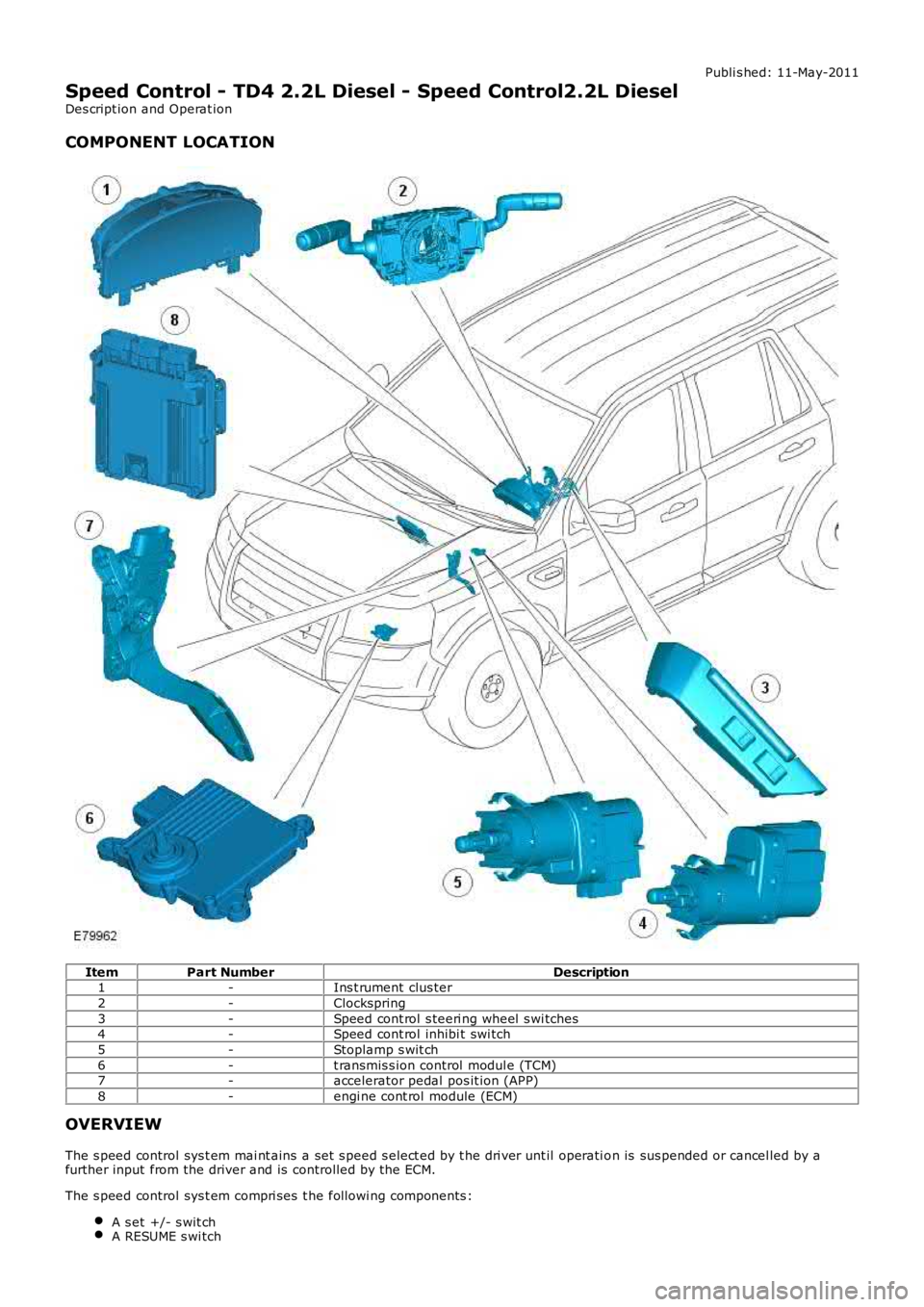
COMPONENT LOCATION
ItemPart NumberDescription1-Ins t rument clus ter
2-Clockspring
3-Speed cont rol s teeri ng wheel s wi tches4-Speed cont rol inhibi t swi tch
5-Stoplamp s wit ch
6-t ransmis s ion control modul e (TCM)7-accelerator pedal pos it ion (APP)
8-engi ne cont rol module (ECM)
OVERVIEW
The s peed control sys t em mai nt ains a set s peed s elect ed by t he dri ver unt il operati on is sus pended or cancel led by afurther input from the driver and is controlled by the ECM.
The s peed control sys t em compri ses t he followi ng components :
A s et +/- s wit chA RESUME s wi tch
Page 1653 of 3229
motor. A Hal l eff ect sens or l ocat ed withi n the st epper motor inf orms the ATC module that move me nt of the ste ppe r motor ist aking pl ace.
Air Temperature Control - Single Zone Manual System
Cabin tempe rature s election is made by turning the LH rota ry controller to t he required pos ition. Turning the controller counterclockwise wil l lower the tempera ture of t he air e xiting the heate r as sembly; turning the control ler clockwise wi ll rai se t het emperat ure of t he a ir exiting the he ate r as sembly.
Maxi mum he ating and cooling is represe nted on the control panel by a red a nd blue dot res pect ivel y. W hen eit her maximumheat ing or cooling is sele cte d, the 'comf ort' algorithm in the ATC modul e wi ll adopt a suitable s trat egy for air s ource, a irdistributi on a nd blower s pee d to ma inta in maximum hea ting or cool ing within t he cabin.
The ATC module adjusts the temperature of the air exit ing t he heat er a ssembly by moving the pos ition of the tempera tureblend door. The tempera ture ble nd door dire cts a proportion of cool ed a ir from t he evaporat or t hrough the heat er core toproduce the required temperature output. The ATC module a djusts t he posi tion of t he t empera ture blend door by provi dingLIN bus mes sage s to the ble nd door ste ppe r motor. A Hall e ffect se nsor located wit hin the stepper motor i nforms t he ATCmodule t hat moveme nt of the st epper motor is taking place .
Air Temperature Control - Dual Zone Automatic System
Dual zone systems f eature 2 rot ary heat ing cont rolle rs, which a llow indi vidual climate control for the LH and RH sides of thecabin. Te mpe rature s election can be ma de by turning the controller to t he requi red tempera ture ma rked on the control panel.Turni ng e ithe r controller pas t the 16°C (61°F) mark will initi ate the maximum cooling s trate gy; turning either controlle r pa stt he 28°C (82°F) mark wi ll initiat e the maximum hea ting stra tegy.
• NO TE: Maximum cooling or hea ting can only be achieved i f both rotary control lers are set to t he s ame position.
The ATC module is a ble to maint ain constant te mpe ratures in both side s of the cabin by monit oring the fee dba ck f rom thecabin temperature se nsor. Unles s any manual overri des have be en s ele cted, the ATC module will a utomati cally control thei ntake ai r source , air dis tribution int o the ca bin and blower spee d to ma inta in t he requi red tempera ture s.
Dual zone systems f eature 2 temperature bl end doors, a llowing individual t emperat ure output for t he LH a nd RH si des of t hecabin.
• NO TE: The drivers side temperature se tting ha s priorit y over t he pass engers s ide tempera ture se tting.
The t empera ture ble nd doors are mounte d on the LH side of the hea ter ass embly a nd direct a proportion of cooled air fromt he e vaporat or through t he heat er core t o provide the re quired t empera ture out puts . The ATC module controls the posi tion oft he t emperat ure blend doors by providing LIN bus mess ages to the blend door stepper mot ors. Hal l eff ect sens ors loca tedwithi n the st epper motors inform the ATC modul e that move ment of the ste ppe r motors is taki ng place .
Blower Motor Control - Single Zone Manual System
Blower motor spe ed is se t by turning the RH rot ary cont rolle r to the require d position. The RH rotary controller allows t hes election of 14 blowe r motor spe eds . Turning the controller fully counte r clockwise will turn the blower mot or off.
O peration of the blower mot or is control led by t he ATC module via t he blower motor control module . The ATC module provi desa PW M s igna l to the blower mot or control modul e ba sed on the sele cted blower spe ed. The blower mot or control modulei nterpret s the PW M s igna l as a blower motor spe ed and controls the vol tage to the blower mot or a ccordingly.
Blower Motor Control - Dual Zone Automatic System
Blower motor spe ed is controlled automa tica lly by the ATC module unle ss a ma nual override ha s be en requeste d. Manualoverrides to blower motor speed can be made by turning the centra l rot ary cont rolle r to the require d position. The rota rycontrolle r all ows the manual sele ction of 7 blower motor spe eds . Turning the controller fully counte r clockwise will turn theblower motor off . W hen a manua l override has been ma de, the 'AUTO' LED loca ted in the ce nte r of the rota ry controlle r wil le xtinguis h.
• NO TE: The central rota ry controller contains 2 LED's. The t op (round) LED will illumina te when the blower motor i s undera utomati c control. The bottom (recta ngular) LED wil l illuminated when a ir distri bution i nto the cabi n is under a utomati ccontrol (s ee below).
The blower motor ca n be ret urne d to aut oma tic cont rol by press ing the 'AUTO' s witch locate d in the center of t he rotarycontrolle r. Under aut oma tic cont rol, the ATC module varies t he s pee d of the blower motor i n line with i ts 'comf ort' algorithmt o maint ain t he required cabin te mperat ure. The ATC modul e wi ll al so vary the blower motor speed to compens ate for the rame ffect on inta ke air produced by forward moveme nt of the ve hicl e.
O peration of the blower mot or is control led by t he ATC module via t he blower motor control module . The ATC module provi desa PW M s igna l to the blower mot or control modul e ba sed on the required blower spe ed. The blower mot or control modulei nterpret s the PW M s igna l as a blower motor spe ed and controls the vol tage to the blower mot or a ccordingly.
Air Distribution Control - Single Zone Manual System
Air distri buti on into t he cabi n ca n be adj uste d by turning the ce ntra l rot ary cont rolle r to the require d positi on. The ATC modulea djus ts t he posit ion of t he a ir di stribution door to the re qui red posi tion by providing LIN bus messa ges to the air distribut iondoor stepper motor. A Ha ll e ffect se nsor loca ted wit hin the stepper mot or informs t he ATC module that movement of t hes tepper motor is taking place.
Air Distribution Control - Dual Zone Automatic System
Air distri buti on into t he cabi n is cont rolle d a utomati cally by the ATC module unless any ma nual ove rrides have bee nreque ste d. Manual overri des can be made by pre ssing the a ppropria te a ir di stribution mome nta ry s witch on the control panel.If a manual override has bee n re que sted, the 'AUTO ' LED locate d in the center of the blowe r motor rota ry controlle r wi lle xtinguis h.
• NO TE: The central rota ry controller contains 2 LED's. The t op (round) LED will illumina te when the blower motor i s undera utomati c control (se e a bove ). The bott om (rect angular) LED wi ll ill uminate d when air distribut ion into the cabin is under
Page 1795 of 3229
The current vehicle operat ing mode, s hown in parenthes is above, i s dis played in the odomet er for 5 s econds when t hevehi cl e first ent ers power mode 6.
• NOTE: 'Nor' is only di s pl ayed in t he Odometer when t he vehicle operat ing mode is changed t o normal from any of theother vehi cle operat ing modes . Under al l ot her condit ions , 'Nor' is not di spl ayed.
The vehi cl e operat ing mode can be changed us i ng the Land Rover approved di agnos ti c sys t em.
Gear Position
The gear pos it ion i ndicat or s hows the current aut omati c t ransmis s ion s elector l ever posi ti on. During normal operat ion thedis play wi ll s how P (park), R (revers e), N (neutral) and D (drive). W hen the t rans mis s ion is operat ed in 'CommandShi ft ™'mode, the odomet er di spl ays the current ly sel ect ed manual gear; 1, 2, 3, 4, 5 or 6.
In the event of eit her a CAN bus fai lure, or if t he TCM det ect s a t rans mi ss i on overheat s it uati on, t he odometer wi ll dis playt he let ter 'E' in the s ame area of t he dis play as t he 'CommandShift™' s elected gear informat ion.
Supplemental Restrain System Warning Indicator
If the i nst rument clus ter det ect s the Supplement al Res t raint Sys tem (SRS) warni ng indicator has fai led, t he mes sage 'SrS'wil l be dis played in the odomet er and a DTC s tored. The DTC can be ret rieved from the ins trument cl us t er us i ng the LandRover approved diagnost ic sys tem.
Service Interval Indicator
The Service Interval Indi cat or (SII) i nforms t he driver when t he next vehicle servi ce is due. The ins t rument clus ter monit orst he dis tance t he vehi cl e has travel ed and t he ti me el aps ed s ince t he las t s ervice.
If vehicle dis tance is the t rigger for the SII, 'SERVICE' will be di s pl ayed in t he odometer accompanied by a dis tancequal ifier (ei ther 'MILES' or 'KM' dependi ng on t he ins trument cl ust er s pecificati on). A di st ance counter wi ll als o be di s pl ayedin the t op Ri ght Hand (RH) corner of t he odometer. If t he point at which a servi ce is requi red is pas sed, t he count er wi lldis play a negat ive value. W hen acti vat ed, t he SII is di spl ayed for 5 s econds when t he vehi cl e enters power mode 6.
If ti me i s the trigger for the SII, 'SERVICE' wil l be di s pl ayed in t he odometer accompanied by a clock symbol . A count er willals o be di spl ayed i n t he t op RH corner of the odomet er. If t he point at which a s ervice is required is pas s ed, t he count erwil l dis play a negati ve val ue. Agai n, when act ivated t he SII is dis played for 5 s econds when t he vehi cl e enters power mode6.
If bot h t he dis tance and t ime triggers are acti vat ed, t he SII wil l di s pl ay the di s tance informat ion for 5 s econds, foll owedby t he ti me i nformati on for 5 s econds .
W hen a service has been carri ed out , t he SII wi ll need t o be re-s et. This can be done us ing t he Land Rover approveddiagnost ic s ys tem or foll owing a manual re-s et procedure. The manual re-s et mode is ent ered by carrying out the foll owingrout ine:
Pres s and hold the t ri p res et butt on wi th the vehicle st ati onary and in a power mode les s t han 6.W hi le holdi ng the trip res et but ton, enter t he vehi cl e int o power mode 6.Releas e the trip res et but ton wit hi n 10 s econds of entering power mode 6.
If the manual re-set mode has been s ucces s full y entered 'dISt ' or 'DATE' wi ll be di spl ayed i n t he odomet er, dependi ng onwhich t ri gger has been acti vat ed.
To clear the 'dISt ' trigger pres s, and hold the t rip reset but ton for more than 5 s econds wit hi n 10 s econds of entering t hemanual re-s et mode. If s ucces s ful, 'RESET' wil l be dis played in the odometer for 5 seconds. If t he dat e t ri gger has notbeen act ivated 'END' wil l t hen be dis played i n t he odomet er.
• NOTE: The dis t ance t ri gger wi ll not res et if t he dis t ance t he vehi cle has t raveled i s les s t han 20% of t he next s ervi ceint erval val ue.
If the dat e trigger has been act ivated, 'DATE' wil l be dis played in t he odometer. To clear the t ri gger, pres s and hold t het rip res et but t on for more t han 5 s econds wit hin 10 s econds of 'DATE' being di s pl ayed. If succes s ful , 'RESET' wi ll bedis played wit hin the odomet er for 5 s econds fol lowed by 'END'. The odomet er wil l now exit re-s et mode.
AMBIENT AIR TEMPERATURE
The ins t rument clus ter can dis play t he ambient air t emperature readi ng in ei ther degrees Cels ius or Fahrenhei t. Theambient air t emperat ure s ignal ori gi nat es i n the ambient air t emperature s ens or. The s ens or i s a Negati ve TemperatureCoefficient (NTC) t hermi st or, and i s mounted i n t he LH door mirror. A t emperature value i s cal cul ated by t he ECM andbroadcas t over the hi gh speed CAN bus to t he i ns t rument clus ter.
If the t emperat ure value fall s bel ow 4ºC (39ºF) t he mes sage center wi ll flas h the low ambi ent ai r temperat ure icon 5t imes . Thi s i s accompanied by a chime from the i nst rument clus t er s ounder. The low ambient air t emperature icon wi ll berepeated if t he ambient air t emperature ri s es above 6ºC (43ºF) t hen drops below 4ºC (39ºF) again or a new ignit ion cycleis st art ed.
Page 1827 of 3229
Publi s hed: 11-May-2011
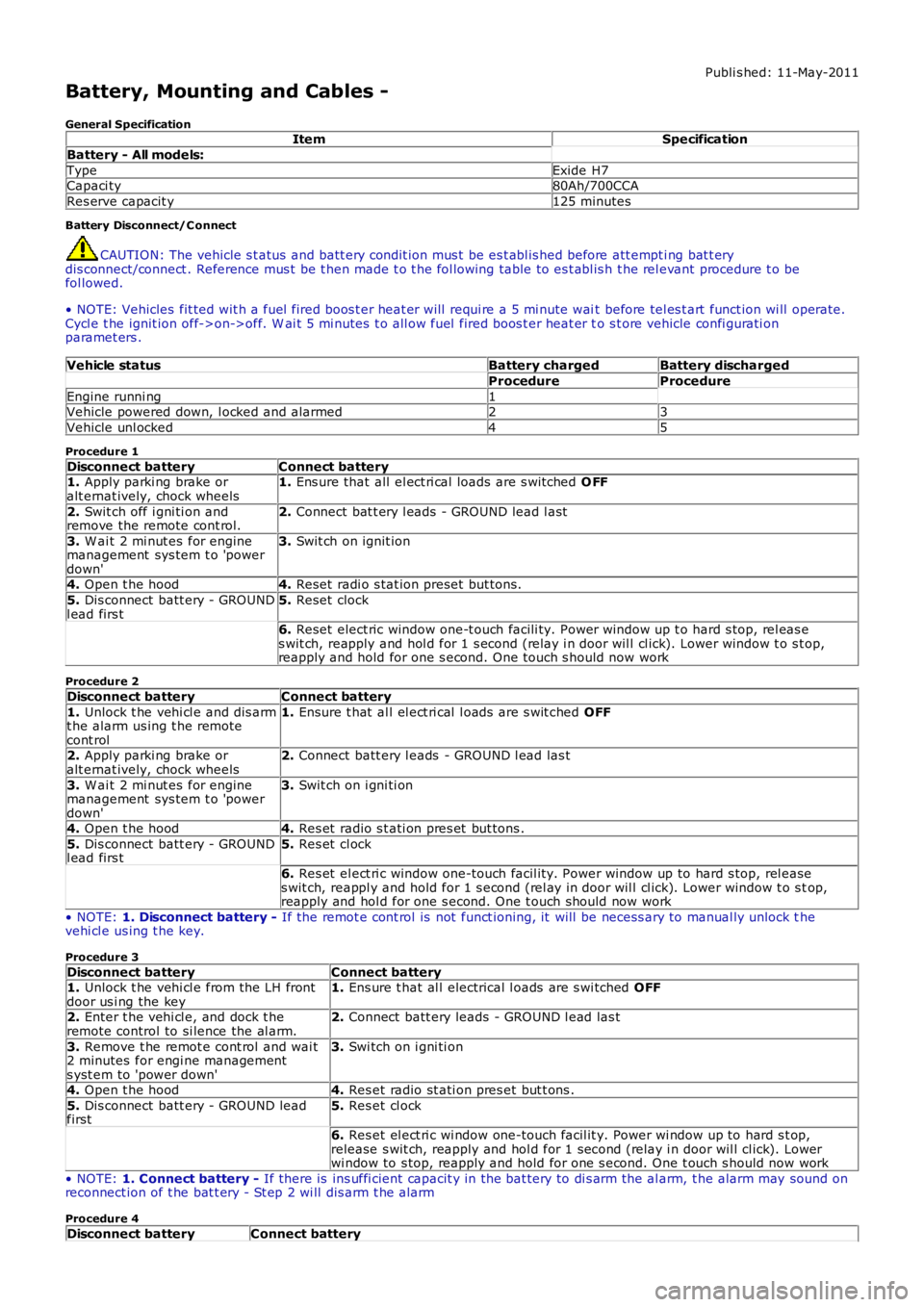
Battery, Mounting and Cables -
General SpecificationItemSpecification
Battery - All models:
TypeExide H7Capaci ty80Ah/700CCA
Res erve capacit y125 minutes
Battery Disconnect/C onnect
CAUTION: The vehicle s t atus and batt ery condit ion mus t be es t abl is hed before att empti ng bat t erydis connect/connect . Reference mus t be t hen made t o t he fol lowing table to es t abl is h t he rel evant procedure t o befol lowed.
• NOTE: Vehicles fit ted wit h a fuel fired boos t er heat er will requi re a 5 mi nute wait before tel es t art funct ion wi ll operate.Cycl e t he ignit ion off->on->off. W ai t 5 mi nutes t o all ow fuel fired boos t er heat er to s t ore vehicle confi gurati onparamet ers .
Vehicle statusBattery chargedBattery discharged
ProcedureProcedure
Engine runni ng1Vehicle powered down, l ocked and alarmed23
Vehicle unl ocked45
Procedure 1
Disconnect batteryConnect battery1. Apply parki ng brake oralt ernat ively, chock wheels1. Ens ure that all el ect ri cal loads are s wit ched O FF
2. Swit ch off i gni ti on andremove the remote cont rol.2. Connect bat t ery l eads - GROUND lead l ast
3. W ai t 2 mi nut es for enginemanagement sys tem t o 'powerdown'
3. Swit ch on ignit ion
4. Open t he hood4. Reset radi o s tat ion preset but tons .
5. Dis connect batt ery - GROUNDl ead firs t5. Reset clock
6. Reset elect ric window one-t ouch facili ty. Power window up t o hard s top, rel eas es wit ch, reapply and hol d for 1 s econd (relay i n door wil l cl ick). Lower window t o s top,reapply and hold for one s econd. One t ouch s hould now work
Procedure 2
Disconnect batteryConnect battery
1. Unlock t he vehi cl e and dis armt he alarm us ing t he remotecont rol
1. Ensure t hat al l el ect ri cal l oads are s wit ched OFF
2. Apply parki ng brake oralt ernat ively, chock wheels2. Connect batt ery l eads - GROUND l ead las t
3. W ai t 2 mi nut es for enginemanagement sys tem t o 'powerdown'
3. Swit ch on i gni ti on
4. Open t he hood4. Res et radio s t ati on pres et but tons .
5. Dis connect batt ery - GROUNDl ead firs t5. Res et cl ock
6. Res et el ect ri c window one-touch facil it y. Power window up to hard s top, rel eases wit ch, reappl y and hold for 1 s econd (rel ay in door wil l cl ick). Lower window t o s top,reapply and hol d for one s econd. One t ouch should now work
• NOTE: 1. Disconnect battery - If the remot e cont rol is not funct ioning, it will be necess ary to manual ly unlock thevehi cl e us ing t he key.
Procedure 3
Disconnect batteryConnect battery1. Unlock t he vehi cl e from the LH frontdoor us i ng the key1. Ens ure t hat al l electrical l oads are s wi tched OFF
2. Enter t he vehi cl e, and dock t heremote control to si lence the al arm.2. Connect batt ery leads - GROUND l ead las t
3. Remove t he remot e cont rol and wai t2 minutes for engi ne managements yst em to 'power down'
3. Swi tch on i gni ti on
4. Open t he hood4. Res et radio st ati on pres et but t ons .
5. Dis connect batt ery - GROUND leadfirst5. Res et cl ock
6. Res et el ect ri c wi ndow one-touch facil it y. Power wi ndow up to hard s t op,release s wit ch, reapply and hol d for 1 second (relay i n door wil l cl ick). Lowerwi ndow to s top, reapply and hold for one s econd. One t ouch s hould now work
• NOTE: 1. Connect battery - If there is ins uffi cient capacit y in the bat tery to di s arm the al arm, t he alarm may sound onreconnect ion of t he bat t ery - St ep 2 wi ll dis arm t he alarm
Procedure 4
Disconnect batteryConnect battery
Page 2751 of 3229

31
Quick start
R
Clock setting
Standard audio
Premium audio
1. Switch on the audio system, by pressing
the volume rotary control.
2. Press the MENU button to access the
function menu.
3. Rotate the control to select Clock and
press to confirm selection.
4. On standard audio units, rotate the control
to select Set and press to confirm
selection.
5. Rotate the control to adjust the hour and
minutes. Press the c ontrol to confirm
setting after each action. On premium
audio units, the time mode (12 or 24 hr)
can also be set from this menu.
6. Once the time has been set, on standard
audio units, OK will be highlighted. Press
the rotary control to accept the settings.
Press the EXIT button on premium audio
units to cancel and return to the menu.
Telephone - Bluetooth system
Mobile phones with Blue tooth capability can
communicate with the vehicle’s inbuilt
telephone feature. You must pair your
Bluetooth mobile phone with the vehicle’s
system before use. Pairing a phone to the vehicle's system
1. With the ignition on, press the telephone
mode button on the audio unit.
2. When prompted, press the ENTER control
to confirm that you want to pair a
telephone to the system.
3. The system will ask you to check that your
Bluetooth function on your telephone is
enabled. Press the ENTER control to
confirm. The system will then search for
your telephone.
4. After the search is completed, the detected
telephones will be listed. Rotate the ENTER
control to scroll through the list and press
to select the correct telephone.
5. The audio unit will then display a Bluetooth
access code number. Enter this number
into your telephone. The telephone will
now pair to the system.
6. If the pairing fails, a message will appear
on the audio unit display. Press the ENTER
control to retry or press the EXIT button
and restart the process.
7. To cancel the pairing process, press and
hold the telephone button on the audio
unit.
Clock
OK06 :
15SetPM
E84423
CANCEL SET
Time SetPM
1:39
E84424
Mobile phone compatibility
Not all phones are fully compatible with the
Land Rover system. For the latest list of
compatible phones and software versions,
please refer to
www.ownerinfo.landrover.com .
Alternatively consult your Land Rover
Dealer/Authorised Repairer.