USB port Lexus CT200h 2013 Owner's Manual (in English)
[x] Cancel search | Manufacturer: LEXUS, Model Year: 2013, Model line: CT200h, Model: Lexus CT200h 2013Pages: 688
Page 4 of 688

TABLE OF CONTENTS4
CT200h_OM_OM76102E_(EE)
5-1. Basic Operations
Audio system types ........... 290
Using the steering wheel audio
switches...........................292
AUX port/USB port .......... 293
5-2. Using the audio system
Optimal use of the audio sys-
tem.....................................295
5-3. Using the radio
Radio operation ................. 297
5-4. Playing audio CDs and MP3/
WMA discs
CD player operation .......... 301
5-5. Using an external device
Listening to an iPod .......... 309
Listening to a USB memory
device................................315
Using the AUX port .......... 3205-6. Using Bluetooth® devices
Bluetooth® audio/phone ... 321
Using the steering wheel
switches.........................326
Registering a Bluetooth® audio
system for the first
time..................................327
Registering a Bluetooth® phone
for the first time................328
5-7. Setup menu
Setting up a Bluetooth®
enabled portable
player..............................329
Bluetooth® audio system
setup.................................332
Setting a cellular phone ..... 333
Security and system setup . 336
Using the phone book ....... 339
5-8. Bluetooth® Audio
Operating a Bluetooth® enabled
portable player.................342
5-9. Bluetooth® Phone
Making a phone call .......... 344
Receiving a phone call ...... 346
Speaking on the phone ...... 347
5-10. Bluetooth®
Bluetooth® ........................ 348
5Audio system
Page 5 of 688

5
1
8 7
6
5
4
3
2
CT200h_OM_OM76102E_(EE)
9
5-11. Basic Operations (Lexus Dis-
play Audio System)
Lexus Display Audio sys-
tem..................................354
Steering wheel audio
switched..........................360
USB/AUX ports ................ 361
5-12. Setup (Lexus Display Audio
System)
Setup menu........................ 363
General settings ................. 364
Voice settings .................... 367
Display settings ................. 368
5-13. Using the audio system (Lexus
Display Audio System)
Selecting the audio
source..............................370
Optimal use of the audio sys-
tem...................................371
Audio settings................... 372
Audio menu screen opera-
tion...................................376
5-14. Using the radio (Lexus Display
Audio System)
Radio operation ................. 379
5-15. Playing an audio CD and MP3/
WMA/AAC discs(Lexus Dis-
play Audio System)
CD player operation .......... 3815-16. Using an external device (Lexus
Display Audio System)
Listening to an iPod .......... 387
Using USB memory
device.................................391
Using the AUX port .......... 396
5-17. Connecting Bluetooth® (Lexus
Display Audio System)
Steps for using Bluetooth®
devices..............................397
Registering a Bluetooth®
device...............................399
Selecting a Bluetooth®
device..............................400
Connecting a Bluetooth® audio
player...............................401
Connecting a Bluetooth®
phone..............................402
Displaying a Bluetooth® device
details..............................403
Detailed Bluetooth® set-
tings...............................404
5-18. Bluetooth® Audio (Lexus Dis-
play Audio System)
Listening to Bluetooth®
Audio................................405
Page 290 of 688

288
CT200h_OM_OM76102E_(EE)
5-1. Basic Operations
Audio system types ........... 290
Using the steering wheel
audio switches................. 292
AUX port/USB port .......... 293
5-2. Using the audio system
Optimal use of the audio
system ............................. 295
5-3. Using the radio
Radio operation ................. 297
5-4. Playing audio CDs and
MP3/WMA discs
CD player operation .......... 301
5-5. Using an external device
Listening to an iPod .......... 309
Listening to a USB memory
device .............................. 315
Using the AUX port .......... 320
5-6. Using Bluetooth
® devices
Bluetooth
® audio/phone.... 321
Using the steering wheel
switches........................... 326
Registering a Bluetooth
®
audio system for the
first time .......................... 327
Registering a Bluetooth
®
phone for the first time ... 328
5-7. Setup menu
Setting up a Bluetooth
®
enabled portable player ... 329
Bluetooth
® audio system
setup ................................ 332Setting a cellular phone .... 333
Security and system setup. 336
Using the phone book ....... 339
5-8. Bluetooth
® Audio
Operating a Bluetooth
®
enabled portable player... 342
5-9. Bluetooth
® Phone
Making a phone call ......... 344
Receiving a phone call...... 346
Speaking on the phone...... 347
5-10. Bluetooth
®
Bluetooth®........................ 348
5-11. Basic Operations
(Lexus Display Audio Sys-
tem)
Lexus Display Audio
System ............................ 354
Steering wheel audio
switches .......................... 360
USB/AUX ports................ 361
5-12. Setup (Lexus Display Audio
System)
Setup menu ....................... 363
General settings ................ 364
Voice settings .................... 367
Display settings................. 368
5-13. Using the audio system
(Lexus Display Audio Sys-
tem)
Selecting the audio
source.............................. 370
Page 291 of 688

289
5Audio system
CT200h_OM_OM76102E_(EE)
Optimal use of the audio
system ............................. 371Audio settings ................... 372
Audio menu screen
operation ......................... 376
5-14. Using the radio (Lexus
Display Audio System)
Radio operation................. 379
5-15. Playing an audio CD and
MP3/WMA/AAC discs
(Lexus Display Audio Sys-
tem)
CD player operation.......... 381
5-16. Using an external device
(Lexus Display Audio Sys-
tem)
Listening to an iPod .......... 387
Using USB memory
device.............................. 391
Using the AUX port.......... 396
5-17. Connecting Bluetooth
®
(Lexus Display Audio Sys-
tem)
Steps for using Bluetooth
®
devices ............................ 397
Registering a Bluetooth
®
device.............................. 399
Selecting a Bluetooth
®
device.............................. 400
Connecting a Bluetooth
®
audio player .................... 401
Connecting a Bluetooth
®
phone .............................. 402
Displaying a Bluetooth
®
device details .................. 403
Page 296 of 688
293
5 5-1. Basic Operations
Audio system
CT200h_OM_OM76102E_(EE)
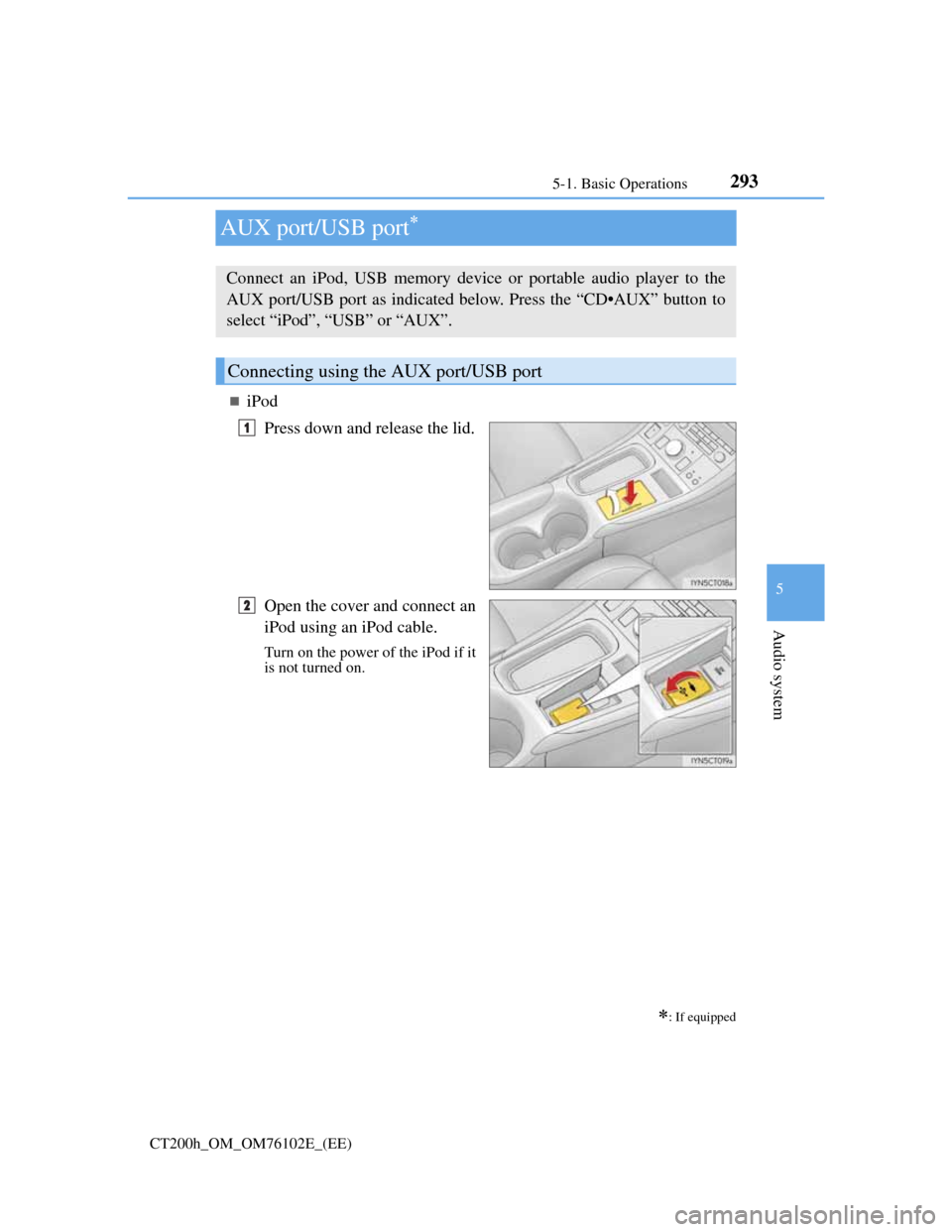
AUX port/USB port
iPod
Press down and release the lid.
Open the cover and connect an
iPod using an iPod cable.
Turn on the power of the iPod if it
is not turned on.
: If equipped
Connect an iPod, USB memory device or portable audio player to the
AUX port/USB port as indicated below. Press the “CD•AUX” button to
select “iPod”, “USB” or “AUX”.
Connecting using the AUX port/USB port
1
2
Page 297 of 688

2945-1. Basic Operations
CT200h_OM_OM76102E_(EE)
USB memory
Press down and release the lid.
Open the cover and connect the USB memory device.
Turn on the power of the USB memory device if it is not turned on.
Portable audio player
Press down and release the lid.
Open the cover and connect the portable audio player.
Turn on the power of the portable audio player if it is not turned on.
WA R N I N G
While driving
Do not connect a device or operate the device controls.
1
2
1
2
Page 322 of 688
3195-5. Using an external device
5
Audio system
CT200h_OM_OM76102E_(EE)
MP3 and WMA playback
• When a device containing MP3 or WMA files is connected, all files in the
USB memory device are checked. Once the file check is finished, the first
MP3 or WMA file is played. To make the file check finish more quickly, we
recommend that you do not include any files other than MP3 or WMA files
or create any unnecessary folders.
• When the USB device is connected and the audio source is changed to USB
memory mode, the USB device will start playing the first file in the first
folder. If the same device is removed and reinserted (and the contents have
not been changed), the USB device will resume play from the same point in
which it was last used.
Extensions
If the file extensions .mp3 and .wma are used for files other than MP3 and
WMA files, they will be mistakenly recognized and played as MP3 and WMA
files. This may result in large amounts of interference and damage to the
speakers.
Playback
• To play MP3 files with steady sound quality, we recommend a fixed bit rate
of at least 128 kbps and a sampling frequency of 44.1 kHz.
• There is a wide variety of freeware and other encoding software for MP3 and
WMA files on the market, and depending on the status of the encoding and
the file format, poor sound quality or noise at the start of playback may
result. In some cases, playback may not be possible at all.
• Microsoft, Windows, and Windows Media are registered trademarks of Mic-
rosoft Corporation in the U.S.A. and other countries.
WA R N I N G
Caution while driving
Do not connect USB memory or operate the controls.
NOTICE
To prevent damage to USB memory
Do not leave USB memory in the vehicle. The temperature inside the vehicle
may become high, resulting in damage to the player.
Do not push down on or apply unnecessary pressure to the USB memory
while it is connected as this may damage the USB memory or its terminal.
Do not insert foreign objects into the port as this may damage the USB mem-
ory or its terminal.
Page 323 of 688
3205-5. Using an external device
CT200h_OM_OM76102E_(EE)
Using the AUX port
P. 2 9 3
Portable audio device holder (if equipped)
P. 291
Operating portable audio devices connected to the audio system
The volume can be adjusted using the vehicle’s audio controls. All other adjust-
ments must be made on the portable audio device itself.
When using a portable audio device connected to the power outlet
Noise may occur during playback. Use the power source of the portable audio
device.
This port can be used to connect a portable audio device and listen to it
through the vehicle’s speakers. Press the “AUX•USB” button to select
“AUX”.
Connecting a portable player
NOTICE
To prevent damage to portable audio device
Do not leave portable audio devices in the vehicle. The temperature inside the
vehicle may become high, resulting in damage to the device.
Do not push down on or apply unnecessary pressure to the portable audio
device while it is connected as this may damage the portable audio device or
its terminal.
Do not insert foreign objects into the port as this may damage the portable
audio device or its terminal.
Page 330 of 688
327
5 5-6. Using Bluetooth® devices
Audio system
CT200h_OM_OM76102E_(EE)
Registering a Bluetooth® audio system for the first
time
Press the “AUX•USB” button and select “BTA MENU” using the
“TUNE•SEL” knob.
Press the talk switch or select “BTA Setup” using the knob.
The introductory guidance and portable player name registration instruc-
tions are heard.
Select “Pair Audio Player (Pair Audio)” using a voice command or the
knob.
Register a portable player name by either of the following methods:
a. Select “Record Name” using the knob, and say the name to be regis-
tered.
b. Press the talk switch and say the name to be registered.
A voice guidance instruction to confirm the input is heard.
Select “Confirm” using a voice command or the knob.
A passkey is displayed and heard, and a voice guidance instruction for
inputting the passkey into the portable player is heard.
Input the passkey into the portable player.
Refer to the manual that comes with the portable player for the operation of
the portable player.
Guidance for registration completion is heard.
If the portable player has a Bluetooth
® phone, the phone can be registered
at the same time. A voice guidance instruction to register a Bluetooth
®
phone is heard.
Select “Yes” or “No” using a voice command or the knob.
(Bluetooth
® phone P. 349)
Changing the passkey
P. 330
Before using the Bluetooth® audio system, it is necessary to register a
Bluetooth® enabled portable player in the system. Follow the procedure
below to register (pair) a portable player:
1
2
3
4
5
6
7
Page 332 of 688
329
5 5-7. Setup menu
Audio system
CT200h_OM_OM76102E_(EE)
Setting up a Bluetooth® enabled portable player
To enter the menu for each function, follow the steps below.
Press the “AUX•USB” button and select “BTA MENU” using the
“TUNE•SEL” knob or press the off-hook switch (P. 326) and select
“Setup” using the knob.
Select “BTA Setup” using the knob.
Select one of the following items using the knob:
Registering a portable player
“Pair Audio”
Selecting a portable player to be used
“Select Audio”
Changing the registered name of a portable player
“Change Name”
Listing the registered portable players
“List Audios”
Changing the passkey
“Set Passkey”
Deleting a registered portable player
“Delete Audio”
Registering a portable audio player in the Bluetooth® audio system
allows the system to function. The following functions can be used for
registered portable players:
Functions and operation procedures
1
2
3