door lock Lexus CT200h 2015 (in English) Service Manual
[x] Cancel search | Manufacturer: LEXUS, Model Year: 2015, Model line: CT200h, Model: Lexus CT200h 2015Pages: 634
Page 470 of 634

CT200h_OM_OM76174U_(U)
4697-2. Maintenance
7
Maintenance and care
Vehicle exterior
ItemsCheck points
Doors• Do the doors operate smoothly?
Engine hood• Does the engine hood lock system work properly?
Fluid leaks• There should not be any signs of fluid leakage afterthe vehicle has been parked.
Ti r e s
• Is the tire inflation pressure correct?
• The tires should not be damaged or excessivelyworn.
• Have the tires been rotated according to the mainte- nance schedule?
• The wheel nuts should not be loose.
Windshield wipers/
rear window wiper
• The wiper blades should not show any signs of crack-
ing, splitting, wear, contamination or deformation.
• The wiper blades should clear the windshield/rear window without streaking or skipping.
WA R N I N G
■If the hybrid system is operating
Turn the hybrid system off and ensure that there is adequate ventilation before per-
forming maintenance checks.
Page 487 of 634

486
CT200h_OM_OM76174U_(U)7-3. Do-it-yourself maintenance
■Before recharging
When recharging, the 12-volt battery produces hydrogen gas which is flammable and
explosive. Therefore, observe the following precautions before recharging:
●If recharging with the 12-volt battery installed on the vehicle, be sure to disconnect the
ground cable.
●Make sure the power switch on the charger is off when connecting and disconnecting
the charger cables to the 12-volt battery.
■After recharging/reconnecting the 12-volt battery
●Unlocking the doors using the smart access system with push-button start may not be
possible immediately after reconnecting the 12-volt battery. If this happens, use the
wireless remote control or the mechanical key to lock/unlock the doors.
●Start the hybrid system with the power switch in ACCESSORY mode. The hybrid sys-
tem may not start with the power switch turned off. However, the hybrid system will
operate normally from the second attempt.
●The power switch mode is recorded by the vehicle. If the 12-volt battery is reconnected,
the vehicle will return the power switch mode to the status it was in before the 12-volt
battery was disconnected. Make sure to turn off the power before disconnect the 12-
volt battery. Take extra care when connecting the 12-volt battery if the power switch
mode prior to discharge is unknown.
●Restart the hybrid system, depress the brake
pedal, and confirm that it is possible to
shift into each shift position.
If the system will not start even after multiple attempts at all methods above, contact your
Lexus dealer.
WA R N I N G
■Chemicals in the 12-volt battery
The 12-volt battery contains poisonous and corrosive sulfuric acid and may produce
hydrogen gas which is flammable and explosive. To reduce the risk of death or serious
injury, take the following precautions while working on or near the 12-volt battery:
●Do not cause sparks by touching the 12-volt battery terminals with tools.
●Do not smoke or light a match near the 12-volt battery.
●Avoid contact with eyes, skin and clothes.
●Never inhale or swallow electrolyte.
●Wear protective safety glasses when working near the 12-volt battery.
●Keep children away from the 12-volt battery.
■Where to safely charge the 12-volt battery
Always charge the 12-volt battery in an open area. Do not charge the 12-volt battery in
a garage or closed room where there is insufficient ventilation.
■How to recharge the 12-volt battery
Only perform a slow charge (4.2 A or less). The 12-volt battery may explode if charged
at a quicker rate.
Page 517 of 634
516
CT200h_OM_OM76174U_(U)7-3. Do-it-yourself maintenance
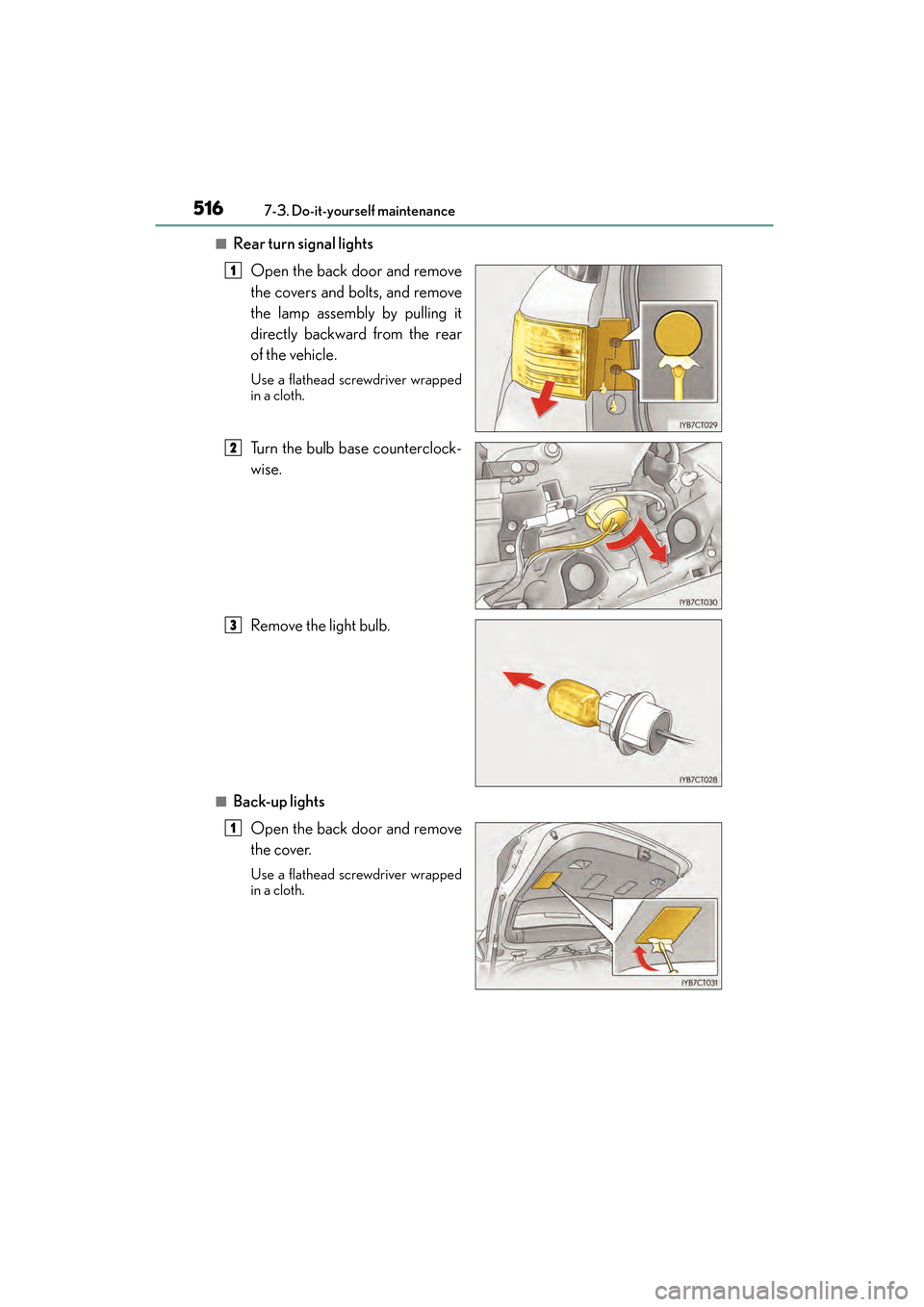
■Rear turn signal lights
Open the back door and remove
the covers and bolts, and remove
the lamp assembly by pulling it
directly backward from the rear
of the vehicle.
Use a flathead screwdriver wrapped
in a cloth.
Turn the bulb base counterclock-
wise.
Remove the light bulb.
■Back-up lightsOpen the back door and remove
the cover.
Use a flathead screwdriver wrapped
in a cloth.
1
2
3
1
Page 545 of 634

5448-2. Steps to take in an emergency
CT200h_OM_OM76174U_(U)
Once3 times
The electronic key was carried out-
side the vehicle and a door other
than the driver’s door was opened
and closed while the power switch
was in a mode other than off.
→Bring the electronic key back
into the vehicle.
The electronic key was carried out-
side the vehicle and the driver’s door
was opened and closed while the
shift position P was selected without
turning off the power switch.
→Tu r n t h e p o w e r s w i t c h o f f .
→ Bring the electronic key back
into the vehicle.
Once
Sounds
once
for 5
sec-
ondsAn attempt was made to exit the
vehicle with the electronic key and
lock the doors without first turning
the power switch off.
→Turn the power switch off and
lock the doors again.
Once
An attempt was made to turn the
power switch off when the shift posi-
tion was not in P.
→To turn off the hybrid system,
first shift the shift position to P
and then turn the power switch
off.
Interior
buzzerExteriorbuzzerWa r n i n g m e s s a g eDetails/Actions
(Flashes)
(Displayed alternately)
(Flashes)
(Flashes)
Page 546 of 634

5458-2. Steps to take in an emergency
CT200h_OM_OM76174U_(U)
8
When trouble arises
Once
Sounds
once
for 5
sec-
onds
• An attempt was made to lock the doors using the smart access sys-
tem with push-button start while
the electronic key was still inside
the vehicle.
• An attempt was made to lock either front door by opening a
door and putting the inside lock
button into the lock position, then
closing the door with the elec-
tronic key still inside the vehicle.
→ Retrieve the electronic key
from the vehicle and lock the
doors again.
Once
• When the doors were unlocked
with the mechanical key and then
the power switch was pressed, the
electronic key could not be
detected in the vehicle.
• The electronic key could not be
detected in the vehicle even after
the power switch was pressed two
consecutive times.
→ Touch the electronic key to the
power switch while depressing
the brake pedal.
Once
The driver’s door was opened and
closed with the power switch turned
off and then the power switch was
put in ACCESSORY mode twice
without the hybrid system being
started.
→Press the power switch while
depressing the brake pedal.
During a hybrid system starting pro-
cedure in the event that the elec-
tronic key was not functioning
properly ( →P. 5 6 0 ) , t h e p o w e r
switch was touched with the elec-
tronic key.
→ Press the power switch within 10
seconds of the buzzer sounding.
Interior
buzzerExteriorbuzzerWa r n i n g m e s s a g eDetails/Actions
(Flashes)
(Flashes)
(Flashes)
Page 560 of 634

559
CT200h_OM_OM76174U_(U)
8
When trouble arises
8-2. Steps to take in an emergency
If the electronic key does not operate properly
Use the mechanical key (→P. 1 0 1 ) i n
order to perform the following opera-
tions:
Locks all the doors
Closes the windows
* (turn and hold)
Unlocks the door
Turning the key rearward unlocks the
driver’s door. Turning the key once again
within 3 seconds unlocks the other
doors.
Opens the windows* (turn and hold)
*: These settings must be customized at your Lexus dealer.
If communication between the electronic key and vehicle is interrupted
(→ P. 115) or the electronic key cannot be used because the battery is
depleted, the smart access system with push-button start and wireless
remote control cannot be used. In such cases, the doors can be opened and
the hybrid system can be started by following the procedure below.
Locking and unlocking the door s and key linked functions
1
2
3
4
Page 593 of 634

592
CT200h_OM_OM76174U_(U)9-2. Customization
Vehicles with a navigation system or Lexus Display Audio system: Settings
that can be changed using the screen of the Remote Touch or Lexus Display
Audio controller
Vehicles with a navigation system or Lexus Display Audio system: Settings
that can be changed using the “DISP” switch
Vehicles without a navigation system or Lexus Display Audio system: Settings
that can be changed using the “DISP” switch
Settings that can be changed by your Lexus dealer
Definition of symbols: O = Available, – =Not available
■Door lock ( →P. 1 0 5 , 5 5 9 )
Customizable Features
1
2
3
4
FunctionDefault
settingCustomized setting
Unlocking on second key
turn
On
(Driver’s door
unlocked in first
step, all doors
unlocked in sec-
ond step)
Off
(All doors
unlocked in first
step)
–––O
Speed linked door locking
functionOffOnO–OO
Shift position linked door
locking functionOnOffO–OO
Shift position linked door
unlocking functionOnOffO–OO
Driver’s door linked door
unlocking functionOffOnO–OO
1234
Page 594 of 634

CT200h_OM_OM76174U_(U)
5939-2. Customization
9
Vehicle specifications
■Smart access system with push-button start and wireless remote control
(→P. 114, 100)
■Smart access system with push-button start ( →P. 114)
FunctionDefault
settingCustomized setting
Operation signal (buzzer) 7 Off
O–OO
1 to 6
Operation signal (emer-
gency flashers) On Off O – O O
Ti m e e l a p s e d b e f o r e t h e
automatic door lock func-
tion is activated if a door is
not opened after being
unlocked
60 seconds
Off
O–OO30 seconds
120 seconds
Open door reminder
buzzer (When locking the
vehicle)OnOff–––O
1234
FunctionDefault
settingCustomized setting
Smart door unlocking Driver’s door All the doors O – O O
Smart access system with
push-button startOnOffO–OO
Number of consecutive
door lock operations2 timesAs many as desired–––O
1234
Page 595 of 634

594
CT200h_OM_OM76174U_(U)9-2. Customization
■Wireless remote control (
→P. 1 0 0 )
■Tu r n s i g n a l l e v e r ( →P. 1 6 7 )
■Automatic light control system (→ P. 1 6 9 )
*: This function cannot be customized for vehicles sold in Canada.
FunctionDefault
settingCustomized setting
Wireless remote control OnOff – – – O
Unlocking operation
Driver’s door
unlocked in first
step, all doors
unlocked in sec-
ond stepAll doors
unlocked in first
stepO–OO
Panic function OnOff–––O
1234
FunctionDefault settingCustomized
setting
Times of flashing of the lane
change signal flashers 35
O– –O
79
11
Off
1234
FunctionDefault
settingCustomized setting
Ti m e e l a p s e d b e f o r e t h e
headlights turn off 30 secondsOff
O–OO
60 seconds
90 seconds
Light sensor sensitivityStandard-2 to 2O–OO
Daytime running lights*OnOffO–OO
Welcome light illumination
controlOnOff–––O
1234
Page 596 of 634

CT200h_OM_OM76174U_(U)
5959-2. Customization
9
Vehicle specifications
■Illumination (→P. 4 2 5 )
*: Interior or exterior illumination can be set separately.
FunctionDefault
settingCustomized setting
Ti m e e l a p s e d b e f o r e t h e
interior lights turn off 15 secondsOff
O–OO
7. 5 s e c o n d s
30 seconds
Ti m e e l a p s e d b e f o r e t h e
exterior lights turn off15 seconds
Off
O–OO7. 5 s e c o n d s
30 seconds
Operation after the power
switch is turned offOnOff–––O
Operation when the doors
are unlocked with the smart
access system with push-
button start or the wireless
remote control function or
the mechanical key
*
OnOff–––O
Operation when you
approach the vehicle with
the electronic key on your
person
*
OnOff–––O
Footwell lightingOnOff–––O
Cup holder lightOnOff–––O
Enable/disable operation of
the outer foot lights when
the doors are unlocked with
the power door lock switch
OnOff–––O
1234