Switches Lexus ES300h 2014 User Guide
[x] Cancel search | Manufacturer: LEXUS, Model Year: 2014, Model line: ES300h, Model: Lexus ES300h 2014Pages: 918, PDF Size: 25.26 MB
Page 143 of 918
142
ES350_300h_OM_OM33A60U_(U)
3-2. Opening, closing and locking the doors and trunk
Doors
The vehicle can be locked and unlocked using the entry function, wireless
remote control or door lock switches.
◆Entry function
→P. 125
◆Wireless remote control
→P. 1 3 9
◆Door lock switch
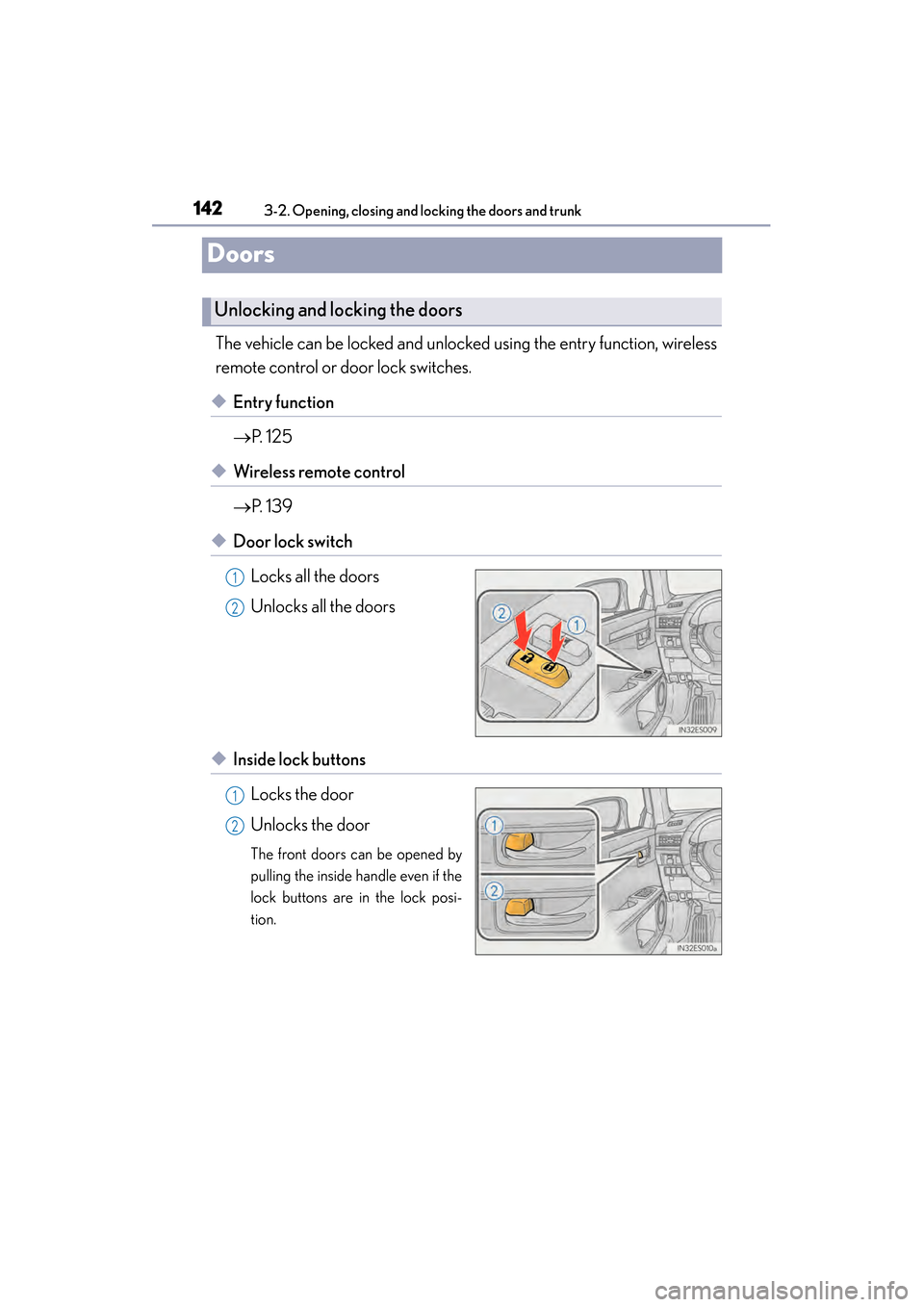
Locks all the doors
Unlocks all the doors
◆Inside lock buttonsLocks the door
Unlocks the door
The front doors can be opened by
pulling the inside handle even if the
lock buttons are in the lock posi-
tion.
Unlocking and locking the doors
1
2
1
2
Page 159 of 918
158
ES350_300h_OM_OM33A60U_(U)
3-3. Adjusting the seats
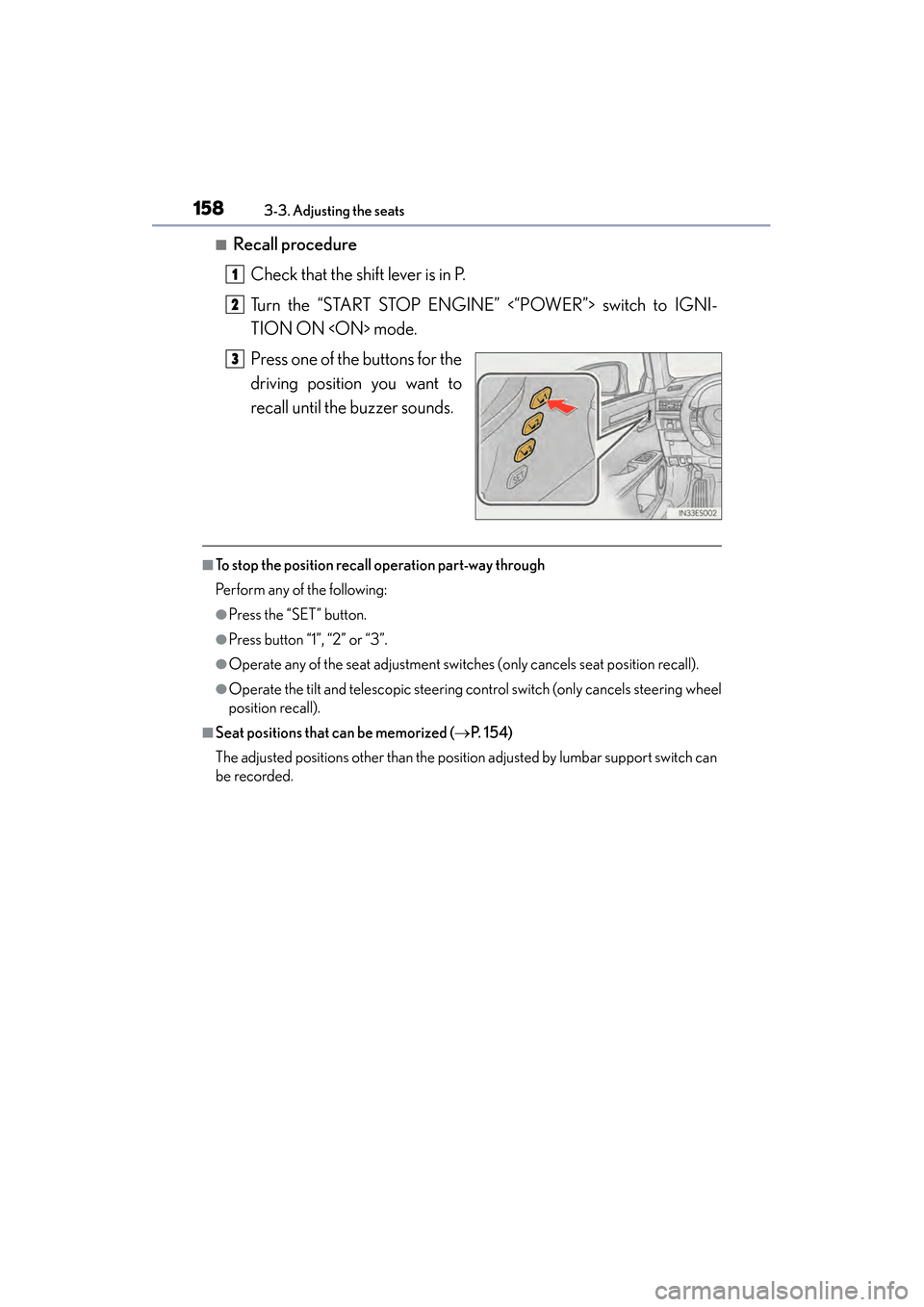
■Recall procedureCheck that the shift lever is in P.
Turn the “START STOP ENGINE” <“POWER”> switch to IGNI-
TION ON
Press one of the buttons for the
driving position you want to
recall until the buzzer sounds.
■To stop the position recall operation part-way through
Perform any of the following:
●Press the “SET” button.
●Press button “1”, “2” or “3”.
●Operate any of the seat adjustment switches (only cancels seat position recall).
●Operate the tilt and telescopic steering control switch (only cancels steering wheel
position recall).
■Seat positions that can be memorized ( →P. 1 5 4 )
The adjusted positions other than the position adjusted by lumbar support switch can
be recorded.
1
2
3
Page 175 of 918
174
ES350_300h_OM_OM33A60U_(U)
3-5. Opening, closing the windows and moon roof
Powe r w i n d ows
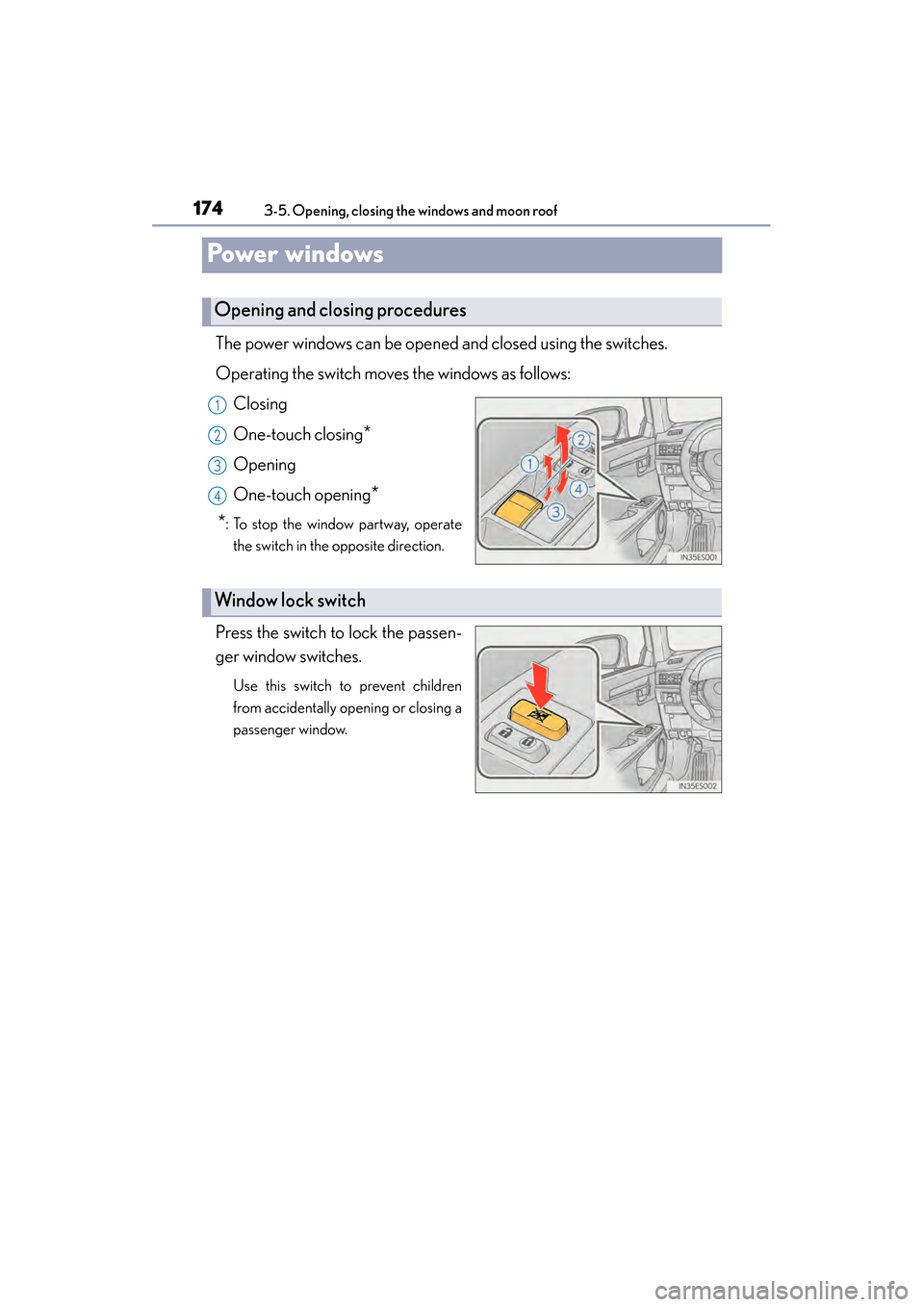
The power windows can be opened and closed using the switches.
Operating the switch moves the windows as follows:Closing
One-touch closing
*
Opening
One-touch opening
*
*
: To stop the window partway, operate the switch in the opposite direction.
Press the switch to lock the passen-
ger window switches.
Use this switch to prevent children
from accidentally opening or closing a
passenger window.
Opening and closing procedures
1
2
3
4
Window lock switch
Page 178 of 918
177
ES350_300h_OM_OM33A60U_(U)
3-5. Opening, closing the windows and moon roof
3
Operation of each component
Moon roof
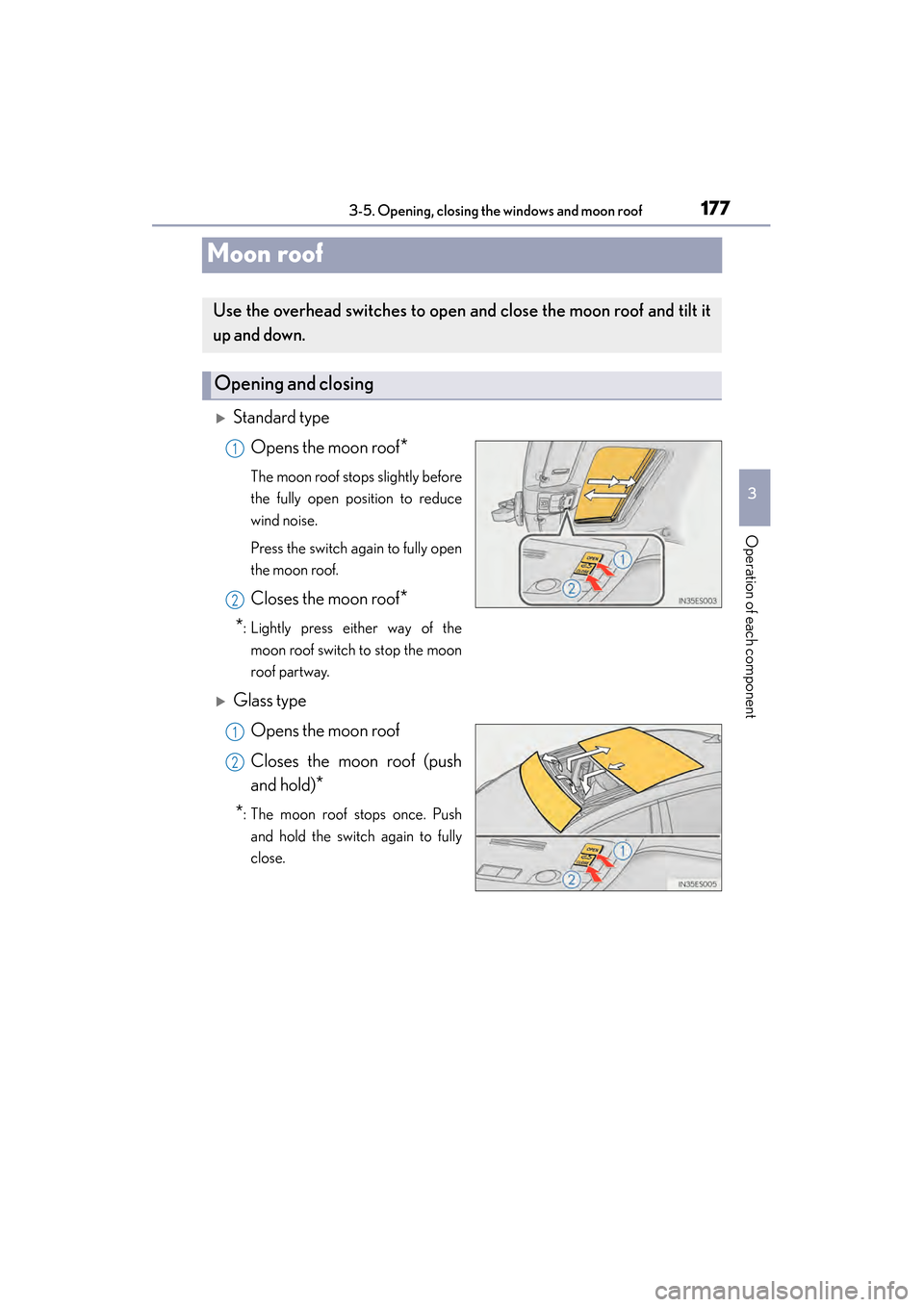
XStandard typeOpens the moon roof
*
The moon roof stops slightly before
the fully open position to reduce
wind noise.
Press the switch again to fully open
the moon roof.
Closes the moon roof*
*
: Lightly press either way of the moon roof switch to stop the moon
roof partway.
XGlass type
Opens the moon roof
Closes the moon roof (push
and hold)
*
*
: The moon roof stops once. Push and hold the switch again to fully
close.
Use the overhead switches to open and close the moon roof and tilt it
up and down.
Opening and closing
1
2
1
2
Page 337 of 918
336
ES350_300h_OM_OM33A60U_(U)
5-1. Lexus Display Audio systemLexus Display Audio system ......................................... 338
Display settings .......................... 343
Setup menu...................................345
Mobile Assistant .......................... 351
5-2. Using the air conditioning system and defogger
Automatic air conditioning system (with the Lexus
Display Audio system) ..........353
Automatic air conditioning system (without a navigation
system or the Lexus
Display Audio system) ..........365
Rear window and outside rear view mirror defoggers........... 378
Windshield wiper de-icer ...... 380 5-3. Using the Lexus
Display Audio system
Audio system (with the Lexus Display Audio system) ..........382
Using the radio............................385
Using the CD player................ 400
Playing an audio CD and MP3/WMA discs ................... 401
Listening to an iPod ...................... 411
Listening to a USB memory ......................... 419
Using the AUX port ................. 429
Listening to Bluetooth
® audio .................... 431
Optimal use of the audio system...................... 446
Using the steering wheel audio switches ..........................448
Hands-free system (for cellular phone)...................451
Using the Bluetooth
®
phone ........................................... 459
Setting the hands-free system .......................................... 478
Bluetooth
® settings ................... 491
Page 338 of 918
337
ES350_300h_OM_OM33A60U_(U)
5Interior features
5-4. Using the audio systemAudio system (without a navigation system or
the Lexus Display
Audio system) .......................... 500
Using the radio ........................... 503
Using the CD player .................. 512
Playing MP3 and WMA discs................................. 521
Operating an iPod ..................... 529
Operating a USB memory.....539
Bluetooth
® audio system ...... 548
Using the Bluetooth
®
audio system.............................. 552
Operating a Bluetooth
®
enabled portable player ....... 557
Setting up a Bluetooth
®
enabled portable player ........ 561
Bluetooth
® audio
system setup ............................. 568
Optimal use of the audio system..............................569
Using the AUX port................... 571
Using the steering wheel audio switches .......................... 573
Hands-free system (for cellular phone) ..................576
Using the hands-free system (for cellular phones) ................581
Making a phone call ................. 589
Setting a cellular phone ...........593
Security and system setup ..... 598
Using the phone book............. 603 5-5. Using the interior lights
Interior lights list ............................ 611• Interior light ..............................612
• Personal lights .........................612
5-6. Using the storage features List of storage features ..............614• Glove box .................................616
• Console box............................. 617
• Cup holders ............................ 618
• Auxiliary box ............................619
Trunk features .............................. 620
5-7. Other interior features Sun visors and vanity mirrors ................... 622
Clock............................................... 623
Power outlets ............................... 624
Heated steering wheel ............ 626
Seat heaters and ventilators ................................... 628
Armrest ..........................................630
Rear sunshade/ rear door sunshades ............... 631
Trunk storage extension .......... 634
Coat hooks ................................... 635
Assist grips.................................... 636
Garage door opener................ 637
Compass ....................................... 644
Safety Connect ........................... 649
Page 352 of 918
351
ES350_300h_OM_OM33A60U_(U)
5-1. Lexus Display Audio system
5
Interior features
Mobile Assistant
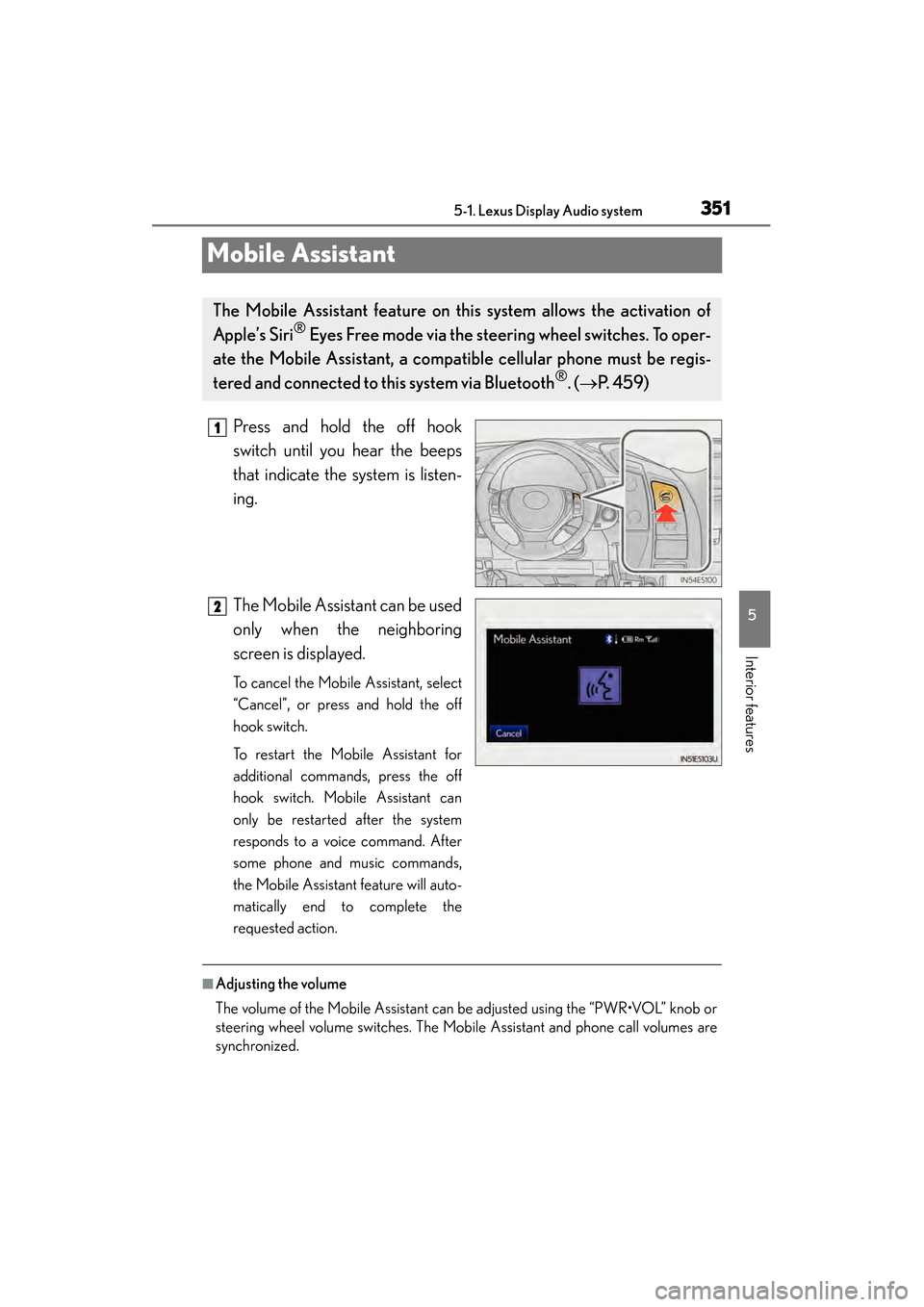
Press and hold the off hook
switch until you hear the beeps
that indicate the system is listen-
ing.
The Mobile Assistant can be used
only when the neighboring
screen is displayed.
To cancel the Mobile Assistant, select
“Cancel”, or press and hold the off
hook switch.
To restart the Mobile Assistant for
additional commands, press the off
hook switch. Mobile Assistant can
only be restarted after the system
responds to a voice command. After
some phone and music commands,
the Mobile Assistant feature will auto-
matically end to complete the
requested action.
■Adjusting the volume
The volume of the Mobile Assistant can be adjusted using the “PWR•VOL” knob or
steering wheel volume switches. The Mobile Assistant and phone call volumes are
synchronized.
The Mobile Assistant feature on this system allows the activation of
Apple’s Siri
® Eyes Free mode via the steering wheel switches. To oper-
ate the Mobile Assistant, a compat ible cellular phone must be regis-
tered and connected to this system via Bluetooth
®. ( → P. 4 5 9 )
1
2
Page 359 of 918
358
ES350_300h_OM_OM33A60U_(U)
5-2. Using the air conditioning system and defogger
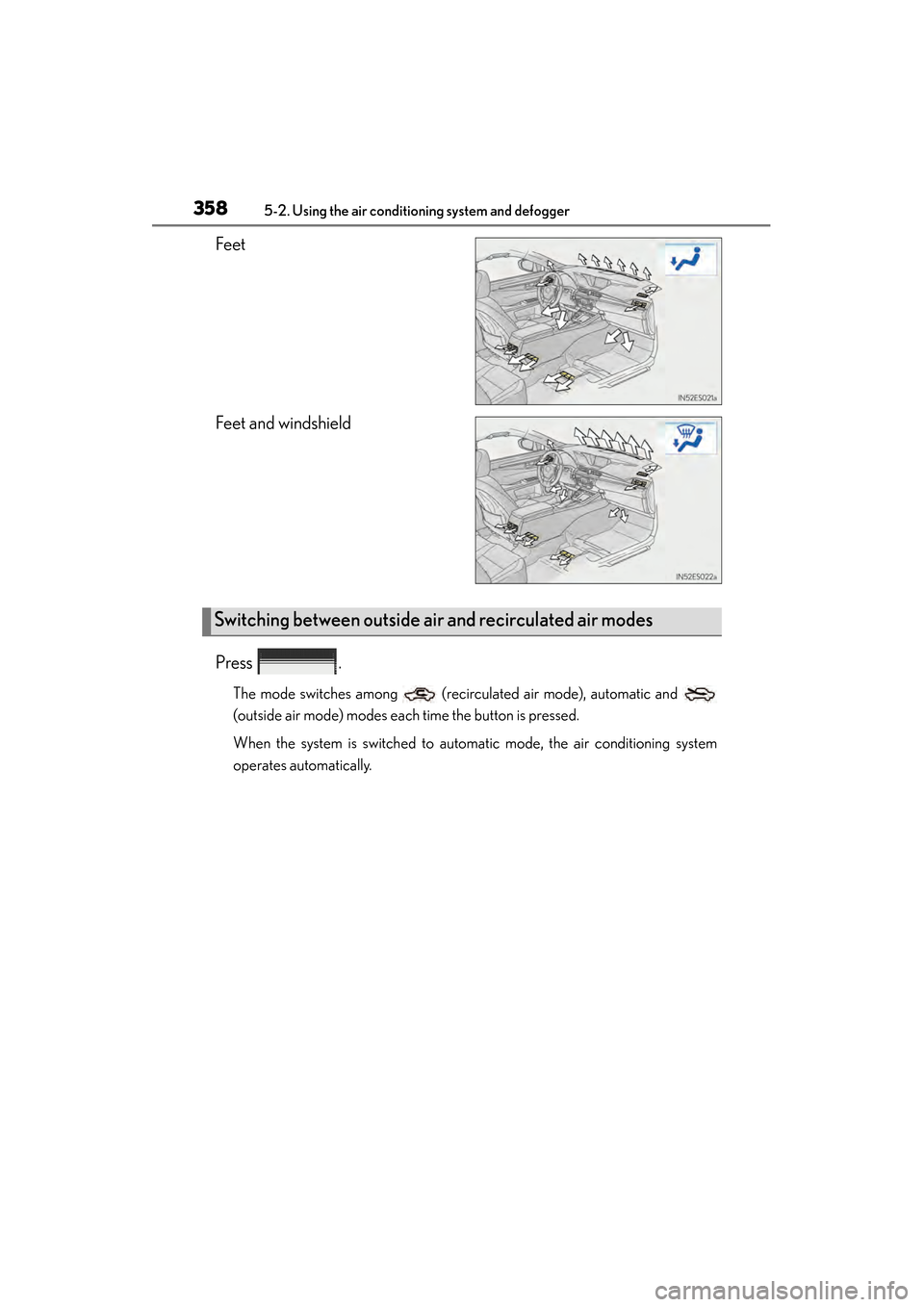
Feet
Feet and windshield
Press .
The mode switches among (recirculated air mode), automatic and
(outside air mode) modes each time the button is pressed.
When the system is switched to automatic mode, the air conditioning system
operates automatically.
Switching between outside air and recirculated air modes
Page 360 of 918
ES350_300h_OM_OM33A60U_(U)
3595-2. Using the air conditioning system and defogger
5
Interior features
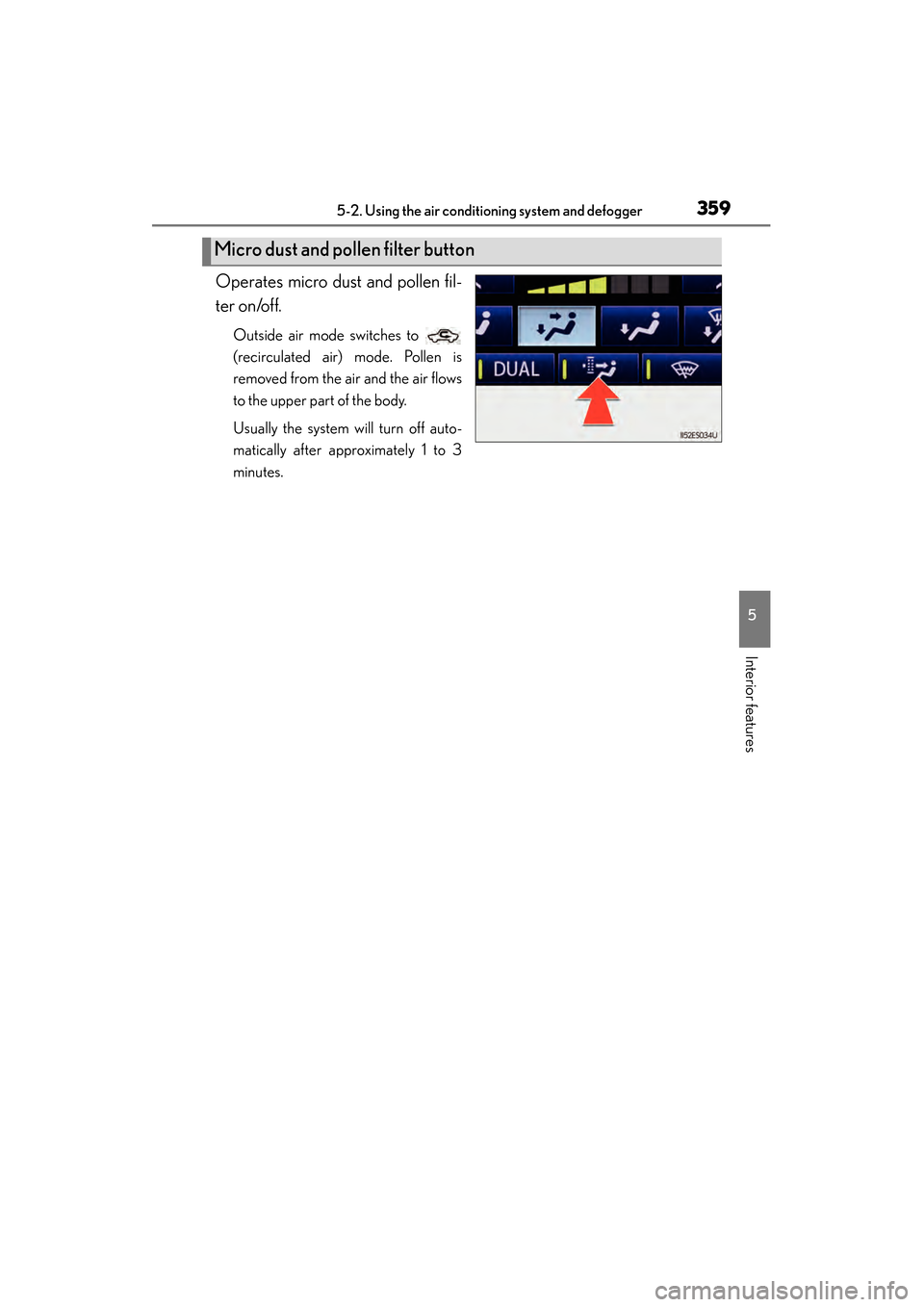
Operates micro dust and pollen fil-
ter on/off.
Outside air mode switches to
(recirculated air) mode. Pollen is
removed from the air and the air flows
to the upper part of the body.
Usually the system will turn off auto-
matically after approximately 1 to 3
minutes.
Micro dust and pollen filter button
Page 363 of 918
362
ES350_300h_OM_OM33A60U_(U)
5-2. Using the air conditioning system and defogger
■When the outside temperature exceeds 75°F (24°C) and the air conditioning sys-
tem is on
●In order to reduce the air conditioning power consumption, the air conditioning
system may switch to recirculated air mode automatically. This may also reduce
fuel consumption.
●Recirculated air mode is selected as a default mode when the “START STOP
ENGINE” <“POWER”> switch is turned on.
●It is possible to switch to outside air mode at any time by pressing .
■Automatic mode for air intake control
In automatic mode, the system detects exhaust gas and other pollutants and auto-
matically switches between outside air and recirculated air modes.
When the dehumidification function is off, and the fan is operating, turning automatic
mode on will activate the dehumidification function.
■Micro dust and pollen filter
●In order to prevent the windshield from fogging up when the outside air is cold, the
following may occur:
• Outside air mode does not switch to (recirculated air) mode.
• The dehumidification function operates.
• The operation cancels after approximately 1 minute.
●In rainy weather, the windows may fog up. Press .
●In extremely humid weather, the windows may fog up.
●The pollens are filtered out even if the micro dust and pollen filter is turned off.
■Operation of the air conditioning system in Eco drive mode
In the Eco drive mode, the air conditioning system is controlled as follows to priori-
tize fuel efficiency:
●Engine speed and compressor operation controlled to restrict heating/cooling
capacity
●Fan speed restricted when automatic mode is selected
To improve air conditioning performance, perform the following operations:
●Adjust the fan speed
●Turn off Eco drive mode
■When the outside temperature falls to nearly 32 °F (0 °C)
The dehumidification function may not operate even when is pressed.