Switches Lexus ES300h 2014 Owner's Manual
[x] Cancel search | Manufacturer: LEXUS, Model Year: 2014, Model line: ES300h, Model: Lexus ES300h 2014Pages: 918, PDF Size: 25.26 MB
Page 5 of 918
TABLE OF CONTENTS4
ES350_300h_OM_OM33A60U_(U)5-1. Lexus Display Audio system
Lexus Display Audio system .......................................... 338
Display settings........................... 343
Setup menu .................................. 345
Mobile Assistant...........................351
5-2. Using the air conditioning system and defogger
Automatic air conditioning system (with the Lexus
Display Audio system).......... 353
Automatic air conditioning system (without a navigation
system or the Lexus
Display Audio system).......... 365
Rear window and outside rear view mirror defoggers .......... 378
Windshield wiper de-icer.......380 5-3. Using the Lexus
Display Audio system
Audio system (with the Lexus Display Audio system).......... 382
Using the radio ...........................385
Using the CD player ................400
Playing an audio CD and MP3/WMA discs ................... 401
Listening to an iPod...................... 411
Listening to a USB memory ..........................419
Using the AUX port ................. 429
Listening to Bluetooth
® audio .....................431
Optimal use of the audio system ..................... 446
Using the steering wheel audio switches.......................... 448
Hands-free system (for cellular phone) .................. 451
Using the Bluetooth
®
phone ........................................... 459
Setting the hands-free system ...........................................478
Bluetooth
® settings ....................491
5Interior features
Page 6 of 918
5
1
8 7
6
5
4
3
2
ES350_300h_OM_OM33A60U_(U)
9
5-4. Using the audio systemAudio system (without a navigation system or
the Lexus Display
Audio system) ..........................500
Using the radio ...........................503
Using the CD player ..................512
Playing MP3 and WMA discs .................................521
Operating an iPod..................... 529
Operating a USB memory .... 539
Bluetooth
® audio system ....... 548
Using the Bluetooth
®
audio system ............................. 552
Operating a Bluetooth
®
enabled portable player....... 557
Setting up a Bluetooth
®
enabled portable player......... 561
Bluetooth
® audio
system setup .............................568
Optimal use of the audio system ............................. 569
Using the AUX port ................... 571
Using the steering wheel audio switches...........................573
Hands-free system (for cellular phone) ................. 576
Using the hands-free system (for cellular phones) ............... 581
Making a phone call .................589
Setting a cellular phone .......... 593
Security and system setup......598
Using the phone book ............. 603 5-5. Using the interior lights
Interior lights list ............................ 611• Interior light.............................. 612
• Personal lights ......................... 612
5-6. Using the storage features List of storage features .............. 614• Glove box ................................. 616
• Console box ............................ 617
• Cup holders .............................618
• Auxiliary box............................ 619
Trunk features .............................. 620
5-7. Other interior features Sun visors and vanity mirrors ....................622
Clock .............................................. 623
Power outlets ................................624
Heated steering wheel .............626
Seat heaters and ventilators................................... 628
Armrest.......................................... 630
Rear sunshade/ rear door sunshades................631
Trunk storage extension .......... 634
Coat hooks ................................... 635
Assist grips ................................... 636
Garage door opener ................637
Compass ....................................... 644
Safety Connect........................... 649
Page 15 of 918
14
ES350_300h_OM_OM33A60U_(U)
Reading this manual
CAUTION:
Explains something that, if not obeyed, could cause death or serious
injury to people.
NOTICE:
Explains something that, if not obeyed, could cause damage to or a
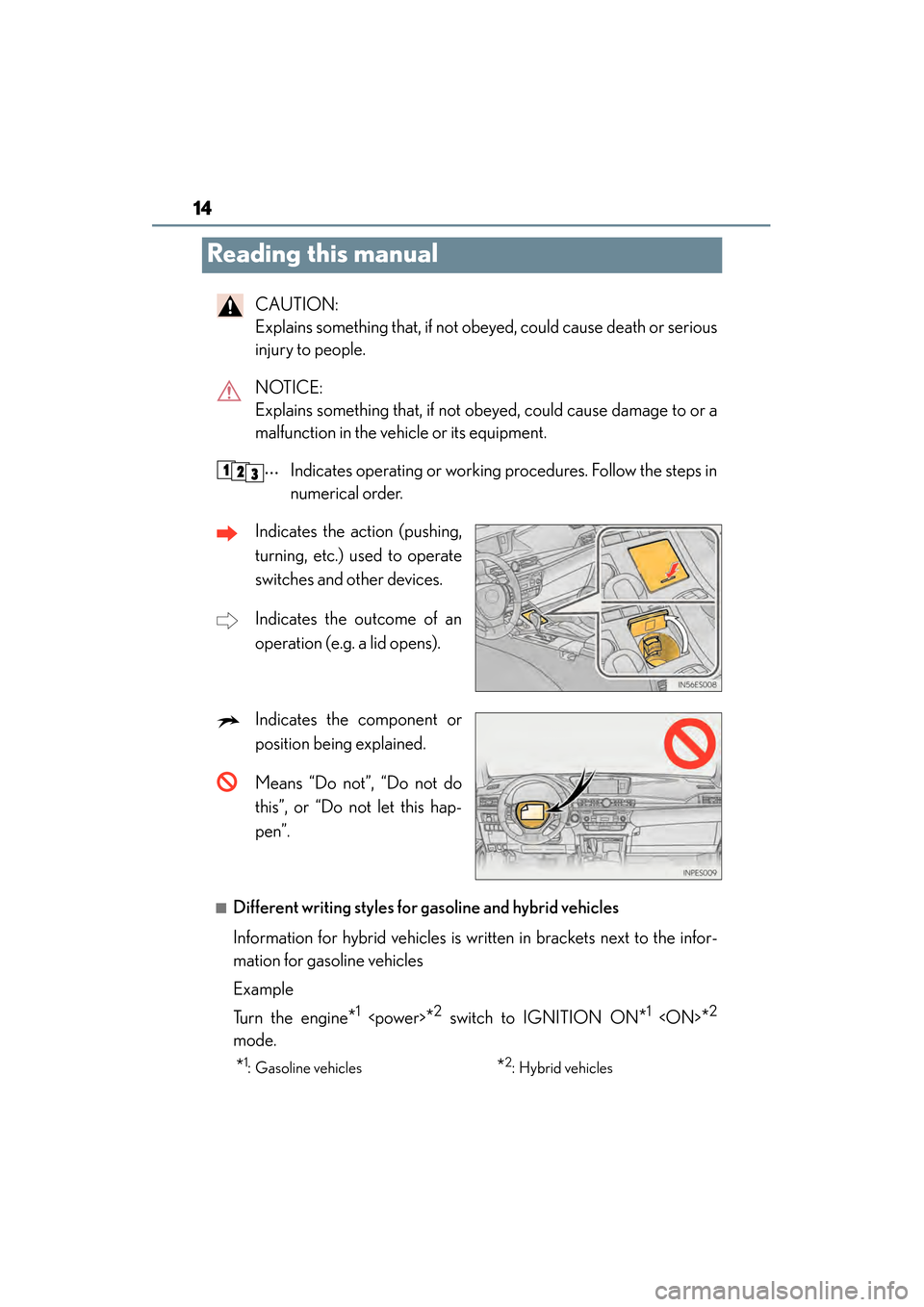
malfunction in the vehicle or its equipment.Indicates operating or working procedures. Follow the steps in
numerical order.
Indicates the action (pushing,
turning, etc.) used to operate
switches and other devices.
Indicates the outcome of an
operation (e.g. a lid opens).
Indicates the component or
position being explained.
Means “Do not”, “Do not do
this”, or “Do not let this hap-
pen”.
■Different writing styles for gasoline and hybrid vehicles
Information for hybrid vehicles is written in brackets next to the infor-
mation for gasoline vehicles
Example
Turn the engine
*1
mode.
*2: Hybrid vehicles*1: Gasoline vehicles
Page 21 of 918
20Pictorial index
ES350_300h_OM_OM33A60U_(U)
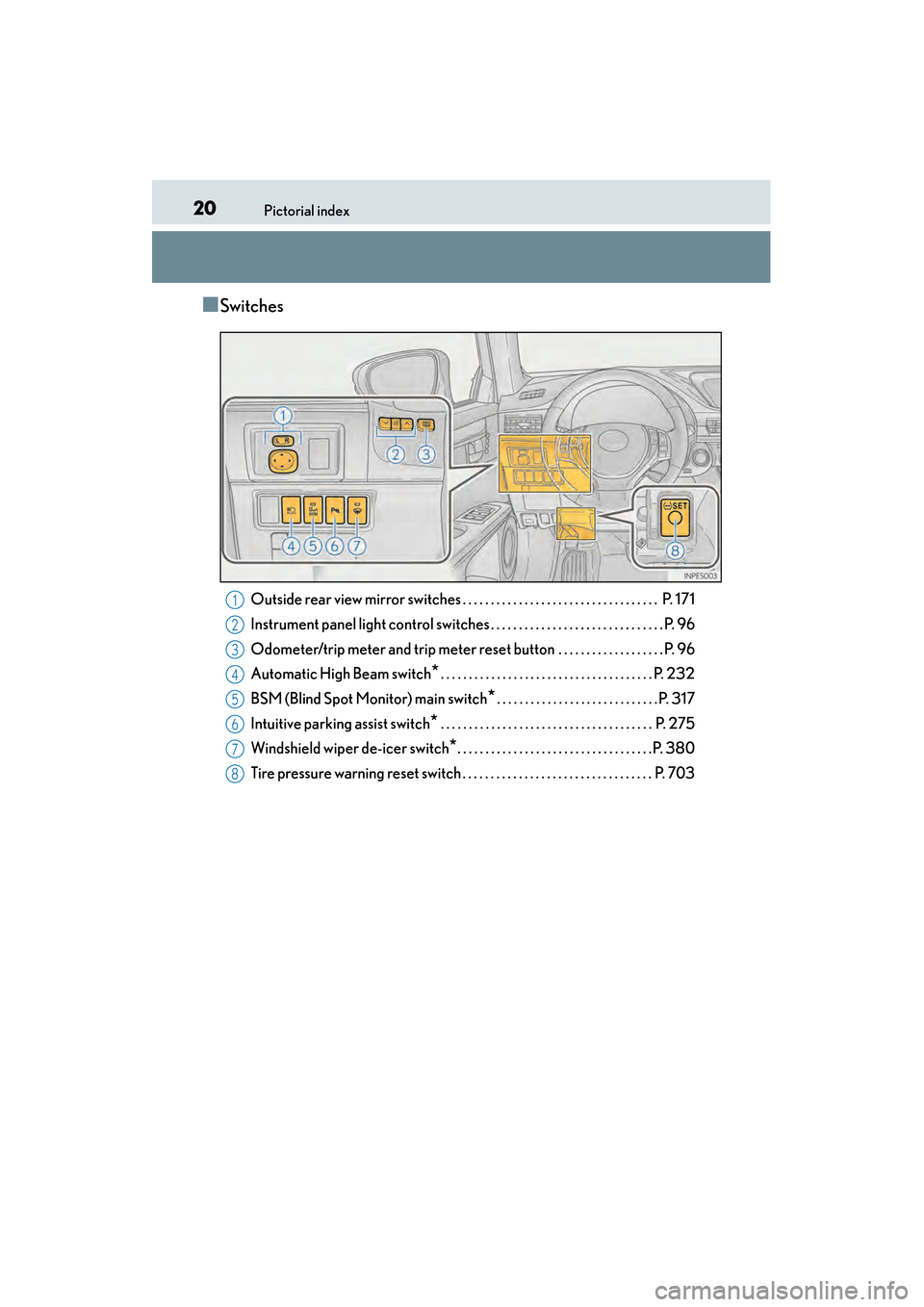
■Switches
Outside rear view mirror switches . . . . . . . . . . . . . . . . . . . . . . . . . . . . . . . . . . . P. 171
Instrument panel light control switches . . . . . . . . . . . . . . . . . . . . . . . . . . . . . . . P. 96
Odometer/trip meter and trip meter reset button . . . . . . . . . . . . . . . . . . . P. 96
Automatic High Beam switch
*. . . . . . . . . . . . . . . . . . . . . . . . . . . . . . . . . . . . . . P. 232
BSM (Blind Spot Monitor) main switch
*. . . . . . . . . . . . . . . . . . . . . . . . . . . . .P. 317
Intuitive parking assist switch
* . . . . . . . . . . . . . . . . . . . . . . . . . . . . . . . . . . . . . . P. 275
Windshield wiper de-icer switch
*. . . . . . . . . . . . . . . . . . . . . . . . . . . . . . . . . . .P. 380
Tire pressure warning reset switch . . . . . . . . . . . . . . . . . . . . . . . . . . . . . . . . . . P. 703
1
2
3
4
5
6
7
8
Page 22 of 918

21Pictorial index
ES350_300h_OM_OM33A60U_(U)Driving position memory switches
*. . . . . . . . . . . . . . . . . . . . . . . . . . . . . . . . . .P. 156
Door lock switch . . . . . . . . . . . . . . . . . . . . . . . . . . . . . . . . . . . . . . . . . . . . . . . . . . . . . .P. 1 42
Power window switches . . . . . . . . . . . . . . . . . . . . . . . . . . . . . . . . . . . . . . . . . . . . . . P. 174
Window lock switch . . . . . . . . . . . . . . . . . . . . . . . . . . . . . . . . . . . . . . . . . . . . . . . . . . P. 174
Trunk opener main switch . . . . . . . . . . . . . . . . . . . . . . . . . . . . . . . . . . . . . . . . . . . P. 148
PCS OFF switch
* . . . . . . . . . . . . . . . . . . . . . . . . . . . . . . . . . . . . . . . . . . . . . . . . . . . . P. 311
*: If equipped
1
2
3
4
5
6
Page 23 of 918
22Pictorial index
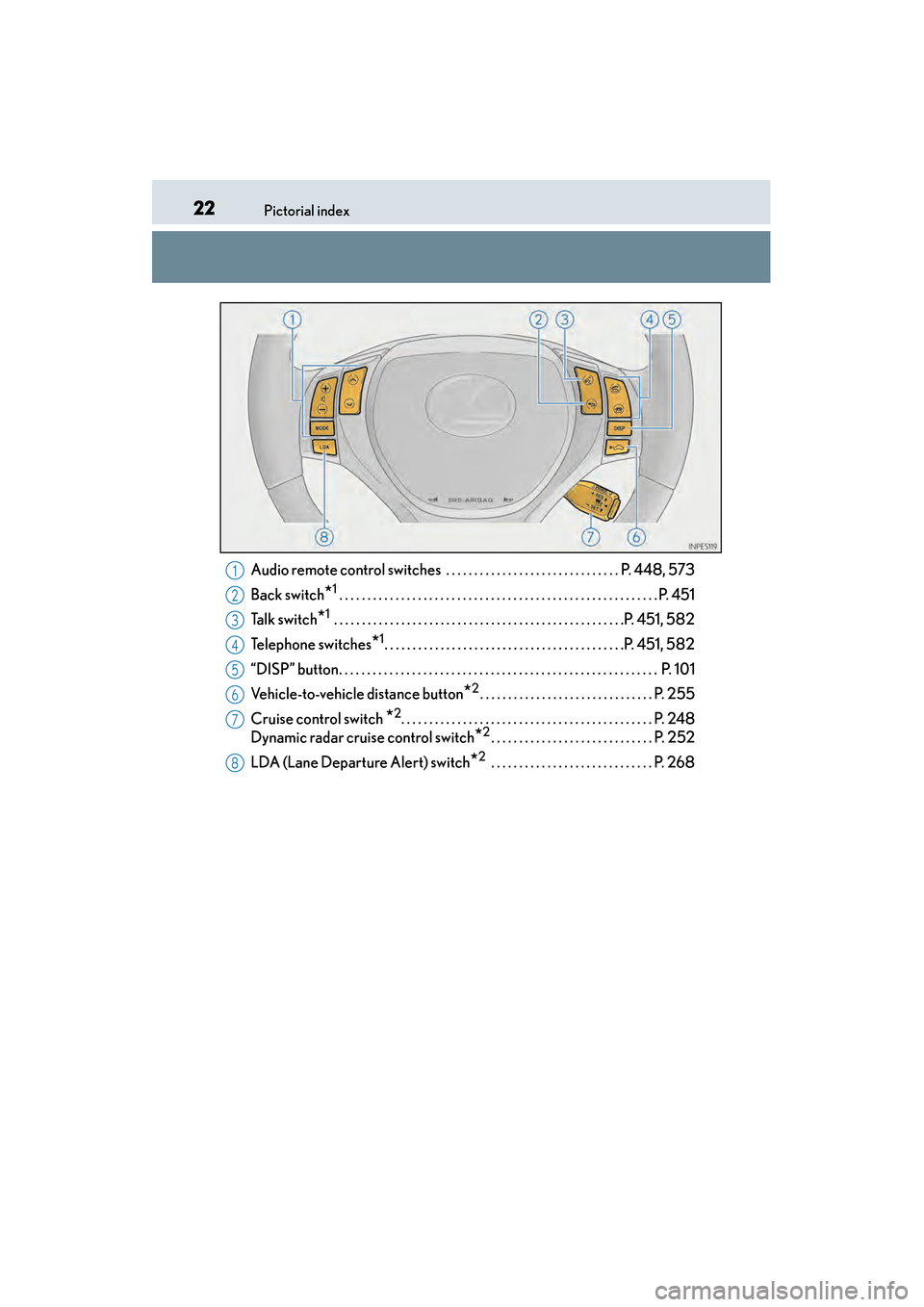
ES350_300h_OM_OM33A60U_(U)Audio remote control switches . . . . . . . . . . . . . . . . . . . . . . . . . . . . . . . P. 448, 573
Back switch
*1 . . . . . . . . . . . . . . . . . . . . . . . . . . . . . . . . . . . . . . . . . . . . . . . . . . . . . . . . . P. 451
Talk switch
*1 . . . . . . . . . . . . . . . . . . . . . . . . . . . . . . . . . . . . . . . . . . . . . . . . . . . .P. 451, 582
Telephone switches
*1. . . . . . . . . . . . . . . . . . . . . . . . . . . . . . . . . . . . . . . . . . .P. 451, 582
“DISP” button. . . . . . . . . . . . . . . . . . . . . . . . . . . . . . . . . . . . . . . . . . . . . . . . . . . . . . . . . P. 1 0 1
Vehicle-to-vehicle distance button
*2. . . . . . . . . . . . . . . . . . . . . . . . . . . . . . . P. 255
Cruise control switch
*2. . . . . . . . . . . . . . . . . . . . . . . . . . . . . . . . . . . . . . . . . . . . . P. 248
Dynamic radar cruise control switch
*2. . . . . . . . . . . . . . . . . . . . . . . . . . . . . P. 252
LDA (Lane Departure Alert) switch
*2 . . . . . . . . . . . . . . . . . . . . . . . . . . . . . P. 268
1
2
3
4
5
6
7
8
Page 24 of 918
23Pictorial index
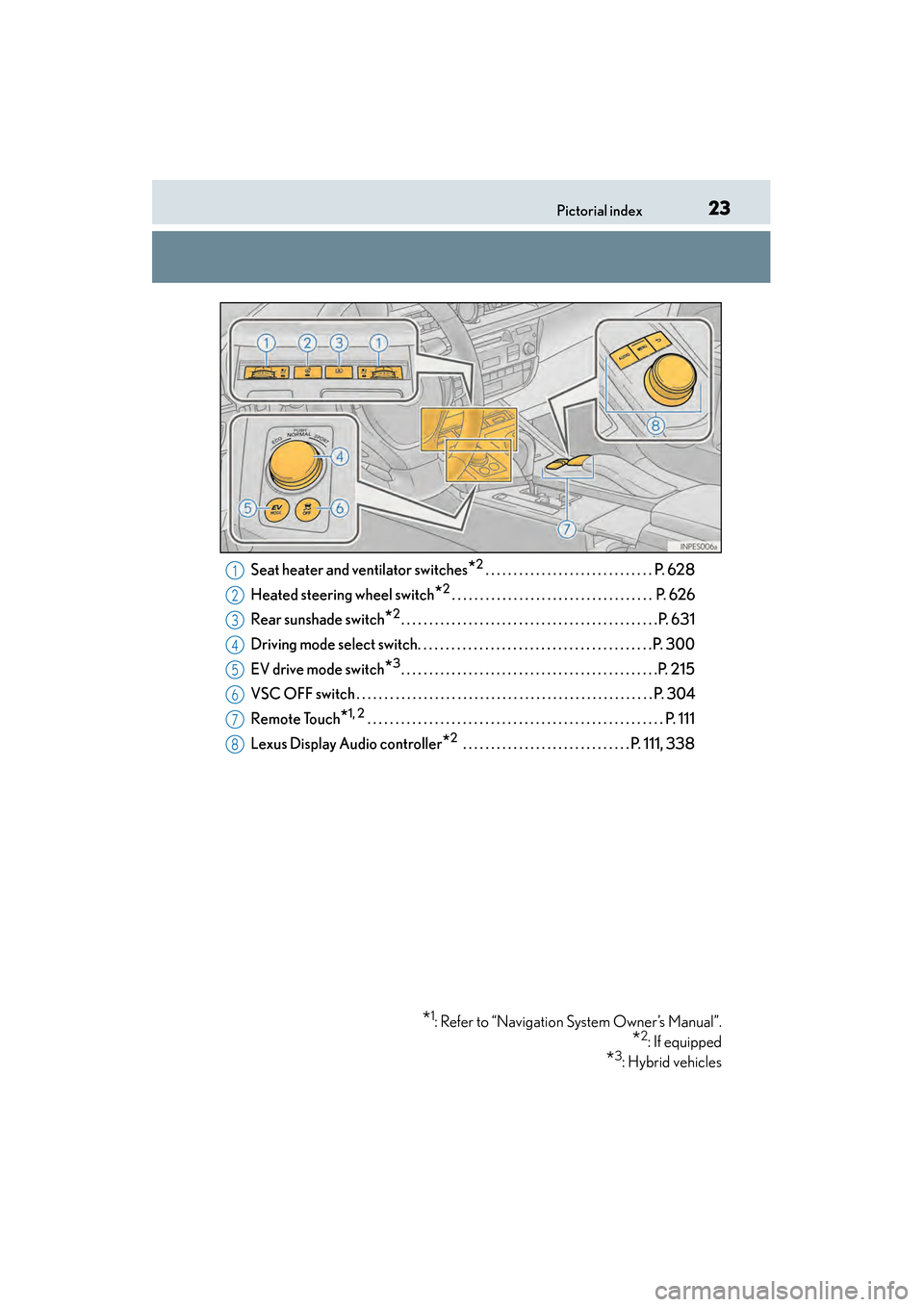
ES350_300h_OM_OM33A60U_(U)Seat heater and ventilator switches
*2. . . . . . . . . . . . . . . . . . . . . . . . . . . . . . P. 628
Heated steering wheel switch
*2. . . . . . . . . . . . . . . . . . . . . . . . . . . . . . . . . . . . P. 626
Rear sunshade switch
*2. . . . . . . . . . . . . . . . . . . . . . . . . . . . . . . . . . . . . . . . . . . . . .P. 631
Driving mode select switch. . . . . . . . . . . . . . . . . . . . . . . . . . . . . . . . . . . . . . . . . .P. 300
EV drive mode switch
*3. . . . . . . . . . . . . . . . . . . . . . . . . . . . . . . . . . . . . . . . . . . . . .P. 215
VSC OFF switch . . . . . . . . . . . . . . . . . . . . . . . . . . . . . . . . . . . . . . . . . . . . . . . . . . . . . P. 304
Remote Touch
*1, 2 . . . . . . . . . . . . . . . . . . . . . . . . . . . . . . . . . . . . . . . . . . . . . . . . . . . . . P. 111
Lexus Display Audio controller
*2 . . . . . . . . . . . . . . . . . . . . . . . . . . . . . . P. 111, 338
*1: Refer to “Navigation System Owner’s Manual”.
*2: If equipped
*3: Hybrid vehicles
1
2
3
4
5
6
7
8
Page 26 of 918
25Pictorial index
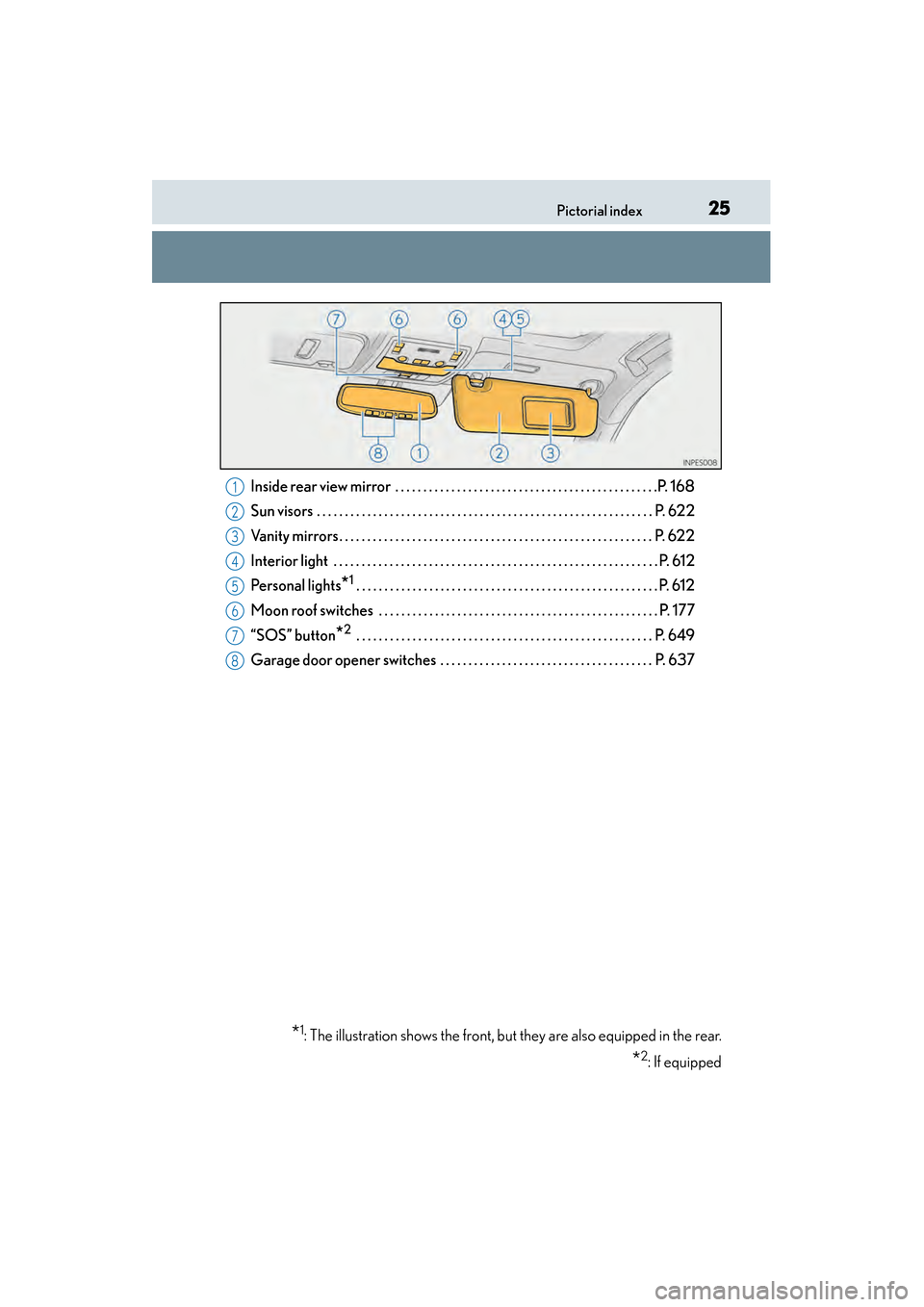
ES350_300h_OM_OM33A60U_(U)Inside rear view mirror . . . . . . . . . . . . . . . . . . . . . . . . . . . . . . . . . . . . . . . . . . . . . . .P. 168
Sun visors . . . . . . . . . . . . . . . . . . . . . . . . . . . . . . . . . . . . . . . . . . . . . . . . . . . . . . . . . .
. . P. 622
Vanity mirrors . . . . . . . . . . . . . . . . . . . . . . . . . . . . . . . . . . . . . . . . . . . . . . . . . . . . . . . . P. 622
Interior light . . . . . . . . . . . . . . . . . . . . . . . . . . . . . . . . . . . . . . . . . . . . . . . . . . . . . . . . . . P. 612
Personal lights
*1 . . . . . . . . . . . . . . . . . . . . . . . . . . . . . . . . . . . . . . . . . . . . . . . . . . . . . . P. 612
Moon roof switches . . . . . . . . . . . . . . . . . . . . . . . . . . . . . . . . . . . . . . . . . . . . . . . . . . P. 177
“SOS” button
*2 . . . . . . . . . . . . . . . . . . . . . . . . . . . . . . . . . . . . . . . . . . . . . . . . . . . . . P. 649
Garage door opener switches . . . . . . . . . . . . . . . . . . . . . . . . . . . . . . . . . . . . . . P. 637
*1: The illustration shows the front, but they are also equipped in the rear.
*2: If equipped
1
2
3
4
5
6
7
8
Page 97 of 918
96
ES350_300h_OM_OM33A60U_(U)
2. Instrument cluster
Fuel gauge
Displays the quantity of fuel remaining in the tank
Shift position and shift range
Displays the selected shift position or selected shift range (→P. 2 1 8 , 2 2 1 )
Odometer and trip meter display
XOdometer
Displays the total distance the vehicle has been driven
XTr i p m e t e r
Displays the distance the vehicle has been driven since the meter was last reset.
Trip meters “A” and “B” can be used to record and display different distances inde-
pendently.
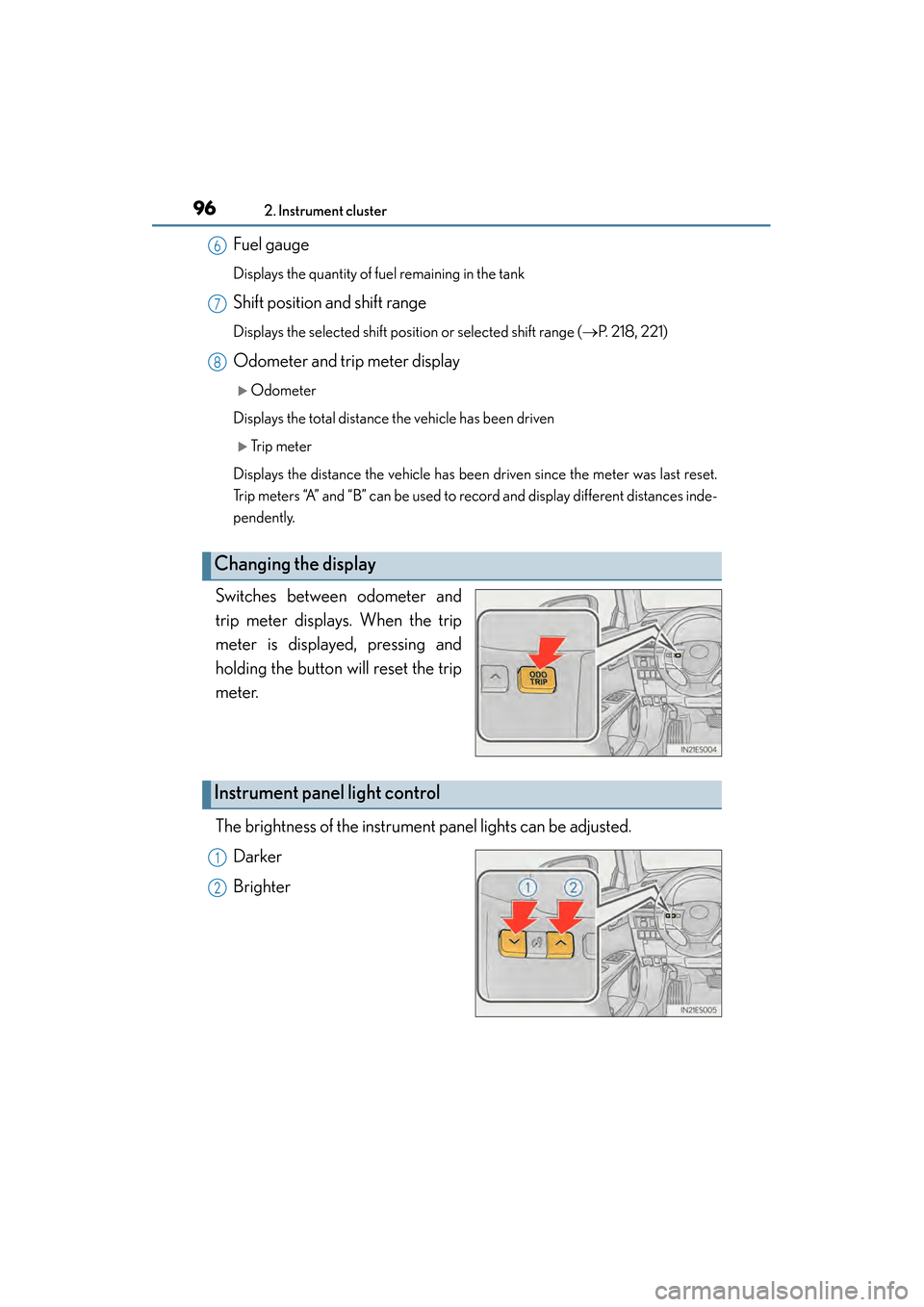
Switches between odometer and
trip meter displays. When the trip
meter is displayed, pressing and
holding the button will reset the trip
meter.
The brightness of the instrument panel lights can be adjusted. Darker
Brighter
Changing the display
6
7
8
Instrument panel light control
1
2
Page 100 of 918
ES350_300h_OM_OM33A60U_(U)
992. Instrument cluster
2
Instrument cluster
■ECO lamp and SPORT lamp
●When sport mode is selected, SPORT lamp (red) will illuminate.
●When all of the following conditions are satisfied and Eco-friendly driving, ECO
lamp (blue) will illuminate. (ECO lamp will become brighter the more Eco-friendly
driving you perform. Also, while the vehicle is stopped or the acceleration exceeds
Zone of Eco driving, ECO lamp turns off. (→P. 107) However, when Eco drive
mode is selected, while the vehicle is stopped or the acceleration exceeds Zone of
Eco driving, ECO lamp does not turn off.):
• Driving with the shift lever in D
• Either normal mode or Eco drive mode is selected.
• The vehicle speed is approximately 80 mph (130 km/h) or below.
■Tachometer (hybrid vehicles)
Hybrid System Indicator automatically switches to the tachometer when driving
mode is in sport mode.
■Engine speed (hybrid vehicles)
Engine speed is precisely controlled in order to help improve fuel efficiency and
reduce exhaust emissions etc.
There are times when the engine speed that is displayed may differ even when vehi-
cle operation and driving conditions are the same.
■Odometer and trip meter display
→ P. 2 0 5 , 2 1 3
■Customization
Settings (e.g. on/off operation of ECO lamp) can be changed.
(Customizable features →P. 8 6 2 )
NOTICE
■To prevent damage to the engine and its components
●Do not let the indicator needle of the tachometer enter the red zone, which indi-
cates the maximum engine speed.
●The engine may be overheating if the engine coolant temperature gauge is in the
red zone (H). In this case, immediately stop the vehicle in a safe place, and check
the engine after it has cooled completely. ( →P. 821, 824)