display Lexus ES300h 2016 (OM33B71U) Owner's Guide
[x] Cancel search | Manufacturer: LEXUS, Model Year: 2016, Model line: ES300h, Model: Lexus ES300h 2016Pages: 600, PDF Size: 8.59 MB
Page 94 of 600
94
ES300h_OM_OM33B71U_(U)2. Instrument cluster
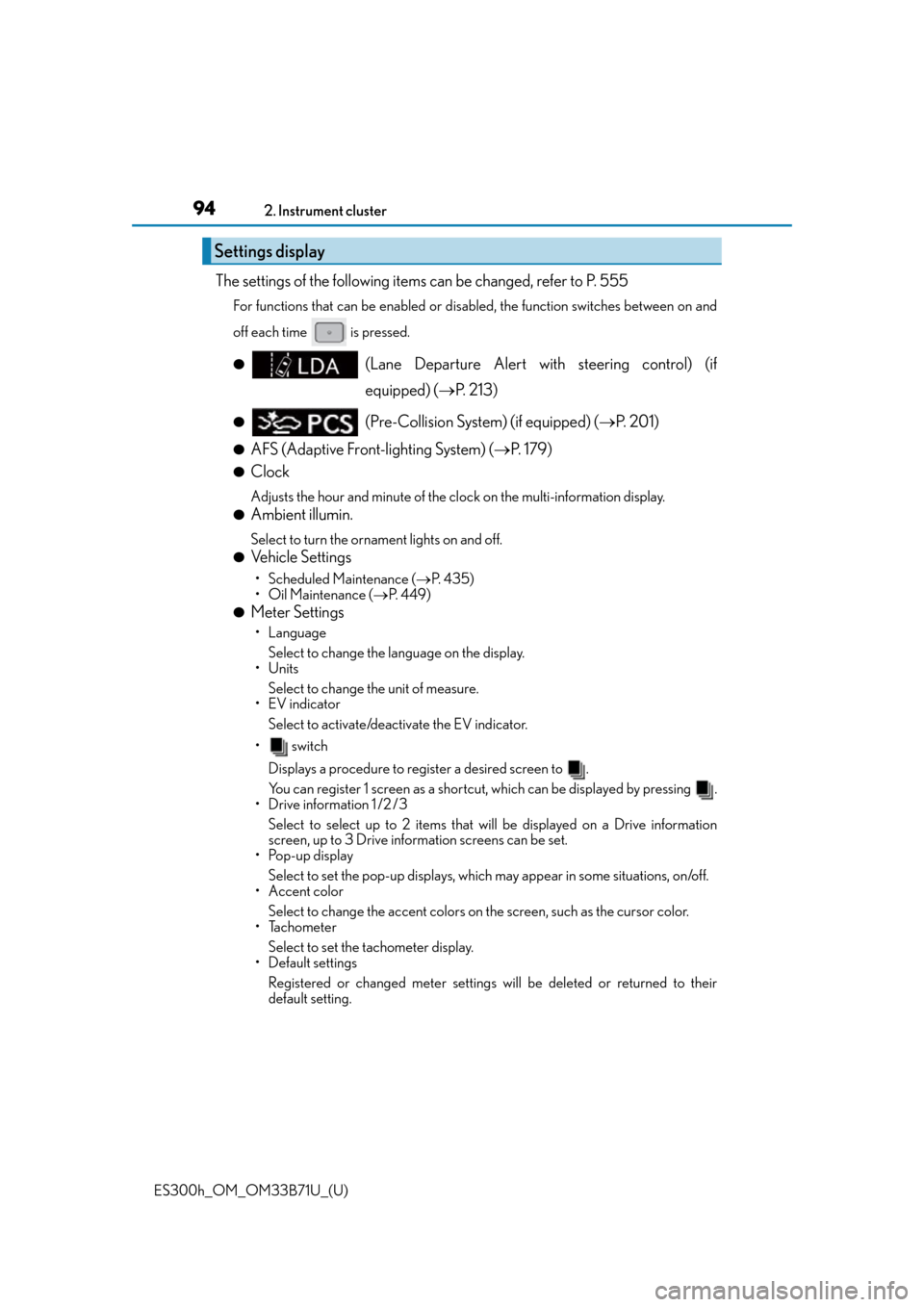
The settings of the following items can be changed, refer to P. 555
For functions that can be enabled or disabled, the function switches between on and
off each time is pressed.
●(Lane Departure Alert with steering control) (if
equipped) (
P. 2 1 3 )
●(Pre-Collision System) (if equipped) ( P. 2 0 1 )
●AFS (Adaptive Front-lighting System) ( P. 1 7 9 )
●Clock
Adjusts the hour and minute of the cl ock on the multi-information display.
●Ambient illumin.
Select to turn the ornament lights on and off.
●Vehicle Settings
• Scheduled Maintenance (P. 4 3 5 )
• Oil Maintenance ( P. 4 4 9 )
●Meter Settings
• Language
Select to change the la nguage on the display.
•Units
Select to change the unit of measure.
•EV indicator
Select to activate/deactivate the EV indicator.
• switch
Displays a procedure to register a desired screen to .
You can register 1 screen as a shortcut , which can be displayed by pressing .
• Drive information 1 /2 /3
Select to select up to 2 items that w ill be displayed on a Drive information
screen, up to 3 Drive information screens can be set.
•Pop-up display
Select to set the pop-up displays, which may appear in some situations, on/off.
• Accent color
Select to change the accent colors on the screen, such as the cursor color.
•Tachometer
Select to set the tachometer display.
• Default settings
Registered or changed meter settings w ill be deleted or returned to their
default setting.
Settings display
Page 95 of 600
ES300h_OM_OM33B71U_(U)
952. Instrument cluster
2
Instrument cluster
■System check display
After turning the power switch to ON mode, opening image is displayed while system
operation is checked. When the system check is complete, the normal screen will return.
■Suspension of the settings display
In the following situations, the settings display using the meter control switches will be
suspended.
●When a warning message appears on the multi-information display
●When the vehicle begins to move
■Tire inflation pressure
●It may take a few minutes to display the tire inflation pressure after the power switch is
turned to ON mode. It may also take a few minutes to display the tire inflation pressure
after inflation pressure has been adjusted.
●“---” may be displayed if the tire information cannot be determined due to unfavorable
radio wave conditions.
●Tire inflation pressure changes with temperat ure. The displayed values may also be dif-
ferent from the values measured using a tire pressure gauge.
■When disconnecting and reconnec ting 12-volt battery terminals
The drive information will be reset.
■Liquid crystal display
P. 8 9
WA R N I N G
■Caution for use while driving
For safety, avoid operating the meter control switch while driving as much as possible,
and do not look continuously at the multi- information display while driving. Stop the
vehicle and operate the meter control switch. Failure to do so may cause a steering
wheel operation error, resultin g in an unexpected accident.
■Cautions during setting up the display
As the hybrid system needs to be operating during setting up the display, ensure that
the vehicle is parked in a place with adequate ventilation. In a closed area such as a
garage, exhaust gases includin g harmful carbon monoxide (CO) may collect and enter
the vehicle. This may lead to death or a serious health hazard.
NOTICE
■During setting up the display
To prevent 12-volt battery discharge, ensure that the hybrid system is operating while
setting up the display features.
Page 96 of 600
96
ES300h_OM_OM33B71U_(U)2. Instrument cluster
Energy monitor/consumption screen
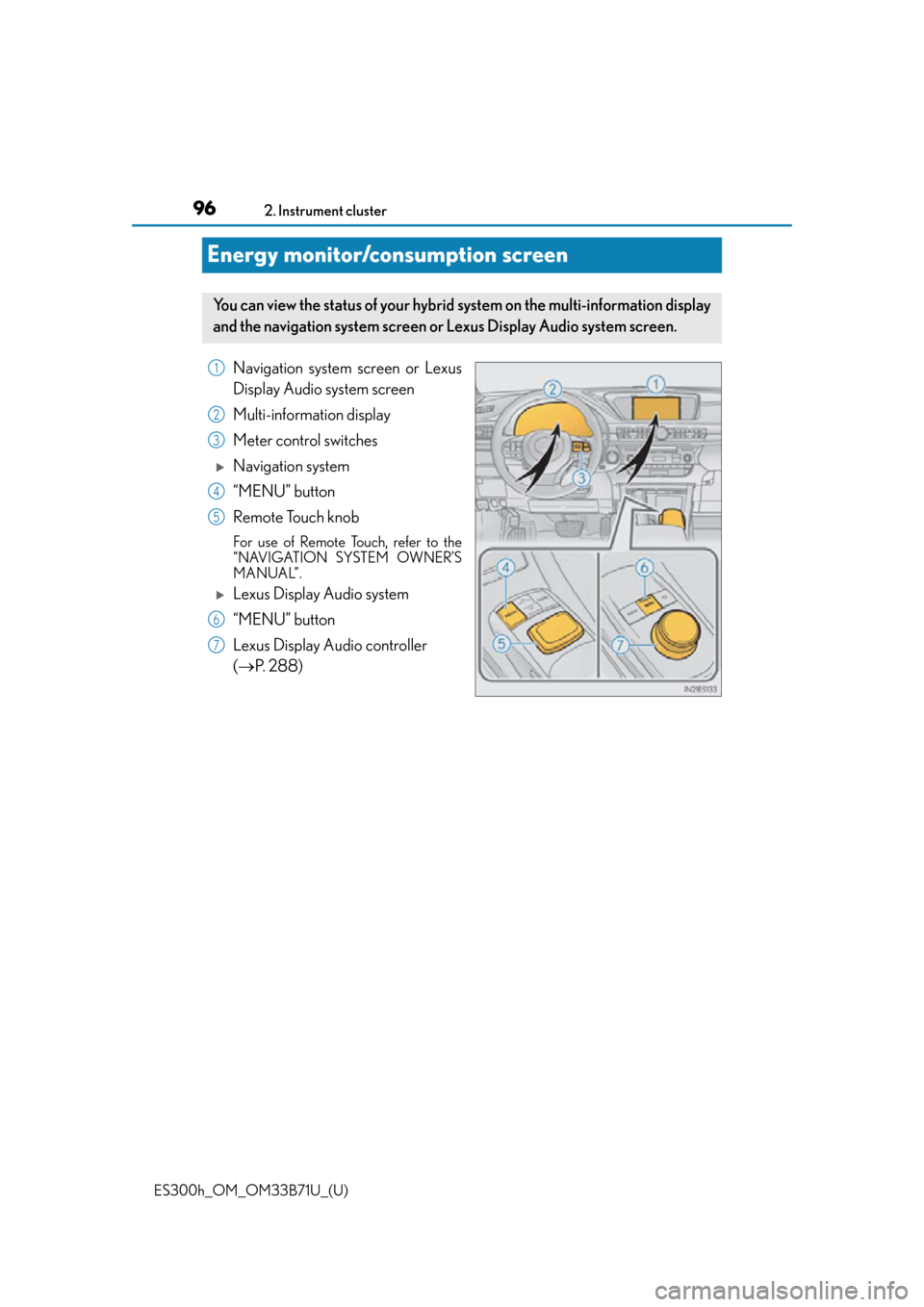
Navigation system screen or Lexus
Display Audio system screen
Multi-information display
Meter control switches
Navigation system
“MENU” button
Remote Touch knob
For use of Remote Touch, refer to the
“NAVIGATION SYSTEM OWNER’S
MANUAL”.
Lexus Display Audio system
“MENU” button
Lexus Display Audio controller
(
P. 288)
You can view the status of your hybrid system on the multi-information display
and the navigation system screen or Lexus Display Audio system screen.
1
2
3
4
5
6
7
Page 97 of 600
ES300h_OM_OM33B71U_(U)
972. Instrument cluster
2
Instrument cluster
Navigation system screen
Press the “MENU” button on the Remote To uch, then select “Info” on the “Menu”
screen, and then select “Fuel Consumption”.
If the “Trip Information” or “Past Record ” screen is displayed, select “Energy”.
Lexus Display Audio screen
Press the “MENU” button on the Lexus Display Audio controller, then select
“Info” on the “Menu” screen, and then select “Fuel Consumption”.
If the “Energy Monitor” screen does not ap pear, move the controller to the right and
select “Energy”.
Multi-information display
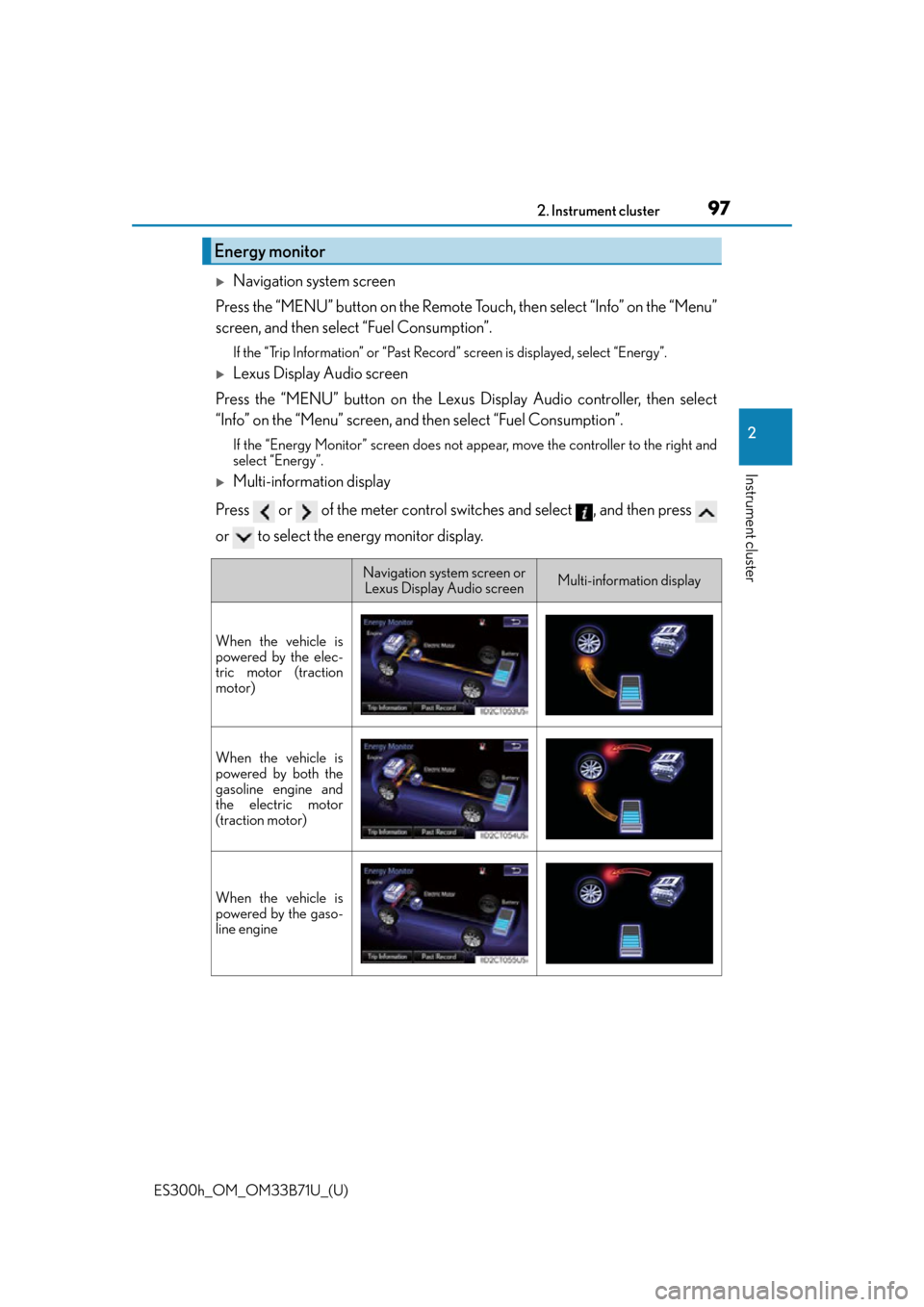
Press or of the meter control switches and select , and then press
or to select the energy monitor display.
Energy monitor
Navigation system screen or Lexus Display Audio screenMulti-information display
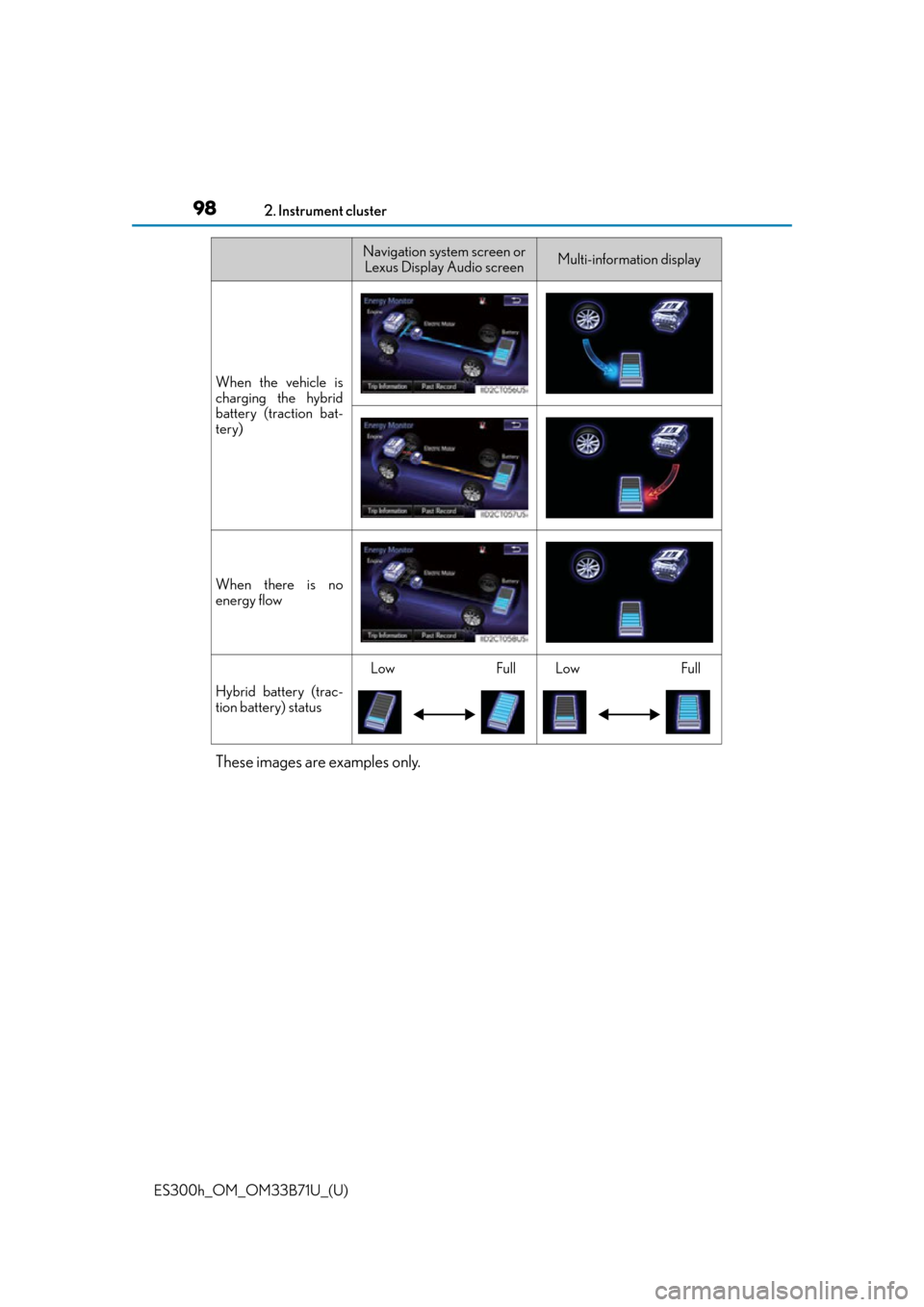
When the vehicle is
powered by the elec-
tric motor (traction
motor)
When the vehicle is
powered by both the
gasoline engine and
the electric motor
(traction motor)
When the vehicle is
powered by the gaso-
line engine
Page 98 of 600
98
ES300h_OM_OM33B71U_(U)2. Instrument cluster
These images are examples only.
When the vehicle is
charging the hybrid
battery (traction bat-
tery)
When there is no
energy flow
Hybrid battery (trac-
tion battery) status
LowFullLowFull
Navigation system screen or
Lexus Display Audio screenMulti-information display
Page 100 of 600
100
ES300h_OM_OM33B71U_(U)2. Instrument cluster
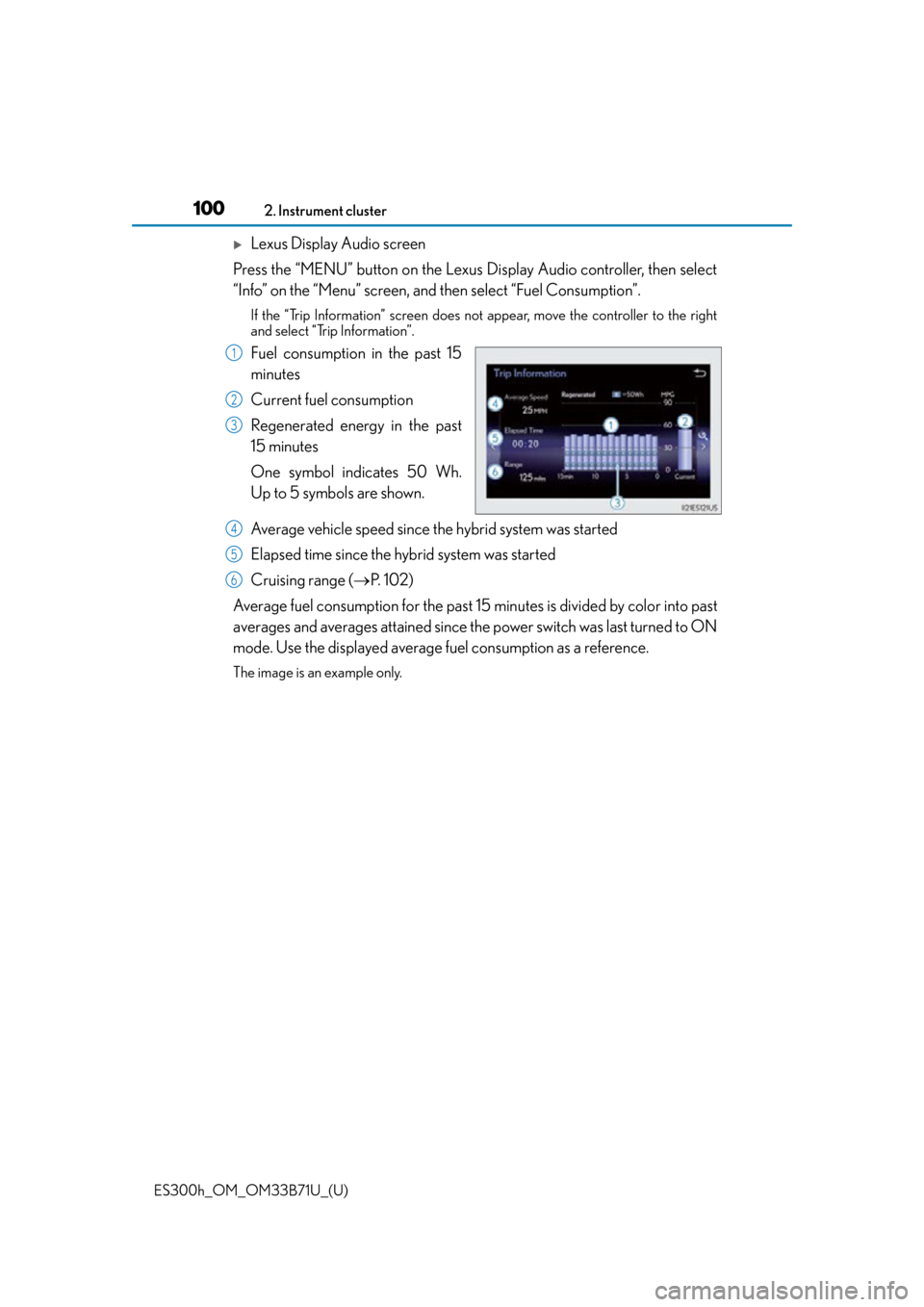
Lexus Display Audio screen
Press the “MENU” button on the Lexus Display Audio controller, then select
“Info” on the “Menu” screen, and then select “Fuel Consumption”.
If the “Trip Information” screen does not appear, move the controller to the right
and select “Trip Information”.
Fuel consumption in the past 15
minutes
Current fuel consumption
Regenerated energy in the past
15 minutes
One symbol indicates 50 Wh.
Up to 5 symbols are shown.
Average vehicle speed since the hybrid system was started
Elapsed time since the hybrid system was started
Cruising range (P. 1 0 2 )
Average fuel consumption fo r the past 15 minutes is divided by color into past
averages and averages attained since th e power switch was last turned to ON
mode. Use the displayed average fuel consumption as a reference.
The image is an example only.
1
2
3
4
5
6
Page 101 of 600
ES300h_OM_OM33B71U_(U)
1012. Instrument cluster
2
Instrument cluster
■Past record
Navigation system screen
Press the “MENU” button on the Remote Touch, then select “Info” on the
“Menu” screen, and then select “Fuel Consumption”.
If the “Past Record” screen does not appear, select “Past Record”.
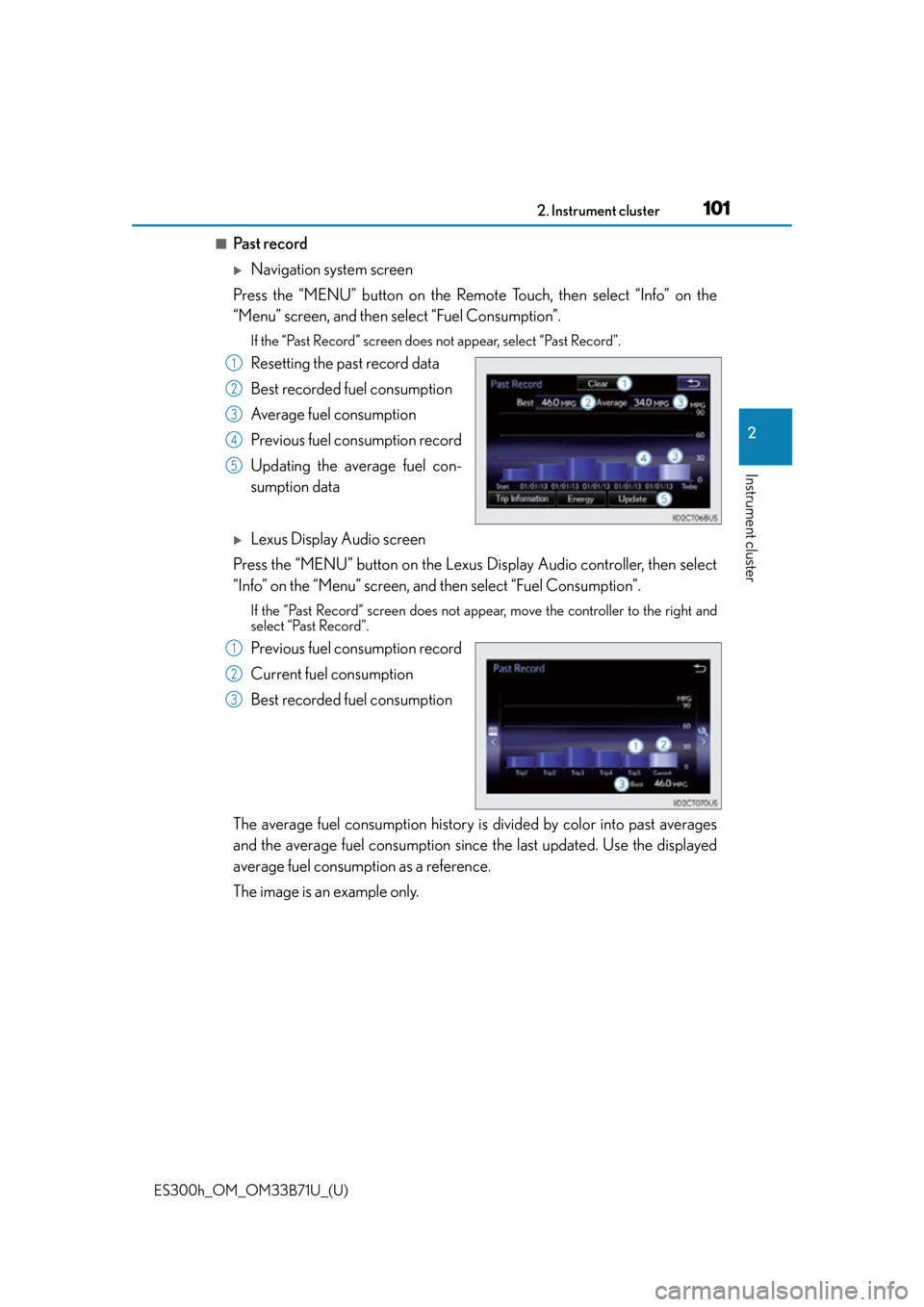
Resetting the past record data
Best recorded fuel consumption
Average fuel consumption
Previous fuel consumption record
Updating the average fuel con-
sumption data
Lexus Display Audio screen
Press the “MENU” button on the Lexus Display Audio controller, then select
“Info” on the “Menu” screen, and then select “Fuel Consumption”.
If the “Past Record” screen does not appe ar, move the controller to the right and
select “Past Record”.
Previous fuel consumption record
Current fuel consumption
Best recorded fuel consumption
The average fuel consumption history is divided by color into past averages
and the average fuel consumption since the last updated. Use the displayed
average fuel consumption as a reference.
The image is an example only.
1
2
3
4
5
1
2
3
Page 102 of 600

102
ES300h_OM_OM33B71U_(U)2. Instrument cluster
■Updating the past record data
Vehicles with navigation system
Update the average fuel consumption by selecting “Update” to measure the current fuel
consumption again.
Vehicles with Lexus Display Audio system
Update the average fuel consumption by moving the controller to the left and select
“Update” to measure the current fuel consumption again.
■Resetting the data
Vehicles with navigation system
The fuel consumption data can be deleted by selecting “Clear”.
Vehicles with Lexus Display Audio system
The fuel consumption data can be deleted by moving the controller to the left and select
“Clear ”.
■Cruising range
Displays the estimated maximum distance that can be driven with the quantity of fuel
remaining.
This distance is computed based on your average fuel consumption.
As a result, the actual distance that can be driven may differ from that displayed.
Page 106 of 600

106
ES300h_OM_OM33B71U_(U)3-1. Key information
■Electronic key battery depletion
●The standard battery life is 1 to 2 years.
●If the battery becomes low, an alarm will
sound in the cabin when the hybrid system
stops. ( P. 4 7 5 )
●As the electronic key always receives ra dio waves, the battery will become depleted
even if the electronic key is not used. The following symptoms indicate that the elec-
tronic key battery may be depleted. Re place the battery when necessary. (P. 4 7 5 )
• The smart access system with push-button start or the wireless remote control does
not operate.
• The detection area becomes smaller.
• The LED indicator on the key surface does not turn on.
●To avoid serious deterioration, do not leave the electronic key within 3 ft. (1 m) of the
following electrical appliances that produce a magnetic field:
•TVs
• Personal computers
• Cellular phones, cordless phones and battery chargers
• Recharging cellular phones or cordless phones
• Table lamps
• Induction cookers
■If “Key Battery Low” is displaye d on the multi-information display
The electronic key has a low battery. Replace the electronic key battery. ( P. 4 7 5 )
■Replacing the battery
P. 4 7 5
■Confirmation of the registered key number
The number of keys already registered to the vehicle can be confirmed. Ask your Lexus
dealer for details.
■If a wrong key is used
The key cylinder rotates freely to isolate inside mechanism.
Page 112 of 600
112
ES300h_OM_OM33B71U_(U)3-2. Opening, closing and
locking the doors and trunk
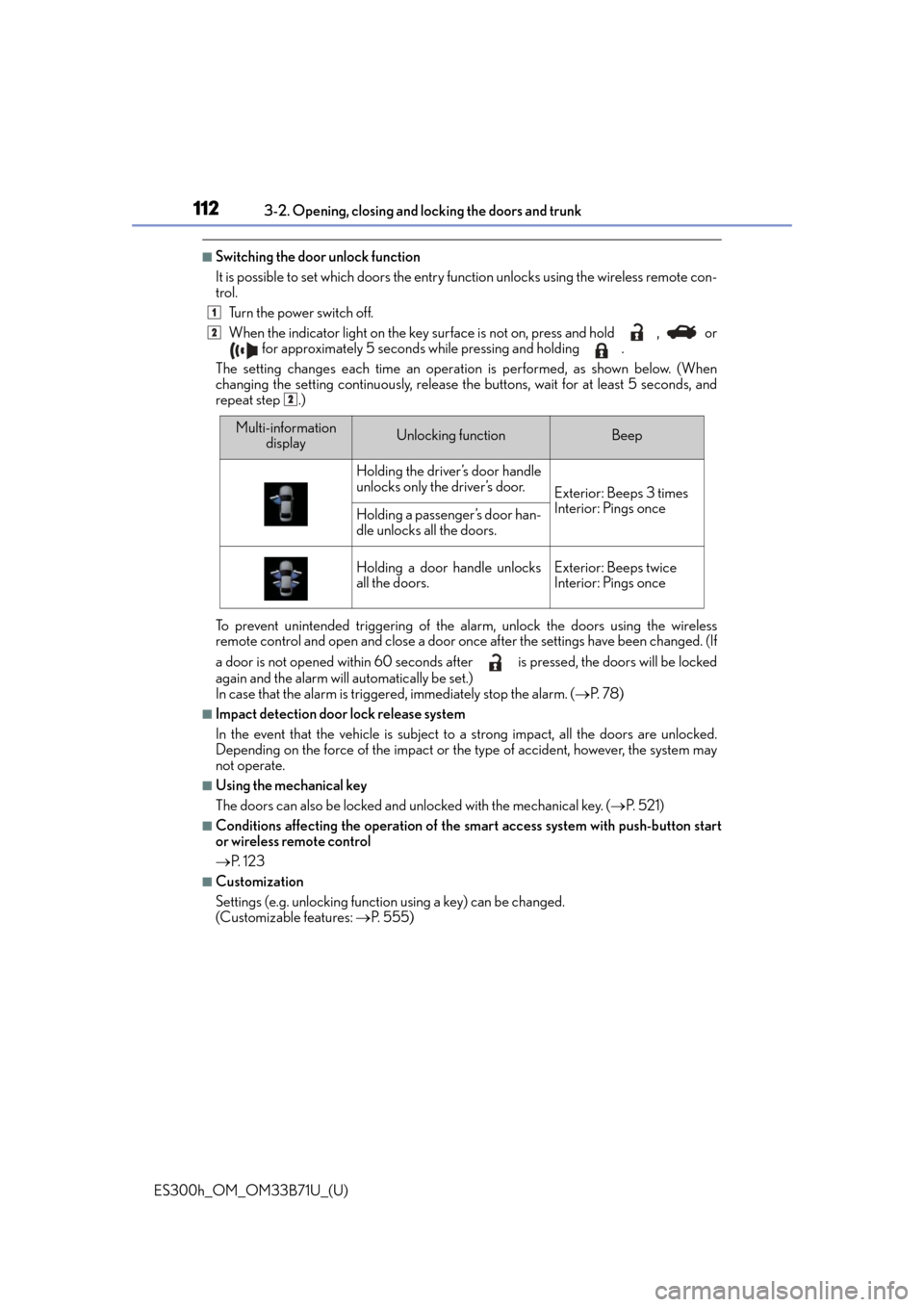
■Switching the door unlock function
It is possible to set which doors the entry fu nction unlocks using the wireless remote con-
trol.
Turn the power switch off.
When the indicator light on the key su rface is not on, press and hold , or
for approximately 5 seconds while pressing and holding .
The setting changes each time an operatio n is performed, as shown below. (When
changing the setting continuously, release the buttons, wait for at least 5 seconds, and
repeat step .)
To prevent unintended triggering of the alarm, unlock the doors using the wireless
remote control and open and close a door once after the settings have been changed. (If
a door is not opened within 60 seconds af ter is pressed, the doors will be locked
again and the alarm will automatically be set.)
In case that the alarm is triggered, immediately stop the alarm. ( P. 7 8 )
■Impact detection door lock release system
In the event that the vehicle is subject to a strong impact, all the doors are unlocked.
Depending on the force of the impact or the type of accident, however, the system may
not operate.
■Using the mechanical key
The doors can also be locked and unlocked with the mechanical key. ( P. 5 2 1 )
■Conditions affecting the operation of the sm art access system with push-button start
or wireless remote control
P. 1 2 3
■Customization
Settings (e.g. unlocking function using a key) can be changed.
(Customizable features: P. 5 5 5 )
1
2
2
Multi-information
displayUnlocking functionBeep
Holding the driver’s door handle
unlocks only the driver’s door.
Exterior: Beeps 3 times
Interior: Pings once
Holding a passenger’s door han-
dle unlocks all the doors.
Holding a door handle unlocks
all the doors.Exterior: Beeps twice
Interior: Pings once