display Lexus ES300h 2016 (OM33B71U) Workshop Manual
[x] Cancel search | Manufacturer: LEXUS, Model Year: 2016, Model line: ES300h, Model: Lexus ES300h 2016Pages: 600, PDF Size: 8.59 MB
Page 213 of 600
213
ES300h_OM_OM33B71U_(U)4-5. Using the driving support systems
4
Driving
LDA (Lane Departure Alert with steering control)
When driving on highways and freeways with white or yellow lines, this function
alerts the driver when the vehicle might depart from its lane and provides assis-
tance by operating the steering wheel to keep the vehicle in its lane.
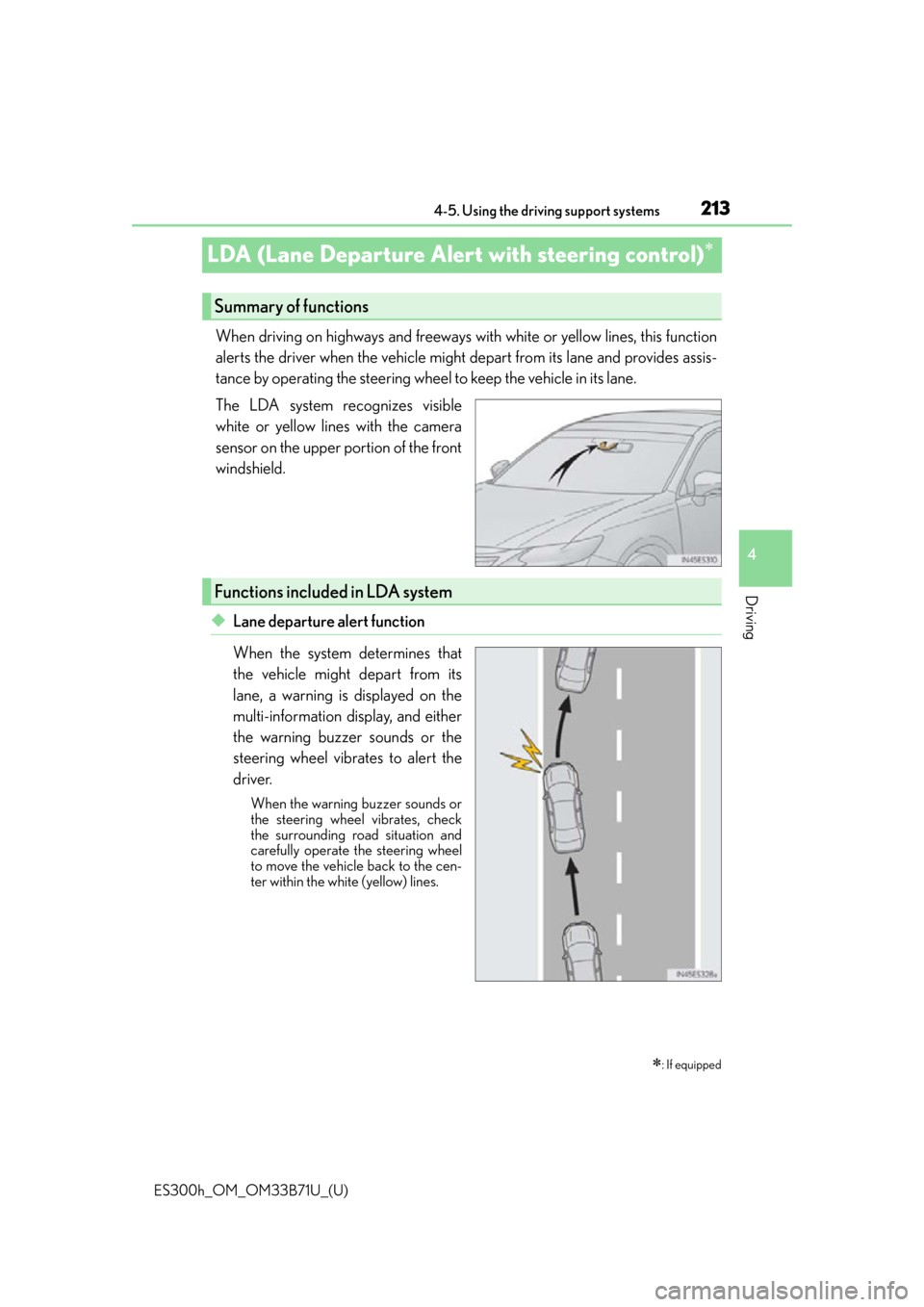
The LDA system recognizes visible
white or yellow lines with the camera
sensor on the upper portion of the front
windshield.
◆Lane departure alert function
When the system determines that
the vehicle might depart from its
lane, a warning is displayed on the
multi-information display, and either
the warning buzzer sounds or the
steering wheel vibrates to alert the
driver.
When the warning buzzer sounds or
the steering wheel vibrates, check
the surrounding road situation and
carefully operate the steering wheel
to move the vehicle back to the cen-
ter within the white (yellow) lines.
: If equipped
Summary of functions
Functions included in LDA system
Page 214 of 600
214
ES300h_OM_OM33B71U_(U)4-5. Using the driving support systems
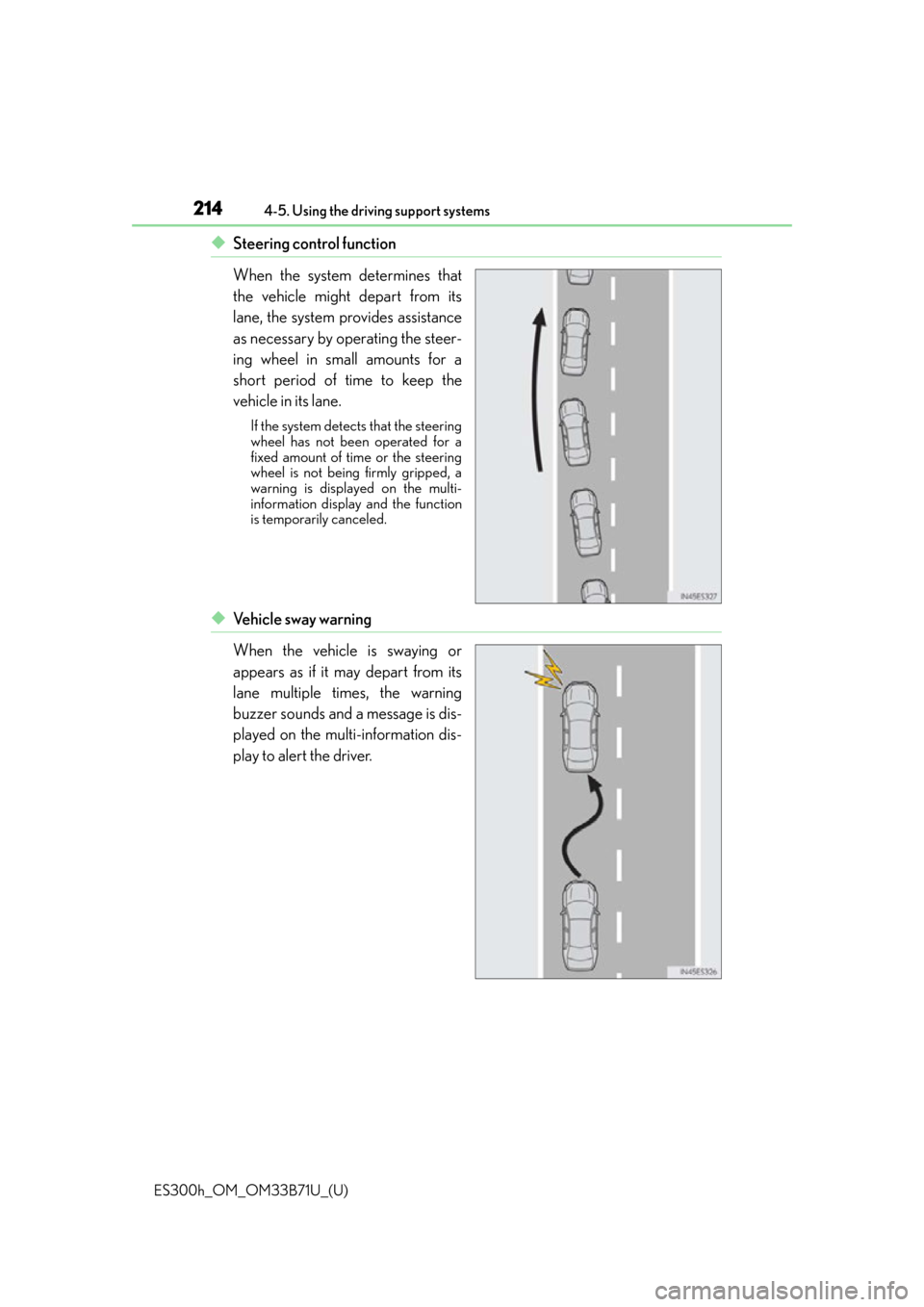
◆Steering control function
When the system determines that
the vehicle might depart from its
lane, the system provides assistance
as necessary by operating the steer-
ing wheel in small amounts for a
short period of time to keep the
vehicle in its lane.
If the system detects that the steering
wheel has not been operated for a
fixed amount of time or the steering
wheel is not being firmly gripped, a
warning is displayed on the multi-
information display and the function
is temporarily canceled.
◆Ve h i c l e s w a y w a r n i n g
When the vehicle is swaying or
appears as if it may depart from its
lane multiple times, the warning
buzzer sounds and a message is dis-
played on the multi-information dis-
play to alert the driver.
Page 216 of 600
216
ES300h_OM_OM33B71U_(U)4-5. Using the driving support systems
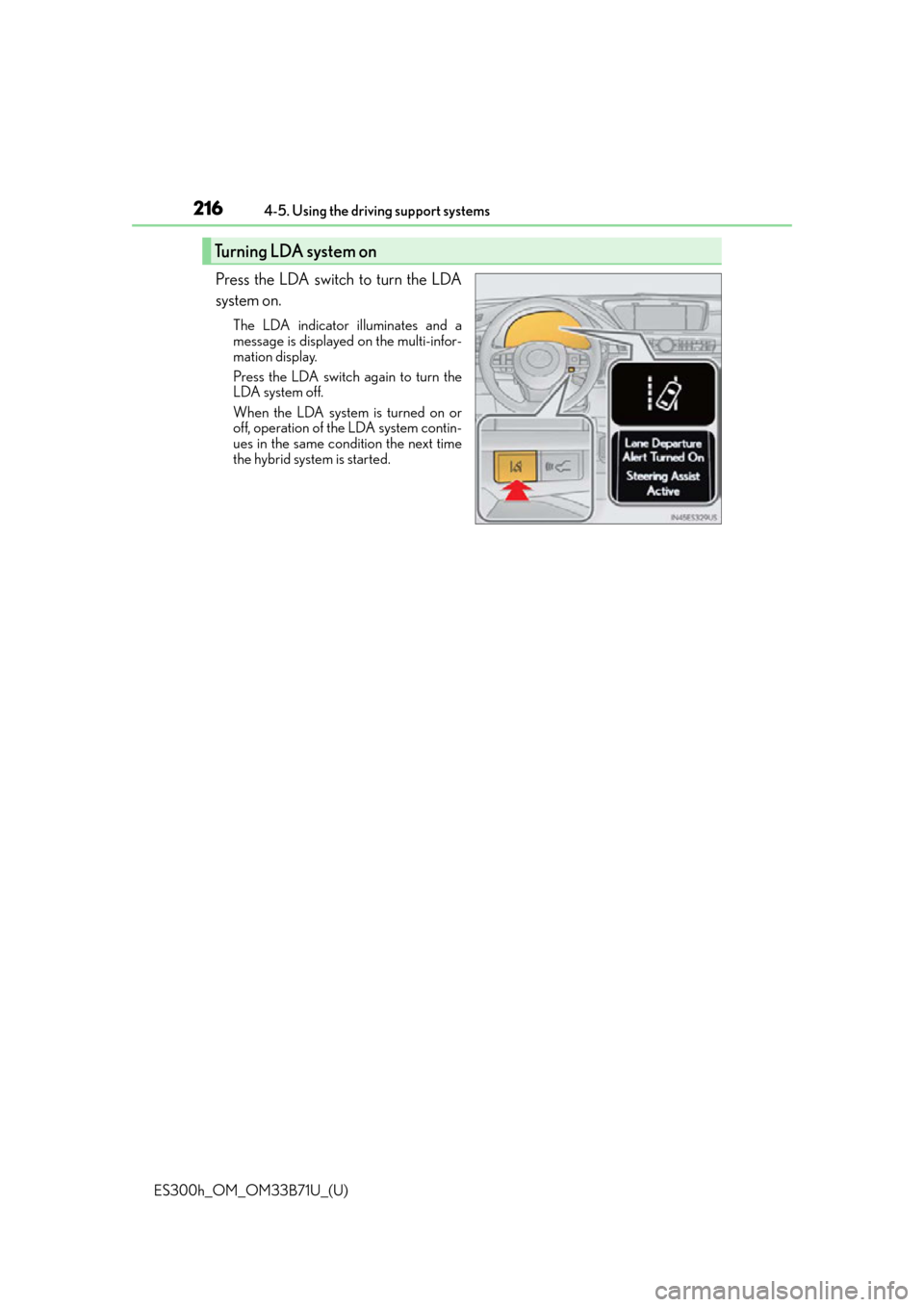
Press the LDA switch to turn the LDA
system on.
The LDA indicator illuminates and a
message is displayed on the multi-infor-
mation display.
Press the LDA switch again to turn the
LDA system off.
When the LDA system is turned on or
off, operation of the LDA system contin-
ues in the same condition the next time
the hybrid system is started.
Turning LDA system on
Page 217 of 600
ES300h_OM_OM33B71U_(U)
2174-5. Using the driving support systems
4
Driving
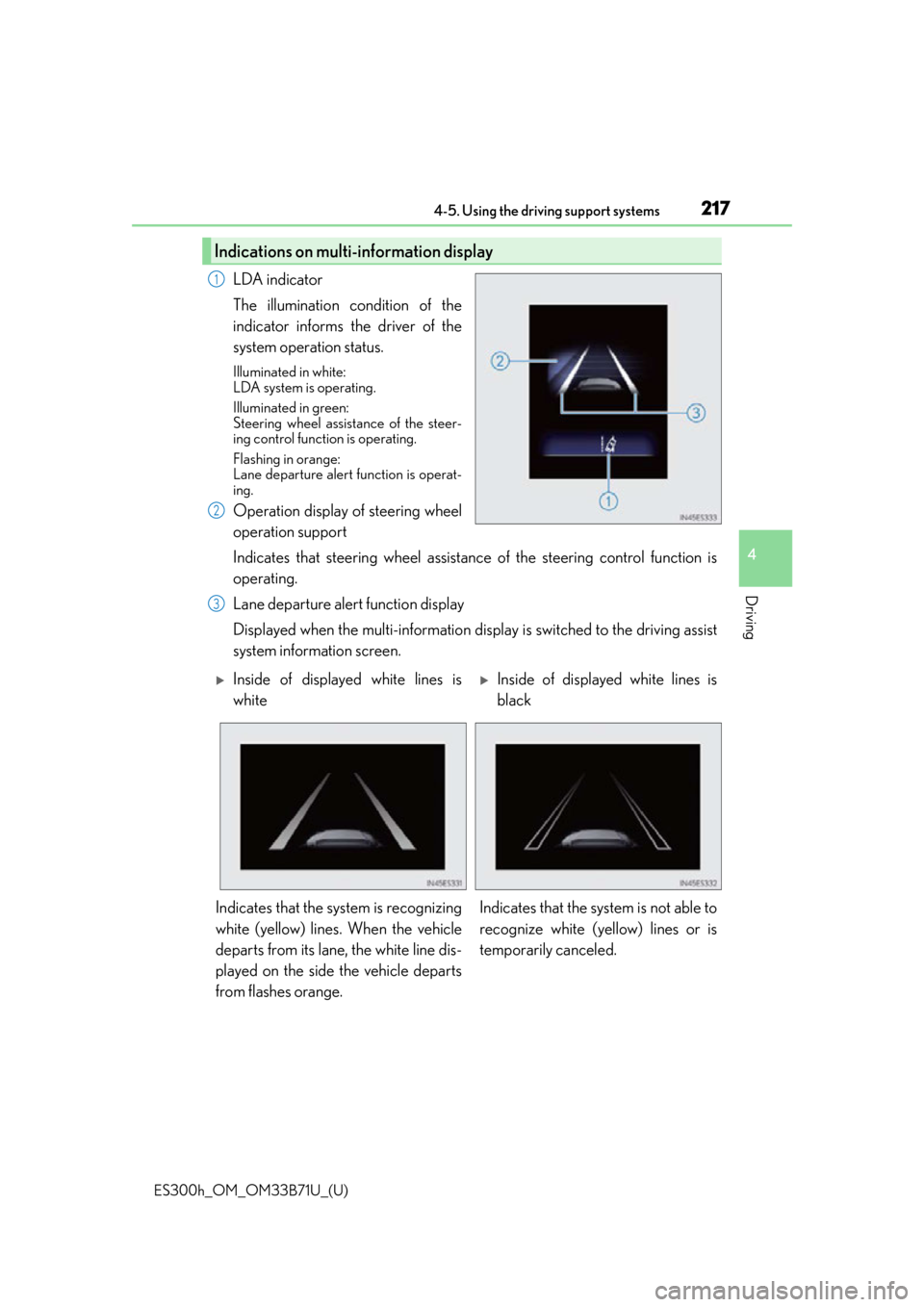
LDA indicator
The illumination condition of the
indicator informs the driver of the
system operation status.
Illuminated in white:
LDA system is operating.
Illuminated in green:
Steering wheel assistance of the steer-
ing control function is operating.
Flashing in orange:
Lane departure alert function is operat-
ing.
Operation display of steering wheel
operation support
Indicates that steering wheel assistance of the steering control function is
operating.
Lane departure alert function display
Displayed when the multi-information disp lay is switched to the driving assist
system information screen.
Indications on multi-information display
1
2
3
Inside of displayed white lines is
whiteInside of displayed white lines is
black
Indicates that the system is recognizing
white (yellow) lines. When the vehicle
departs from its lane, the white line dis-
played on the side the vehicle departs
from flashes orange. Indicates that the system is not able to
recognize white (yellow) lines or is
temporarily canceled.
Page 218 of 600
218
ES300h_OM_OM33B71U_(U)4-5. Using the driving support systems
■Operation conditions of each function
●Lane departure alert function
This function operates when all of
the following conditions are met.
• LDA is turned on.
• Vehicle speed is approximately 32 mph (50 km/h) or more.
• System recognizes white (yellow) lines.
• Width of traffic lane is approximately 9.8 ft. (3 m) or more.
• Turn signal lever is not operated.
• Vehicle is driven on a straight road or around a gentle curve with a radius of more
than approximately 492 ft. (150 m).
• No system malfunctions are detected. ( P. 220)
●Steering control function
This function operates when all of the following conditions are met in addition to the
operation conditions for the lane departure alert function.
• Setting for “Steering Assist” in (setti ngs display) of the multi-information dis-
play is set to “On”. ( P. 9 1 )
• Vehicle is not accelerated or decelerated by a fixed amount or more.
• Steering wheel is not operated with a st eering force level suitable for changing
lanes.
• ABS, VSC, TRAC and PCS are not operating.
• Hands off steering wheel alert is not displayed. ( P. 2 1 8 )
●Ve h i c l e s w a y w a r n i n g
This function operates when all of the following conditions are met.
• Setting for “Sway Warning” in (setting s display) of the multi-information dis-
play is set to “On”. ( P. 9 1 )
• Vehicle speed is approximately 32 mph (50 km/h) or more.
• Width of traffic lane is approximately 9.8 ft. (3 m) or more.
• No system malfunctions are detected. ( P. 220)
■Temporary cancellation of functions
When operation conditions are no longer me t, a function may be temporarily canceled.
However, when the operation conditions are met again, operation of the function is auto-
matically restored. ( P. 2 1 8 )
■Steering control function
Depending on the vehicle speed, lane depart ure situation, road conditions, etc., the
operation of the functions may not be reco gnized or the functions may not operate.
■Lane departure alert function
The warning buzzer may be difficult to hear due to external noise, audio playback, etc.
Also, it may be difficult to feel steering wheel vibrations due to the road conditions, etc.
■Hands off steering wheel alert
When the system determines that the driver has removed their hands from the steering
wheel while the steering control function is operating, a warning message is displayed on
the multi-information display.
If the driver continues to keep their hands off of the steering wheel, the buzzer sounds, a
warning message is displayed and the function is temporarily canceled. This alert also
operates in the same way when the vehicle is driven with the steering wheel lightly
gripped. However, depending on the road conditions, etc., the function may not cancel.
Page 220 of 600
220
ES300h_OM_OM33B71U_(U)4-5. Using the driving support systems
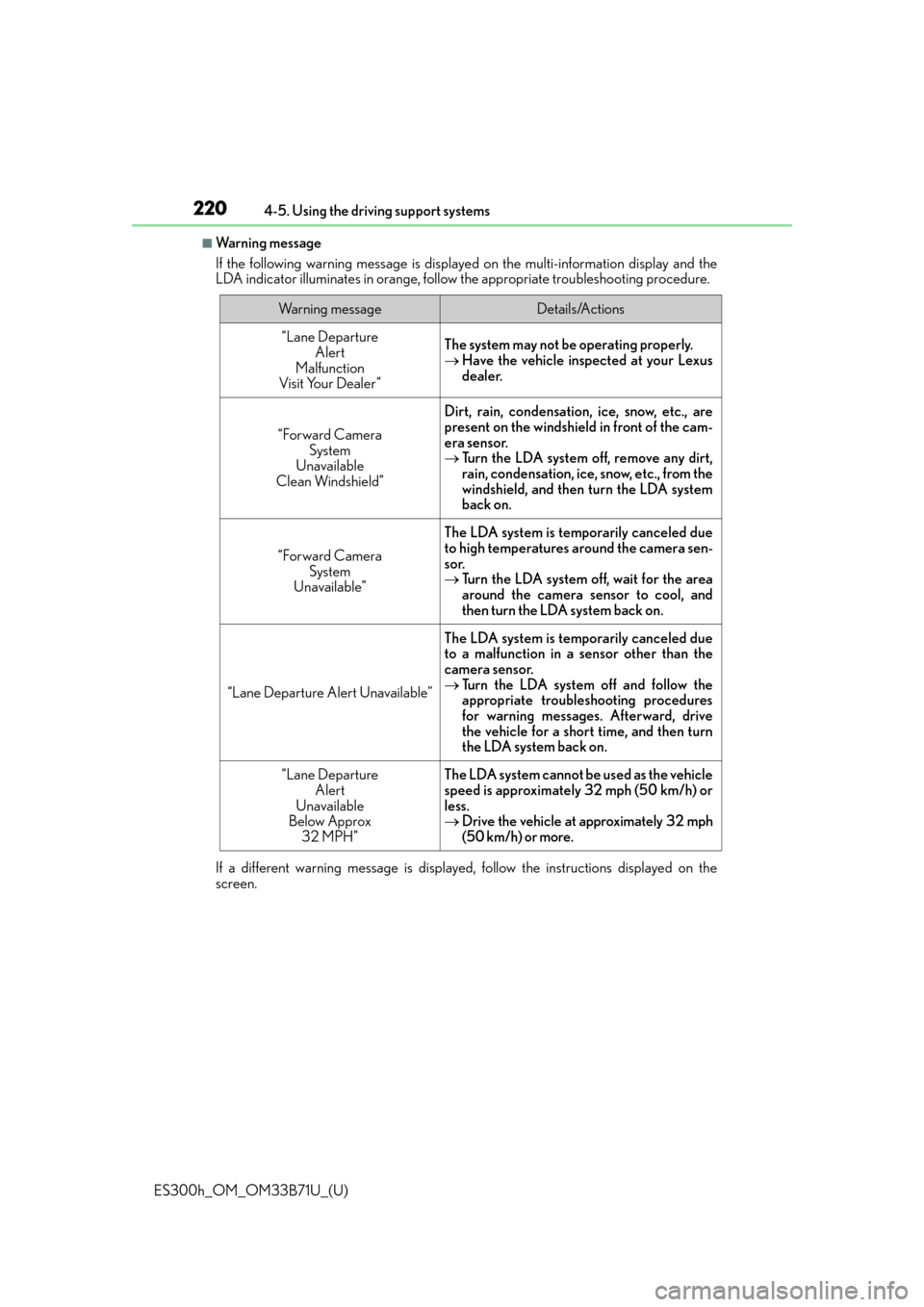
■Wa r n i n g m e s s a g e
If the following warning message is displaye
d on the multi-information display and the
LDA indicator illuminates in orange, follow the appropriate troubleshooting procedure.
If a different warning message is displayed, follow the instructions displayed on the
screen.
Wa r n i n g m e s s a g eDetails/Actions
“Lane Departure Alert
Malfunction
Visit Your Dealer ”The system may not be operating properly.
Have the vehicle inspected at your Lexus
dealer.
“Forward Camera
System
Unavailable
Clean Windshield”
Dirt, rain, condensation, ice, snow, etc., are
present on the windshield in front of the cam-
era sensor.
Turn the LDA system off, remove any dirt,
rain, condensation, ice, snow, etc., from the
windshield, and then turn the LDA system
back on.
“Forward Camera
System
Unavailable”
The LDA system is temporarily canceled due
to high temperatures around the camera sen-
sor.
Turn the LDA system off, wait for the area
around the camera sensor to cool, and
then turn the LDA system back on.
“Lane Departure Alert Unavailable”
The LDA system is temporarily canceled due
to a malfunction in a sensor other than the
camera sensor.
Turn the LDA system off and follow the
appropriate troubleshooting procedures
for warning messages. Afterward, drive
the vehicle for a short time, and then turn
the LDA system back on.
“Lane Departure
Alert
Unavailable
Below Approx
32 MPH”The LDA system cannot be used as the vehicle
speed is approximately 32 mph (50 km/h) or
less.
Drive the vehicle at approximately 32 mph
(50 km/h) or more.
Page 222 of 600
222
ES300h_OM_OM33B71U_(U)4-5. Using the driving support systems
Dynamic radar cruise control
In vehicle-to-vehicle distance control mode, the vehicle automatically acceler-
ates and decelerates to match the speed changes of the preceding vehicle even
if the accelerator pedal is not depressed.
In constant speed control mode, the
vehicle runs at a fixed speed.
Use the dynamic radar cruise control on freeways and highways.
●Vehicle-to-vehicle distance control mode ( P. 225)
●Constant speed control mode ( P. 2 3 0 )
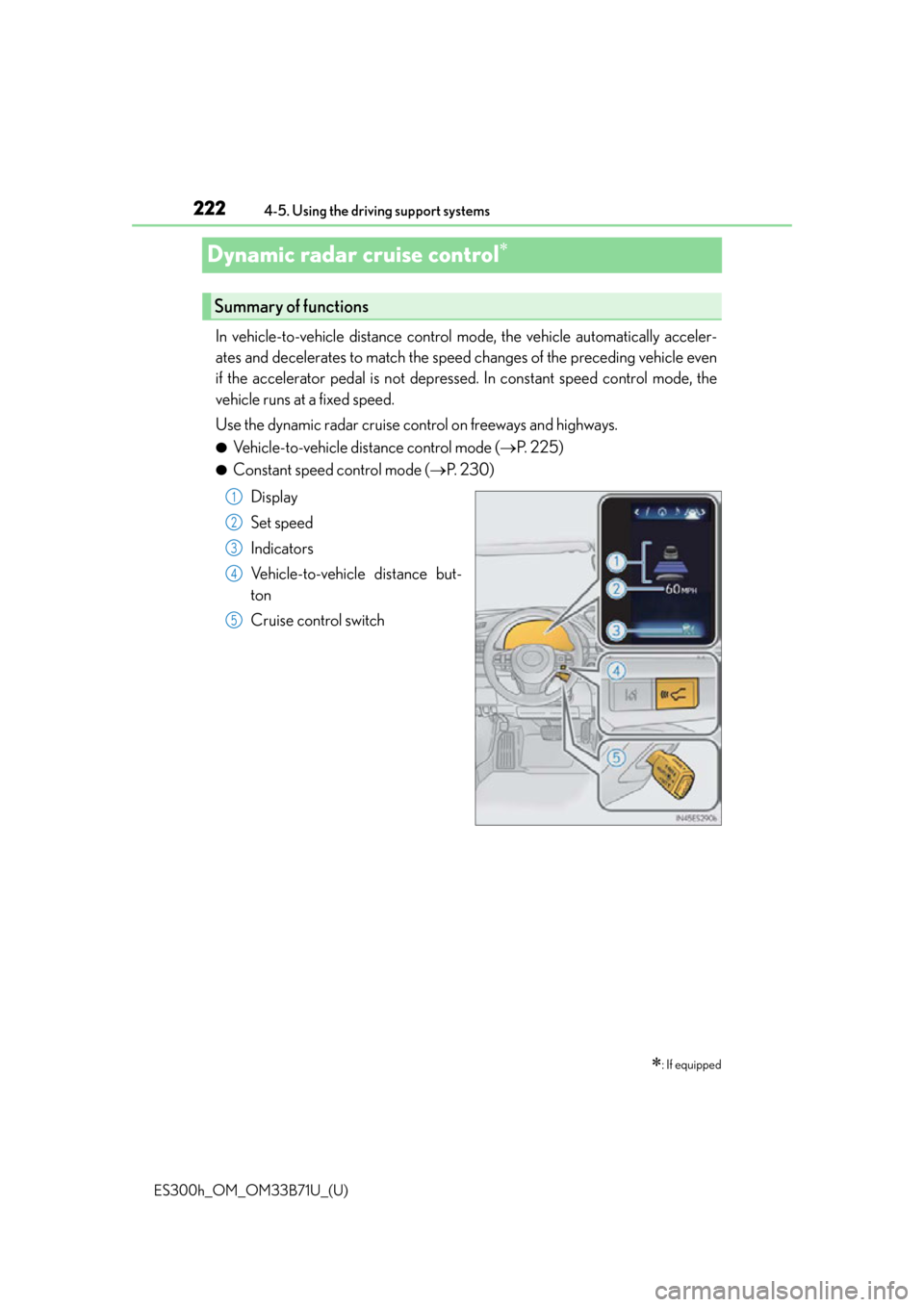
Display
Set speed
Indicators
Vehicle-to-vehicle distance but-
ton
Cruise control switch
: If equipped
Summary of functions
1
2
3
4
5
Page 226 of 600
226
ES300h_OM_OM33B71U_(U)4-5. Using the driving support systems
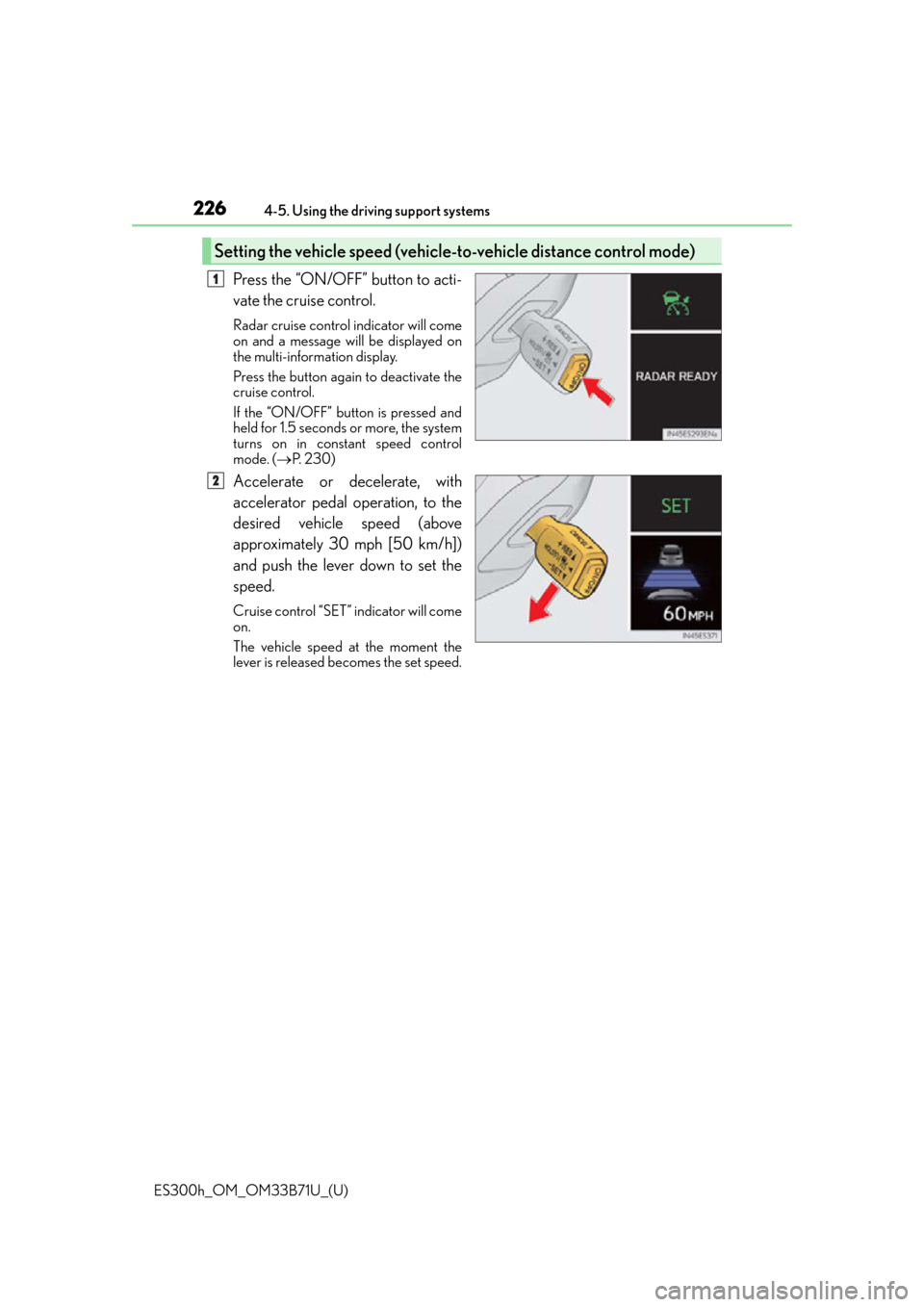
Press the “ON/OFF” button to acti-
vate the cruise control.
Radar cruise control indicator will come
on and a message will be displayed on
the multi-information display.
Press the button again to deactivate the
cruise control.
If the “ON/OFF” button is pressed and
held for 1.5 seconds or more, the system
turns on in constant speed control
mode. (
P. 2 3 0 )
Accelerate or decelerate, with
accelerator pedal operation, to the
desired vehicle speed (above
approximately 30 mph [50 km/h])
and push the lever down to set the
speed.
Cruise control “SET” indicator will come
on.
The vehicle speed at the moment the
lever is released be comes the set speed.
Setting the vehicle speed (vehicle-to-vehicle distance control mode)
1
2
Page 228 of 600
228
ES300h_OM_OM33B71U_(U)4-5. Using the driving support systems
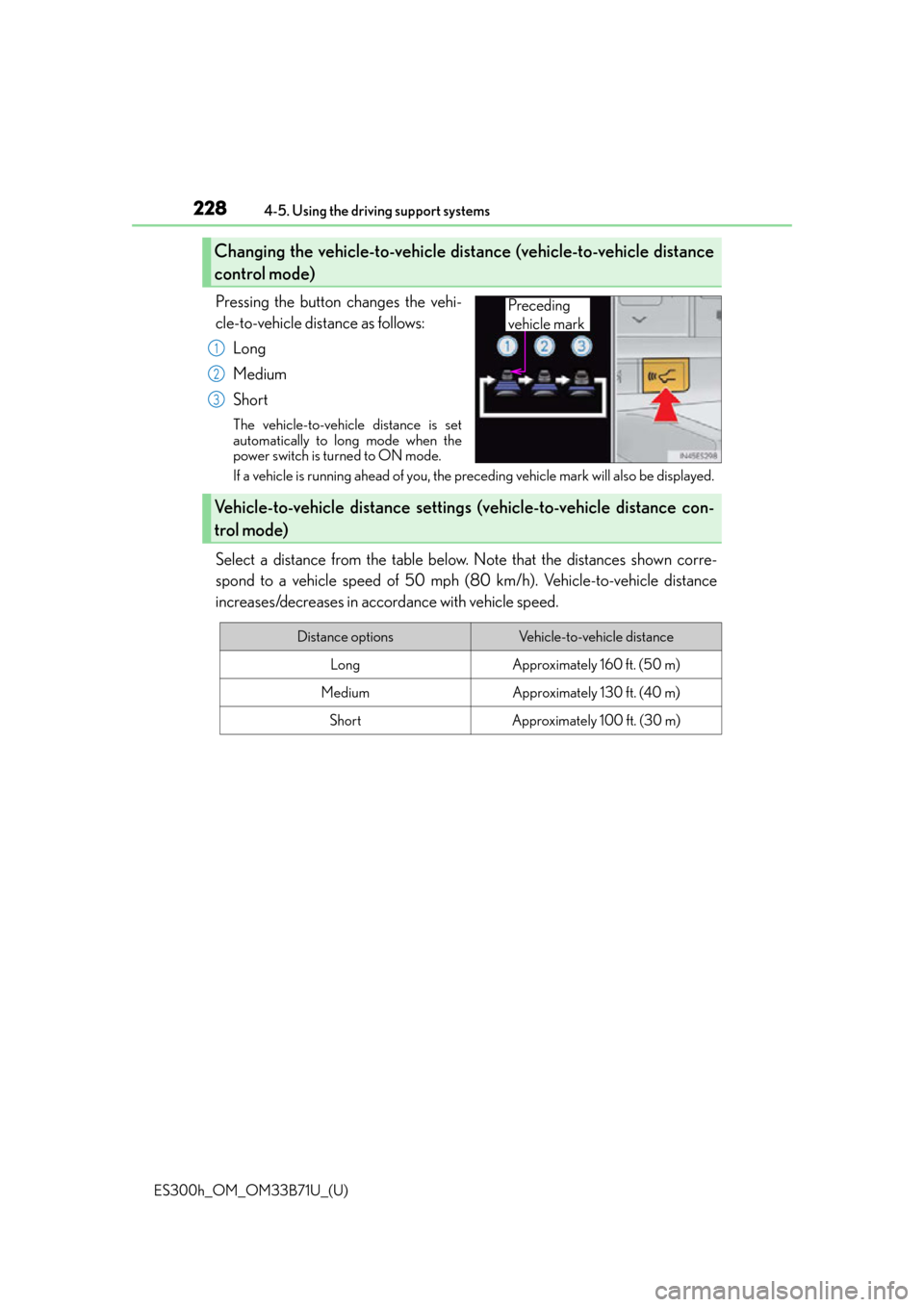
Pressing the button changes the vehi-
cle-to-vehicle distance as follows:
Long
Medium
Short
The vehicle-to-vehicle distance is set
automatically to long mode when the
power switch is turned to ON mode.
If a vehicle is running ahead of you, the preceding vehicle mark will also be displayed.
Select a distance from the table below. Note that the distances shown corre-
spond to a vehicle speed of 50 mph (8 0 km/h). Vehicle-to-vehicle distance
increases/decreases in accordance with vehicle speed.
Changing the vehicle-to-vehicle distance (vehicle-to-vehicle distance
control mode)
Preceding
vehicle mark
1
2
3
Vehicle-to-vehicle distance settings (vehicle-to-vehicle distance con-
trol mode)
Distance optionsVehicle-to-vehicle distance
LongApproximately 160 ft. (50 m)
MediumApproximately 130 ft. (40 m)
ShortApproximately 100 ft. (30 m)
Page 229 of 600
ES300h_OM_OM33B71U_(U)
2294-5. Using the driving support systems
4
Driving
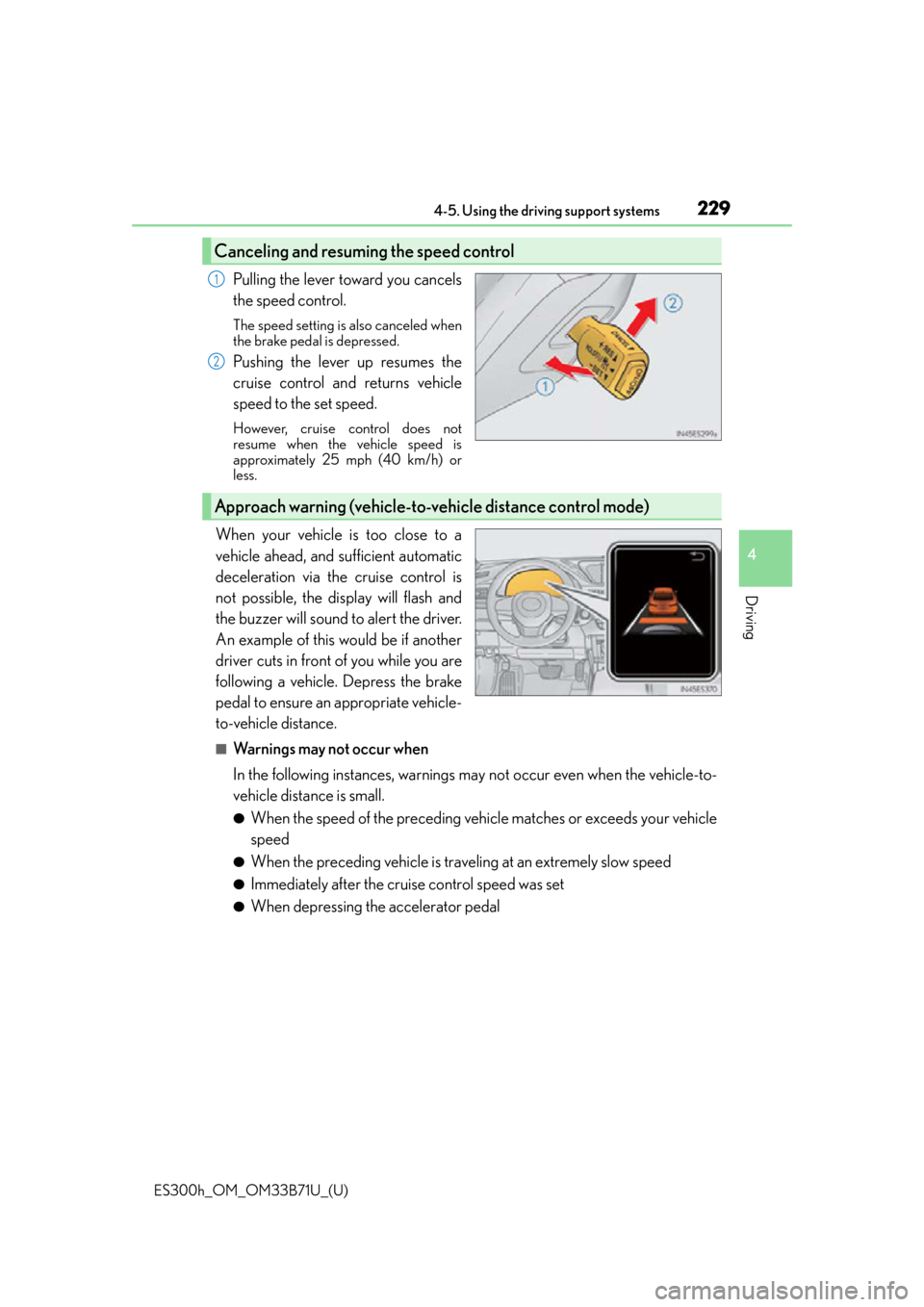
Pulling the lever toward you cancels
the speed control.
The speed setting is also canceled when
the brake pedal is depressed.
Pushing the lever up resumes the
cruise control and returns vehicle
speed to the set speed.
However, cruise control does not
resume when the vehicle speed is
approximately 25 mph (40 km/h) or
less.
When your vehicle is too close to a
vehicle ahead, and sufficient automatic
deceleration via the cruise control is
not possible, the display will flash and
the buzzer will sound to alert the driver.
An example of this would be if another
driver cuts in front of you while you are
following a vehicle. Depress the brake
pedal to ensure an appropriate vehicle-
to-vehicle distance.
■Warnings may not occur when
In the following instances, warnings may not occur even when the vehicle-to-
vehicle distance is small.
●When the speed of the preceding vehicle matches or exceeds your vehicle
speed
●When the preceding vehicle is traveling at an extremely slow speed
●Immediately after the cruise control speed was set
●When depressing the accelerator pedal
Canceling and resuming the speed control
1
2
Approach warning (vehicle-to-vehicle distance control mode)