eta Lexus ES300h 2017 Navigation Manual
[x] Cancel search | Manufacturer: LEXUS, Model Year: 2017, Model line: ES300h, Model: Lexus ES300h 2017Pages: 357, PDF Size: 9.68 MB
Page 121 of 357
119
3. ROUTE GUIDANCE
ES350/300h_Navi_OM33C79U_(U)16.06.22 14:52
NAVIGATION SYSTEM
3
1Display the “Route” screen. (→P.118)
2Select “Delete” .
3Select “Yes” when the confirmation
screen appears.
z When more than 1 destination has been set,
a list will be displayed on the screen. Select
the item(s) to be deleted.
“Delete All” : Select to delete all destina-
tions on the list.
z If more than 1 destinat ion has been set, the
system will recalculate the route(s) to the
set destination(s) as necessary.
1Display the “Route” screen. ( →P.118)
2Select “Preferences” .
3Select the desired route preferences
and select “OK”.
zWhen set to on, the indicator will illuminate.
1Display the “Route” screen. ( →P.118)
2Select “Route Type” .
3Select the desired route type and select
“OK”.
zDuring driving, the route guidance starts
after selecting the desired route type.
4The entire route from the starting point
to the destination is displayed.
zFor details about this screen: →P.1 0 5
DELETING DESTINATIONSSETTING ROUTE
PREFERENCES
The conditions to determine the route
can be selected from various choices
such as freeways, toll roads, ferries, etc.
SELECTING ROUTE TYPE
ES350_300h_Navi_OM33C79U_(U).book Page 119 Wednesday, June 22, 2016 2:54 PM
Page 124 of 357
122
ES350/300h_Navi_OM33C79U_(U)16.06.22 14:52
4. MEMORY POINTS
1. MEMORY POINTS SETTINGS
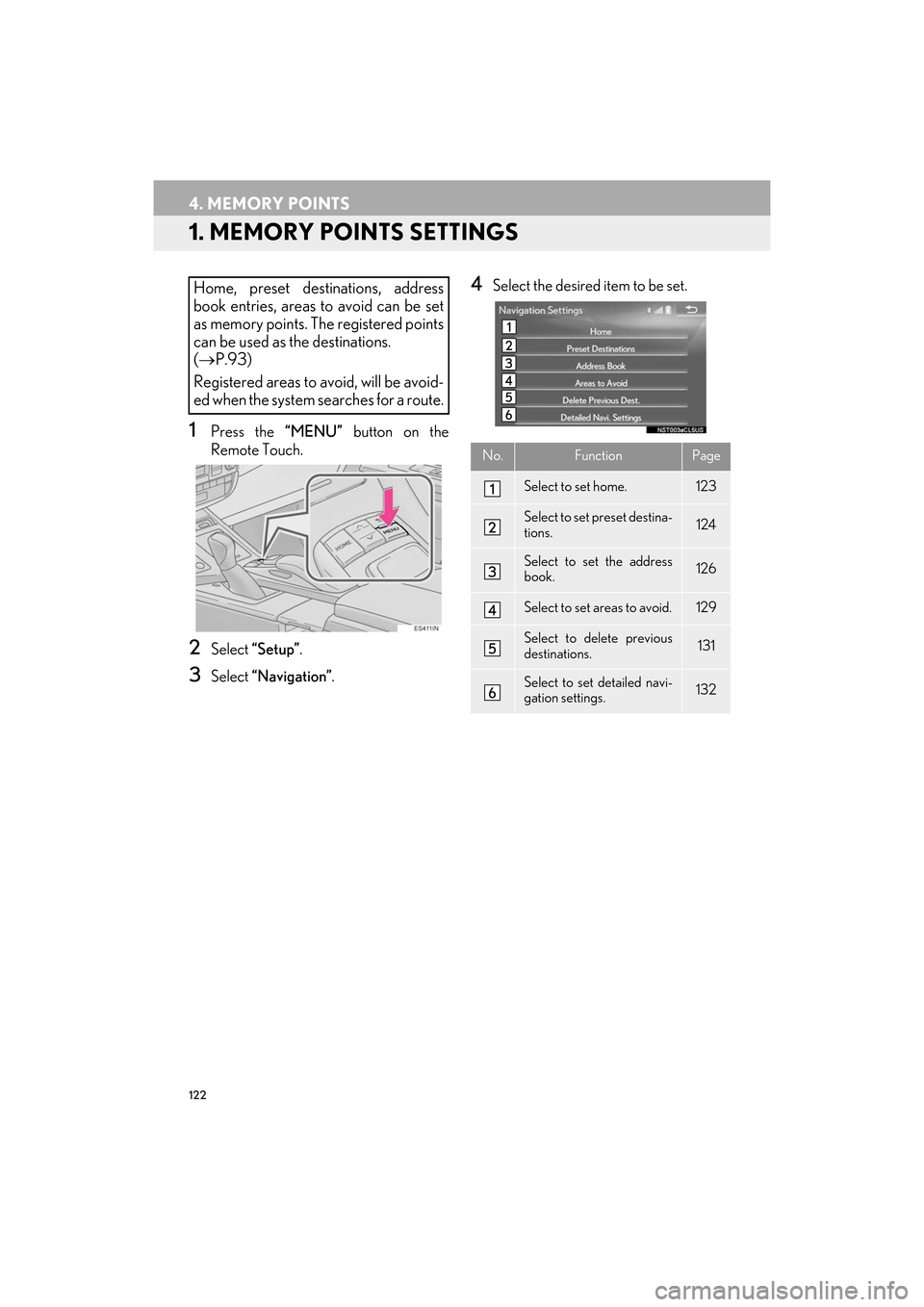
1Press the “MENU” button on the
Remote Touch.
2Select “Setup” .
3Select “Navigation” .
4Select the desired item to be set.Home, preset destinations, address
book entries, areas to avoid can be set
as memory points. The registered points
can be used as the destinations.
(→ P.93)
Registered areas to avoid, will be avoid-
ed when the system searches for a route.
No.FunctionPage
Select to set home.123
Select to set preset destina-
tions.124
Select to set the address
book.126
Select to set areas to avoid.129
Select to delete previous
destinations.131
Select to set detailed navi-
gation settings.132
ES350_300h_Navi_OM33C79U_(U).book Page 122 Wednesday, June 22, 2016 2:54 PM
Page 134 of 357

132
ES350/300h_Navi_OM33C79U_(U)16.06.22 14:52
5. SETUP
1. DETAILED NAVIGATION SETTINGS
1Press the “MENU” button on the
Remote Touch.
2Select “Setup” .
3Select “Navigation” .
4Select “Detailed Navi. Settings” .
5Select the items to be set.
Settings are available for pop-up infor-
mation, favorite POI categories, low fuel
warning, etc.SCREENS FOR NAVIGATION
SETTINGS
ES350_300h_Navi_OM33C79U_(U).book Page 132 Wednesday, June 22, 2016 2:54 PM
Page 136 of 357

134
5. SETUP
ES350/300h_Navi_OM33C79U_(U)16.06.22 14:52
1Display the “Detailed Navi. Settings”
screen.
(→ P.1 3 2 )
2Select “Favorite POI Categories” .
3Select the category to be changed.
“Default” : Select to set the default catego-
ries.
4Select the desired POI category.
“List All Categories” : Select to display all
POI categories.
5Select the desired POI icon.
1Display the “Detailed Navi. Settings”
screen.
( → P.1 3 2 )
2Select “Low Fuel Warning” .
3Select “On” or “Off ” .
■SEARCHING GAS STATION IN
LOW FUEL WARNING
1Select “Yes” when the low fuel warning
appears.
2Select the desired nearby gas station.
3Select “Enter ” to set as a destination.
“Info” : Select to display gas station informa-
tion. ( →P.89)
FAVORITE POI CATEGORIES
(SELECT POI ICONS)
Up to 6 POI icons, which are used for
selecting POIs on the map screen, can
be selected as favorites.LOW FUEL WARNING
When the fuel level is low, a warning
message will pop up on the screen.
A nearby gas station can be selected as
a destination.
ES350_300h_Navi_OM33C79U_(U).book Page 134 Wednesday, June 22, 2016 2:54 PM
Page 137 of 357
135
5. SETUP
ES350/300h_Navi_OM33C79U_(U)16.06.22 14:52
NAVIGATION SYSTEM
3
1Display the “Detailed Navi. Settings”
screen.
(→ P.1 3 2 )
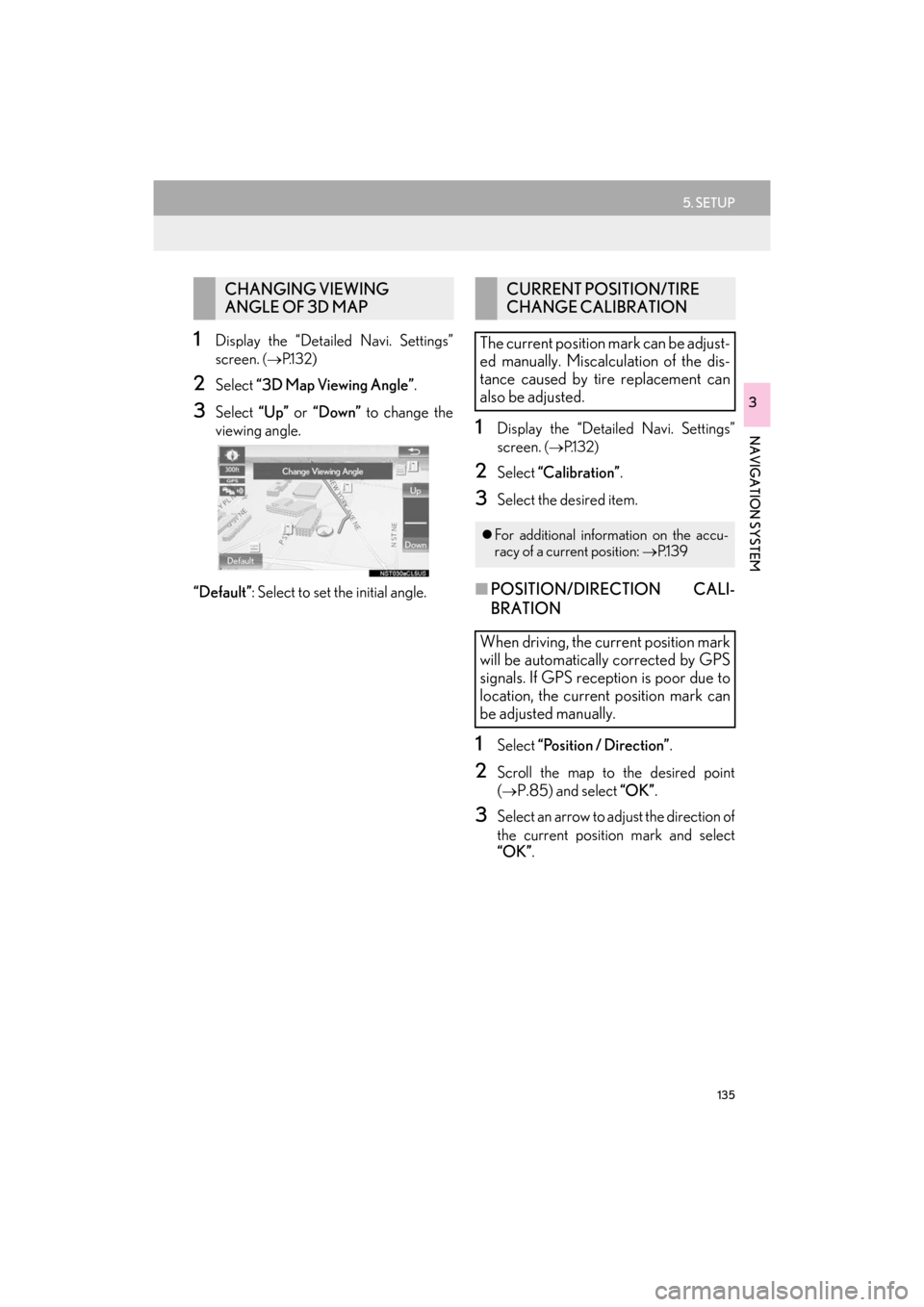
2Select “3D Map Viewing Angle” .
3Select “Up” or “Down” to change the
viewing angle.
“Default” : Select to set the initial angle.
1Display the “Detailed Navi. Settings”
screen.
(→ P.1 3 2 )
2Select “Calibration” .
3Select the desired item.
■POSITION/DIRECTION CALI-
BRATION
1Select “Position / Direction” .
2Scroll the map to the desired point
(
→P.85) and select “OK”.
3Select an arrow to adjust the direction of
the current position mark and select
“OK”.
CHANGING VIEWING
ANGLE OF 3D MAPCURRENT POSITION/TIRE
CHANGE CALIBRATION
The current position mark can be adjust-
ed manually. Miscalculation of the dis-
tance caused by tire replacement can
also be adjusted.
z For additional information on the accu-
racy of a current position: →P.1 3 9
When driving, the current position mark
will be automatically corrected by GPS
signals. If GPS reception is poor due to
location, the current position mark can
be adjusted manually.
ES350_300h_Navi_OM33C79U_(U).book Page 135 Wednesday, June 22, 2016 2:54 PM
Page 141 of 357
139
ES350/300h_Navi_OM33C79U_(U)16.06.22 14:52
NAVIGATION SYSTEM
3
6. TIPS FOR THE NAVIGATION SYSTEM
1. GPS (GLOBAL POSITIONING SYSTEM)
The Global Positioning System (GPS) de-
veloped and operated by the U.S. Depart-
ment of Defense provides an accurate
current position, normally using 4 or more
satellites, and in some case 3 satellites. The
GPS system has a certain level of inaccura-
cy. While the navigation system compen-
sates for this most of the time, occasional
positioning errors of up to 300 ft. (100 m)
can and should be expected. Generally, po-
sition errors will be corrected within a few
seconds.When the vehicle is receiving signals from
satellites, the “GPS” mark appears at the
top left of the screen.
The GPS signal may be physically obstruct-
ed, leading to inaccurate vehicle position on
the map screen. Tunnels, tall buildings,
trucks, or even the placement of objects on
the instrument panel may obstruct the GPS
signals.
The GPS satellites may not send signals due
to repairs or improvements being made to
them.
Even when the navigation system is receiv-
ing clear GPS signals, the vehicle position
may not be shown accura
tely or inappropri-
ate route guidance may occur in some cas-
es.
LIMITATIONS OF THE
NAVIGATION SYSTEM
This navigation system calculates the
current position using satellite signals,
various vehicle signals, map data, etc.
However, an accurate position may not
be shown depending on satellite condi-
tions, road configuration, vehicle condi-
tion or other circumstances.
NOTICE
● The installation of window tinting may
obstruct the GPS signals. Most window
tinting contains some metallic content
that will interfere with GPS signal recep-
tion of the antenna in the instrument
panel. We advise against the use of win-
dow tinting on vehicles equipped with
navigation systems.
ES350_300h_Navi_OM33C79U_(U).book Page 139 Wednesday, June 22, 2016 2:54 PM
Page 166 of 357

164
2. RADIO OPERATION
ES350/300h_Navi_OM33C79U_(U)16.06.22 14:52
1Select the “HD)” logo.
2Select the desired channel.
zTu r n i n g t h e “TUNE·SCROLL” knob can
also select the desired multicast channel.
USING HD Radio ™
TECHNOLOGY
HD Radio ™
Technology is the digital
evolution of analog AM/FM radio. Your
radio product has a special receiver
which allows it to receive digital broad-
casts (where available) in addition to the
analog broadcasts it already receives.
Digital broadcasts have better sound
quality than analog broadcasts as digital
broadcasts provide free, crystal clear
audio with no static or distortion. For
more information, and a guide to avail-
able radio stations and programming,
refer to www.hdradio.com
.
HD Radio features included in Lexus
radios:
z Digital Sound HD Radio broadcasts
deliver crystal-clear, digital audio quality
to listeners.
z HD2 /HD3 Channels FM stations can
provide additional digital only audio pro-
gramming with expanded content and
format choices on HD2 /HD3 channels.
z PSD Program Service Data (PSD)
gives you on-screen information such as
artist name and song title.
z iTunes Tagging Listeners can tag
(store) songs they like for later review and
purchase through iTunes.
z Artist Experience Images related to
the broadcast are displayed on the radio
screen, such as album cover art and sta-
tion logos.
HD Radio Technology manufactured
under license from iBiquity Digital
Corporation. U.S. and Foreign Patents.
HD Radio ™
and the HD, HD Radio, and
“Arc” logos are proprietary trademarks
of iBiquity Digital Corp.
AVAILABLE HD Radio ™
TECHNOLOGY
MULTICAST
On the FM radio frequency most digital
stations have “multiple” or supplemental
programs on one FM station.
ES350_300h_Navi_OM33C79U_(U).book Page 164 Wednesday, June 22, 2016 2:54 PM
Page 173 of 357

171
2. RADIO OPERATION
ES350/300h_Navi_OM33C79U_(U)16.06.22 14:52
AUDIO/VISUAL SYSTEM
4
zIf “Ch 000” is selected using the
“TUNE·SCROLL” knob, the ID code,
which is 8 alphanumeric characters, will be
displayed. If another channel is selected,
the ID code will no longer be displayed.
The channel (000) alternates between dis-
playing the radio ID and the specific radio
code.
1Select “Channel List” .
2Select the desired channel category.
3Select the desired channel.
“Info” : Select to display the control screen.
INFORMATION
●XM Satellite Radio is solely responsible
for the quality, ava ilability and content of
the satellite radio services provided,
which are subject to the terms and condi-
tions of the XM Satellite Radio customer
service agreement.
● Customers should have their radio ID
ready; the radio ID can be found by tun-
ing to “Ch 000” on the radio. For details,
see “DISPLAYING THE RADIO ID”
below.
● All fees and programming are the
responsibility of XM Satellite Radio and
are subject to change.
SATELLITE TUNER
TECHNOLOGY NOTICE
Lexus’s satellite radio tuners are award-
ed Type Approval Certificates from XM
Satellite Radio Inc. as proof of compati-
bility with the services offered by XM
Satellite Radio.
INFORMATION
● Infotainment and Data services XM
offers a variety of advanced Infotainment
and data services.
DISPLAYING THE RADIO ID
Each XM tuner is identified with a
unique radio ID. The radio ID is required
when activating an XM service or when
reporting a problem.
SELECTING A CHANNEL
FROM THE LIST
ES350_300h_Navi_OM33C79U_(U).book Page 171 Wednesday, June 22, 2016 2:54 PM
Page 176 of 357

174
2. RADIO OPERATION
ES350/300h_Navi_OM33C79U_(U)16.06.22 14:52
3. INTERNET RADIO
1Display the audio source selection
screen.
(→ P.149)
2Select the desired application screen
button.
zThe internet radio application screen is dis-
played.
z Perform operations according to the dis-
played application screen.
z For the instrument panel operation method
and the Remote Touch operation method:
→ P.1 4 9
z By pressing the “RADIO” button, the
“Audio” screen can be returned to.
LISTENING TO INTERNET
RADIO
One of LEXUS App Suite’s features is
the ability to listen to internet radio. In or-
der to use this service, a compatible
phone and the system needs to be set
up. For details: →P.320
INFORMATION
●Other applications can be activated
while listening to internet radio.
● An iPhone cannot be connected via
Bluetooth
® and USB connection at the
same time. However, it is possible to
recharge an iPhone while using applica-
tions by connecting via USB. The system
uses the connection method that was
used last. Therefore, if connected via
USB after Bluetooth
® connection, it is
necessary to reconnect the iPhone via
Bluetooth
®.
● Some parts of applications can be
adjusted using the switches on the steer-
ing wheel.
● For additional information, refer to
http://www.lexus.com/enform/
or call
1-800-255-3987.
ES350_300h_Navi_OM33C79U_(U).book Page 174 Wednesday, June 22, 2016 2:54 PM
Page 182 of 357

180
3. MEDIA OPERATION
ES350/300h_Navi_OM33C79U_(U)16.06.22 14:52
Turn to select a chapter.
•Press to select a chapter.
• Press and hold to fast forward/rewind.
WA R N I N G
● Conversational speech on some DVDs is recorded at a low volume to emphasize the
impact of sound effects. If you adjust the volume assuming that the conversations represent
the maximum volume level that the DVD will play, you may be startled by louder sound
effects or when you change to a different audio source. The louder sounds may have a sig-
nificant impact on the human body or pose a driving hazard. Keep this in mind when you
adjust the volume.
INFORMATION
● According to the DVD disc, some menu items ca n be selected directly. (For details, see the
manual that comes with the DVD disc provided separately.)
● If appears on the screen when a control is selected, the operation relevant to the control
is not permitted.
No.Function
ES350_300h_Navi_OM33C79U_(U).book Page 180 Wednesday, June 22, 2016 2:54 PM