warning lights Lexus ES300h 2017 User Guide
[x] Cancel search | Manufacturer: LEXUS, Model Year: 2017, Model line: ES300h, Model: Lexus ES300h 2017Pages: 612, PDF Size: 14.05 MB
Page 84 of 612
82
ES300h_OM_OM33C75U_(U)2. Instrument cluster
Warning lights and indicators
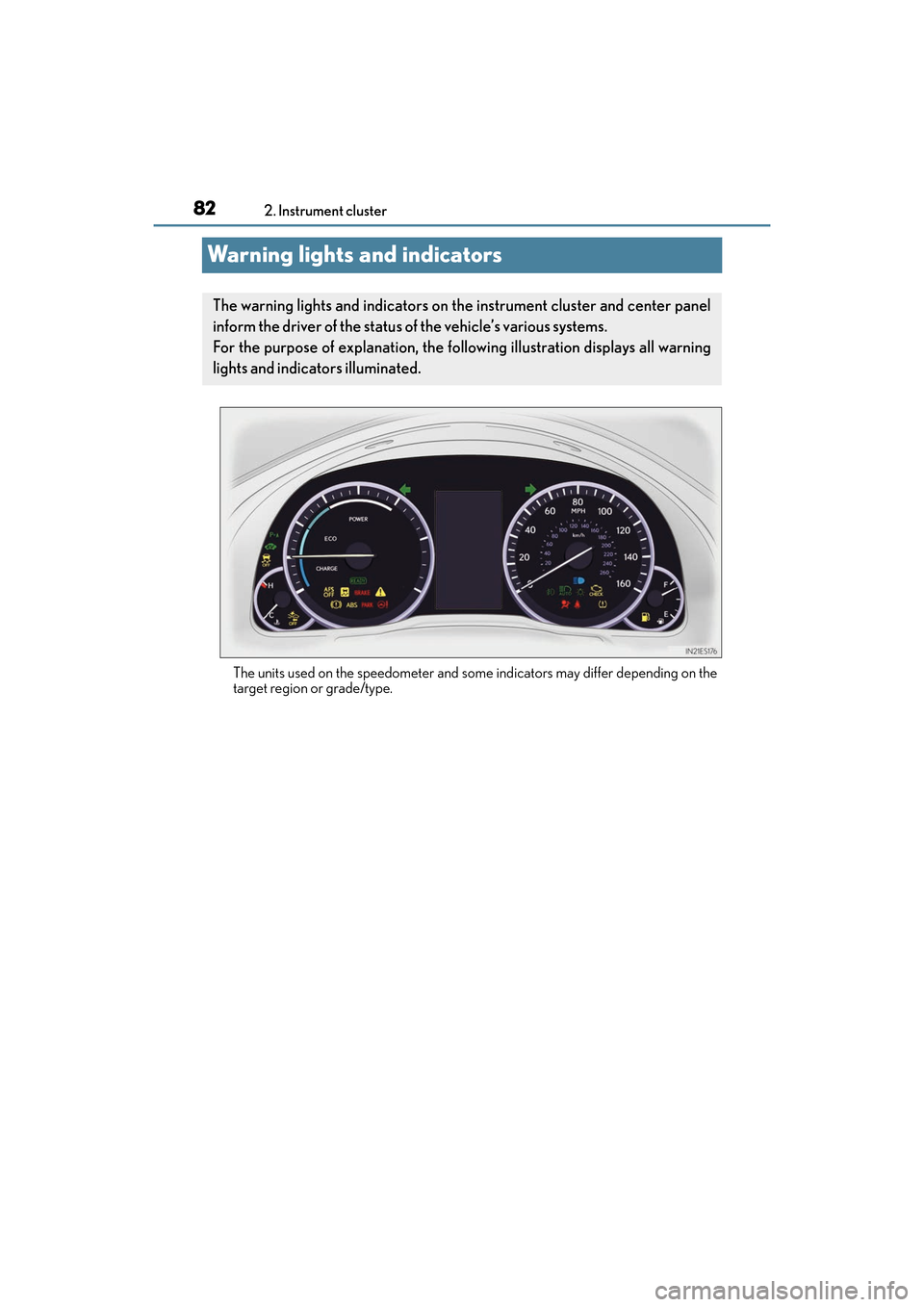
The units used on the speedometer and some indicators may differ depending on the
target region or grade/type.
The warning lights and indicators on th
e instrument cluster and center panel
inform the driver of the status of the vehicle’s various systems.
For the purpose of explanation, the following illustration displays all warning
lights and indicators illuminated.
Page 85 of 612
ES300h_OM_OM33C75U_(U)
832. Instrument cluster
2
Instrument cluster
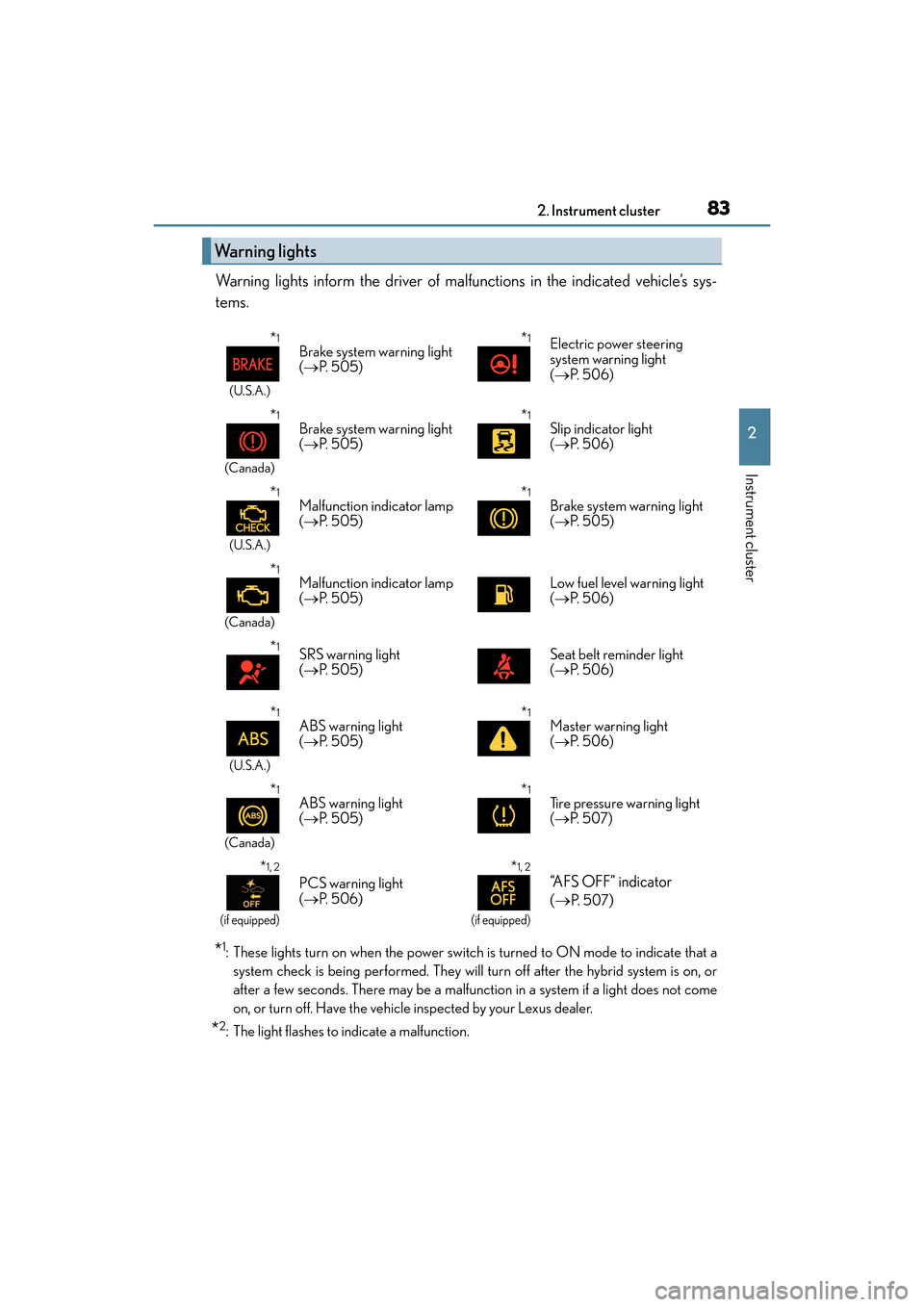
Warning lights inform the driver of malfunctions in the indicated vehicle’s sys-
tems.
*1: These lights turn on when the power switch is turned to ON mode to indicate that asystem check is being performe d. They will turn off after the hybrid system is on, or
after a few seconds. There may be a malfunction in a system if a light does not come
on, or turn off. Have the vehicle inspected by your Lexus dealer.
*2: The light flashes to indicate a malfunction.
Warning lights
*1
(U.S.A.)
Brake system warning light
( → P. 5 0 5 )*1Electric power steering
system warning light
(→ P. 5 0 6 )
*1
(Canada)
Brake system warning light
(→ P. 5 0 5 )*1Slip indicator light
(→ P. 5 0 6 )
*1
(U.S.A.)
Malfunction indicator lamp
(→ P. 5 0 5 )*1Brake system warning light
(→ P. 505)
*1
(Canada)
Malfunction indicator lamp
(→ P. 5 0 5 )Low fuel level warning light
(→ P. 5 0 6 )
*1SRS warning light
(→ P. 5 0 5 )Seat belt reminder light
(→ P. 5 0 6 )
*1
(U.S.A.)
ABS warning light
(→ P. 5 0 5 )*1Master warning light
(→ P. 5 0 6 )
*1
(Canada)
ABS warning light
(→ P. 5 0 5 )*1Tire pressure warning light
(→ P. 5 0 7 )
*1, 2
(if equipped)
PCS warning light
(→ P. 5 0 6 )
*1, 2
(if equipped)
“AFS OFF” indicator
(→
P. 5 0 7)
Page 87 of 612
ES300h_OM_OM33C75U_(U)
852. Instrument cluster
2
Instrument cluster
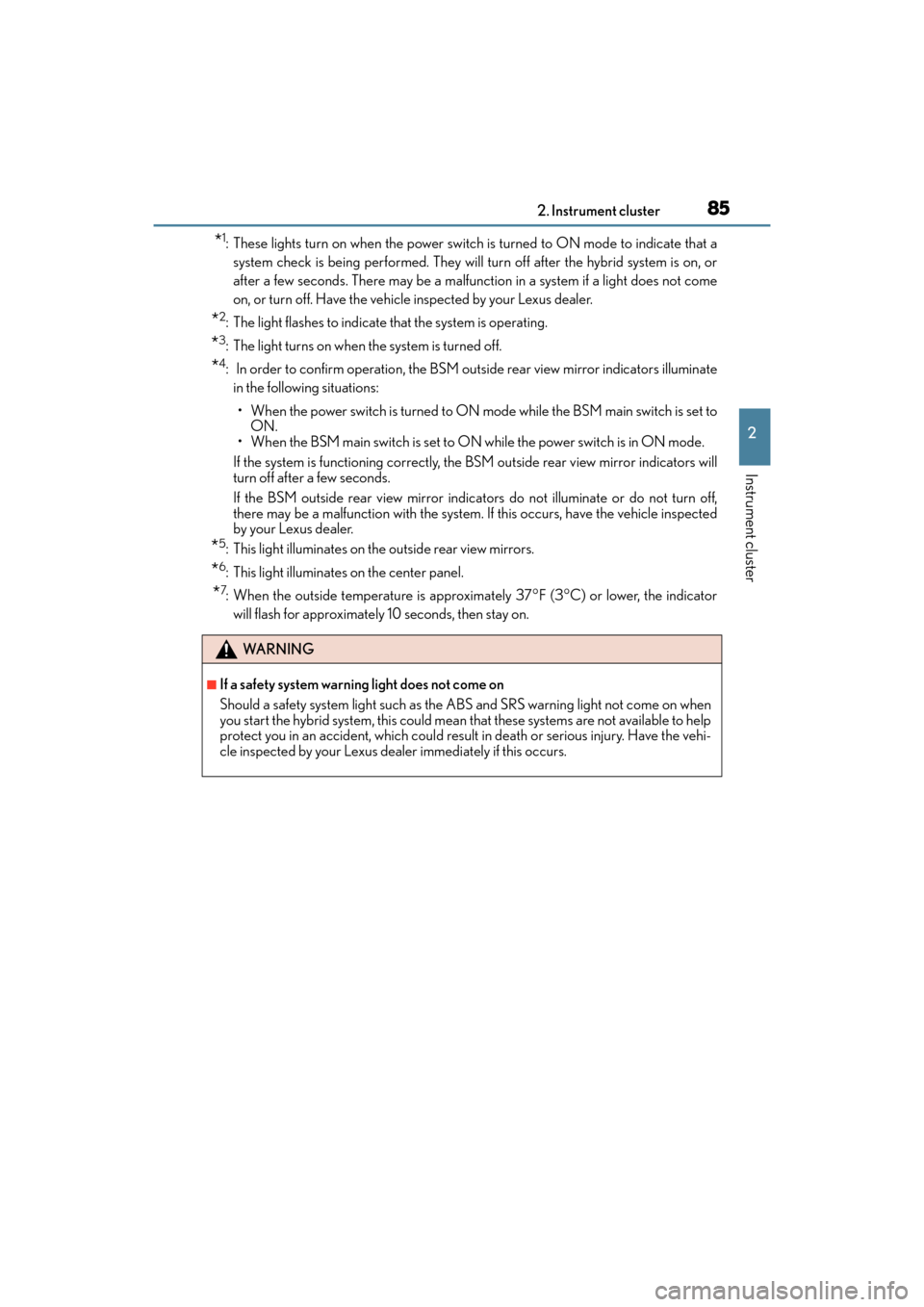
*1: These lights turn on when the power switch is turned to ON mode to indicate that asystem check is being performe d. They will turn off after the hybrid system is on, or
after a few seconds. There may be a malfunction in a system if a light does not come
on, or turn off. Have the vehicle inspected by your Lexus dealer.
*2: The light flashes to indicate that the system is operating.
*3: The light turns on when the system is turned off.
*4: In order to confirm operation, the BSM outside rear view mirror indicators illuminate in the following situations:
• When the power switch is turned to ON mode while the BSM main switch is set to ON.
• When the BSM main switch is set to ON while the power switch is in ON mode.
If the system is functioning correctly, the BSM outside rear view mirror indicators will
turn off after a few seconds.
If the BSM outside rear view mirror indicators do not illuminate or do not turn off,
there may be a malfunction with the system. If this occurs, have the vehicle inspected
by your Lexus dealer.
*5: This light illuminates on the outside rear view mirrors.
*6: This light illuminates on the center panel.
*7: When the outside temperature is approximately 37°F (3°C) or lower, the indicator
will flash for approximately 10 seconds, then stay on.
WA R N I N G
■If a safety system warning light does not come on
Should a safety system light such as the ABS and SRS warning light not come on when
you start the hybrid system, this could mean that these systems are not available to help
protect you in an accident, which could result in death or serious injury. Have the vehi-
cle inspected by your Lexus dealer immediately if this occurs.
Page 225 of 612
ES300h_OM_OM33C75U_(U)
2234-5. Using the driving support systems
4
Driving
■Hands off steering wheel alert
When the system determines that the driver has removed the hands from the steering
wheel while the steering control function is operating, a warning message is displayed on
the multi-information display.
If the driver continues to keep their hands off of the steering wheel, the buzzer sounds, a
warning message is displayed and the function is temporarily canceled. This alert also
operates in the same way when the vehicle is driven with the steering wheel lightly
gripped. However, depending on the road conditions, etc., the function may not cancel.
■White (yellow) lines are only on one side of road
The LDA system will not operate for the side on which white (yellow) lines could not be
recognized.
■Conditions in whic h functions may not operate properly
In the following situations, the camera sensor may not detect white (yellow) lines and var-
ious functions may not operate normally.
●There are shadows on the road that run parallel with, or cover, the white (yellow) lines.
●The vehicle is driven in an area without white (yellow) lines, such as in front of a tollgate
or checkpoint, or at an intersection, etc.
●The white (yellow) lines are cracked, “Raised pavement marker” or stones are present.
●The white (yellow) lines cannot be seen or are difficult to see due to sand, etc.
●The vehicle is driven on a road surface that is wet due to rain, puddles, etc.
●The traffic lines are yellow (which may be more difficult to recognize than lines that are
white).
●The white (yellow) lines cross over a curb, etc.
●The vehicle is driven on a bright surface, such as concrete.
●The vehicle is driven on a surface that is bright due to reflected light, etc.
●The vehicle is driven in an area where the brightness changes suddenly, such as at the
entrances and exits of tunnels, etc.
●Light from the headlights of an oncoming vehicle, the sun, etc. enters the camera.
●The vehicle is driven where the road diverges, merges, etc.
●The vehicle is driven on a slope.
●The vehicle is driven on a road which t ilts left or right, or a winding road.
●The vehicle is driven on an unpaved or rough road.
●The vehicle is driven around a sharp curve.
●The traffic lane is excessively narrow or wide.
●The vehicle is extremely tilted due to carrying heavy luggage or having improper tire
pressure.
●The distance to the preceding vehicle is extremely short.
●The vehicle is moving up and down a large amount due to road conditions during driv-
ing (poor roads or road seams).
●The headlight lenses are dirty and emit a faint amount of light at night, or the beam axis
has deviated.
●The vehicle is struck by a crosswind.
●The vehicle has just changed lanes or crossed an intersection.
●Snow tires, etc. are equipped.
Page 231 of 612
ES300h_OM_OM33C75U_(U)
2294-5. Using the driving support systems
4
Driving
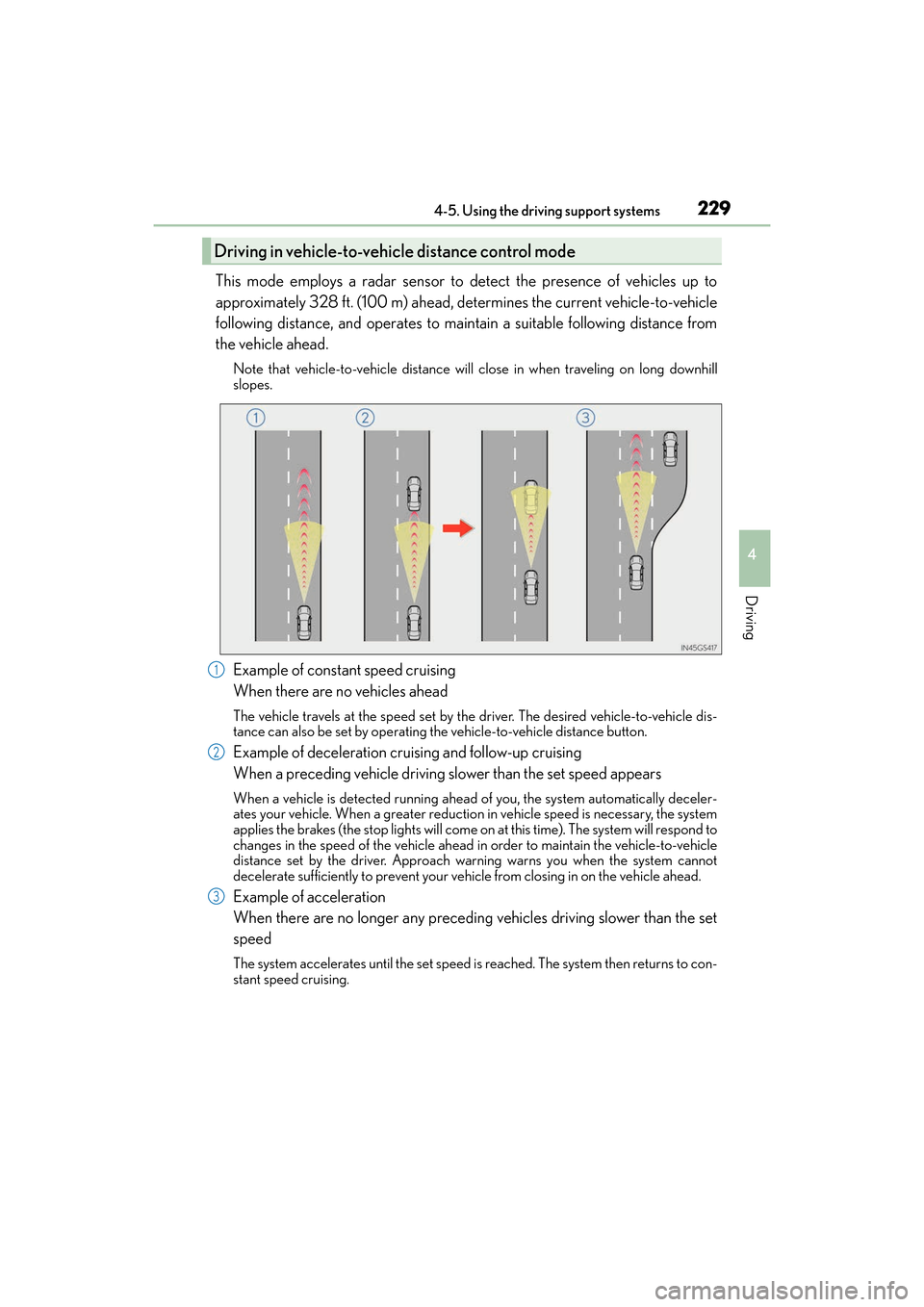
This mode employs a radar sensor to detect the presence of vehicles up to
approximately 328 ft. (100 m) ahead, determines the current vehicle-to-vehicle
following distance, and operates to maintain a suitable following distance from
the vehicle ahead.
Note that vehicle-to-vehicle distance will close in when traveling on long downhill
slopes.
Example of constant speed cruising
When there are no vehicles ahead
The vehicle travels at the speed set by the driver. The desired vehicle-to-vehicle dis-
tance can also be set by operating the vehicle-to-vehicle distance button.
Example of deceleration cruising and follow-up cruising
When a preceding vehicle driving slower than the set speed appears
When a vehicle is detected running ahead of you, the system automatically deceler-
ates your vehicle. When a greater reduction in vehicle speed is necessary, the system
applies the brakes (the stop lights will come on at this time). The system will respond to
changes in the speed of the vehicle ahead in order to maintain the vehicle-to-vehicle
distance set by the driver. Approach warning warns you when the system cannot
decelerate sufficiently to prevent your vehicle from closing in on the vehicle ahead.
Example of acceleration
When there are no longer any preceding vehicles driving slower than the set
speed
The system accelerates until the set speed is reached. The system then returns to con-
stant speed cruising.
Driving in vehicle-to-vehicle distance control mode
1
2
3
Page 507 of 612
505
ES300h_OM_OM33C75U_(U)8-2. Steps to take in an emergency
8
When trouble arises
If a warning light turns
on or a warning buzzer
sounds
Calmly perform the following actions if any of the warning lights comes on or
flashes. If a light comes on or flashes, but then goes off, this does not necessar-
ily indicate a malfunction in the system. However, if this continues to occur,
have the vehicle inspected by your Lexus dealer.
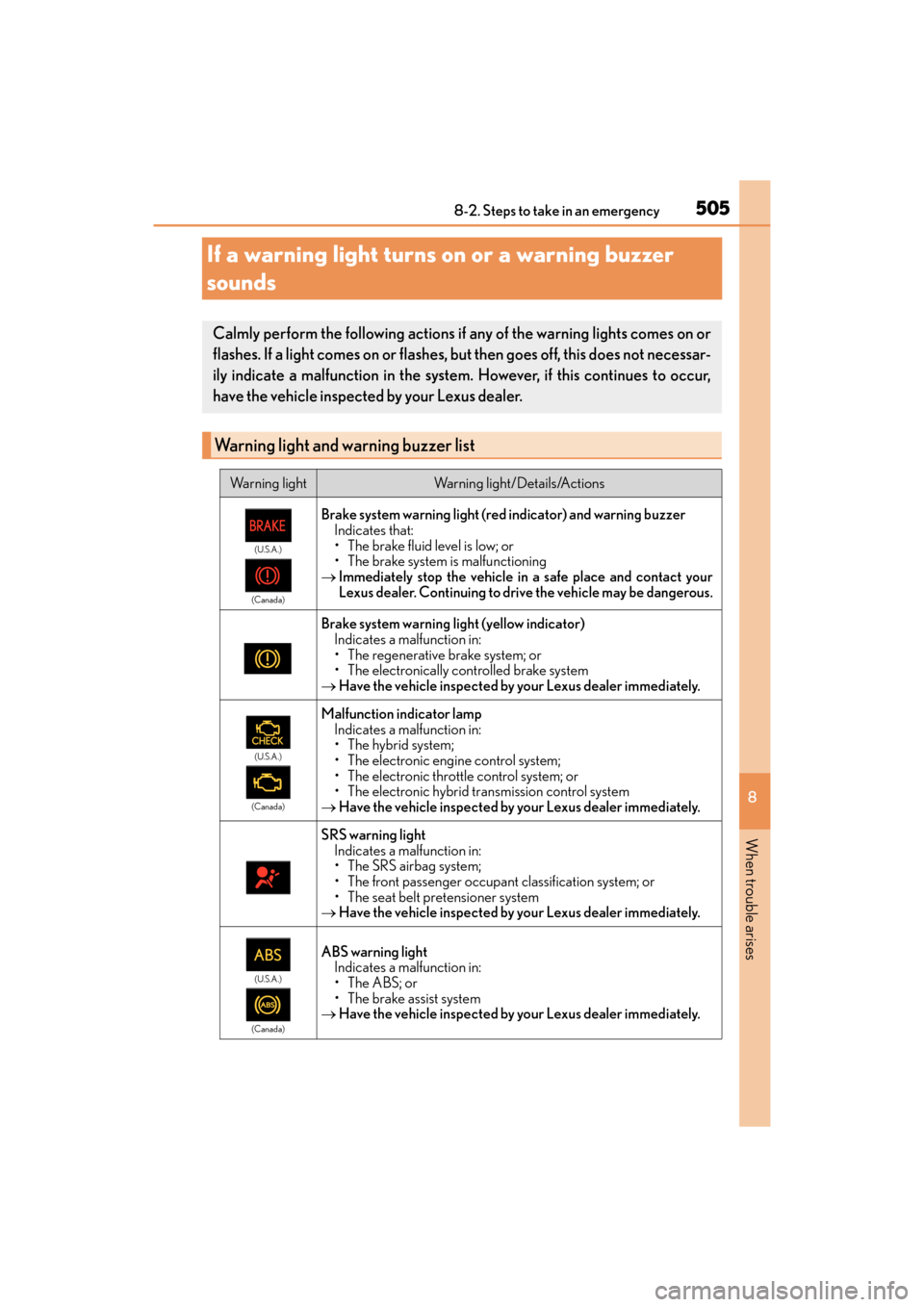
Warning light and warning buzzer list
Warning lightWarning light/Details/Actions
(U.S.A.)
(Canada)
Brake system warning light (red indicator) and warning buzzer Indicates that:
• The brake fluid level is low; or
• The brake system is malfunctioning
→ Immediately stop the vehicle in a safe place and contact your
Lexus dealer. Continuing to drive the vehicle may be dangerous.
Brake system warning light (yellow indicator)
Indicates a malfunction in:
• The regenerative brake system; or
• The electronically controlled brake system
→ Have the vehicle inspected by your Lexus dealer immediately.
(U.S.A.)
(Canada)
Malfunction indicator lamp Indicates a malfunction in:
• The hybrid system;
• The electronic engine control system;
• The electronic throttle control system; or
• The electronic hybrid transmission control system
→ Have the vehicle inspected by your Lexus dealer immediately.
SRS warning light
Indicates a malfunction in:
• The SRS airbag system;
• The front passenger occupant classification system; or
• The seat belt pr etensioner system
→ Have the vehicle inspected by your Lexus dealer immediately.
(U.S.A.)
(Canada)
ABS warning light Indicates a malfunction in:
•The ABS; or
• The brake assist system
→ Have the vehicle inspected by your Lexus dealer immediately.
Page 511 of 612
5098-2. Steps to take in an emergency
ES300h_OM_OM33C75U_(U)
8
When trouble arises
WA R N I N G
■If both the ABS and the brake system warning lights remain on
Stop your vehicle in a safe place immediately and contact your Lexus dealer. The vehi-
cle will become extremely unstable during br aking, and the ABS system may fail, which
could cause an accident resulting in death or serious injury.
■When the electric power steering system warning light comes on
The steering wheel may become extremely heavy.
If the steering wheel becomes heavier than usual when operating, hold firmly and oper-
ate using more force than usual.
■If the tire pressure warning light comes on
Be sure to observe the following precautions. Failure to do so could cause a loss of
vehicle control and result in death or serious injury.
●Stop your vehicle in a safe place as soon as possible. Adjust the tire inflation pressure
immediately.
●If the tire pressure warning light comes on even after tire inflation pressure adjust-
ment, it is probable that you have a flat tire. Check the tires. If a tire is flat, change it
with the spare tire and have the flat tire repaired by the nearest Lexus dealer.
●Avoid abrupt maneuvering and braking. If the vehicle tires deteriorate, you could lose
control of the steering wheel or the brakes.
■If a blowout or sudden air leakage should occur
The tire pressure warning system may not activate immediately.
Page 513 of 612
511
ES300h_OM_OM33C75U_(U)8-2. Steps to take in an emergency
8
When trouble arises
If a warning message is displayed
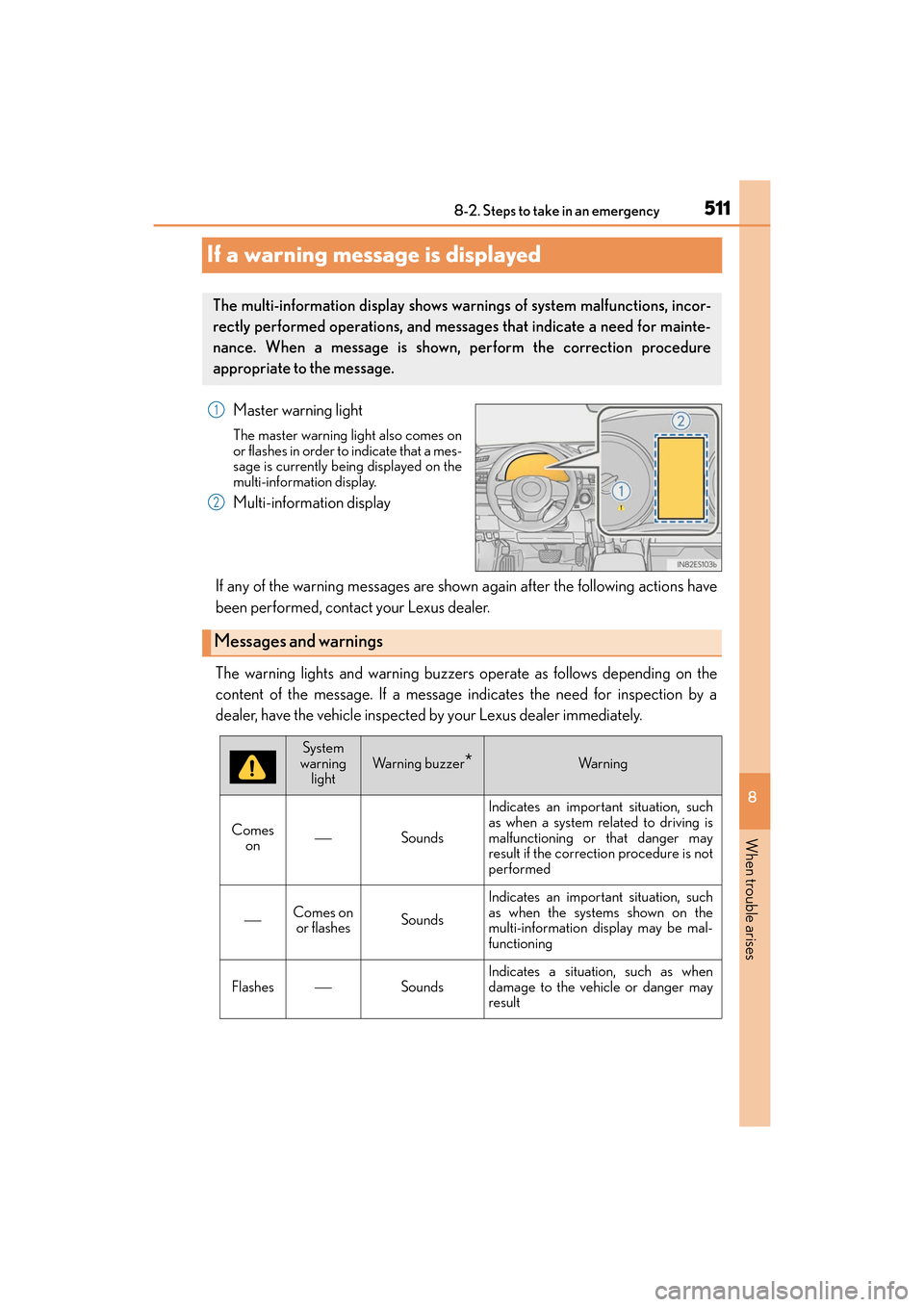
Master warning light
The master warning light also comes on
or flashes in order to indicate that a mes-
sage is currently being displayed on the
multi-information display.
Multi-information display
If any of the warning messages are shown again after the following actions have
been performed, contact your Lexus dealer.
The warning lights and warning buzzers operate as follows depending on the
content of the message. If a message indicates the need for inspection by a
dealer, have the vehicle inspected by your Lexus dealer immediately.
The multi-information display shows warnings of system malfunctions, incor-
rectly performed operations, and messages that indicate a need for mainte-
nance. When a message is shown, perform the correction procedure
appropriate to the message.
1
2
Messages and warnings
System
warning light
Warning buzzer*Wa r n i n g
Comes on
Sounds Indicates an important situation, such
as when a system related to driving is
malfunctioning or that danger may
result if the correction procedure is not
performed
Comes on
or flashesSounds
Indicates an important situation, such
as when the systems shown on the
multi-information display may be mal-
functioning
FlashesSounds
Indicates a situation, such as when
damage to the vehicle or danger may
result
Page 593 of 612
591Alphabetical index
ES300h_OM_OM33C75U_(U)
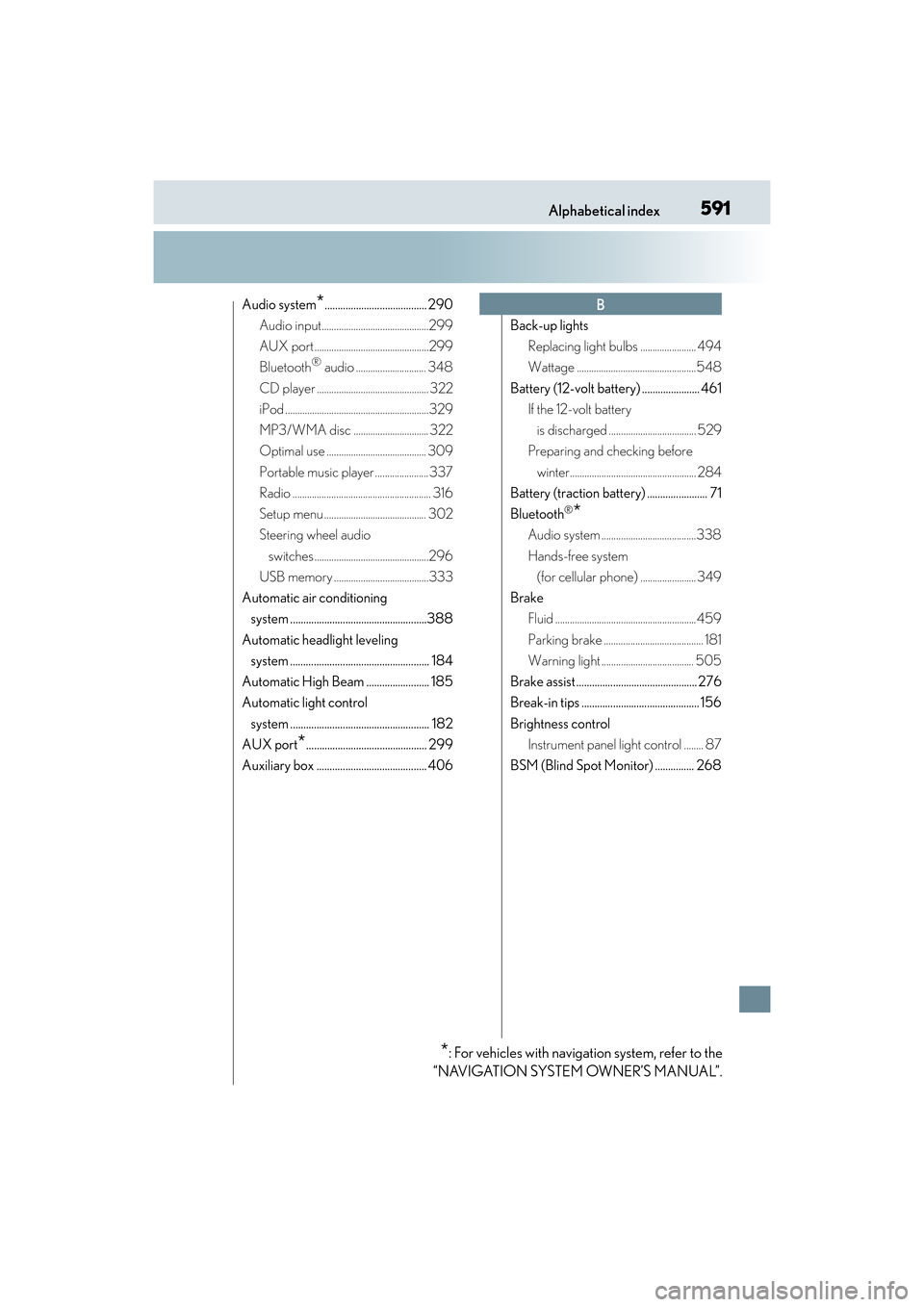
Audio system*....................................... 290
Audio input............................................299
AUX port ...............................................299
Bluetooth
® audio ............................. 348
CD player .............................................. 322
iPod ...........................................................329
MP3/WMA disc ............................... 322
Optimal use ......................................... 309
Portable music player ...................... 337
Radio ......................................................... 316
Setup menu .......................................... 302
Steering wheel audio switches ...............................................296
USB memory .......................................333
Automatic air conditioning system ....................................................388
Automatic headlight leveling system ..................................................... 184
Automatic High Beam ........................ 185
Automatic light control system ..................................................... 182
AUX port
*.............................................. 299
Auxiliary box .......................................... 406 Back-up lights
Replacing light bulbs ....................... 494
Wattage .................................................548
Battery (12-volt battery) ...................... 461 If the 12-volt battery
is discharged .................................... 529
Preparing and checking before
winter.................................................... 284
Battery (traction battery) ....................... 71
Bluetooth
®*
Audio system .......................................338
Hands-free system (for cellular phone) ....................... 349
Brake Fluid .......................................................... 459
Parking brake ......................................... 181
Warning light ...................................... 505
Brake assist .............................................. 276
Break-in tips ............................................. 156
Brightness control Instrument panel light control ........ 87
BSM (Blind Spot Monitor) ............... 268
B
*: For vehicles with navigation system, refer to the
“NAVIGATION SYSTEM OWNER’S MANUAL”.
Page 595 of 612
593Alphabetical index
ES300h_OM_OM33C75U_(U)
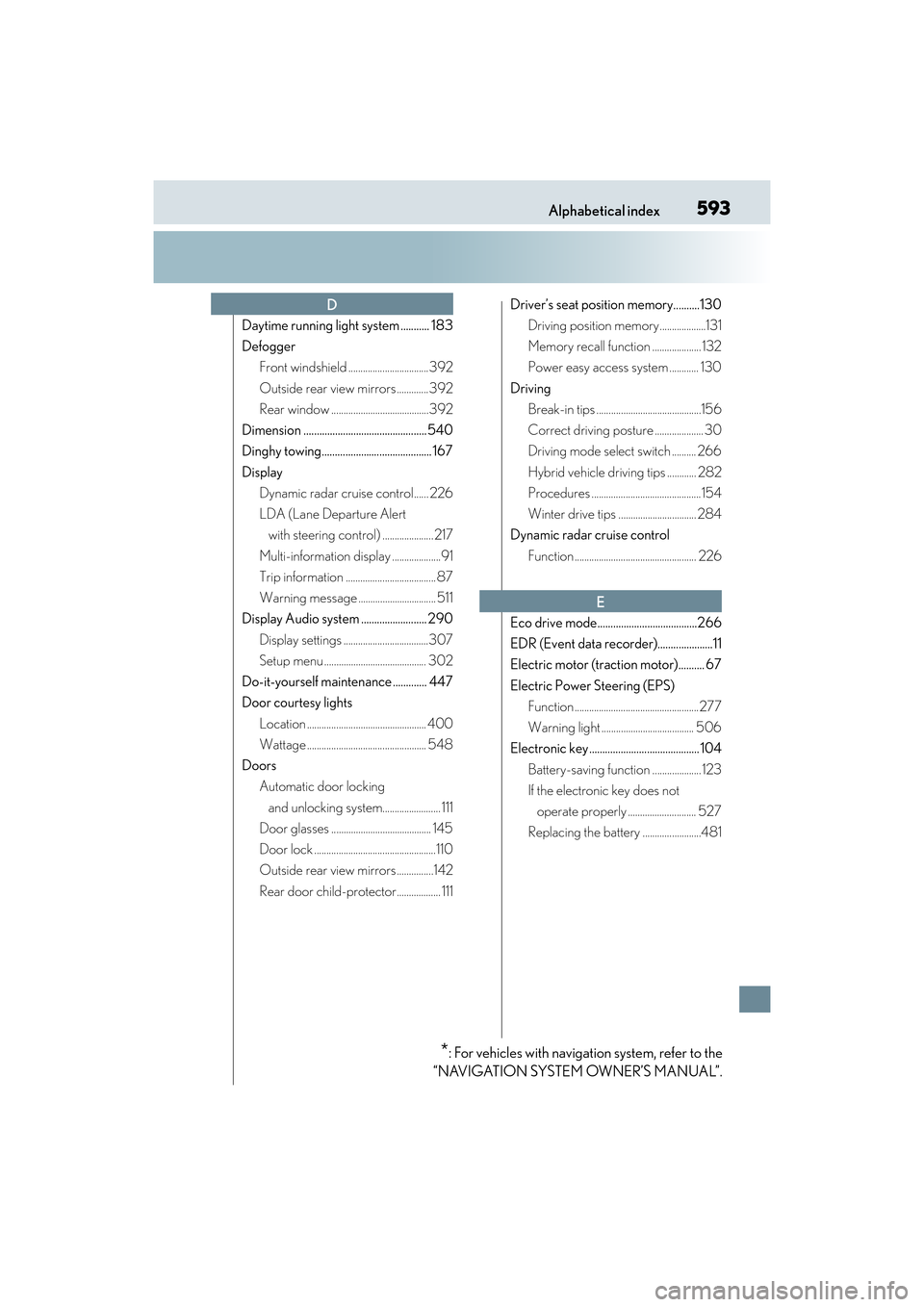
Daytime running light system ........... 183
DefoggerFront windshield ................................. 392
Outside rear view mirrors .............392
Rear window ........................................392
Dimension ............................................... 540
Dinghy towing.......................................... 167
Display Dynamic radar cruise control...... 226
LDA (Lane Departure Alert with steering control) ..................... 217
Multi-information display ....................91
Trip information ..................................... 87
Warning message ................................ 511
Display Audio system ......................... 290
Display settings ...................................307
Setup menu .......................................... 302
Do-it-yourself maintenance ............. 447
Door courtesy lights Location ................................................. 400
Wattage ................................................. 548
Doors Automatic door locking
and unlocking system........................ 111
Door glasses ......................................... 145
Door lock ..................................................110
Outside rear view mirrors ...............142
Rear door child-protector.................. 111 Driver’s seat position memory..........130
Driving position memory...................131
Memory recall function .................... 132
Power easy access system ............ 130
Driving Break-in tips ...........................................156
Correct driving posture .................... 30
Driving mode select switch .......... 266
Hybrid vehicle driving tips ............ 282
Procedures .............................................154
Winter drive tips ................................ 284
Dynamic radar cruise control
Function .................................................. 226
Eco drive mode......................................266
EDR (Event data recorder).....................11
Electric motor (traction motor).......... 67
Electric Power Steering (EPS) Function ...................................................277
Warning light ...................................... 506
Electronic key .......................................... 104
Battery-saving function .................... 123
If the electronic key does not operate properly ............................ 527
Replacing the battery ........................481
D
E
*: For vehicles with navigation system, refer to the
“NAVIGATION SYSTEM OWNER’S MANUAL”.