lights LEXUS ES300h 2021 Owner's Guide
[x] Cancel search | Manufacturer: LEXUS, Model Year: 2021, Model line: ES300h, Model: LEXUS ES300h 2021Pages: 464, PDF Size: 9.55 MB
Page 170 of 464
1704-3. Operating the lights and wipers
as snow, the operation of the windshield
wipers may be stopped automatically to
protect the windshield wipers. In this case,
turn the windshield wiper switch off and
remove the foreign object, and then use the
windshield wipers.
■When stopping the hybrid system in an
emergency while driving
If the windshield wipers are operating when
the hybrid system is stopped, the windshield
wipers will operate in high speed operation.
After the vehicle is stopped, operation will
return to normal when the power switch is
turned to ON mode, or operation will stop
when the driver’s door is opened.When the windshield wipers are not
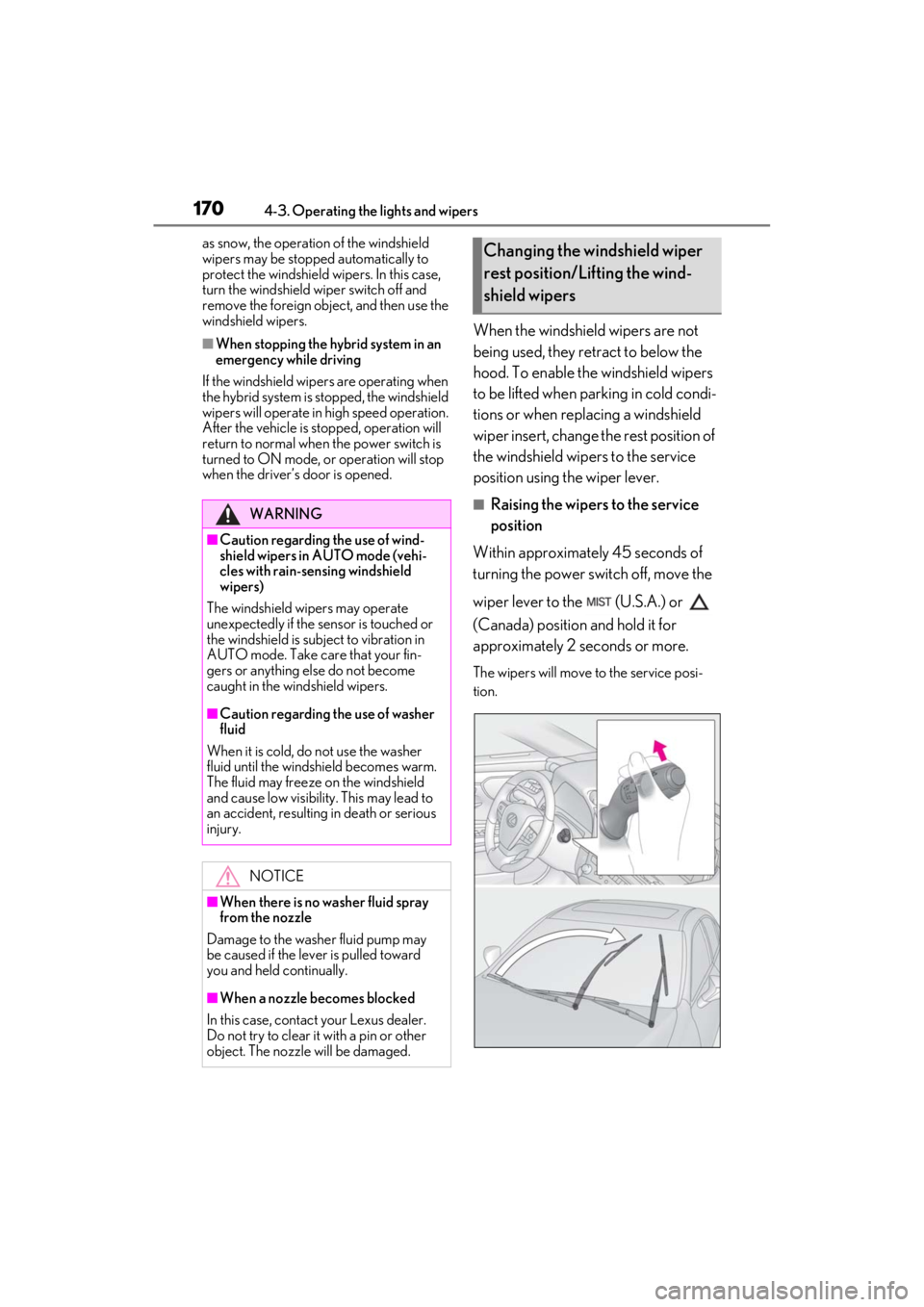
being used, they retract to below the
hood. To enable the windshield wipers
to be lifted when parking in cold condi-
tions or when replacing a windshield
wiper insert, change the rest position of
the windshield wipers to the service
position using the wiper lever.
■Raising the wipers to the service
position
Within approximately 45 seconds of
turning the power switch off, move the
wiper lever to the (U.S.A.) or
(Canada) position and hold it for
approximately 2 seconds or more.
The wipers will move to the service posi-
tion.
WARNING
■Caution regarding the use of wind-
shield wipers in AUTO mode (vehi-
cles with rain-sen sing windshield
wipers)
The windshield wipers may operate
unexpectedly if the sensor is touched or
the windshield is subject to vibration in
AUTO mode. Take ca re that your fin-
gers or anything else do not become
caught in the windshield wipers.
■Caution regarding the use of washer
fluid
When it is cold, do not use the washer
fluid until the windshield becomes warm.
The fluid may freeze on the windshield
and cause low visibility. This may lead to
an accident, resulting in death or serious
injury.
NOTICE
■When there is no washer fluid spray
from the nozzle
Damage to the washer fluid pump may
be caused if the lever is pulled toward
you and held continually.
■When a nozzle becomes blocked
In this case, contact your Lexus dealer.
Do not try to clear it with a pin or other
object. The nozzle will be damaged.
Changing the windshield wiper
rest position/Lifting the wind-
shield wipers
Page 171 of 464
1714-3. Operating the lights and wipers
4
Driving
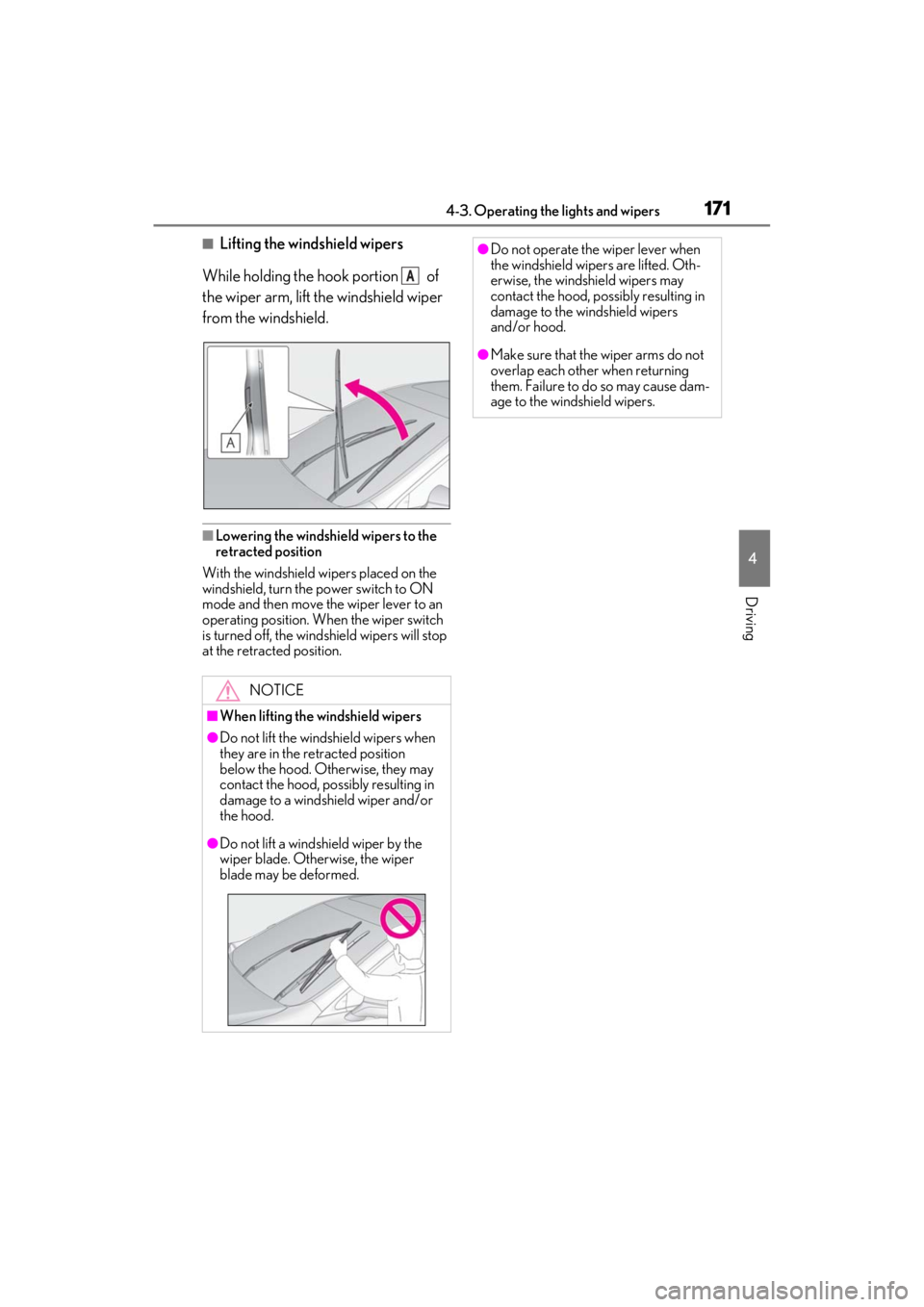
■Lifting the windshield wipers
While holding the hook portion of
the wiper arm, lift the windshield wiper
from the windshield.
■Lowering the windshield wipers to the
retracted position
With the windshield wi pers placed on the
windshield, turn the power switch to ON
mode and then move the wiper lever to an
operating position. When the wiper switch
is turned off, the windshield wipers will stop
at the retracted position.
NOTICE
■When lifting the windshield wipers
●Do not lift the windshield wipers when
they are in the retracted position
below the hood. Otherwise, they may
contact the hood, possibly resulting in
damage to a windshield wiper and/or
the hood.
●Do not lift a windshield wiper by the
wiper blade. Otherwise, the wiper
blade may be deformed.
A
●Do not operate the wiper lever when
the windshield wipe rs are lifted. Oth-
erwise, the windshield wipers may
contact the hood, possibly resulting in
damage to the windshield wipers
and/or hood.
●Make sure that the wiper arms do not
overlap each other when returning
them. Failure to do so may cause dam-
age to the windshield wipers.
Page 176 of 464
1764-5. Using the driving support systems
WARNING
●If the part of the windshield in front of
the front camera is fogged up or cov-
ered with condensation, or ice, use the
windshield defogger to remove the
fog, condensation, or ice. (P.266)
●If water droplets cannot be properly
removed from the area of the wind-
shield in front of the front camera by
the windshield wipers, replace the
wiper insert or wiper blade.
●Do not attach window tint to the wind-
shield.
●Replace the windshield if it is damaged
or cracked. After replacing the wind-
shield, the front camera must be recal-
ibrated. Contact your Lexus dealer for
details.
●Do not allow liquids to contact the
front camera.
●Do not allow bright lights to shine into
the front camera.
●Do not dirty or damage the front cam-
era.
When cleaning the inside of the wind-
shield, do not allow glass cleaner to
contact the lens of the front camera.
Also, do not touch the lens.
If the lens is dirty or damaged, contact
your Lexus dealer.
●Do not subject the front camera to a
strong impact.
●Do not change the installation position
or direction of the front camera or
remove it.
●Do not disassemble the front camera.
●Do not modify any components of the
vehicle around the front camera
(inside rear view mirror, etc.) or ceil-
ing.
●Do not attach any accessories to the
hood, front grille or front bumper that
may obstruct the front camera. Con-
tact your Lexus dealer for details.
●If a surfboard or other long object is to
be mounted on the roof, make sure
that it will not obstruct the front cam-
era.
●Do not modify the headlights or other
lights.
Page 179 of 464
1794-5. Using the driving support systems
4
Driving
●In the following situations, if the situation has changed (or the vehicle has been driven for
some time) and the normal operating conditions are detected, the message will disap-
pear and the system will become operational.
If the message does not disappear, contact your Lexus dealer.
• When the temperature around the radar sensor is outside of the operational range, such
as when the vehicle is in the sun or in an extremely cold environment
• When the front camera cannot detect objects in front of the vehicle, such as when driving
in the dark, snow, or fog, or when brig ht lights are shining into the front camera
When the temperature around the front
camera is outside of th e operational range,
such as when the vehicle is in the sun or in an
extremely cold environment
If the front camera is hot, such as after the
vehicle had been parked in the sun, use the
air conditioning system to decrease the tem-
perature around the front camera.
If a sunshade was used when the vehicle was
parked, depending on its type, the sunlight
reflected from the surface of the sunshade
may cause the temperature of the front cam-
era to become excessively high.
If the front camera is cold, such after the
vehicle is parked in an extremely cold envi-
ronment, use the air conditioning system to
increase the temperature around the front
camera.
The area in front of the front camera is
obstructed, such as when the hood is open
or a sticker is attached to the part of the
windshield in front of the front camera.
Close the hood, remove the sticker, etc. to
clear the obstruction.
SituationActions
Page 185 of 464
1854-5. Using the driving support systems
4
Driving
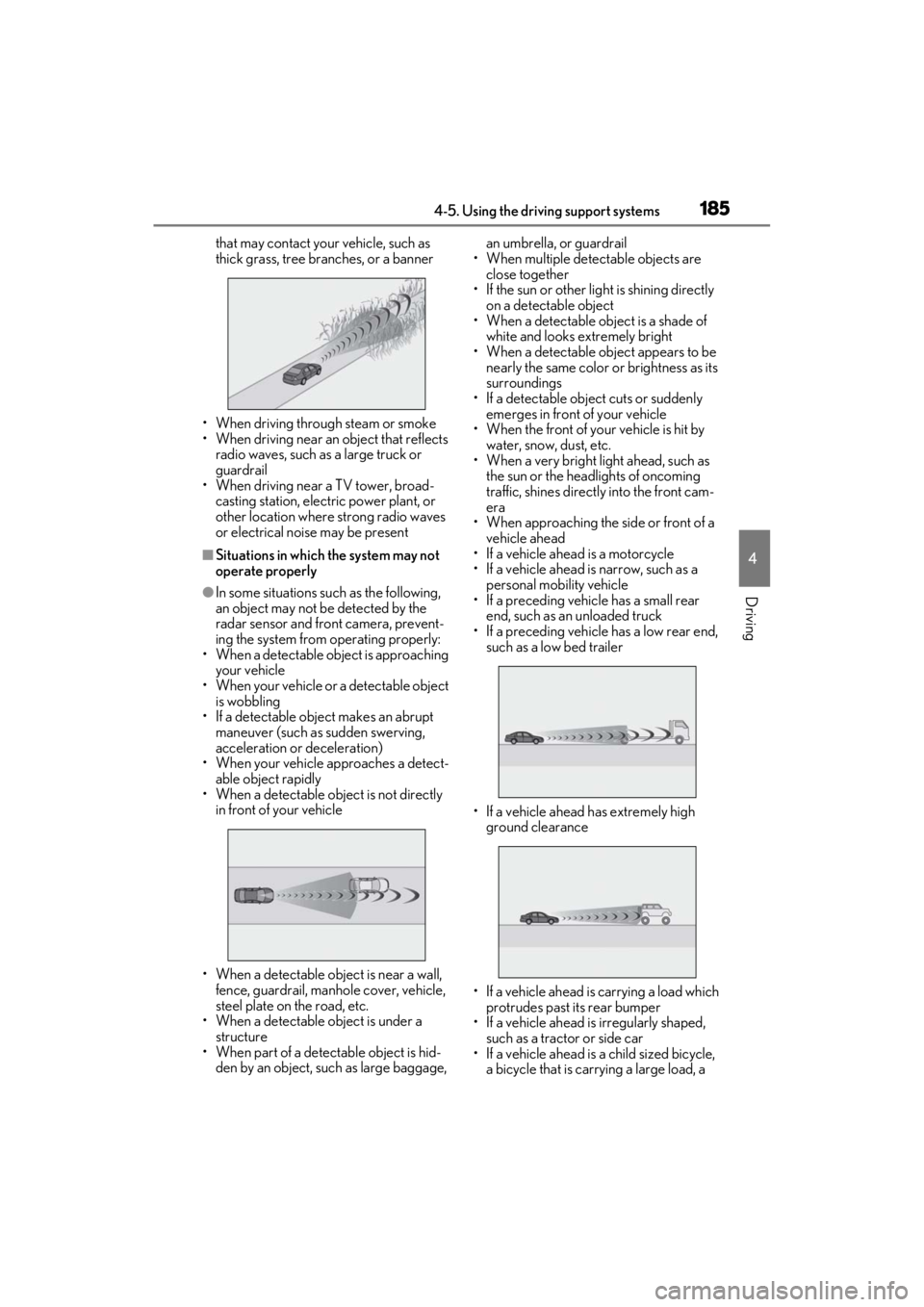
that may contact your vehicle, such as
thick grass, tree branches, or a banner
• When driving through steam or smoke
• When driving near an object that reflects
radio waves, such as a large truck or
guardrail
• When driving near a TV tower, broad- casting station, electric power plant, or
other location where strong radio waves
or electrical noise may be present
■Situations in which the system may not
operate properly
●In some situations such as the following,
an object may not be detected by the
radar sensor and front camera, prevent-
ing the system from operating properly:
• When a detectable object is approaching
your vehicle
• When your vehicle or a detectable object
is wobbling
• If a detectable object makes an abrupt maneuver (such as sudden swerving,
acceleration or deceleration)
• When your vehicle approaches a detect- able object rapidly
• When a detectable object is not directly
in front of your vehicle
• When a detectable object is near a wall, fence, guardrail, manhole cover, vehicle,
steel plate on the road, etc.
• When a detectable object is under a structure
•When part of a detect able object is hid-
den by an object, such as large baggage, an umbrella, or guardrail
• When multiple dete ctable objects are
close together
• If the sun or other light is shining directly on a detectable object
• When a detectable object is a shade of
white and looks extremely bright
• When a detectable ob ject appears to be
nearly the same color or brightness as its
surroundings
• If a detectable object cuts or suddenly emerges in front of your vehicle
• When the front of your vehicle is hit by water, snow, dust, etc.
• When a very bright light ahead, such as
the sun or the head lights of oncoming
traffic, shines direct ly into the front cam-
era
• When approaching the side or front of a vehicle ahead
• If a vehicle ahead is a motorcycle
• If a vehicle ahead is narrow, such as a
personal mobility vehicle
• If a preceding vehicle has a small rear
end, such as an unloaded truck
• If a preceding vehicle has a low rear end, such as a low bed trailer
• If a vehicle ahead has extremely high ground clearance
• If a vehicle ahead is carrying a load which protrudes past its rear bumper
• If a vehicle ahead is irregularly shaped,
such as a tractor or side car
• If a vehicle ahead is a child sized bicycle, a bicycle that is carrying a large load, a
Page 188 of 464
1884-5. Using the driving support systems
WARNING
●When tires of a size other than speci-
fied are installed.
●Vehicle is driven in traffic lanes other
than that highways and freeways.
●During emergency towing
■Preventing LTA system malfunctions
and operations performed by mistake
●Do not modify the headlights or place
stickers, etc. on the surface of the
lights.
●Do not modify the suspension etc. If
the suspension etc. needs to be
replaced, contact your Lexus dealer.
●Do not install or place anything on the
hood or grille. Also, do not install a
grille guard (bull bars, kangaroo bar,
etc.).
●If your windshield needs repairs, con-
tact your Lexus dealer.
■Conditions in which functions may
not operate properly
In the following situations, the functions
may not operate properly and the vehi-
cle may depart from its lane. Drive safely
by always paying careful attention to
your surroundings and operate the
steering wheel to correct the path of the
vehicle without relying solely on the func-
tions.
●When the follow-up cruising display is
displayed ( P.192) and the preced-
ing vehicle changes lanes. (Your vehi-
cle may follow the preceding vehicle
and also change lanes.)
●When the follow-up cruising display is
displayed ( P.192) and the preced-
ing vehicle is swaying. (Your vehicle
may sway accordingly and depart from
the lane.)
●When the follow-up cruising display is
displayed ( P.192) and the preced-
ing vehicle departs from its lane. (Your
vehicle may follow the preceding vehi-
cle and depart from the lane.)
●When the follow-up cruising display is
displayed ( P.192) and the preced-
ing vehicle is being driven extremely
close to the left/right lane line. (Your
vehicle may follow the preceding vehi-
cle and depart from the lane.)
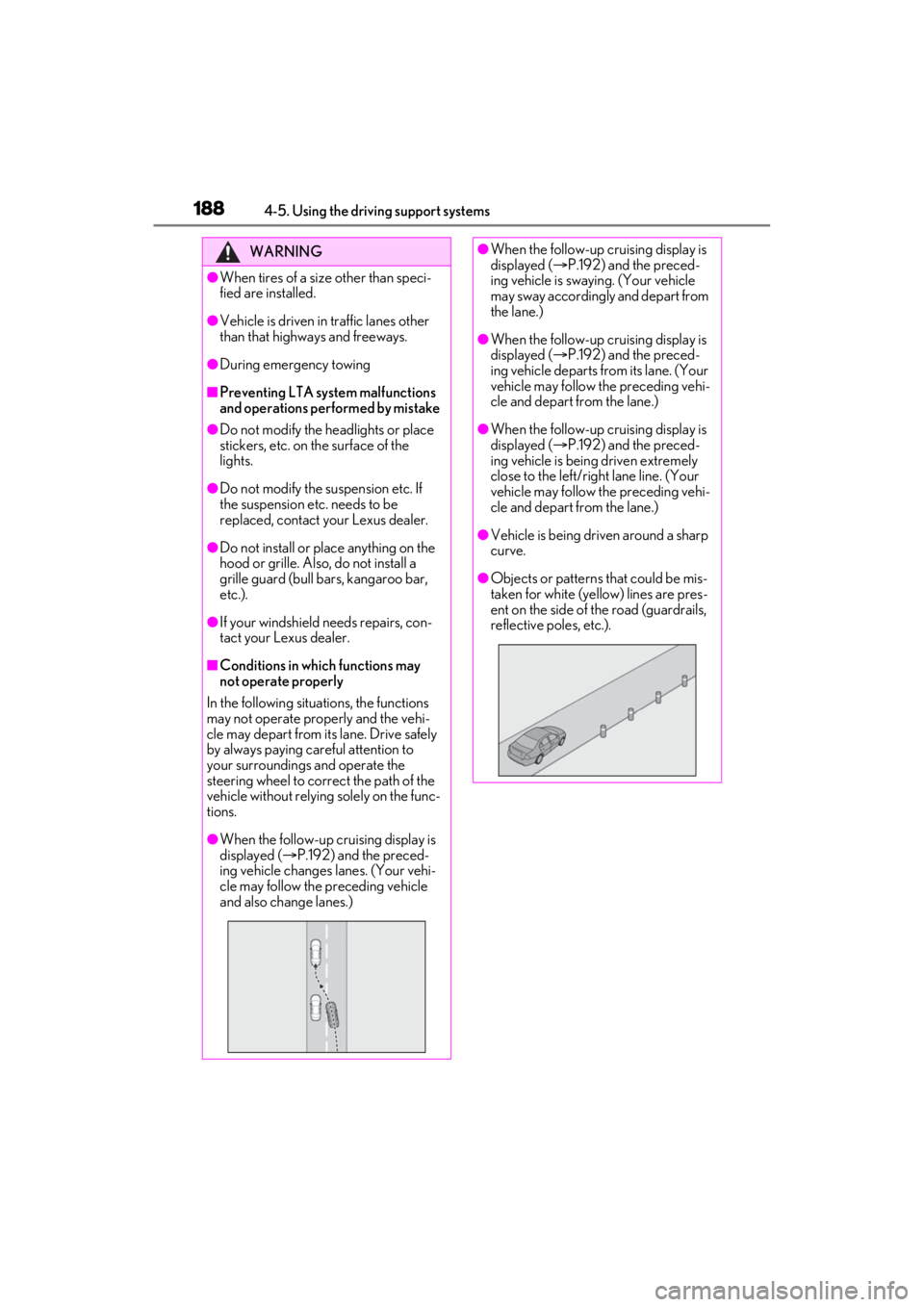
●Vehicle is being driven around a sharp
curve.
●Objects or patterns that could be mis-
taken for white (yellow) lines are pres-
ent on the side of the road (guardrails,
reflective poles, etc.).
Page 189 of 464
1894-5. Using the driving support systems
4
Driving
WARNING
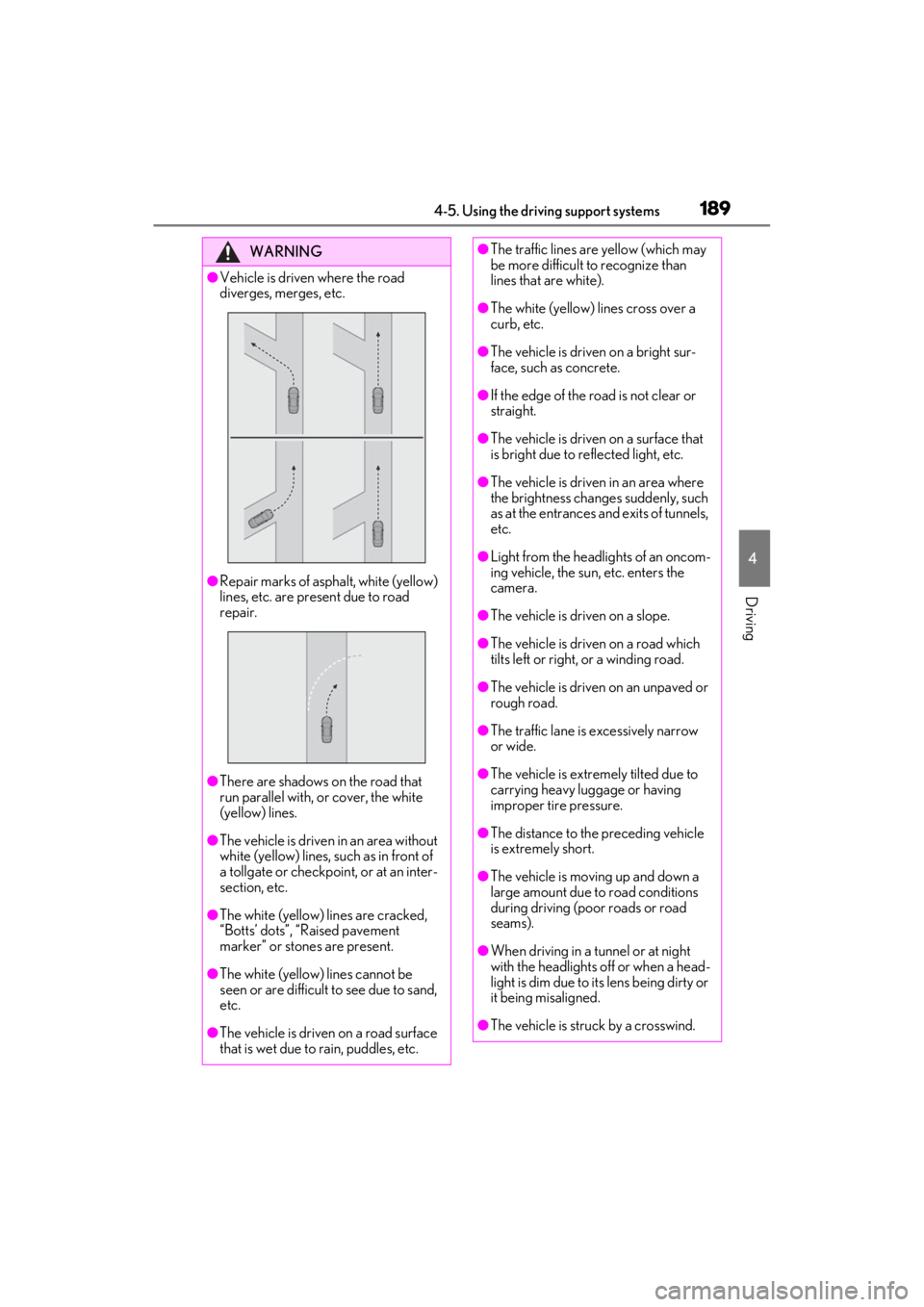
●Vehicle is driven where the road
diverges, merges, etc.
●Repair marks of asphalt, white (yellow)
lines, etc. are present due to road
repair.
●There are shadows on the road that
run parallel with, or cover, the white
(yellow) lines.
●The vehicle is driven in an area without
white (yellow) lines, such as in front of
a tollgate or checkpoint, or at an inter-
section, etc.
●The white (yellow) lines are cracked,
“Botts’ dots”, “Raised pavement
marker” or stones are present.
●The white (yellow) lines cannot be
seen or are difficult to see due to sand,
etc.
●The vehicle is driven on a road surface
that is wet due to rain, puddles, etc.
●The traffic lines are yellow (which may
be more difficult to recognize than
lines that are white).
●The white (yellow) lines cross over a
curb, etc.
●The vehicle is driven on a bright sur-
face, such as concrete.
●If the edge of the road is not clear or
straight.
●The vehicle is driven on a surface that
is bright due to reflected light, etc.
●The vehicle is driven in an area where
the brightness change s suddenly, such
as at the entrances and exits of tunnels,
etc.
●Light from the headlights of an oncom-
ing vehicle, the sun, etc. enters the
camera.
●The vehicle is driven on a slope.
●The vehicle is driven on a road which
tilts left or right, or a winding road.
●The vehicle is driven on an unpaved or
rough road.
●The traffic lane is excessively narrow
or wide.
●The vehicle is extremely tilted due to
carrying heavy luggage or having
improper tire pressure.
●The distance to the preceding vehicle
is extremely short.
●The vehicle is moving up and down a
large amount due to road conditions
during driving (poor roads or road
seams).
●When driving in a tunnel or at night
with the headlights off or when a head-
light is dim due to its lens being dirty or
it being misaligned.
●The vehicle is struck by a crosswind.
Page 201 of 464
2014-5. Using the driving support systems
4
Driving
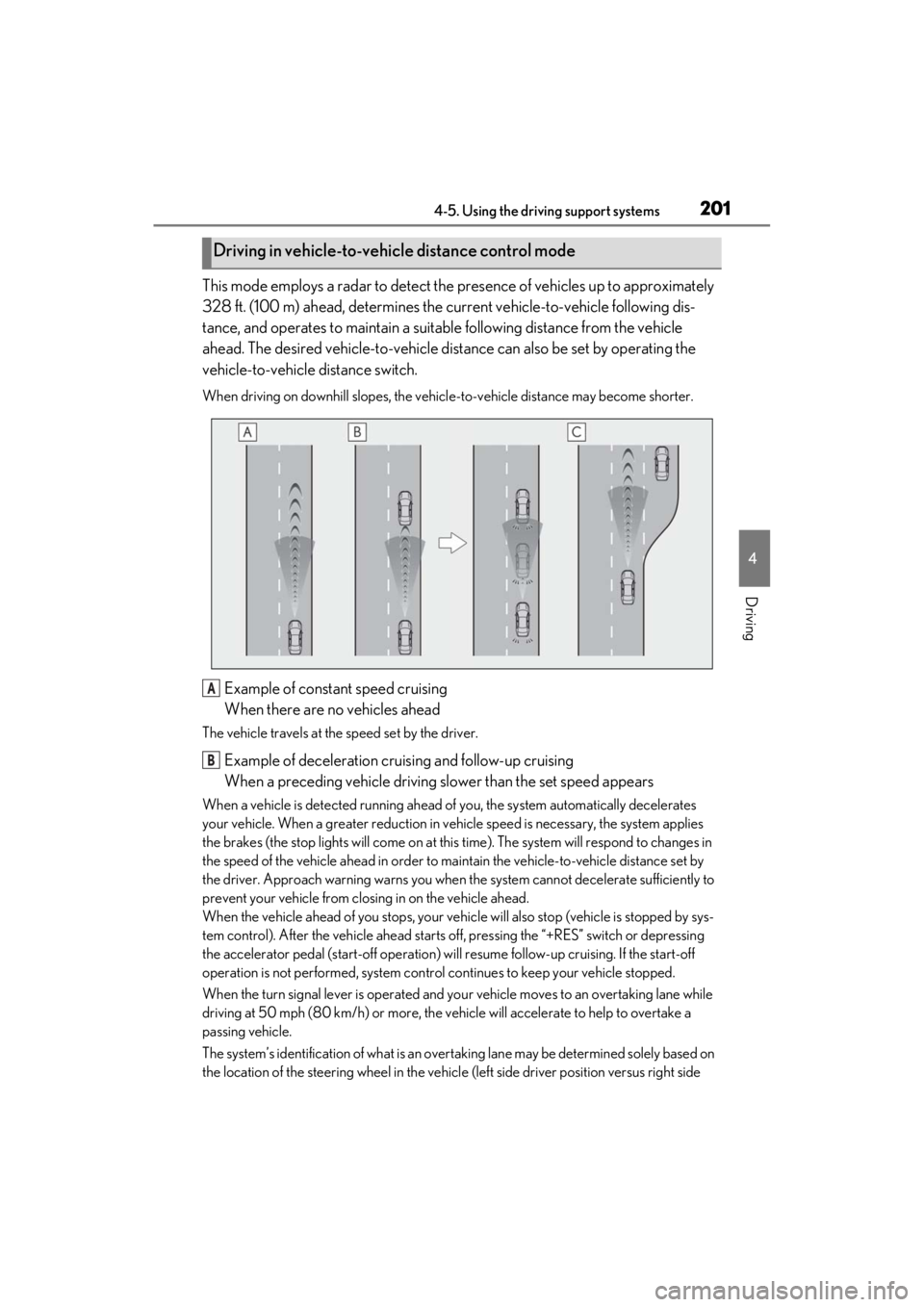
This mode employs a radar to detect the presence of vehicles up to approximately
328 ft. (100 m) ahead, determines the cu rrent vehicle-to-vehicle following dis-
tance, and operates to maintain a suitab le following distance from the vehicle
ahead. The desired vehicle-to-vehicle distance can also be set by operating the
vehicle-to-vehicle distance switch.
When driving on downhill slopes, the vehicl e-to-vehicle distance may become shorter.
Example of constant speed cruising
When there are no vehicles ahead
The vehicle travels at the speed set by the driver.
Example of deceleration cruising and follow-up cruising
When a preceding vehicle driving slower than the set speed appears
When a vehicle is detected running ahead of you, the system automatically decelerates
your vehicle. When a greater reduction in vehicle speed is necessary, the system applies
the brakes (the stop lights will come on at this time). The system will respond to changes in
the speed of the vehicle ahead in order to maintain the vehicle-to-vehicle distance set by
the driver. Approach warning warns you when th e system cannot decelerate sufficiently to
prevent your vehicle from closing in on the vehicle ahead.
When the vehicle ahead of you stops, your vehi cle will also stop (vehicle is stopped by sys-
tem control). After the vehicle ahead starts off, pressing the “+RES” switch or depressing
the accelerator pedal (start-off operation) will resume follow-up cruising. If the start-off
operation is not performed, system contro l continues to keep your vehicle stopped.
When the turn signal lever is operated and yo ur vehicle moves to an overtaking lane while
driving at 50 mph (80 km/h) or more, the vehicle will accelerate to help to overtake a
passing vehicle.
The system’s identification of what is an over taking lane may be determined solely based on
the location of the steering wheel in the vehicl e (left side driver position versus right side
Driving in vehicle-to-vehicle distance control mode
A
B
Page 217 of 464
2174-5. Using the driving support systems
4
Driving
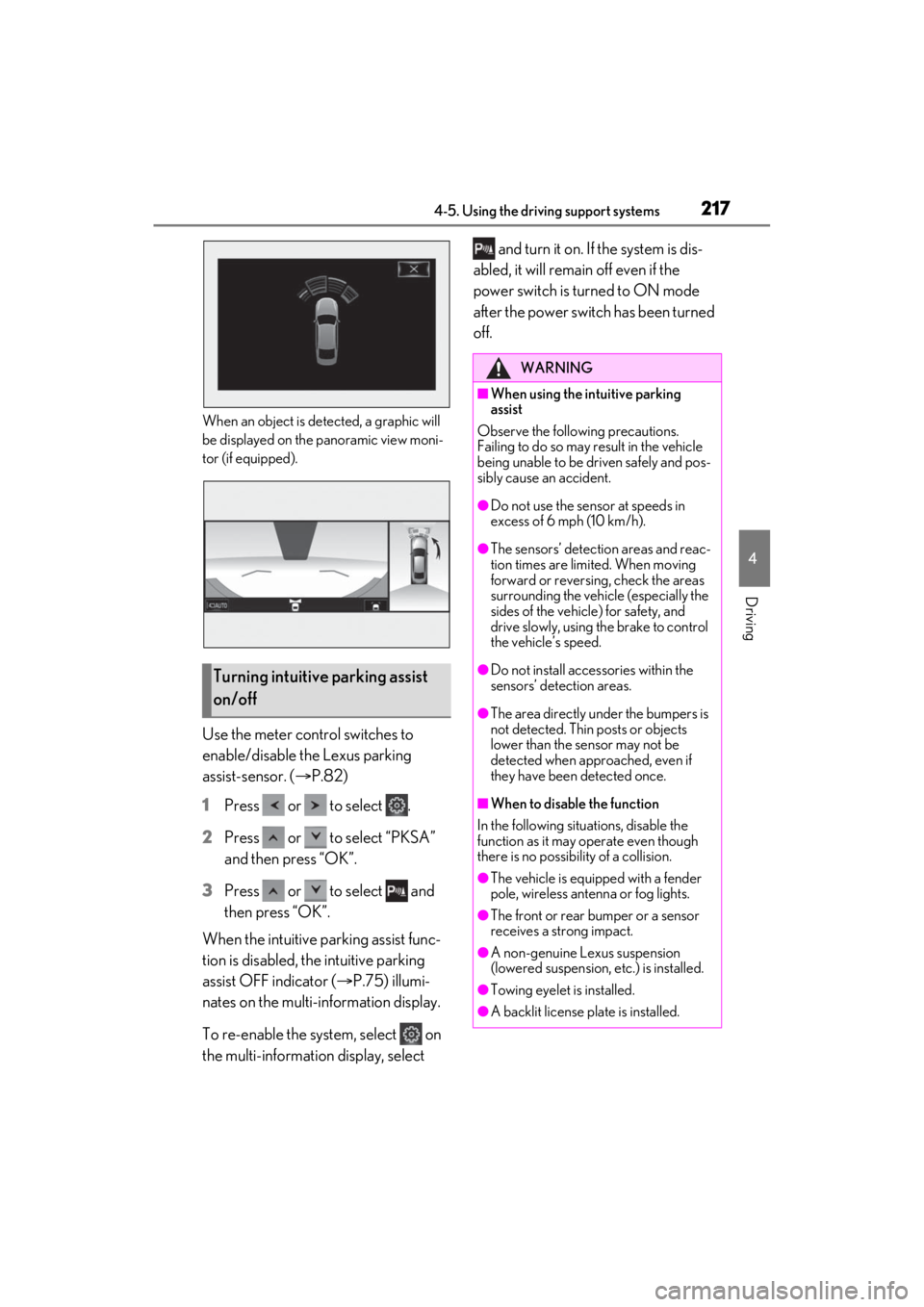
When an object is detected, a graphic will
be displayed on the panoramic view moni-
tor (if equipped).
Use the meter control switches to
enable/disable the Lexus parking
assist-sensor. (P.82)
1 Press or to select .
2 Press or to select “PKSA”
and then press “OK”.
3 Press or to select and
then press “OK”.
When the intuitive parking assist func-
tion is disabled, the intuitive parking
assist OFF indicator ( P.75) illumi-
nates on the multi-information display.
To re-enable the system, select on
the multi-information display, select and turn it on. If the system is dis-
abled, it will remain off even if the
power switch is tu rned to ON mode
after the power switch has been turned
off.
Turning intuitive parking assist
on/off
WARNING
■When using the intuitive parking
assist
Observe the following precautions.
Failing to do so may result in the vehicle
being unable to be driven safely and pos-
sibly cause an accident.
●Do not use the sensor at speeds in
excess of 6 mph (10 km/h).
●The sensors’ detection areas and reac-
tion times are limited. When moving
forward or reversin g, check the areas
surrounding the vehicle (especially the
sides of the vehicl e) for safety, and
drive slowly, using the brake to control
the vehicle’s speed.
●Do not install accessories within the
sensors’ detection areas.
●The area directly under the bumpers is
not detected. Thin posts or objects
lower than the sensor may not be
detected when approached, even if
they have been detected once.
■When to disable the function
In the following situations, disable the
function as it may operate even though
there is no possibility of a collision.
●The vehicle is equipped with a fender
pole, wireless antenna or fog lights.
●The front or rear bumper or a sensor
receives a strong impact.
●A non-genuine Lexus suspension
(lowered suspension, etc.) is installed.
●Towing eyelet is installed.
●A backlit license plate is installed.
Page 228 of 464
2284-5. Using the driving support systems
Sounds repeatedly
Pedestrian detection icon: Blinks 3
times and then stays on
If the system determines that your
vehicle may collide with a pedes-
trian in area
Buzzer: Sounds repeatedly
Pedestrian detection icon: Blinks 3
times and then stays on
■The rear camera detection function is
operational when
●The power switch is in ON mode.
●RCD function is on.
●The shift lever is in R.
■Setting the buzzer volume
The buzzer volume can be adjusted on the
multi-information display. ( P.215)
The RCD buzzer sound is linked with the
RCTA buzzer.
■If “Rear Camera Detection Unavailable
Remove the Dirt of Rear Camera” is
displayed on the mu lti-information dis-
play
A rear camera lens may be dirty or covered
with snow or ice. In such cases, if it is
removed from the rear camera lens, the
system should return to normal. (It may be
necessary to drive the vehicle for some time
before the system returns to normal.)
■If “Rear Camera Detection Unavail-
able” is displayed on the multi-informa-
tion display
●If this message is di splayed after the 12-
volt battery has been disconnected and
reconnected, fully turn the steering wheel
to the left and then the right on level
ground.
●If this message is displayed only when the
shift lever is in R, the rear camera lens
may be dirty. Clean the rear camera lens.
■Situations in which the system may not
operate properly
●Some pedestrians, such as the following, may not be detected by the rear camera
detection function, preventing the func-
tion from operating properly:
• Pedestrians who are bending forward or squatting
• Pedestrians who are lying down
• Pedestrians who are running
• Pedestrians who suddenly enter the detection area
• People riding a bicycle, skateboard, or other light vehicle
• Pedestrians wearing oversized clothing
such as a rain coat, long skirt, etc., making
their silhouette obscure
• Pedestrians whose body is partially hid-
den by an object, such as a cart or
umbrella
• Pedestrians which are obscured by dark-
ness, such as at night
●In some situations, such as the following,
pedestrians may not be detected by the
rear camera detection function, prevent-
ing the function from operating properly:
• When backing up in inclement weather
(rain, snow, fog, etc.)
• When the rear camera is obscured (dirt,
snow, ice, etc. are at tached) or scratched
• When a very bright light, such as the sun, or the headlights of another vehicle,
shines directly into the rear camera
• When backing up in a place where the surrounding brightness changes sud-
denly, such as at the entrance or exit of a
garage or underground parking lot
• When backing up in a dim environment
such as during dusk or in an underground
parking lot
●Even though there are no pedestrians in
the detection area, some objects, such as
the following, may be detected, possibly
causing the rear camera detection func-
tion to operate.
• Three dimensional objects, such as a
pole, traffic cone, fence, or parked vehi-
cle
• Moving objects, such as a car or motor- cycle
• Objects moving toward your vehicle when backing up, such as flags or pud-
dles (or airborne matter, such as smoke,
steam, rain, or snow)
• Cobblestone or gravel roads, tram rails, road repairs, white lines, pedestrian
C
C