high LEXUS ES300h 2022 Owner's Manual
[x] Cancel search | Manufacturer: LEXUS, Model Year: 2022, Model line: ES300h, Model: LEXUS ES300h 2022Pages: 480, PDF Size: 27.63 MB
Page 120 of 480

1183-2. Opening, closing and locking the doors and trunk
effective range (detection areas), the sys-
tem may not operate properly in the fol-
lowing cases:
• The electronic key is too close to the win- dow or outside door handle, near the
ground, or in a high place when the doors
are locked or unlocked.
• The electronic key is near the ground or in a high place, or too close to the center
of the rear bumper when the trunk is
opened.
• The electronic key is on the instrument
panel, rear package tray or floor, or in the
door pockets or glove box when the
hybrid system is started or power switch
modes are changed.
ODo not leave the electronic key on top of
the instrument panel or near the door
pockets when exiting the vehicle.
Depending on the radio wave reception
conditions, it may be detected by the
antenna outside the cabin and the doors
will become lockable from the outside,
possibly trapping the electronic key
inside the vehicle.
OAs long as the electronic key is within the
effective range, the doors may be locked
or unlocked by anyone. However, only
the doors detecting the electronic key
can be used to unlock the vehicle.
OEven if the electronic key is not inside the
vehicle, it may be possible to start the
hybrid system if the electronic key is near
the window.
OThe doors may unlock or lock if a large
amount of water splashes on the door
handle, such as in the rain or in a car
wash, when the electronic key is within
the effective range. (The doors will auto-
matically be locked after approximately
60 seconds if the doors are not opened
and closed.)
OIf the wireless remote control is used to
lock the doors when the electronic key is
near the vehicle, there is a possibility that
the door may not be unlocked by the
entry function. (Use the wireless remote
control to unlock the doors.)
OTouching the door lock sensor while
wearing gloves may delay or prevent
lock operation. Remove the gloves and
touch the lock sensor again.
OWhen the lock operation is performed
using the lock sensor, recognition signals
will be shown up to two consecutive
times. After this, no recognition signals
will be given.
OUnlocking the vehicle may take more
time if another electronic key is within the
effective range.
OIf the door handle becomes wet while the
electronic key is within the effective
range, the door may lock and unlock
repeatedly. In this case, follow the follow-
ing correction procedures to wash the
vehicle:
• Place the electronic key in a location 6 ft. (2 m) or more away from the vehicle.
(Take care to ensure that the key is not
stolen.)
• Set the electronic key to battery-saving
mode to disable the smart access system
with push-button start. ( P.117)
OIf the electronic key is inside the vehicle
and a door handle becomes wet during a
car wash, a message may be shown on
the multi-information display and a
buzzer will sound outside the vehicle. To
turn off the alarm, lock all the doors.
OThe lock sensor may not work properly if
it comes into contact with ice, snow, mud,
etc.
Clean the lock sensor and attempt to
operate it again.
OA sudden approach to the effective
range or door handle may prevent the
doors from being unlocked. In this case,
return the door handle to the original
position and check that the doors unlock
before pulling the door handle again.
QWhen the vehicle is not driven for
extended periods
OTo prevent theft of the vehicle, do not
leave the electronic key within 6 ft. (2 m)
of the vehicle.
OThe smart access system with push-but-
ton start can be deactivated in advance.
OBattery-saving mode can reduce the
power consumption of electronic keys.
( P.117)
Page 139 of 480
137
4
4
Driving
Driving
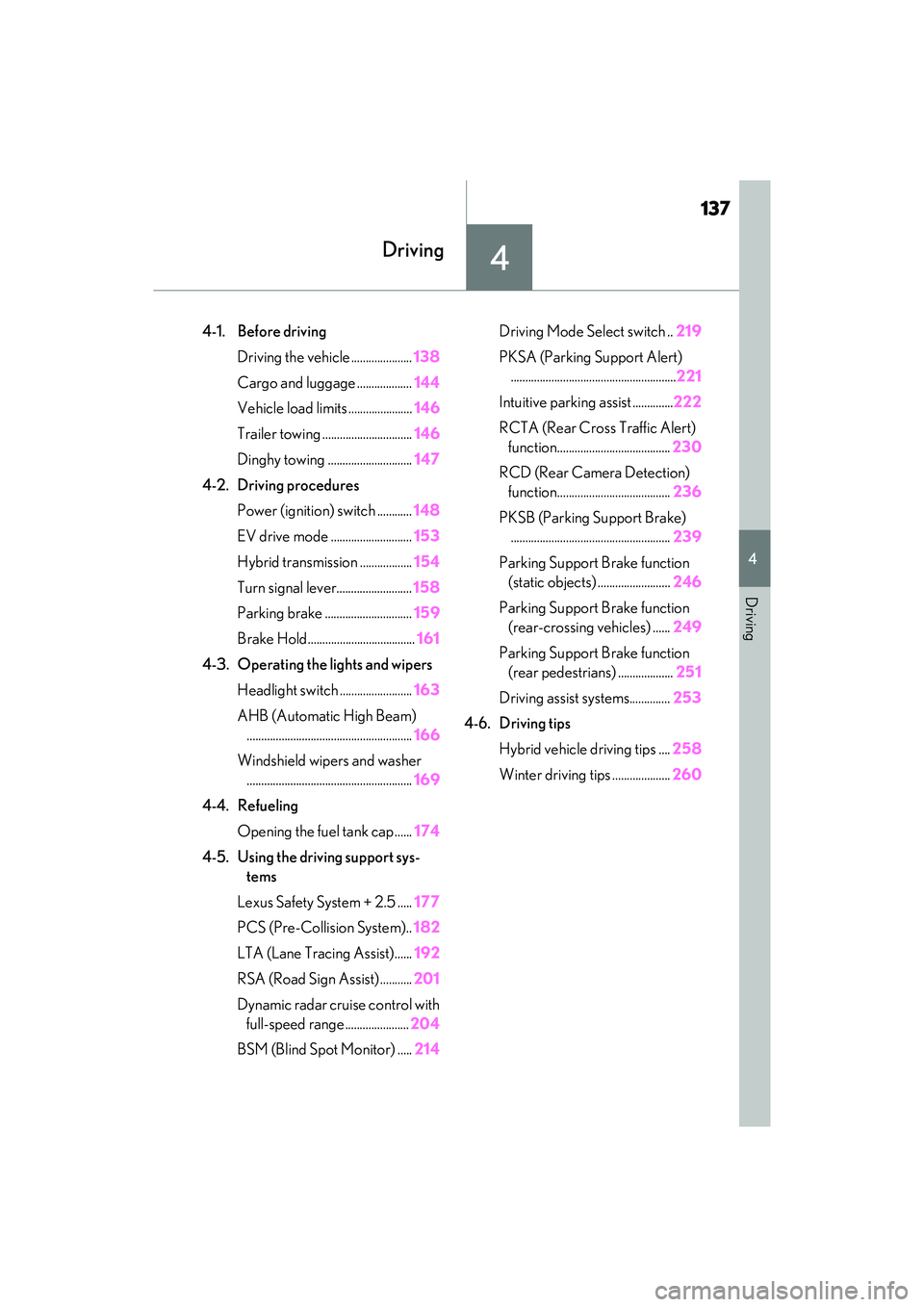
4-1. Before drivingDriving the vehicle ..................... 138
Cargo and luggage ................... 144
Vehicle load limits ...................... 146
Trailer towing ............................... 146
Dinghy towing ............................. 147
4-2. Driving procedures Power (ignition) switch ............ 148
EV drive mode ............................ 153
Hybrid transmission .................. 154
Turn signal lever.......................... 158
Parking brake .............................. 159
Brake Hold..................................... 161
4-3. Operating the lights and wipers
Headlight switch ......................... 163
AHB (Automatic High Beam) ......................................................... 166
Windshield wipers and washer ......................................................... 169
4-4. Refueling Opening the fuel tank cap ...... 174
4-5. Using the driving support sys- tems
Lexus Safety System + 2.5 ..... 177
PCS (Pre-Collision System).. 182
LTA (Lane Tracing Assist)...... 192
RSA (Road Sign Assist) ........... 201
Dynamic radar cruise control with full-speed range ...................... 204
BSM (Blind Spot Monitor) ..... 214Driving Mode Select switch ..
219
PKSA (Parking Support Alert) ......................................................... 221
Intuitive parking assist .............. 222
RCTA (Rear Cross Traffic Alert) function....................................... 230
RCD (Rear Camera Detection) function....................................... 236
PKSB (Parking Support Brake) ....................................................... 239
Parking Support Brake function (static objects) ......................... 246
Parking Support Brake function (rear-crossing vehicles) ...... 249
Parking Support Brake function (rear pedestrians) ................... 251
Driving assist systems.............. 253
4-6. Driving tips
Hybrid vehicle driving tips .... 258
Winter driving tips .................... 260
Page 140 of 480
1384-1. Before driving
4-1. Be fore driving
QStarting the hybrid system
P.148
QDriving
1 With the brake pedal depressed,
shift the shift lever to D. ( P.155)
2 If the parking brake is in manual
mode, release the parking brake.
( P.159)
3 Gradually release the brake pedal
and gently depress the accelerator
pedal to accelerate the vehicle.
QStopping
1 With the shift in D, depress the
brake pedal.
2 If necessary, set the parking brake.
If the vehicle is to be stopped for an
extended period of time, shift the shift lever
to P. ( P.155)
QParking the vehicle
1 With the shift lever in D, depress
the brake pedal.
2 Set the parking brake ( P.159),
and shift the shift lever to P
( P.155).
3 Press the power switch to stop the
hybrid system.
4 Lock the door, making sure that
you have the electronic key on your
person.
If parking on a hill, block the wheels as
needed.
QStarting off on a steep uphill
1 Make sure that the parking brake is
set with the brake pedal depressed,
and then shift the shift lever to D.
2 Release the brake pedal and gently
depress the accelerator pedal.
3 Release the parking brake.
QWhen starting off on a uphill
The hill-start assist control will activate.
( P.253)
QFor fuel-efficient driving
Keep in mind that hybrid vehicles are simi-
lar to conventional vehicles, and it is neces-
sary to refrain from activities such as
sudden acceleration. ( P.258)
QCoasting (Auto Glide Control)
When Eco drive mode is selected, under
certain conditions, Auto Glide Control will
operate automatically and allow the vehicle
coast, enhancing fuel economy. ( P.220)
QDriving in the rain
ODrive carefully when it is raining, because
visibility will be reduced, the windows
may become fogged-up, and the road
will be slippery.
ODrive carefully when it starts to rain,
because the road surface will be espe-
cially slippery.
ORefrain from high speeds when driving on
an expressway in the rain, because there
may be a layer of water between the tires
and the road surface, preventing the
steering and brakes from operating
properly.
QRestraining the hybrid system output
(Brake Override System)
OWhen the accelerator and brake pedals
are depressed at the same time, the
hybrid system output may be restrained.
OA warning message is displayed on the
multi-information display while the sys-
tem is operating. ( P.366)
Driving the vehicle
The following procedures should be
observed to ensure safe driving:
Driving procedure
Page 141 of 480
1394-1. Before driving
4
Driving
QBreaking in your new Lexus
To extend the life of the vehicle, observing
the following precautions is recommended:
OFor the first 186 miles (300 km):
Avoid sudden stops.
OFor the first 621 miles (1000 km):
• Do not drive at extremely high speeds.
• Avoid sudden acceleration.
• Do not drive continuously in low gears.
• Do not drive at a constant speed for extended periods.
QOperating your vehicle in a foreign
country
Comply with the releva nt vehicle registra-
tion laws and confirm the availability of the
correct fuel. ( P.403)
WARNING
Observe the following precautions.
Failure to do so may result in death or
serious injury.
QWhen starting the vehicle
Always keep your foot on the brake
pedal while stopped with the “READY”
indicator is illuminated. This prevents the
vehicle from creeping.
QWhen driving the vehicle
ODo not drive if you are unfamiliar with
the location of the brake and accelera-
tor pedals to avoid depressing the
wrong pedal.
• Accidentally depressing the accelera- tor pedal instead of the brake pedal
will result in sudden acceleration that
may lead to an accident.
• When backing up, you may twist your body around, leading to a difficulty in
operating the pedals. Make sure to
operate the pedals properly.
• Make sure to keep a correct driving posture even when moving the vehicle
only slightly. This allows you to depress
the brake and accelerator pedals
properly.
• Depress the brake pedal using your right foot. Depressing the brake pedal
using your left foot may delay
response in an emer gency, resulting in
an accident.
OThe driver should pay extra attention
to pedestrians when the vehicle is
powered only by the electric motor
(traction motor). As there is minimal
motor noise, pedestrians may mis-
judge the vehicle’s movement. Even if
the Acoustic Vehicle Alerting system
is operating, drive with care as pedes-
trians in the vicinity may still not notice
the vehicle if the surrounding area is
noisy.
ODo not drive the vehicle over or stop
the vehicle near flammable materials
such as leaves, paper or rags.
The exhaust system and exhaust gases
can be extremely hot. These hot parts
may cause a fire if there is any flamma-
ble material nearby.
Page 142 of 480
1404-1. Before driving
WARNING
ODuring normal driving, do not turn off
the hybrid system. Turning the hybrid
system off while driving will not cause
loss of steering or braking control,
however, power assist to the steering
will be lost. This will make it more diffi-
cult to steer smoothly, so you should
pull over and stop the vehicle as soon
as it is safe to do so.
In the event of an emergency, such as
if it becomes impossible to stop the
vehicle in the normal way: P.358
OUse engine braking (downshift) to
maintain a safe sp eed when driving
down a steep hill.
Using the brakes continuously may
cause the brakes to overheat and lose
effectiveness. ( P.154)
ODo not adjust the positions of the
steering wheel, the seat, or the inside
or outside rear view mirrors while driv-
ing.
Doing so may result in a loss of vehicle
control.
OAlways check that all passengers’
arms, heads or other parts of their
body are not outside the vehicle.
ODo not drive in excess of the speed
limit. Even if the legal speed limit per-
mits it, do not drive over 85 mph (140
km/h) unless your vehicle has high-
speed capability tires. Driving over 85
mph (140 km/h) may result in tire fail-
ure, loss of control and possible injury.
Be sure to consult a tire dealer to
determine whether the tires on your
vehicle are high-speed capability tires
or not before driving at such speeds.
QWhen driving on slippery road sur-
faces
OSudden braking, acceleration and
steering may cause tire slippage and
reduce your ability to control the vehi-
cle.
OSudden acceleration, engine braking
due to shifting, or changes in engine
speed could cause the vehicle to skid,
resulting in an accident.
OAfter driving through a puddle, lightly
depress the brake pedal to make sure
that the brakes are functioning prop-
erly. Wet brake pads may prevent the
brakes from functioning properly. If
the brakes on only one side are wet
and not functioning properly, steering
control may be affected.
QWhen shifting the shift lever
ODo not let the vehicle roll backward
while the shift lever is in a driving posi-
tion, or roll forward while the shift lever
is in R.
Doing so may result in an accident or
damage to the vehicle.
ODo not shift the shift lever to P while
the vehicle is moving.
Doing so can damage the transmission
and may result in a loss of vehicle con-
trol.
ODo not shift the shift lever to R while
the vehicle is moving forward.
Doing so can damage the transmission
and may result in a loss of vehicle con-
trol.
ODo not shift the shift lever to a driving
position while the vehicle is moving
backward.
Doing so can damage the transmission
and may result in a loss of vehicle con-
trol.
OShifting the shift lever to N while the
vehicle is moving will disengage the
hybrid system. Engine braking is not
available when N is selected.
OBe careful not to shift the shift lever
with the accelerator pedal depressed.
Shifting the shift lever to a gear other
than P or N may lead to unexpected
rapid acceleration of the vehicle that
may cause an accident and result in
death or serious injury.
Page 143 of 480
1414-1. Before driving
4
Driving
WARNING
QIf you hear a squealing or scraping
noise (brake pad wear limit indica-
tors)
Have the brake pads checked and
replaced by your Lexus dealer as soon as
possible. Rotor damage may result if the
pads are not replaced when needed. It is
dangerous to drive the vehicle when the
wear limits of the brake pads and/or
those of the brake discs are exceeded.
QWhen the vehicle is stopped
ODo not depress the accelerator pedal
unnecessarily.
If the shift lever is in any position other
than P or N, the vehicle may acceler-
ate suddenly and unexpectedly, caus-
ing an accident.
OIn order to prevent accidents due to
the vehicle rolling away, always keep
depressing the brake pedal while
stopped with the “READY” indicator is
illuminated, and apply the parking
brake as necessary.
OIf the vehicle is stopped on an incline,
in order to prevent accidents caused
by the vehicle rolling forward or back-
ward, always depress the brake pedal
and securely apply the parking brake
as needed.
OAvoid revving or racing the engine.
Running the engine at high speed
while the vehicle is stopped may cause
the exhaust system to overheat, which
could result in a fire if combustible
material is nearby.
QWhen the vehicle is parked
ODo not leave glasses, cigarette light-
ers, spray cans, or soft drink cans in the
vehicle when it is in the sun.
Doing so may result in the following:
• Gas may leak from a cigarette lighter or spray can, and may lead to a fire.
• The temperature inside the vehicle may cause the plastic lenses and plas-
tic material of glasses to deform or
crack.
• Soft drink cans may fracture, causing the contents to spray over the interior
of the vehicle, and may also cause a
short circuit in the vehicle’s electrical
components.
ODo not leave cigarette lighters in the
vehicle. If a cigarette lighter is in a
place such as the glove box or on the
floor, it may be lit accidentally when
luggage is loaded or the seat is
adjusted, causing a fire.
ODo not attach adhesive discs to the
windshield or windows. Do not place
containers such as air fresheners on
the instrument panel or dashboard.
Adhesive discs or containers may act
as lenses, causing a fire in the vehicle.
ODo not leave a door or window open if
the curved glass is coated with a met-
allized film such as a silver-colored
one. Reflected sunlight may cause the
glass to act as a lens, causing a fire.
OAlways apply the parking brake, shift
the shift lever to P, stop the hybrid sys-
tem and lock the vehicle.
Do not leave the vehicle unattended
while the “READY” indicator is illumi-
nated.
If the vehicle is parked with the shift
lever in P but the parking brake is not
set, the vehicle may start to move, pos-
sibly leading to an accident.
ODo not touch the exhaust pipes while
the “READY” indicator is illuminated
or immediately after turning the hybrid
system off.
Doing so may cause burns.
Page 155 of 480
1534-2. Driving procedures
4
Driving
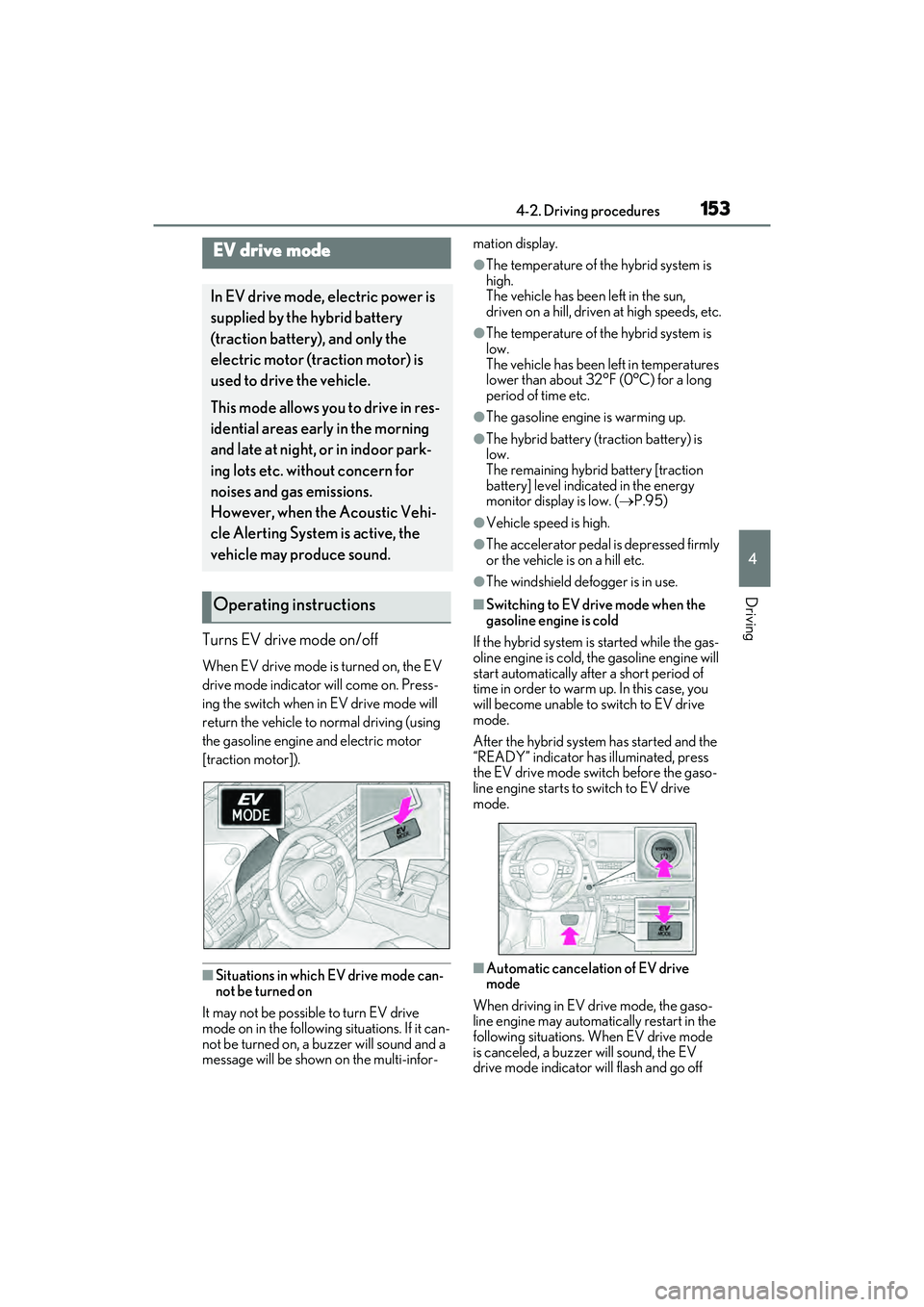
Turns EV drive mode on/off
When EV drive mode is turned on, the EV
drive mode indicator will come on. Press-
ing the switch when in EV drive mode will
return the vehicle to normal driving (using
the gasoline engine and electric motor
[traction motor]).
QSituations in which EV drive mode can-
not be turned on
It may not be possible to turn EV drive
mode on in the following situations. If it can-
not be turned on, a buzzer will sound and a
message will be shown on the multi-infor- mation display.
OThe temperature of the hybrid system is
high.
The vehicle has been left in the sun,
driven on a hill, driven
at high speeds, etc.
OThe temperature of the hybrid system is
low.
The vehicle has been left in temperatures
lower than about 32°F (0°C) for a long
period of time etc.
OThe gasoline engine is warming up.
OThe hybrid battery (traction battery) is
low.
The remaining hybrid battery [traction
battery] level indicated in the energy
monitor display is low. ( P.95)
OVehicle speed is high.
OThe accelerator pedal is depressed firmly
or the vehicle is on a hill etc.
OThe windshield defogger is in use.
QSwitching to EV drive mode when the
gasoline engine is cold
If the hybrid system is started while the gas-
oline engine is cold, the gasoline engine will
start automatically after a short period of
time in order to warm up. In this case, you
will become unable to switch to EV drive
mode.
After the hybrid system has started and the
“READY” indicator has illuminated, press
the EV drive mode switch before the gaso-
line engine starts to switch to EV drive
mode.
QAutomatic cancelation of EV drive
mode
When driving in EV drive mode, the gaso-
line engine may automatically restart in the
following situations. When EV drive mode
is canceled, a buzzer will sound, the EV
drive mode indicator will flash and go off
EV drive mode
In EV drive mode, electric power is
supplied by the hybrid battery
(traction battery), and only the
electric motor (traction motor) is
used to drive the vehicle.
This mode allows you to drive in res-
idential areas early in the morning
and late at night, or in indoor park-
ing lots etc. without concern for
noises and gas emissions.
However, when the Acoustic Vehi-
cle Alerting System is active, the
vehicle may produce sound.
Operating instructions
Page 156 of 480
![LEXUS ES300h 2022 Owners Manual 1544-2. Driving procedures
and a message will be shown on the multi-
information display.
OThe hybrid battery (traction battery)
becomes low.
The remaining hybrid battery [traction
battery] level](/img/36/58916/w960_58916-155.png "LEXUS ES300h 2022 Owners Manual 1544-2. Driving procedures
and a message will be shown on the multi-
information display.
OThe hybrid battery (traction battery)
becomes low.
The remaining hybrid battery [traction
battery] level")
1544-2. Driving procedures
and a message will be shown on the multi-
information display.
OThe hybrid battery (traction battery)
becomes low.
The remaining hybrid battery [traction
battery] level indicated in the energy
monitor display is low. (P.95)
OVehicle speed is high.
OThe accelerator pedal is depressed firmly
or the vehicle is on a hill etc.
When it is possible to inform the driver of
automatic cancelation in advance, a prior
notice screen will appear on the multi-infor-
mation display.
QPossible driving distance when driving
in EV drive mode
EV drive mode’s possible driving distance
ranges from a few hundred meters to
approximately 0.6 mile (1 km). However,
depending on vehicle conditions, there are
situations when EV drive mode cannot be
used.
(The distance that is possible depends on
the hybrid battery [traction battery] level
and driving conditions.)
QFuel economy
The hybrid system is designed to achieve
the best possible fuel economy during nor-
mal driving (using the gasoline engine and
electric motor [traction motor]). Driving in
EV drive mode more than necessary may
lower fuel economy.
*1: To improve fuel efficiency and reduce noise, set the shift lever in D for normal
driving. You can choose shift range
suitable for your driving situation by
operating the paddle shift switches.
*2: By selecting shift ranges using S mode, you can control accelerating force and
engine braking forces.
QWhen driving with dynamic radar cruise
control with full-speed range activated
Even when performing the following
actions with the intent of enabling engine
braking, engine brak ing will not activate
because dynamic radar cruise control with
full speed range will not be canceled.
OWhile driving in the D position or S mode,
downshifting to S5 or S4. ( P.204)
OWhen switching the driving mode to
sport mode while driving in the D posi-
tion. ( P.219)
WARNING
QCaution while driving
When driving in EV drive mode, pay spe-
cial attention to the area around the vehi-
cle. Because there is no engine noise,
pedestrians, people riding bicycles or
other people and vehicles in the area
may not be aware of the vehicle starting
off or approaching them. Therefore, take
extra care while driving even if the
Acoustic Vehicle Alerting System is
active.
Hybrid transmission
Select the shift position depending
on your purpose and situation.
Shift position purpose and func-
tions
Shift posi- tionObjective or function
PParking the vehicle/starting the hybrid system
RReversing
NNeutral
DNormal driving*1
SS mode driving*2 ( P.157)
Page 159 of 480
1574-2. Driving procedures
4
Driving
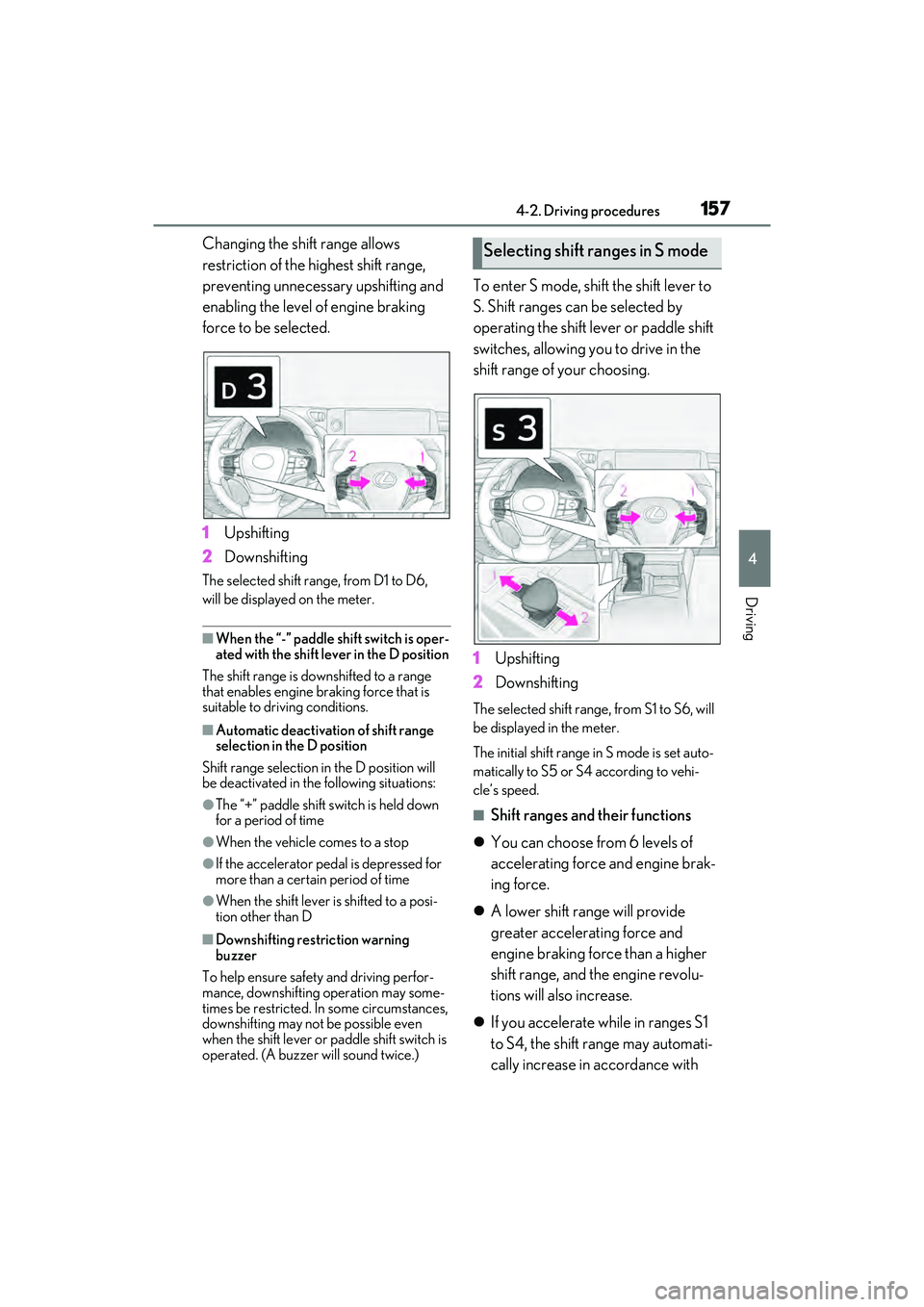
Changing the shift range allows
restriction of the highest shift range,
preventing unnecessary upshifting and
enabling the level of engine braking
force to be selected.
1Upshifting
2 Downshifting
The selected shift range, from D1 to D6,
will be displayed on the meter.
QWhen the “-” paddle shift switch is oper-
ated with the shift lever in the D position
The shift range is downshifted to a range
that enables engine braking force that is
suitable to driving conditions.
QAutomatic deactivation of shift range
selection in the D position
Shift range selection in the D position will
be deactivated in the following situations:
OThe “+” paddle shift switch is held down
for a period of time
OWhen the vehicle comes to a stop
OIf the accelerator pedal is depressed for
more than a certain period of time
OWhen the shift lever is shifted to a posi-
tion other than D
QDownshifting restriction warning
buzzer
To help ensure safety and driving perfor-
mance, downshifting operation may some-
times be restricted. In some circumstances,
downshifting may not be possible even
when the shift lever or paddle shift switch is
operated. (A buzzer will sound twice.)
To enter S mode, shift the shift lever to
S. Shift ranges can be selected by
operating the shift lever or paddle shift
switches, allowing you to drive in the
shift range of your choosing.
1 Upshifting
2 Downshifting
The selected shift range, from S1 to S6, will
be displayed in the meter.
The initial shift range in S mode is set auto-
matically to S5 or S4 according to vehi-
cle’s speed.
QShift ranges and their functions
You can choose from 6 levels of
accelerating force and engine brak-
ing force.
A lower shift range will provide
greater accelerating force and
engine braking force than a higher
shift range, and the engine revolu-
tions will also increase.
If you accelerate while in ranges S1
to S4, the shift range may automati-
cally increase in accordance with
Selecting shift ranges in S mode
Page 167 of 480
1654-3. Operating the lights and wipers
4
Driving
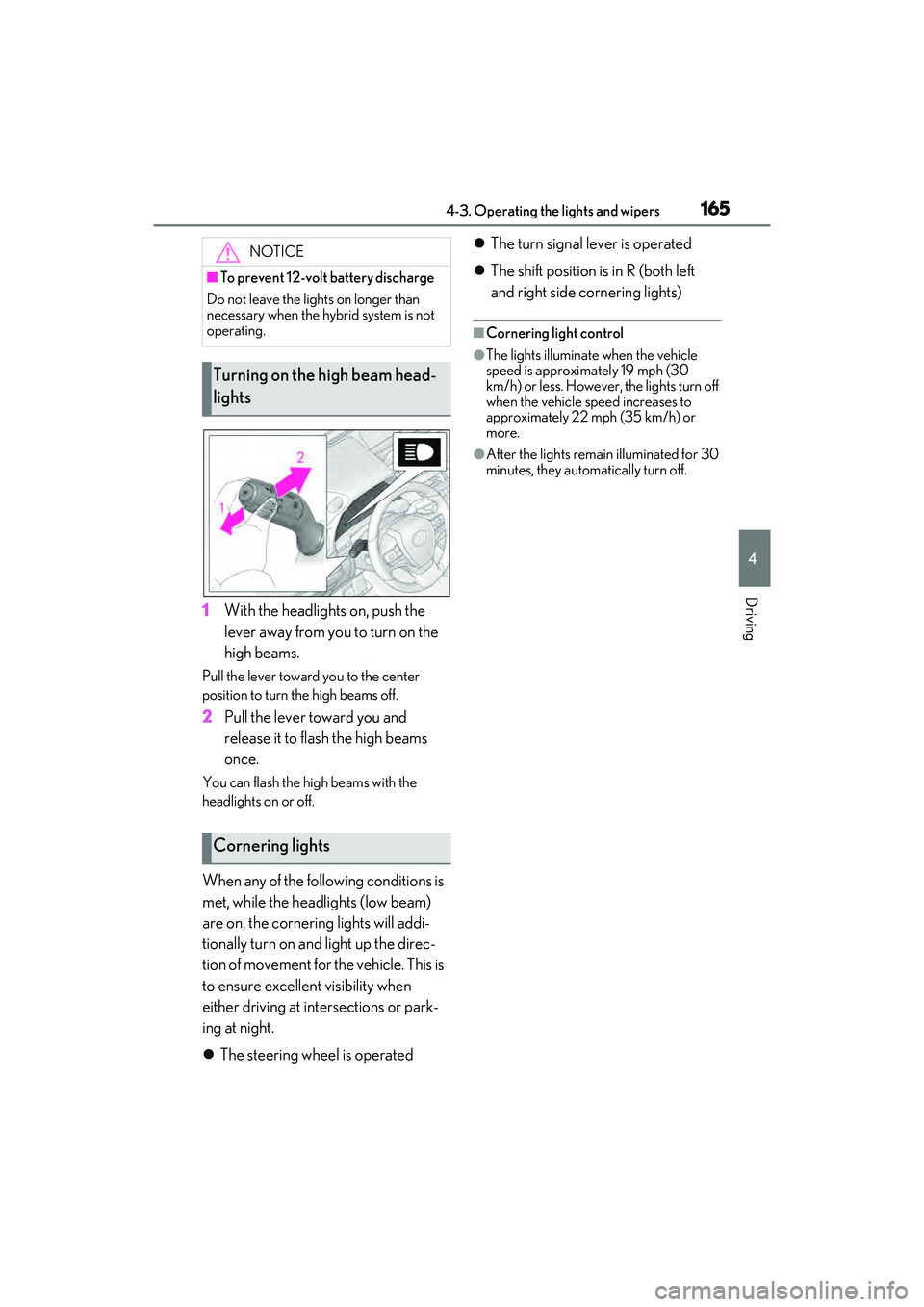
1With the headlights on, push the
lever away from you to turn on the
high beams.
Pull the lever toward you to the center
position to turn the high beams off.
2Pull the lever toward you and
release it to flash the high beams
once.
You can flash the high beams with the
headlights on or off.
When any of the following conditions is
met, while the headlights (low beam)
are on, the cornering lights will addi-
tionally turn on and light up the direc-
tion of movement for the vehicle. This is
to ensure excellent visibility when
either driving at intersections or park-
ing at night.
The steering wheel is operated
The turn signal lever is operated
The shift position is in R (both left
and right side cornering lights)
QCornering light control
OThe lights illuminate when the vehicle
speed is approximately 19 mph (30
km/h) or less. However, the lights turn off
when the vehicle speed increases to
approximately 22 mph (35 km/h) or
more.
OAfter the lights remain illuminated for 30
minutes, they automatically turn off.
NOTICE
QTo prevent 12-volt battery discharge
Do not leave the lights on longer than
necessary when the hybrid system is not
operating.
Turning on the high beam head-
lights
Cornering lights