lights Lexus ES350 2008 Owner's Guide
[x] Cancel search | Manufacturer: LEXUS, Model Year: 2008, Model line: ES350, Model: Lexus ES350 2008Pages: 459, PDF Size: 5.93 MB
Page 137 of 459

135
2-3. Operating the lights and windshield wipers
2
When driving
ES350_U_(L/O_0708)
Fog light switch
The fog lights improve visibility in difficult driving conditions, such as in rain
or fog. They can be turned on only when the headlights are on low beam.
OFF
Fog lights ON
Page 138 of 459
136
2-3. Operating the lights and windshield wipers
ES350_U_(L/O_0708)
Windshield wipers and washer
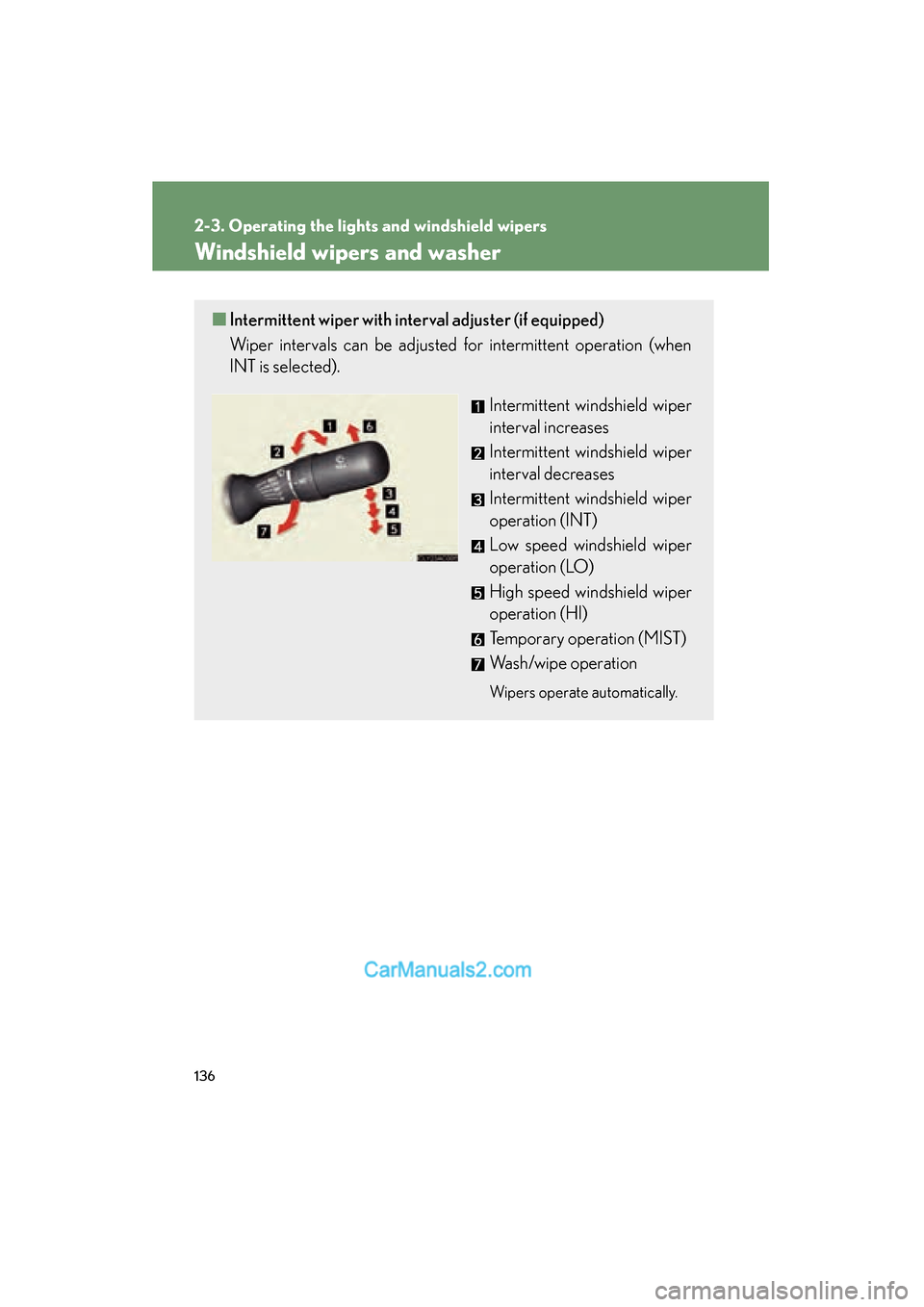
■Intermittent wiper with interval adjuster (if equipped)
Wiper intervals can be adjusted for intermittent operation (when
INT is selected).
Intermittent windshield wiper
interval increases
Intermittent windshield wiper
interval decreases
Intermittent windshield wiper
operation (INT)
Low speed windshield wiper
operation (LO)
High speed windshield wiper
operation (HI)
Temporary operation (MIST)
Wash/wipe operation
Wipers operate automatically.
Page 139 of 459
137
2-3. Operating the lights and windshield wipers
2
When driving
ES350_U_(L/O_0708)
■The windshield wiper and washer can be operated when
The “ENGINE START STOP” switch is in IGNITION ON mode.
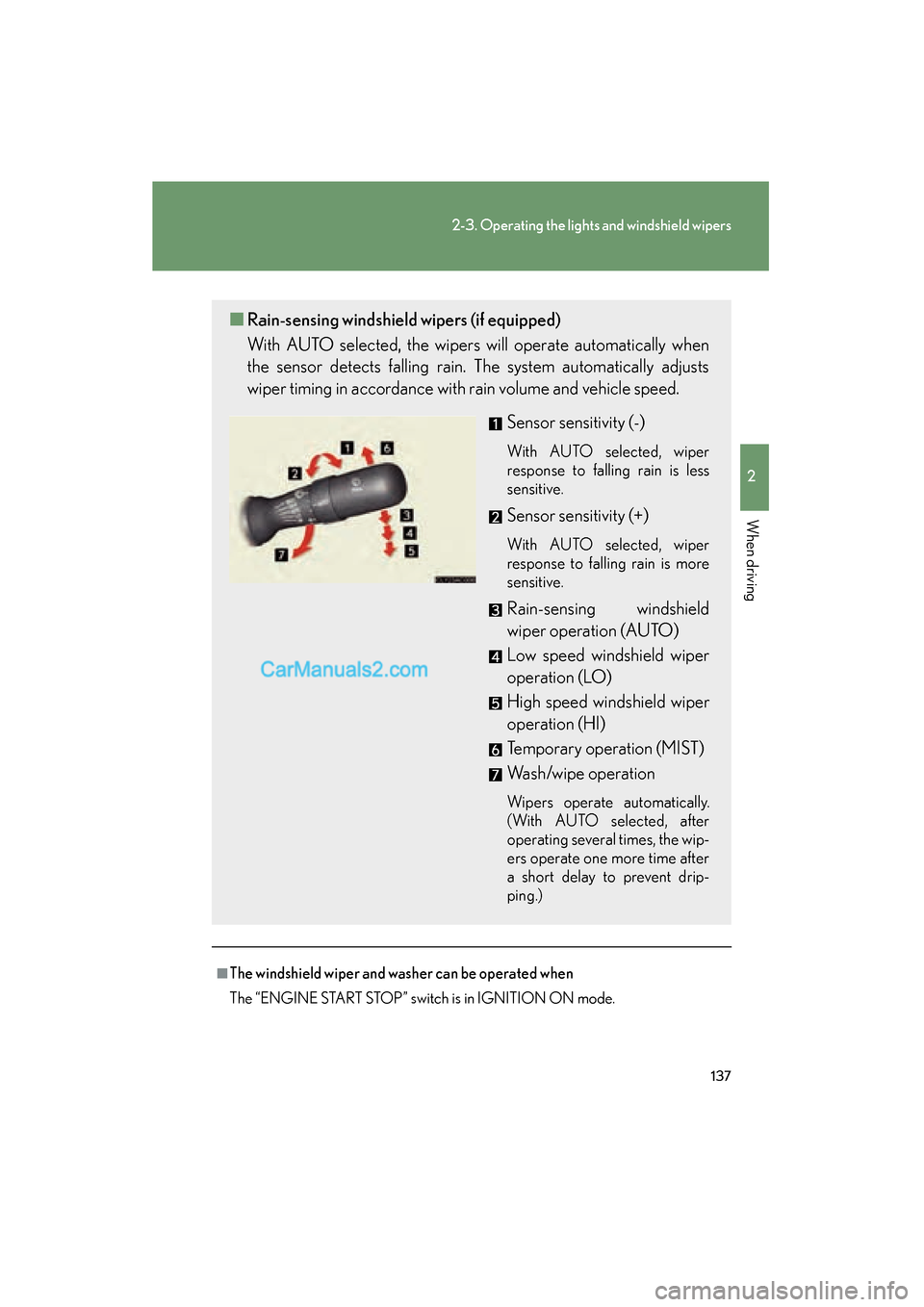
■Rain-sensing windshield wipers (if equipped)
With AUTO selected, the wipers will operate automatically when
the sensor detects falling rain. The system automatically adjusts
wiper timing in accordance with rain volume and vehicle speed.
Sensor sensitivity (-)
With AUTO selected, wiper
response to falling rain is less
sensitive.
Sensor sensitivity (+)
With AUTO selected, wiper
response to falling rain is more
sensitive.
Rain-sensing windshield
wiper operation (AUTO)
Low speed windshield wiper
operation (LO)
High speed windshield wiper
operation (HI)
Temporary operation (MIST)
Wash/wipe operation
Wipers operate automatically.
(With AUTO selected, after
operating several times, the wip-
ers operate one more time after
a short delay to prevent drip-
ping.)
Page 140 of 459

138
2-3. Operating the lights and windshield wipers
ES350_U_(L/O_0708)
■Rain drop sensor (vehicles equipped with the rain-sensing windshield wipers)
■AUTO mode
If the wiper switch is turned to AUTO position while the “ENGINE START STOP”
switch is in IGNITION ON mode, the wiper will operate once to show that AUTO
mode is activated.
■If no windshield washer fluid sprays
Check that the washer nozzles are not blocked if there is washer fluid in the wind-
shield washer fluid reservoir.
CAUTION
■Caution regarding the use of windshield wipers in AUTO mode (vehicles
equipped with the rain-sensing windshield wipers)
The windshield wipers may operate unexpectedly if the sensor is touched or the
windshield is subject to vibration in AUTO mode. Take care that your fingers or any-
thing else do not become caught in the windshield wipers.
NOTICE
■When the windshield is dry
Do not use the wipers, as they may damage the windshield.
■When there is no washer fluid spray from the nozzle
Damage to the washer fluid pump may be caused if the lever is pulled toward you
and held continually.
The sensor judges the amount of raindrops.
Page 148 of 459
146
2-4. Using other driving systems
ES350_U_(L/O_0708)Example of follow-up cruising (when following a vehicle driving slower
than the set speed): When the speed is set to 62 mph (100 km/h) and
the vehicle ahead is driving at 50 mph (80 km/h)
The system continues follow-up cruising while adjusting for changes in the
speed of the vehicle ahead in order to maintain the vehicle-to-vehicle dis-
tance set by the driver.
Example of acceleration (when there are no longer vehicles driving
slower than the set speed in the lane ahead): When the speed is set to
62 mph (100 km/h) and the vehicle ahead driving at 50 mph (80 km/
h) is out of the lane
When the vehicle ahead of you executes a lane change, the system slowly
accelerates until the set vehicle speed is reached. The system then returns to
fixed speed cruising.
■Fine adjustment of the set speed
Adjustment of the set speed by the following speed can be made by lightly pressing
the lever up or down and releasing it.
In the constant speed control mode: Approximately 1.0 mph (1.6 km/h)
In the vehicle-to-vehicle distance control mode: USA: Approximately 5 mph (8 km/h)
Canada: Approximately 3 mph (5 km/h)
■Dynamic radar cruise control warning lights, messages and buzzers
Warning lights, messages and buzzers are used to indicate a system malfunction or
to alert you to the need for caution while driving. ( →P. 3 7 3 )
■The dynamic radar cruise can be set when
●The shift lever is in D or the 4, 5 or 6 range of S.
●Vehicle speed is between approximately 30 mph (45 km/h) and 85 mph (135
km/h).
■Accelerating
The vehicle can be accelerated normally.
Page 163 of 459
161
2-4. Using other driving systems
2
When driving
ES350_U_(L/O_0708)
■The pre-collision system is operational when
●Seat belt (linked to the radar sensor)
• Vehicle speed is above 3 mph (5 km/h).
• The speed at which your vehicle is approaching the obstacle or oncomingvehicle exceeds 18 to 24 mph (30 to 40 km/h).
• The front occupants are wearing a seat belt.
●Seat belts (linked to brake operation)
• Vehicle speed exceeds 9 mph (15 km/h).
• The system detects sudden braking or skidding.
• The front occupants are wearing a seat belt.
●Brake Assist
• Vehicle speed is above 18 mph (30 km/h).
• The speed at which your vehicle is approaching the obstacle or the vehicle is greater than 18 to 24 mph (30 to 40 km/h).
• The brake pedal is depressed.
■Conditions that may trigger the system even if there is no danger of collision
●When there is an object by the roadside at the entrance to a curve
●When passing an oncoming vehicle on a curve
●When driving over a narrow iron bridge
●When there is a metal object on the road surface
●When driving on an uneven road surface
●When passing an oncoming vehicle on a left-turn
●When your vehicle rapidly closes on the vehicle in front
When the system is activated in the situations described above there is also a possi-
bility that the seat belts will retract quickly and the brakes will be applied with a force
greater than normal. When the seat belt is locked in the retracted position, stop the
vehicle in a safe place, release the seat belt and refasten.
■When there is a malfunction in the system
Warning lights and/or warning messages will turn on or flash. ( →P. 362, 373)
Page 177 of 459
175
2-5. Driving information
2
When driving
ES350_U_(L/O_0708)
■Before towing
●Ensure that your vehicle’s tires are properly inflated. (→P. 3 2 4 )
●Trailer tires should be inflated according to the trailer manufacturer's recom-
mendation.
●All trailer lights work to be legal.
●Confirm all lights work each time you connect them.
●Check that your vehicle remains level when a loaded or unloaded trailer is
hitched. Do not drive if the vehicle is not level, and check for improper tongue
load, overloading, worn suspension, or other possible causes.
●Make sure the trailer cargo is securely loaded.
●Check that your rear view mirrors conform to any federal, state/provincial or
local regulations. If they do not, install rear view mirrors appropriate for towing
purposes.
■Break-in schedule
Lexus recommends that you do not use a new vehicle or a vehicle with any new
power train components (engine, transmission, differential, wheel bearings, etc.) to
tow a trailer for the first 500 miles (800 km) of driving.
■Maintenance
●If you tow a trailer, your vehicle will require more frequent maintenance due to
the additional load. (See “Warranty and Services Guide/Owner's Manual Sup-
plement/ Scheduled Maintenance”.)
●Retighten the fixing bolts of the towing ball and bracket after approximately
600 miles (1000 km) of trailer towing.
CAUTION
■To avoid accident or injury
●The total trailer weight (trailer weight plus the weight of cargo) must not exceed
1000 lb. (450 kg).
●Do not exceed the trailer hitch assembly weight, gross vehicle weight, gross axle
weight and trailer tongue load capacities.
●Never load more weight in the back than in the front of the trailer. About 60% of
the load should be in the front half of the trailer, and the remaining 40% in the
rear.
Page 179 of 459
177
2-5. Driving information
2
When driving
ES350_U_(L/O_0708)
Trailer towing tipsYour vehicle will handle differently when towing a trailer. The three main
causes of vehicle-trailer accidents are driver error, excessive speed and
improper trailer loading. Keep these in mind when towing.
● Before starting out, check the trailer’s lights and the vehicle-trailer
connections. Recheck after driving a short distance.
● Practice turning, stopping and rever sing with the trailer attached in an
area away from traffic until you become accustomed to the feel of the
vehicle.
● Reversing with a trailer attached is difficult and requires practice. Grip
the bottom of the steering wheel and move your hand to the left to
move the trailer to the left. Move your hand to the right to move the
trailer to the right. (This is generally opposite to reversing without a
trailer attached.) Avoid sharp or prolonged turning. Have someone
guide you when reversing to reduce the risk of an accident.
● As stopping distance is increased when towing a trailer, vehicle-to-
vehicle distance should be increased. For each 10 mph (16 km/h) of
speed, allow at least one vehicle and trailer length.
NOTICE
■Safety chain
A safety chain must always be used between the towing vehicle and the trailer.
Leave sufficient slack in the chain for turns. The chain should cross under the trailer
tongue to prevent the tongue from dropping to the ground in the case that it
becomes damaged or separated. For the correct safety chain installation proce-
dure, ask your Lexus dealer.
■Do not directly splice trailer lights
Directly splicing may damage your vehicle's electrical system and cause a malfunc-
tion.
Page 183 of 459

Interior features3
181
ES350_U_(L/O_0708)
3-1. Using the air conditioning system and
defogger ........................ 182
Automatic air conditioning
system ...................................... 182
Rear window and outside rear view mirror
defoggers ............................... 189
3-2. Using the audio system ........................... 190
Audio system type................... 190
Using the radio......................... 192
Using the CD player .............. 199
Playing back MP3 and
WMA discs........................... 205
Optimal use of the audio system ...................................... 213
Using the AUX adapter ........ 216
Using the steering wheel audio switches ....................... 217
3-3. Using the hands-free phone system
(for cellular phone) ...... 219
Hands-free phone system
features
(for cellular phone) .............. 219
Using the hands-free phone
system
(for cellular phone) ............. 222
Making a phone call ............. 230
Setting a cellular phone ....... 234
Security and system setup ....................................... 238 Using the phone book ........... 241
3-4. Using the interior lights ............................. 247
Interior lights list ..................... 247
• Front interior lights............. 249
• Personal lights ..................... 249
3-5. Using the storage features ........................ 250
List of storage features......... 250
• Glove box .............................. 250
• Console box .......................... 251
• Overhead console.............. 253
• Cup holders .......................... 254
• Auxiliary box ........................ 256
3-6. Other interior features ........................ 257
Sun visors ................................. 257
Vanity mirror ........................... 258
Clock ......................................... 259
Ashtray ..................................... 260
Cigarette lighter ...................... 261
Power outlet ............................ 262
Seat heaters and ventilators ............................. 263
Armrest .................................... 265
Rear sunshade ........................ 266
Extended trunk....................... 268
Floor mat .................................. 269
Trunk features ......................... 270
Garage door opener ............ 272
Compass.................................... 277
Page 249 of 459
247
3
Interior features
ES350_U_(L/O_0708)
3-4. Using the interior lights
Interior lights list
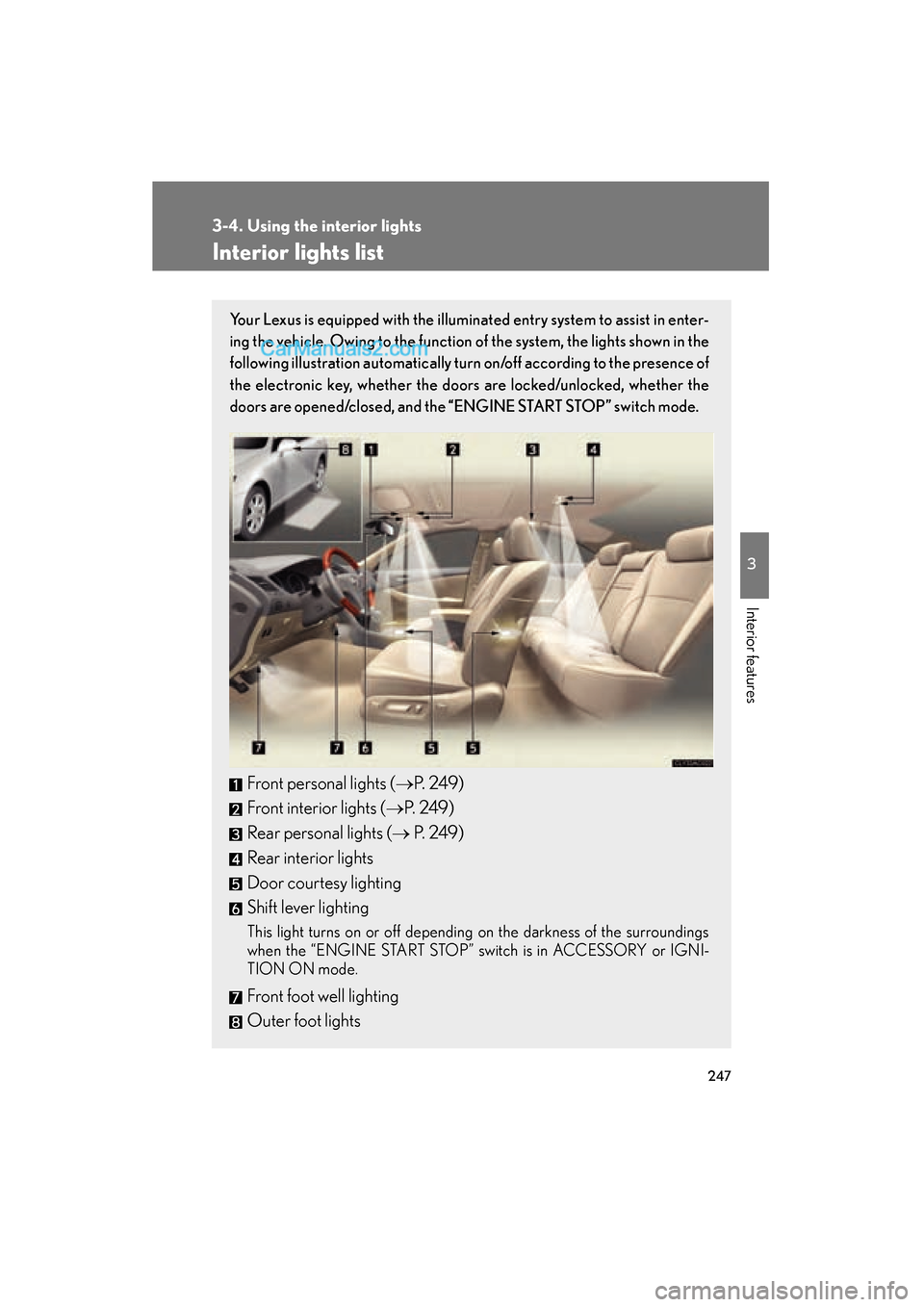
Your Lexus is equipped with the illuminated entry system to assist in enter-
ing the vehicle. Owing to the function of the system, the lights shown in the
following illustration automatically turn on/off according to the presence of
the electronic key, whether the door s are locked/unlocked, whether the
doors are opened/closed, and the “ENGINE START STOP” switch mode.
Front personal lights (→P. 2 4 9 )
Front interior lights ( →P. 2 4 9 )
Rear personal lights (→ P. 2 4 9 )
Rear interior lights
Door courtesy lighting
Shift lever lighting
This light turns on or off depending on the darkness of the surroundings
when the “ENGINE START STOP” switch is in ACCESSORY or IGNI-
TION ON mode.
Front foot well lighting
Outer foot lights