light Lexus ES350 2008 Quick Guide
[x] Cancel search | Manufacturer: LEXUS, Model Year: 2008, Model line: ES350, Model: Lexus ES350 2008Pages: 56, PDF Size: 1.64 MB
Page 3 of 56
Enterin g and Exiting
Before Driving
When Driving
Rain and
Night Dr iving
Drivin g Com for t
Ope ning and Clos ing
What to do if ...
Customizin g
Y our L exus
2
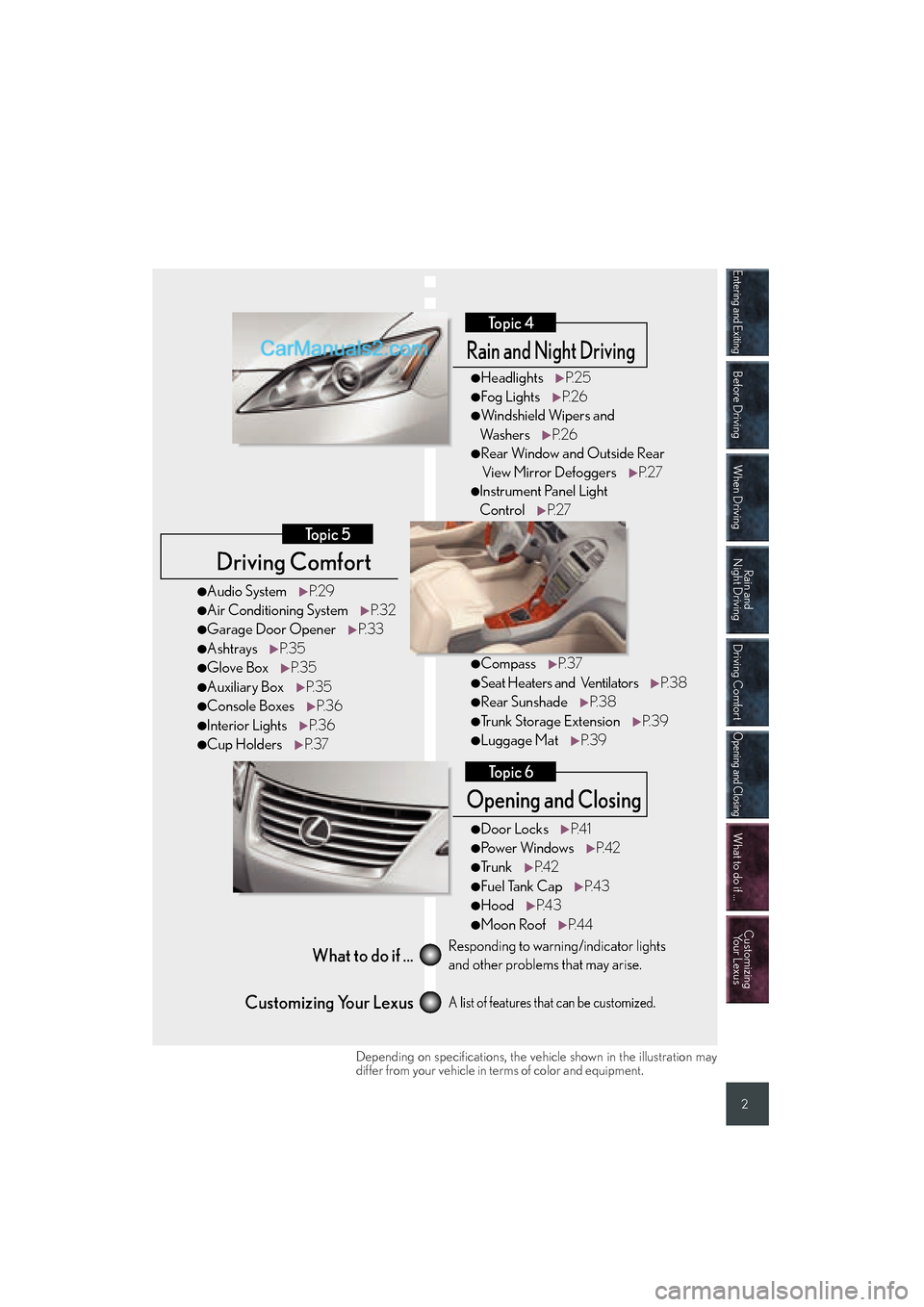
Driving Comfort
Topic 5
Opening and Closing
Topic 6
What to do if ...
Customizing Your LexusResponding to warning/indicator lights
and other problems that may arise.
A list of features that can be customized.
Rain and Night Driving
Topic 4
●Headlights P.25
●Fo g L ights P.26
●Wi ndshield W iper s and
Wa shers P.26
●Re ar W indo w and Outside R ear
Vi ew Mirror D efoggers P.27
●Instrument Panel Lig ht
Control P.27
●Compas sP.37
●Seat Heat ers an d Ve ntila tor s P.38
●Re ar S unshade P.38
●Trun k Storage Ex tension P.39
●Lu ggage Mat P.39
●Door L ocks P.41
●Po wer W indows P.42
●Tr unk P.42
●Fu el Tank Cap P.43
●H ood P.43
●M oon R oof P.44
●Audi o Sy stem P.29
●Air Conditioning S ystem P.32
●Garage Door Op enerP.33
●Ashtr ays P.35
●Glo ve B ox P.35
●Auxiliar y Box P.35
●Console Bo xesP.36
●Interi or Light sP.36
●Cup Holder sP.37
Depe nding on specifications, the ve hicle sh own in the il lustration may
differ from your vehicle in terms of color and equipment.
Page 4 of 56
3
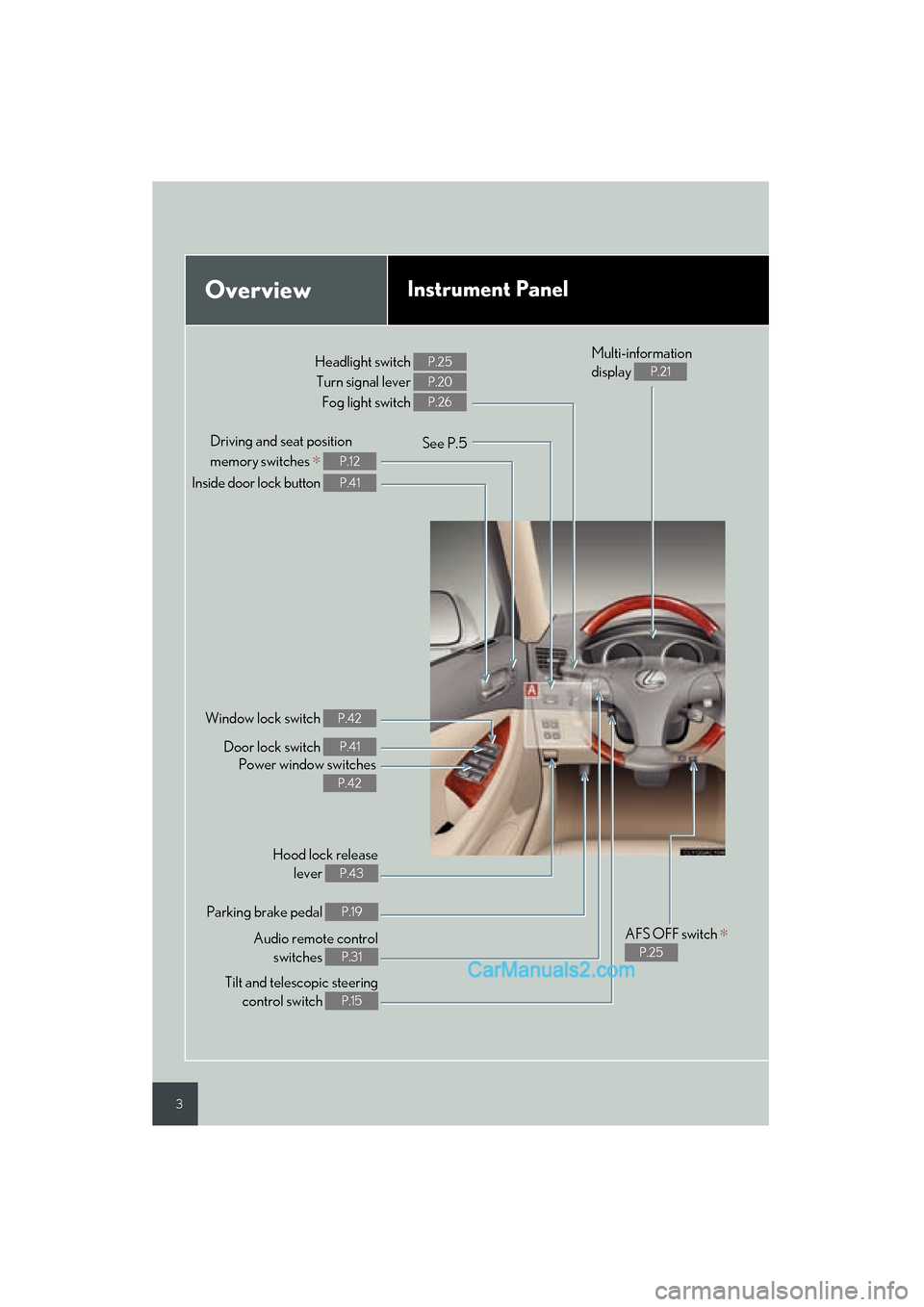
OverviewInstrument Panel
Headlight switch
Turn signal lev er
Fog li ght swit ch P.2 5
P.20
P.26
See P.5
Ins ide door lock b utt on
P. 41
Doo r lock switch P. 41
Power w indow switches
P.42
Hood lock release
lever
P.4 3
Parking brake pedal P.19
Tilt and telescopic steeri ng
control switch
P.15
M ulti-information
display
P.2 1
Audio remote control
switches
P. 31
Dr iving and seat positi on
me mory switches
∗ P.12
Window lock switch P.42
AFS OFF switch ∗
P.25
Page 10 of 56
Topic 1
Ent ering and Exit ing
9
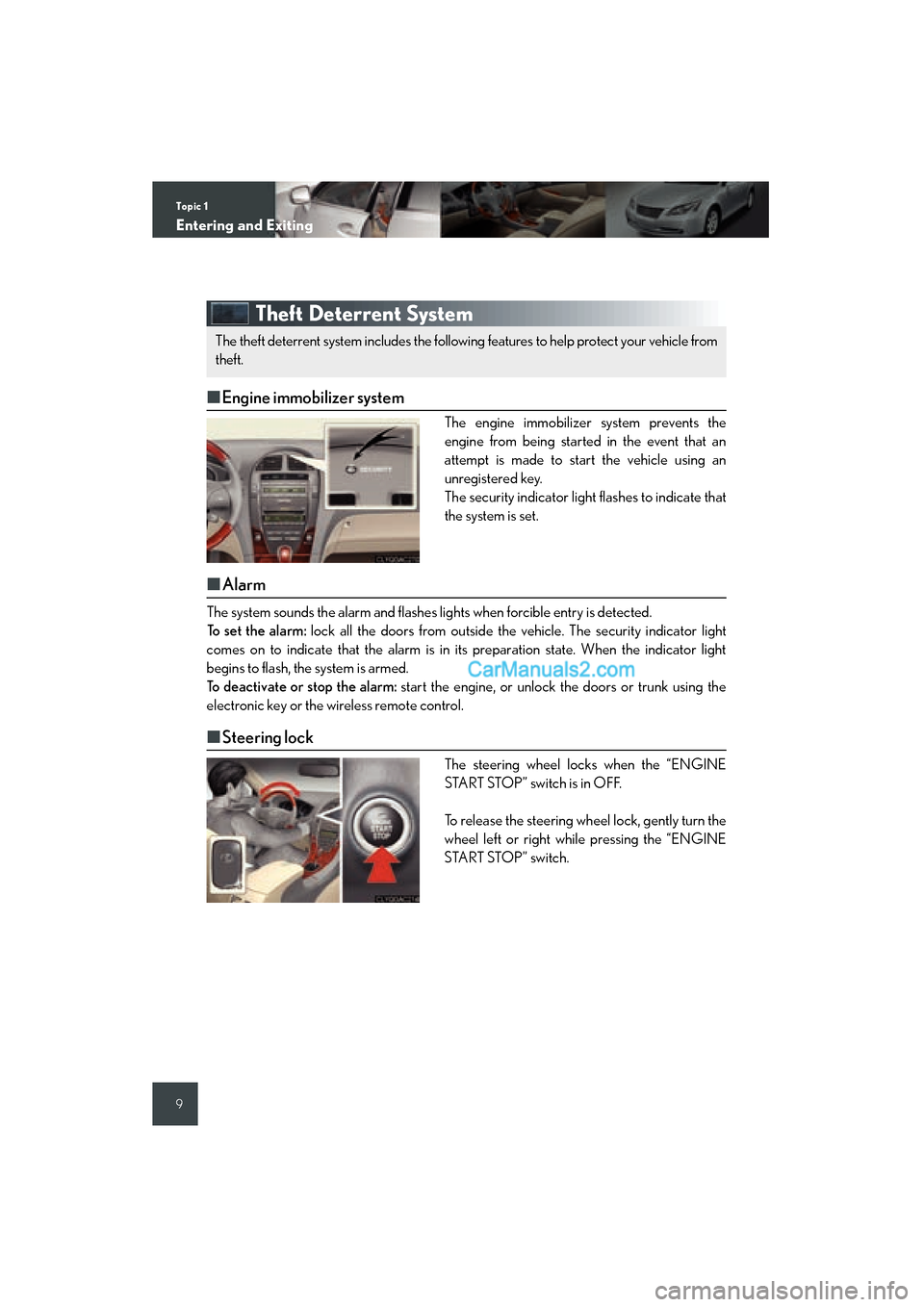
Theft Deterrent S ystem
■ Engine immobiliz er system
The eng ine immobili zer s yst em p revents th e
eng ine from b eing sta rted in the e vent th at an
attempt is made to st art the v ehi cle using an
unregistered key.
The security indicator light flashes to indica te that
the system is s et.
■Alarm
Th e system sounds the alarm and f lashes lights when for cible entr y is de tected.
To se t the alarm: lock all the doors fr om outside the v ehic le. Th e securit y indicator li ght
com es on to indicate that the alarm is in it s preparat ion st ate. When t he indi cator light
beg ins t o fla sh, t he s yst em is arme d.
To deactivate or stop t he alarm: star t the engine, or unlock the doors or trunk using the
electr onic k ey or the w ireles s r emo te contr ol.
■ Steering lock
The ste ering wh eel locks when the “ ENGINE
ST AR T STOP ” switch is in OFF .
To r elease th e steering whee l lock, gently turn the
wheel l eft or right while pr essing the “ENGINE
ST ART STOP” s witch.
The theft dete rrent sy stem includes the follo wing f eatur es to help protect y our v ehicle from
theft.
Page 15 of 56

Topic 2
Before Drivin g
14
Entering and Exiting
Before Driving
When Driving
Rain and
Night Dr iving
Drivin g Com for t
Ope ning and Clos ing
What to do if ...
Customizin g
Y our L exus
Outside R ear V iew Mirror s
To select the mirror you wish to adjust (L or R),
use the ma ster s witch .
To adjust mirr or angle, u se the contr ol s witch.
On some models, the mirr ors will automatically
ang le d own ward s when the v ehicle is reversi ng.
T o disable this functio n, s et the master switch in
th e ne utra l posit ion ( betwe en L and R ).
Anti-glare Inside R ear V iew M irror
To turn AUTO mode ON/OFF, press t he AUTO
button .
The indicator comes on when A UTO mode is
turne d ON.
Wh en the inside r ear view mirror is switched to
AUTO mode, the outside r ear vie w mirr ors ar e
al so swit ched to the AUTO mode automatically.
The an ti- gla re mirr or uses a sensor to det ect light fr om veh icles be hind an d automatically
r educes g lare.
Page 18 of 56

Topic 3
When Driv ing
17
Starting
■Star ting the en gine
Make sure the parking br ake is engaged and the
shi ft le ver is in P .
Depr ess the b rak e p edal.
The “ENGI NE ST AR T S TOP ” switc h indi-
cator light turns gr een.
Pr ess the “ENGI NE S TAR T S TOP ” switc h.
■Stopping the en gine
Engage the parking br ake and shift the shift le ver to P.
P res s the “ENGI NE S TAR T S TOP ” switc h.
■Changing powe r modes
To change power modes wit hout tu rning on the engine, pr ess the “ENGINE S TART STOP”
sw itch wit hout de pressing the br ake pedal . T he modes can be changed i n t he f ollowing
order :
With th e electronic ke y on your person, th e engine c an be sta rted b y simply p ressing the
“ENGINE S TAR T STOP ” swi tch , wh ile de pressing the brake pedal .
(The me chanical key ca nnot be use d to sta rt the e ngine.)
ACCESSO RY mode IGNITION
ON mode
(Indicato r light: amber)
OF
F
(I ndi cator light: of f)
Page 25 of 56
Rain and Night DrivingTopic 4
Hea dlight s.............................. ................................ . 25
F og L ights ............................................................... . 26
Windshi eld Wipers and Was hers................. ... 26
Rear Window and Outside Rear View
Mirro r Defo ggers................................................ . 27
Ins trum ent Pa nel Ligh t C ontro l ...................... . 27
Page 26 of 56

Topic 4
Rain and Nig ht Dri vin g
25
Headlights
The instrument panel, the side mark er, parking,
t ail and lic ense plate lights turn on.
The headlights an d all lights listed abo ve turn on.
The headlights and parking l ights turn on/off
automat ica lly in ac cordanc e wit h am bient li ght
le ve ls.
To engage the high b eams, push the le ver for ward.
To flash the high beams, pull the le ver and hold.
■ AF S (A daptiv e F ront -lighting S ystem) (if equipped)
AFS impr oves visibility on cur ves by automatica lly adjusting the hori zontal orientation of the
hea dlights in ac cordanc e with v ehic le speed and th e de gree of the t ire an gle tha t a re con-
tr olled by steering inpu t.
To can cel the s ystem, press the AFS OFF butt on.
OFF
ON
Th e indicat or comes on when t he s yst em is of f.
1
2
3
1
2
Page 27 of 56
Topic 4
Rain and Night Dri vin g
26
Ent ering and Exiting
Before DrivingBefore Driving
When Driving
Rain and
Night Dr ivingRain and
Night Dr iving
Drivin g Com for t
Ope ning and Clos ing
What to do if ...
Customizin g
Y our L exus
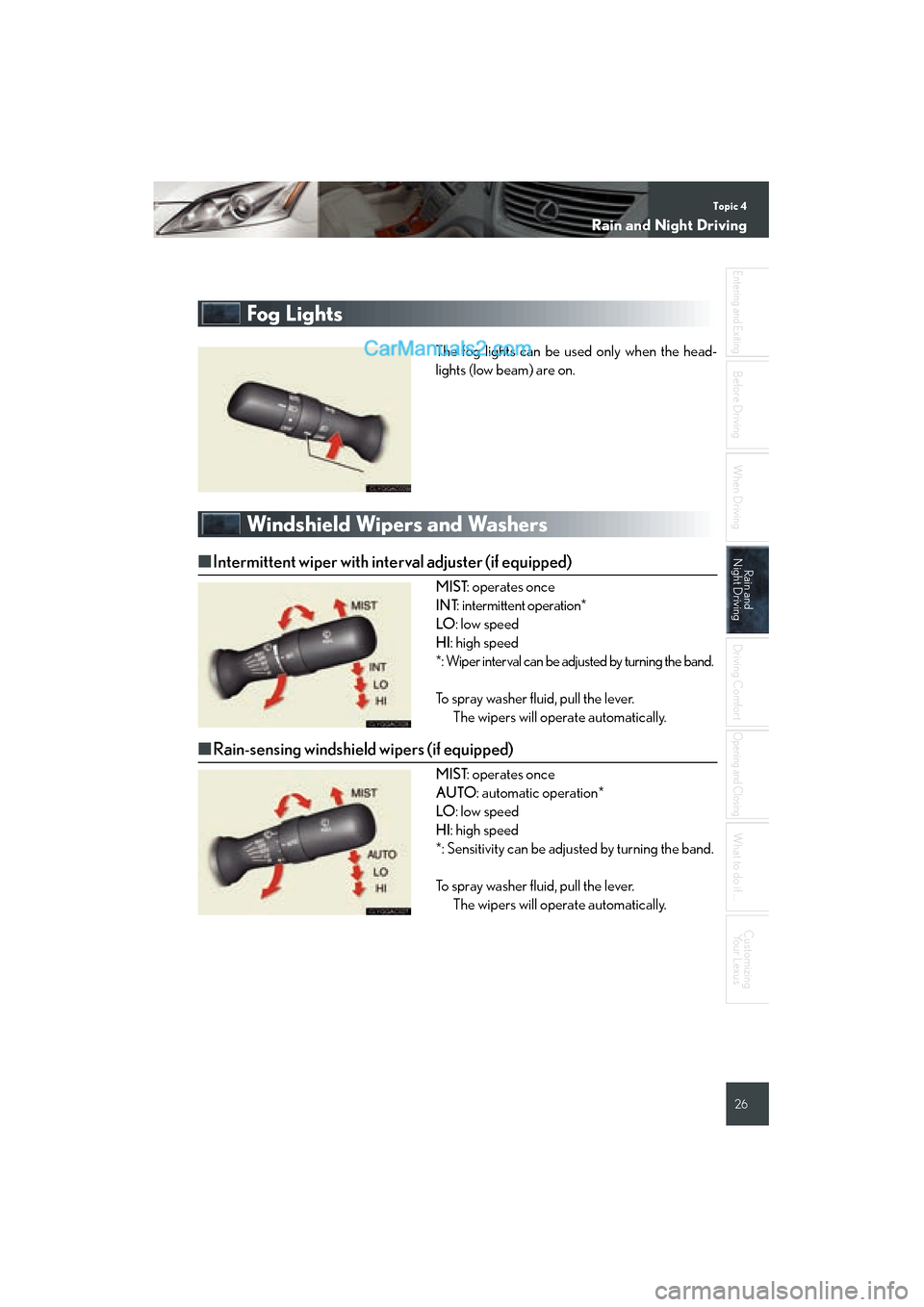
Fog Lights
The fog ligh ts can b e used o nly when the h ead-
lig hts (lo w b eam) are on.
Wind shield W ipers and W ashers
■Intermittent wiper with interval adjuster (if eq uipped)
MIST: op erates once
INT : int ermittent operation*
LO : low spe ed
HI : hig h sp eed
*: Wiper in terval can be ad justed by turning the b and .
T o spr ay w asher fluid, pull the le ver.
The wiper s will operate au tomatically .
■Rain-sensi ng windshield wipers (if equip ped)
MIST: op erates once
AU TO: automat ic oper ation*
LO : low spe ed
HI : hig h sp eed
*: Sensitivity can be adjusted by tu rning the ba nd.
T o spr ay w asher fluid, pull the le ver.
The wiper s will operate au tomatically .
Page 28 of 56

Topic 4
Rain and Nig ht Dri vin g
27
Re ar W indow and Outside Rear Vi ew
Mirr or Defoggers
Without navigation sy stem
To defog the rear windo w and the outside rear
vie w mirr ors, press the b utton.
Pr ess aga in t o can cel.
Wi th navigation sy stem
Instrument Panel Light Contr ol
To brighten: turn the knob up ward.
To dim: turn the knob do wnward.
Wh en t he head light switc h is turne d to ON, th e
bri ghtenes s will be reduced slightly unles s the
contr ol dial is turned fully on.
The s ystem turns of f au tomatically af ter 15 to 60 minutes. The oper ation time changes
accor ding to the ambient temperatur e and vehicle speed.
1
2
Page 34 of 56

Topic 5
Driving Comfort
33
Gar age Door Opener
The gar age door opener (Home Link Univ ersal T ransceiv er) is manufactured under license
fr om Ho meLi nk.
The HomeLink
compatibl e transceiv er in your
ve hic le ha s 3 butt ons which can be programme d
to op erat e 3 d ifferen t devices.
■ Pr ogr amming HomeLink
Hold y our hand-h eld tr ansmitte r within 3
inch es of the Ho meLink buttons.
Pr ess and h old down the desir ed HomeL ink
button.
F or U .S.A. o wner s:
While pres sing the HomeLink
but ton,
press and hold d own the button on the hand-
held transmitter until the indicato r light
changes from a slow to a rapid f lash.
Fo r Ca nadian owner s:
While pres sing the HomeLink
but ton,
r epe atedly pr ess and release (cycle ) the but-
ton on the h and-held transmitter e very 2
seconds until the indicator light changes
fr om a slo w to a rapid flash.
If y our gar age doo r has the rolling code featur e:
Pr ess the training button on the motor -head unit
in y our gar age.
Pr ess and r elease the pr ogrammed
HomeLink
button twice. The g arage d oor
may ope n.
If the door does not open, pr ess and r elease
the same but ton once again.
The gar age door opener can be pr ogrammed to oper ate gar age doors, ga tes, e ntry
door s, door locks , home lighti ng s ystem s, security s ystems, and ot her de vices.