change time Lexus ES350 2016 s / User Guide
[x] Cancel search | Manufacturer: LEXUS, Model Year: 2016, Model line: ES350, Model: Lexus ES350 2016Pages: 576, PDF Size: 8.3 MB
Page 154 of 576
154
ES350_OM_OM33B64U_(U)4-2. Driving procedures
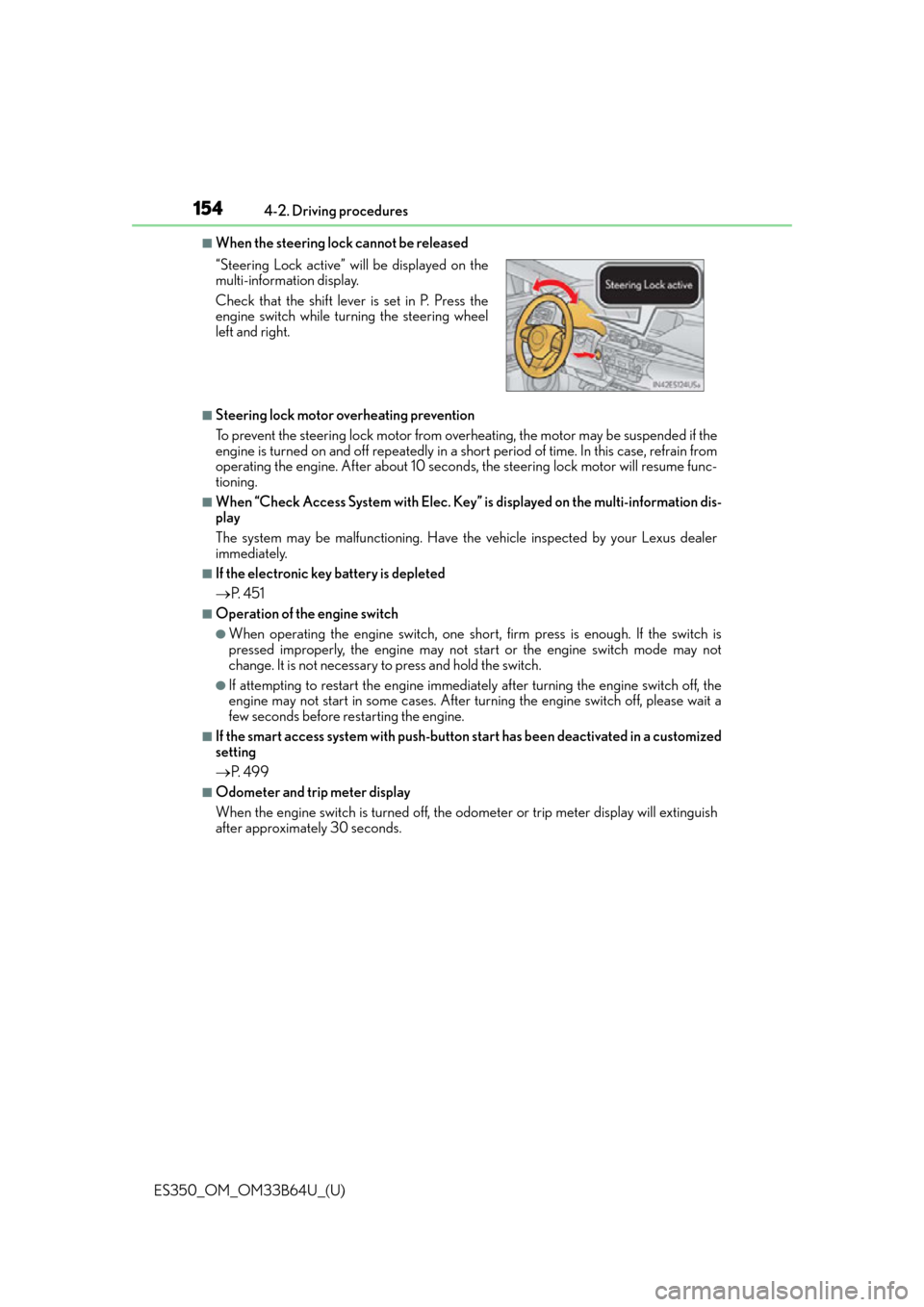
■When the steering lock cannot be released
■Steering lock motor overheating prevention
To prevent the steering lock motor from overheating, the motor may be suspended if the
engine is turned on and off repeatedly in a sh
ort period of time. In this case, refrain from
operating the engine. After about 10 seconds, the steering lock motor will resume func-
tioning.
■When “Check Access System with Elec. Key” is displayed on the multi-information dis-
play
The system may be malfunctioning. Have the vehicle inspected by your Lexus dealer
immediately.
■If the electronic key battery is depleted
P. 4 5 1
■Operation of the engine switch
●When operating the engine switch, one short, firm press is enough. If the switch is
pressed improperly, the engine may not start or the engine switch mode may not
change. It is not necessary to press and hold the switch.
●If attempting to restart the engine immediat ely after turning the engine switch off, the
engine may not start in some cases. After tu rning the engine switch off, please wait a
few seconds before re starting the engine.
■If the smart access system with push-butto n start has been deactivated in a customized
setting
P. 4 9 9
■Odometer and trip meter display
When the engine switch is tu rned off, the odometer or trip meter display will extinguish
after approximately 30 seconds. “Steering Lock active” will be displayed on the
multi-information display.
Check that the shift lever is set in P. Press the
engine switch while turning the steering wheel
left and right.
Page 158 of 576

158
ES350_OM_OM33B64U_(U)4-2. Driving procedures
■S mode
●When the shift range is 4 or lower, holding th
e shift lever toward “+” sets the shift range
to 6.
●To prevent excessive engine speed, a function was adopted that automatically selects a
higher shift range before the engine speed becomes too high.
●To protect the automatic transmission, a function is adopted that automatically selects a
higher shift range when the fluid temperature is high.
■When driving with cruise control or dynamic radar cruise control activated
Even when performing the following actions with the intent of enabling engine braking,
the engine brake will not operate in the S mo de, even when downshifting to 5 or 4.
( P. 2 1 7 )
■Downshifting restrictions warning buzzer
To help ensure safety and driving performa nce, downshifting operation may sometimes
be restricted. In some circumstances, downshifting may not be possible even when the
shift lever is operated. (A buzzer will sound twice.)
■If the S indicator does not come on even af ter shifting the shift lever to the S position
This may indicate a malfunction in the automatic transmission system. Have the vehicle
inspected by your Lexus dealer immediately.
(In this situation, the transmission will operat e in the same manner as when the shift lever
is in the D position.)
■If the shift lever cannot be shifted from P
P. 4 9 8
■AI-SHIFT
AI-SHIFT automatically select s the suitable gear according to driver performance and
driving conditions.
AI-SHIFT automatically operates when the shift lever is in D. (Shifting the shift lever to S
cancels the function.)
WA R N I N G
■When driving on slippery road surfaces
Do not accelerate or shift gears suddenly.
Sudden changes in engine braking may cause th e vehicle to spin or skid, resulting in an
accident.
Page 159 of 576
159
ES350_OM_OM33B64U_(U)4-2. Driving procedures
4
Driving
Turn signal lever
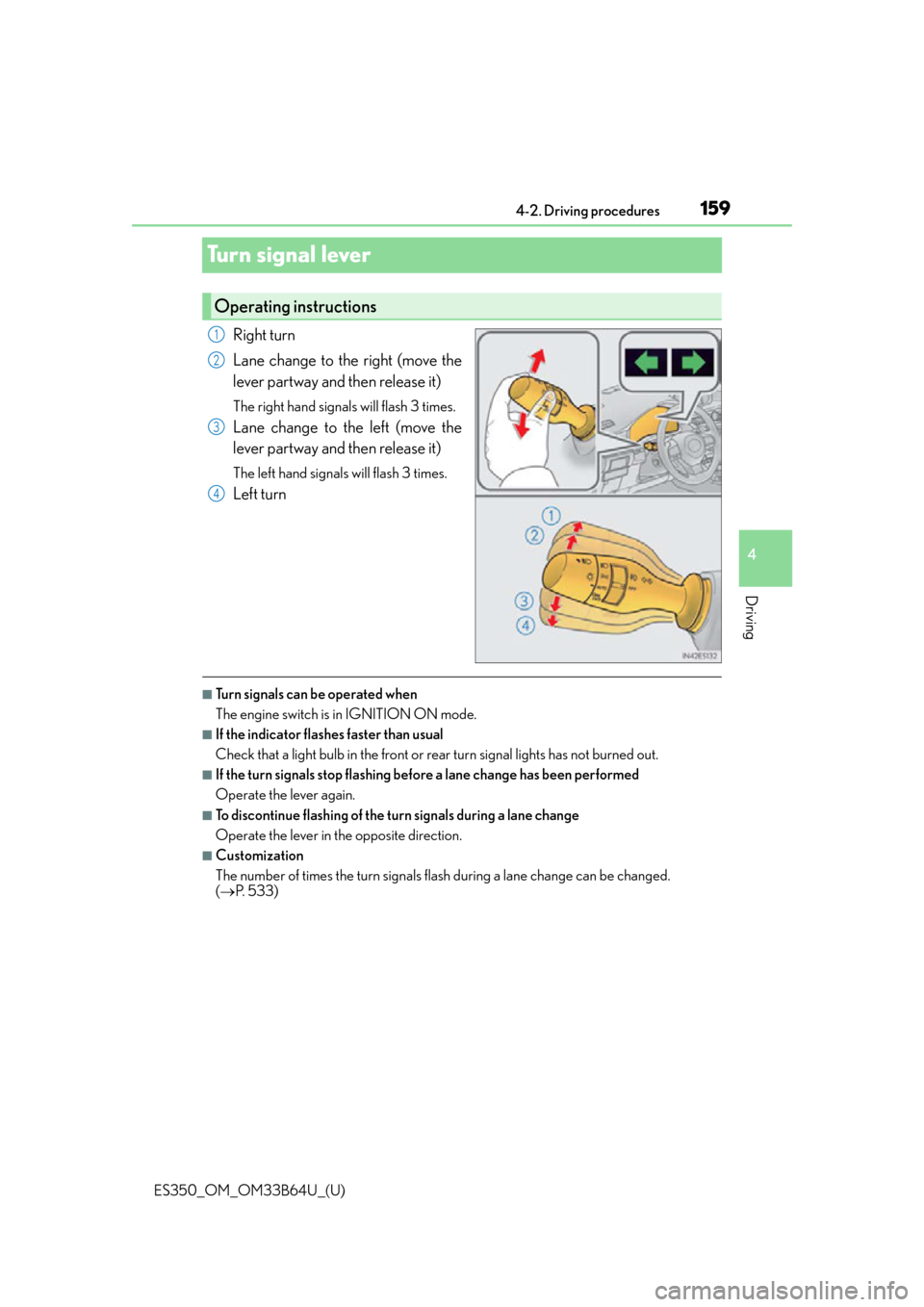
Right turn
Lane change to the right (move the
lever partway and then release it)
The right hand signals will flash 3 times.
Lane change to the left (move the
lever partway and then release it)
The left hand signals will flash 3 times.
Left turn
■Turn signals can be operated when
The engine switch is in IGNITION ON mode.
■If the indicator flashes faster than usual
Check that a light bulb in the front or rear turn signal lights has not burned out.
■If the turn signals stop flashing befo
re a lane change has been performed
Operate the lever again.
■To discontinue flashing of the turn signals during a lane change
Operate the lever in the opposite direction.
■Customization
The number of times the turn signals flash during a lane change can be changed.
( P. 5 3 3 )
Operating instructions
1
2
3
4
Page 167 of 576

ES350_OM_OM33B64U_(U)
1674-3. Operating the lights and wipers
4
Driving
■Temporarily lowering sensor sensitivity
The sensitivity of the sensor can be temporarily lowered.Turn the engine switch off while the following conditions are met.
• The headlight switch is in or .
• The headlight switch lever is in high beam position.
• Automatic High Beam switch is on. Turn the engine switch to IGNITION ON mode.
Within 30 seconds after , repeat pulling the headlight switch lever to the original
position then pushing it to the high beam position quickly 10 times, then leave the
lever in high beam position.
If the sensitivity is changed, the Automatic High Beam indicator is turn on and off
three times.
Automatic High Beam (headlights) may turn on even the vehicle is stopped.
1
2
32
4
Page 187 of 576
ES350_OM_OM33B64U_(U)
1874-5. Using the driving support systems
4
Driving
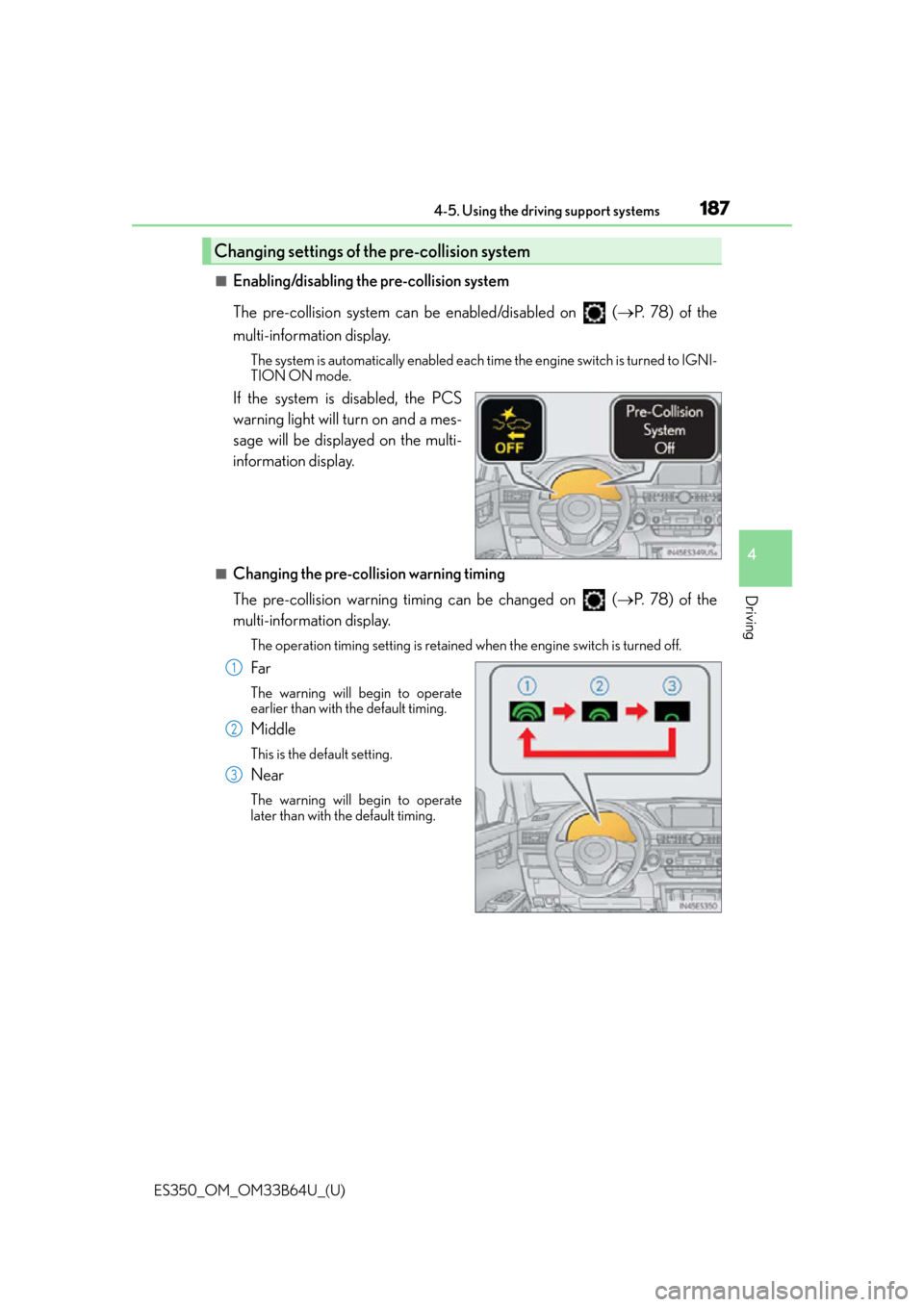
■Enabling/disabling the pre-collision system
The pre-collision system can be enabled/disabled on (P. 7 8 ) o f t h e
multi-information display.
The system is automatically enabled each time the engine switch is turned to IGNI-
TION ON mode.
If the system is disabled, the PCS
warning light will turn on and a mes-
sage will be displayed on the multi-
information display.
■Changing the pre-col lision warning timing
The pre-collision warning timing can be changed on ( P. 7 8 ) o f t h e
multi-information display.
The operation timing setting is retained when the engine switch is turned off.
Far
The warning will begin to operate
earlier than with the default timing.
Middle
This is the default setting.
Near
The warning will begin to operate
later than with the default timing.
Changing settings of the pre-collision system
1
2
3
Page 208 of 576
208
ES350_OM_OM33B64U_(U)4-5. Using the driving support systems
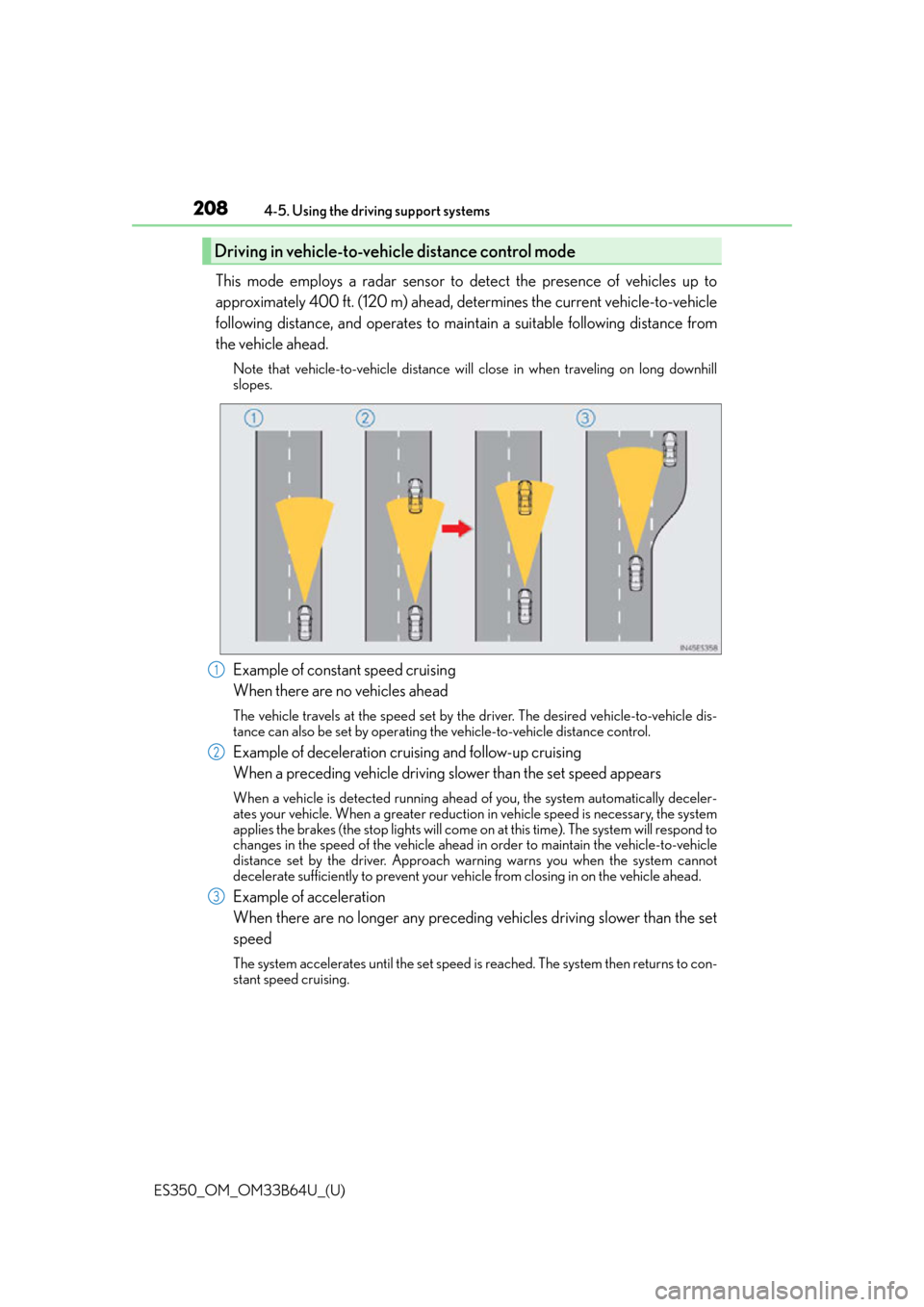
This mode employs a radar sensor to detect the presence of vehicles up to
approximately 400 ft. (120 m) ahead, determines the current vehicle-to-vehicle
following distance, and operates to main
tain a suitable following distance from
the vehicle ahead.
Note that vehicle-to-vehicle distance will close in when traveling on long downhill
slopes.
Example of constant speed cruising
When there are no vehicles ahead
The vehicle travels at the speed set by the driver. The desired vehicle-to-vehicle dis-
tance can also be set by operating the vehicle-to-vehicle distance control.
Example of deceleration cruising and follow-up cruising
When a preceding vehicle driving slower than the set speed appears
When a vehicle is detected running ahead of you, the system automatically deceler-
ates your vehicle. When a greater reduction in vehicle speed is necessary, the system
applies the brakes (the stop lights will come on at this time). The system will respond to
changes in the speed of the vehicle ahead in order to maintain the vehicle-to-vehicle
distance set by the driver. Approach wa rning warns you when the system cannot
decelerate sufficiently to prevent your ve hicle from closing in on the vehicle ahead.
Example of acceleration
When there are no longer any preceding vehicles driving slower than the set
speed
The system accelerates until the set speed is reached. The system then returns to con-
stant speed cruising.
Driving in vehicle-to-vehicle distance control mode
1
2
3
Page 210 of 576
210
ES350_OM_OM33B64U_(U)4-5. Using the driving support systems
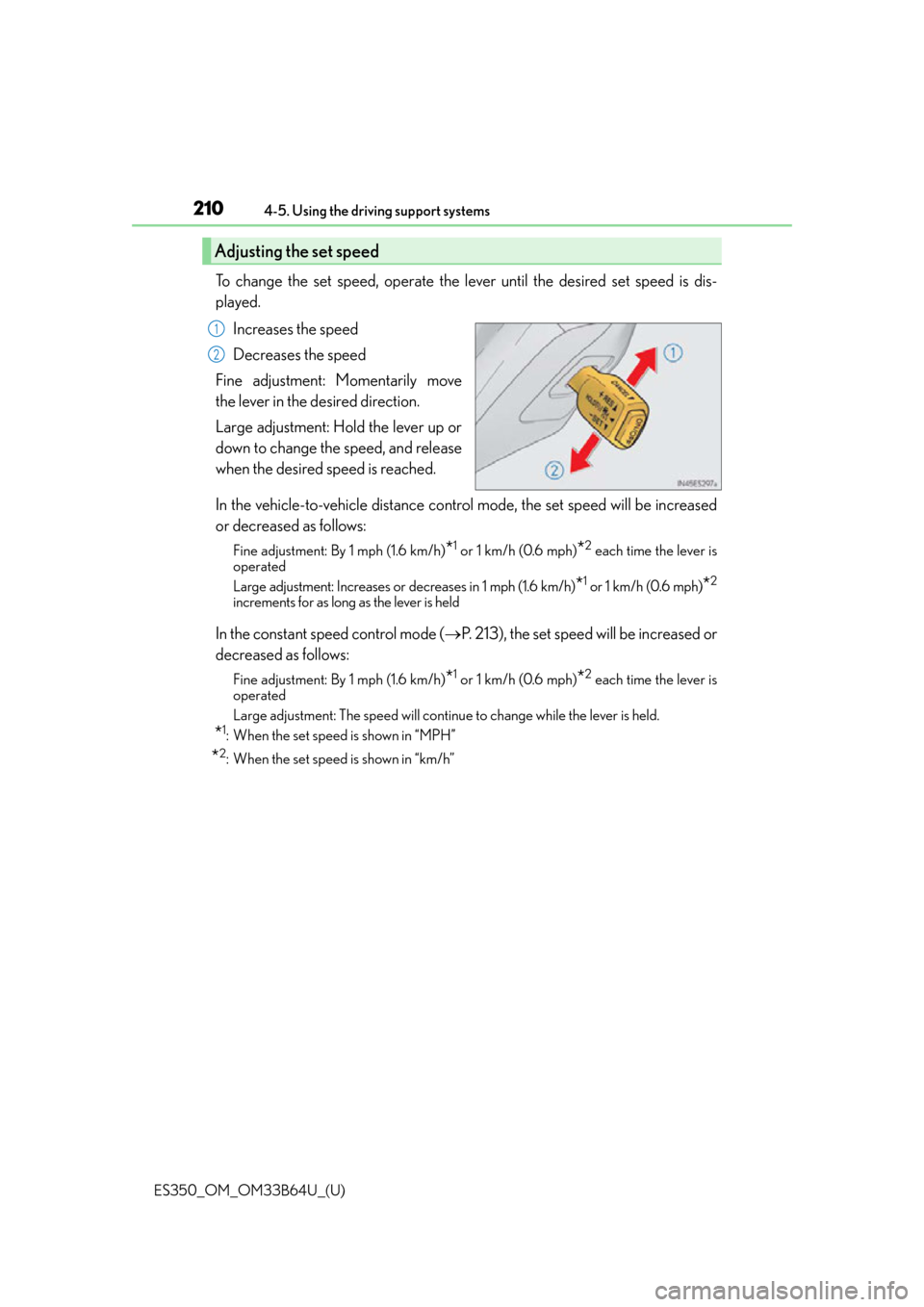
To change the set speed, operate the lever until the desired set speed is dis-
played.
Increases the speed
Decreases the speed
Fine adjustment: Momentarily move
the lever in the desired direction.
Large adjustment: Hold the lever up or
down to change the speed, and release
when the desired speed is reached.
In the vehicle-to-vehicle distance control mode, the set speed will be increased
or decreased as follows:
Fine adjustment: By 1 mph (1.6 km/h)*1 or 1 km/h (0.6 mph)*2 each time the lever is
operated
Large adjustment: Increases or decreases in 1 mph (1.6 km/h)
*1 or 1 km/h (0.6 mph)*2
increments for as long as the lever is held
In the constant speed control mode ( P. 213), the set speed will be increased or
decreased as follows:
Fine adjustment: By 1 mph (1.6 km/h)*1 or 1 km/h (0.6 mph)*2 each time the lever is
operated
Large adjustment: The speed will continue to change while the lever is held.
*1: When the set speed is shown in “MPH”
*2: When the set speed is shown in “km/h”
Adjusting the set speed
1
2
Page 218 of 576
218
ES350_OM_OM33B64U_(U)4-5. Using the driving support systems
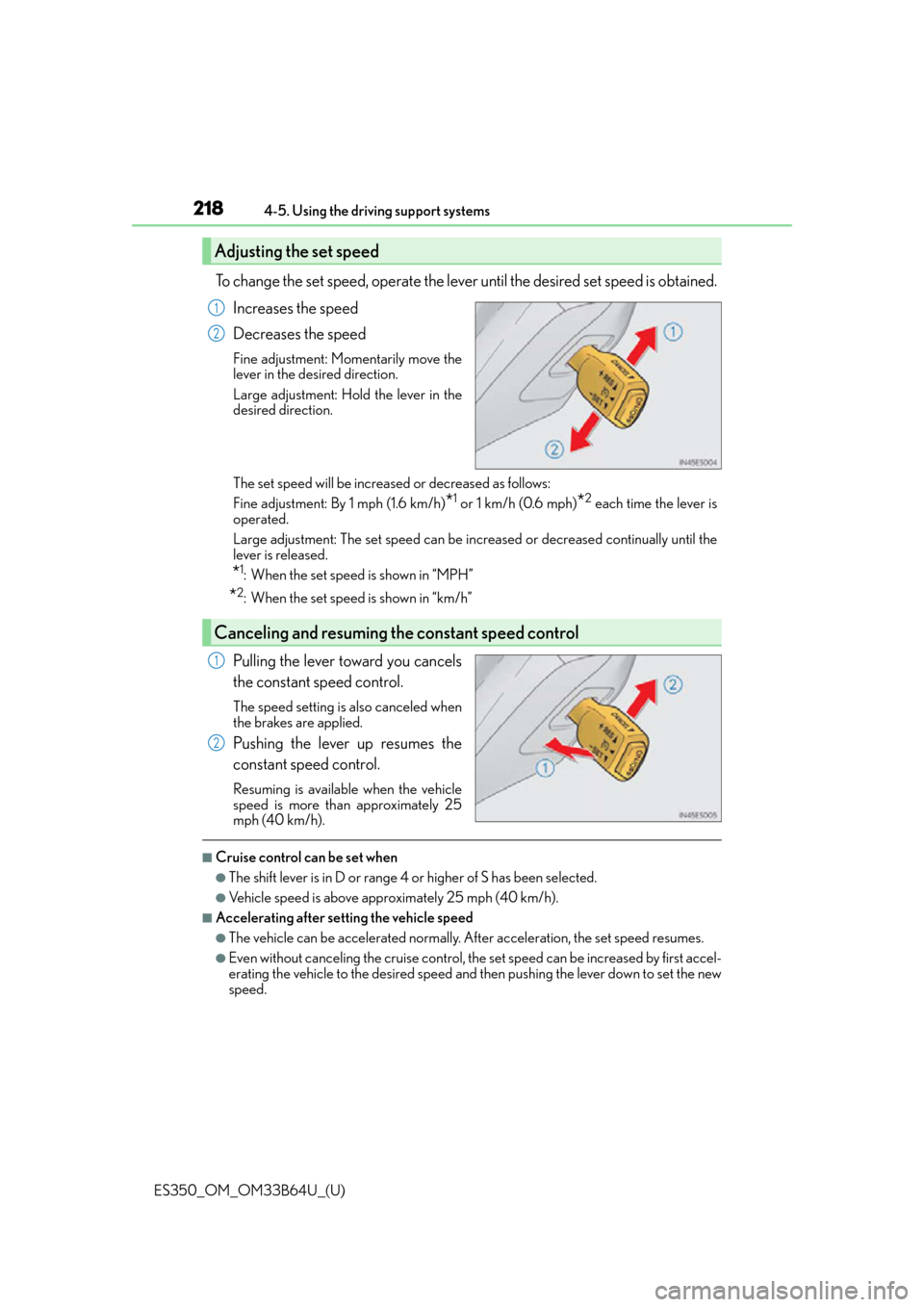
To change the set speed, operate the lever until the desired set speed is obtained.
Increases the speed
Decreases the speed
Fine adjustment: Mo mentarily move the
lever in the desired direction.
Large adjustment: Hold the lever in the
desired direction.
The set speed will be increase d or decreased as follows:
Fine adjustment: By 1 mph (1.6 km/h)
*1 or 1 km/h (0.6 mph)*2 each time the lever is
operated.
Large adjustment: The set speed can be incr eased or decreased continually until the
lever is released.
*1: When the set speed is shown in “MPH”
*2: When the set speed is shown in “km/h”
Pulling the lever toward you cancels
the constant speed control.
The speed setting is also canceled when
the brakes are applied.
Pushing the lever up resumes the
constant speed control.
Resuming is available when the vehicle
speed is more than approximately 25
mph (40 km/h).
■Cruise control can be set when
●The shift lever is in D or range 4 or higher of S has been selected.
●Vehicle speed is above approximately 25 mph (40 km/h).
■Accelerating after setting the vehicle speed
●The vehicle can be accelerated normally. After acceleration, the set speed resumes.
●Even without canceling the cruise control, the set speed can be increased by first accel-
erating the vehicle to the desired speed and then pushing the lever down to set the new
speed.
Adjusting the set speed
1
2
Canceling and resuming the constant speed control
1
2
Page 284 of 576
284
ES350_OM_OM33B64U_(U)5-3. Using the audio system
Selecting the audio source
Press the “AUDIO” button to display the “Source” screen.
If the “Source” screen is not displayed, press the button again.
Select the desired audio source.
The audio source can be selected by pressing the “RADIO” or “MEDIA” button.
Press the “MODE” switch when the audio
system is turned on. The audio source
changes each time the “MODE” switch is pressed.
■Rearranging the list
The listing order of the sour ce list can be rearranged.
Move the controller to the left while on the “Source” screen.
Select “Audio Source Select”.
Select an item you wish to move and th en select where to move the item to.
Switching between audio sources such as radio and CD are explained in this
section.
Changing audio source
Using the steering wheel switches to change audio sources
1
2
1
2
3
Page 296 of 576

2965-4. Using the radio
ES350_OM_OM33B64U_(U)
■Reception sensitivity
●Maintaining perfect radio recept ion at all times is difficult due to the continually chang-
ing position of the antenna, differences in signal strength and surrounding objects, such
as trains, transmitters, etc.
●The radio antenna is mounted inside the rear window. To maintain clear radio reception,
do not attach metallic window tinting or other metallic objects to the antenna wire
mounted inside the rear window.
■XM Radio Services — Descriptions
●Radio and Entertainment
XM offers more than 170 satellite radio channels of commercial-free music and
premier sports, news, talk, and entertainment. XM is broadcast via satellites to millions
of listeners across the continental United States. XM subscribers listen to XM on
satellite radio receivers for the car, home, and portable use. More information about
XM is available online at www.siriusxm.com
(U.S.A.) or www.xmradio.ca (Canada).
●Satellite tuner
The tuner supports only Audio Services (M usic and Talk) and the accompanying Text
Information of XM
® Satellite Radio.
■XM Radio Services — Subscription Instructions
For XM Services requiring a subscription (s uch as XM Radio), the following paragraph
shall be included.
Required XM Radio monthly subscriptions sold separately after trial period. Subscrip-
tion fee is consumer only. All fees and prog ramming subject to change. Subscriptions are
subject to the Customer Agreement available at www.siriusxm.com
(U.S.A.) or
www.xmradio.ca
(Canada) XM service only availa ble in the 48 contiguous United
States and 10 Canadian provinces. © 2011 Sirius XM Radio Inc. Sirius, XM and all
related marks and logos are trademarks of Sirius XM Radio Inc. All other marks, channel
names and logos are the property of their respective owners.
For more information, program schedules, and to subscribe or extend subscription after
complimentary trial period; more information is available at:
U.S.A. Customers:
Visit ww w.siriusxm.com
or call 1-877-515-3987
Canadian Customers:
Visit ww w.xmradio.ca
or call 1-877-438-9677
●Radio ID
You will need the radio ID when activating XM service or reporting a problem. If
“Ch000” is selected using the “TUNE•SCRO LL” knob, the ID code, which is 8 alpha-
numeric characters, will be displayed. If anot her channel is selected, the ID code will no
longer be displayed. The channel (000) alte rnates between displaying the radio ID and
the specific radio code.