change time Lexus ES350 2016 s / Owner's Guide
[x] Cancel search | Manufacturer: LEXUS, Model Year: 2016, Model line: ES350, Model: Lexus ES350 2016Pages: 576, PDF Size: 8.3 MB
Page 297 of 576

ES350_OM_OM33B64U_(U)
2975-4. Using the radio
5
Lexus Display Audio system
■XM Radio Services — Legal Disclaimers and Warnings
●Fees and Taxes — Subscription fee, taxes, one time activation fee, and other fees may
apply. Subscription fee is consumer only. All fees and programming subject to change.
Subscriptions subject to Customer Agreement available at www.siriusxm.com
(U.S.A.)
or www.xmradio.ca
(Canada) XM service only availa ble in the 48 contiguous United
States and Canada
*.
*: Canada — some deterioration of service may occur in extreme northern latitudes.
This is beyond the control of XM Satellite Radio.
Explicit Language Notice — Channels with frequent explicit language are indicated
with an “XL” preceding the channel name. Channel blocking is available for XM Satel-
lite Radio receivers by notifying XM at;
U.S.A. Customers:
Visit w w w.siriusxm.com
or calling 1-877-515-3987
Canadian Customers:
Visit w w w.xmradio.ca
or calling 1-877-438-9677
It is prohibited to copy, decompile, disassemble, reverse engineer, hack, manipulate, or
otherwise make available any technology or software incorporated in receivers compat-
ible with the XM Satellite Ra dio System or that support the XM website, the Online Ser-
vice or any of its content. Furthermore, the AMBE
® voice compression software
included in this product is protected by intellectual property rights including patent
rights, copyrights, and trade secrets of Digital Voice Systems, Inc.
Note: this applies to XM receivers only and not XM Ready devices.
Page 298 of 576
2985-4. Using the radio
ES350_OM_OM33B64U_(U)
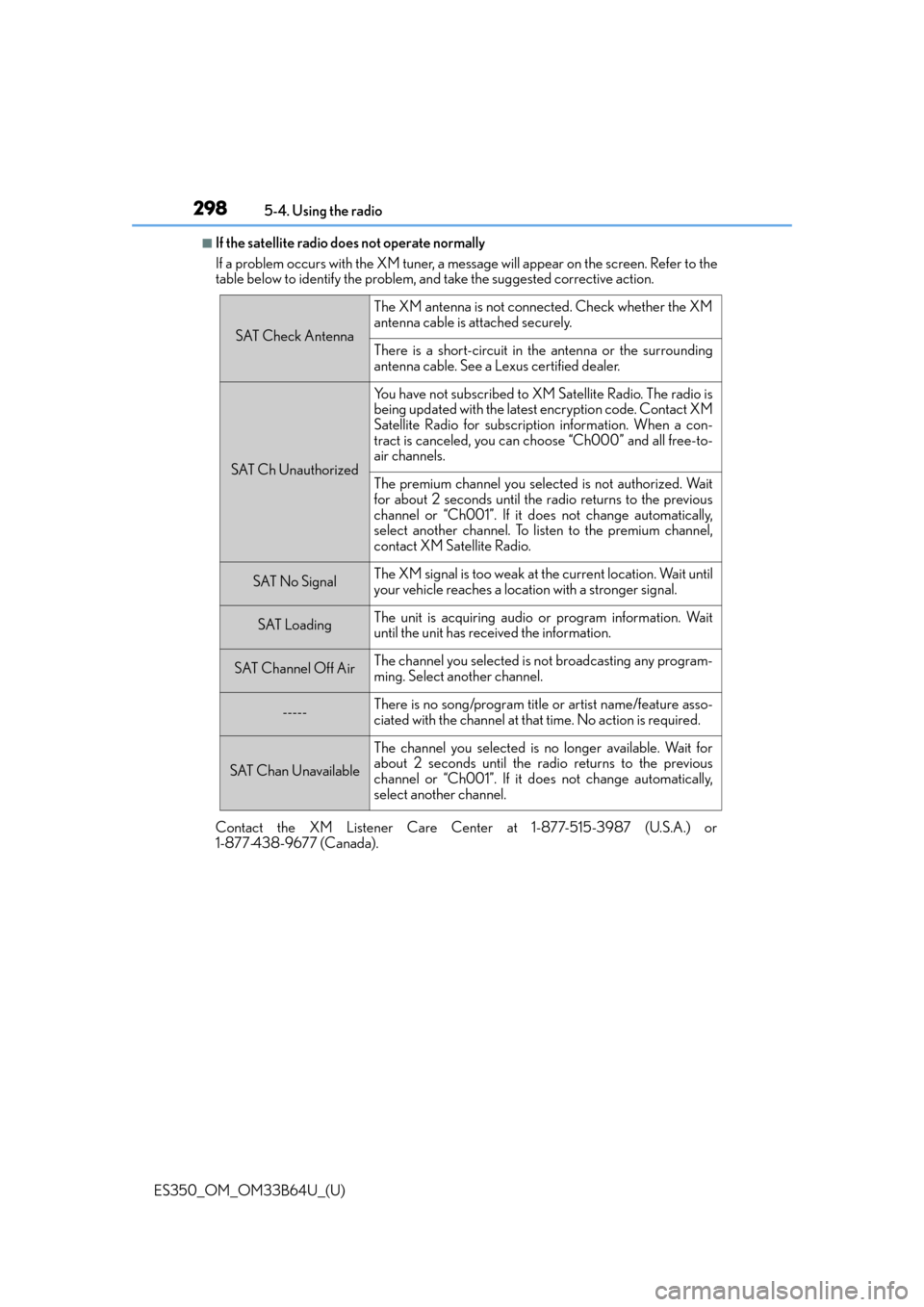
■If the satellite radio does not operate normally
If a problem occurs with the XM tuner, a me ssage will appear on the screen. Refer to the
table below to identify the problem, and take the suggested corrective action.
Contact the XM Listener Care Center at 1-877-515-3987 (U.S.A.) or
1-877-438-9677 (Canada).
SAT Check Antenna
The XM antenna is not connected. Check whether the XM
antenna cable is attached securely.
There is a short-circuit in the antenna or the surrounding
antenna cable. See a Lexus certified dealer.
SAT Ch Unauthorized
Yo u h a v e n o t s u b s c r i b e d t o X M Satellite Radio. The radio is
being updated with the latest encryption code. Contact XM
Satellite Radio for subscription information. When a con-
tract is canceled, you can choose “Ch000” and all free-to-
air channels.
The premium channel you select ed is not authorized. Wait
for about 2 seconds until the radio returns to the previous
channel or “Ch001”. If it does not change automatically,
select another channel. To listen to the premium channel,
contact XM Satellite Radio.
SAT No SignalThe XM signal is too weak at the current location. Wait until
your vehicle reaches a location with a stronger signal.
SAT LoadingThe unit is acquiring audio or program information. Wait
until the unit has received the information.
SAT Channel Off AirThe channel you selected is not broadcasting any program-
ming. Select another channel.
-----There is no song/program title or artist name/feature asso-
ciated with the channel at that time. No action is required.
SAT Chan Unavailable
The channel you selected is no longer available. Wait for
about 2 seconds until the radio returns to the previous
channel or “Ch001”. If it does not change automatically,
select another channel.
Page 307 of 576
ES350_OM_OM33B64U_(U)
3075-6. Using an external device
5
Lexus Display Audio system
■About iPod
●“Made for iPod” and “Made for iPhone” mean that an electronic accessory has been
designed to connect specifically to an iPod , or iPhone, respectively, and has been certi-
fied by the developer to meet Apple performance standards.
●Apple is not responsible for the operation of this device or its compliance with safety
and regulatory standards. Please note that th e use of this accessory with iPod or iPhone
may affect wireless performance.
●iPhone, iPod, iPod classic, iPod nano and iPod touch are trademarks of Apple Inc., reg-
istered in the U.S. and other countries.
■iPod cover art
●Depending on the iPod and songs in the iPod, iPod cover art may be displayed.
●This function can be changed to on/off. (P. 2 8 8 )
●It may take time to display iPod cover art, and the iPod may not be operated while the
cover art display is in process.
■iPod functions
●When an iPod is connected and the audio sour ce is changed to iPod mode, the iPod will
resume play from the same poin t in which it was last used.
●Depending on the iPod that is connected to the system, certain functions may not be
available. If a function is unavailable due to a malfunction (as opposed to a system spec-
ification), disconnecting the device and reconnecting it may resolve the problem.
●Depending on the iPod, while connected to the system, the iPod cannot be operated
with its own controls. It is necessary to use the controls of the vehicle’s audio system
instead.
●When the battery level of an iPod is very low, the iPod may not operate. If so, charge the
iPod before use.
●Compatible models (P. 3 0 9 )
Page 364 of 576
364
ES350_OM_OM33B64U_(U)6-1. Using the air conditioning system and defogger
Automatic air conditioning system
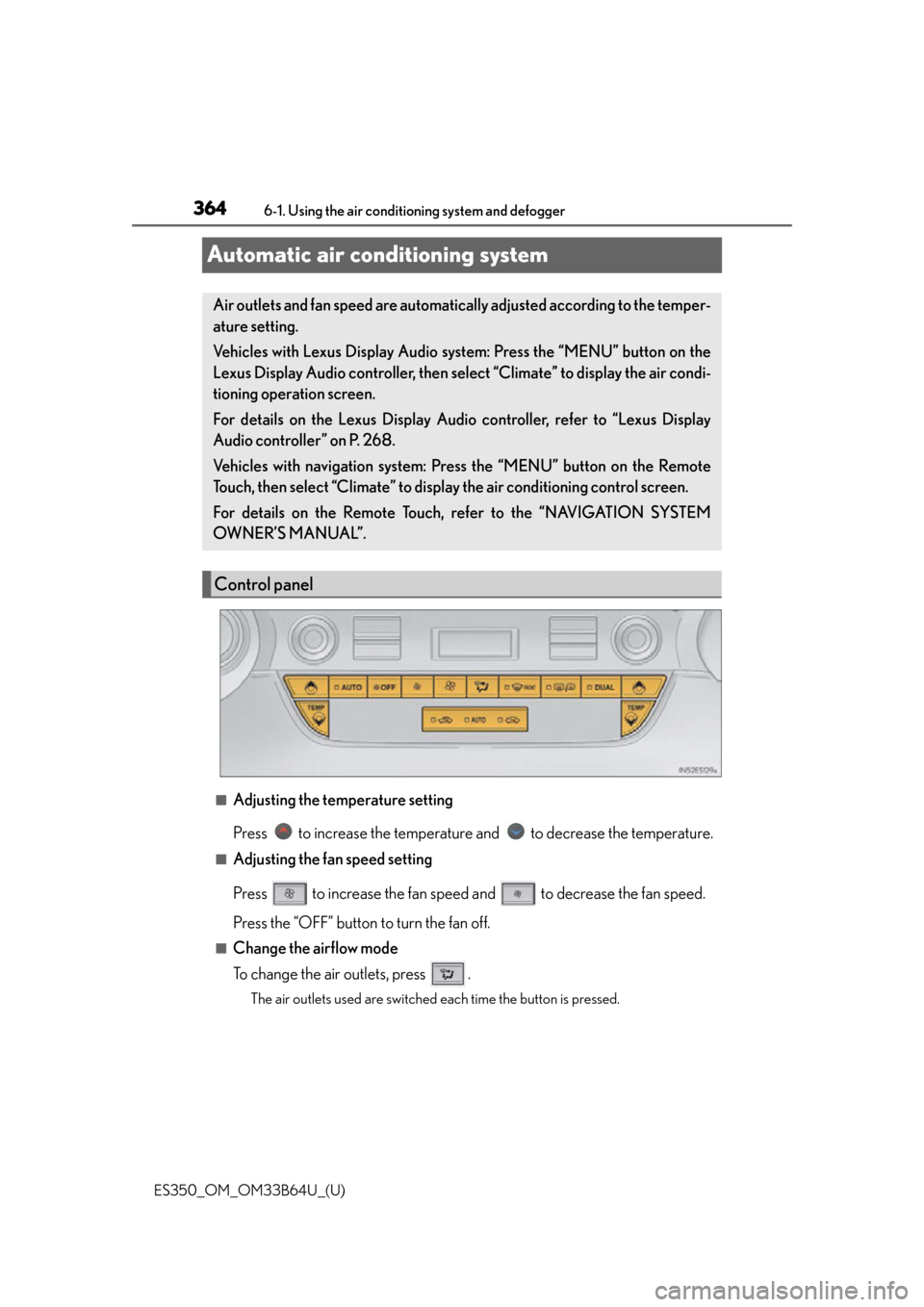
■Adjusting the temperature setting
Press to increase the temperature and to decrease the temperature.
■Adjusting the fan speed setting
Press to increase the fan speed and to decrease the fan speed.
Press the “OFF” button to turn the fan off.
■Change the airflow mode
To change the air outlets, press .
The air outlets used are switched each time the button is pressed.
Air outlets and fan speed are automatica
lly adjusted according to the temper-
ature setting.
Vehicles with Lexus Display Audio sy stem: Press the “MENU” button on the
Lexus Display Audio controller, then select “Climate” to display the air condi-
tioning operation screen.
For details on the Lexus Display Audio controller, refer to “Lexus Display
Audio controller” on P. 268.
Vehicles with navigation system: Press the “MENU” button on the Remote
Touch, then select “Climate” to display the air conditioning control screen.
For details on the Remote Touch, refer to the “NAVIGATION SYSTEM
OWNER’S MANUAL”.
Control panel
Page 369 of 576
ES350_OM_OM33B64U_(U)
3696-1. Using the air conditioning system and defogger
6
Interior features
■Micro dust and pollen filter
Pollen is removed from the air and the air flows to the upper part of the body.
Select on the option control screen.
When the micro dust and pollen filter is on, is displayed on the air condition-
ing control screen.
In order to prevent the windshield from fo gging up when the outside air is cold, the
dehumidification function may operate.
The pollen is filtered out even if the micr o dust and pollen filter is turned off.
■Windshield wiper de-icer (if equipped)
This feature is used to prevent ice from building up on the windshield and
wiper blades.
Select on the option control screen.
When the windshield wiper de-icer is on , is displayed on the air condition-
ing control screen.
The windshield wiper de-icer will automati cally turn off after a period of time.
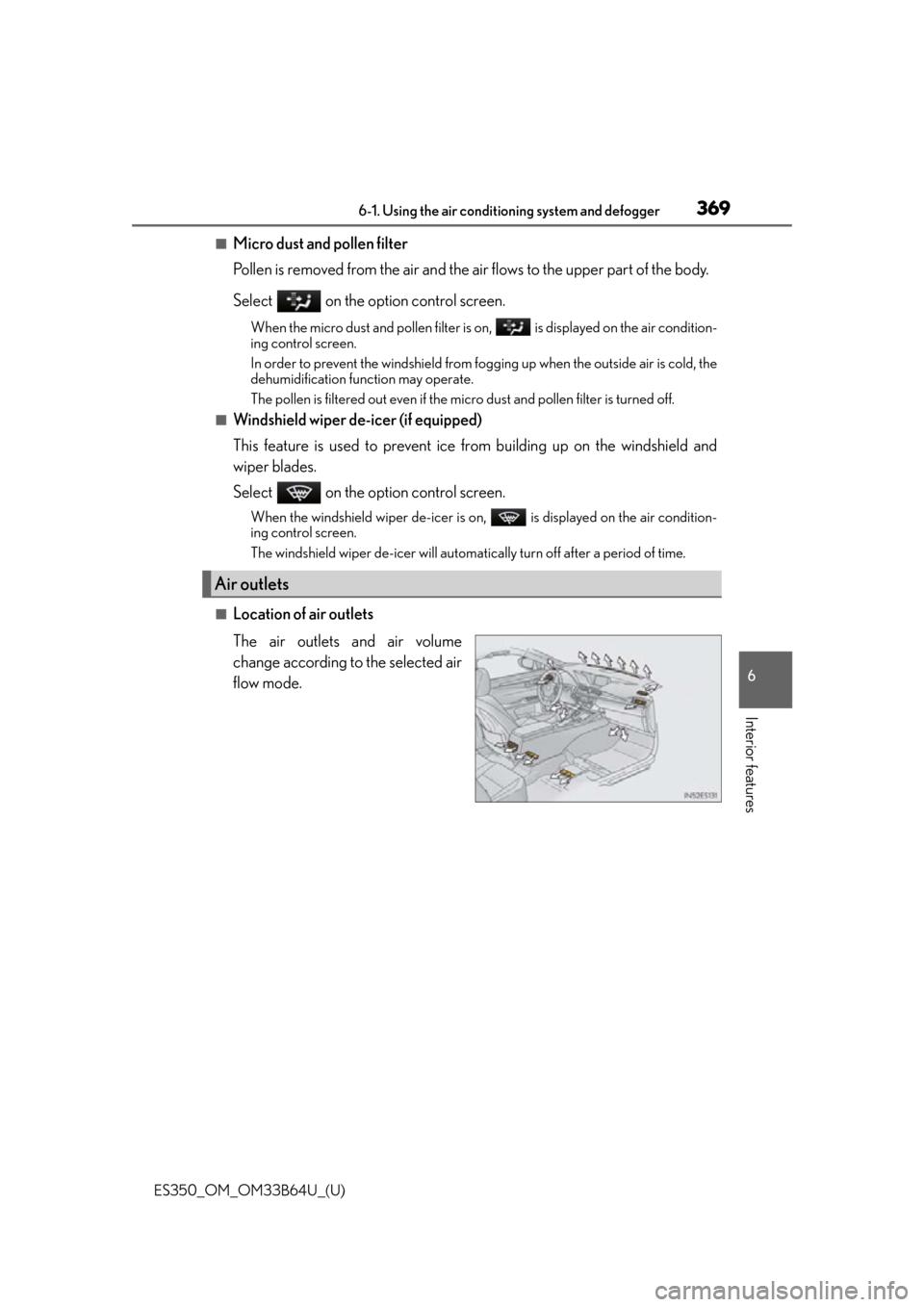
■Location of air outlets
The air outlets and air volume
change according to the selected air
flow mode.
Air outlets
Page 370 of 576
3706-1. Using the air conditioning system and defogger
ES350_OM_OM33B64U_(U)
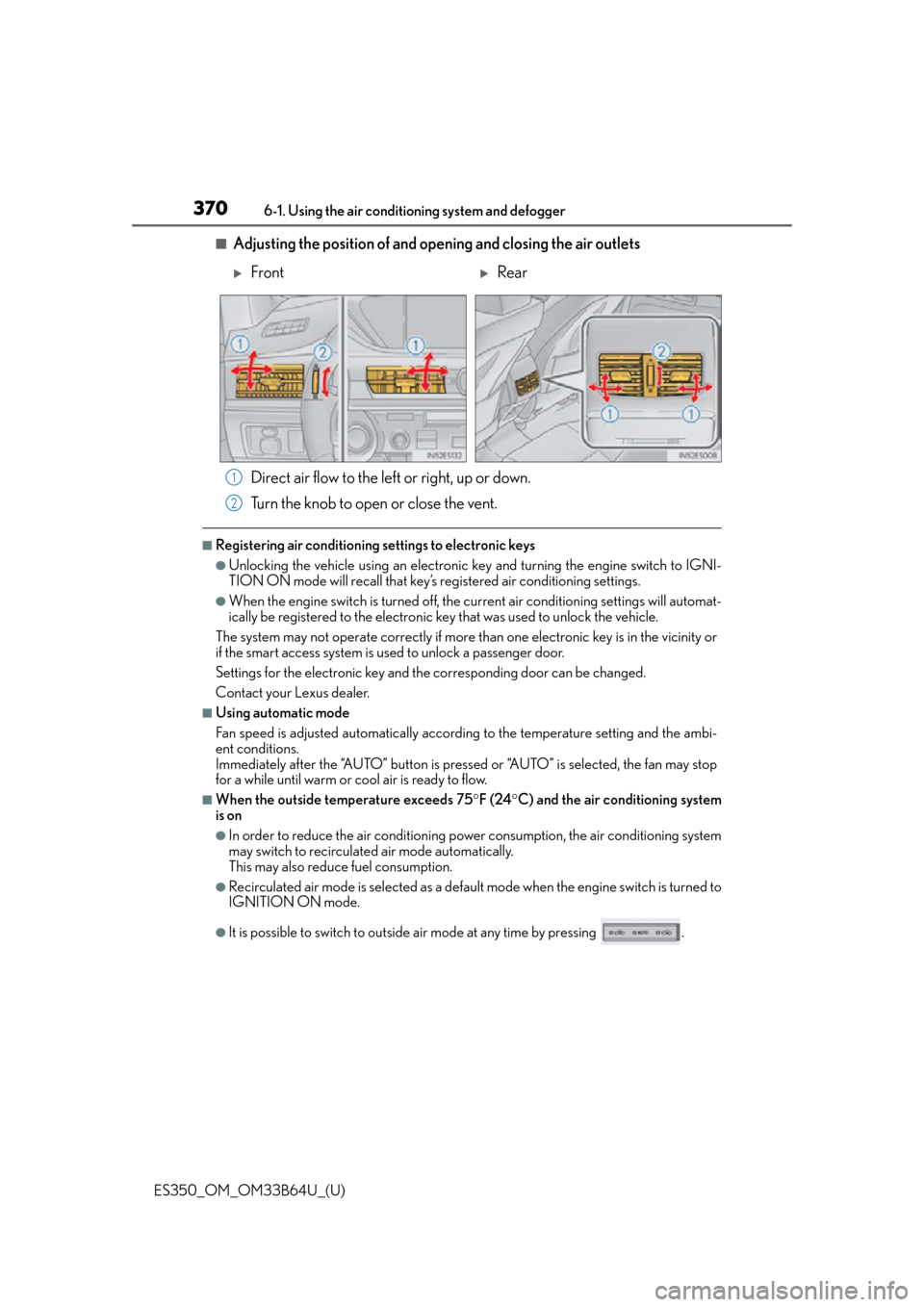
■Adjusting the position of and opening and closing the air outlets Direct air flow to the left or right, up or down.
Turn the knob to open or close the vent.
■Registering air conditioning settings to electronic keys
●Unlocking the vehicle using an electronic ke y and turning the engine switch to IGNI-
TION ON mode will recall that key’s registered air conditioning settings.
●When the engine switch is tu rned off, the current air conditioning settings will automat-
ically be registered to the electronic key that was used to unlock the vehicle.
The system may not operate correctly if more th an one electronic key is in the vicinity or
if the smart access system is used to unlock a passenger door.
Settings for the electronic key and the corresponding door can be changed.
Contact your Lexus dealer.
■Using automatic mode
Fan speed is adjusted automatically accordin g to the temperature setting and the ambi-
ent conditions.
Immediately after the “AUTO” button is pressed or “AUTO” is selected, the fan may stop
for a while until warm or cool air is ready to flow.
■When the outside temperature exceeds 75 F (24 C) and the air conditioning system
is on
●In order to reduce the air conditioning po wer consumption, the air conditioning system
may switch to recirculated air mode automatically.
This may also reduce fuel consumption.
●Recirculated air mode is selected as a default mode when the engine switch is turned to
IGNITION ON mode.
●It is possible to switch to outside air mode at any time by pressing .
FrontRear
1
2
Page 372 of 576
3726-1. Using the air conditioning system and defogger
ES350_OM_OM33B64U_(U)
■Ventilation and air conditioning odors
●To let fresh air in, set the air conditio ning system to the outside air mode.
●During use, various odors from inside and outside the vehicle may enter into and accu-
mulate in the air conditioning system. This may then cause odor to be emitted from the
vents.
●To reduce potential odors from occurring:
• It is recommended that the air conditioning system be set to outside air mode prior to turning the vehicle off.
• Immediately after the air conditioning system is started in automatic mode, the start
timing of the blower may be delayed for a short period of time.
■Air conditioning filter
P. 4 4 9
■Customization
Settings (e.g. A/C automatic mode switch operation) can be changed.
(Customizable features: P. 5 4 0 )
WA R N I N G
■To prevent the windshield from fogging up
●Do not use during cool air operation in extremely humid weather. The differ-
ence between the temperature of the outside air and that of the windshield can cause
the outer surface of the windshield to fog up, blocking your vision.
■To prevent burns
●Do not touch the rear view mirror surfaces when the outside rear view mirror defog-
gers are on.
●Vehicles with windshield wiper de-icer: Do not touch the glass at lower part of the
windshield or to the side of the front pilla rs when the windshield wiper de-icer is on.
NOTICE
■To prevent battery discharge
Do not leave the air conditioning system on longer than necessary when the engine is
not running.
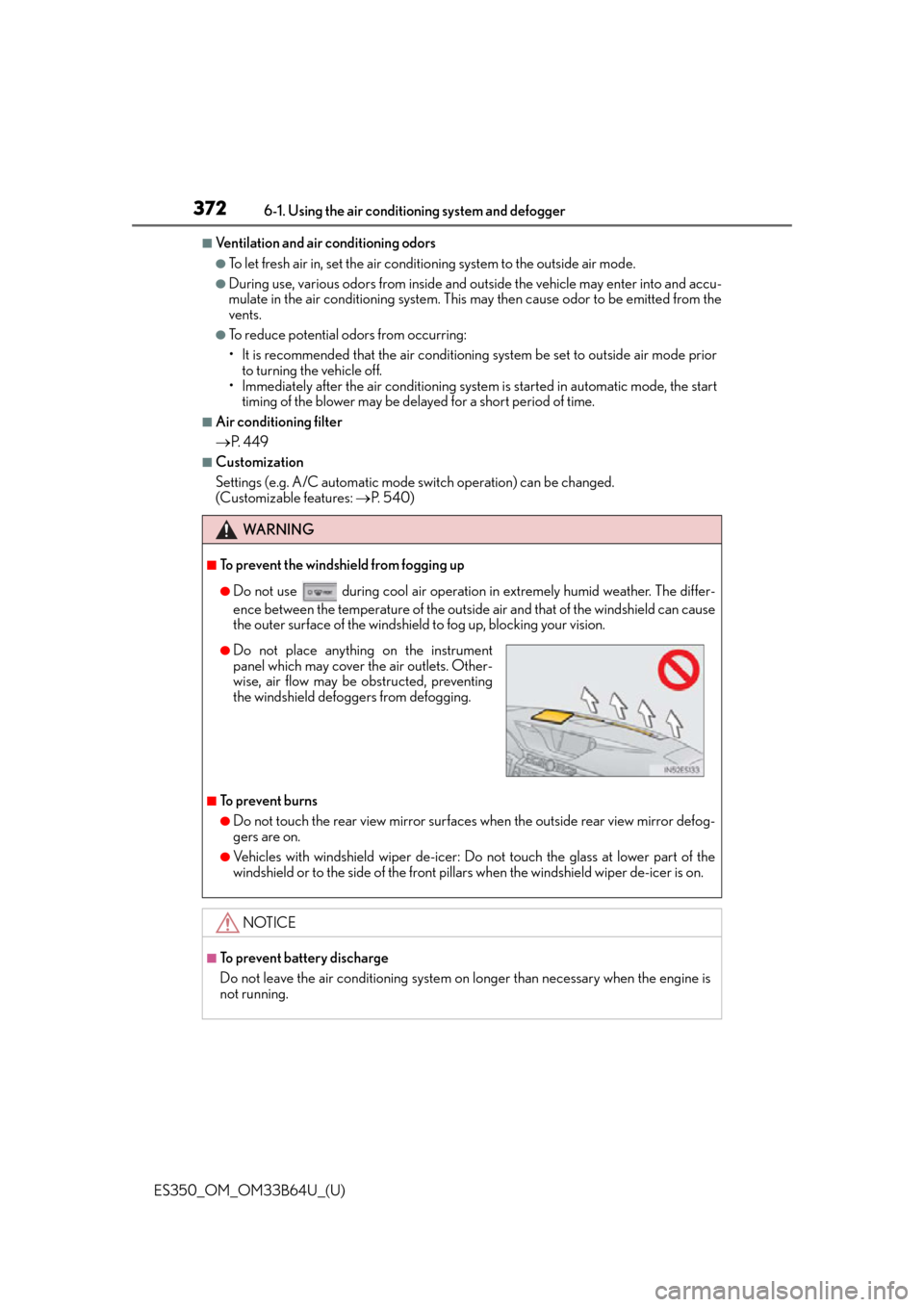
●Do not place anything on the instrument
panel which may cover the air outlets. Other-
wise, air flow may be obstructed, preventing
the windshield defoggers from defogging.
Page 377 of 576

ES350_OM_OM33B64U_(U)
3776-2. Using the interior lights
6
Interior features
●Illuminated entry system: The lights automatically turn on/off according to engine
switch mode, the presence of the electronic key, whether the doors are locked/
unlocked, and whether the doors are opened/closed.
●If the following lights remain on when the engine switch is turned off the lights will go off
automatically after 20 minutes:
• Outer foot lights
• Personal/interior lights
• Door courtesy lights
• Ornament lights (if equipped)
• Footwell lights
●Setting (e.g. the time elapsed before lights turn off) can be changed.
(Customizable features: P. 5 3 3 )
Page 388 of 576
388
ES350_OM_OM33B64U_(U)6-4. Using the other interior features
●The rear sunshade can be used when the engine switch is in IGNITION ON mode.
●The rear sunshade can be operated for approximately 1 minute even after the engine
switch is turned to ACCESSORY mode or turned off.
●Reverse operation feature: To ensure adequate
rear visibility, the rear sunshade auto-
matically lowers when the sh ift lever is shifted to R.
However, the rear sunshade is raised again if any of the following occurs:
• The button is pressed again.
*
• Shift the shift lever to P.
• The shift lever is shifted out of R, and th e vehicle reaches a speed of 9 mph (15 km/h).
If the engine is not running when the rear sunshade has been lowered due to the
reverse operation feature, it will not be ra ised even when the engine is turned on
again and the vehicle reaches a speed of 9 mph (15 km/h). To raise the sunshade
again, press the button.
*: Occasionally, the reverse function may not be carried out after the switch has been
pressed. Repeat the above operation to operate the function.
●Time elapsed before the reverse operation feature activates can be changed.
(Customizable features: P. 5 3 3 )
WA R N I N G
When the rear sunshade is being operated no t place fingers or other objects in the fas-
tener section or in the opening. They may get caught, causing injury.
NOTICE
●To prevent battery discharge, do not operate the rear sunshade when the engine is
not running.
●To ensure normal operation of the rear su nshade and rear door sunshades, observe
the following precautions:
• Do not place excessive load on the motor or other components of the rear sun- shade.
• Do not place objects where they may hi nder opening and closing operations.
• Do not attach items to the rear sunshade and rear door sunshades.
• Keep the opening clean and clear of obstructions.
• Do not operate the rear sunshade cont inuously for long periods of time.
Page 441 of 576

ES350_OM_OM33B64U_(U)
4417-3. Do-it-yourself maintenance
7
Maintenance and care
■The initialization operation
●Make sure to carry out initialization after adjusting the tire inflation pressure.
Also, make sure the tires are cold before carry ing out initialization or tire inflation pres-
sure adjustment.
●If you have accidentally turned the engine swit ch off during initialization, it is not neces-
sary to press the reset switch again as init ialization will restart automatically when the
engine switch has been turned to IG NITION ON mode for the next time.
●If you accidentally press the reset switch when initialization is not necessary, adjust the
tire inflation pressure to the specified level when the tires are co ld, and conduct initial-
ization again.
■When initialization of the tire pressure warning system has failed
Initialization can be completed in a few minutes. However, in the following cases, the set-
tings have not been recorded and the system will not operate properly. If repeated
attempts to record tire inflation pressure settings are unsuccessful, have the vehicle
inspected by your Lexus dealer.
●When operating the tire pressure warning reset switch, the tire pressure warning light
does not blink 3 times.
●After carrying out the initialization procedure, the tire pressure warning light blinks for 1
minute then stays on after driving for 20 minutes.
■Tire pressure warning system certification
MODEL/FCC IDs:
Tr a n s m i t t e r : PA X P M V C 0 1 0
Initiator: HYQ22AAA
For vehicles sold in the U.S.A., Hawaii, Guam, Saipan, American Samoa and
Puerto Rico
Note:
This device complies with part 15 of the FCC Rules. Operation is subject to the fol-
lowing two conditions: (1) This device may not cause harmful interference, and (2)
this device must accept any interference received, including interference that may
cause undesired operation.
FCC WARNING:
Changes or modifications not expressly ap proved by the party responsible for com-
pliance could void the user’s authority to operate the equipment.
For vehicles sold in Canada
●Tr a n s m i t t e r
NOTE:
Operation is subject to the following two conditions: (1) this device may not cause
interference, and (2) this device must a ccept any interference, including interfer-
ence that may cause undesired operation of the device.