engine Lexus ES350 2016 s / User Guide
[x] Cancel search | Manufacturer: LEXUS, Model Year: 2016, Model line: ES350, Model: Lexus ES350 2016Pages: 576, PDF Size: 8.3 MB
Page 65 of 576
651-2. Theft deterrent system
ES350_OM_OM33B64U_(U)
1
For safety and security
Engine immobilizer system
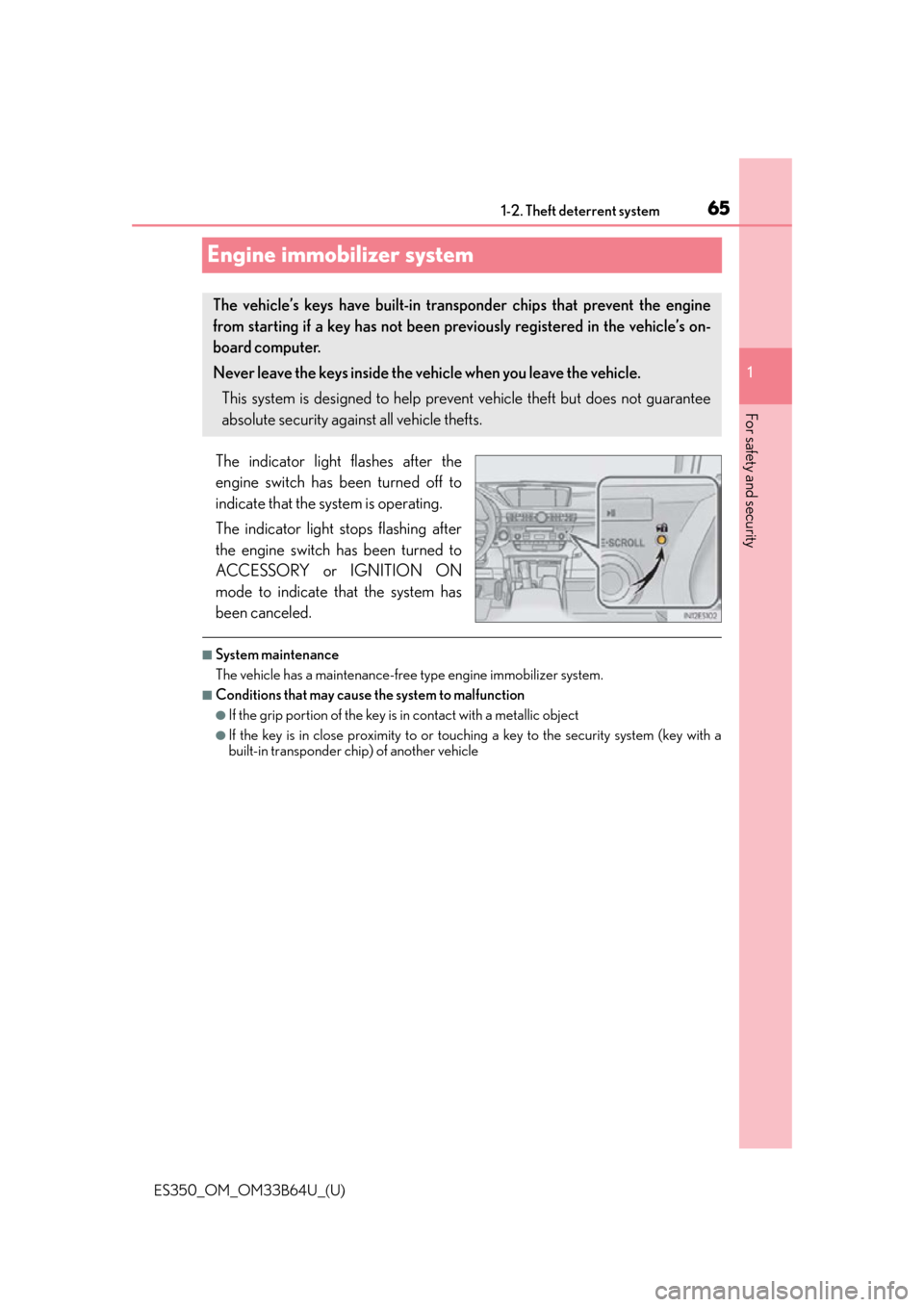
The indicator light flashes after the
engine switch has been turned off to
indicate that the system is operating.
The indicator light stops flashing after
the engine switch has been turned to
ACCESSORY or IGNITION ON
mode to indicate that the system has
been canceled.
■System maintenance
The vehicle has a maintenance-free type engine immobilizer system.
■Conditions that may cause the system to malfunction
●If the grip portion of the key is in contact with a metallic object
●If the key is in close proximity to or touching a key to the security system (key with a
built-in transponder ch ip) of another vehicle
The vehicle’s keys have built-in transponder chips that prevent the engine
from starting if a key has not been prev iously registered in the vehicle’s on-
board computer.
Never leave the keys inside the vehicle when you leave the vehicle.
This system is designed to help prevent vehicle theft but does not guarantee
absolute security against all vehicle thefts.
Page 66 of 576
661-2. Theft deterrent system
ES350_OM_OM33B64U_(U)
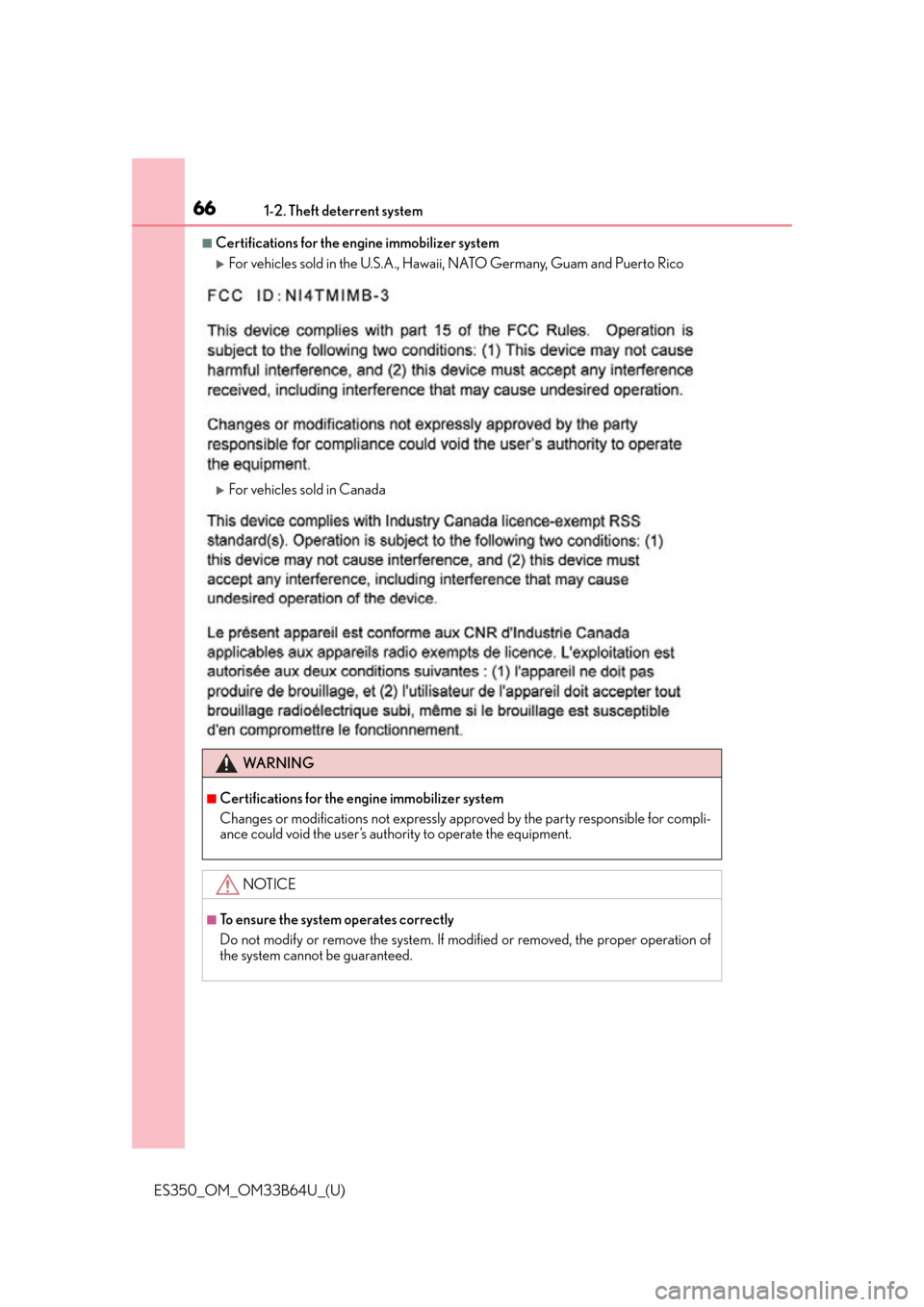
■Certifications for the engine immobilizer system
For vehicles sold in the U.S.A., Hawaii, NATO Germany, Guam and Puerto Rico
For vehicles sold in Canada
WA R N I N G
■Certifications for the engine immobilizer system
Changes or modifications not expressly approved by the party responsible for compli-
ance could void the user’s authority to operate the equipment.
NOTICE
■To ensure the system operates correctly
Do not modify or remove the system. If modified or removed, the proper operation of
the system cannot be guaranteed.
Page 67 of 576
671-2. Theft deterrent system
ES350_OM_OM33B64U_(U)
1
For safety and security
Alarm
The alarm uses light and sound to give an alert when an intrusion is detected.
The alarm is triggered in the following situations when the alarm is set:
●A locked door or trunk is unlocked or opened in any way other than using the
entry function, wireless remote control or mechanical key. (The doors will lock
again automatically.)
●The hood is opened.
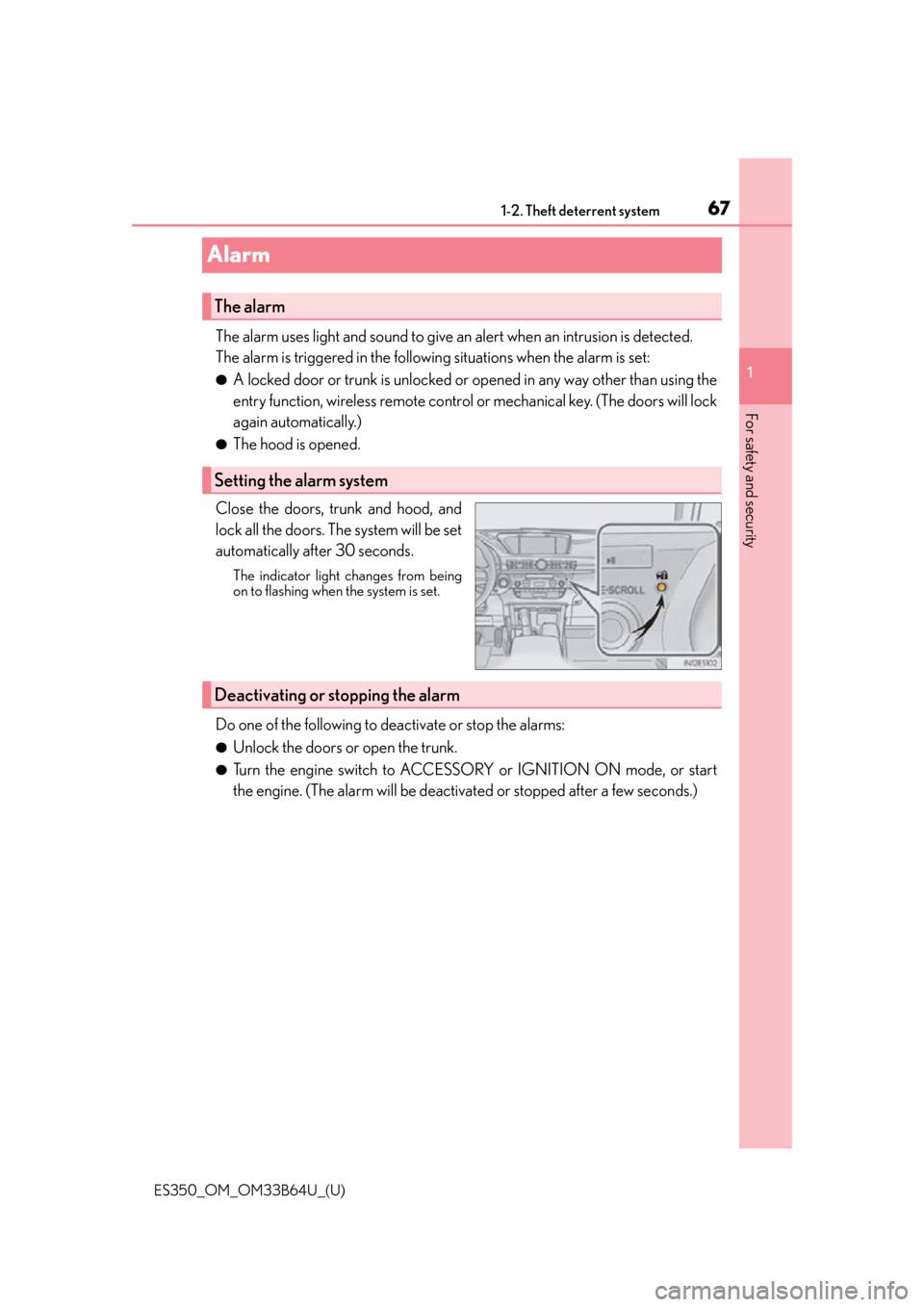
Close the doors, trunk and hood, and
lock all the doors. The system will be set
automatically after 30 seconds.
The indicator light changes from being
on to flashing when the system is set.
Do one of the following to de activate or stop the alarms:
●Unlock the doors or open the trunk.
●Turn the engine switch to ACCESSORY or IGNITION ON mode, or start
the engine. (The alarm will be deactivat ed or stopped after a few seconds.)
The alarm
Setting the alarm system
Deactivating or stopping the alarm
Page 71 of 576
ES350_OM_OM33B64U_(U)
712. Instrument cluster
2
Instrument cluster
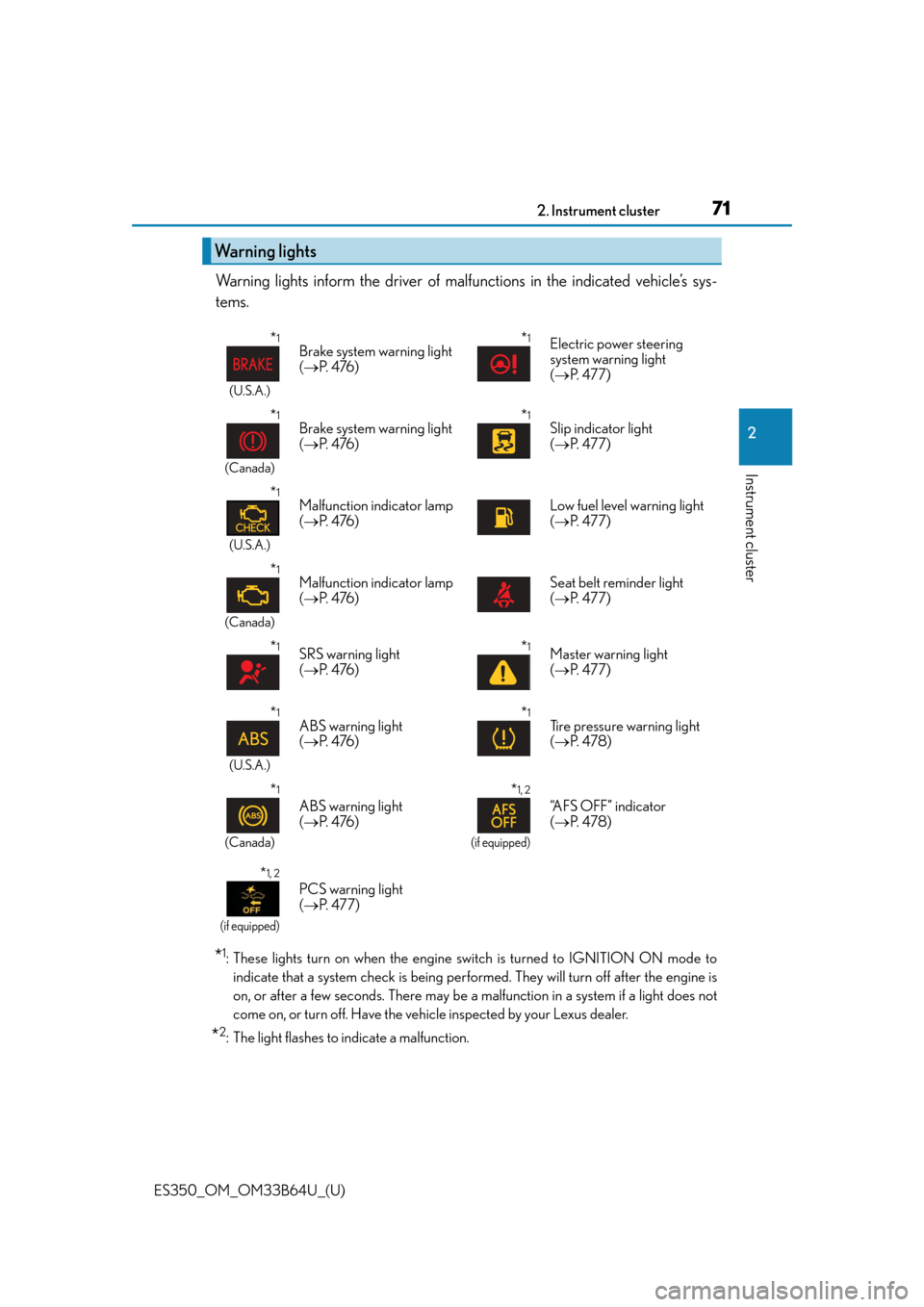
Warning lights inform the driver of malfunctions in the indicated vehicle’s sys-
tems.
*1: These lights turn on when the engine switch is turned to IGNITION ON mode to indicate that a system check is being perfor med. They will turn off after the engine is
on, or after a few seconds. There may be a malfunction in a system if a light does not
come on, or turn off. Have the vehi cle inspected by your Lexus dealer.
*2: The light flashes to indicate a malfunction.
Warning lights
*1
(U.S.A.)
Brake system warning light
( P. 4 76 )*1Electric power steering
system warning light
( P. 477)
*1
(Canada)
Brake system warning light
( P. 4 76 )*1Slip indicator light
( P. 477)
*1
(U.S.A.)
Malfunction indicator lamp
( P. 4 76 )Low fuel level warning light
( P. 477)
*1
(Canada)
Malfunction indicator lamp
( P. 4 76 )Seat belt reminder light
( P. 477)
*1SRS warning light
( P. 4 76 )*1Master warning light
( P. 477)
*1
(U.S.A.)
ABS warning light
( P. 4 76 )*1Tire pressure warning light
( P. 4 7 8 )
*1
(Canada)
ABS warning light
( P. 4 76 )
*1, 2
(if equipped)
“AFS OFF” indicator
( P. 4 7 8 )
*1, 2
(if equipped)
PCS warning light
( P. 477)
Page 73 of 576

ES350_OM_OM33B64U_(U)
732. Instrument cluster
2
Instrument cluster
*1: These lights turn on when the engine switch is turned to IGNITION ON mode toindicate that a system check is being perfor med. They will turn off after the engine is
on, or after a few seconds. There may be a malfunction in a system if a light does not
come on, or turn off. Have the vehi cle inspected by your Lexus dealer.
*2: The light flashes to indicate that the system is operating.
*3: The light turns on when the system is turned off.
*4: In order to confirm operation, the BSM ou tside rear view mirror indicators illuminate
in the following situations:
• When the engine switch is turned to IGNITION ON mode while the BSM main
switch is set to ON.
• When the BSM main switch is set to ON while the engine switch is in IGNITION
ON mode.
If the system is functioning correctly, the BSM outside rear view mirror indicators will
turn off after a few seconds.
If the BSM outside rear view mirror indica tors do not illuminate or do not turn off,
there may be a malfunction with the system. If this occurs, have the vehicle inspected
by your Lexus dealer.
*5: This light illuminates on the outside rear view mirrors.
*6: This light illuminates on the center panel.
*7: When the outside temperature is approximately 37 F (3 C) or lower, the indicator
will flash for approximately 10 seconds, then stay on.
WA R N I N G
■If a safety system warning light does not come on
Should a safety system light such as the ABS and SRS warning light not come on when
you start the engine, this could mean that these systems are not available to help pro-
tect you in an accident, which could result in death or serious injury. Have the vehicle
inspected by your Lexus dealer immediately if this occurs.
Page 74 of 576
74
ES350_OM_OM33B64U_(U)2. Instrument cluster
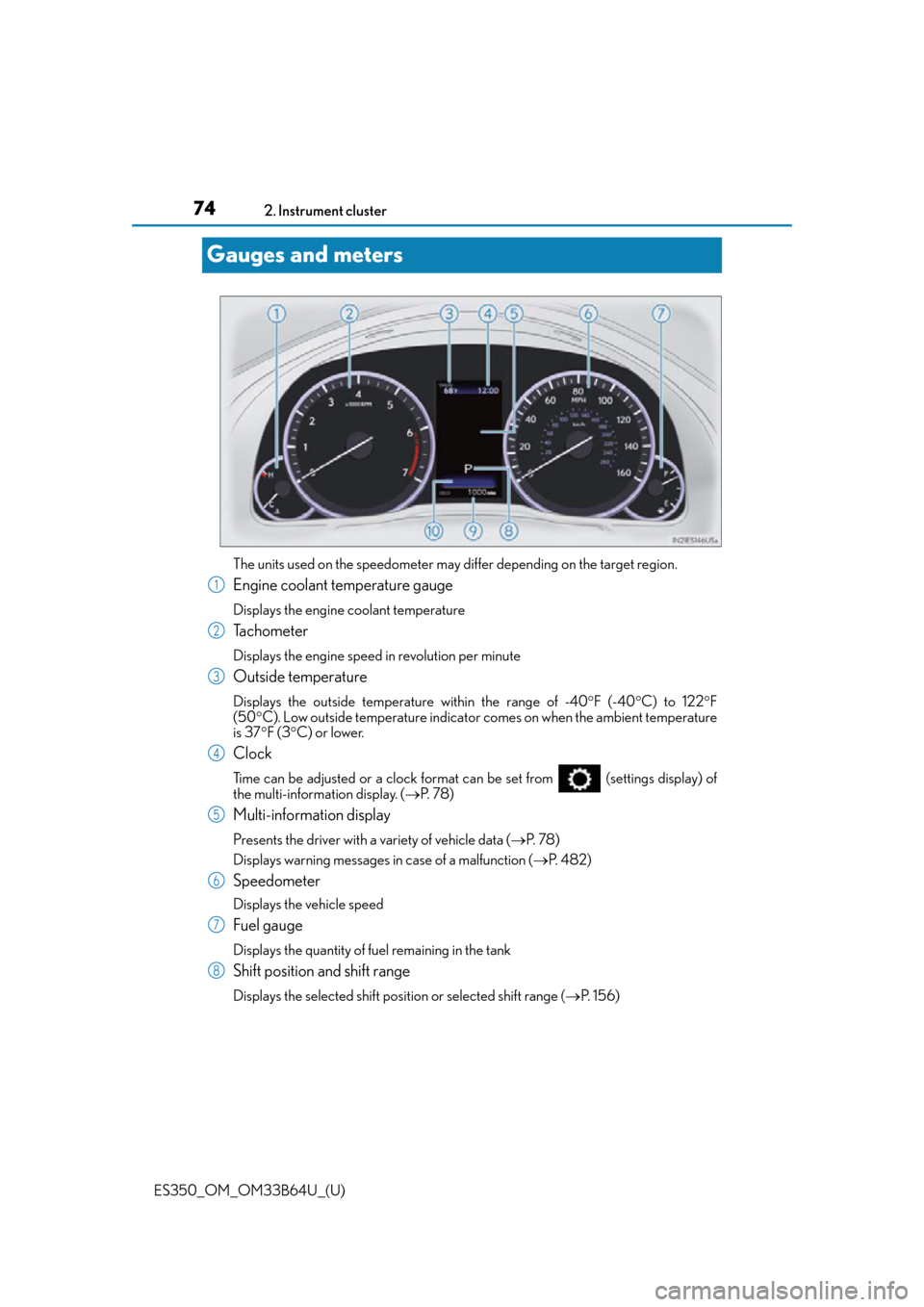
Gauges and meters
The units used on the speedometer may differ depending on the target region.
Engine coolant temperature gauge
Displays the engine coolant temperature
Tachometer
Displays the engine speed in revolution per minute
Outside temperature
Displays the outside temperature within the range of -40
F (-40 C) to 122 F
(50 C). Low outside temperature indicator comes on when the ambient temperature
is 37 F (3 C) or lower.
Clock
Time can be adjusted or a clock format can be set from (settings display) of
the multi-information display. ( P. 7 8 )
Multi-information display
Presents the driver with a variety of vehicle data ( P. 7 8 )
Displays warning messages in case of a malfunction ( P. 4 8 2 )
Speedometer
Displays the vehicle speed
Fuel gauge
Displays the quantity of fuel remaining in the tank
Shift position and shift range
Displays the selected shift posi tion or selected shift range (P. 1 5 6 )
1
2
3
4
5
6
7
8
Page 75 of 576
ES350_OM_OM33B64U_(U)
752. Instrument cluster
2
Instrument cluster
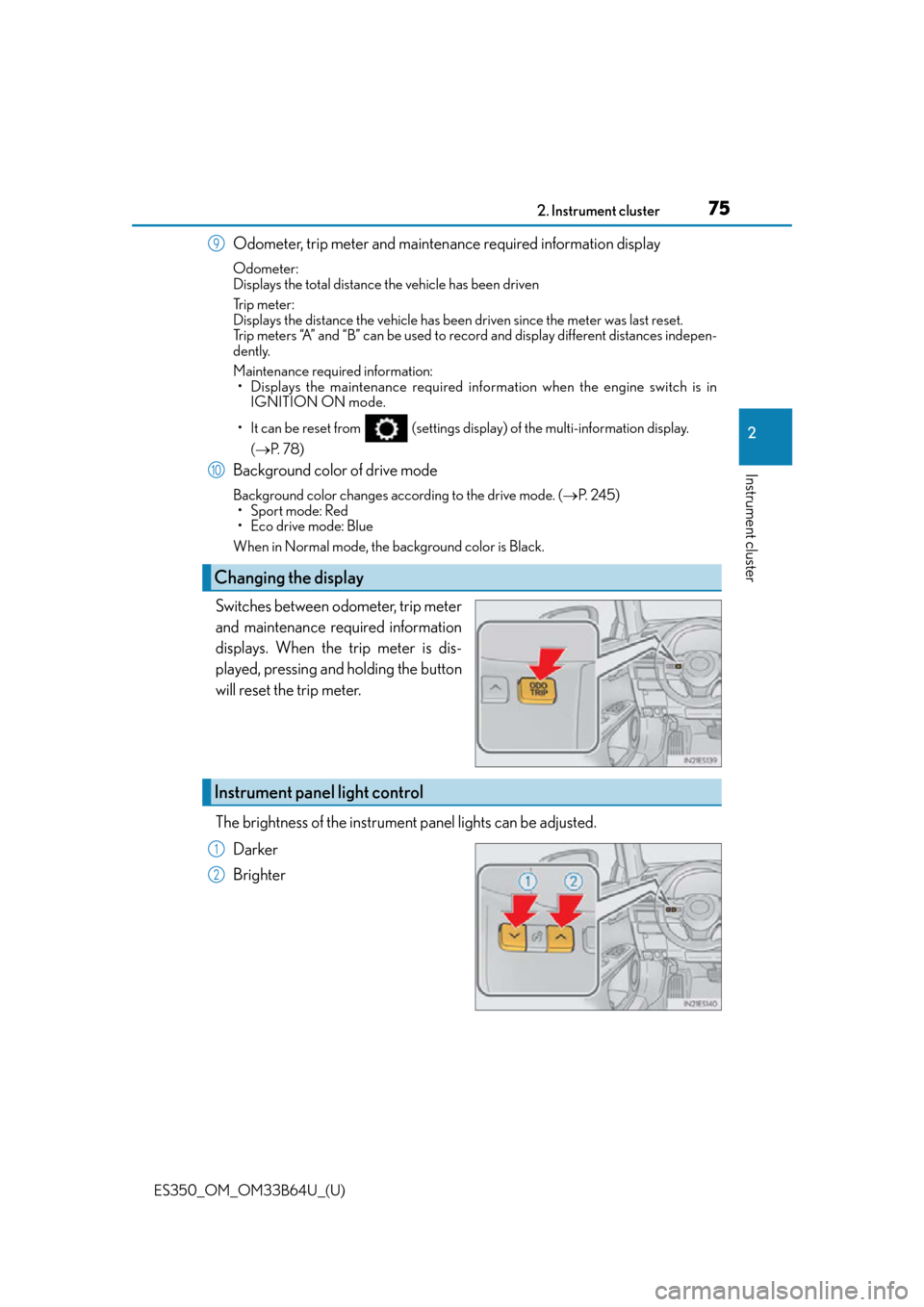
Odometer, trip meter and maintenance required information display
Odometer:
Displays the total distance the vehicle has been driven
Tr i p m e t e r :
Displays the distance the vehicle has been driven since the meter was last reset.
Trip meters “A” and “B” can be used to record and display different distances indepen-
dently.
Maintenance required information:
• Displays the maintenance required info rmation when the engine switch is in
IGNITION ON mode.
• It can be reset from (settings displa y) of the multi-information display.
( P. 7 8 )
Background color of drive mode
Background color changes according to the drive mode. ( P. 2 4 5 )
• Sport mode: Red
• Eco drive mode: Blue
When in Normal mode, the background color is Black.
Switches between odometer, trip meter
and maintenance required information
displays. When the trip meter is dis-
played, pressing and holding the button
will reset the trip meter.
The brightness of the instrument panel lights can be adjusted.
Darker
Brighter
Changing the display
9
10
Instrument panel light control
1
2
Page 76 of 576
76
ES350_OM_OM33B64U_(U)2. Instrument cluster
■The meters and display illuminate when
The engine switch is in IGNITION ON mode.
■Instrument panel brightness adjustment
The instrument panel brig
htness levels when the tail ligh ts are on and off can be adjusted
individually. However, when the surroundings ar e bright (daytime, etc.), turning on the tail
lights will not change the instru ment panel brightness. At this time, any adjustments made
to the instrument panel bright ness levels will be applied to both settings at once.
■Limitation of brightness adjustment
The brightness of the instrume nt panel lights is automatically adjusted based on the light
sensor detecting how bright the surroundings are. However, if the instrument panel
brightness has been manually set to either th e brightest or darkest setting, the automatic
adjustment will not be performed.
■Outside temperature display
●In the following situations, the correct outside temperature may not be displayed, or the
display may take longer than normal to change.
• When stopped, or driving at low speeds (less than 12 mph [20 km/h])
• When the outside temperature has change d suddenly (at the entrance/exit of a
garage, tunnel, etc.)
• When the vehicle is parked in direct sunlight
●When “--” or “E” is displayed, the system may be malfunctioning.
Take your vehicle to your Lexus dealer.
■Pop-up display
In some situations, a pop-up display will be temporarily displayed on the multi-informa-
tion display or the odometer/trip meter/ maintenance required information screen.
The pop-up display function can be set on/off. ( P. 5 3 4 )
■Liquid crystal display
Small spots or light spots may appear on the display. This phenomenon is characteristic
of liquid crystal displays, and there is no problem continuing to use the display.
■Customization
The meter display can be customized on the multi-information display.
(Customizable features P. 5 3 3 )
WA R N I N G
■The information display at low temperatures
Allow the interior of the vehicle to warm up before using the liquid crystal information
display. At extremely low temperatures, th e information display monitor may respond
slowly, and display changes may be delayed.
For example, there is a lag between the driver’s shifting and the new gear number
appearing on the display. This lag could cau se the driver to downshift again, causing
rapid and excessive engine braking and po ssibly an accident resulting in personal
death or injury.
Page 77 of 576
ES350_OM_OM33B64U_(U)
772. Instrument cluster
2
Instrument cluster
NOTICE
■To prevent damage to the engine and its components
●Do not let the indicator needle of the tachometer enter the red zone, which indicates
the maximum engine speed.
●The engine may be overheating if the engine coolant temperature gauge is in the red
zone (H); or “Engine Coolant Temp High” is shown on the multi-information display.
In this case, immediately stop the vehicle in a safe place, and check the engine after it
has cooled completely. ( P. 5 0 5 )
Page 79 of 576
ES350_OM_OM33B64U_(U)
792. Instrument cluster
2
Instrument cluster
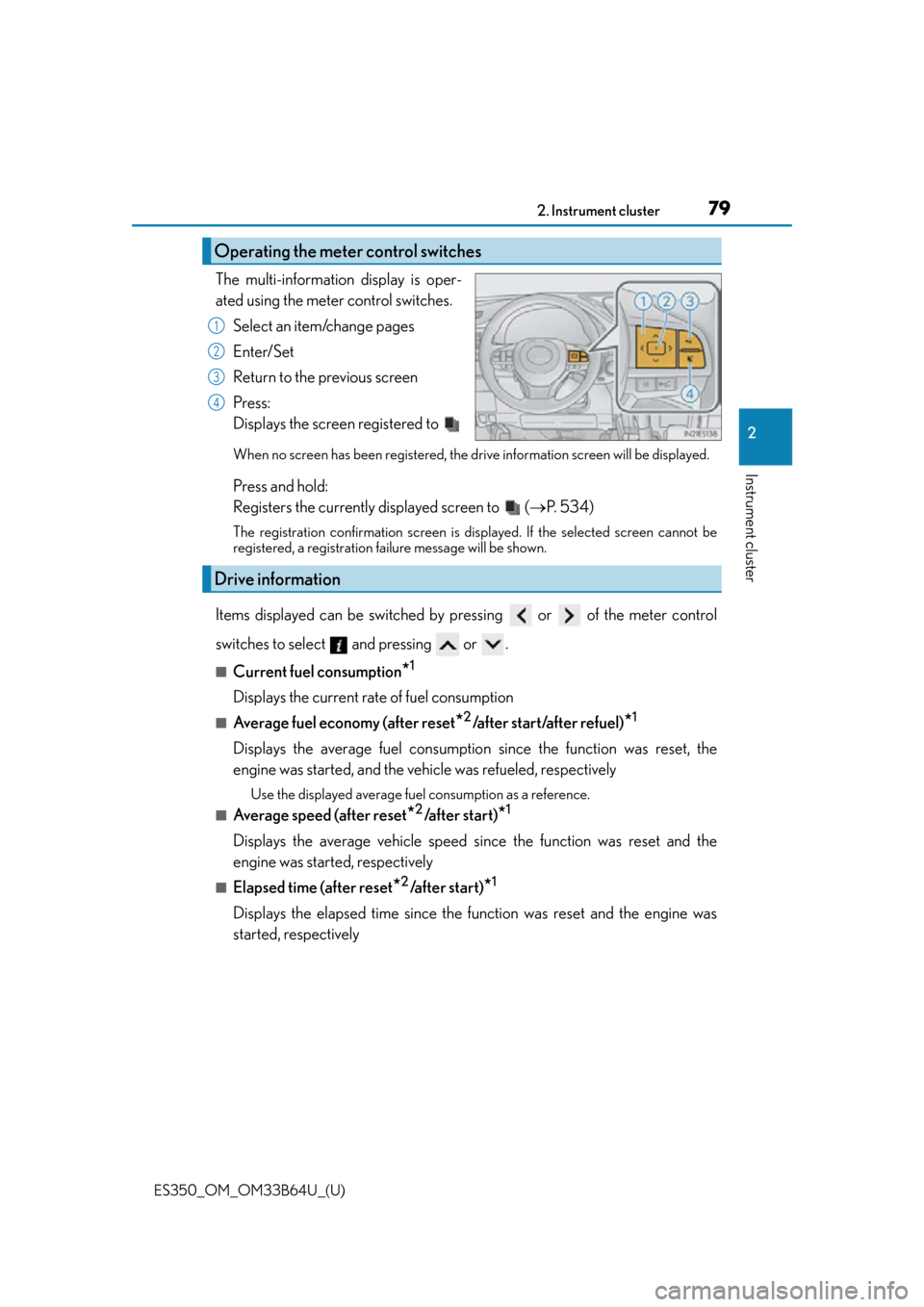
The multi-information display is oper-
ated using the meter control switches.Select an item/change pages
Enter/Set
Return to the previous screen
Press:
Displays the screen registered to
When no screen has been registered, the drive information screen will be displayed.
Press and hold:
Registers the currently displayed screen to ( P. 5 3 4 )
The registration confirmation screen is di splayed. If the selected screen cannot be
registered, a registration failure message will be shown.
Items displayed can be switched by pressing or of the meter control
switches to select and pressing or .
■Current fuel consumption*1
Displays the current rate of fuel consumption
■Average fuel economy (after reset*2/after start/after refuel)*1
Displays the average fuel consumptio n since the function was reset, the
engine was started, and the vehicle was refueled, respectively
Use the displayed average fuel consumption as a reference.
■Average speed (after reset*2/a f t e r s t a r t )*1
Displays the average vehicle speed since the function was reset and the
engine was started, respectively
■Elapsed time (after reset*2/after start)*1
Displays the elapsed time since the function was reset and the engine was
started, respectively
Operating the meter control switches
1
2
3
4
Drive information