ignition Lexus ES350 2016 s / Owner's Guide
[x] Cancel search | Manufacturer: LEXUS, Model Year: 2016, Model line: ES350, Model: Lexus ES350 2016Pages: 576, PDF Size: 8.3 MB
Page 152 of 576
152
ES350_OM_OM33B64U_(U)4-2. Driving procedures
Stop the vehicle.
Shift the shift lever to P.
Set the parking brake. (
P. 1 6 0 )
Press the engine switch.
Release the brake pedal and check that “POWER ON” on the multi-informa-
tion display is off.
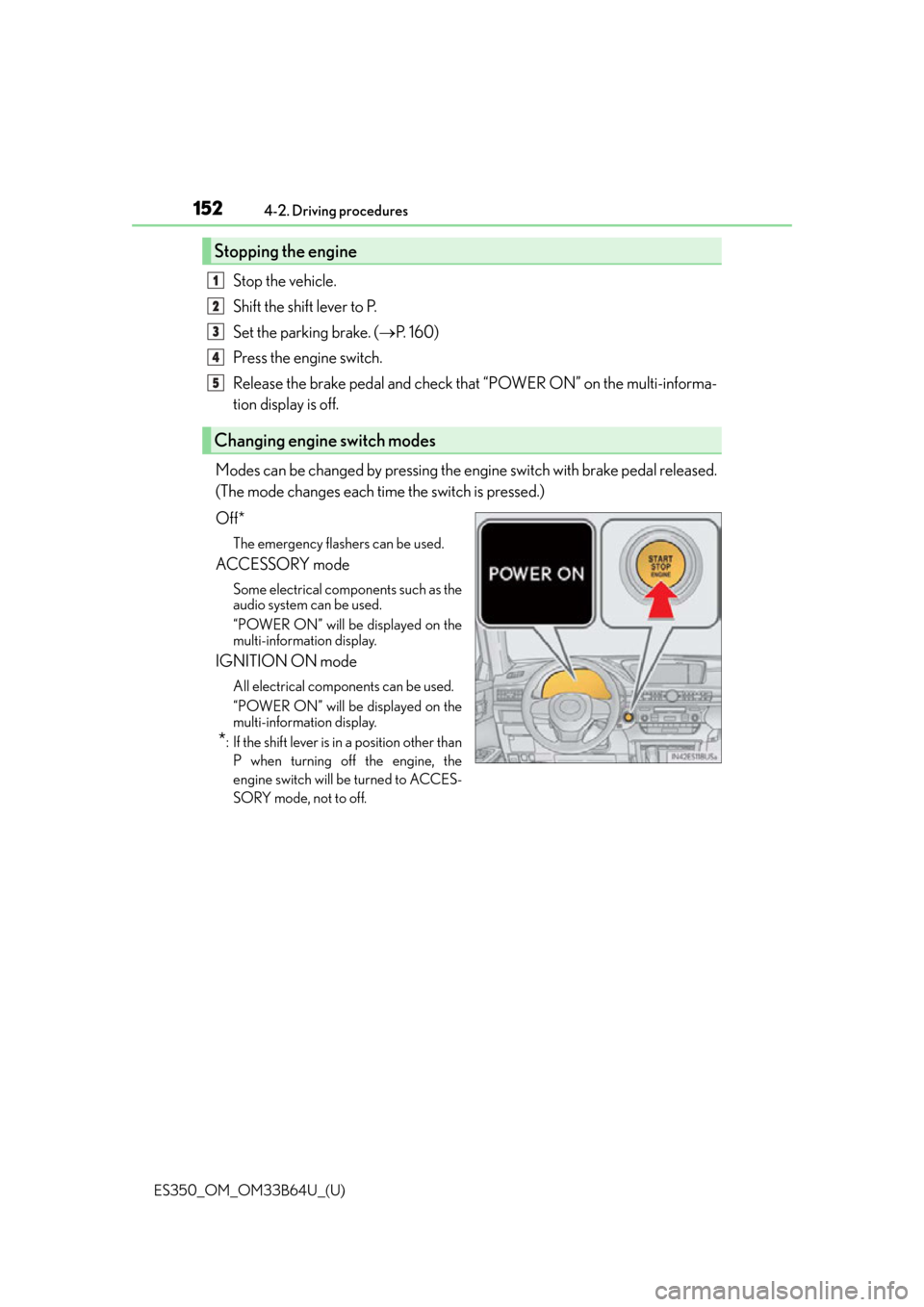
Modes can be changed by pressing the engine switch with brake pedal released.
(The mode changes each time the switch is pressed.)
Off*
The emergency flashers can be used.
ACCESSORY mode
Some electrical components such as the
audio system can be used.
“POWER ON” will be displayed on the
multi-information display.
IGNITION ON mode
All electrical components can be used.
“POWER ON” will be displayed on the
multi-information display.
*: If the shift lever is in a position other than P when turning off the engine, the
engine switch will be turned to ACCES-
SORY mode, not to off.
Stopping the engine
Changing engine switch modes
1
2
3
4
5
Page 153 of 576

ES350_OM_OM33B64U_(U)
1534-2. Driving procedures
4
Driving
If the engine is stopped with the shift lever in a position other than P, the engine
switch will not be turned off but inst ead be turned to ACCESSORY mode. Per-
form the following procedure to turn the switch off:
Check that the parking brake is set.
Shift the shift lever to P.
Check that “Turn Off Vehicle” is displayed on the multi-information display
and then press the engine switch once.
Check that “Turn Off Vehicle” on the multi-information display is off.
■Auto power off function
If the vehicle is left in ACCESSORY mode for more than 20 minutes or IGNITION ON
mode (the engine is not running) for more than an hour with the shift lever in P, the engine
switch will automatically turn off. However, this function cannot entirely prevent battery
discharge. Do not leave the vehicle with the engine switch in ACCESSORY or IGNI-
TION ON mode for long periods of ti me when the engine is not running.
■Electronic key battery depletion
P. 9 1
■Conditions affe cting operation
P. 1 0 8
■Notes for the entry function
P. 1 0 9
■If the engine does not start
●The engine immobilizer system may not have been deactivated. ( P. 6 5 )
Contact your Lexus dealer.
●Check that the shift lever is securely set in P. The engine may not start if the shift lever is
displaced out of P. “Shift to P position to Start” will be displayed on the multi-information
display.
■Steering lock
After turning the engine switch off and opening and closing the doors, the steering wheel
will be locked due to the stee ring lock function. Operating the engine switch again auto-
matically cancels the steering lock.
When stopping the engine with the shift lever in a position other than P
1
2
3
4
Page 155 of 576

ES350_OM_OM33B64U_(U)
1554-2. Driving procedures
4
Driving
WA R N I N G
■When starting the engine
Always start the engine while sitting in the driver’s seat. Do not depress the accelerator
pedal while starting the engine under any circumstances.
Doing so may cause an accident resu lting in death or serious injury.
■Caution while driving
If engine failure occurs while the vehicle is moving, do not lock or open the doors until
the vehicle reaches a safe and complete stop. Activation of the steering lock in this cir-
cumstance may lead to an accident, re sulting in death or serious injury.
■Stopping the engine in an emergency
If you want to stop the engine in an emergency while driving the vehicle, press and hold
the engine switch for more than 2 seconds, or press it briefly 3 times or more in succes-
sion. ( P. 4 6 9 )
However, do not touch the engine switch while driving except in an emergency. Turning
the engine off while driving will not cause lo ss of steering or braking control, but the
power assist to these systems will be lost. Th is will make it more difficult to steer and
brake, so you should pull over and stop the vehicle as soon as it is safe to do so.
NOTICE
■To prevent battery discharge
●Do not leave the engine switch in ACCESSORY or IGNITION ON mode for long
periods of time without the engine running.
●If “POWER ON” is displayed on the multi- information display, the engine switch is
not off. Exit the vehicle after turning the engine switch off.
●Do not stop the engine when the shift lever is in a position other than P. If the engine is
stopped in another shift lever position, the engine switch will not be turned off but
instead be turned to ACCESSORY mode. If the vehicle is left in ACCESSORY
mode, battery discharge may occur.
■When starting the engine
●Do not race a cold engine.
●If the engine becomes difficult to start or stalls frequently, have your vehicle checked
by your Lexus dealer immediately.
■Symptoms indicating a malfun ction with the engine switch
If the engine switch seems to be operating somewhat differently than usual, such as the
switch sticking slightly, there may be a malf unction. Contact your Lexus dealer immedi-
ately.
Page 156 of 576
156
ES350_OM_OM33B64U_(U)4-2. Driving procedures
Automatic transmission
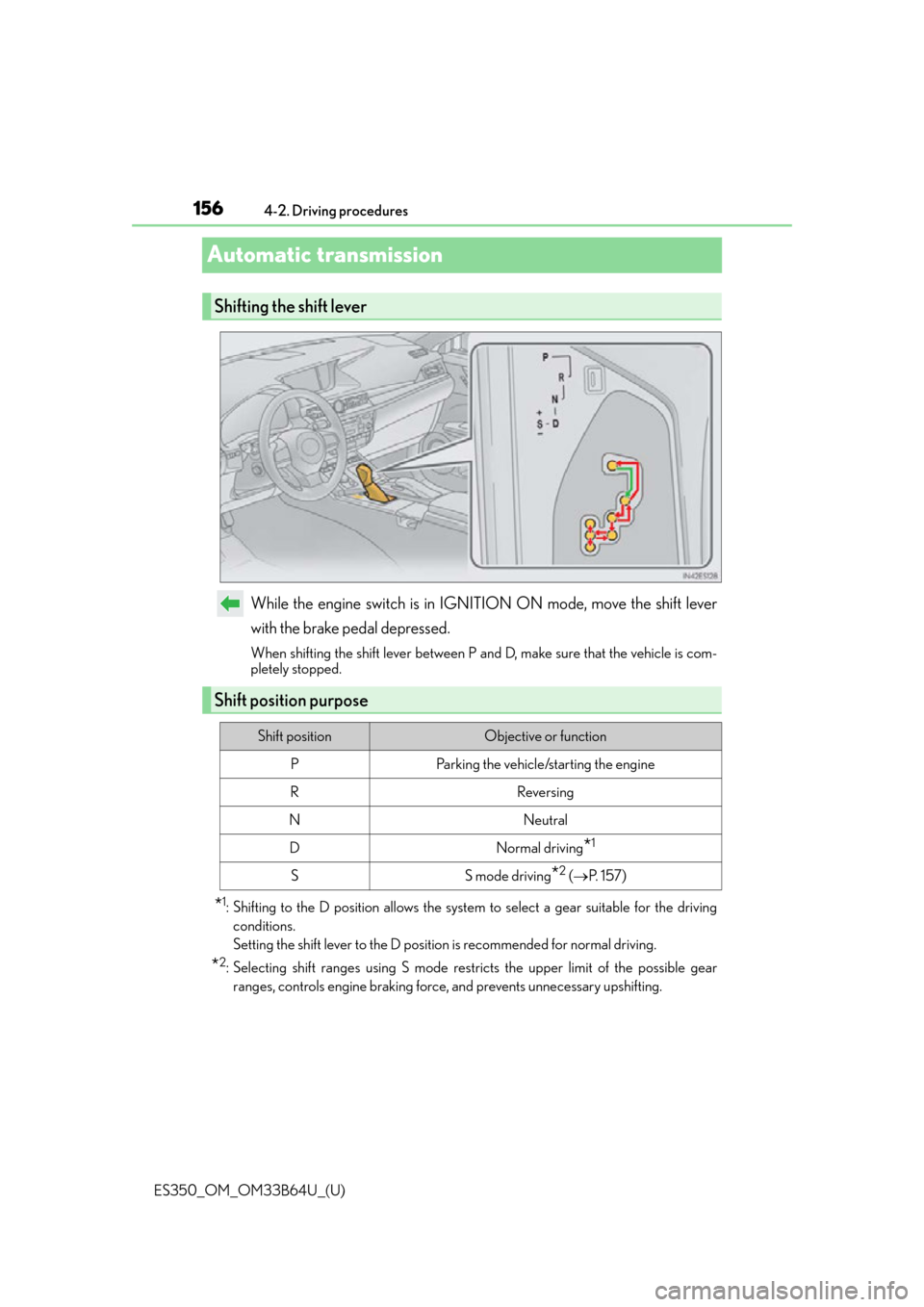
While the engine switch is in IGNITION ON mode, move the shift lever
with the brake pedal depressed.
When shifting the shift lever between P and D, make sure that the vehicle is com-
pletely stopped.
*1: Shifting to the D position allows the system
to select a gear suitable for the driving
conditions.
Setting the shift lever to the D positi on is recommended for normal driving.
*2: Selecting shift ranges using S mode rest ricts the upper limit of the possible gear
ranges, controls engine braking force, and prevents unnecessary upshifting.
Shifting the shift lever
Shift position purpose
Shift positionObjective or function
PParking the vehicle/starting the engine
RReversing
NNeutral
DNormal driving*1
SS mode driving*2 ( P. 1 5 7 )
Page 159 of 576
159
ES350_OM_OM33B64U_(U)4-2. Driving procedures
4
Driving
Turn signal lever
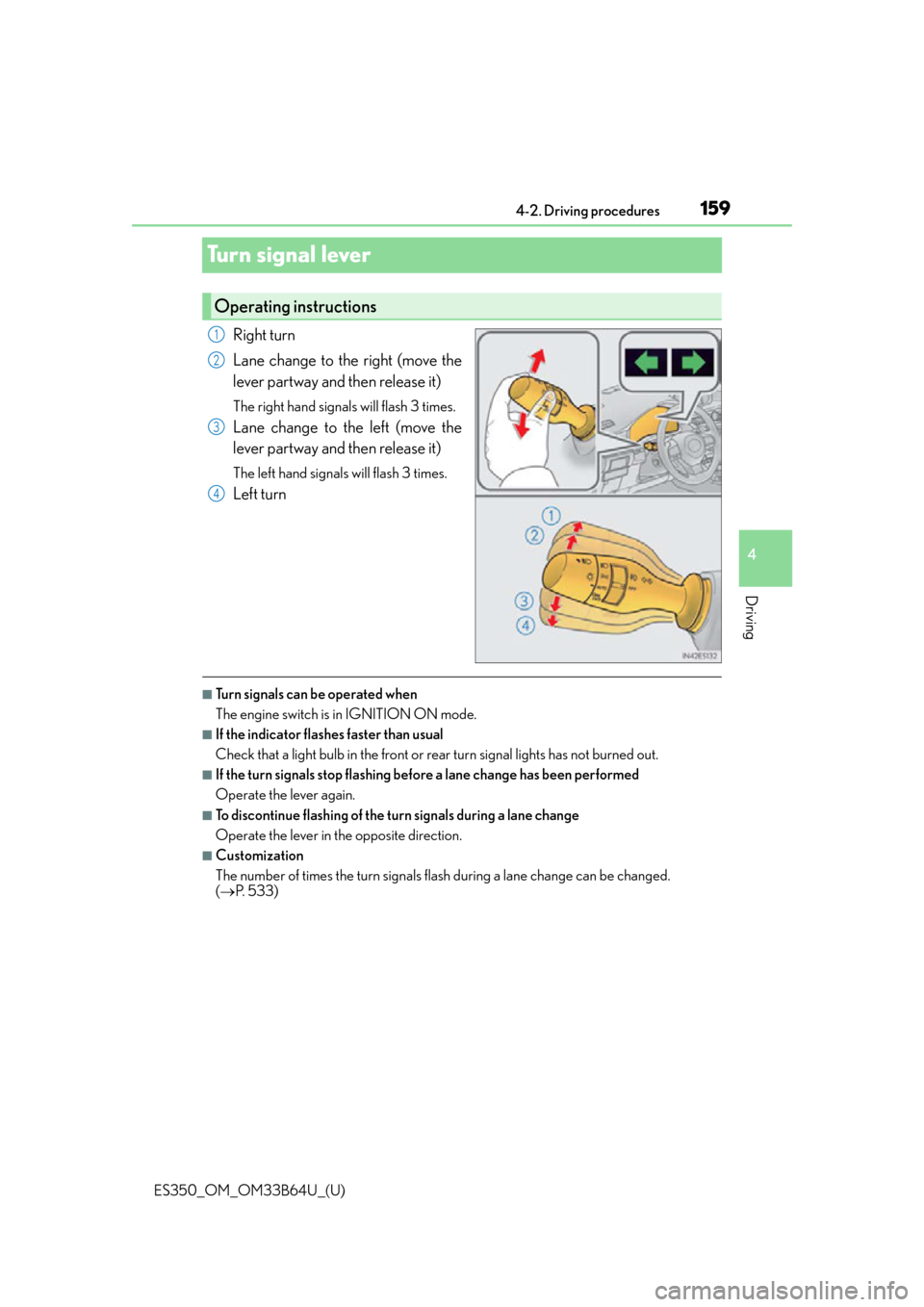
Right turn
Lane change to the right (move the
lever partway and then release it)
The right hand signals will flash 3 times.
Lane change to the left (move the
lever partway and then release it)
The left hand signals will flash 3 times.
Left turn
■Turn signals can be operated when
The engine switch is in IGNITION ON mode.
■If the indicator flashes faster than usual
Check that a light bulb in the front or rear turn signal lights has not burned out.
■If the turn signals stop flashing befo
re a lane change has been performed
Operate the lever again.
■To discontinue flashing of the turn signals during a lane change
Operate the lever in the opposite direction.
■Customization
The number of times the turn signals flash during a lane change can be changed.
( P. 5 3 3 )
Operating instructions
1
2
3
4
Page 161 of 576
161
ES350_OM_OM33B64U_(U)4-3. Operating the lights and wipers
4
Driving
Headlight switch
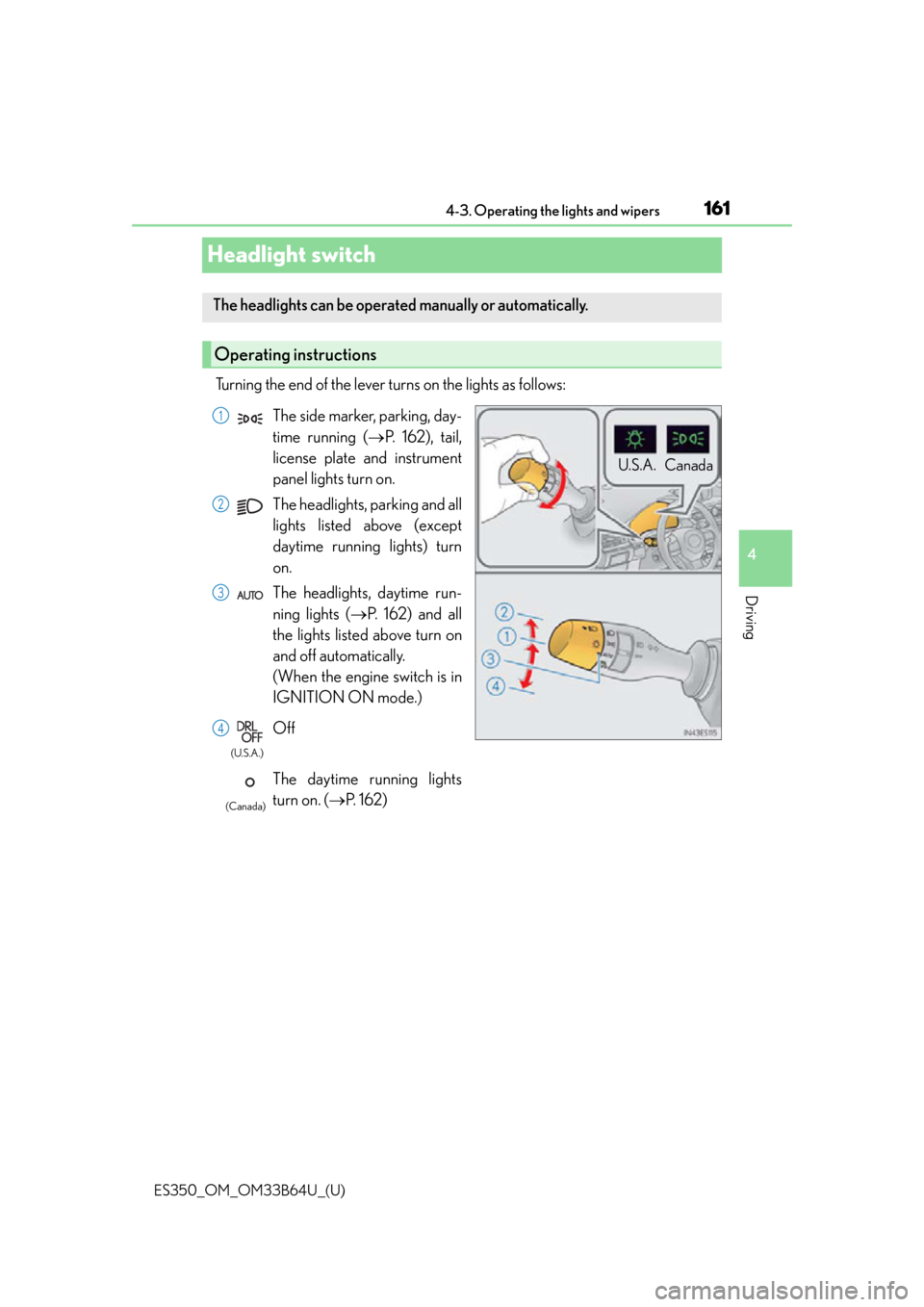
Turning the end of the lever turns on the lights as follows:
The headlights can be operated manually or automatically.
Operating instructions
U.S.A. Canada
The side marker, parking, day-
time running (
P. 162), tail,
license plate and instrument
panel lights turn on.
The headlights, parking and all
lights listed above (except
daytime running lights) turn
on.
The headlights, daytime run-
ning lights ( P. 162) and all
the lights listed above turn on
and off automatically.
(When the engine switch is in
IGNITION ON mode.)
Off
The daytime running lights
turn on. ( P. 1 6 2 )1
2
3
4
(U.S.A.)
(Canada)
Page 163 of 576

ES350_OM_OM33B64U_(U)
1634-3. Operating the lights and wipers
4
Driving
■Automatic light off system
When the light switch is in , or : The headlights and tail lights turn off 30
seconds after the engine switch is turned to ACCESSORY mode or turned off and a
door is opened and all of the doors and trunk are closed. (The lights turn off immediately
if on the key is pressed twice after all the doors are closed.)
To turn the lights on again, turn the engine switch to IGNITION ON mode, or turn the
light switch off once and then back to or .
If any of the doors or trunk lid is kept open , the lights automatically turn off after 20 min-
utes.
■Light reminder buzzer
A buzzer sounds when the engine switch is turned off or turned to ACCESSORY mode
and the driver’s door is opened while the lights are turned on.
■Automatic headlight leveling system (if equipped)
The level of the headlights is automatically ad justed according to the number of passen-
gers and the loading condition of the vehicle to ensure that the headlights do not inter-
fere with other road users.
■If “Headlight System Malfunction Visit Your Dealer” is displayed on the multi-informa-
tion display
The system may be malfunctioning. Have the vehicle inspected by your Lexus dealer.
■Customization
Settings (e.g. light sensor se nsitivity) can be changed.
(Customizable features: P. 5 3 3 )
NOTICE
■To prevent battery discharge
Do not leave the lights on longer than ne cessary when the engine is not running.
Page 167 of 576

ES350_OM_OM33B64U_(U)
1674-3. Operating the lights and wipers
4
Driving
■Temporarily lowering sensor sensitivity
The sensitivity of the sensor can be temporarily lowered.Turn the engine switch off while the following conditions are met.
• The headlight switch is in or .
• The headlight switch lever is in high beam position.
• Automatic High Beam switch is on. Turn the engine switch to IGNITION ON mode.
Within 30 seconds after , repeat pulling the headlight switch lever to the original
position then pushing it to the high beam position quickly 10 times, then leave the
lever in high beam position.
If the sensitivity is changed, the Automatic High Beam indicator is turn on and off
three times.
Automatic High Beam (headlights) may turn on even the vehicle is stopped.
1
2
32
4
Page 170 of 576
170
ES350_OM_OM33B64U_(U)4-3. Operating the lights and wipers
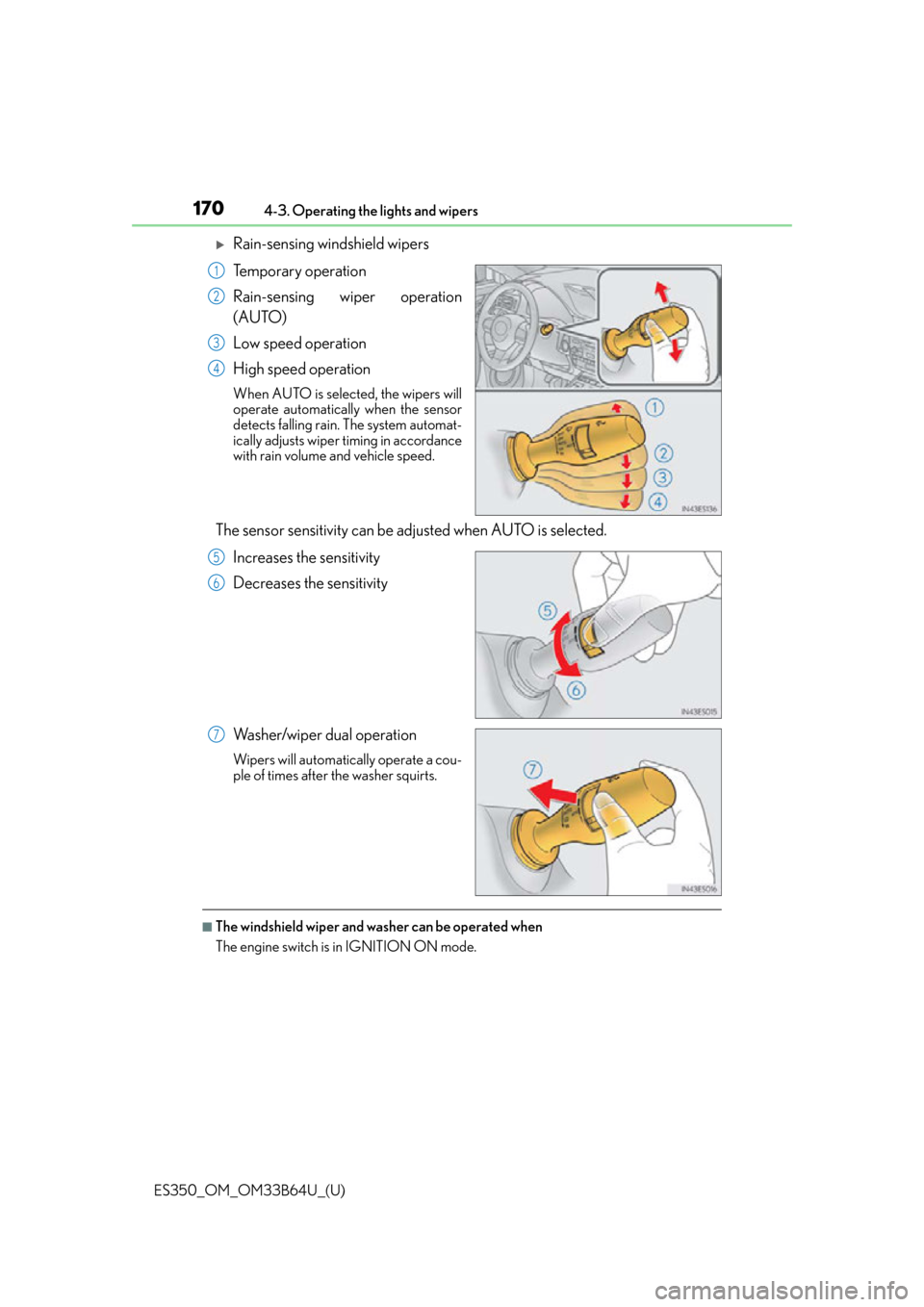
Rain-sensing windshield wipers
Temporary operation
Rain-sensing wiper operation
(AUTO)
Low speed operation
High speed operation
When AUTO is selected, the wipers will
operate automatically when the sensor
detects falling rain. The system automat-
ically adjusts wiper timing in accordance
with rain volume and vehicle speed.
The sensor sensitivity can be ad
justed when AUTO is selected.
Increases the sensitivity
Decreases the sensitivity
Washer/wiper dual operation
Wipers will automatically operate a cou-
ple of times after the washer squirts.
■The windshield wiper and washer can be operated when
The engine switch is in IGNITION ON mode.
1
2
3
4
5
6
7
Page 171 of 576

ES350_OM_OM33B64U_(U)
1714-3. Operating the lights and wipers
4
Driving
■Raindrop sensor (vehicles with rain-sensing windshield wipers)
●If the wiper switch is turned to AUTO position while the engine switch is in IGNITION
ON mode, the wipers will operate once to show that AUTO mode is activated.
●When the sensor sensitivity ring is turned toward high while in AUTO mode, the wipers
will operate once to indicate that the sensor sensitivity is enhanced.
●If the temperature of the raindrop sensor is 185°F (85°C) or higher, or -22°F
(-30°C) or lower, automatic operation ma y not occur. In this case, operate the
wipers in any mode other than AUTO mode.
■If no windshield washer fluid sprays
Check that the washer nozzles are not blocked if there is washer fluid in the windshield
washer fluid reservoir.
●The raindrop sensor judges the amount of
raindrops.
An optical sensor is ad opted. It may not oper-
ate properly when sunlight from the rising or
setting of the sun intermittently strikes the
windshield, or if bugs etc. are present on the
windshield.
WA R N I N G
■Caution regarding the use of windshield wi pers in AUTO mode (vehicles with rain-
sensing windshield wipers)
The windshield wipers may operate unexpectedly if the sensor is touched or the wind-
shield is subject to vibration in AUTO mode. Take care that your fingers or anything
else do not become caught in the windshield wipers.
■Caution regarding the use of washer fluid
When it is cold, do not use the washer fl uid until the windshield becomes warm. The
fluid may freeze on the windshield and cause lo w visibility. This may lead to an accident,
resulting in death or serious injury.