steering Lexus ES350 2016 s / Repair Manual
[x] Cancel search | Manufacturer: LEXUS, Model Year: 2016, Model line: ES350, Model: Lexus ES350 2016Pages: 576, PDF Size: 8.3 MB
Page 255 of 576

255
ES350_OM_OM33B64U_(U)4-5. Using the driving support systems
4
Driving
Driving assist systems
◆ABS (Anti-lock Brake System)
Helps to prevent wheel lock when the brakes are applied suddenly, or if the
brakes are applied while drivin
g on a slippery road surface
◆Brake assist
Generates an increased level of braking force after the brake pedal is
depressed when the system detects a panic stop situation
◆VSC (Vehicle Stability Control)
Helps the driver to control skidding when swerving suddenly or turning on
slippery road surfaces
◆Enhanced VSC (Enhanced Vehicle Stability Control)
Provides cooperative control of the ABS, TRAC, VSC and EPS.
Helps to maintain directional stability when swerving on slippery road sur-
faces by controlling steering performance.
◆TRAC (Traction Control)
Helps to maintain drive power and prevent the drive wheels from spinning
when starting the vehicle or accelerating on slippery roads
◆Hill-start assist control
Helps to prevent the vehicle from rolling backward when starting on an
incline.
To help enhance driving safety and performance, the following systems oper-
ate automatically in response to various driving situations. Be aware, however,
that these systems are supplementary and should not be relied upon too
heavily when operating the vehicle.
Page 256 of 576
256
ES350_OM_OM33B64U_(U)4-5. Using the driving support systems
◆EPS (Electric Power Steering)
Employs an electric motor to reduce the
amount of effort needed to turn the
steering wheel
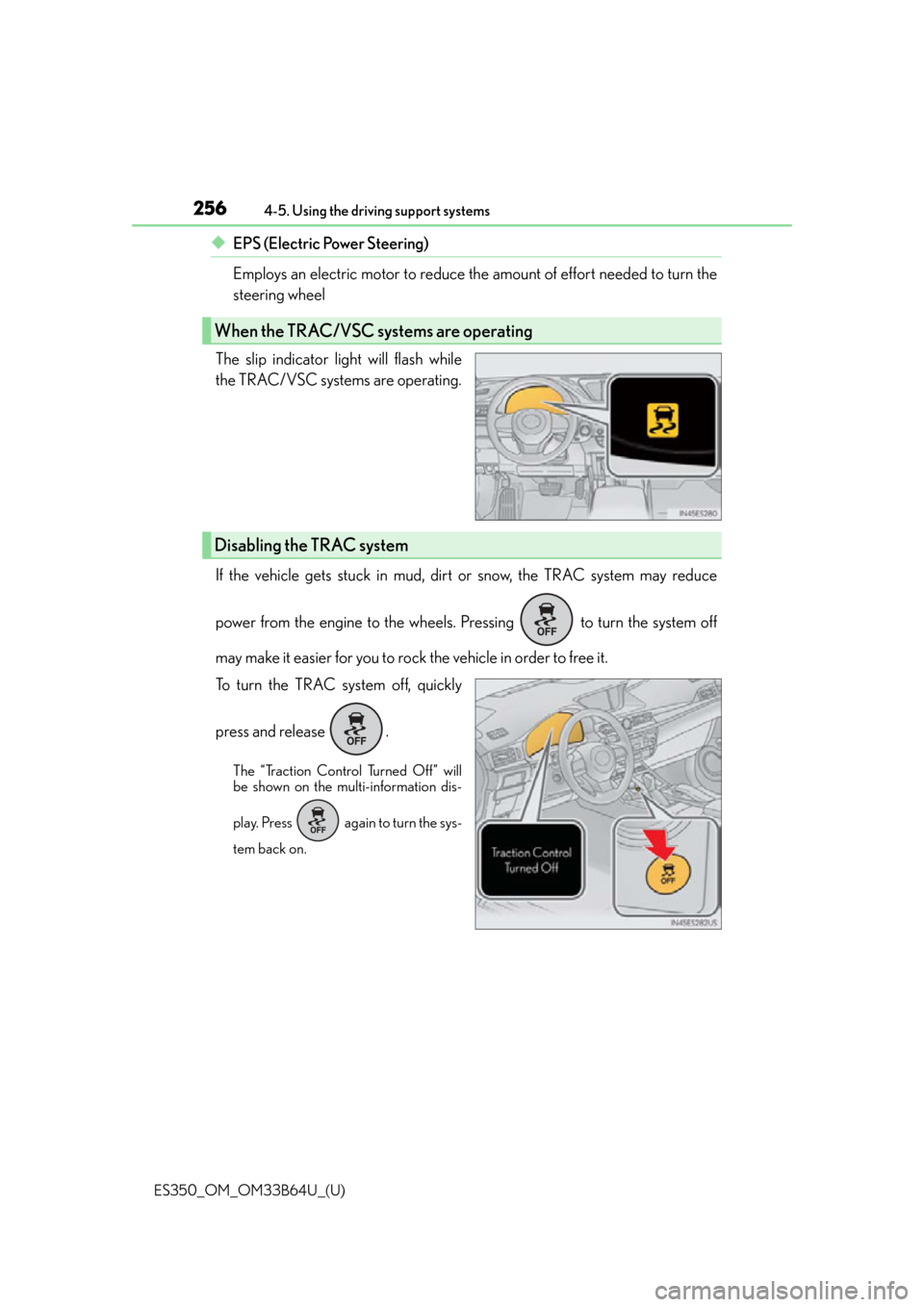
The slip indicator light will flash while
the TRAC/VSC systems are operating.
If the vehicle gets stuck in mud, dirt or snow, the TRAC system may reduce
power from the engine to the wheels. Pressing to turn the system off
may make it easier for you to rock the vehicle in order to free it.
To turn the TRAC system off, quickly
press and release .
The “Traction Control Turned Off” will
be shown on the multi-information dis-
play. Press again to turn the sys-
tem back on.
When the TRAC/VSC systems are operating
Disabling the TRAC system
Page 257 of 576

ES350_OM_OM33B64U_(U)
2574-5. Using the driving support systems
4
Driving
■Turning off both TRAC and VSC systems
To turn the TRAC and VSC systems off, press and hold for more than 3 seconds
while the vehicle is stopped.
The VSC OFF indicator light will come on an d the “Traction Control Turned Off” will be
shown on the multi- information display.
*
Press again to turn the systems back on.
*: On vehicles with pre-collision system, pre-collision brake assist and pre-collision brak-
ing will also be disabled. The PCS warning light will come on and the message will be
shown on the multi-information display. ( P. 1 8 3 )
■When the message is displayed on the mu lti-information display showing that TRAC
has been disabled even if the VSC OFF switch has not been pressed
TRAC cannot be operated. Contact your Lexus dealer.
■When the battery is disconnected
The steering wheel may move fr om its straight forward position, but this will be corrected
automatically when driving.
■Sounds and vibrations caused by the ABS, brake assist, TRAC, VSC and hill-start assist
control systems
●A sound may be heard from the engine compartment when the brake pedal is
depressed repeatedly, when the engine is started or just after the vehicle begins to
move. This sound does not indicate that a malfunction has occurred in any of these sys-
tems.
●Any of the following condit ions may occur when the above systems are operating.
None of these indicates that a malfunction has occurred.
• Vibrations may be felt through the vehicle body and steering.
• A motor sound may be heard after the vehicle comes to a stop.
• The brake pedal may pulsate slig htly after the ABS is activated.
• The brake pedal may move down s lightly after the ABS is activated.
■EPS operation sound
When the steering wheel is operated, a motor sound (whirring sound) may be heard.
This does not indicate a malfunction.
■Automatic reactivation of TRAC and VSC systems
After turing the TRAC and VSC systems of f, the systems will be automatically re-
enabled in the following situations:
●When the engine switch is turned off
●If only the TRAC system is turned off, the TRAC will turn on when vehicle speed
increases.
If both the TRAC and VSC systems are turned off, automatic re-enabling will not occur
when vehicle speed increases.
Page 258 of 576

258
ES350_OM_OM33B64U_(U)4-5. Using the driving support systems
■Operating conditions of hill-start assist control
When the following four conditions are met,
the hill-start assist control will operate:
●The shift lever is in a position other than P or N (when starting off forward/backward on
an upward incline).
●The vehicle is stopped.
●The accelerator pedal is not depressed.
●The parking brake is not engaged.
■Automatic system cancelation of hill-start assist control
The hill-start assist control will turn off in any of the following situations:
●The shift lever is moved to P or N.
●The accelerator pedal is depressed.
●The parking brake is engaged.
●Approximately 2 seconds elapse after the brake pedal is released.
■Reduced effectiveness of the EPS system
The effectiveness of the EPS system is reduced to prevent the system from overheating
when there is frequent steering input over an extended period of time. The steering
wheel may feel heavy as a result. Should this occur, refrain from excessive steering input
or stop the vehicle and turn the engine of f. The EPS system should return to normal
within 10 minutes.
Page 263 of 576

ES350_OM_OM33B64U_(U)
2634-6. Driving tips
4
Driving
WA R N I N G
■Driving with snow tires
Observe the following precautions to reduce the risk of accidents.
Failure to do so may result in a loss of vehicle control and cause death or serious injury.
●Use tires of the specified size.
●Maintain the recommended level of air pressure.
●Do not drive in excess of 75 mph (120 km/h), regardless of the type of snow tires
being used.
●Use snow tires on all, not just some wheels.
■Driving with tire chains
Observe the following precautions to reduce the risk of accidents.
Failure to do so may result in the vehicle being unable to be driven safely, and may
cause death or serious injury.
●Do not drive in excess of the speed limit specified for the tire chains being used, or 30
mph (50 km/h), whichever is lower.
●Avoid driving on bumpy road surfaces or over potholes.
●Avoid sudden acceleration, ab rupt steering, sudden braking and shifting operations
that cause sudden engine braking.
●Slow down sufficiently before entering a cu rve to ensure that vehicle control is main-
tained.
●Do not use LDA (Lane Departure Alert with steering control) system. (if equipped)
NOTICE
■Repairing or replacing snow tires
Request repairs or replacement of snow tires from Lexus dealers or legitimate tire
retailers.
This is because the removal and attachment of snow tires affects the operation of the
tire pressure warning valves and transmitters.
■Fitting tire chains
The tire pressure warning valves and transmitters may not function correctly when tire
chains are fitted.
■When standing the windshield wipers up
Raise the wipers in line with the windshield. ( P. 2 6 2 )
Failure to do so may result in dama ge to the wipers and/or the hood.
Page 264 of 576

264
ES350_OM_OM33B64U_(U)
5-1. Basic OperationsLexus Display Audio System ......................................... 266
Steering wheel audio switches........................................273
USB/AUX ports .......................... 274
5-2. Setup Setup menu ................................... 276
General settings ..........................277
Voice settings ............................... 281
Display settings ........................... 282
Lexus Display Audio system
5
Page 265 of 576

265
ES350_OM_OM33B64U_(U)
Lexus Display Audiosystem
5
5-3. Using the audio system
Selecting the audio source ..........................................284
Optimal use of the audio system ......................................... 285
Audio settings ..............................286
Audio menu screen operation ....................................289
5-4. Using the radio Radio operation .......................... 292
5-5. Playing an audio CD and MP3/WMA/AAC discs
CD player operation.................299
5-6. Using an external device Listening to an iPod .................. 306
Using USB memory device ............................................ 310
Using the AUX port................... 314
5-7. Connecting Bluetooth
®
Steps for using Bluetooth®
devices .......................................... 315
Registering a Bluetooth
®
device ............................................ 317
Selecting a Bluetooth
®
device ............................................ 318
Connecting a Bluetooth
®
audio player ................................ 319
Connecting a Bluetooth
®
phone .......................................... 320
Displaying a Bluetooth
®
device details ............................. 321
Detailed Bluetooth
®
settings.........................................322 5-8. Bluetooth
® Audio
Listening to Bluetooth
®
Audio ........................................... 323
5-9. Bluetooth
® Phone
Using a Bluetooth
®
Phone ........................................... 325
Making a call ................................ 327
Receiving a call ...........................330
Speaking on the phone............. 331
Using a Bluetooth
®
phone message........................ 334
Using the steering wheel switches....................................... 336
Bluetooth
® phone
settings ........................................ 337
5-10. Phonebook Contact settings ......................... 339
Messaging setting...................... 342
5-11. Bluetooth
®
What to do if... (Troubleshooting)....................343
Bluetooth
®................................... 346
5-12. Other function “Information” screen .................. 351
USB photo .................................... 353
Weather information ................ 355
Voice command system .......... 356
Mobile Assistant.........................360
LEXUS Enform Remote ......... 362
Page 273 of 576
273
ES350_OM_OM33B64U_(U)5-1. Basic Operations
5
Lexus Display Audio system
Steering wheel audio switches
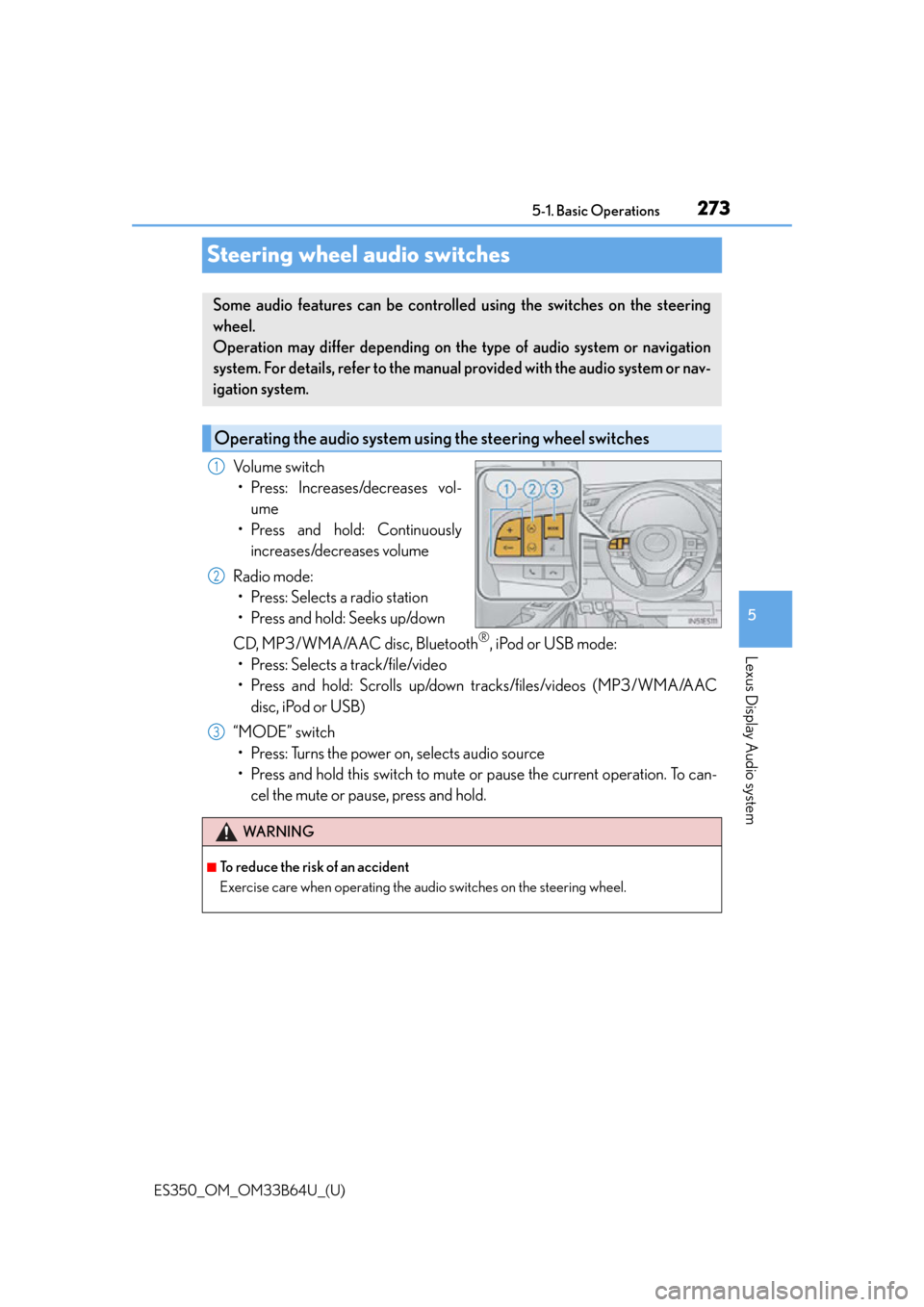
Volume switch
• Press: Increases/decreases vol- ume
• Press and hold: Continuously increases/decreases volume
Radio mode: • Press: Selects a radio station
• Press and hold: Seeks up/down
CD, MP3/WMA/AAC disc, Bluetooth
®, iPod or USB mode:
• Press: Selects a track/file/video
• Press and hold: Scrolls up/down tracks/files/videos (MP3/WMA/AAC disc, iPod or USB)
“MODE” switch • Press: Turns the power on, selects audio source
• Press and hold this switch to mute or pause the current operation. To can- cel the mute or pause, press and hold.
Some audio features can be controlled using the switches on the steering
wheel.
Operation may differ depending on th e type of audio system or navigation
system. For details, refer to the manual provided with the audio system or nav-
igation system.
Operating the audio system us ing the steering wheel switches
1
2
WA R N I N G
■To reduce the risk of an accident
Exercise care when operating the audio switches on the steering wheel.
3
Page 284 of 576
284
ES350_OM_OM33B64U_(U)5-3. Using the audio system
Selecting the audio source
Press the “AUDIO” button to display the “Source” screen.
If the “Source” screen is not displayed, press the button again.
Select the desired audio source.
The audio source can be selected by pressing the “RADIO” or “MEDIA” button.
Press the “MODE” switch when the audio
system is turned on. The audio source
changes each time the “MODE” switch is pressed.
■Rearranging the list
The listing order of the sour ce list can be rearranged.
Move the controller to the left while on the “Source” screen.
Select “Audio Source Select”.
Select an item you wish to move and th en select where to move the item to.
Switching between audio sources such as radio and CD are explained in this
section.
Changing audio source
Using the steering wheel switches to change audio sources
1
2
1
2
3
Page 325 of 576
325
ES350_OM_OM33B64U_(U)5-9. Bluetooth
® Phone
5
Lexus Display Audio system
Using a Bluetooth® Phone
Before making a phone call, check the connection status, battery charge, call
area and signal strength. (
P. 326)
If a Bluetooth
® device cannot be connected, chec k the connection status. If the
device is not connected, either register or reconnect it. (
P. 3 1 7 , 3 2 0 )
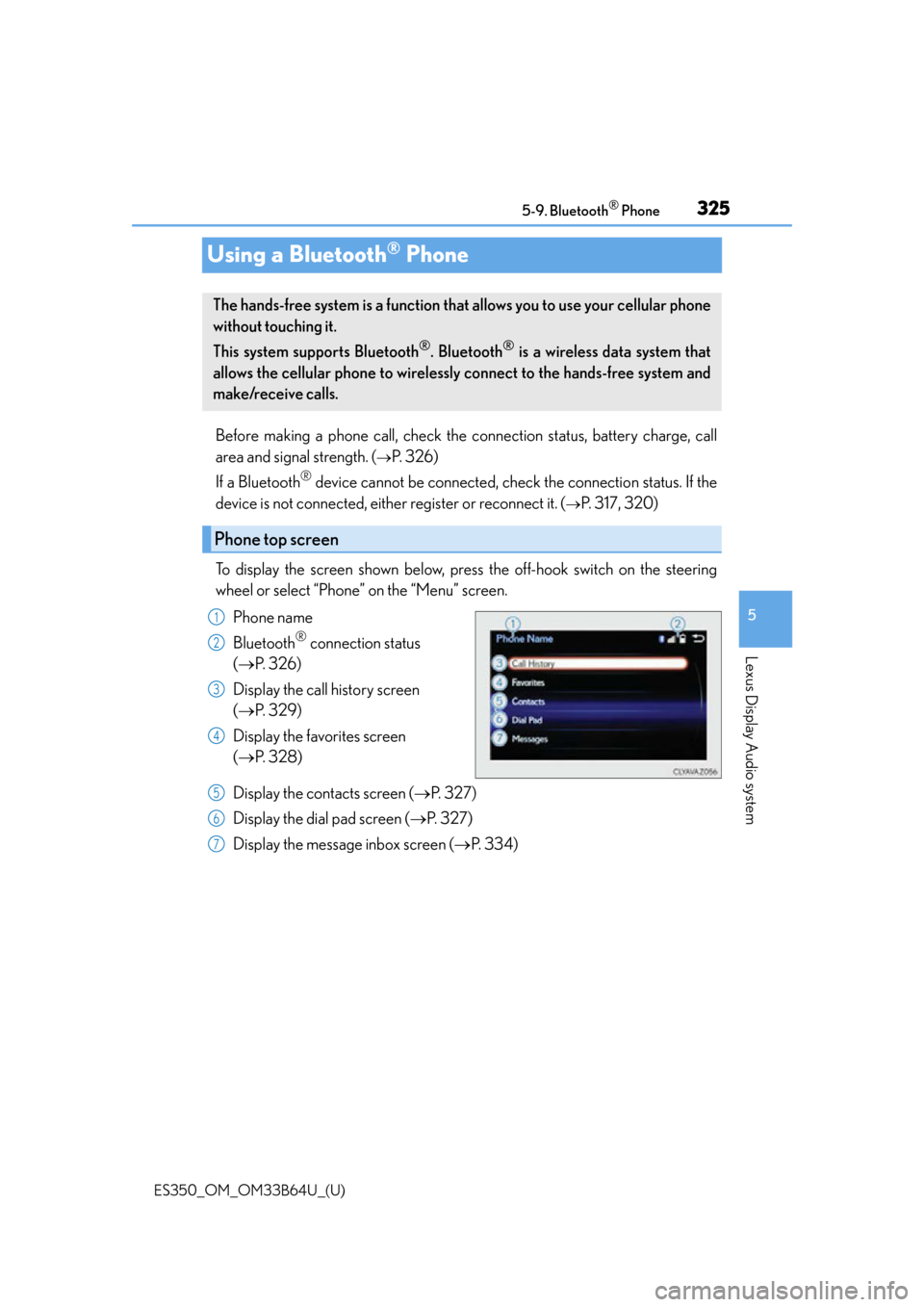
To display the screen shown below, press the off-hook switch on the steering
wheel or select “Phone” on the “Menu” screen. Phone name
Bluetooth
® connection status
( P. 3 2 6 )
Display the call history screen
( P. 3 2 9 )
Display the favorites screen
( P. 3 2 8 )
Display the contacts screen ( P. 3 2 7 )
Display the dial pad screen ( P. 3 2 7 )
Display the message inbox screen ( P. 3 3 4 )
The hands-free system is a function that allows you to use your cellular phone
without touching it.
This system supports Bluetooth
®. Bluetooth® is a wireless data system that
allows the cellular phone to wirelessly connect to the hands-free system and
make/receive calls.
Phone top screen
1
2
3
4
5
6
7