lock Lexus ES350 2016 s / Manual PDF
[x] Cancel search | Manufacturer: LEXUS, Model Year: 2016, Model line: ES350, Model: Lexus ES350 2016Pages: 576, PDF Size: 8.3 MB
Page 283 of 576

ES350_OM_OM33B64U_(U)
2835-2. Setup
5
Lexus Display Audio system
Select “General” or “Camera” on the “Display” screen or select “Display” on
each audio menu screen. (P. 2 8 9 )
Adjust the display as desired by turning the controller clockwise (+) or coun-
terclockwise (-).
To select “Contrast”, “Brightness”, “Color” or “Tone”, move the controller to the left.
(“Colour” and “Tone” are available when “D isplay” on the audio settings screen for
each audio source is selected.)
■Changing the sample image (when “General” is selected)
Move the controller to the right and select the desired sample image.
Adjusting the screen quality
1
2
Page 297 of 576

ES350_OM_OM33B64U_(U)
2975-4. Using the radio
5
Lexus Display Audio system
■XM Radio Services — Legal Disclaimers and Warnings
●Fees and Taxes — Subscription fee, taxes, one time activation fee, and other fees may
apply. Subscription fee is consumer only. All fees and programming subject to change.
Subscriptions subject to Customer Agreement available at www.siriusxm.com
(U.S.A.)
or www.xmradio.ca
(Canada) XM service only availa ble in the 48 contiguous United
States and Canada
*.
*: Canada — some deterioration of service may occur in extreme northern latitudes.
This is beyond the control of XM Satellite Radio.
Explicit Language Notice — Channels with frequent explicit language are indicated
with an “XL” preceding the channel name. Channel blocking is available for XM Satel-
lite Radio receivers by notifying XM at;
U.S.A. Customers:
Visit w w w.siriusxm.com
or calling 1-877-515-3987
Canadian Customers:
Visit w w w.xmradio.ca
or calling 1-877-438-9677
It is prohibited to copy, decompile, disassemble, reverse engineer, hack, manipulate, or
otherwise make available any technology or software incorporated in receivers compat-
ible with the XM Satellite Ra dio System or that support the XM website, the Online Ser-
vice or any of its content. Furthermore, the AMBE
® voice compression software
included in this product is protected by intellectual property rights including patent
rights, copyrights, and trade secrets of Digital Voice Systems, Inc.
Note: this applies to XM receivers only and not XM Ready devices.
Page 363 of 576

363
ES350_OM_OM33B64U_(U)
6Interior features
6-1. Using the air conditioning system and defogger
Automatic air conditioning system .......................................... 364
Heated steering wheel/ seat heaters/seat
ventilators ................................... 373
6-2. Using the interior lights Interior lights list ......................... 375• Interior lights ........................... 376
• Personal lights ........................ 376
6-3. Using the storage features List of storage features ............ 378• Glove box ............................... 379
• Console box........................... 379
• Cup holders .......................... 380
• Auxiliary box ........................... 381
Trunk features ..............................382
6-4. Using the other interior features
Other interior features ............384 • Sun visors ................................384
• Vanity mirrors ........................384
• Clock ........................................385
• Power outlets .........................385
• Armrest ....................................386
• Rear sunshade/rear door sunshades................................ 387
•Trunk storage extension .................................389
• Coat hooks .............................390
• Assist grips..............................390
Garage door opener................. 391
Compass .......................................398
LEXUS Enform Safety Connect ...................................... 402
Page 370 of 576
3706-1. Using the air conditioning system and defogger
ES350_OM_OM33B64U_(U)
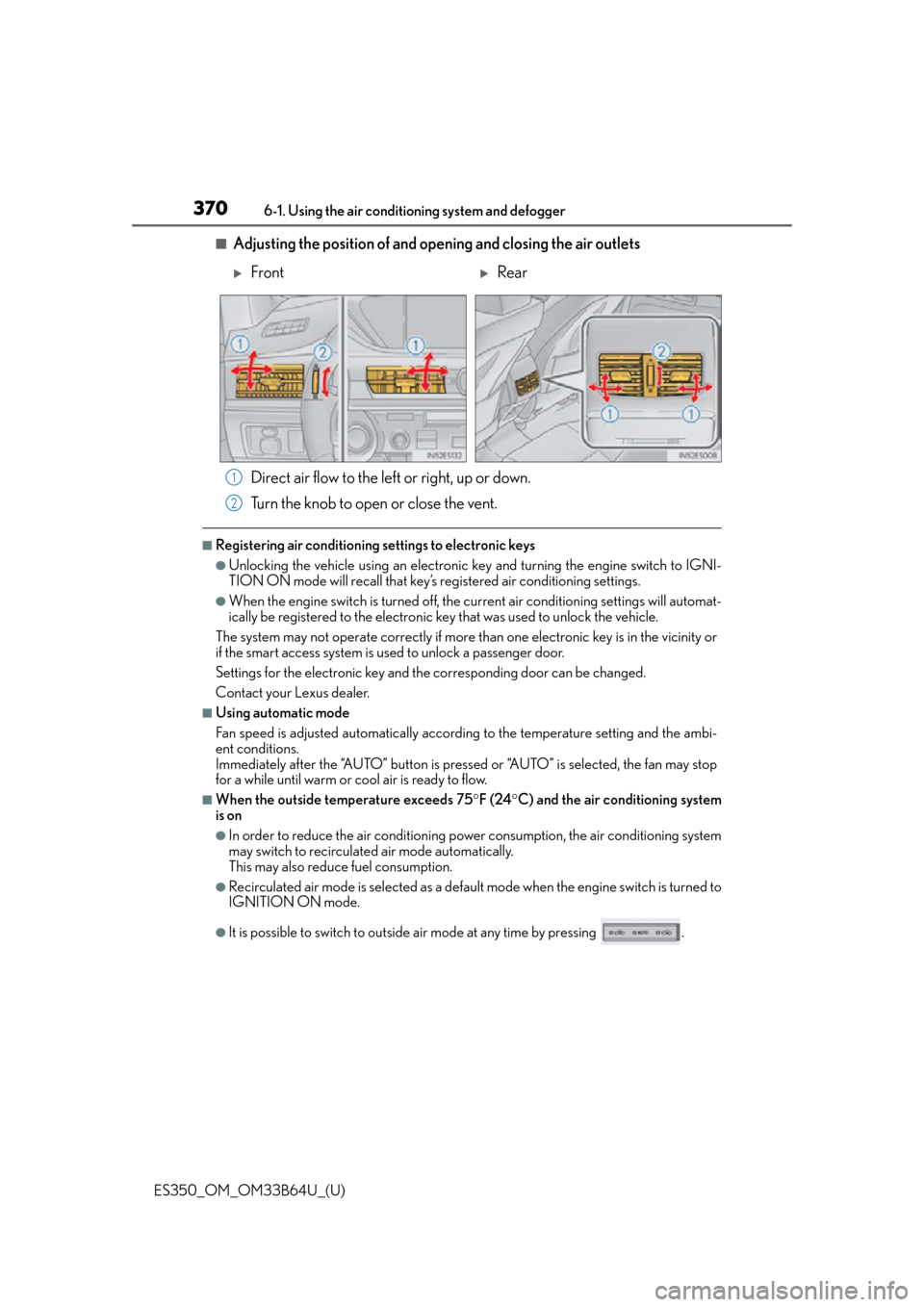
■Adjusting the position of and opening and closing the air outlets Direct air flow to the left or right, up or down.
Turn the knob to open or close the vent.
■Registering air conditioning settings to electronic keys
●Unlocking the vehicle using an electronic ke y and turning the engine switch to IGNI-
TION ON mode will recall that key’s registered air conditioning settings.
●When the engine switch is tu rned off, the current air conditioning settings will automat-
ically be registered to the electronic key that was used to unlock the vehicle.
The system may not operate correctly if more th an one electronic key is in the vicinity or
if the smart access system is used to unlock a passenger door.
Settings for the electronic key and the corresponding door can be changed.
Contact your Lexus dealer.
■Using automatic mode
Fan speed is adjusted automatically accordin g to the temperature setting and the ambi-
ent conditions.
Immediately after the “AUTO” button is pressed or “AUTO” is selected, the fan may stop
for a while until warm or cool air is ready to flow.
■When the outside temperature exceeds 75 F (24 C) and the air conditioning system
is on
●In order to reduce the air conditioning po wer consumption, the air conditioning system
may switch to recirculated air mode automatically.
This may also reduce fuel consumption.
●Recirculated air mode is selected as a default mode when the engine switch is turned to
IGNITION ON mode.
●It is possible to switch to outside air mode at any time by pressing .
FrontRear
1
2
Page 372 of 576
3726-1. Using the air conditioning system and defogger
ES350_OM_OM33B64U_(U)
■Ventilation and air conditioning odors
●To let fresh air in, set the air conditio ning system to the outside air mode.
●During use, various odors from inside and outside the vehicle may enter into and accu-
mulate in the air conditioning system. This may then cause odor to be emitted from the
vents.
●To reduce potential odors from occurring:
• It is recommended that the air conditioning system be set to outside air mode prior to turning the vehicle off.
• Immediately after the air conditioning system is started in automatic mode, the start
timing of the blower may be delayed for a short period of time.
■Air conditioning filter
P. 4 4 9
■Customization
Settings (e.g. A/C automatic mode switch operation) can be changed.
(Customizable features: P. 5 4 0 )
WA R N I N G
■To prevent the windshield from fogging up
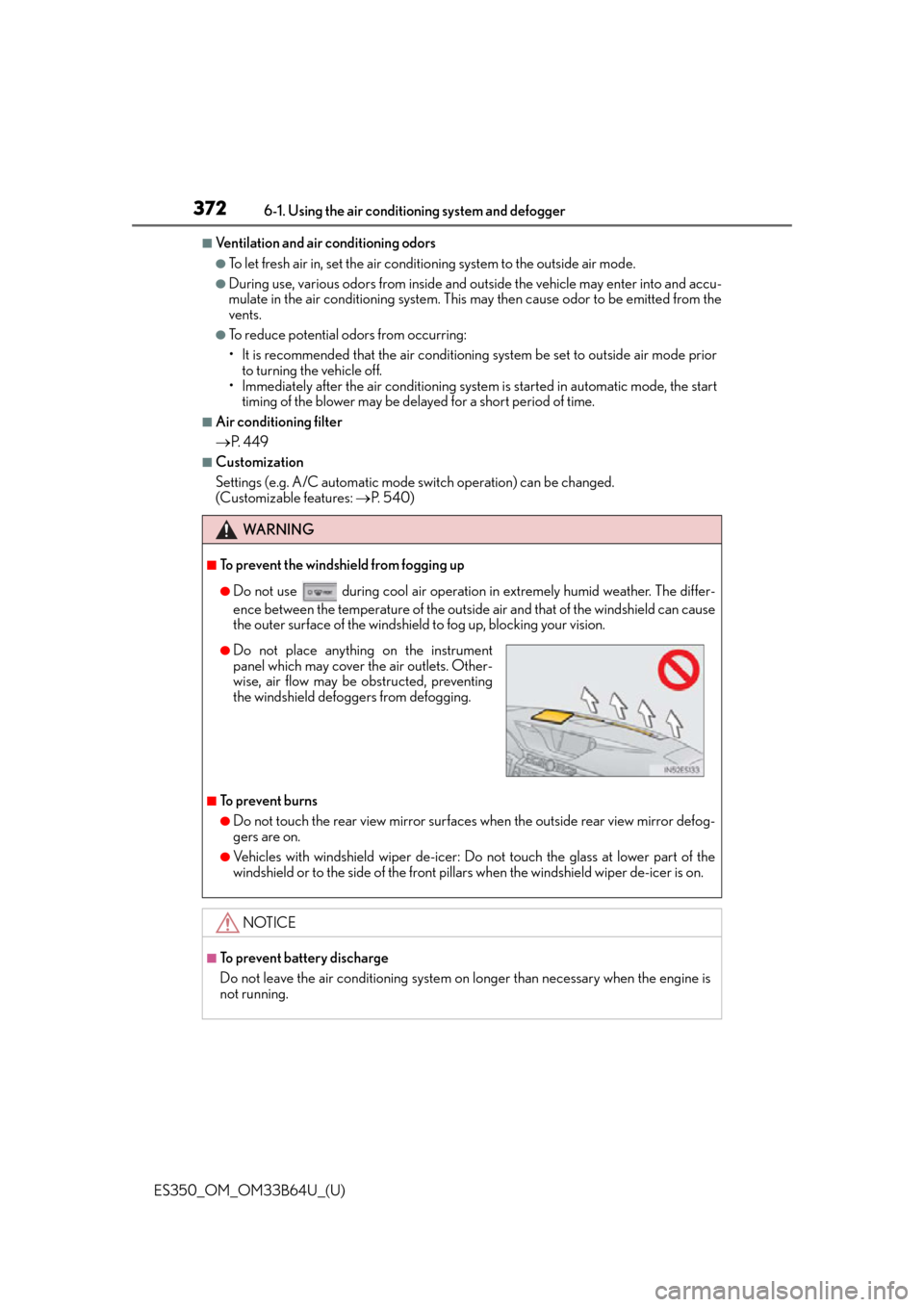
●Do not use during cool air operation in extremely humid weather. The differ-
ence between the temperature of the outside air and that of the windshield can cause
the outer surface of the windshield to fog up, blocking your vision.
■To prevent burns
●Do not touch the rear view mirror surfaces when the outside rear view mirror defog-
gers are on.
●Vehicles with windshield wiper de-icer: Do not touch the glass at lower part of the
windshield or to the side of the front pilla rs when the windshield wiper de-icer is on.
NOTICE
■To prevent battery discharge
Do not leave the air conditioning system on longer than necessary when the engine is
not running.
●Do not place anything on the instrument
panel which may cover the air outlets. Other-
wise, air flow may be obstructed, preventing
the windshield defoggers from defogging.
Page 377 of 576

ES350_OM_OM33B64U_(U)
3776-2. Using the interior lights
6
Interior features
●Illuminated entry system: The lights automatically turn on/off according to engine
switch mode, the presence of the electronic key, whether the doors are locked/
unlocked, and whether the doors are opened/closed.
●If the following lights remain on when the engine switch is turned off the lights will go off
automatically after 20 minutes:
• Outer foot lights
• Personal/interior lights
• Door courtesy lights
• Ornament lights (if equipped)
• Footwell lights
●Setting (e.g. the time elapsed before lights turn off) can be changed.
(Customizable features: P. 5 3 3 )
Page 379 of 576
ES350_OM_OM33B64U_(U)
3796-3. Using the storage features
6
Interior features
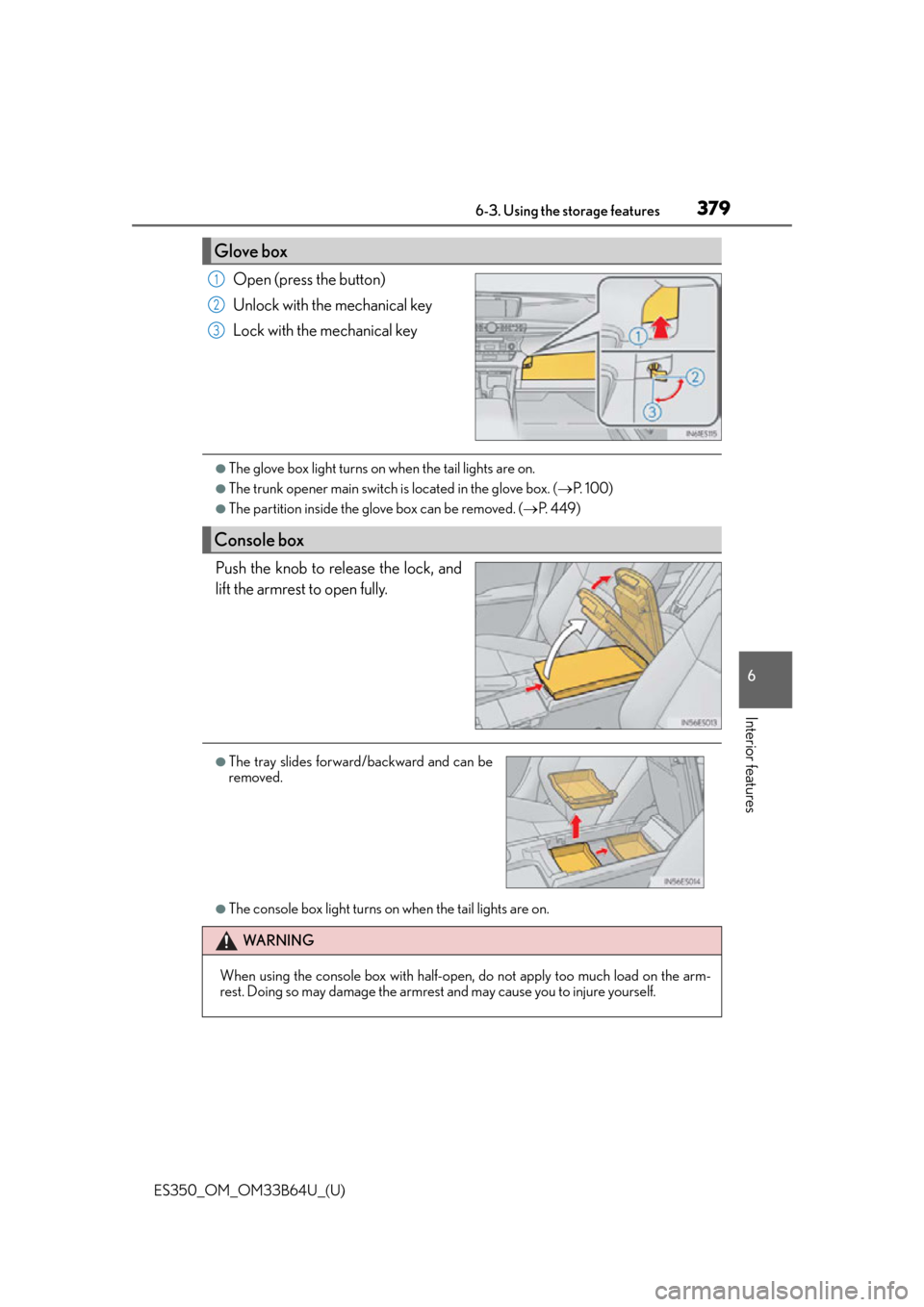
Open (press the button)
Unlock with the mechanical key
Lock with the mechanical key
●The glove box light turns on when the tail lights are on.
●The trunk opener main switch is located in the glove box. (P. 100)
●The partition inside the glove box can be removed. ( P. 4 4 9 )
Push the knob to release the lock, and
lift the armrest to open fully.
●The console box light turns on when the tail lights are on.
Glove box
1
2
3
Console box
●The tray slides forward/backward and can be
removed.
WA R N I N G
When using the console box with half-open, do not apply too much load on the arm-
rest. Doing so may damage the armrest and may cause you to injure yourself.
Page 380 of 576
380
ES350_OM_OM33B64U_(U)6-3. Using the storage features
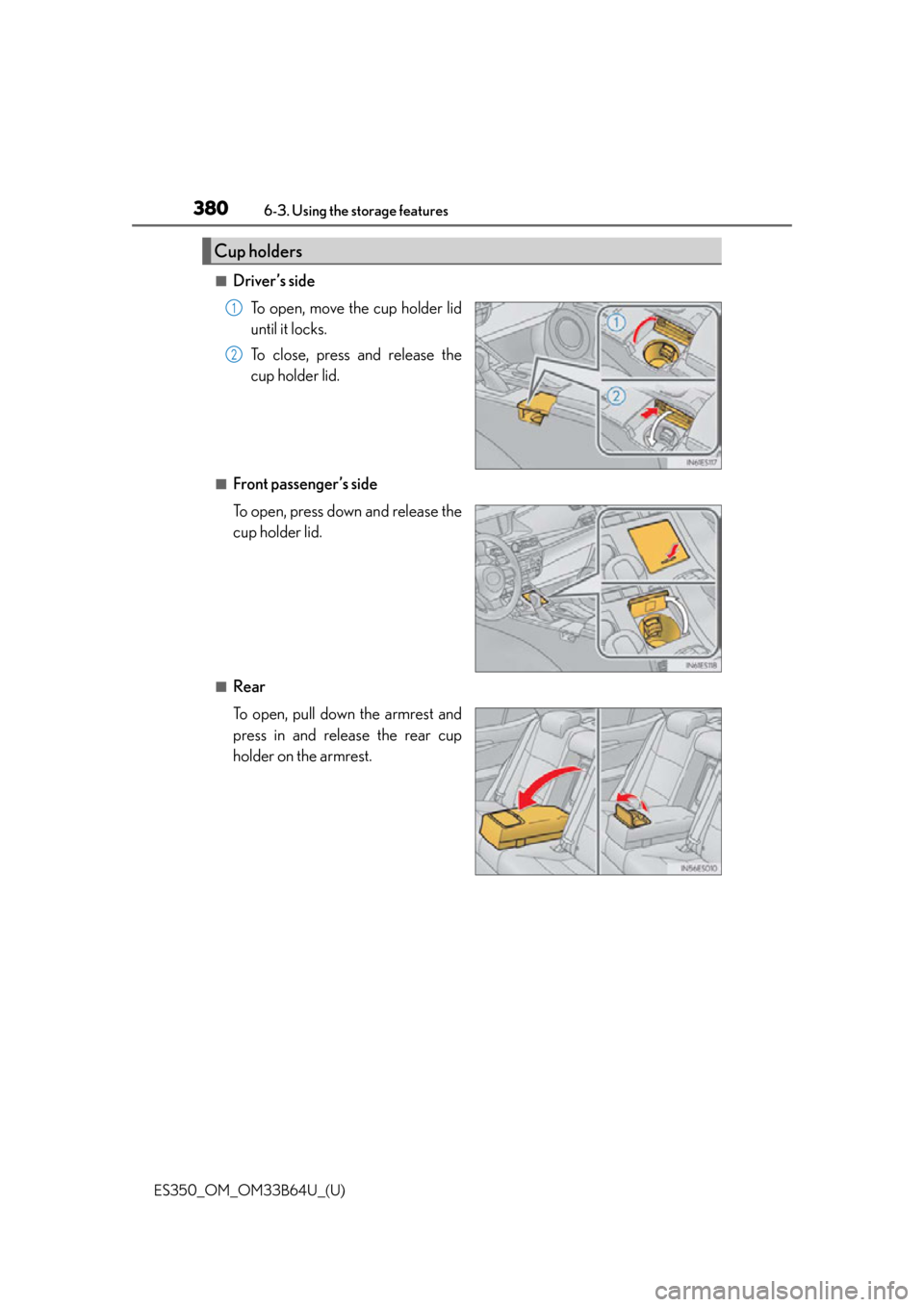
■Driver’s side
To open, move the cup holder lid
until it locks.
To close, press and release the
cup holder lid.
■Front passenger’s side
To open, press down and release the
cup holder lid.
■Rear
To open, pull down the armrest and
press in and release the rear cup
holder on the armrest.
Cup holders
1
2
Page 381 of 576
ES350_OM_OM33B64U_(U)
3816-3. Using the storage features
6
Interior features
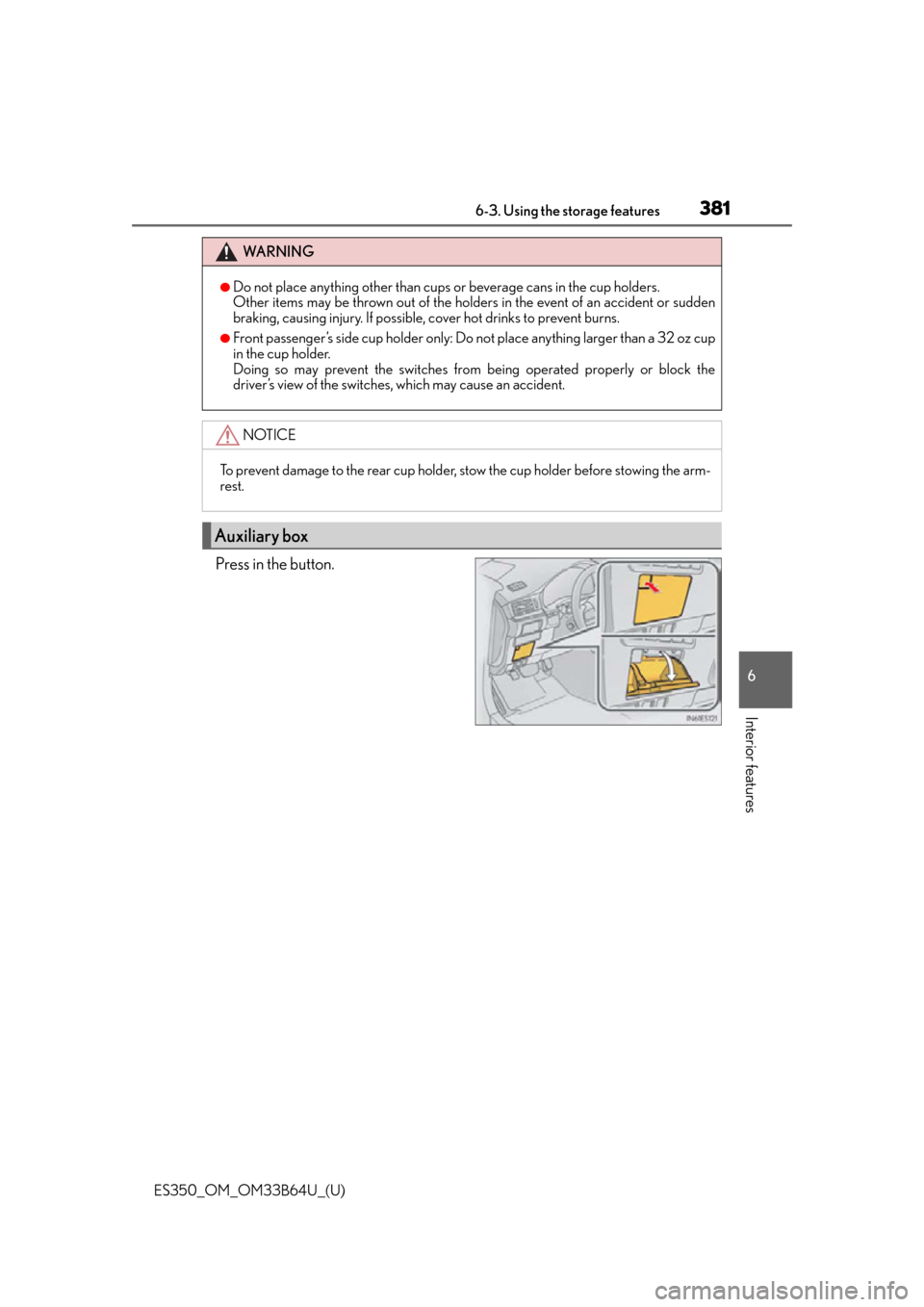
Press in the button.
WA R N I N G
●Do not place anything other than cups or beverage cans in the cup holders.
Other items may be thrown out of the holders in the event of an accident or sudden
braking, causing injury. If possible, cover hot drinks to prevent burns.
●Front passenger’s side cup holder only: Do not place anything larger than a 32 oz cup
in the cup holder.
Doing so may prevent the switches from being operated properly or block the
driver’s view of the switches, which may cause an accident.
NOTICE
To prevent damage to the rear cup holder, stow the cup holder before stowing the arm-
rest.
Auxiliary box
Page 385 of 576
ES350_OM_OM33B64U_(U)
3856-4. Using the other interior features
6
Interior features
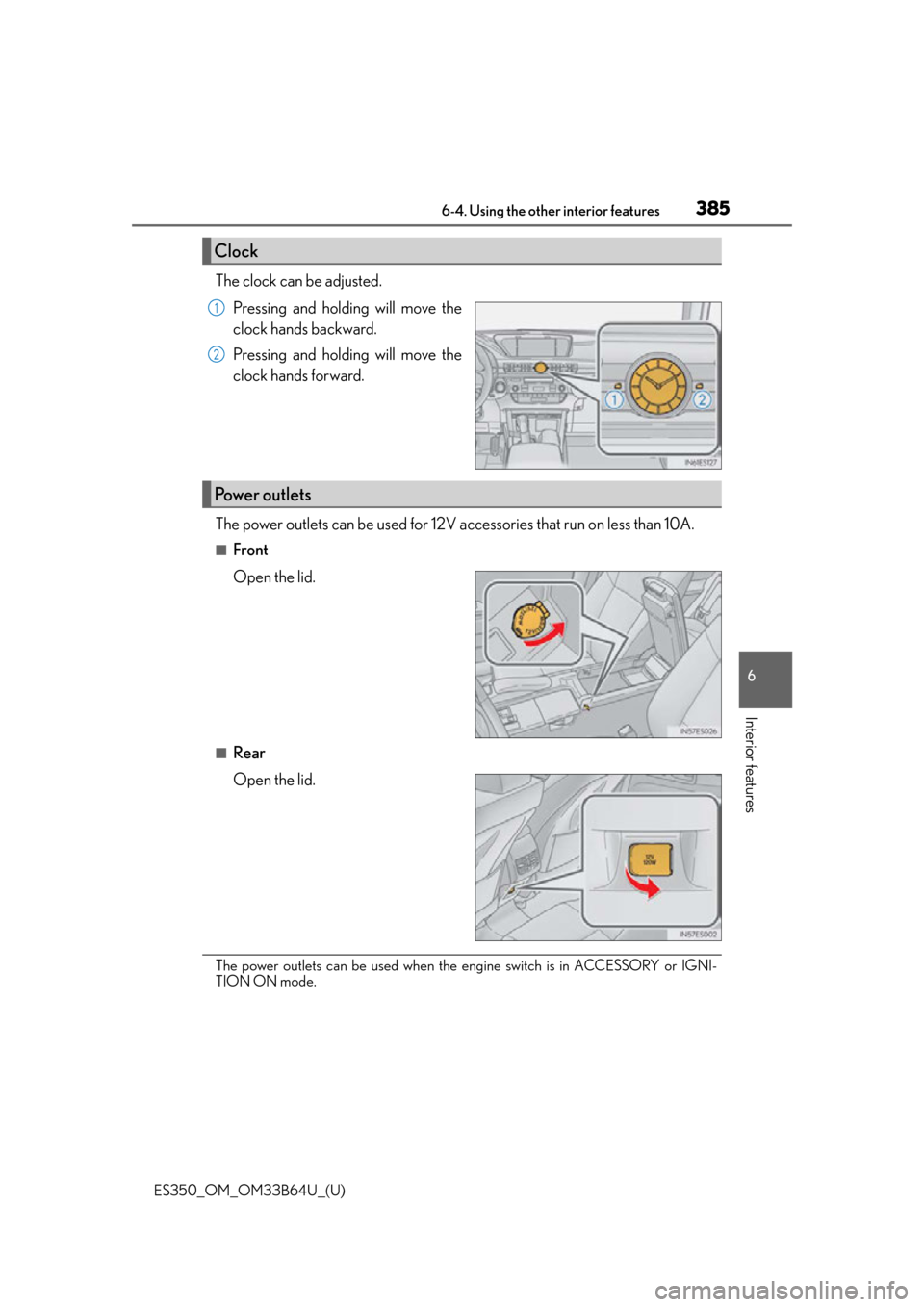
The clock can be adjusted.Pressing and holding will move the
clock hands backward.
Pressing and holding will move the
clock hands forward.
The power outlets can be used for 12V accessories that run on less than 10A.
■Front
Open the lid.
■Rear
Open the lid.
The power outlets can be used when the engine switch is in ACCESSORY or IGNI-
TION ON mode.
Clock
1
2
Power outlets