steering Lexus ES350 2016 Quick Guide /
[x] Cancel search | Manufacturer: LEXUS, Model Year: 2016, Model line: ES350, Model: Lexus ES350 2016Pages: 112, PDF Size: 2.11 MB
Page 47 of 112

47
ES350_QG_OM33B82U_(U)
Driving Mode Select Switch
Normal mode
For normal driving.
Press the switch to change the driving mode to normal mode when selected to
Eco drive mode or sport mode.
Eco drive mode
Use Eco drive mode to help achieve low fuel consumption during trips that
involve frequent accelerating.
When not in Eco drive mode and the drivin g mode select switch is turned to the
left, the “ECO” indicator comes on in the multi-information display.
Sport mode
Assists acceleration response by controllin g the steering and transmission. Suit-
able for when precise handling is de sirable, for example when driving on
mountain roads.
When not in Sport mode and the driving mode select switch is turned to the
right, the “SPORT” indicator comes on in the multi-information display.
The driving modes can be selected to suit driving condition.
1
2
3
Page 59 of 112

58
ES350_QG_OM33B82U_(U)
Hands-free System For Cellular Phone
(with navigation system)
n Bluetooth® phone pairing
Compatible Bluetooth®-equipped phones can be connec ted to the vehicle, enabling
hands-free operation. Please refer to the cel lular phone manufacturer’s user guide for
pairing procedures, or go to “www.lexus.com/MobileLink
” (for U.S.A.) for more
phone information.
To use a Bluetooth
® phone, it is neces-
sary to first register it in the system.
Press on the steering wheel.
Select “Yes”.
When this screen is displayed,
search for the device name dis-
played on this screen on the screen
of your Bluetooth
® device.
Refer to the cellular phone user’s
manual for cellular phone opera-
tion.
Register the Bluetooth
® device
using your Bluetooth
® device.
Check that the following screen is
displayed when registration is com-
plete.
2
1
2
33
4
55
Page 63 of 112

62
ES350_QG_OM33B82U_(U)
nCalling by name
You can call by giving a name registered in the contacts. For details, refer to the
“NAVIGATION SYSTEM OWNER’S MANUAL”.
Press .
Say “Call
nCalling by favorites list
Press on the steering wheel.
Select the “Favorites” tab and
select the desired contact.
Select the desired number.
Check that the “Call” screen is dis-
played.
11
2
: Pressing this switch turns the voice command system on. Say a command
after the beep.
21
2
33
4
Page 64 of 112
63
ES350_QG_OM33B82U_(U)
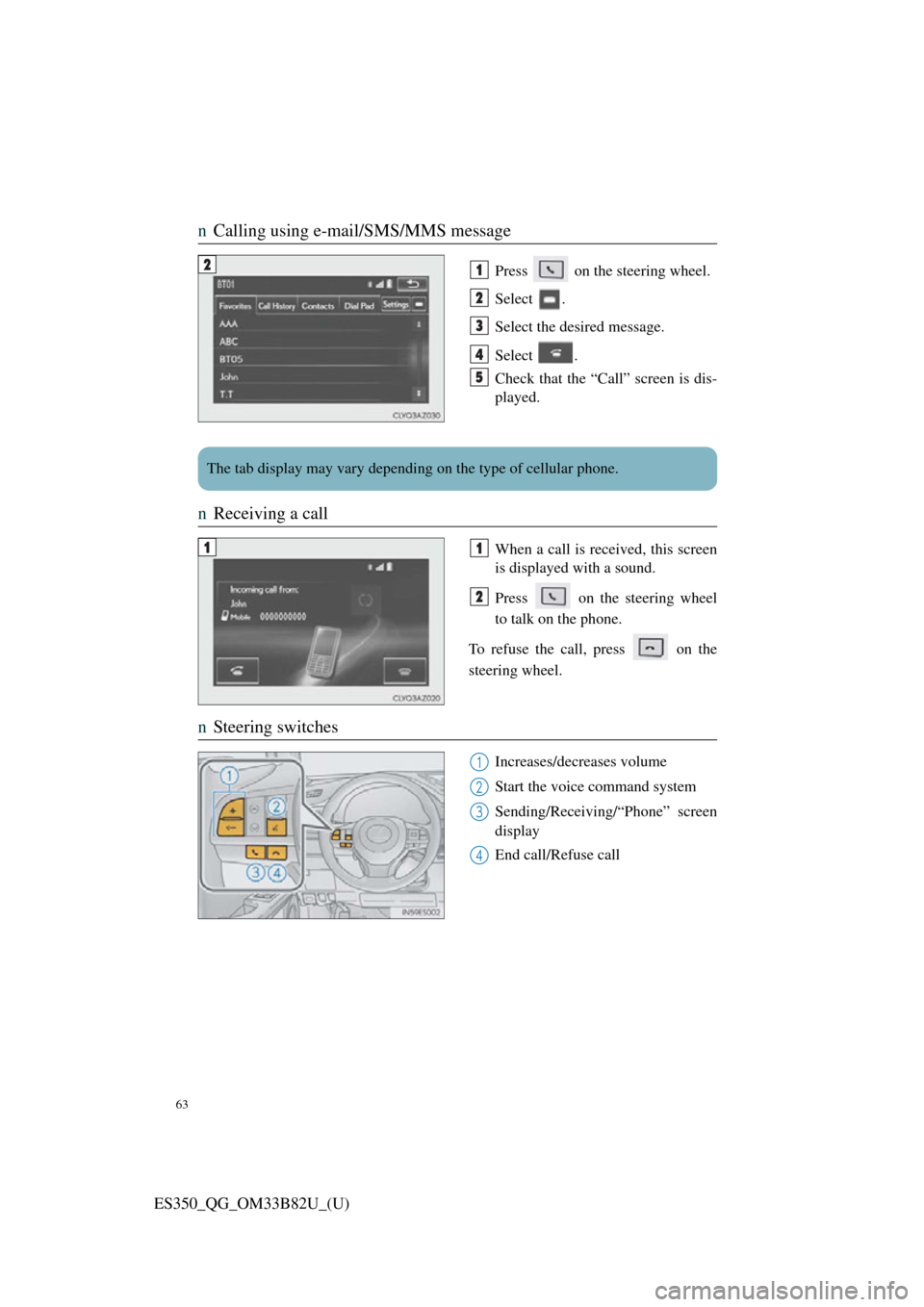
nCalling using e-mail/SMS/MMS message
Press on the steering wheel.
Select .
Select the desired message.
Select .
Check that the “Call” screen is dis-
played.
nReceiving a call
When a call is received, this screen
is displayed with a sound.
Press on the steering wheel
to talk on the phone.
To refuse the call, press on the
steering wheel.
n Steering switches
Increases/decreases volume
Start the voice command system
Sending/Receiving/“Phone” screen
display
End call/Refuse call
21
2
3
4
5
The tab display may vary depending on the type of cellular phone.
11
2
1
2
3
4
Page 65 of 112

64
ES350_QG_OM33B82U_(U)
Audio System (with navigation system)
nAudio control screen
Follow the procedure below to di splay the audio control screen.
Press the “MENU” button on the
Remote Touch.
Please refer to P.48 for the
Remote Touch operation.
The “Menu” screen will be dis-
played.
Using the Remote Touch, select
“Radio” or “Media” and select each
tab.
nRemote control (steer ing wheel switches)
Some audio features can be controlled using the switches on the steering wheel.
Increases/decreases volume
Radio mode: Selects a radio station/
channel
Audio CD mode: Selects a track
MP3/WMA/AAC disc mode:
Selects a file
DVD mode: Selects a chapter
iPod mode: Selects a track/file
Press: Change audio modes
Press and hold: Mute/unmute or
pause/resume the current operation
1
2
1
2
3
Page 73 of 112

72
ES350_QG_OM33B82U_(U)
Hands-free System For Cellular Phone
(with Lexus Display Audio System)
n How to register a Bluetooth® phone
Compatible Bluetooth®-equipped phones can be connected to the vehicle, enabling
hands-free operation. Please refer to the cellular phone manufacture’s user guide for
pairing procedures, or go to “www.lexus.com/MobileLink
” (for U.S.A) for phone
information.
Turn the Bluetooth® connection setting of your device set to on.
Go to “Bluetooth* Setup”: “MENU” button → “Setup” → “Bluetooth*”
Move the controller to the left and then select “Add Device”
When this screen is displayed, input
the passcode displayed on the
screen into your Bluetooth
® phone.
Register the Bluetooth
® phone
using your Bluetooth
® phone.
*: Bluetooth is a registered trad emark of Bluetooth SIG, Inc.
nRegistering favorites
You can register the desired contact from the phonebook. Up to 15 contacts per
phone can be registered.
Go to “Add Favorite”: “MENU” button → “Setup” → “Phone” → “Contact/
Call History Settings” → “Add Favorite”
Choose the contact to register.
n Dialing
Go to “Dial Pad”: “MENU” button → “Phone” → “Dial Pad”
Input a phone number.
Press the off-hook switch on th e steering wheel or select .
nDialing from the phonebook
Go to “Contacts”: “MENU” button → “Phone” → “Contacts”
Choose the desired contact to call from the list.
Choose the number and then press the of f-hook switch on the steering wheel or
press the controller.
1
2
3
4
5
1
2
1
2
3
1
2
3
Page 74 of 112
73
ES350_QG_OM33B82U_(U)
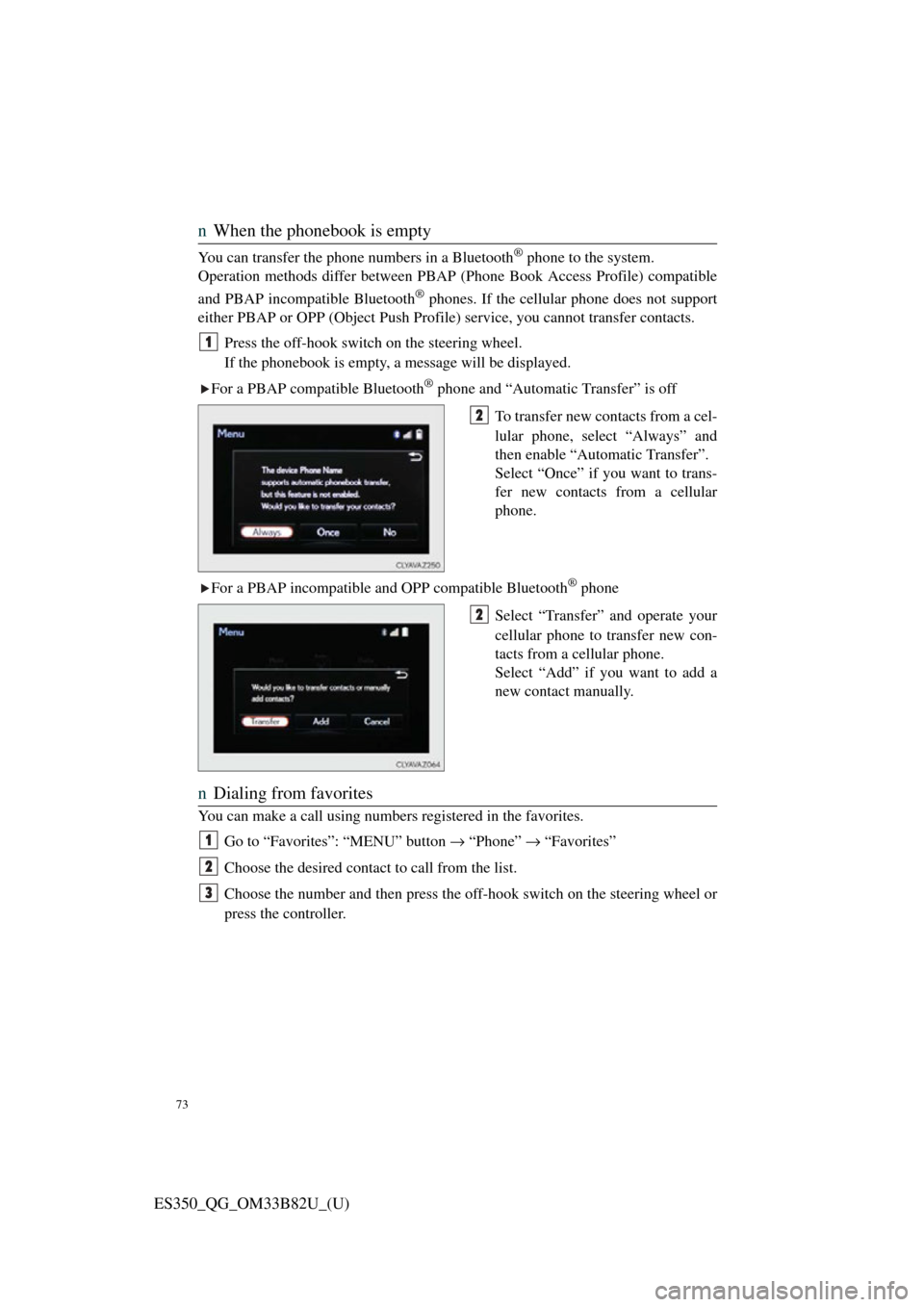
nWhen the phonebook is empty
You can transfer the phone numbers in a Bluetooth® phone to the system.
Operation methods differ between PBAP (Phone Book Access Profile) compatible
and PBAP incompatible Bluetooth
® phones. If the cellular phone does not support
either PBAP or OPP (Object Push Profile) service, you cannot transfer contacts.
Press the off-hook switch on the steering wheel.
If the phonebook is empty, a message will be displayed.
For a PBAP compatible Bluetooth
® phone and “Automatic Transfer” is off
To transfer new contacts from a cel-
lular phone, select “Always” and
then enable “Automatic Transfer”.
Select “Once” if you want to trans-
fer new contacts from a cellular
phone.
For a PBAP incompatible and OPP compatible Bluetooth
® phone
Select “Transfer” and operate your
cellular phone to transfer new con-
tacts from a cellular phone.
Select “Add” if you want to add a
new contact manually.
n Dialing from favorites
You can make a call using numbers registered in the favorites.
Go to “Favorites”: “MENU” button → “Phone” → “Favorites”
Choose the desired contact to call from the list.
Choose the number and then press the off-hook switch on the steering wheel or
press the controller.
1
2
2
1
2
3
Page 75 of 112
74
ES350_QG_OM33B82U_(U)
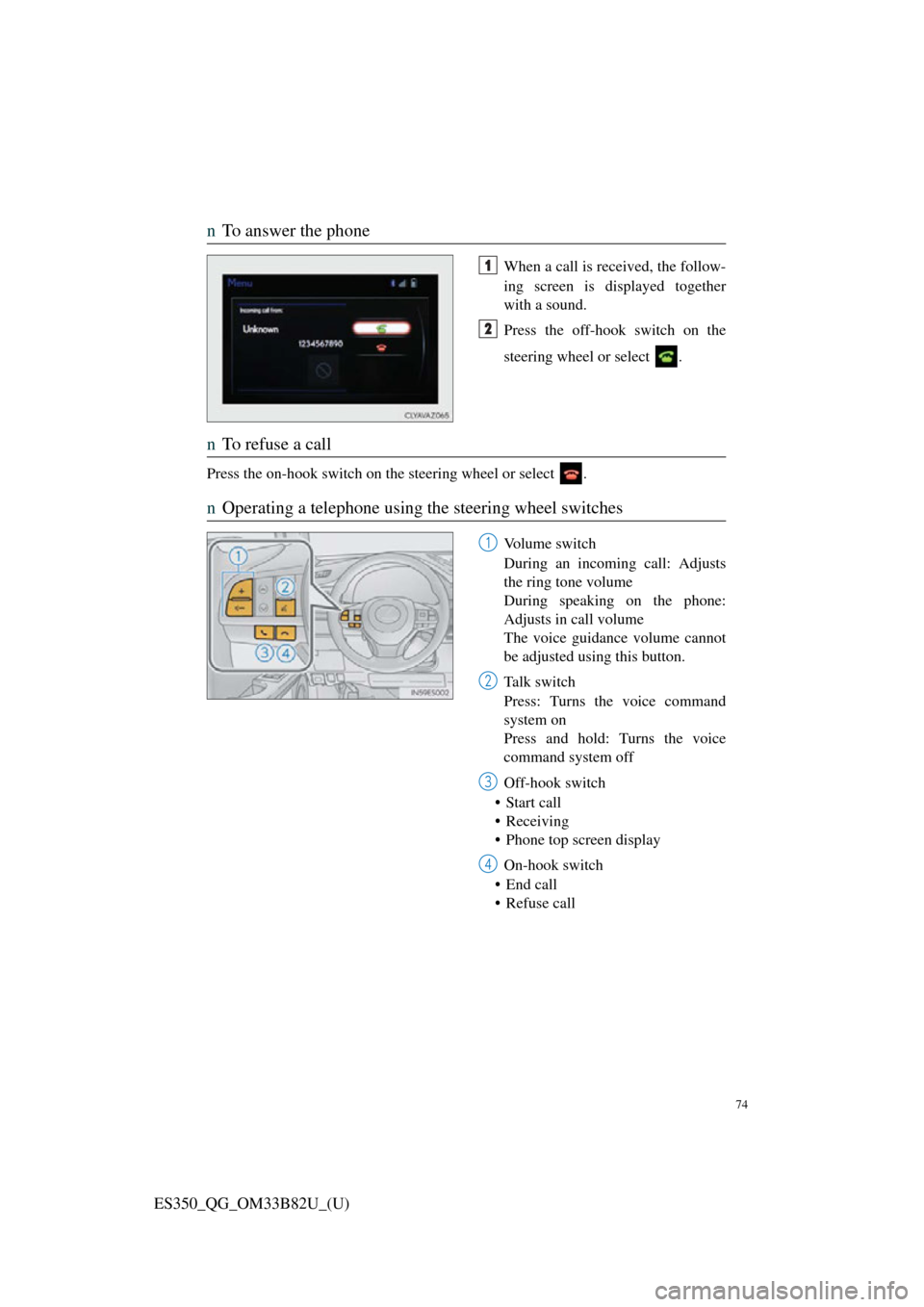
nTo answer the phone
When a call is received, the follow-
ing screen is displayed together
with a sound.
Press the off-hook switch on the
steering wheel or select .
nTo refuse a call
Press the on-hook switch on the steering wheel or select .
nOperating a telephone using the steering wheel switches
Volume switch
During an incoming call: Adjusts
the ring tone volume
During speaking on the phone:
Adjusts in call volume
The voice guidance volume cannot
be adjusted using this button.
Ta l k s w i t c h
Press: Turns the voice command
system on
Press and hold: Turns the voice
command system off
Off-hook switch
• Start call
• Receiving
• Phone top screen display
On-hook switch
• End call
• Refuse call
1
2
1
2
3
4
Page 76 of 112

75
ES350_QG_OM33B82U_(U)
Audio System (with Lexus Display Audio
System)
nLexus Display Audio operation buttons
Eject a disc.
Disc slot
Except radio and A/V mode: Pause or resume playing a track.
Radio and A/V mode: Turn mute on/off
“TUNE•SCROLL” knob
Select a radio station band, track or file.
Selects a preset radio station, or to access a desired track or file.
Display the radio top screen.
Display the media top screen.
“PWR•VOL” knob
Press to turn the audio system on/off, and turn to adjust the volume.
nUsing the steering switches to change audio sources
Press the “MODE” switch when the audio system is turned on. The audio source
changes each time the “MODE” switch is pressed.
1
2
3
4
5
6
7
8
Page 79 of 112

78
ES350_QG_OM33B82U_(U)
nOperating the audio system using the steering wheel switches
Volume switch
• Press: Increases/decreases vol-
ume
• Press and hold: Continuously increases/decreases volume
Radio mode:
• Press: Selects a radio station
• Press and hold: Seeks up/down
CD, MP3/WMA/AAC disc,
Bluetooth
®, iPod or USB mode:
• Press: Selects a track/file/video
• Press and hold: Scrolls up/down tracks/files/videos (MP3/WMA/
AAC disc, iPod or USB)
“MODE” switch
• Press: Turns the power on, selects audio source
• Press and hold this switch to mute or pause the current operation. To
cancel the mute or pause, press
and hold.
1
2
3