steering Lexus ES350 2016 Quick Guide /
[x] Cancel search | Manufacturer: LEXUS, Model Year: 2016, Model line: ES350, Model: Lexus ES350 2016Pages: 112, PDF Size: 2.11 MB
Page 1 of 112
1
ES350_QG_OM33B82U_(U)
The Quick Guide is not intended as a substitute for your
Owner’s Manual . We strongly encourag e you to review the
Owner’s Manual and supplementary manuals so you will have
a better understanding of your vehicle’s capabilities and
limitations.
Air Conditioning System ............................................................................78
Audio System (with Lexu s Display Audio System)
Lexus Display Audio operation buttons ... ................................................74
Using the steering switches to change audio sources...............................74
Audio menu screen ...................................................................................75
Operating the audio system using the steering wheel switches ...............77
Audio System (with navigation system)
*
Audio control screen ................................................................................63
Remote control (steering wheel switches ) ...............................................63
Basic operation .........................................................................................64
Radio ........................................................................................................65
DVD player/CD player.............................................................................66
Operating an iPod .....................................................................................68
Automatic High Beam ................................................................................32
Automatic Transmission .............................................................................25
BSM (Blind Spot Monitor) .........................................................................45
Cruise Control .............................................................................................37
Door Locks ...................................................................................................97
Driving Mode Select Switch .......................................................................46
Driving Position Memory ...........................................................................19
Dynamic Radar Cruise Control .................................................................39
Eco Driving Indicator .................................................................................30
Engine (Ignition) Switch .............................................................................22
Contents
*: These features may be operated by Voice Command (See P.82)
Page 2 of 112
2
ES350_QG_OM33B82U_(U)
Floor mat installation................................................................................. 11
Front Seats ................................................................................................... 17
Fuel Consumption Screen .......................................................................... 12
Fuel Tank Cap ........................................................................................... 101
Garage Door Opener .................................................................................. 90
Hands-free System For Cellular Ph one (with Lexus Display Audio Sys-
tem)
How to register a Bluetooth
® phone ........................................................ 71
Registering favorites ................................................................................ 71
Dialing ...................................................................................................... 71
Dialing from the phonebook .................................................................... 71
When the phonebook is empty ................................................................. 72
Dialing from favorites .............................................................................. 72
To answer the phone................................................................................. 73
To refuse a call ......................................................................................... 73
Operating a telephone using the steeri ng wheel switches ........................ 73
Hands-free System For Cellular Phone (with navigation system)
*
Bluetooth® phone pairing ........................................................................ 58
Contacts transfer ...................................................................................... 59
Registering the contacts in the favorites list ............................................ 60
Calling by name ....................................................................................... 61
Calling by favorites list ............................................................................ 61
Calling using e-mail/SMS/MMS message . .............................................. 62
Receiving a call ...... ....................................................................... ........... 62
Steering switches...................................................................................... 62
*: These features may be operated by Voice Command (See P.82)
Page 3 of 112
3
ES350_QG_OM33B82U_(U)
Headlights....................................................................................................31
Head Restraints ...........................................................................................18
Intuitive Parking Assist ..............................................................................44
Keys ..............................................................................................................14
LDA (Lane Departure Alert with steering control) .................................43
Lexus Display Audio Controller (w ith Lexus Display Audio System)...69
LEXUS Enform ...........................................................................................94
LEXUS Enform Safety Connect ................................................................92
Moon Roof ...................................................................................................99
Multi-information Display .........................................................................28
Navigation System
*
Register home...........................................................................................52
Destination input - Search by address ......................................................53
Destination input - Search points of in terest by name .............................55
Destination input - Search points of in terest by category ........................56
Destination input - Search points of interest by telephone number .........57
*: These features may be operated by Voice Command (See P.82)
Page 5 of 112
5
ES350_QG_OM33B82U_(U)
OverviewInstrument Panel
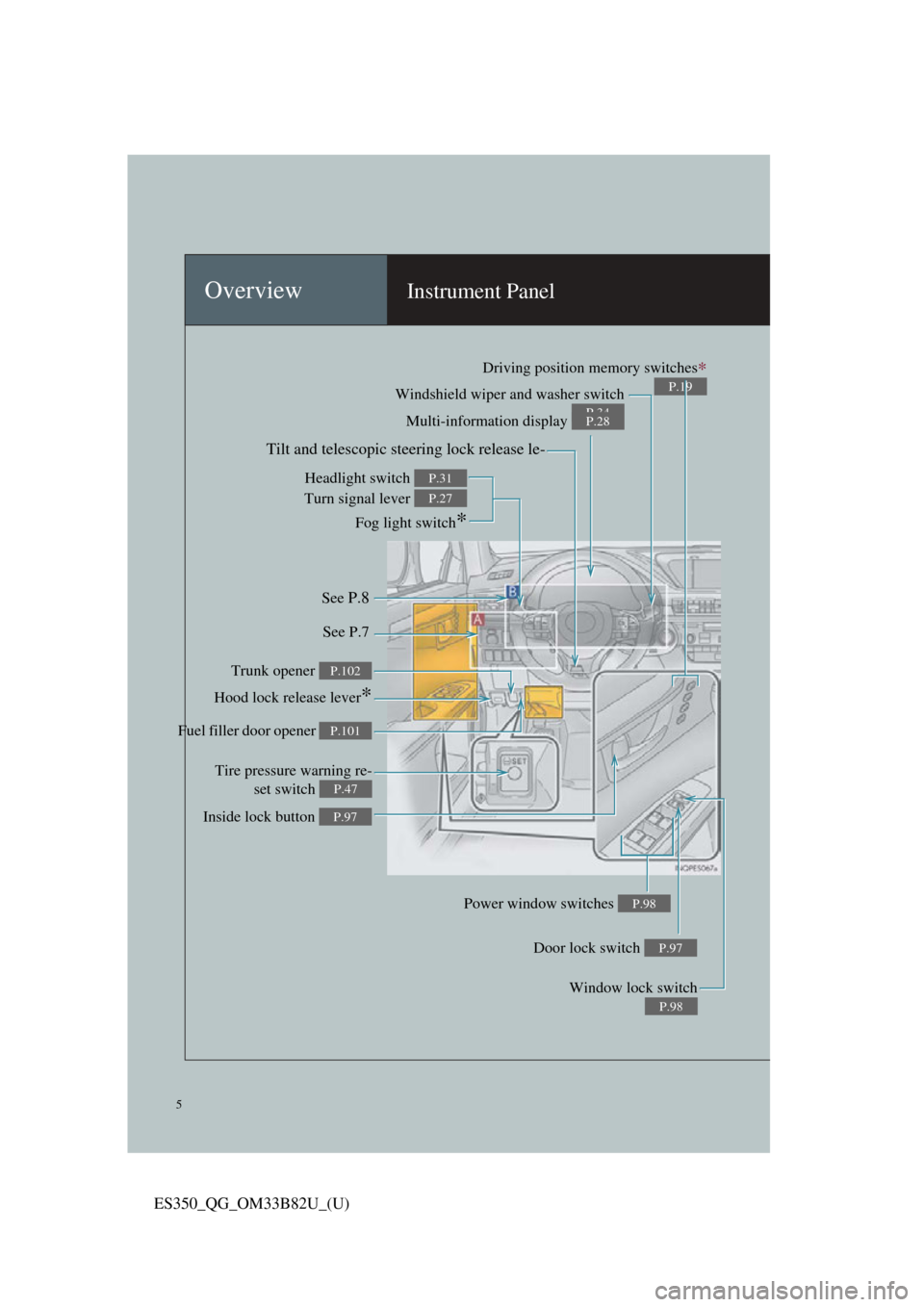
Windshield wiper and washer switch
P.34Multi-information display P.28
Headlight switch
Turn signal lever
Fog light switch
*
P.31
P.27
Inside lock button P.97
Trunk opener P.102
Hood lock release lever*
Driving position memory switches∗
P.19
See P.8
See P.7
Window lock switch
P.98
Power window switches P.98
Door lock switch P.97
Tire pressure warning re-set switch
P.47
Fuel filler door opener P.101
Tilt and telescopic steering lock release le-
Page 6 of 112
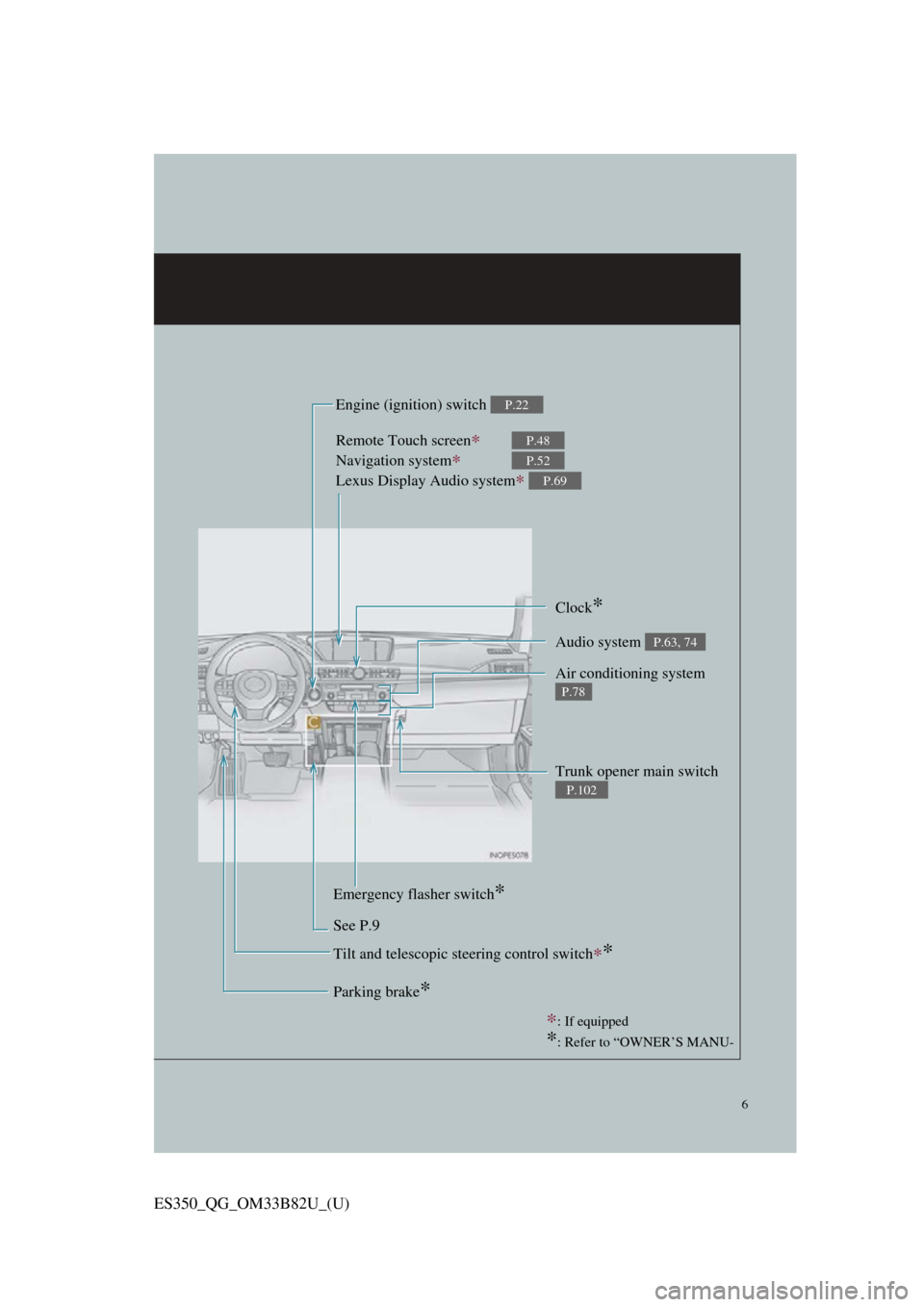
6
ES350_QG_OM33B82U_(U)
Remote Touch screen∗
Navigation system∗
Lexus Display Audio system
∗
P.48
P.52
P.69
Clock*
Trunk opener main switch
P.102
Audio system P.63, 74
Air conditioning system
P.78
Emergency flasher switch*
See P.9 Engine (ignition) switch
P.22
Parking brake*
∗
: If equipped
*: Refer to “OWNER’S MANU-
Tilt and telescopic steering control switch∗*
Page 8 of 112
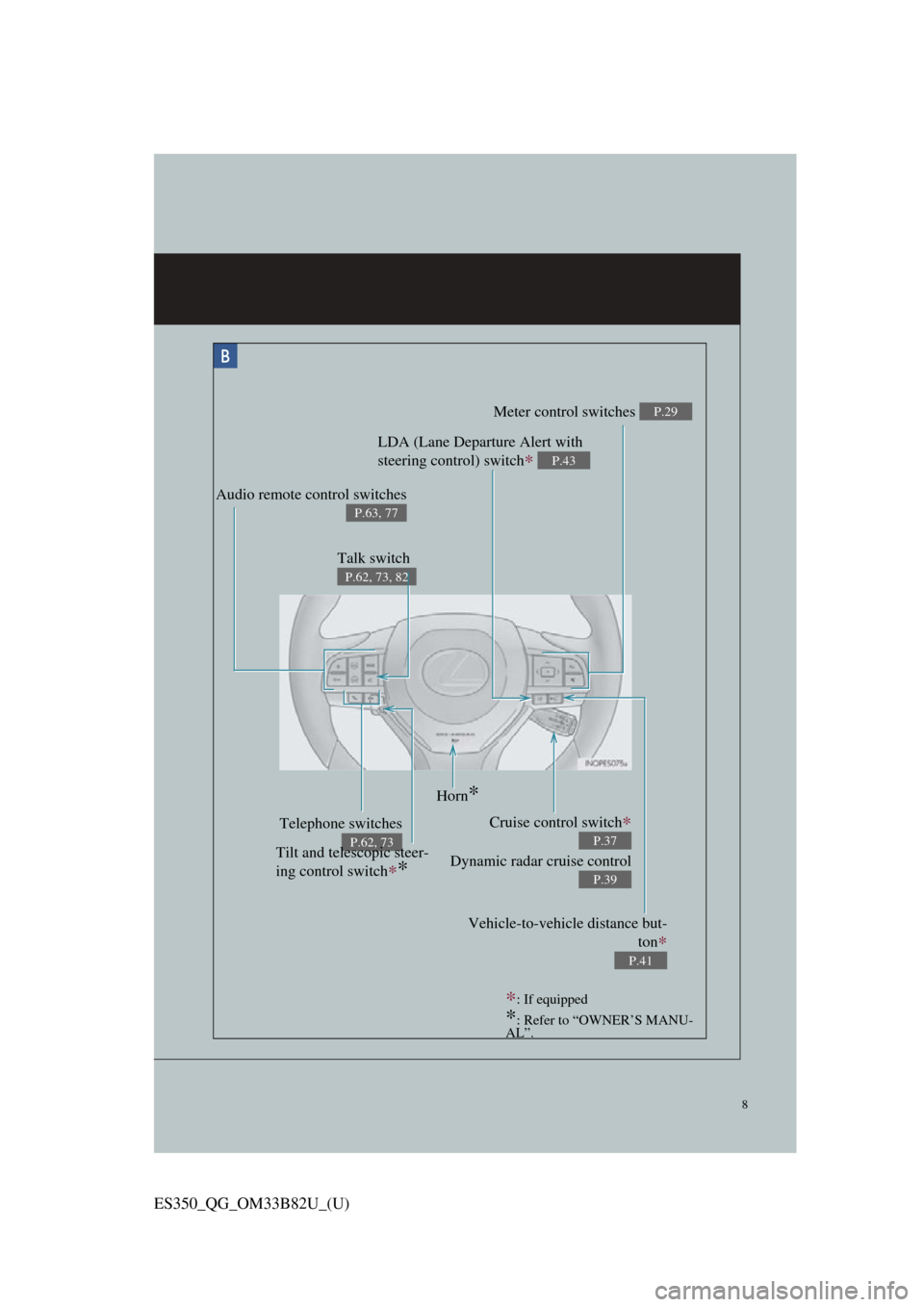
8
ES350_QG_OM33B82U_(U)
Meter control switches P.29
Telephone switches
P.62, 73
Vehicle-to-vehicle distance but-ton
∗
P.41
Audio remote control switches
P.63, 77
LDA (Lane Departure Alert with
steering control) switch
∗ P.43
Cruise control switch∗
Dynamic radar cruise control
P.37
P.39
Horn*
Tilt and telescopic steer-
ing control switch
∗*
∗: If equipped
*: Refer to “OWNER’S MANU-
AL”.
Talk switch
P.62, 73, 82
Page 9 of 112
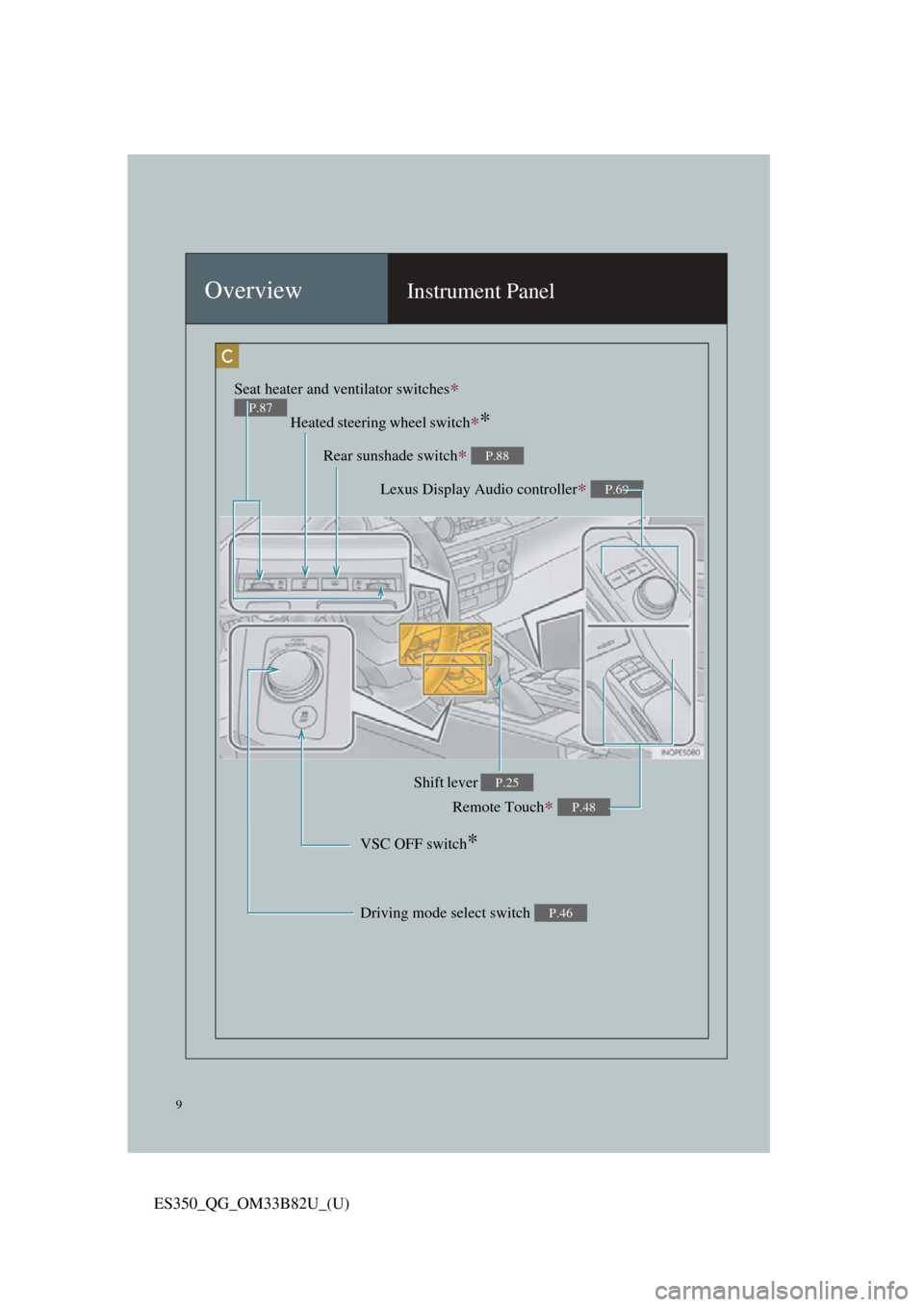
9
ES350_QG_OM33B82U_(U)
OverviewInstrument Panel
Remote Touch∗ P.48
Heated steering wheel switch∗*
VSC OFF switch*
Seat heater and ventilator switches∗
P.87
Driving mode select switch P.46
Shift lever P.25
Rear sunshade switch∗ P.88
Lexus Display Audio controller∗ P.69
Page 19 of 112
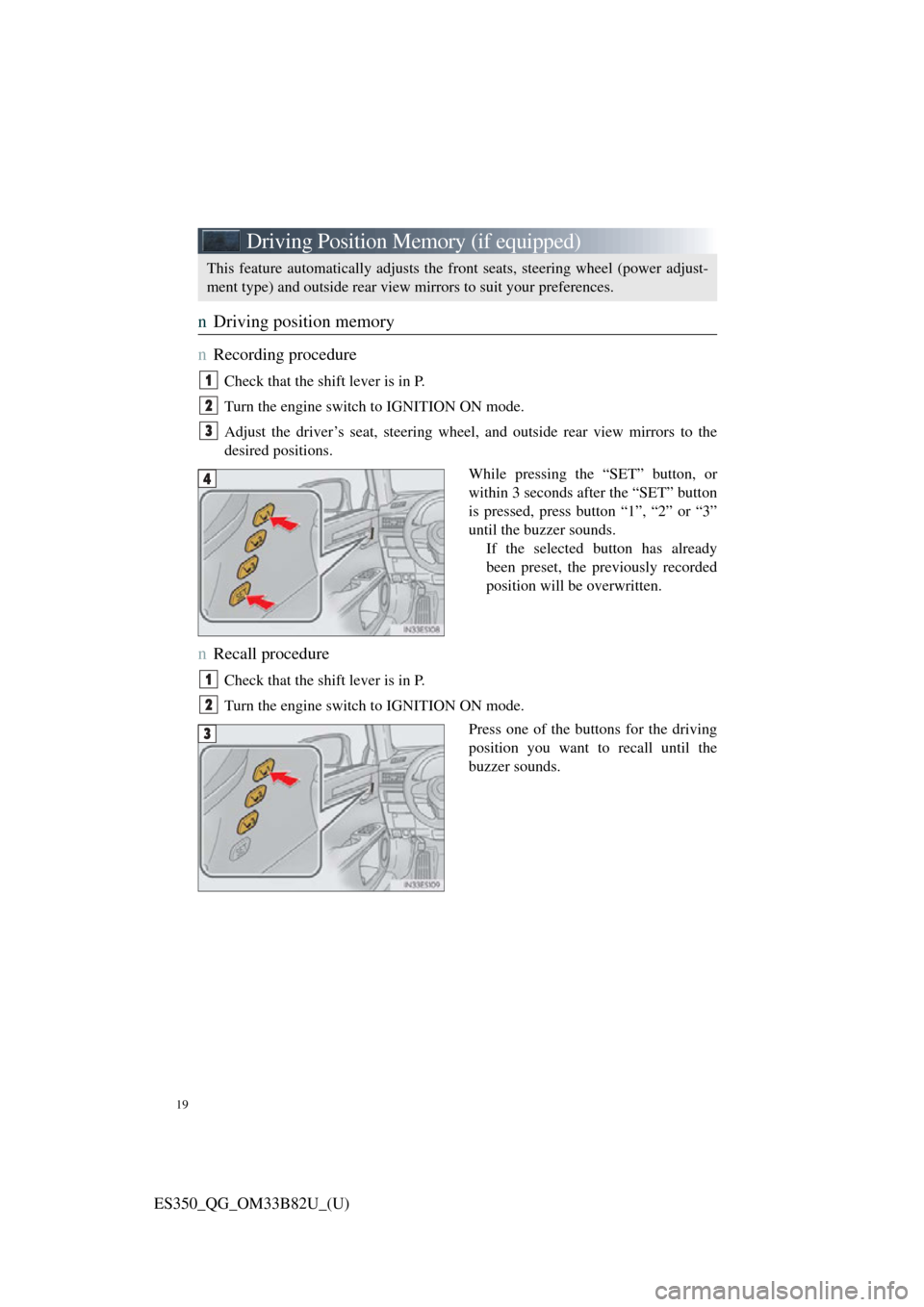
19
ES350_QG_OM33B82U_(U)
Driving Position Memory (if equipped)
nDriving position memory
n
Recording procedure
Check that the shift lever is in P.
Turn the engine switch to IGNITION ON mode.
Adjust the driver’s seat, steering wheel, and outside rear view mirrors to the
desired positions.
While pressing the “SET” button, or
within 3 seconds af ter the “SET” button
is pressed, press button “1”, “2” or “3”
until the buzzer sounds. If the selected button has already
been preset, the previously recorded
position will be overwritten.
nRecall procedure
Check that the shift lever is in P.
Turn the engine switch to IGNITION ON mode.
Press one of the buttons for the driving
position you want to recall until the
buzzer sounds.
This feature automatically adjusts the front seats, steering wheel (power adjust-
ment type) and outside rear view mirrors to suit your preferences.
1
2
3
4
1
2
3
Page 31 of 112

31
ES350_QG_OM33B82U_(U)
Headlights
The side marker, parking,
daytime running, tail, license
plate and instrument panel
lights turn on.
The headlights, parking and
all lights listed above (except
daytime running lights) turn
on.
The headlights, daytime
running lights and all the
lights listed above turn on
and off automatically.
(When the engine switch is
in IGNITION ON mode.)
Off
The daytime running lights
turn on.
nTurning on the high beam headlights
With the headlights on, push the
lever away from you to turn on the
high beams.
Pull the lever toward you to the
center position to turn the high
beams off.
Pull the lever toward you and
release it to fl ash the high beams
once.
You can flash the high beams with
the headlights on or off.
n AFS (Adaptive Front-lighting System) (if equipped)
AFS (Adaptive Front-lighting System) improves visibility at intersections and on
curves by automatically ad justing the lateral angle of the headlights according to
vehicle speed and the degree of the tire angle that are controlled by steering input.
Operates at speed of 6 mph (10 km/h) or higher.
nDeactivating AFS
Select “AFS” on (settings display) of the multi-information display.
(Canada)
(U.S.A
1
2
3
4
(U.S.A
(Canada)
1
2
1
Page 44 of 112

44
ES350_QG_OM33B82U_(U)
LDA (Lane Departure Alert with
steering control) (if equipped)
nTurning LDA system on
Press the LDA switch to turn the LDA
system on.
The LDA indicator illuminates and
a message is displayed on the multi-
information display.
Press the LDA switch again to turn
the LDA system off.
When the LDA system is turned on
or off, operation of the LDA system
continues in the same condition the
next time the engine is started.
When driving on highways and freeways with white or yellow lines, this func-
tion alerts the driver when the vehicle might depart from its lane and provides
assistance by operating th e steering wheel to keep the vehicle in its lane.
The LDA system recognizes vi sible white or yellow lines with the camera sensor
on the upper portion of the front windshield.