turn Lexus ES350 2017 Quick Guide
[x] Cancel search | Manufacturer: LEXUS, Model Year: 2017, Model line: ES350, Model: Lexus ES350 2017Pages: 104, PDF Size: 3.83 MB
Page 50 of 104
49
ES350_QG_OM33C84U_(U)
■Menu
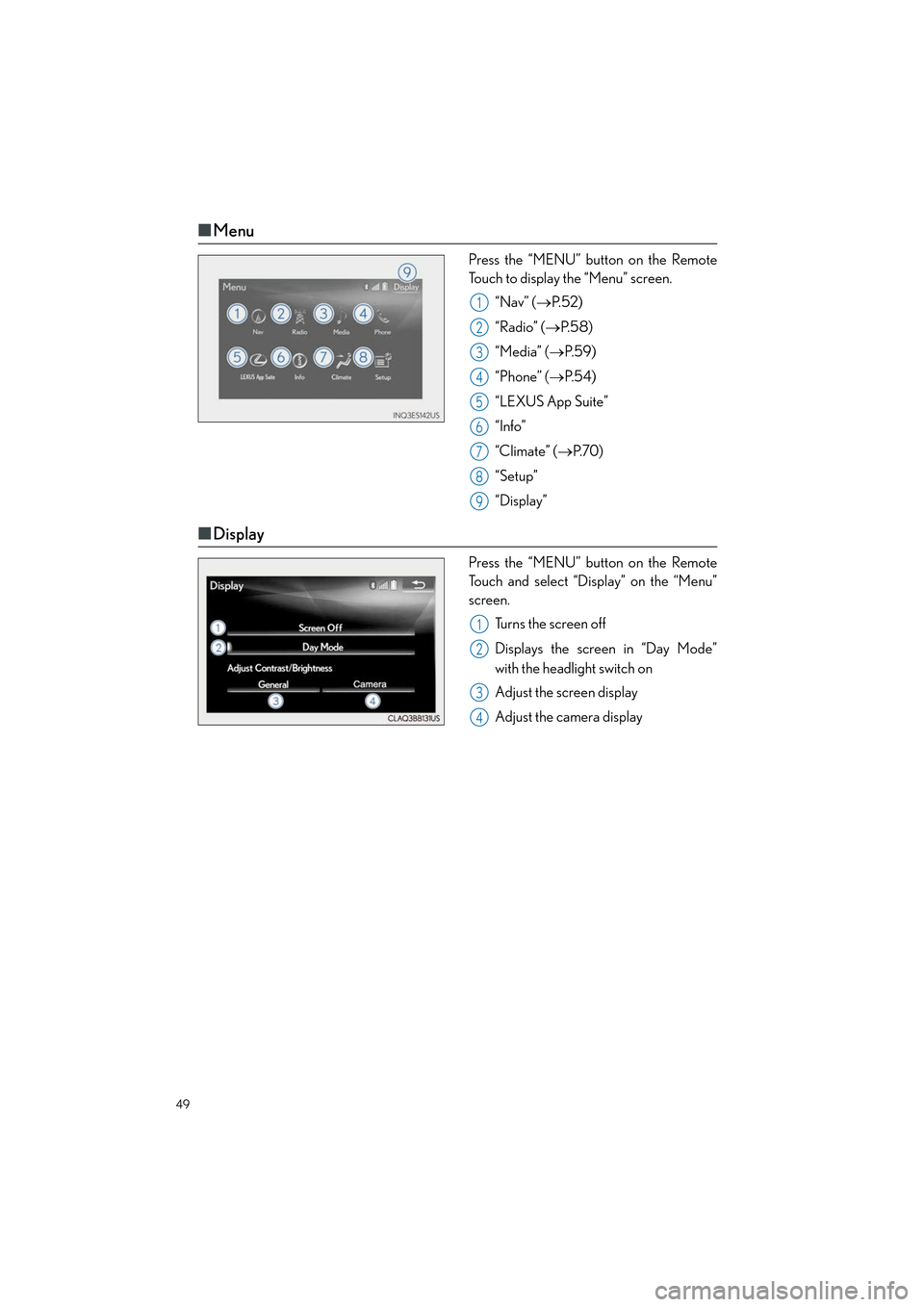
Press the “MENU” button on the Remote
Touch to display the “Menu” screen.
“Nav” ( →P. 5 2 )
“Radio” ( →P. 5 8 )
“Media” ( →P. 5 9 )
“Phone” ( →P. 5 4 )
“LEXUS App Suite”
“Info”
“Climate” ( →P. 7 0 )
“Setup”
“Display”
■ Display
Press the “MENU” button on the Remote
Touch and select “Display” on the “Menu”
screen.
Turns the screen off
Displays the screen in “Day Mode”
with the headlight switch on
Adjust the screen display
Adjust the camera display
1
2
3
4
5
6
7
8
9
1
2
3
4
Page 51 of 104

50
ES350_QG_OM33C84U_(U)
■Screen scroll operation
To scroll over the map screen, place the
cursor mark in the desired position and then
press and hold the Remote Touch knob.
Cursor mark
Distance from the current position to
the cursor mark.
Zooms in on the map
Zooms out on the map
Select to return to the current position.
Select to register as a memory point.
Select to set as a destination.
1
2
3
4
5
6
7
Page 57 of 104
56
ES350_QG_OM33C84U_(U)
■Calling by name
You can call by giving a name registered in the contact list. For details, refer to the
“NAVIGATION SYSTEM OWNER’S MANUAL”.
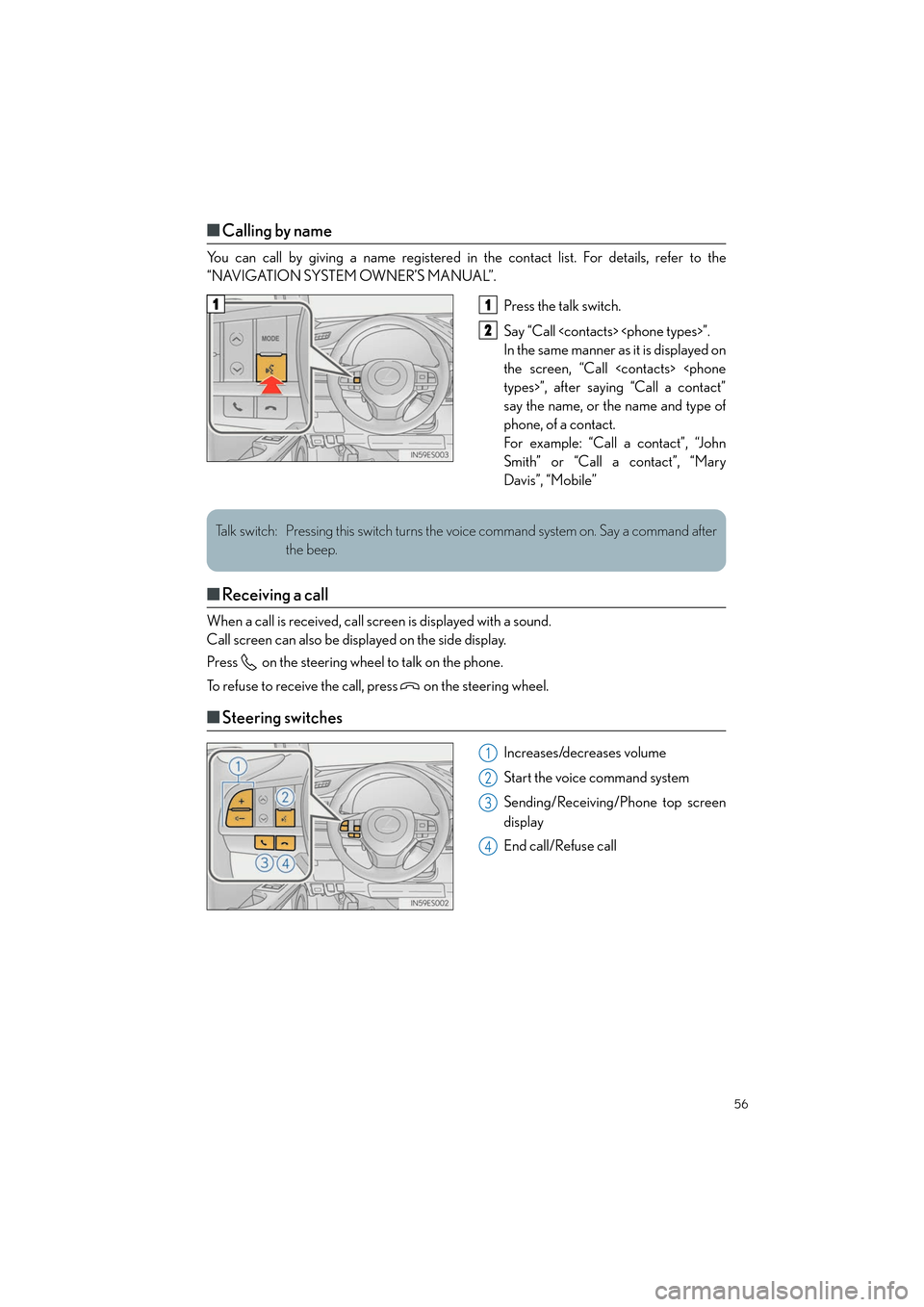
Press the talk switch.
Say “Call
In the same manner as it is displayed on
the screen, “Call
say the name, or the name and type of
phone, of a contact.
For example: “Call a contact”, “John
Smith” or “Call a contact”, “Mary
Davis”, “Mobile”
■Receiving a call
When a call is received, call screen is displayed with a sound.
Call screen can also be displayed on the side display.
Press on the steering wheel to talk on the phone.
To refuse to receive the call, press on the steering wheel.
■Steering switches
Increases/decreases volume
Start the voice command system
Sending/Receiving/Phone top screen
display
End call/Refuse call
11
2
Talk switch: Pressing this switch turns the voice command system on. Say a command after
the beep.
1
2
3
4
Page 59 of 104
58
ES350_QG_OM33C84U_(U)
■Basic operation
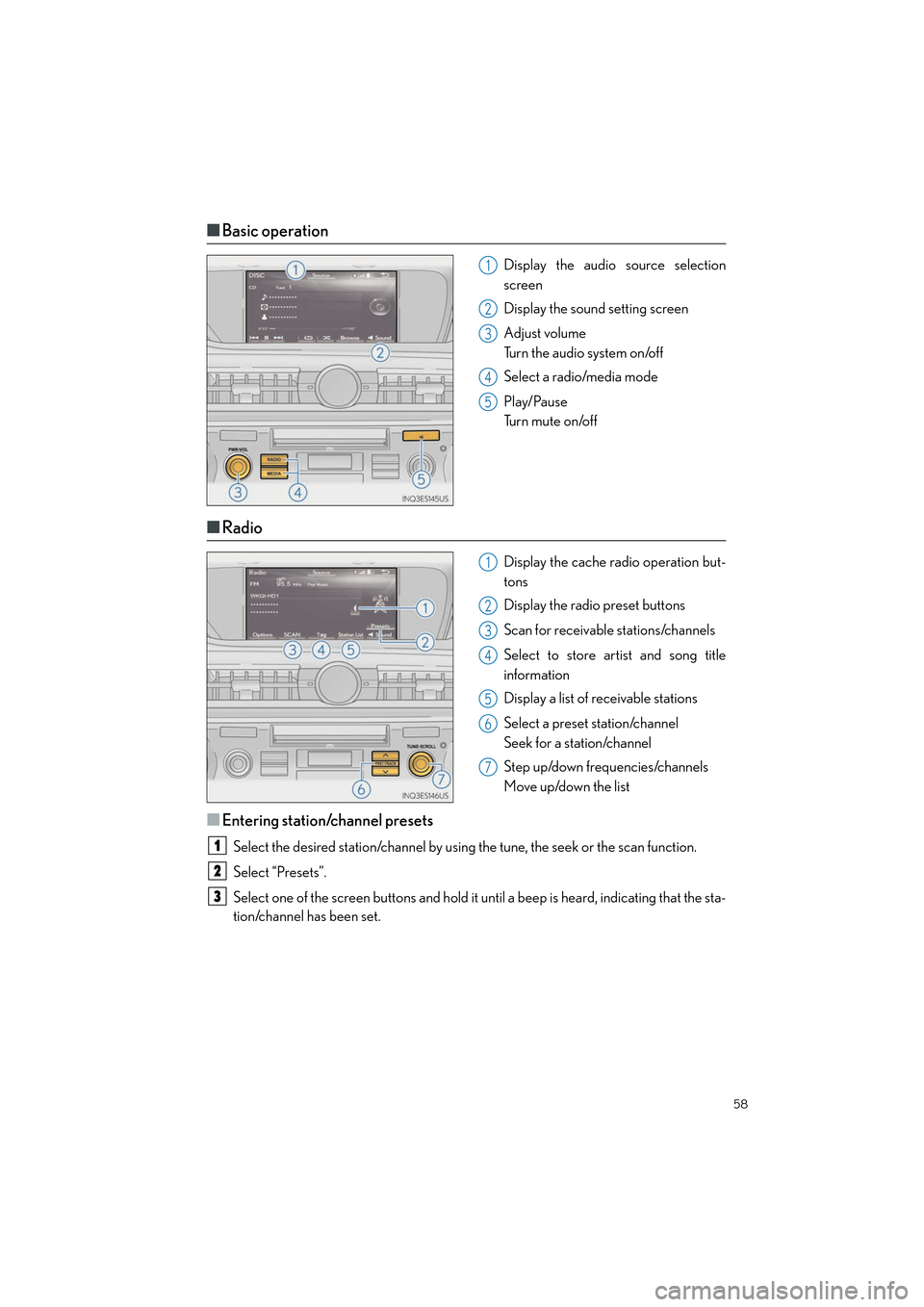
Display the audio source selection
screen
Display the sound setting screen
Adjust volume
Turn the audio system on/off
Select a radio/media mode
Play/Pause
Tu r n m u t e o n /o f f
■Radio
Display the cache radio operation but-
tons
Display the radio preset buttons
Scan for receivable stations/channels
Select to store artist and song title
information
Display a list of receivable stations
Select a preset station/channel
Seek for a station/channel
Step up/down frequencies/channels
Move up/down the list
■Entering station/channel presets
Select the desired station/channel by using the tune, the seek or the scan function.
Select “Presets”.
Select one of the screen buttons and hold it until a beep is heard, indicating that the sta-
tion/channel has been set.
1
2
3
4
5
1
2
3
4
5
6
7
1
2
3
Page 62 of 104
61
ES350_QG_OM33C84U_(U)
Lexus Display Audio Controller
(with Lexus Display Audio System)
■Basic operation
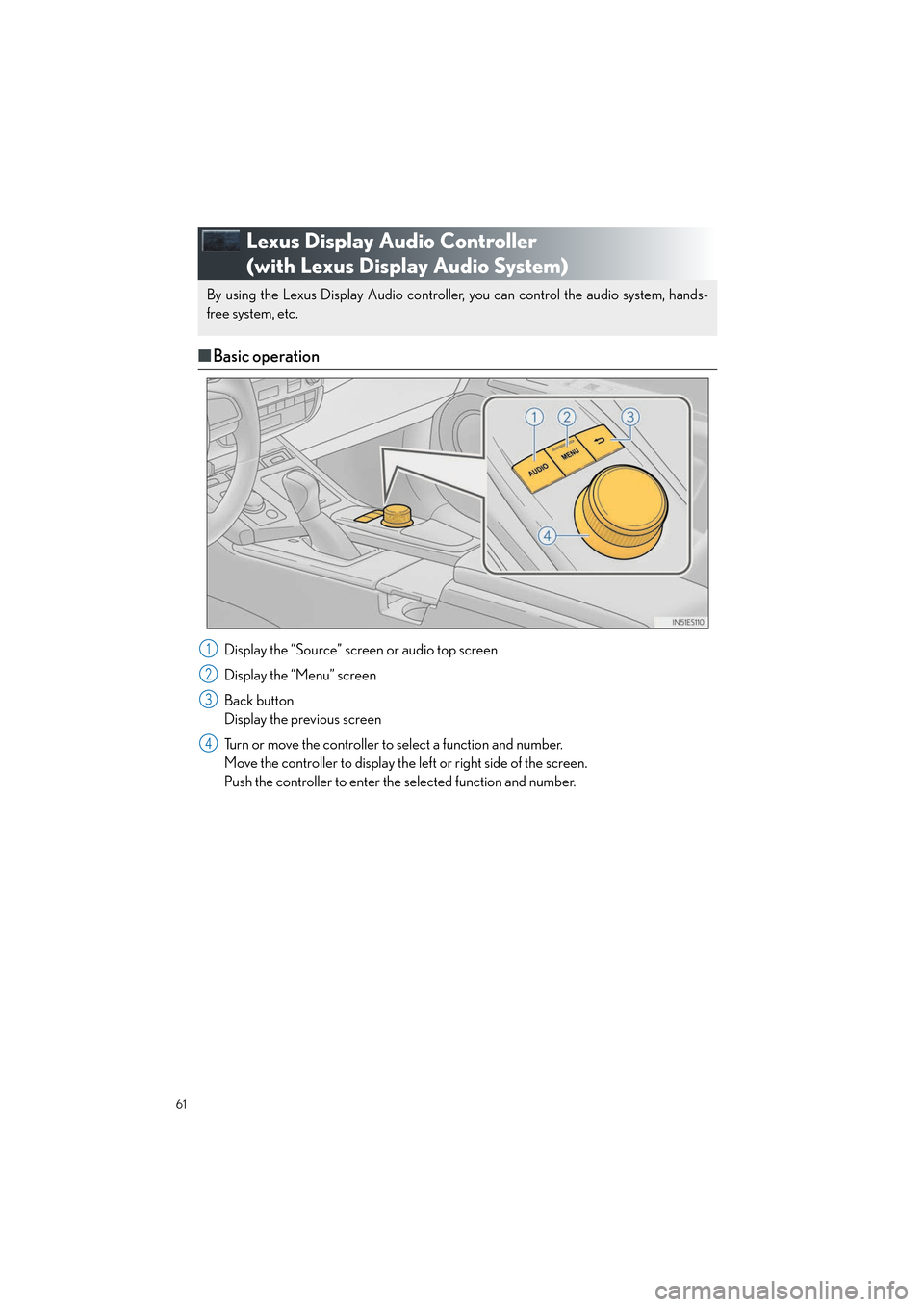
Display the “Source” screen or audio top screen
Display the “Menu” screen
Back button
Display the previous screen
Turn or move the controller to select a function and number.
Move the controller to display the left or right side of the screen.
Push the controller to enter the selected function and number.
By using the Lexus Display Audio controller, you can control the audio system, hands-
free system, etc.
1
2
3
4
Page 63 of 104
62
ES350_QG_OM33C84U_(U)
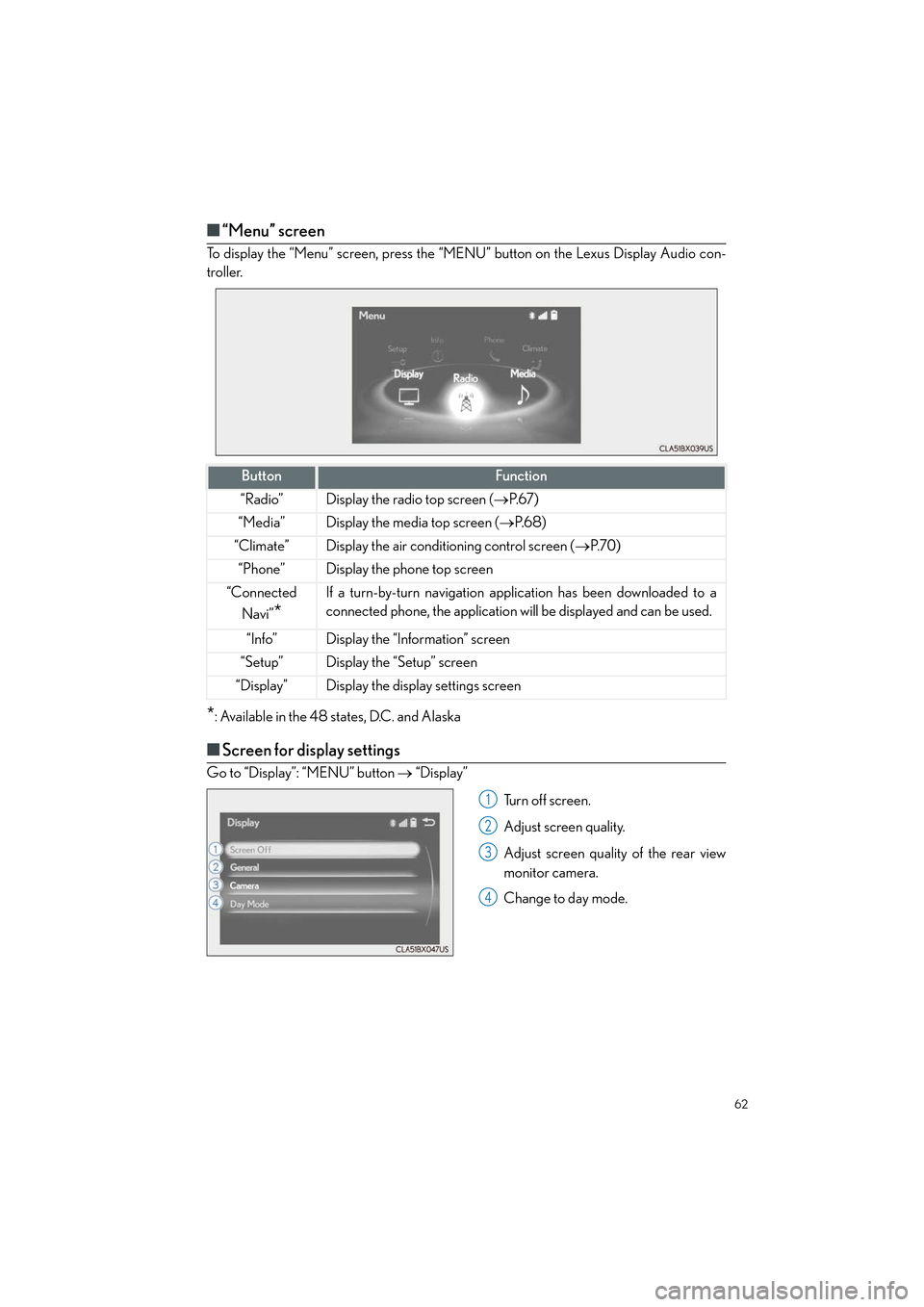
■“Menu” screen
To display the “Menu” screen, press the “MENU” button on the Lexus Display Audio con-
troller.
*: Available in the 48 states, D.C. and Alaska
■Screen for display settings
Go to “Display”: “MENU” button → “Display”
Tu r n o f f s c r e e n .
Adjust screen quality.
Adjust screen quality of the rear view
monitor camera.
Change to day mode.
ButtonFunction
“Radio”Display the radio top screen ( →P. 6 7 )
“Media”Display the media top screen ( →P. 6 8 )
“Climate”Display the air conditioning control screen ( →P. 7 0 )
“Phone”Display the phone top screen
“Connected
Navi”
*
If a turn-by-turn navigation app lication has been downloaded to a
connected phone, the application will be displayed and can be used.
“Info”Display the “Information” screen
“Setup”Display the “Setup” screen
“Display”Display the display settings screen
1
2
3
4
Page 64 of 104
63
ES350_QG_OM33C84U_(U)
Hands-free System For Cellular Phone
(with Lexus Display Audio System)
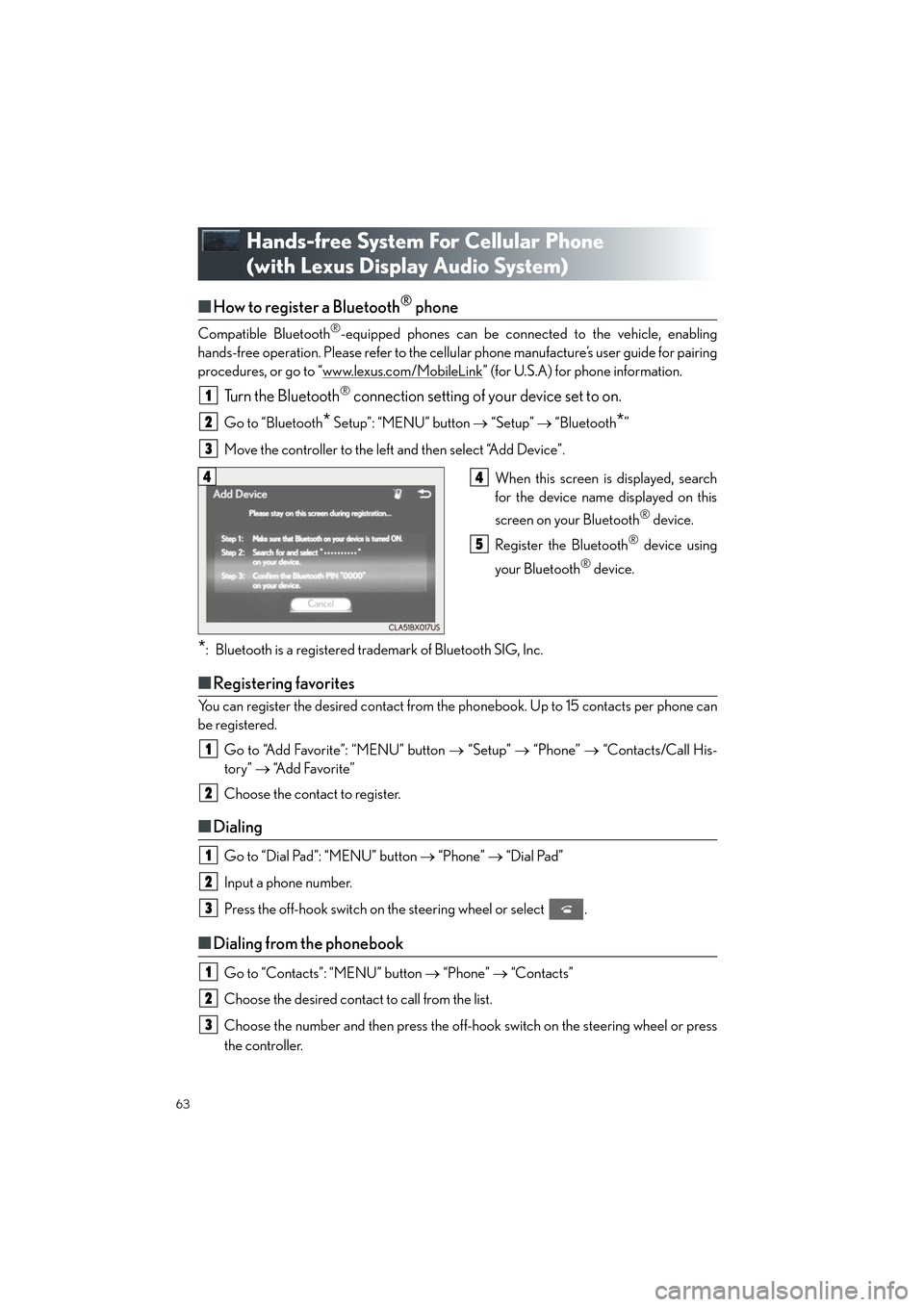
■How to register a Bluetooth® phone
Compatible Bluetooth®-equipped phones can be connected to the vehicle, enabling
hands-free operation. Please refer to the cellu lar phone manufacture’s user guide for pairing
procedures, or go to “www.lexus.com/MobileLink
” (for U.S.A) for phone information.
Turn the Bluetooth® connection setting of your device set to on.
Go to “Bluetooth* Setup”: “MENU” button → “Setup” → “Bluetooth*”
Move the controller to the left and then select “Add Device”.
When this screen is displayed, search
for the device name displayed on this
screen on your Bluetooth
® device.
Register the Bluetooth
® device using
your Bluetooth
® device.
*: Bluetooth is a registered trademark of Bluetooth SIG, Inc.
■ Registering favorites
You can register the desired contact from the phonebook. Up to 15 contacts per phone can
be registered.
Go to “Add Favorite”: “MENU” button → “Setup” → “Phone” → “Contacts/Call His-
tory” → “Add Favorite”
Choose the contact to register.
■ Dialing
Go to “Dial Pad”: “MENU” button → “Phone” → “Dial Pad”
Input a phone number.
Press the off-hook switch on the steering wheel or select .
■ Dialing from the phonebook
Go to “Contacts”: “MENU” button → “Phone” → “Contacts”
Choose the desired contact to call from the list.
Choose the number and then press the off-hook switch on the steering wheel or press
the controller.
1
2
3
44
5
1
2
1
2
3
1
2
3
Page 66 of 104
65
ES350_QG_OM33C84U_(U)
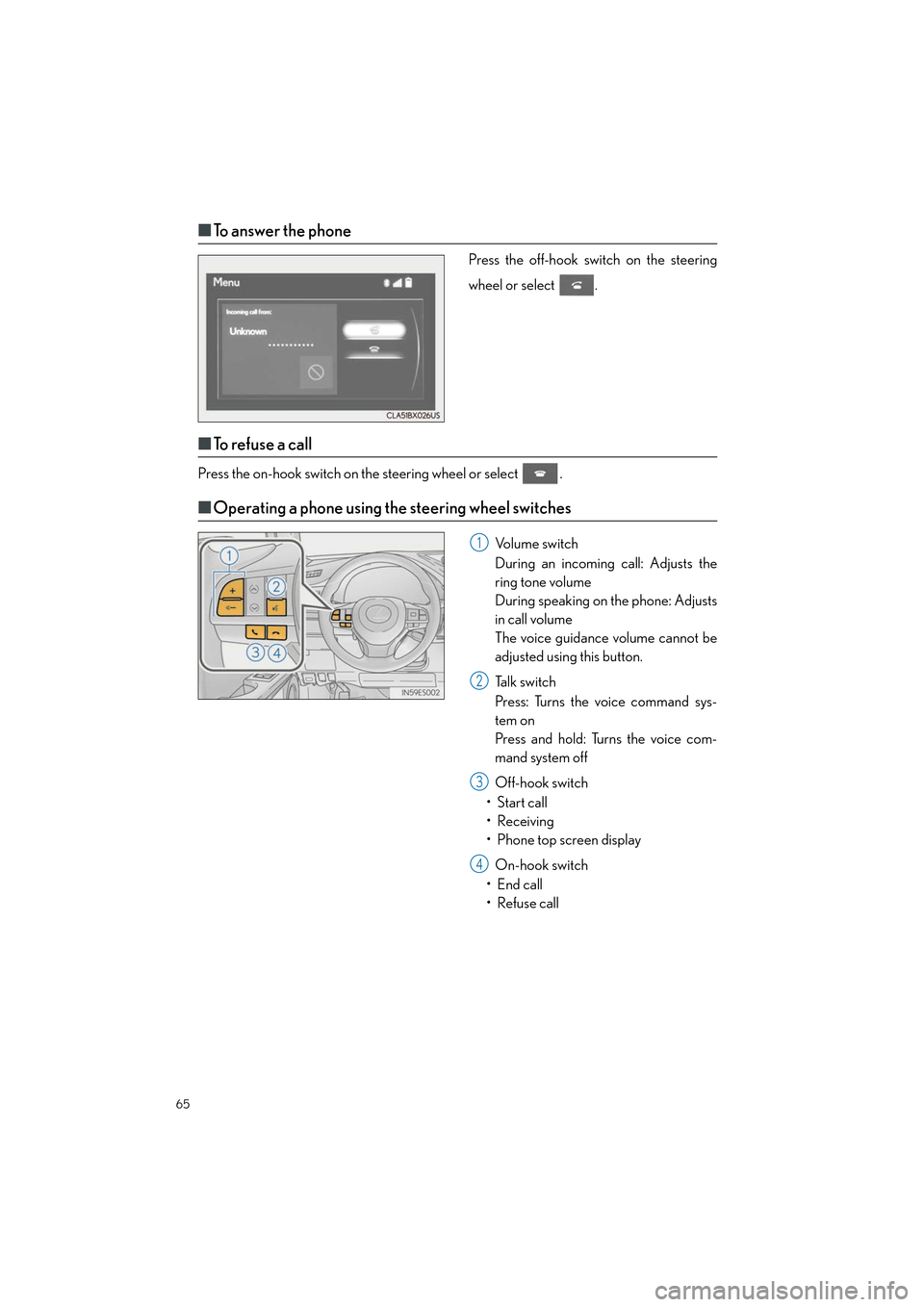
■To answer the phone
Press the off-hook switch on the steering
wheel or select .
■To r e f u s e a c a l l
Press the on-hook switch on the steering wheel or select .
■Operating a phone using the steering wheel switches
Volume switch
During an incoming call: Adjusts the
ring tone volume
During speaking on the phone: Adjusts
in call volume
The voice guidance volume cannot be
adjusted using this button.
Talk switch
Press: Turns the voice command sys-
tem on
Press and hold: Turns the voice com-
mand system off
Off-hook switch
• Start call
•Receiving
• Phone top screen display
On-hook switch
• End call
• Refuse call1
2
3
4
Page 67 of 104
66
ES350_QG_OM33C84U_(U)
Audio System (with Lexus Display Audio
System)
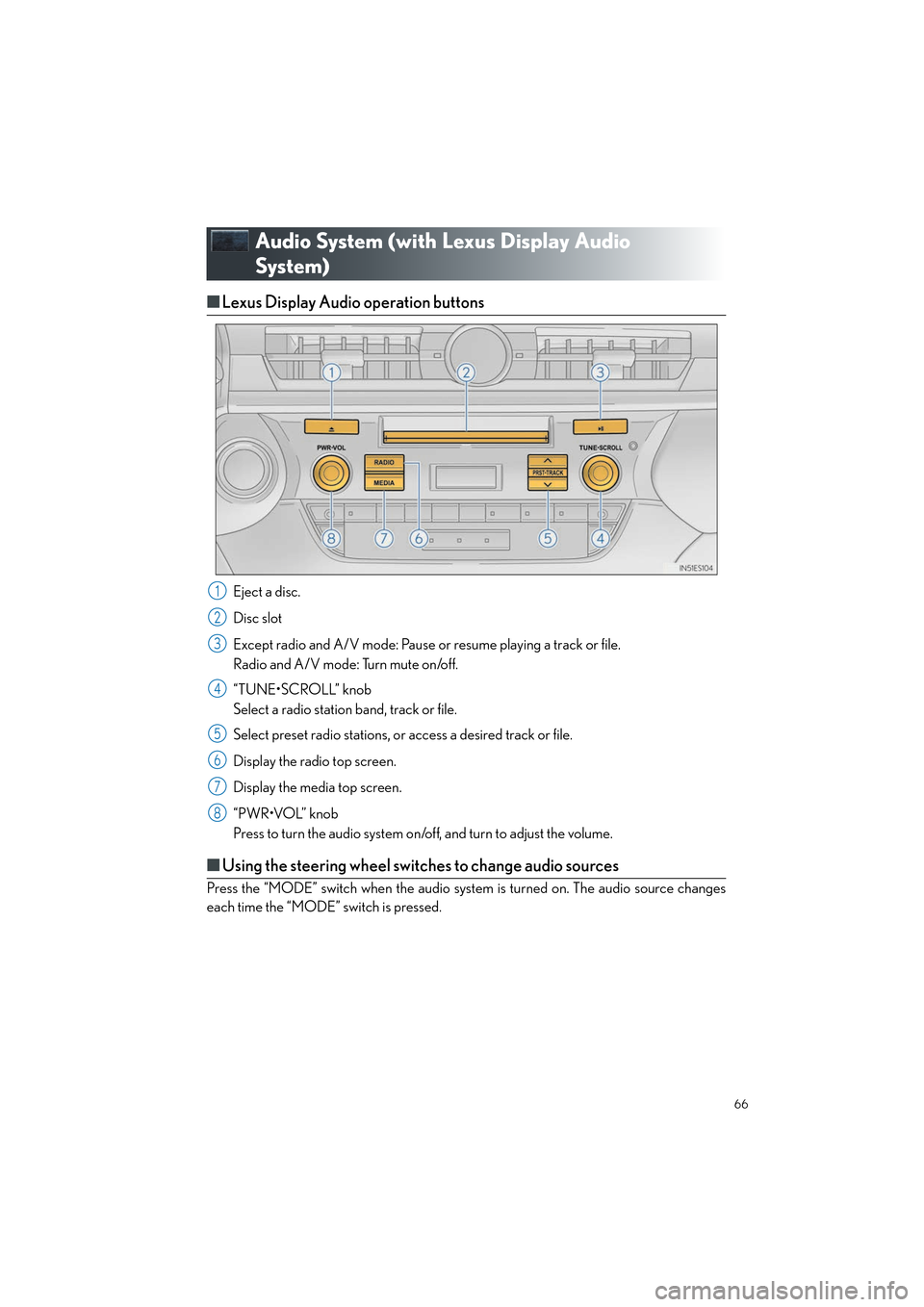
■Lexus Display Audio operation buttons
Eject a disc.
Disc slot
Except radio and A/V mode: Pause or resume playing a track or file.
Radio and A/V mode: Turn mute on/off.
“TUNE•SCROLL” knob
Select a radio station band, track or file.
Select preset radio stations, or access a desired track or file.
Display the radio top screen.
Display the media top screen.
“PWR•VOL” knob
Press to turn the audio system on/off, and turn to adjust the volume.
■Using the steering wheel switches to change audio sources
Press the “MODE” switch when the audio system is turned on. The audio source changes
each time the “MODE” switch is pressed.
1
2
3
4
5
6
7
8
Page 70 of 104
69
ES350_QG_OM33C84U_(U)
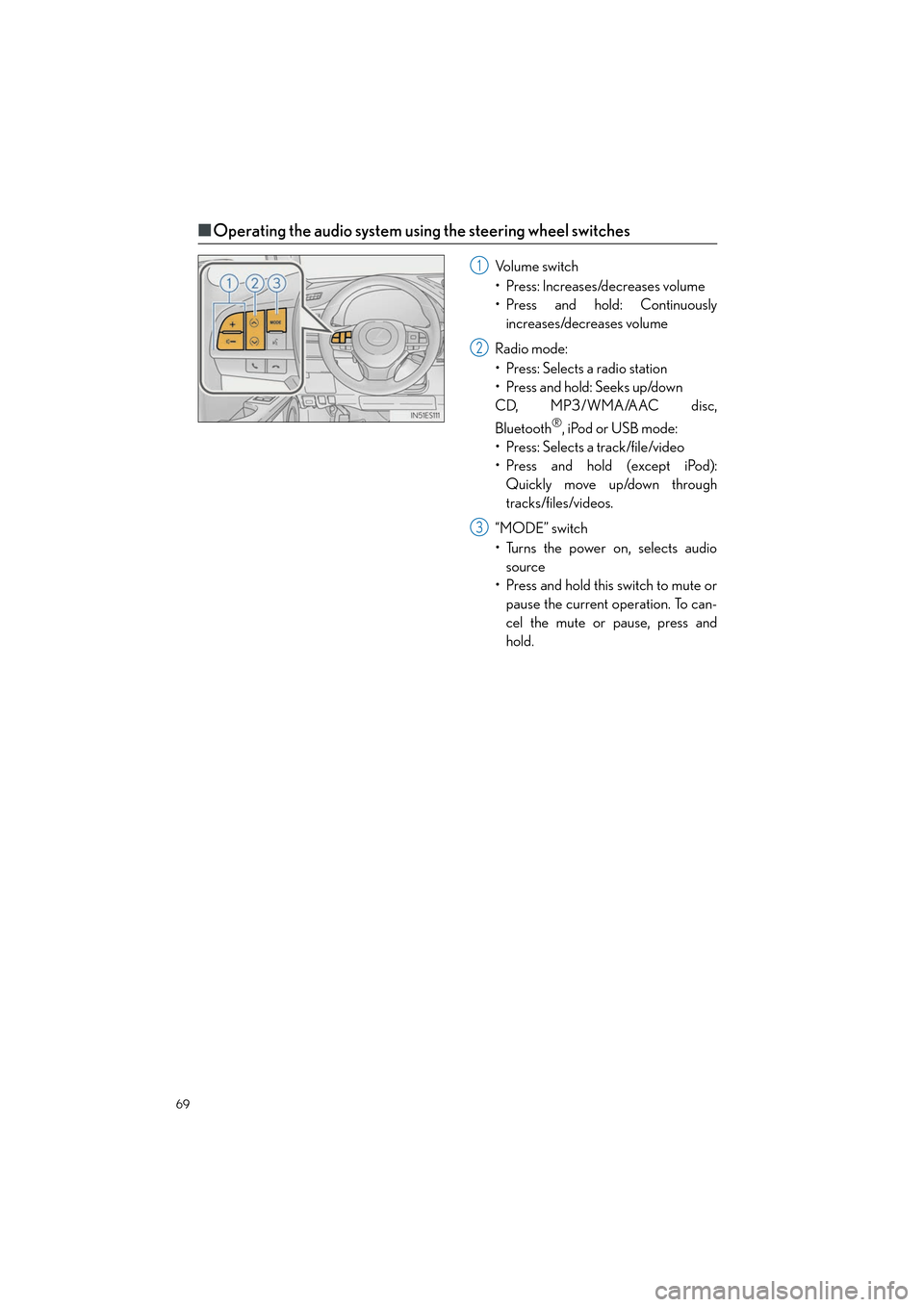
■Operating the audio system using the steering wheel switches
Volume switch
• Press: Increases/decreases volume
• Press and hold: Continuously
increases/decreases volume
Radio mode:
• Press: Selects a radio station
•Press and hold: Seeks up/down
CD, MP3/WMA/AAC disc,
Bluetooth
®, iPod or USB mode:
• Press: Selects a track/file/video
• Press and hold (except iPod): Quickly move up/down through
tracks/files/videos.
“MODE” switch
• Turns the power on, selects audio source
• Press and hold this switch to mute or pause the current operation. To can-
cel the mute or pause, press and
hold.
1
2
3