turn Lexus ES350 2017 Quick Guide
[x] Cancel search | Manufacturer: LEXUS, Model Year: 2017, Model line: ES350, Model: Lexus ES350 2017Pages: 104, PDF Size: 3.83 MB
Page 31 of 104

30
ES350_QG_OM33C84U_(U)
Eco Driving Indicator
Eco Driving Indicator Light
During Eco-friendly acceleration (Eco
driving), the Eco Driving Indicator
Light will turn on. When the accelera-
tion exceeds the Zone of Eco driving,
or when the vehicle is stopped, the light
turns off.
Eco Driving Indicator Zone Display
Suggests the Zone of Eco driving with
current Eco driving ratio based on
acceleration.
Eco driving ratio based on accelera-
tion
If the acceleration exceeds the Zone of
Eco driving, the right side of the Eco
Driving Indicator Zone Display will illu-
minate.
When this happens, the Eco Driving
Indicator Light will turn off.
Zone of Eco driving
Eco Driving Indicator will not operate
under the following conditions:
● The engine is not running.
● The shift lever is in any position other
than D.
● Neither normal mode nor Eco drive
mode is selected. ( →P. 4 6 )
● The vehicle speed is approximately
80 mph (130 km/h) or higher.
Settings of the display and non-display of
the Eco Driving Indicator Light can be
changed.1
2
3
4
Page 32 of 104
31
ES350_QG_OM33C84U_(U)
Headlights
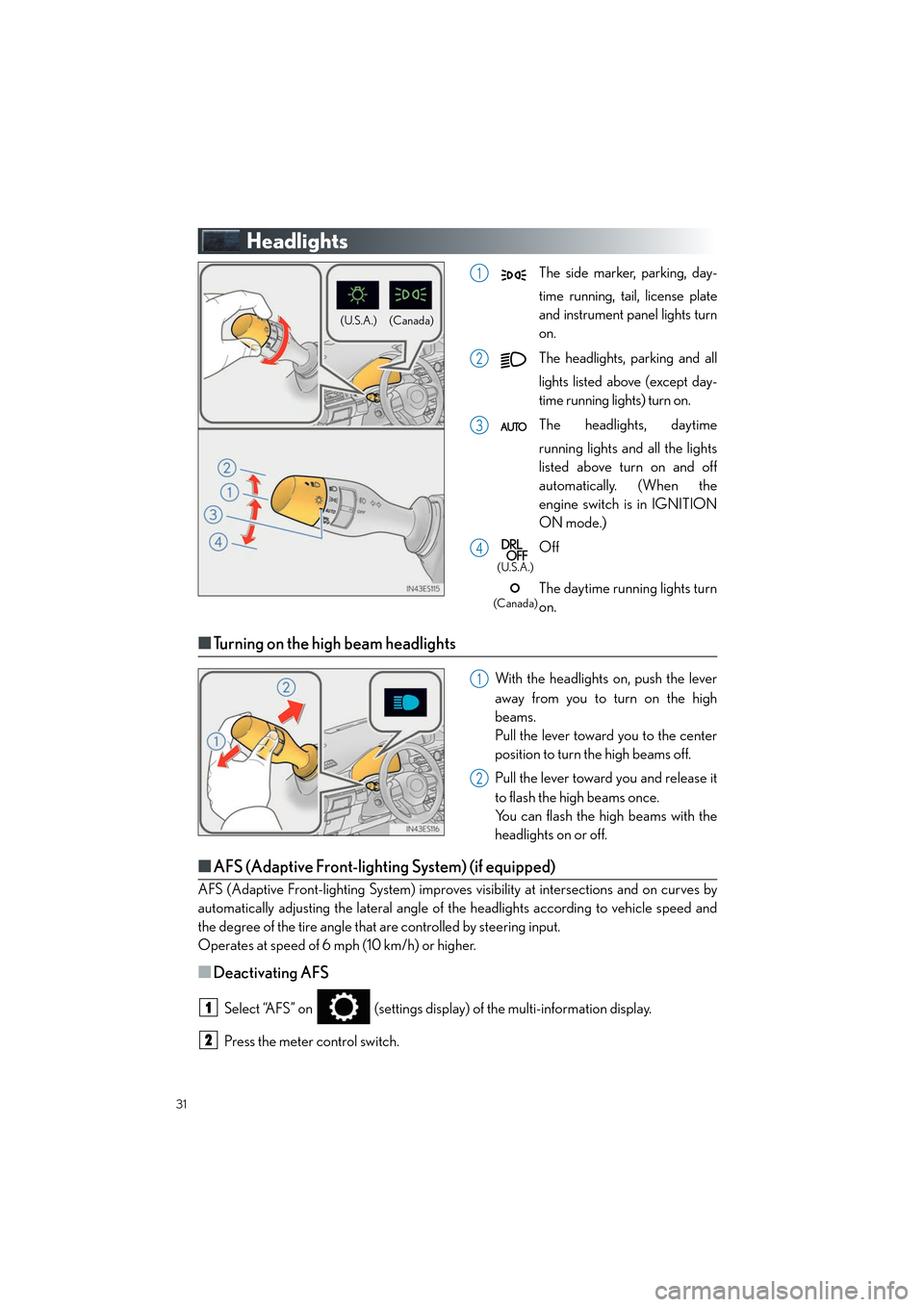
The side marker, parking, day-
time running, tail, license plate
and instrument panel lights turn
on.
The headlights, parking and all
lights listed above (except day-
time running lights) turn on.
The headlights, daytime
running lights and all the lights
listed above turn on and off
automatically. (When the
engine switch is in IGNITION
ON mode.)
Off
The daytime running lights turn
on.
■Turning on the high beam headlights
With the headlights on, push the lever
away from you to turn on the high
beams.
Pull the lever toward you to the center
position to turn the high beams off.
Pull the lever toward you and release it
to flash the high beams once.
You can flash the high beams with the
headlights on or off.
■AFS (Adaptive Front-lighting System) (if equipped)
AFS (Adaptive Front-lighting Syst em) improves visibility at intersections and on curves by
automatically adjusting the lateral angle of the headlights according to vehicle speed and
the degree of the tire angle that are controlled by steering input.
Operates at speed of 6 mph (10 km/h) or higher.
■Deactivating AFS
Select “AFS” on (settings display) of the multi-information display.
Press the meter control switch.
(Canada)
(U.S.A.)
1
2
3
4
(U.S.A.)
(Canada)
1
2
1
2
Page 33 of 104
32
ES350_QG_OM33C84U_(U)
Automatic High Beam (if equipped)
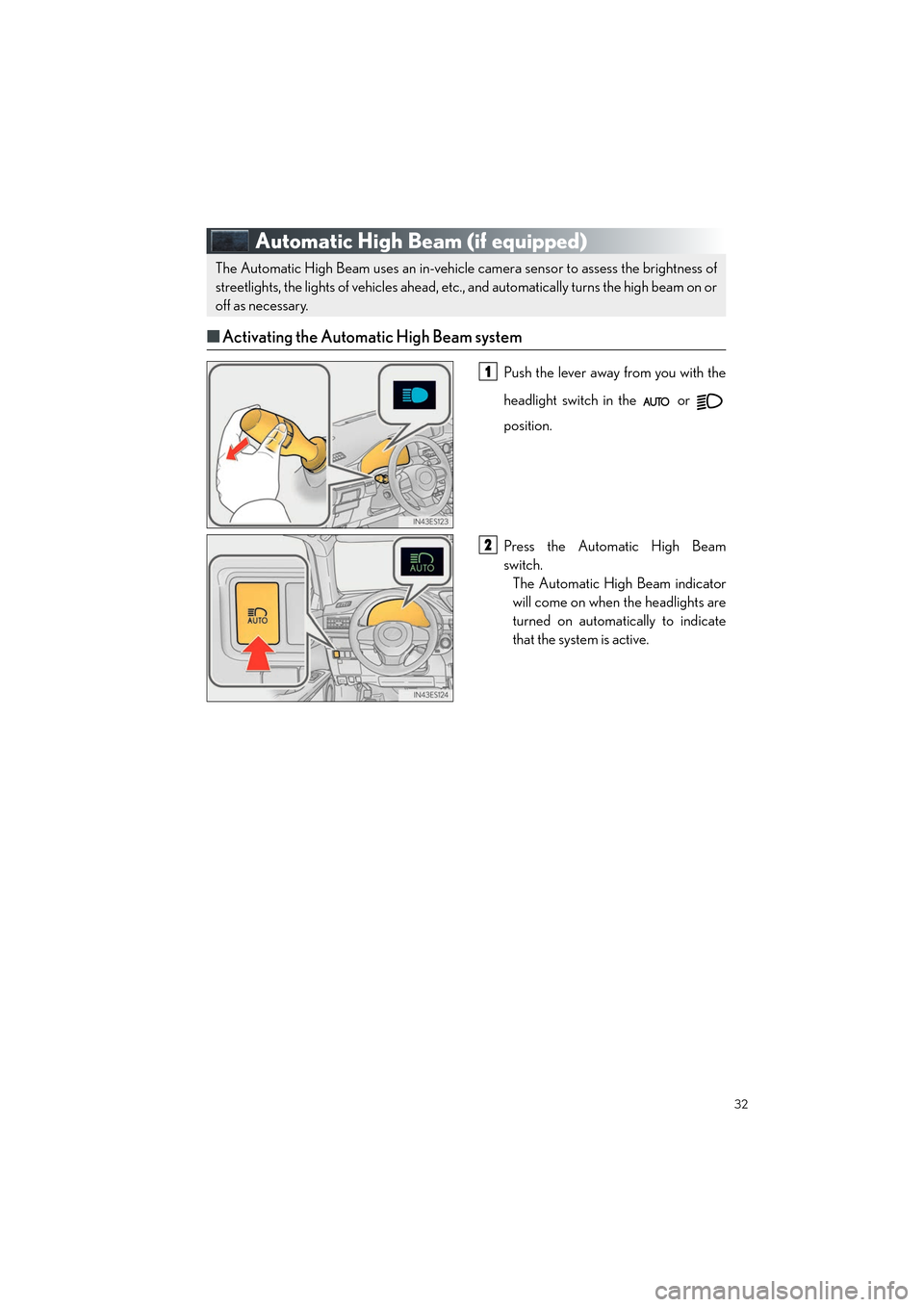
■Activating the Automatic High Beam system
Push the lever away from you with the
headlight switch in the or
position.
Press the Automatic High Beam
switch.
The Automatic High Beam indicator
will come on when the headlights are
turned on automatically to indicate
that the system is active.
The Automatic High Beam uses an in-vehicle camera sensor to assess the brightness of
streetlights, the lights of vehicles ahead, etc., and automatically turns the high beam on or
off as necessary.
1
2
Page 34 of 104
33
ES350_QG_OM33C84U_(U)
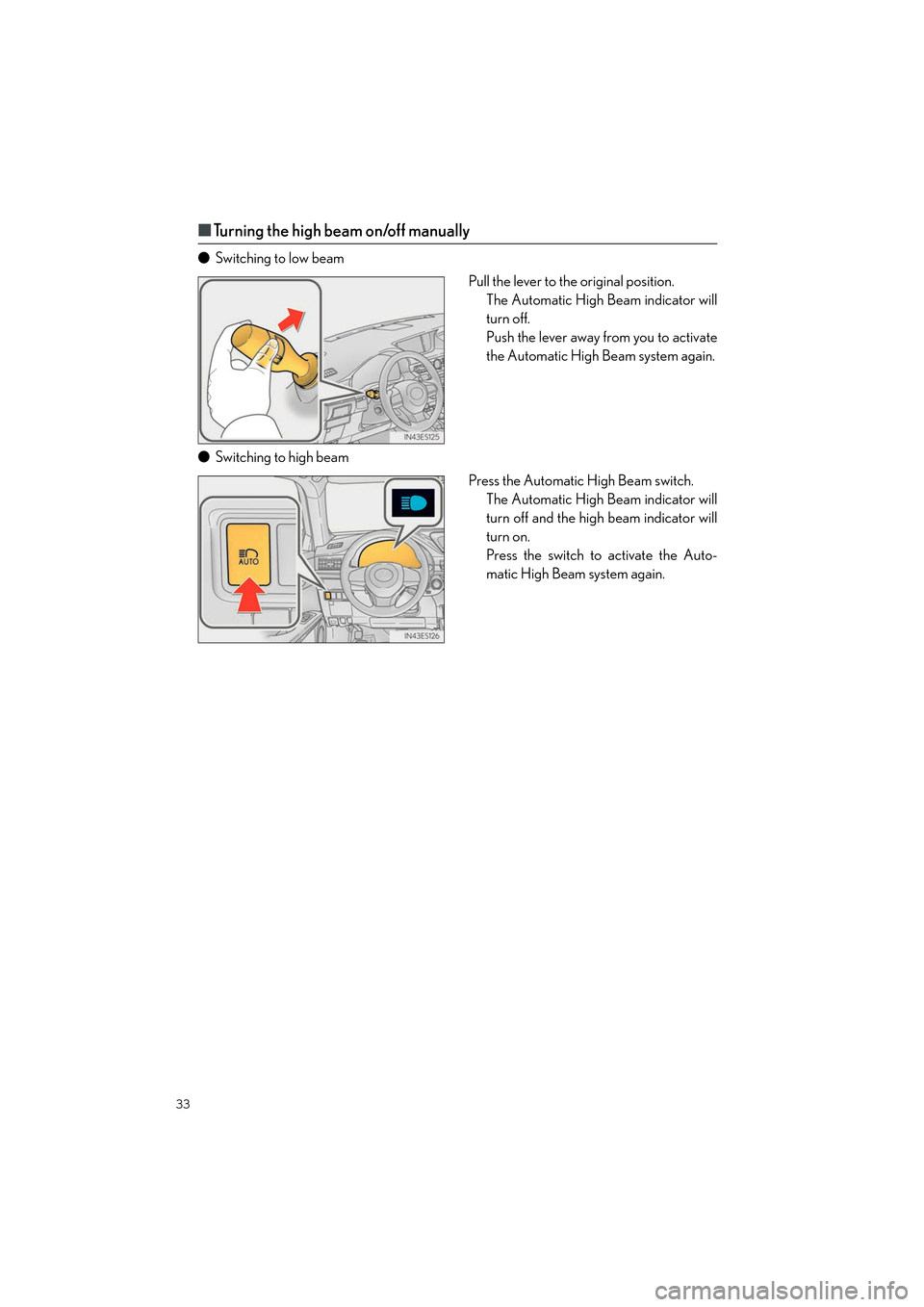
■Turning the high beam on/off manually
● Switching to low beam
Pull the lever to the original position.The Automatic High Beam indicator will
turn off.
Push the lever away from you to activate
the Automatic High Beam system again.
● Switching to high beam
Press the Automatic High Beam switch.The Automatic High Beam indicator will
turn off and the high beam indicator will
turn on.
Press the switch to activate the Auto-
matic High Beam system again.
Page 42 of 104

41
ES350_QG_OM33C84U_(U)
■Adjusting the set speed
Increases the speed
Decreases the speed
Fine adjustment: Momentarily move
the lever in the desired direction.
Large adjustment: Hold the lever up or
down to change the speed, and release
when the desired speed is reached.
■Changing the vehicle-to-vehicle distance (vehicle-to-vehicle distance con-
trol mode)
Pressing the button changes the vehicle-to-
vehicle distance as follows:
Long
Medium
Short
The vehicle-to-vehicle distance is set
automatically to long mode when the
engine switch is turned to IGNITION
ON mode.
If a vehicle is running ahead of you, the
preceding vehicle mark will also be dis-
played.
1
2
Preceding
vehicle mark
1
2
3
The vehicle-to-vehicle distance control mode maintains the preset cruising speed as long
as no vehicle is detected ahead.
Page 43 of 104

42
ES350_QG_OM33C84U_(U)
■Canceling and resuming the speed control
Pulling the lever toward you cancels
the speed control.
The speed control is also canceled
when the brake pedal is depressed.
Pushing the lever up resumes the
cruise control and returns vehicle
speed to the set speed.
However, cruise control does not
resume when the vehicle speed is
approximately 25 mph (40 km/h) or
less.
■Selecting constant speed control mode
With the cruise control off, press and
hold the “ON/OFF” button for 1.5 sec-
onds or more.
Immediately after the “ON/OFF”
button is pressed, the radar cruise
control indicator will come on. After-
wards, it switches to the cruise con-
trol indicator.
Switching to constant speed control
mode is only possible when operating
the lever with the cruise control off.
Accelerate or decelerate, with accel-
erator pedal operation, to the desired
vehicle speed (above approximately
30 mph [50 km/h]) and push the lever
down to set the speed. Cruise control “SET” indicator will
come on.
The vehicle speed at the moment the
lever is released becomes the set
speed.
1
2
1
2
Page 44 of 104
43
ES350_QG_OM33C84U_(U)
LDA (Lane Departure Alert with
steering control) (if equipped)
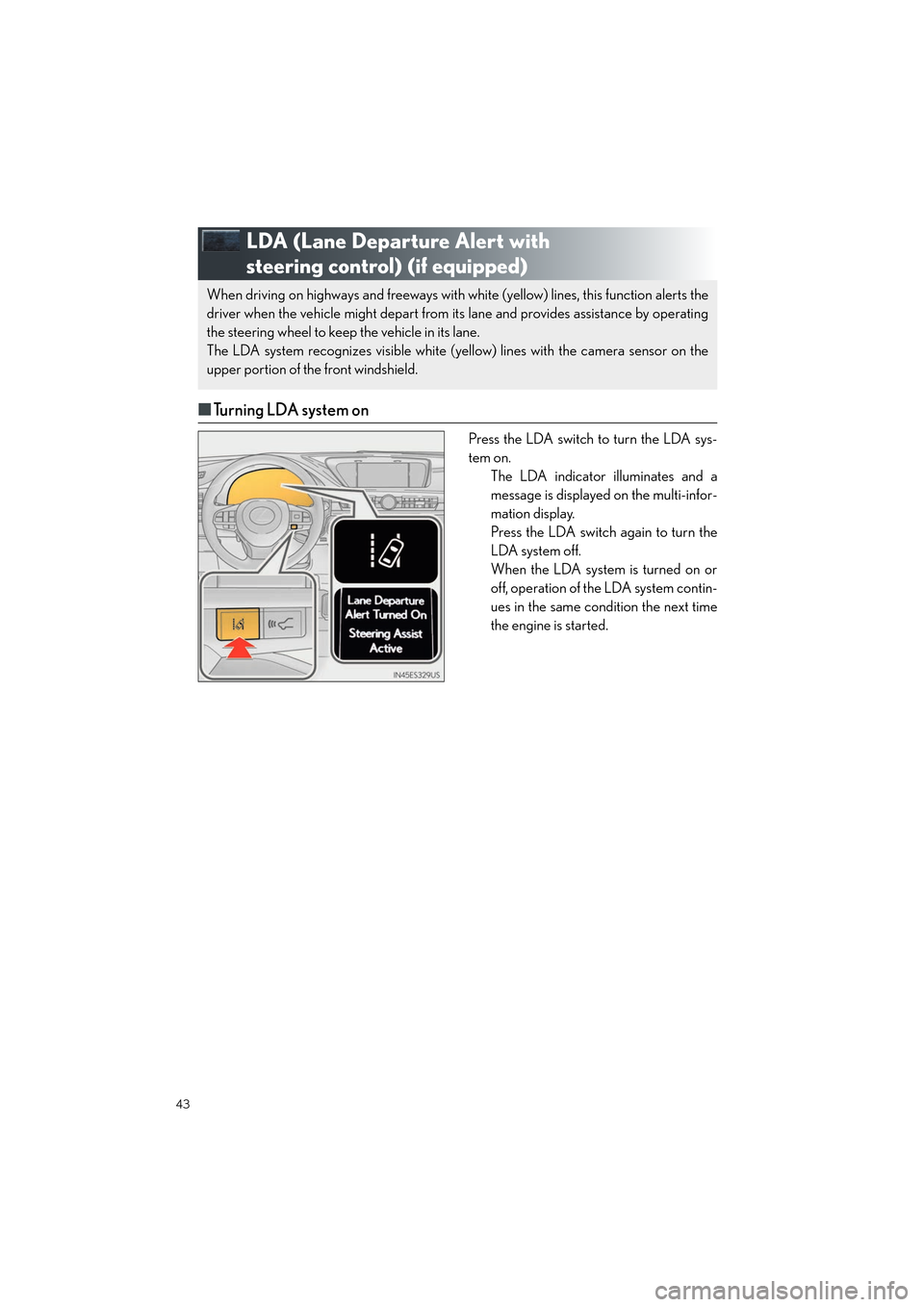
■Turning LDA system on
Press the LDA switch to turn the LDA sys-
tem on.
The LDA indicator illuminates and a
message is displayed on the multi-infor-
mation display.
Press the LDA switch again to turn the
LDA system off.
When the LDA system is turned on or
off, operation of the LDA system contin-
ues in the same condition the next time
the engine is started.
When driving on highways and freeways with wh ite (yellow) lines, this function alerts the
driver when the vehicle might depart from its lane and provides assistance by operating
the steering wheel to keep the vehicle in its lane.
The LDA system recognizes visible white (yellow) lines with the camera sensor on the
upper portion of the front windshield.
Page 45 of 104

44
ES350_QG_OM33C84U_(U)
Intuitive Parking Assist (if equipped)
■Turning the system on and off
Turns the intuitive parking assist on/off
When on, the indicator light comes on to
inform the driver that the system is oper-
ational.
The distance from your vehicle to nearby obstacles when parallel parking or maneuver-
ing into a garage is measured by the sensors and communicated via the multi-informa-
tion display, navigation system screen or Lexus Display Audio system screen and a
buzzer. Always check the surrounding area when using this system.
Page 46 of 104

45
ES350_QG_OM33C84U_(U)
BSM (Blind Spot Monitor) (if equipped)
BSM main switch
Pressing the switch turns the system on or off. When the switch is set to on, the switch’s
indicator illuminates. Common switch for Blind Spot Monitor function and Rear Cross
Traffic Alert function.
Outside rear view mirror indicator
Blind Spot Monitor function:
When a vehicle is detected in the blind spot, the outside rear view mirror indicator
comes on while the turn signal lever is not operated. If the turn signal lever is operated
toward the detected side, the outside rear view mirror indicator flashes.
Rear Cross Traffic Alert function:
When a vehicle approaching from the right or left rear of the vehicle is detected, the
outside rear view mirror indicators flash.
Rear Cross Traffic Alert function buzzer (Rear Cross Traffic Alert function only)
When a vehicle approaching from the right or left rear of the vehicle is detected, a
buzzer sounds from behind the rear seat.
The Blind Spot Monitor is a system that has 2 functions;
● The Blind Spot Monitor function
Assists the driver in making th e decision when changing lanes
● The Rear Cross Traffic Alert function
Assists the driver when backing up
These functions use same sensors.
1
2
3
Page 47 of 104

46
ES350_QG_OM33C84U_(U)
Driving Mode Select Switch
Normal mode
For normal driving.
Press the switch to change the driving mode to normal mode when selected to Eco
drive mode or sport mode.
Eco drive mode
Use Eco drive mode to help achieve low fuel consumption during trips that involve fre-
quent accelerating.
When not in Eco drive mode and the driving mode select switch is turned to the left, the
“ECO” indicator comes on in the multi-information display.
Sport mode
Assists acceleration response by controlling the steering and transmission. Suitable for
when precise handling is desirable, for example when driving on mountain roads.
When not in Sport mode and the driving mode select switch is turned to the right, the
“SPORT” indicator comes on in the multi-information display.
The driving modes can be select ed to suit driving condition.
1
2
3