low Lexus ES350 2017 Quick Guide
[x] Cancel search | Manufacturer: LEXUS, Model Year: 2017, Model line: ES350, Model: Lexus ES350 2017Pages: 104, PDF Size: 3.83 MB
Page 16 of 104

15
ES350_QG_OM33C84U_(U)
Smart Access System with Push-button Start
■Entering and exiting the vehicle
Grip the driver’s door handle to unlock
the door. Grip the passenger’s door
handle to unlock all the doors.
*
Make sure to touch the sensor on the
back of the handle.
The doors cannot be unlocked for
3 seconds after the doors are locked.
*: The door unlock settings can be
changed.
Touch the lock sensor (the indentation
on the upper part of the door handle)
to lock all the doors. Check that the door is securely
locked.
■ Opening the trunk
Press the button.
If the vehicle is equipped with power
trunk opener and closer, the trunk lid
automatically opens fully.
The following operations can be performed simply by carrying the electronic key on your
person, for example in your pocket. The driver should always carry the electronic key.
For details on starting the engine, see page 22.
1
2
For details on what to do when the electronic key does not operate properly, see page 97.
Page 23 of 104

22
ES350_QG_OM33C84U_(U)
Engine (Ignition) Switch
■Starting the engine
Check that the parking brake is set.
Check that the shift lever is set in P.
Firmly depress the brake pedal.
will be displayed on the
multi-information display. If it is not
displayed, the engine cannot be
started.
Press the engine switch shortly and
firmly. When operating the engine switch,
one short, firm press is enough. It is
not necessary to press and hold the
switch.
The engine will crank until it starts or
for up to 30 seconds, whichever is
less.
Continue depressing the brake pedal
until the engine is completely started.
The engine can be started from any
engine switch mode.
Performing the following operations when carrying the electronic key on your person
starts the engine or changes engine switch modes.
1
2
3
4
Page 25 of 104

24
ES350_QG_OM33C84U_(U)
■If your vehicle has to be stopped in an emergency
Only in an emergency, such as if it becomes im possible to stop the vehicle in the normal way,
stop the vehicle using the following procedure:
Steadily step on the brake pedal with both feet and firmly depress it.
Do not pump the brake pedal repeatedly as this will increase the effort required to slow
the vehicle.
Shift the shift lever to N.
If the shift lever is shifted to N
After slowing down, stop the vehicle in a safe place by the road.
Stop the engine.
If the shift lever cannot be shifted to N
Keep depressing the brake pedal with both feet to reduce vehicle speed as much as
possible. To stop the engine, press and hold the
engine switch for 2 consecutive seconds or
more, or press it briefly 3 times or more in
succession.
Stop the vehicle in a safe place by the road.
1
2
3
4
3
Press and hold for 2 seconds or more
or press briefly 3 times or more
4
5
Page 26 of 104

25
ES350_QG_OM33C84U_(U)
Automatic Transmission
■Shifting the shift lever
While the engine switch is in IGNITION ON mode, move the shift lever with the
brake pedal depressed.
When shifting the shift lever between P and D, make sure that the vehicle is com-
pletely stopped.
■Shift position purpose
*1: Shifting to the D position allows the system to select a gear suitable for the driving con-
ditions.
Setting the shift lever to the D position is recommended for normal driving.
*2: Selecting shift ranges using S mode restricts the upper limit of the possible gear ranges,controls engine braking force, and prevents unnecessary upshifting.
Shift positionObjective or function
PParking the vehicle/starting the engine
RReversing
NNeutral
DNormal driving*1
SS mode driving*2
Page 27 of 104

26
ES350_QG_OM33C84U_(U)
■Selecting gears in the S position
When the shift lever is in the S position, the shift lever can be operated as follows:
Upshifting
Downshifting
The selected shift range, from 1 to 6,
will be displayed in the meter.
The initial shift range in S mode is set
automatically to 5 or 4 according to
vehicle speed. But, the initial shift range
may be set to 3 if AI-SHIFT has oper-
ated while the shift lever was in the D
position.
1
2
■Shift ranges and their functions
• Automatically selecting gears between 1 and 6 according to vehicle speed and driving
conditions. But, the gear is limited according to selected shift range.
• You can choose from 6 levels of engine braking force.
• A lower shift range will provide greater engine braking force than a higher shift range,
and the engine speed will also increase.
Page 29 of 104

28
ES350_QG_OM33C84U_(U)
Multi-information Display
Drive information
Select to display various drive data.
Navigation system-linked display (if equipped)
Select to display the following navigation system-linked information.
• Route guidance
• Compass display (north-up display/heading-up display)
Audio system-linked display
Select to enable selection of an audio source or track on the display using the
meter control switches.
Driving assist information
Select to display the cruise control or dynamic radar cruise control/LDA
(Lane Departure Alert with steering control) (if equipped) information, when
the system is used. (→P. 3 7 , 3 9 , 4 3 )
Warning message display
Select to display warning messages and measures to be taken if a malfunction
is detected.
Settings display
Select to change the meter display settings.
The multi-information display presents the driver with a variety of vehicle data.
Page 31 of 104

30
ES350_QG_OM33C84U_(U)
Eco Driving Indicator
Eco Driving Indicator Light
During Eco-friendly acceleration (Eco
driving), the Eco Driving Indicator
Light will turn on. When the accelera-
tion exceeds the Zone of Eco driving,
or when the vehicle is stopped, the light
turns off.
Eco Driving Indicator Zone Display
Suggests the Zone of Eco driving with
current Eco driving ratio based on
acceleration.
Eco driving ratio based on accelera-
tion
If the acceleration exceeds the Zone of
Eco driving, the right side of the Eco
Driving Indicator Zone Display will illu-
minate.
When this happens, the Eco Driving
Indicator Light will turn off.
Zone of Eco driving
Eco Driving Indicator will not operate
under the following conditions:
● The engine is not running.
● The shift lever is in any position other
than D.
● Neither normal mode nor Eco drive
mode is selected. ( →P. 4 6 )
● The vehicle speed is approximately
80 mph (130 km/h) or higher.
Settings of the display and non-display of
the Eco Driving Indicator Light can be
changed.1
2
3
4
Page 34 of 104
33
ES350_QG_OM33C84U_(U)
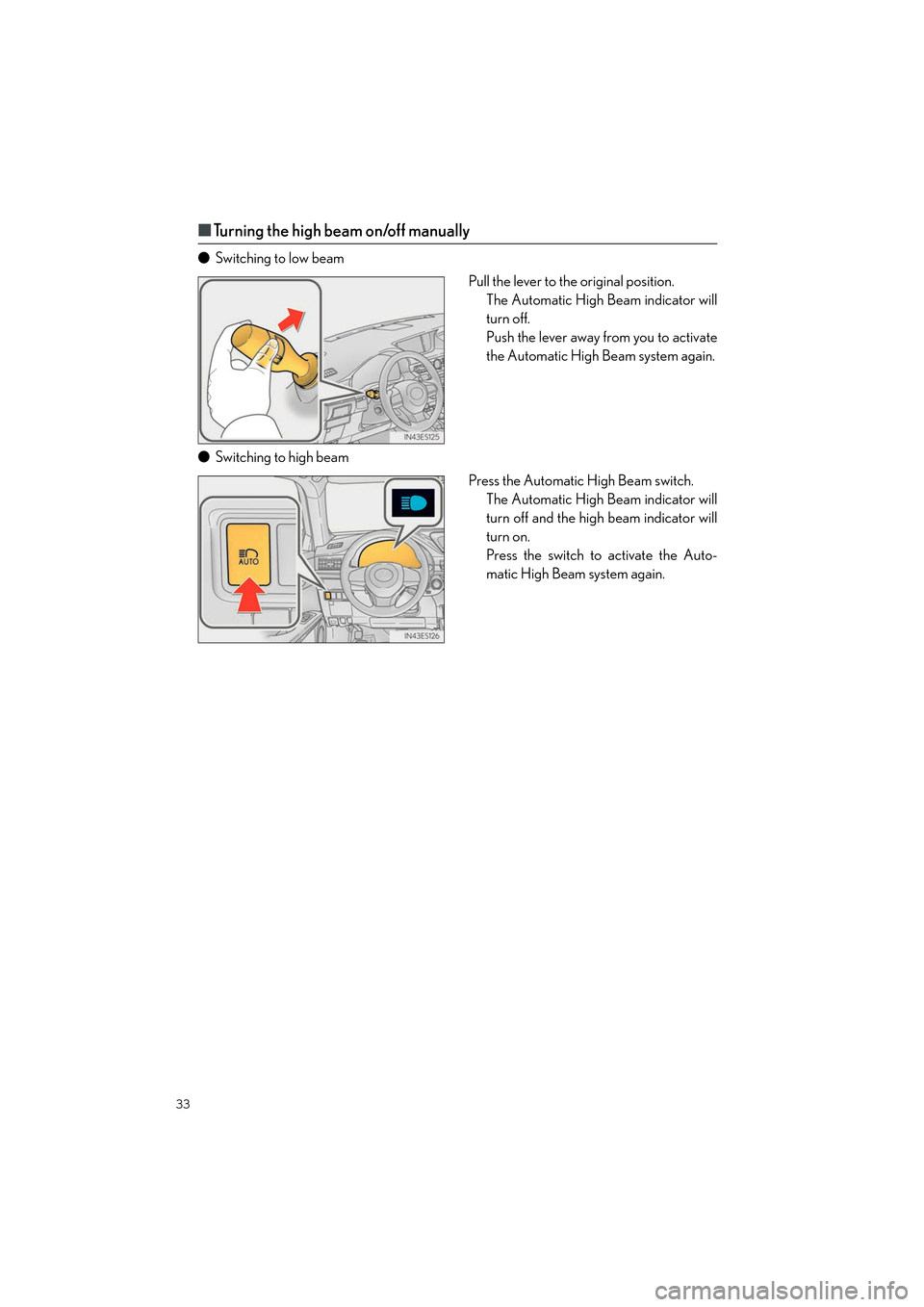
■Turning the high beam on/off manually
● Switching to low beam
Pull the lever to the original position.The Automatic High Beam indicator will
turn off.
Push the lever away from you to activate
the Automatic High Beam system again.
● Switching to high beam
Press the Automatic High Beam switch.The Automatic High Beam indicator will
turn off and the high beam indicator will
turn on.
Press the switch to activate the Auto-
matic High Beam system again.
Page 35 of 104

34
ES350_QG_OM33C84U_(U)
Windshield Wipers and Washer
■Intermittent windshield wipers with interval adjuster
Temporary operation
Intermittent operation
Low speed operation
High speed operation
Wiper intervals can be adjusted when inter-
mittent operation is selected. Increases the intermittent windshield
wiper frequency
Decreases the intermittent windshield
wiper frequency
Washer/wiper dual operation
Wipers will automatically operate a
couple of times after the washer
squirts.1
2
3
4
5
6
7
Page 36 of 104

35
ES350_QG_OM33C84U_(U)
■Rain-sensing windshield wipers
Temporary operation
Rain-sensing wiper operation (AUTO)
Low speed operation
High speed operation
With AUTO selected, the wipers will
operate automatically when the sen-
sor detects falling rain. The system
automatically adjusts wiper timing in
accordance with rain volume and vehi-
cle speed.
The sensor sensitivity can be adjusted when
AUTO is selected.
Increases the sensitivity
Decreases the sensitivity
Washer/wiper dual operation
Wipers will automatically operate a
couple of times after the washer
squirts.1
2
3
4
5
6
7