park assist LEXUS ES350 2021 User Guide
[x] Cancel search | Manufacturer: LEXUS, Model Year: 2021, Model line: ES350, Model: LEXUS ES350 2021Pages: 464, PDF Size: 9.61 MB
Page 138 of 464
1384-1. Before driving
WARNING
■When taking a nap in the vehicle
Always turn the engine off. Otherwise, if
you accidentally move the shift lever or
depress the accelerator pedal, this could
cause an accident or fire due to engine
overheating. Additionally, if the vehicle is
parked in a poorly ventilated area,
exhaust gases may collect and enter the
vehicle, leading to death or a serious
health hazard.
■When braking
●When the brakes are wet, drive more
cautiously.
Braking distance increases when the
brakes are wet, and this may cause
one side of the vehicle to brake differ-
ently than the other side. Also, the
parking brake may not securely hold
the vehicle.
●If the brake booster device does not
operate, do not follow other vehicles
closely and avoid hills or sharp turns
that require braking.
In this case, braking is still possible, but
the brake pedal should be depressed
more firmly than usual. Also, the brak-
ing distance will increase. Have your
brakes fixed immediately.
●Do not pump the brake pedal if the
engine stalls.
Each push on the brake pedal uses up
the reserve for the power-assisted
brakes.
●The brake system consists of 2 or
more individual hydraulic systems; if
one of the systems fails, the other(s)
will still operate. In this case, the brake
pedal should be depressed more
firmly than usual and the braking dis-
tance will increase. Have your brakes
fixed immediately.
■If the vehicle becomes stuck (AWD
models)
Do not spin the wheels excessively when
any of the tires is up in the air, or the vehi-
cle is stuck in sand, mud, etc. This may
damage the driveline components or
propel the vehicle forward or backward,
causing an accident.
NOTICE
■When driving the vehicle
●Do not depress the accelerator and
brake pedals at th e same time while
driving, as this may restrain the engine
output.
●Do not use the accelerator pedal or
depress the accelerator and brake
pedals at the same time to hold the
vehicle on a hill.
■Avoiding damage to vehicle parts
●Do not turn the steering wheel fully in
either direction and hold it there for an
extended period of time.
Doing so may damage the power
steering motor.
●When driving over bumps in the road,
drive as slowly as possible to avoid
damaging the wheels, underside of the
vehicle, etc.
■If you get a flat tire while driving
A flat or damaged tire may cause the fol-
lowing situations. Hold the steering
wheel firmly and gradually depress the
brake pedal to slow down the vehicle.
●It may be difficult to control your vehi-
cle.
●The vehicle will make abnormal
sounds or vibrations.
●The vehicle will lean abnormally.
Information on what to do in case of a flat
tire ( P.375)
Page 146 of 464

1464-2. Driving procedures
1Stop the vehicle completely.
2 Set the parking brake ( P.154),
and shift the shift lever to P
( P.150).
3 Press the engine switch.
4 Release the brake pedal and check
that “ACCESSORY” or “IGNI-
TION ON” is not shown on the
meter.
■Automatic engine shut off feature
●The vehicle is equipped with a feature
that automatically shuts off the engine
when the shift lever is in P with the engine
running for an extended period.
●The engine will automatically shut off
after approximately 1 hour if it has been
left running while the shift lever is in P.
●The timer for the automatic engine shut
off feature will reset if the brake pedal is
depressed or if the shif t lever is in a posi-
tion other than P.
●After the vehicle is parked, if the door is
locked with the door lock switch
( P.97) from the inside or the mechani-
cal key from the outside, the automatic
engine shut off feature will be disabled.
The timer for the automatic engine shut
off feature will be re-enabled if the
driver’s door is opened.
■Locking the door from outside with the
engine running
1 With the driver’s door open, pull the
driver’s door hand le and insert the
mechanical key.
2 Turn the mechanical key counterclock-
wise.
3 Pull out the mechanical key and close
the door.NOTICE
■Symptoms indicating a malfunction
with the engine switch
If the engine switch seems to be operat-
ing somewhat differently than usual, such
as the switch sticking slightly, there may
be a malfunction. Contact your Lexus
dealer immediately.
Stopping the engine
WARNING
■Stopping the engine in an emergency
●If you want to stop the engine in an
emergency while driving the vehicle,
press and hold the engine switch for
more than 2 seconds, or press it briefly
3 times or more in succession.
( P.352)
However, do not touch the engine
switch while driving except in an emer-
gency. Turning the engine off while
driving will not cause loss of steering
or braking control, but the power
assist to these systems will be lost. This
will make it more difficult to steer and
brake, so you should pull over and stop
the vehicle as soon as it is safe to do so.
●If the engine switch is operated while
the vehicle is running, a warning mes-
sage will be shown on the multi-infor-
mation display and a buzzer sounds.
Page 212 of 464
2124-5. Using the driving support systems
■Automatic deactivation of sport mode
and custom mode (if equipped)
If the engine switch is turned off after driv-
ing in sport mode or custom mode, the
drive mode will be changed to normal
mode.
■Driving mode pop-up display (12.3-inch
display model)
When the driving mode is changed, the
selected driving mode will be temporarily
displayed on the side display. ( P.259)
■Customization (vehicles with Adaptive
Variable Suspension system)
Settings (e.g. cust om mode) can be
changed.
(Customizable features: P.419)
*: If equipped
■Intuitive parking assist
Ultrasonic sensors are used to detect
static objects in the detection area
when driving at a low speed or backing
up. ( P.213)
■RCTA (Rear Cross Traffic Alert)
function (if equipped)
Rear side radar sensors are used to
detect approaching vehicles in the
detection areas behind the vehicle
when backing up. ( P.220)
■RCD (Rear Camera Detection)
function (if equipped)
A rear camera sensor is used to detect
pedestrians in the detection area
behind the vehicle when backing up.
( P.224)
PKSA (Parking Support
Alert)*
The Parking Support Alert system
consists of the following functions
that operate when driving at a low
speed or backing up, such as when
parking. When the system deter-
mines that the possibility of a colli-
sion with a detected object, such as
a wall, or pedestrian is high, a warn-
ing operates to urge the driver to
take evasive action.
PKSA (Parking Support Alert)
system
Page 213 of 464
2134-5. Using the driving support systems
4
Driving
■Adjusting the buzzer volume
The buzzer volume can be adjusted on
the multi-information display. The vol-
ume of buzzers for the intuitive parking
assist, RCTA function and RCD func-
tion will be adjusted simultaneously.
Use the meter control switches to
change settings. ( P.78)
1 Press or to select .
2 Press or to select “PKSA”
and then press “OK”.
3 Press or to select and
then press “OK”.
Each time the switch is pressed, the vol-
ume level will change between 1, 2, and 3.
■Muting a buzzer temporarily
A mute button will be displayed on the
multi-information display when an
object or pedestrian is detected. To
mute the buzzer, press “OK”.
The buzzers for the intuitive parking
assist, RCTA function and RCD func-
tion will be muted simultaneously.
Mute will be automatically canceled in
the following situations:
When the shift position is changed.
When there is a malfunction in a
sensor or the system is temporarily
unavailable.
When the function is disabled while
it is operating.
When the engine switch is turned
off.
*: If equipped
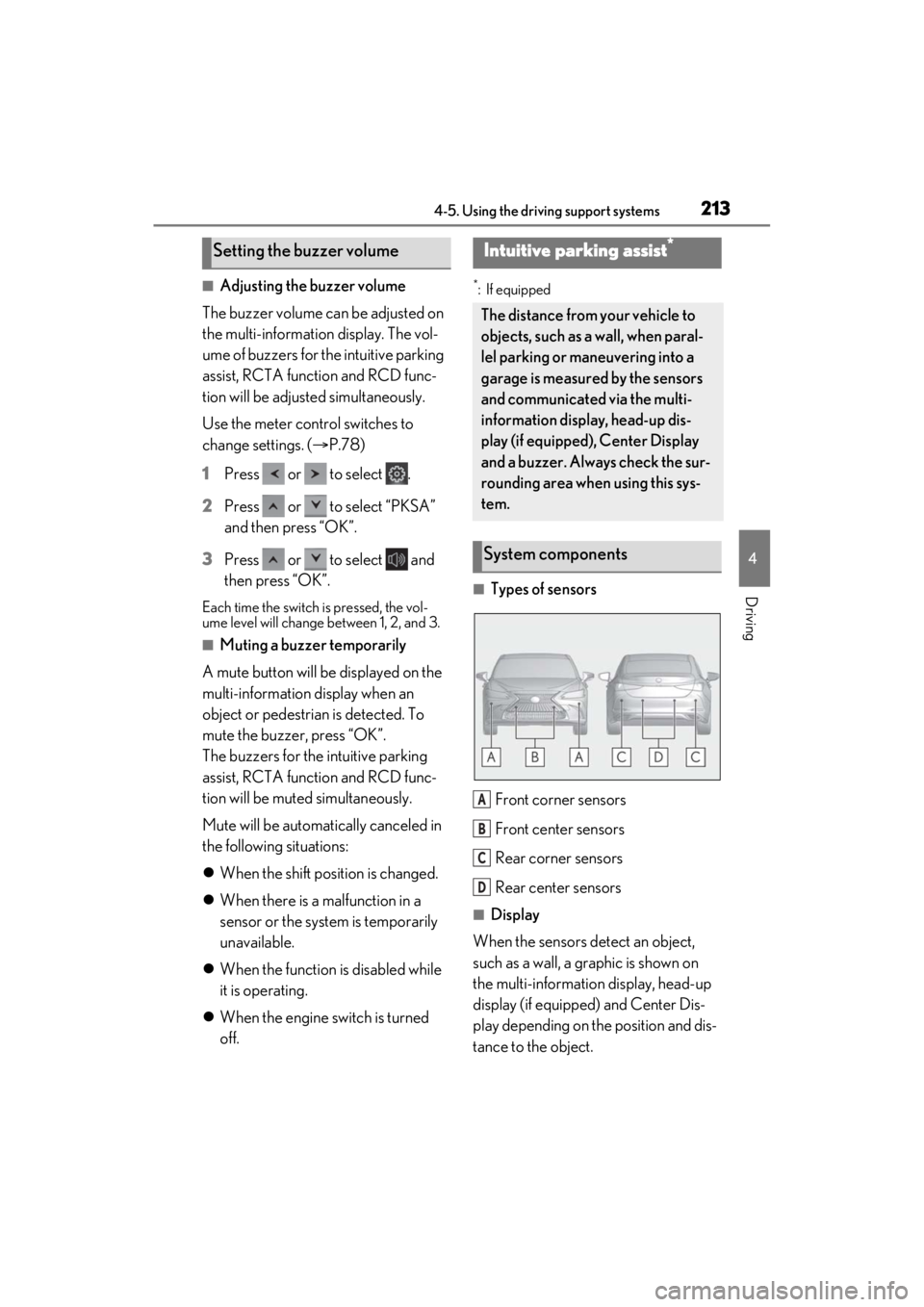
■Types of sensors
Front corner sensors
Front center sensors
Rear corner sensors
Rear center sensors
■Display
When the sensors detect an object,
such as a wall, a graphic is shown on
the multi-information display, head-up
display (if equipped) and Center Dis-
play depending on the position and dis-
tance to the object.
Setting the buzzer volumeIntuitive parking assist*
The distance from your vehicle to
objects, such as a wall, when paral-
lel parking or maneuvering into a
garage is measured by the sensors
and communicated via the multi-
information display, head-up dis-
play (if equipped), Center Display
and a buzzer. Always check the sur-
rounding area when using this sys-
tem.
System components
A
B
C
D
Page 214 of 464
2144-5. Using the driving support systems
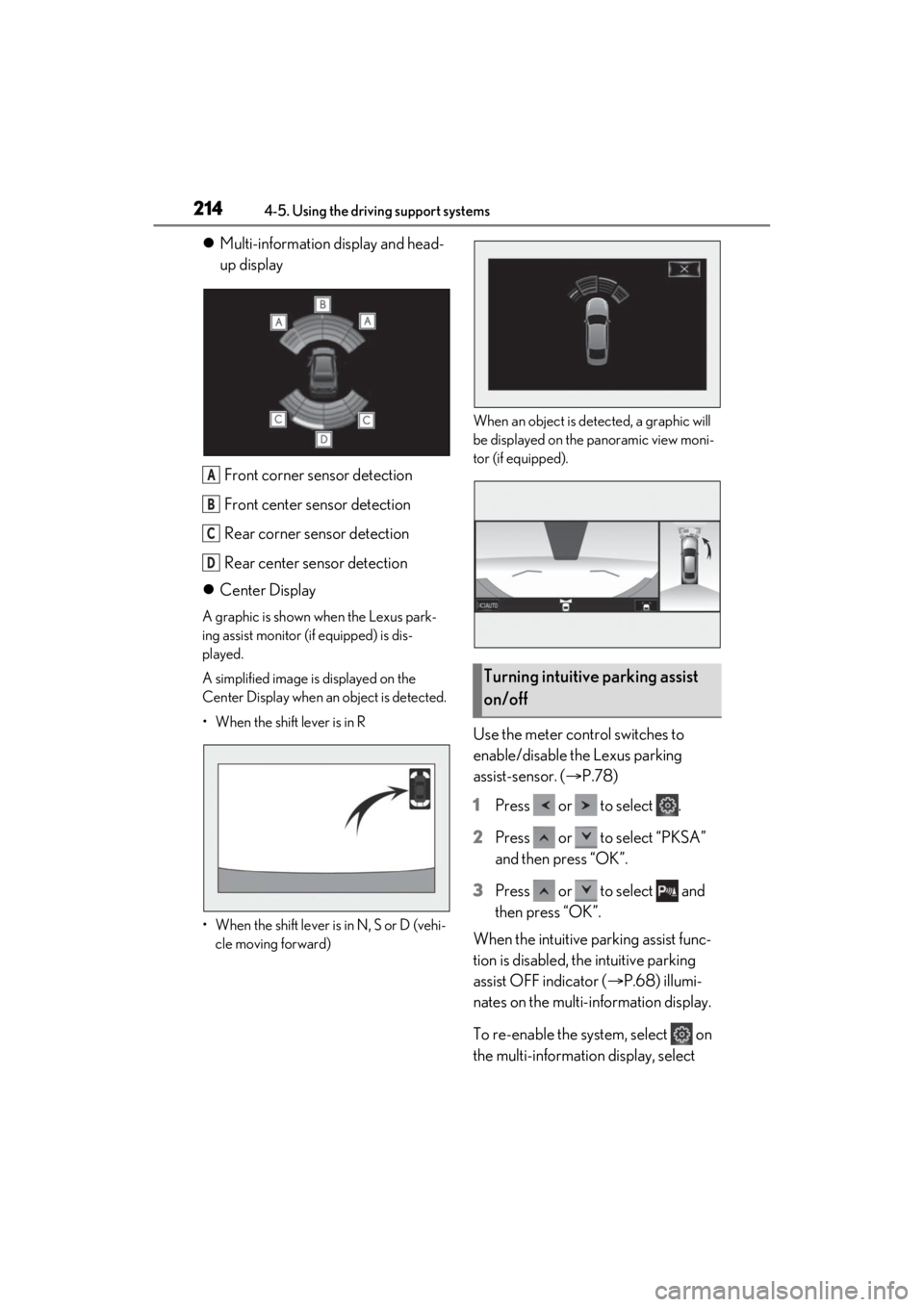
Multi-information display and head-
up display
Front corner sensor detection
Front center sensor detection
Rear corner sensor detection
Rear center sensor detection
Center Display
A graphic is shown when the Lexus park-
ing assist monitor (if equipped) is dis-
played.
A simplified image is displayed on the
Center Display when an object is detected.
• When the shift lever is in R
• When the shift lever is in N, S or D (vehi- cle moving forward) When an object is detected, a graphic will
be displayed on the panoramic view moni-
tor (if equipped).
Use the meter control switches to
enable/disable the Lexus parking
assist-sensor. (
P.78)
1 Press or to select .
2 Press or to select “PKSA”
and then press “OK”.
3 Press or to select and
then press “OK”.
When the intuitive parking assist func-
tion is disabled, th e intuitive parking
assist OFF indicator ( P.68) illumi-
nates on the multi-information display.
To re-enable the system, select on
the multi-information display, select
A
B
C
D
Turning intuitive parking assist
on/off
Page 215 of 464

2154-5. Using the driving support systems
4
Driving
and turn it on. If the system is dis-
abled, it will remain off even if the
engine switch is turned to IGNTION
ON mode after the engine switch has
been turned off.
■The system can be operated when
●The engine switch is in IGNITION ON
mode.
●Intuitive parking assist function is on.
●The vehicle speed is less than about 6
mph (10 km/h).
WARNING
■When using the intuitive parking
assist
Observe the following precautions.
Failing to do so may result in the vehicle
being unable to be driven safely and pos-
sibly cause an accident.
●Do not use the sensor at speeds in
excess of 6 mph (10 km/h).
●The sensors’ detection areas and reac-
tion times are limited. When moving
forward or reversing, check the areas
surrounding the vehicle (especially the
sides of the vehicle) for safety, and
drive slowly, using the brake to control
the vehicle’s speed.
●Do not install accessories within the
sensors’ detection areas.
●The area directly under the bumpers is
not detected. Thin posts or objects
lower than the sensor may not be
detected when appr oached, even if
they have been detected once.
■When to disable the function
In the following situations, disable the
function as it may operate even though
there is no possibility of a collision.
●The vehicle is equipped with a fender
pole, wireless antenna or fog lights.
●The front or rear bu mper or a sensor
receives a strong impact.
●A non-genuine Lexus suspension
(lowered suspension, etc.) is installed.
●Towing eyelet is installed.
●A backlit license plate is installed.
■When using intuitive parking assist
In the following situations, the system
may not function correctly due to a sen-
sor malfunction, etc. Have the vehicle
checked by your Lexus dealer.
●The intuitive parking assist operation
display flashes or shows continuously,
and a buzzer sounds when no objects
are detected.
●If the area around a sensor collides
with something, or is subjected to
strong impact.
●If the bumper or grille collides with
something.
●If the display flashes or is displayed
continuously and a buzzer does not
sound, except when the mute function
has been turned on.
●If a display error oc curs, first check the
sensor.
If the error occurs even when there is
no ice, snow or mud on the sensor, it is
likely that the sensor is malfunctioning.
■Notes when washing the vehicle
Do not apply intensive bursts of water or
steam to the sensor area.
Doing so may result in the sensor mal-
functioning.
●When using a high pressure washer to
wash the vehicle, do not spray the sen-
sors directly, as doing so may cause a
sensor to malfunction.
●When using steam to clean the vehi-
cle, do not direct steam too close to
the sensors as doing so may cause a
sensor to malfunction.
Page 216 of 464
2164-5. Using the driving support systems
●A shift lever is shifted to a position other
than P.
■Setting the buzzer volume
The buzzer volume can be adjusted on the
multi-information display. ( P.213)
■If “Parking Assist Unavailable Clean
Parking Assist Sensor” is displayed on
the multi-inform ation display
A sensor may be covered with ice, snow,
dirt, etc. Remove the ice, snow, dirt, etc.,
from the sensor to return the system to nor-
mal.
Also, due to ice forming on a sensor at low
temperatures, a warning message may be
displayed or the sensor may not be able to
detect an object. Once the ice melts, the
system will return to normal.
■If “Parking Assist Unavailable” is dis-
played on the multi-information display
●Water may be continuo usly flowing over
the sensor surface, such as in a heavy
rain. When the system determines that it
is normal, the system will return to nor-
mal.
●Initialization may no t have been per-
formed after a battery terminal was dis-
connected and reconnec ted. Initialize the
system. ( P.216)
If this message continues to be displayed
even after init ialization, have the vehicle
inspected by your Lexus dealer.
■If a battery terminal has been discon-
nected and reconnected
The system needs to be initialized. To initial-
ize the system, drive the vehicle straight
ahead for 5 seconds or more at a speed of
approximately 22 mph (35 km/h) or more.
Additionally, for vehicles with the Parking
Support Brake function, turn the steering
wheel fully to the left and right with the vehi-
cle stopped.
■Sensor detectio n information
●The sensor’s detection areas are limited
to the areas around the vehicle’s front
and rear bumpers.
●The following situations may occur
during use.
• Depending on the shape of the object and other factors, the detection distance
may shorten, or detection may be impos-
sible.
• There will be a short delay between object detection and di splay. Even at low
speeds, there is a possibility that the
object will come within the sensor’s
detection areas befo re the display is
shown and the warning beep sounds.
• It might be difficult to hear the buzzer due to the volume of the audio system or air
flow noise of the air conditioning system.
• It may be difficult to hear the buzzer if buzzers for other systems are sounding.
■Conditions under wh ich the function
may not function correctly
Certain vehicle conditions and the sur-
rounding environment may affect the ability
of a sensor to correctly detect objects. Par-
ticular instances where this may occur are
listed below.
●There is dirt, snow or ice on a sensor.
(Cleaning the sensors will resolve this
problem.)
●A sensor is frozen. (Thawing the area will
resolve this problem.)
In especially cold weather, if a sensor is
frozen the sensor display may be dis-
played abnormally, or objects, such as a
wall, may not be detected.
●A sensor is covered in any way.
●When a sensor or the area around a sen-
sor is extremely hot or cold.
●On an extremely bumpy road, on an
incline, on gravel, or on grass.
●The vicinity of the vehicle is noisy due to
vehicle horns, motorcycle engines, air
brakes of large vehicles, or other loud
noises producing ultrasonic waves.
●There is another vehicle equipped with
parking assist sensors in the vicinity.
●A sensor is coated with a sheet of spray
or heavy rain.
●If a sensor is hit by a large amount of
water, such as when driving on a flooded
road.
●If the vehicle is significantly tilted.
●The vehicle is approaching a tall or
curved curb.
Page 220 of 464
2204-5. Using the driving support systems
*:If equipped
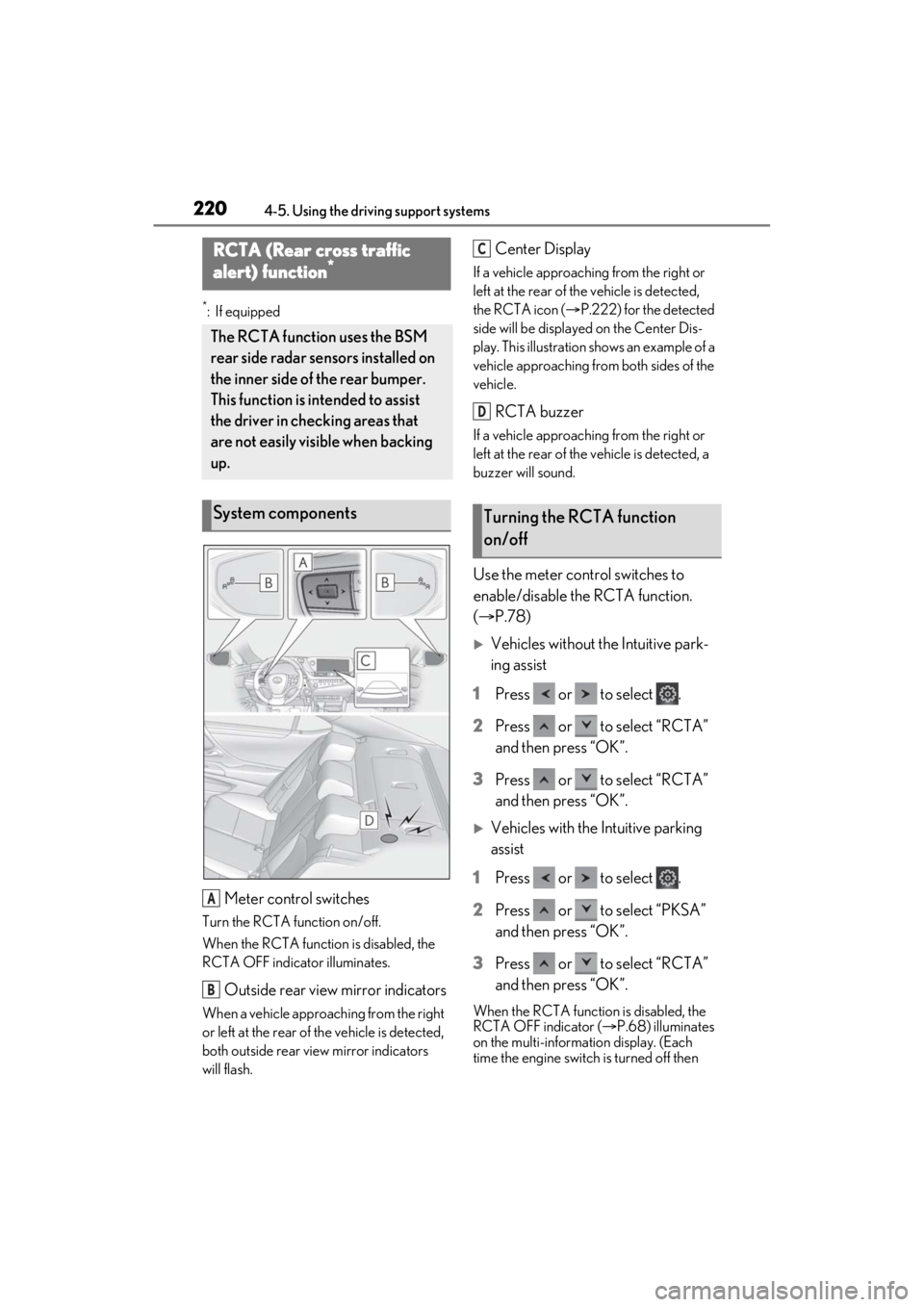
Meter control switches
Turn the RCTA function on/off.
When the RCTA function is disabled, the
RCTA OFF indicator illuminates.
Outside rear view mirror indicators
When a vehicle approaching from the right
or left at the rear of the vehicle is detected,
both outside rear view mirror indicators
will flash.
Center Display
If a vehicle approaching from the right or
left at the rear of the vehicle is detected,
the RCTA icon ( P.222) for the detected
side will be displayed on the Center Dis-
play. This illustration shows an example of a
vehicle approaching from both sides of the
vehicle.
RCTA buzzer
If a vehicle approaching from the right or
left at the rear of th e vehicle is detected, a
buzzer will sound.
Use the meter control switches to
enable/disable the RCTA function.
( P.78)
Vehicles without the Intuitive park-
ing assist
1 Press or to select .
2 Press or to select “RCTA”
and then press “OK”.
3 Press or to select “RCTA”
and then press “OK”.
Vehicles with the Intuitive parking
assist
1 Press or to select .
2 Press or to select “PKSA”
and then press “OK”.
3 Press or to select “RCTA”
and then press “OK”.
When the RCTA function is disabled, the
RCTA OFF indicator ( P.68) illuminates
on the multi-informat ion display. (Each
time the engine switch is turned off then
RCTA (Rear cross traffic
alert) function*
The RCTA function uses the BSM
rear side radar sensors installed on
the inner side of the rear bumper.
This function is intended to assist
the driver in checking areas that
are not easily visible when backing
up.
System components
A
B
Turning the RCTA function
on/off
C
D
Page 222 of 464
2224-5. Using the driving support systems
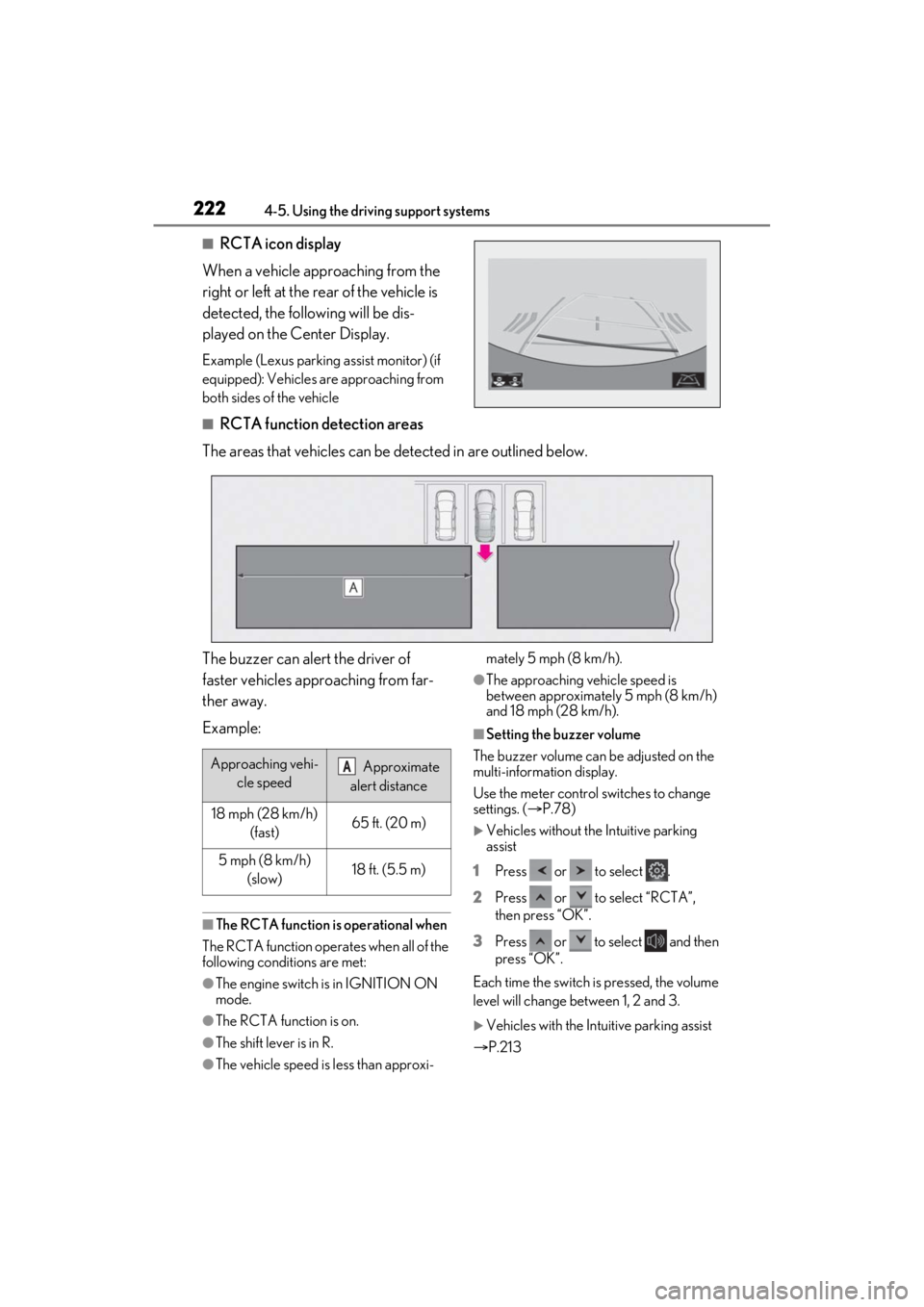
■RCTA icon display
When a vehicle approaching from the
right or left at the rear of the vehicle is
detected, the following will be dis-
played on the Center Display.
Example (Lexus parking assist monitor) (if
equipped): Vehicles are approaching from
both sides of the vehicle
■RCTA function detection areas
The areas that vehicles can be detected in are outlined below.
The buzzer can alert the driver of
faster vehicles approaching from far-
ther away.
Example:
■The RCTA function is operational when
The RCTA function operates when all of the
following conditions are met:
●The engine switch is in IGNITION ON
mode.
●The RCTA function is on.
●The shift lever is in R.
●The vehicle speed is less than approxi- mately 5 mph (8 km/h).
●The approaching vehicle speed is
between approximately 5 mph (8 km/h)
and 18 mph (28 km/h).
■Setting the buzzer volume
The buzzer volume can be adjusted on the
multi-information display.
Use the meter control switches to change
settings. ( P.78)
Vehicles without the Intuitive parking
assist
1 Press or to select .
2 Press or to select “RCTA”,
then press “OK”.
3 Press or to select and then
press “OK”.
Each time the switch is pressed, the volume
level will change between 1, 2 and 3.
Vehicles with the Intuitive parking assist
P.213
Approaching vehi-
cle speed Approximate
alert distance
18 mph (28 km/h) (fast)65 ft. (20 m)
5 mph (8 km/h) (slow)18 ft. (5.5 m)
A
Page 223 of 464
2234-5. Using the driving support systems
4
Driving
■Muting a buzzer temporarily
Vehicles without the Intuitive parking
assist
A mute button will be displayed on the
multi-information display when an object is
detected. To mute the buzzer, press “OK”.
●When the shift lever is changed.
●When the vehicle speed exceeds a cer-
tain speed.
●When the operating function is tempo-
rarily canceled.
●When the operating function is disabled
manually.
●When the engine switch is turned off.
Vehicles with the Intuitive parking assist
P.213
■Conditions under which the RCTA
function will not detect a vehicle
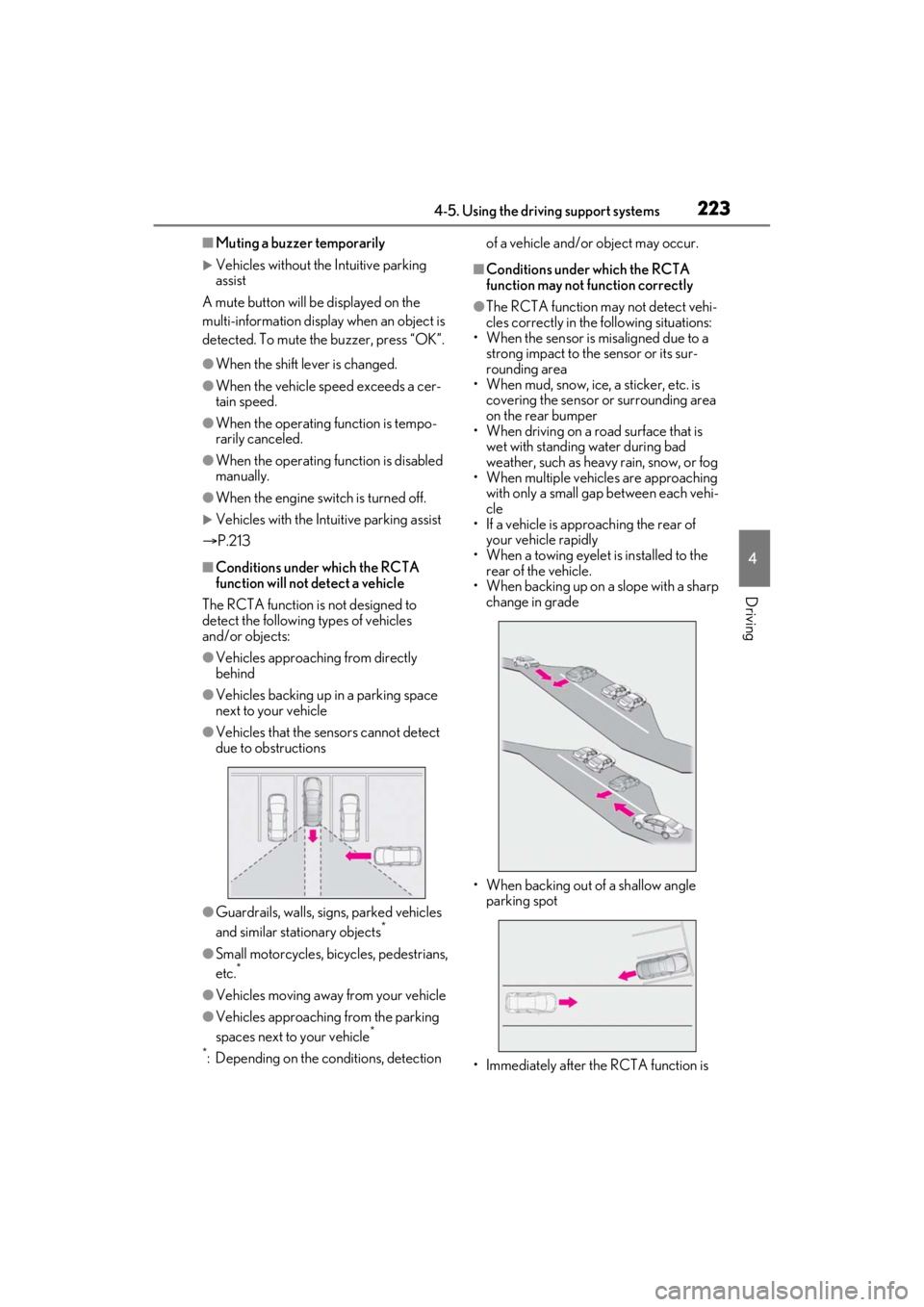
The RCTA function is not designed to
detect the following types of vehicles
and/or objects:
●Vehicles approaching from directly
behind
●Vehicles backing up in a parking space
next to your vehicle
●Vehicles that the sensors cannot detect
due to obstructions
●Guardrails, walls, signs, parked vehicles
and similar stationary objects*
●Small motorcycles, bicycles, pedestrians,
etc.*
●Vehicles moving away from your vehicle
●Vehicles approaching from the parking
spaces next to your vehicle*
*
: Depending on the conditions, detection of a vehicle and/or object may occur.
■Conditions under which the RCTA
function may not function correctly
●The RCTA function may not detect vehi-
cles correctly in the following situations:
• When the sensor is misaligned due to a strong impact to the sensor or its sur-
rounding area
• When mud, snow, ice, a sticker, etc. is covering the sensor or surrounding area
on the rear bumper
• When driving on a road surface that is wet with standing water during bad
weather, such as heavy rain, snow, or fog
• When multiple vehicles are approaching with only a small gap between each vehi-
cle
• If a vehicle is approaching the rear of your vehicle rapidly
• When a towing eyelet is installed to the rear of the vehicle.
• When backing up on a slope with a sharp
change in grade
• When backing out of a shallow angle parking spot
• Immediately after the RCTA function is