park assist LEXUS ES350 2021 Owner's Manual
[x] Cancel search | Manufacturer: LEXUS, Model Year: 2021, Model line: ES350, Model: LEXUS ES350 2021Pages: 464, PDF Size: 9.61 MB
Page 231 of 464

2314-5. Using the driving support systems
4
Driving
Braking force
Time
Engine output restriction control begins operating
System determines that po ssibility of collision with detected object is high
Engine output reduced
System determines that possibility of col lision with detected object is extremely
high
Brake control begins operating
Brake control strength increased
Example: Multi-informat ion display: “BRAKE!”
Example: Multi-information display: “Switch to Brake”
■If the Parking Support Brake has oper-
ated
If the vehicle is stopped due to operation of
the Parking Support Brake, the Parking
Support Brake will be disabled and the
PKSB OFF indicator will illuminate. If the
Parking Support Brake operates unneces-
sarily, brake control can be canceled by
depressing the brake pedal or waiting for
approximately 2 seconds for it to automati-
cally be canceled. Then, the vehicle can be
operated by depressing the accelerator
pedal.
■Re-enabling the Park ing Support Brake
To re-enable the Parking Support Brake
when it has been disabled due to system
operation, perform any of the following
operations. At this time, the PKSB OFF
indicator will turn off. ( P.68)
●Turn the PKSB system on ( P.228)
●Turn the engine switch off, and then back
to IGNITION ON mode
●Shift the shift lever to P
●Drive with no operation targets in the
traveling direction of the vehicle
●Change the traveling direction of the
vehicle*
*
: Except the Parking Support Brake func- tion (rear pedestrian)
■If “Parking Support Brake Unavailable”
is displayed on th
e multi-information
display and the PKSB OFF indicator is
flashing
●If this message is di splayed only when the
shift lever is in R, the rear camera lens
may be dirty. Clean the camera lens. If
this message is disp layed when the shift
lever is in any position other than R, a
sensor on the front or rear bumper may
be dirty. Clean the sensors and their sur-
rounding area on the bumpers.
●Initialization may not have been per-
formed after a battery terminal was dis-
connected and reconnected. Initialize the
system. ( P.232)
If this message continues to be displayed
even after initializati on, have the vehicle
inspected by your Lexus dealer.
■If “Parking Support Brake Unavailable”
and “Parking Assist Unavailable Clean
Parking Assist Sensor” are displayed on
the multi-information display and the
PKSB OFF indicator is flashing
●A sensor may be cove red with ice, snow,
dirt, etc. In this case, remove the ice,
snow, dirt, etc., from the sensor to return
the system to normal. If this message is
shown even after removing dirt from the
sensor, or shown when the sensor was
B
C
D
E
F
G
H
I
J
K
Page 236 of 464

2364-5. Using the driving support systems
has become avoidable with normal brake
operation.
• The static object is no longer 6 to 13 ft. (2
to 4 m) away from the vehicle or in the
traveling direction of the vehicle.
●Brake control
• The Parking Support Brake is disabled.
• Approximately 2 seconds have elapsed since the vehicle was stopped by brake
control.
• The brake pedal is depressed after the
vehicle is stopped by brake control.
• The static object is no longer 6 to 13 ft. (2 to 4 m) away from the vehicle or in the
traveling direction of the vehicle.
■Detection range of the Parking Support
Brake function (static objects)
The detection range of the Parking Support
Brake function (static objects) differs from
the detection range of the intuitive parking
assist. ( P.217) Therefore, even if the intui-
tive parking assist de tects an object and
provides a warning, the Parking Support
Brake function (static objects) may not start
operating.
■Objects that the Parking Support Brake
function (static obje cts) may not detect
The sensors may not be able to detect cer-
tain objects, such as the following:
●Pedestrian
●Cotton cloth, snow, and other materials
that are poor reflectors of ultrasonic
waves
●Objects which are not perpendicular to
the ground, are not perpendicular to the
traveling direction of the vehicle, are
uneven or are waving
●Low objects
●Thin objects such as wires, fences, ropes
and signposts
●Objects that are extremely close to the
bumper
●Sharply-angled objects
●Tall objects with upper sections project-
ing outwards in the direction of your vehi-
cle
■Situations in which the Parking Support
Brake function (static objects) may not
operate
When the shift lever is in N.
■Intuitive parking assist buzzer
Regardless of whether the intuitive parking
assist system is enabled or not (P.214), if
the Parking Support Brake function (static
objects) is enabled ( P.228), the front or
rear sensors detect an object and brake
control is performed, the intuitive parking
assist buzzer will sound to notify the driver
of the approximate distance to the object.
■Situations in which the Parking Support
Brake function (static objects) may
operate even if there is no possibility of a
collision
In some situations, such as the following, the
Parking Support Brake function (static
objects) may operate even though there is
no possibility of a collision.
●Vehicle surroundings
• When driving on a narrow road
• When driving on a gravel road or in an area with tall grass
• When driving toward a banner, flag, low- hanging branch or boom barrier (such as
those used at railroad crossings, toll
gates and parking lots)
• When driving on a narrow path sur-
rounded by a structure, such as in a tun-
nel or on an iron bridge
Page 247 of 464

2474-5. Using the driving support systems
4
Driving
steering wheel
■AVS (Adaptive Variable Suspen-
sion System) (if equipped)
By independently controlling the
damping force of the shock absorbers
for each of the 4 wheels according to
the road and driving conditions, this
system helps riding comfort with supe-
rior vehicle stabilit y, and helps good
vehicle posture.
Also, the damping force changes
depending on the selected driving
mode. ( P.210)
■When the TRAC/VSC systems are
operating
The slip indicator light will flash while the
TRAC/VSC systems are operating.
■Disabling the TRAC system
If the vehicle gets stuck in mud, dirt or snow,
the TRAC system may reduce power from
the engine to the wheels. Pressing the
switch to turn the system off may
make it easier for you to rock the vehicle in
order to free it.
To turn the TRAC system off, quickly press
and release the switch.
“Traction Control Turned Off” will be
shown on the multi-information display.
Press the switch again to turn the
system back on.
■Turning off both TRAC and VSC sys-
tems
To turn the TRAC and VSC systems off,
press and hold the switch for more
than 3 seconds while the vehicle is stopped.
The VSC OFF indicator light will come on
and the “Traction Control Turned Off” will
be shown on the multi-information display.
*
Press the switch again to turn the
system back on.
*: PCS (Pre-Collision System) will also be disabled (only Pre-Collision warning is
available). The PCS warning light will
come on and a message will be displayed
on the multi-information display.
( P.183)
■When the message is displayed on the
multi-information display showing that
TRAC has been disabled even if the
switch has not been pressed
TRAC is temporary deactivated. If the
information continues to show, contact your
Lexus dealer.
■Operating conditions of hill-start assist
control
When the following four conditions are met,
the hill-start assist control will operate:
●The shift lever is in a position other than P
or N (when starting off forward/back-
ward on an up ward incline).
●The vehicle is stopped.
●The accelerator pedal is not depressed.
●The parking brake is not engaged.
Page 248 of 464

2484-5. Using the driving support systems
■Automatic system cancelation of hill-
start assist control
The hill-start assist control will turn off in any
of the following situations:
●The shift lever is shifted to P or N.
●The accelerator pedal is depressed.
●The parking brake is engaged.
●2 seconds at maximum elapsed after the
brake pedal is released.
■Sounds and vibrations caused by the
ABS, brake assist, VSC, TRAC and hill-
start assist control systems
●A sound may be heard from the engine
compartment when the brake pedal is
depressed repeatedly, when the engine is
started or just after the vehicle begins to
move. This sound does not indicate that a
malfunction has occurred in any of these
systems.
●Any of the following conditions may
occur when the above systems are oper-
ating. None of these indicates that a mal-
function has occurred.
•Vibrations may be fe lt through the vehi-
cle body and steering.
• A motor sound may be heard also after the vehicle comes to a stop.
• The brake pedal may pulsate slightly after the ABS is activated.
• The brake pedal may move down slightly
after the ABS is activated.
■Active Cornering Assist operation
sounds and vibrations
When the Active Cornering Assist is oper-
ated, operation sounds and vibrations may
be generated from the brake system, but
this is not a malfunction.
■EPS operation sound
When the steering wheel is operated, a
motor sound (whirring sound) may be
heard. This does not indicate a malfunction.
■Automatic reactivation of TRAC and
VSC systems
After turning the TRAC and VSC systems
off, the systems will be automatically re-
enabled in the following situations:
●When the engine switch is turned off
●If only the TRAC system is turned off, the
TRAC will turn on when vehicle speed
increases
If both the TRAC and VSC systems are
turned off, automatic re-enabling will not
occur when vehicle speed increases.
■Secondary Collision Brake operating
conditions
The system operates when the SRS airbag
sensor detects a collision while the vehicle
is in motion.
However, the system does not operate in
any of the following situations.
●The vehicle speed is below 6 mph (10
km/h)
●Components are damaged
■Secondary Collision Brake automatic
cancellation
The system is automatically canceled in any
of the following situations.
●The vehicle speed drops below approxi-
mately 6 mph (10 km/h)
●A certain amount of time elapses during
operation
●The accelerator pedal is depressed a
large amount
■Operating conditions of Active Corner-
ing Assist
The system operates when the following
occurs.
●TRAC/VSC can operate
●The driver is attempting to accelerate
while turning
●The system detects that the vehicle is
drifting to the outer side
●The brake pedal is released
■Reduced effectiveness of the EPS sys-
tem
The effectiveness of the EPS system is
reduced to prevent the system from over-
heating when there is frequent steering
input over an extended period of time. The
steering wheel may feel heavy as a result.
Should this occur, re frain from excessive
steering input or stop the vehicle and turn
the engine off. The EPS system should
Page 250 of 464

2504-5. Using the driving support systems
WARNING
■TRAC/VSC may not operate effec-
tively when
Directional control and power may not
be achievable while driving on slippery
road surfaces, even if the TRAC/VSC
system is operating.
Drive the vehicle carefully in conditions
where stability and power may be lost.
■Active Cornering Assist does not
operate effectively when
●Do not overly rely on Active Corner-
ing Assist. Active Cornering Assist
may not operate effectively when
accelerating down slopes or driving on
slippery road surfaces.
●When Active Cornering Assist fre-
quently operates, Active Cornering
Assist may temporarily stop operating
to ensure proper operation of the
brakes, TRAC and VSC.
■Hill- start assist control does not
operate effectively when
●Do not overly rely on hill-start assist
control. Hill-start assist control may
not operate effectively on steep
inclines and roads covered with ice.
●Unlike the parking brake, hill-start
assist control is not intended to hold
the vehicle stationary for an extended
period of time. Do not attempt to use
hill-start assist control to hold the vehi-
cle on an incline, as doing so may lead
to an accident.
■When the TRAC/VSC is activated
The slip indicator light flashes. Always
drive carefully. Re ckless driving may
cause an accident. Exercise particular
care when the indicator light flashes.
■When the TRAC/VSC systems are
turned off
Be especially careful and drive at a
speed appropriate to the road condi-
tions. As these are the systems to help
ensure vehicle stability and driving force,
do not turn the TRAC/VSC systems off
unless necessary.
■Secondary Collision Brake
Do not rely solely upon the Secondary
Collision Brake. This system is designed
to help reduce the possibility of further
damage due to a secondary collision,
however, that effect changes according
to various conditions. Overly relying on
the system may result in death or serious
injury.
■Replacing tires
Make sure that all ti res are of the speci-
fied size, brand, tread pattern and total
load capacity. In addition, make sure that
the tires are inflated to the recom-
mended tire inflation pressure level.
The ABS, TRAC and VSC systems will
not function correctly if different tires are
installed on the vehicle.
Contact your Lexus dealer for further
information when replacing tires or
wheels.
■Handling of tires and the suspension
Using tires with any kind of problem or
modifying the suspensi on will affect the
driving assist systems, and may cause a
system to malfunction.
Page 358 of 464
3587-2. Steps to take in an emergency
hard surfaced roads for at most 50
miles (80 km) at under 18 mph (30
km/h).
A driver must be in the vehicle to steer
and operate the brakes. The vehicle’s
wheels, drive train, axles, steering and
brakes must be in good condition.
To have your vehicle towed by another
vehicle, the towing eyelet must be
installed to your vehicle. Install the tow-
ing eyelet using the following proce-
dure.
1 Take out the wheel nut wrench and
towing eyelet. ( P.376)
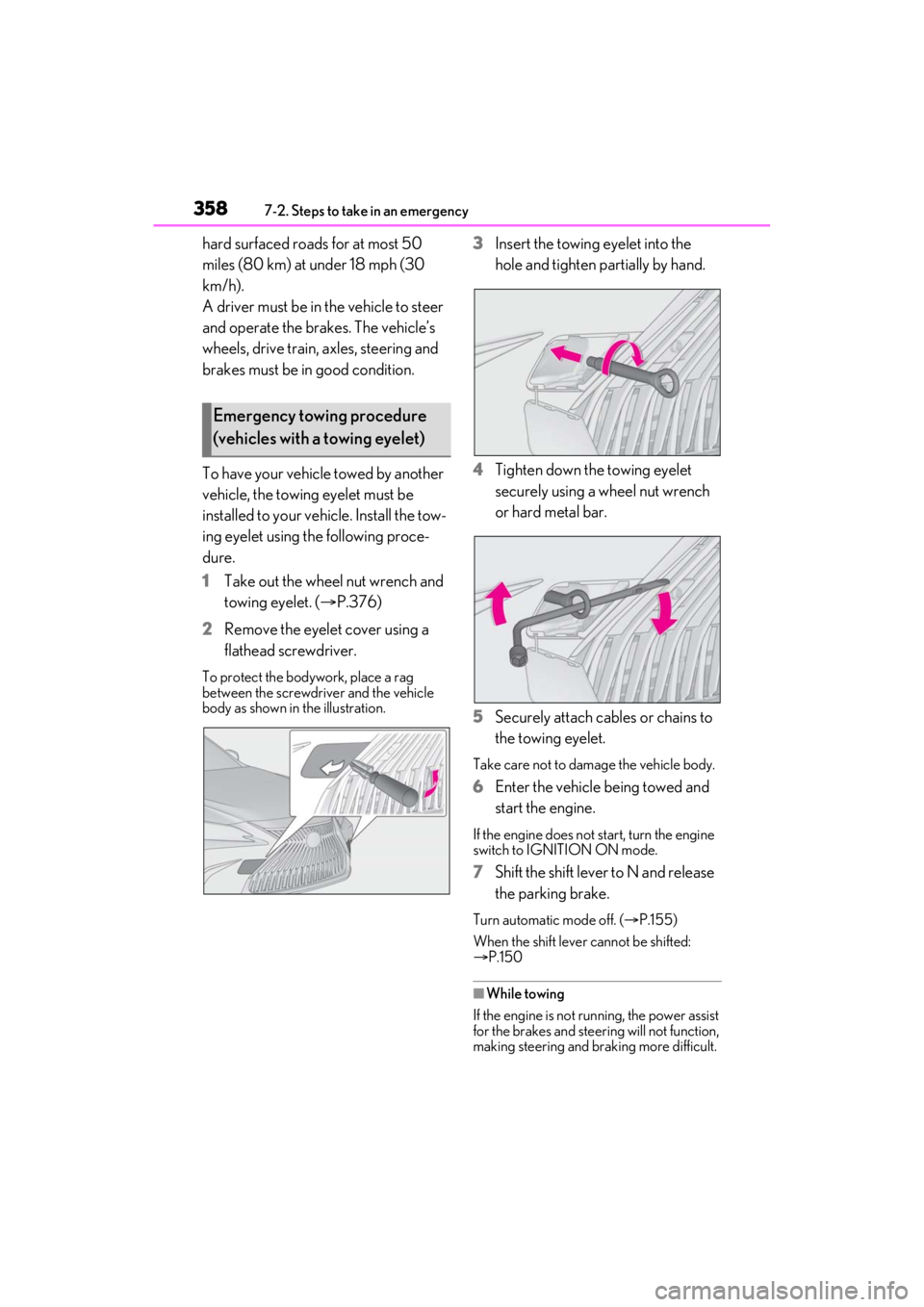
2 Remove the eyelet cover using a
flathead screwdriver.
To protect the bodywork, place a rag
between the screwdriver and the vehicle
body as shown in the illustration.
3Insert the towing eyelet into the
hole and tighten partially by hand.
4 Tighten down the towing eyelet
securely using a wheel nut wrench
or hard metal bar.
5 Securely attach cables or chains to
the towing eyelet.
Take care not to damage the vehicle body.
6Enter the vehicle being towed and
start the engine.
If the engine does not start, turn the engine
switch to IGNITION ON mode.
7Shift the shift lever to N and release
the parking brake.
Turn automatic mode off. ( P.155)
When the shift lever cannot be shifted:
P.150
■While towing
If the engine is not running, the power assist
for the brakes and steering will not function,
making steering and braking more difficult.
Emergency towing procedure
(vehicles with a towing eyelet)
Page 365 of 464
3657-2. Steps to take in an emergency
7
When trouble arises
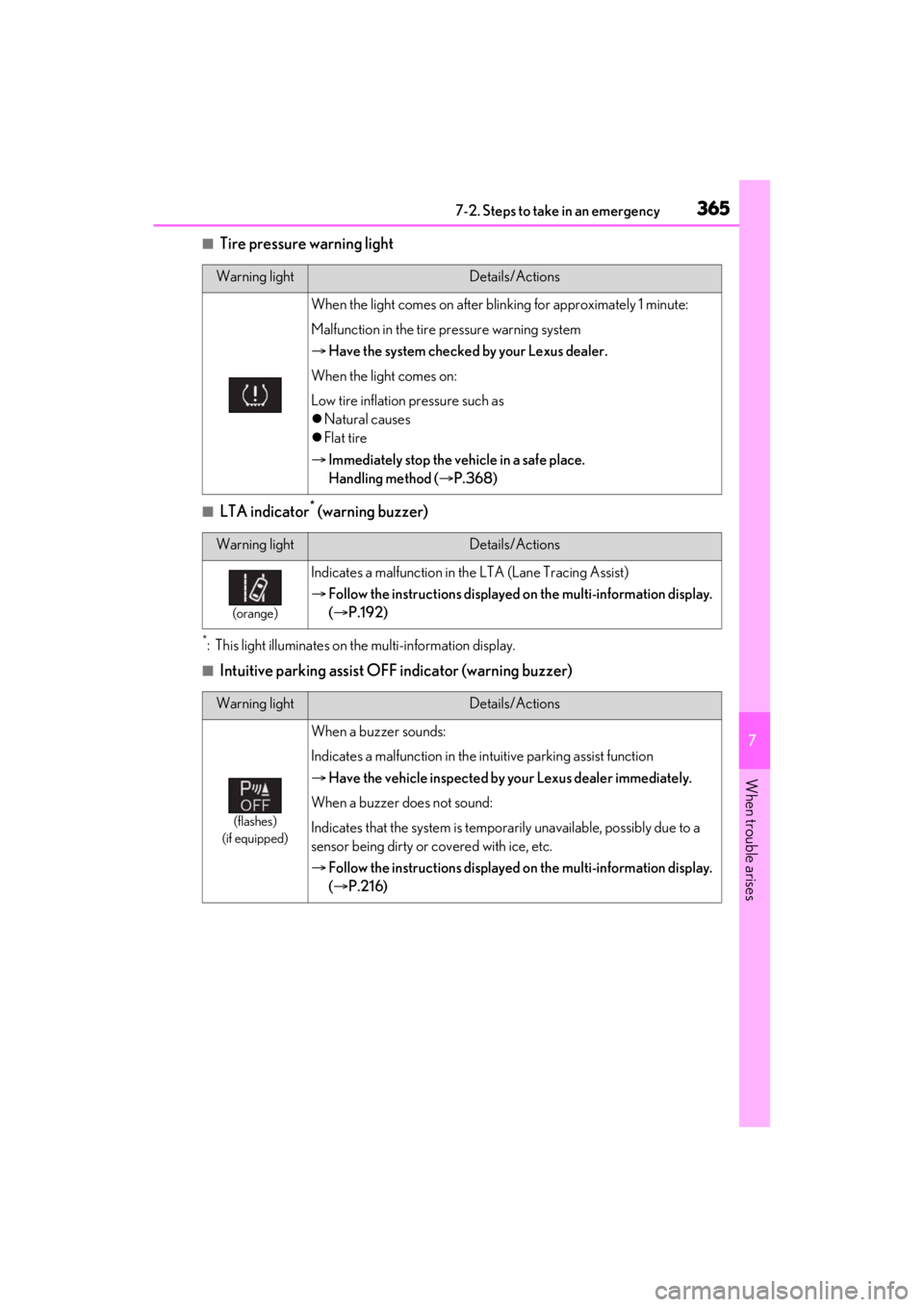
■Tire pressure warning light
■LTA indicator* (warning buzzer)
*: This light illuminates on the multi-information display.
■Intuitive parking assist OFF indicator (warning buzzer)
Warning lightDetails/Actions
When the light comes on after blinking for approximately 1 minute:
Malfunction in the tire pressure warning system
Have the system checked by your Lexus dealer.
When the light comes on:
Low tire inflation pressure such as
Natural causes
Flat tire
Immediately stop the vehicle in a safe place.
Handling method ( P.368)
Warning lightDetails/Actions
(orange)
Indicates a malfunction in the LTA (Lane Tracing Assist)
Follow the instructions displayed on the multi-information display.
( P.192)
Warning lightDetails/Actions
(flashes)
(if equipped)
When a buzzer sounds:
Indicates a malfunctio n in the intuitive parking assist function
Have the vehicle inspected by your Lexus dealer immediately.
When a buzzer does not sound:
Indicates that the system is temporarily unavailable, possibly due to a
sensor being dirty or covered with ice, etc.
Follow the instructions displayed on the multi-information display.
( P.216)
Page 367 of 464
3677-2. Steps to take in an emergency
7
When trouble arises
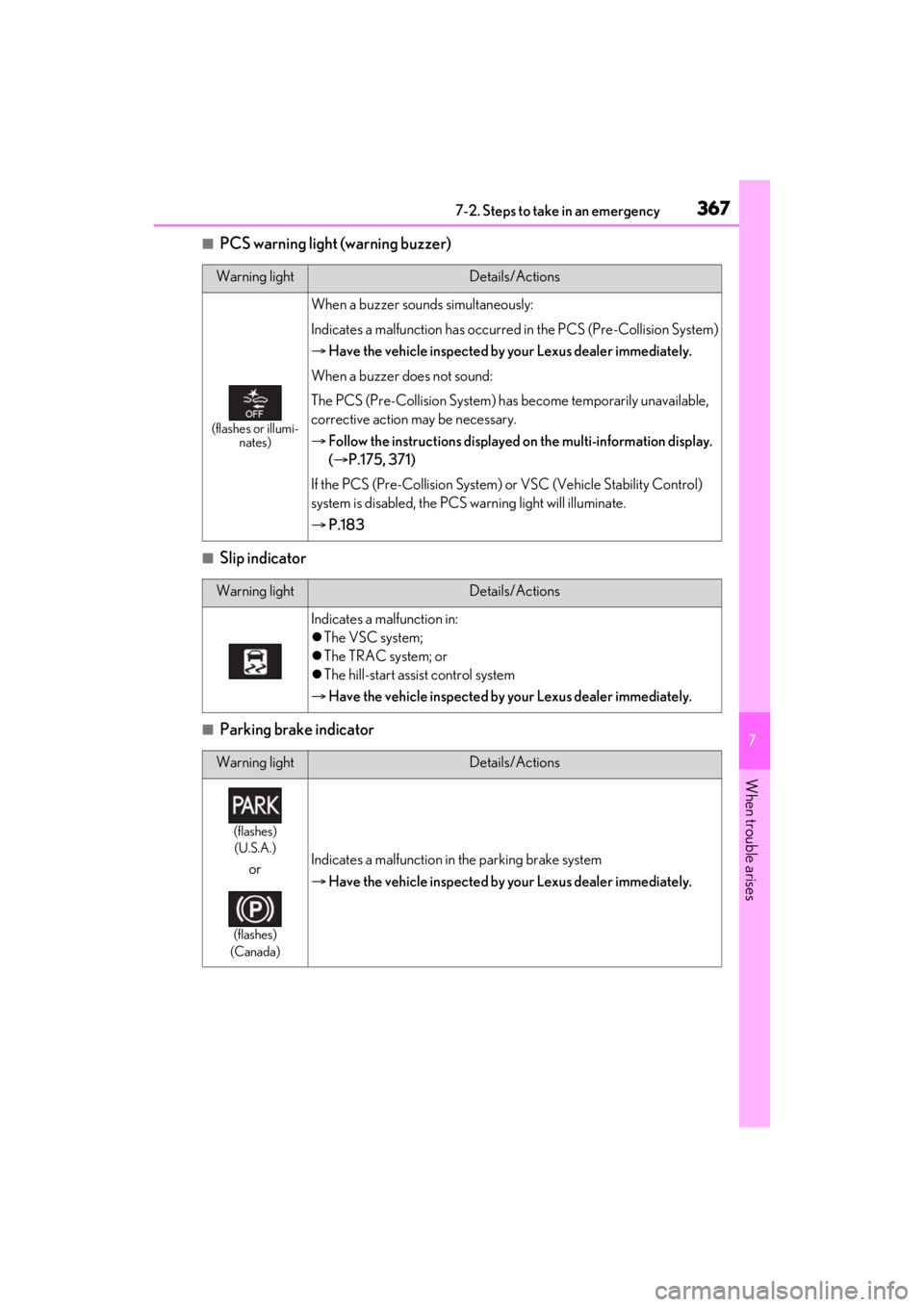
■PCS warning light (warning buzzer)
■Slip indicator
■Parking brake indicator
Warning lightDetails/Actions
(flashes or illumi-nates)
When a buzzer sounds simultaneously:
Indicates a malfunction has occurred in the PCS (Pre-Collision System)
Have the vehicle inspected by your Lexus dealer immediately.
When a buzzer does not sound:
The PCS (Pre-Collision System) has become temporarily unavailable,
corrective action may be necessary.
Follow the instructions displayed on the multi-information display.
( P.175, 371)
If the PCS (Pre-Collision System) or VSC (Vehicle Stability Control)
system is disabled, the PCS warning light will illuminate.
P.183
Warning lightDetails/Actions
Indicates a malfunction in:
The VSC system;
The TRAC system; or
The hill-start assist control system
Have the vehicle inspected by your Lexus dealer immediately.
Warning lightDetails/Actions
(flashes)
(U.S.A.)
or
(flashes)
(Canada)
Indicates a malfunction in the parking brake system
Have the vehicle inspected by your Lexus dealer immediately.
Page 383 of 464
3837-2. Steps to take in an emergency
7
When trouble arises
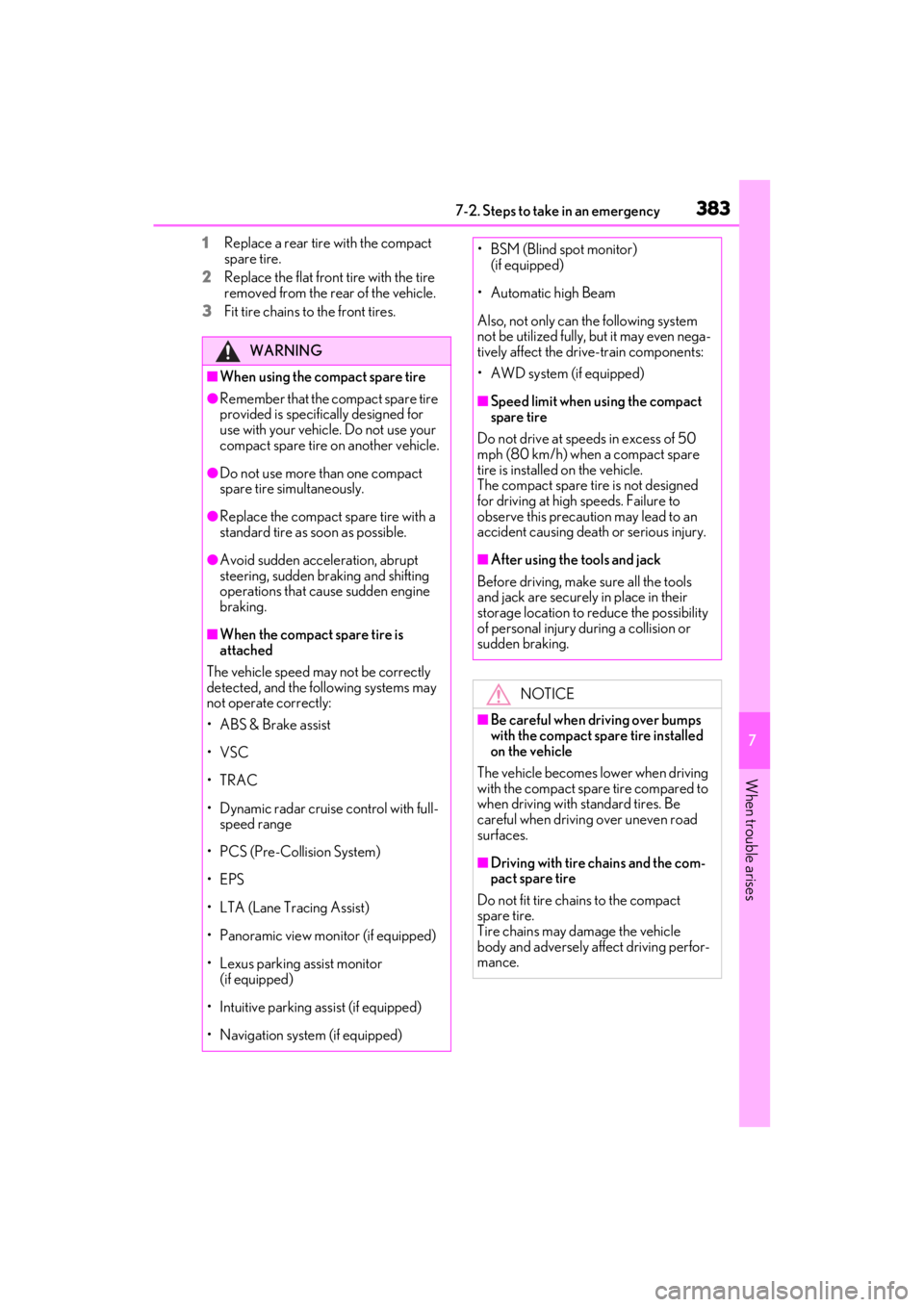
1Replace a rear tire with the compact
spare tire.
2 Replace the flat front tire with the tire
removed from the rear of the vehicle.
3 Fit tire chains to the front tires.
WARNING
■When using the compact spare tire
●Remember that the compact spare tire
provided is specifically designed for
use with your vehicle. Do not use your
compact spare tire on another vehicle.
●Do not use more than one compact
spare tire simultaneously.
●Replace the compact spare tire with a
standard tire as soon as possible.
●Avoid sudden acceleration, abrupt
steering, sudden braking and shifting
operations that cause sudden engine
braking.
■When the compact spare tire is
attached
The vehicle speed may not be correctly
detected, and the following systems may
not operate correctly:
• ABS & Brake assist
•VSC
•TRAC
• Dynamic radar cruise control with full- speed range
• PCS (Pre-Collision System)
•EPS
• LTA (Lane Tracing Assist)
• Panoramic view monitor (if equipped)
• Lexus parking assist monitor (if equipped)
• Intuitive parking assist (if equipped)
• Navigation system (if equipped)
• BSM (Blind spot monitor) (if equipped)
• Automatic high Beam
Also, not only can the following system
not be utilized fully, bu t it may even nega-
tively affect the drive-train components:
• AWD system (if equipped)
■Speed limit when using the compact
spare tire
Do not drive at speeds in excess of 50
mph (80 km/h) when a compact spare
tire is installed on the vehicle.
The compact spare tire is not designed
for driving at high speeds. Failure to
observe this precaution may lead to an
accident causing death or serious injury.
■After using the tools and jack
Before driving, make sure all the tools
and jack are securely in place in their
storage location to reduce the possibility
of personal injury during a collision or
sudden braking.
NOTICE
■Be careful when driving over bumps
with the compact spare tire installed
on the vehicle
The vehicle becomes lower when driving
with the compact spar e tire compared to
when driving with standard tires. Be
careful when driving over uneven road
surfaces.
■Driving with tire chains and the com-
pact spare tire
Do not fit tire chains to the compact
spare tire.
Tire chains may damage the vehicle
body and adversely affect driving perfor-
mance.
Page 426 of 464
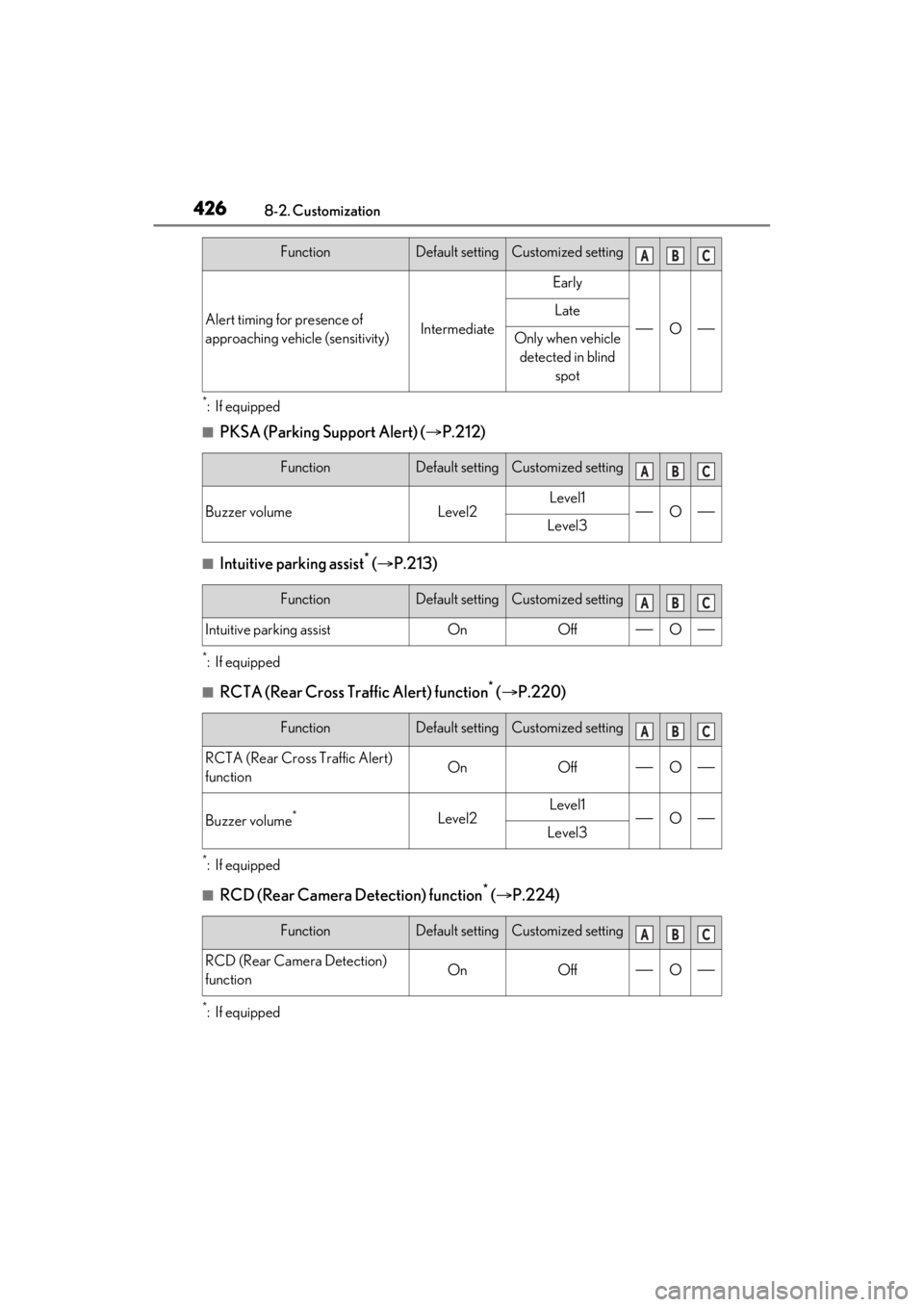
4268-2. Customization
*:If equipped
■PKSA (Parking Support Alert) (P.212)
■Intuitive parking assist* ( P.213)
*:If equipped
■RCTA (Rear Cross Traffic Alert) function* ( P.220)
*:If equipped
■RCD (Rear Camera Detection) function* ( P.224)
*:If equipped
Alert timing for presence of
approaching vehicle (sensitivity)Intermediate
Early
O
Late
Only when vehicle
detected in blind spot
FunctionDefault settingCustomized setting
Buzzer volumeLevel2Level1OLevel3
FunctionDefault settingCustomized setting
Intuitive parking assistOnOffO
FunctionDefault settingCustomized setting
RCTA (Rear Cross Traffic Alert)
functionOnOffO
Buzzer volume*Level2Level1OLevel3
FunctionDefault settingCustomized setting
RCD (Rear Camera Detection)
functionOnOffO
FunctionDefault settingCustomized settingABC
ABC
ABC
ABC
ABC