ESP LEXUS ES350 2021 Owner's Manual
[x] Cancel search | Manufacturer: LEXUS, Model Year: 2021, Model line: ES350, Model: LEXUS ES350 2021Pages: 464, PDF Size: 9.61 MB
Page 128 of 464
1283-5. Opening and closing the windows and moon roof
WARNING
●Do not sit on top of the moon roof.
■Opening and closing the moon roof
●The driver is responsible for moon roof
opening and closing operations.
In order to prevent accidental opera-
tion, especially by a child, do not let a
child operate the moon roof. It is possi-
ble for children and other passengers
to have body parts caught in the moon
roof.
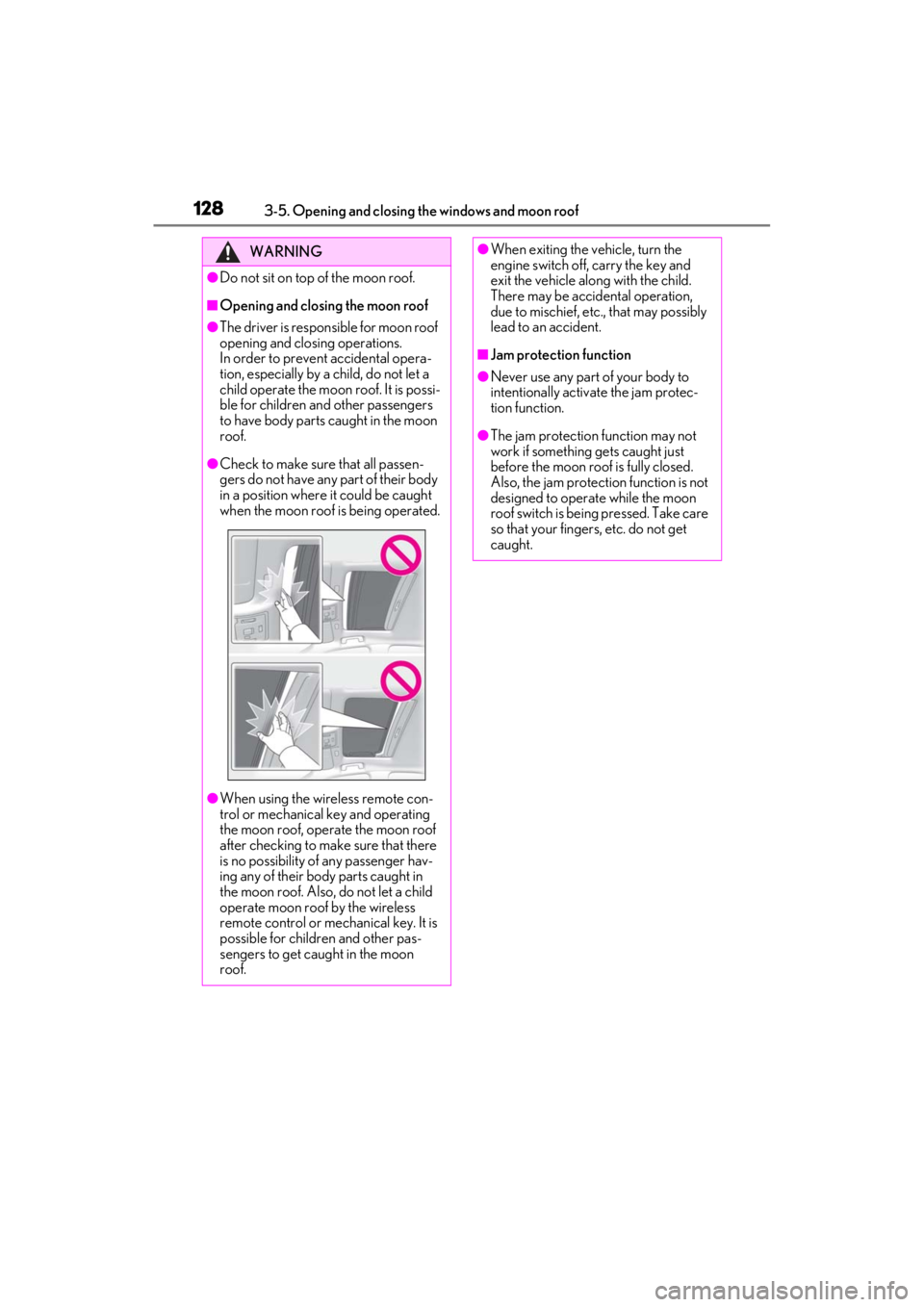
●Check to make sure that all passen-
gers do not have any part of their body
in a position where it could be caught
when the moon roof is being operated.
●When using the wireless remote con-
trol or mechanical key and operating
the moon roof, operate the moon roof
after checking to make sure that there
is no possibility of any passenger hav-
ing any of their body parts caught in
the moon roof. Also, do not let a child
operate moon roof by the wireless
remote control or mechanical key. It is
possible for children and other pas-
sengers to get caught in the moon
roof.
●When exiting the vehicle, turn the
engine switch off, carry the key and
exit the vehicle along with the child.
There may be accidental operation,
due to mischief, etc., that may possibly
lead to an accident.
■Jam protection function
●Never use any part of your body to
intentionally activa te the jam protec-
tion function.
●The jam protection function may not
work if something gets caught just
before the moon roof is fully closed.
Also, the jam protection function is not
designed to operate while the moon
roof switch is being pressed. Take care
so that your fingers, etc. do not get
caught.
Page 131 of 464
1313-5. Opening and closing the windows and moon roof
3
Before driving
■Panoramic moon roof open warning
buzzer
A buzzer sounds and a message is shown
on the multi-information display when the
engine switch is turned off and the driver’s
door is opened with the panoramic moon
roof open.
■Customization
Settings (e.g. linked door lock operation)
can be changed. (Customizable fea-
tures: P.419)
WARNING
Observe the following precautions.
Failing to do so may cause death or seri-
ous injury.
■Opening and closing the electronic
roof sunshade
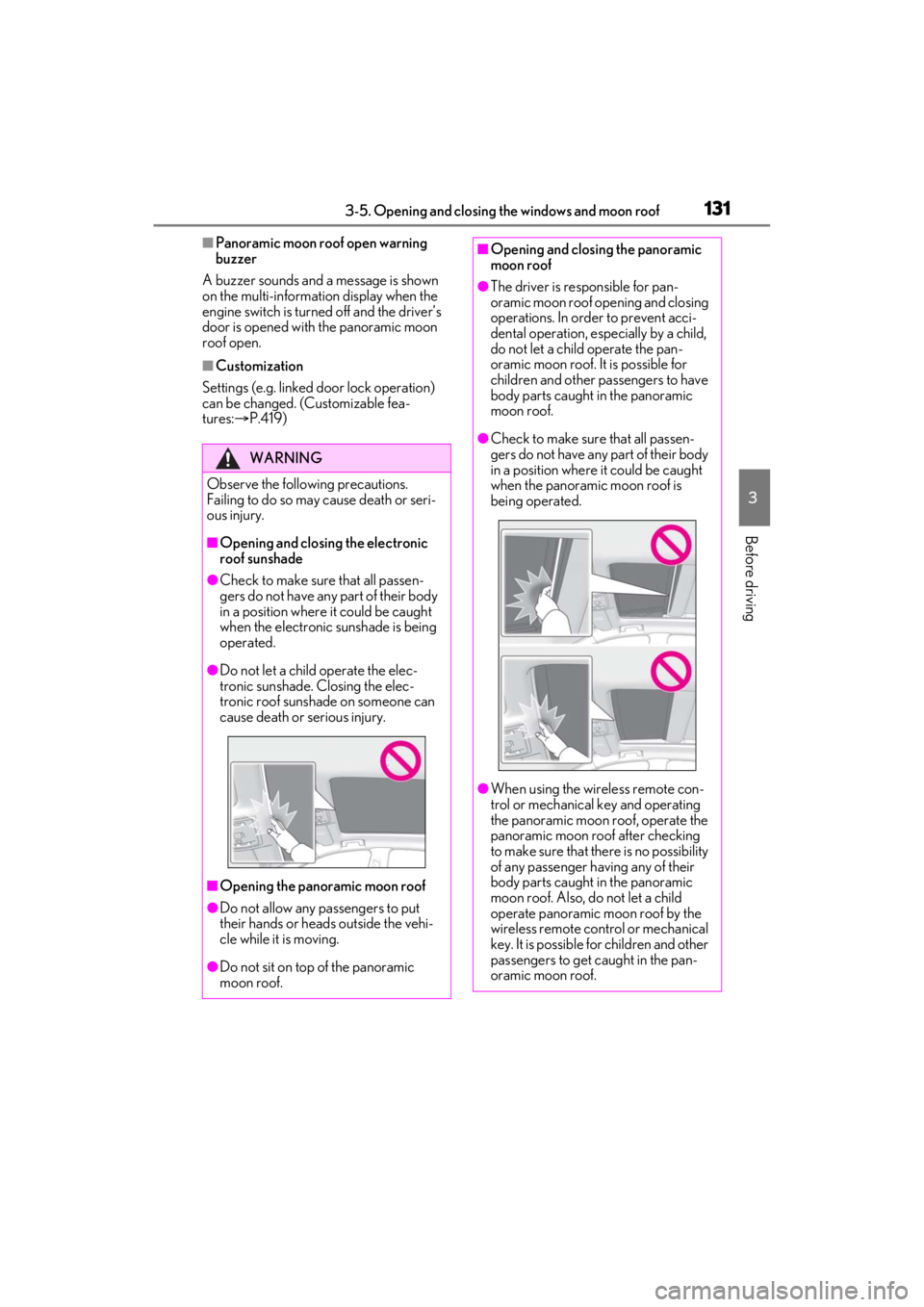
●Check to make sure that all passen-
gers do not have any part of their body
in a position where it could be caught
when the electronic sunshade is being
operated.
●Do not let a child operate the elec-
tronic sunshade. Closing the elec-
tronic roof sunshade on someone can
cause death or serious injury.
■Opening the panoramic moon roof
●Do not allow any passengers to put
their hands or heads outside the vehi-
cle while it is moving.
●Do not sit on top of the panoramic
moon roof.
■Opening and closing the panoramic
moon roof
●The driver is responsible for pan-
oramic moon roof opening and closing
operations. In order to prevent acci-
dental operation, especially by a child,
do not let a child operate the pan-
oramic moon roof. It is possible for
children and other pa ssengers to have
body parts caught in the panoramic
moon roof.
●Check to make sure that all passen-
gers do not have any part of their body
in a position where it could be caught
when the panoramic moon roof is
being operated.
●When using the wireless remote con-
trol or mechanical key and operating
the panoramic moon roof, operate the
panoramic moon r oof after checking
to make sure that there is no possibility
of any passenger ha ving any of their
body parts caught in the panoramic
moon roof. Also, do not let a child
operate panoramic moon roof by the
wireless remote control or mechanical
key. It is possible for children and other
passengers to get caught in the pan-
oramic moon roof.
Page 134 of 464
1344-1. Before driving
4-1.Before driving
■Starting the engine
P.144
■Driving
1 With the brake pedal depressed,
shift the shift lever to D. ( P.150)
2 If the parking brake is in manual
mode, release the parking brake.
(P.154)
3 Gradually release the brake pedal
and gently depress the accelerator
pedal to accelerate the vehicle.
■Stopping
1 With the shift lever in D, depress
the brake pedal.
2 If necessary, set the parking brake.
If the vehicle is to be stopped for an
extended period of time, shift the shift lever
to P or N. ( P.150)
■Parking the vehicle
1 With the shift lever in D, depress
the brake pedal.
2 Set the parking brake ( P.154),
and shift the shift lever to P
( P.150).
3 Press the engine switch to stop the
engine.
4 Lock the door, making sure that
you have the electronic key on your
person.
If parking on a hill, block the wheels as
needed.
■Starting off on a steep uphill
1 Make sure that the parking brake is
set with the brake pedal depressed,
and then shift the shift lever to D.
2 Release the brake pedal and gently
depress the accelerator pedal.
3 Release the parking brake.
■When starting off on a uphill
The hill-start assist control will activate.
( P.246)
■Driving in the rain
●Drive carefully when it is raining, because
visibility will be reduced, the windows
may become fogged-up, and the road
will be slippery.
●Drive carefully when it starts to rain,
because the road surface will be espe-
cially slippery.
●Refrain from high speeds when driving on
an expressway in the rain, because there
may be a layer of wa ter between the tires
and the road surface, preventing the
steering and brakes from operating
properly.
■Engine speed while driving
In the following conditions, the engine
speed may become high while driving. This
is due to automatic up-shifting control or
down-shifting implementation to meet driv-
ing conditions. It does not indicate sudden
acceleration.
●The vehicle is judged to be driving uphill
or downhill
●When the accelerato r pedal is released
●When the brake pedal is firmly or quickly
depressed
■Restraining the engine output (Brake
Override System)
●When the accelerator and brake pedals
are depressed at the same time, the
engine output may be restrained.
Driving the vehicle
The following procedures should be
observed to ensure safe driving:
Driving procedure
Page 135 of 464

1354-1. Before driving
4
Driving
●A warning message is displayed on the
multi-information display while the sys-
tem is operating. ( P.363)
■Restraining sudden start (Drive-Start
Control)
●When the following unusual operation is
performed, the engine output may be
restrained.
• When the shift lever is shifted from R to
D, D to R, N to R, P to D, or P to R (D
includes S) with the accelerator pedal
depressed, a warning message appears
on the multi-information display. If a
warning message is shown on the multi-
information display, read the message
and follow the instructions.
• When the accelerator pedal is depressed
too much while the vehicle is in reverse.
●While Drive-Start Control is being acti-
vated, your vehicle may have trouble
escaping from the mud or fresh snow. In
such case, deactivate TRAC ( P.247)
to cancel Drive-Start Control so that the
vehicle may become able to escape from
the mud or fresh snow.
■Breaking in your new Lexus
To extend the life of the vehicle, observing
the following precautions is recommended:
●For the first 186 miles (300 km):
Avoid sudden stops.
●For the first 621 miles (1000 km):
• Do not drive at extremely high speeds.
• Avoid sudden acceleration.
• Do not drive continuously in low gears.
• Do not drive at a constant speed for extended periods.
■Operating your vehicle in a foreign
country
Comply with the relevant vehicle registra-
tion laws and confirm the availability of the
correct fuel. ( P.400)
WARNING
Observe the following precautions.
Failure to do so may result in death or
serious injury.
■When starting the vehicle
Always keep your foot on the brake
pedal while stopped with the engine run-
ning. This prevents the vehicle from
creeping.
■When driving the vehicle
●Do not drive if you are unfamiliar with
the location of the brake and accelera-
tor pedals to avoid depressing the
wrong pedal.
• Accidentally depressing the accelera- tor pedal instead of the brake pedal
will result in sudden acceleration that
may lead to an accident.
• When backing up, you may twist your body around, leading to a difficulty in
operating the pedals. Make sure to
operate the pedals properly.
• Make sure to keep a correct driving posture even when moving the vehicle
only slightly. This allows you to depress
the brake and accelerator pedals
properly.
• Depress the brake pedal using your right foot. Depressing the brake pedal
using your left foot may delay
response in an emer gency, resulting in
an accident.
●Do not drive the vehicle over or stop
the vehicle near flammable materials.
The exhaust system and exhaust gases
can be extremely hot. These hot parts
may cause a fire if there is any flamma-
ble material nearby.
●During normal driving, do not turn off
the engine. Turning the engine off
while driving will not cause loss of
steering or braking control, but the
power assist to these systems will be
lost. This will make it more difficult to
steer and brake, so you should pull
over and stop the vehicle as soon as it
is safe to do so.
However, in the event of an emer-
gency, such as if it becomes impossible
to stop the vehicle in the normal way:
P.352
Page 171 of 464
1714-5. Using the driving support systems
4
Driving
4-5.Using the driving support systems
■PCS (Pre-Collision System)
P.177
■LTA (Lane Tracing Assist)
P.184
■AHB (Automatic High Beam)
P.161
■RSA (Road Sign Assist) (if
equipped)
P.193
■Dynamic radar cruise control with
full-speed range
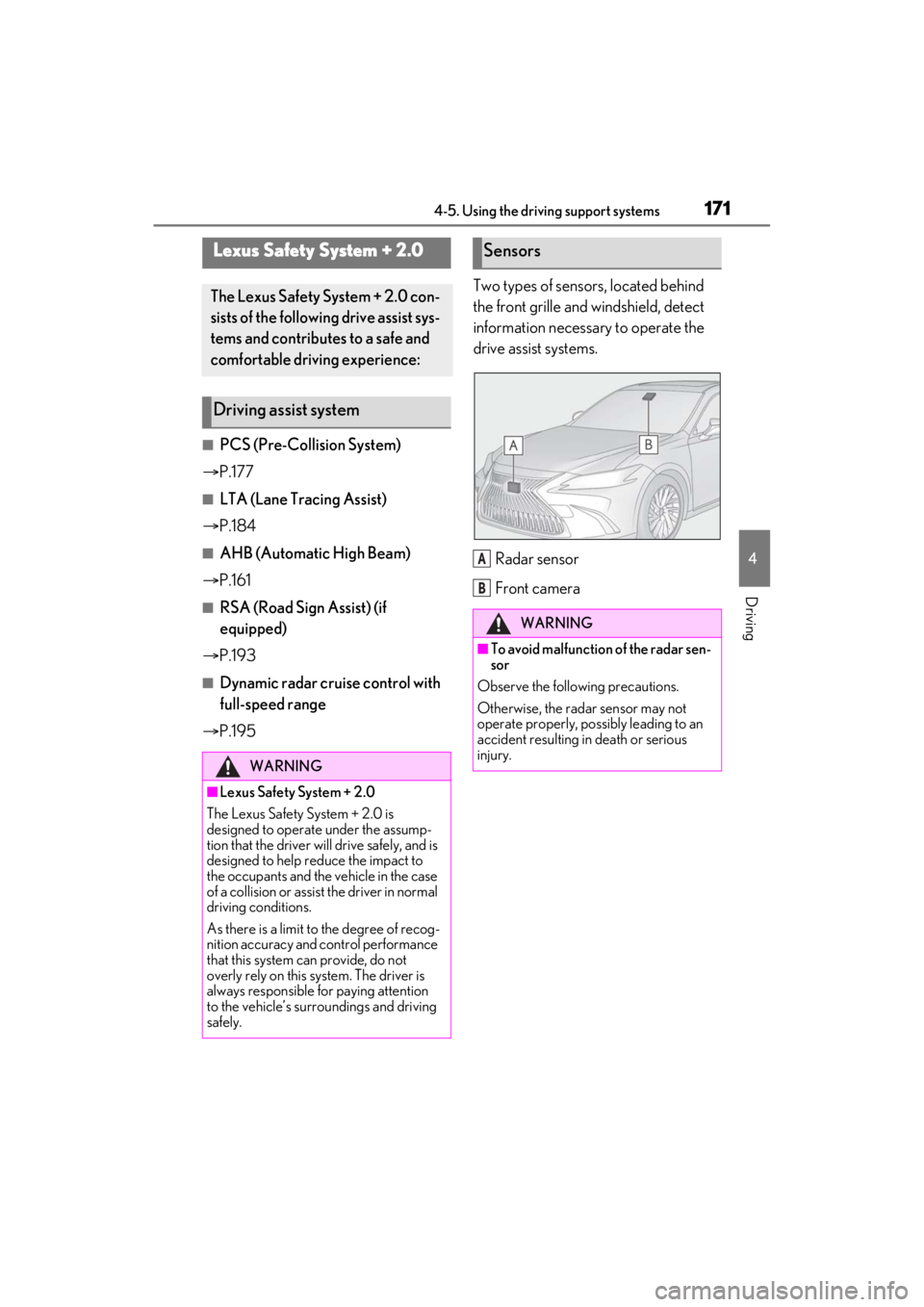
P.195 Two types of sensors, located behind
the front grille and windshield, detect
information necessary to operate the
drive assist systems.
Radar sensor
Front camera
Lexus Safety System + 2.0
The Lexus Safety System + 2.0 con-
sists of the following drive assist sys-
tems and contributes to a safe and
comfortable driving experience:
Driving assist system
WARNING
■Lexus Safety System + 2.0
The Lexus Safety System + 2.0 is
designed to operate under the assump-
tion that the driver wi ll drive safely, and is
designed to help reduce the impact to
the occupants and the vehicle in the case
of a collision or assist the driver in normal
driving conditions.
As there is a limit to the degree of recog-
nition accuracy and control performance
that this system can provide, do not
overly rely on this system. The driver is
always responsible for paying attention
to the vehicle’s surro undings and driving
safely.
Sensors
WARNING
■To avoid malfunction of the radar sen-
sor
Observe the following precautions.
Otherwise, the radar sensor may not
operate properly, possibly leading to an
accident resulting in death or serious
injury.
A
B
Page 178 of 464
1784-5. Using the driving support systems
WARNING
■Limitations of the pre-collision sys-
tem
●The driver is solely responsible for safe
driving. Always drive safely, taking
care to observe your surroundings.
Do not use the pre-collision system
instead of normal braking operations
under any circumstances. This system
will not prevent collisions or lessen col-
lision damage or injury in every situa-
tion. Do not overly rely on this system.
Failure to do so may lead to an acci-
dent, resulting in death or serious
injury.
●Although this system is designed to
help avoid a collision or help reduce
the impact of the coll ision, its effective-
ness may change according to various
conditions, therefore the system may
not always be able to achieve the same
level of performance.
Read the following conditions care-
fully. Do not overly rely on this system
and always drive carefully.
• Conditions under which the system may operate even if there is no possi-
bility of a collision: P.181
• Conditions under which the system may not operate properly: P.182
●Do not attempt to test the operation of
the pre-collision system yourself.
Depending on the objects used for
testing (dummies, cardboard objects
imitating detectable objects, etc.), the
system may not operate properly, pos-
sibly leading to an accident.
■Pre-collision braking
●When the pre-collision braking func-
tion is operating, a large amount of
braking force will be applied.
●If the vehicle is stopped by the opera-
tion of the pre-collision braking func-
tion, the pre-collision braking function
operation will be canceled after
approximately 2 seconds.
Depress the brake pedal as necessary.
●The pre-collision braking function may
not operate if certain operations are
performed by the driver. If the acceler-
ator pedal is being depressed strongly
or the steering wheel is being turned,
the system may determine that the
driver is taking evasive action and pos-
sibly prevent the pre-collision braking
function from operating.
●In some situations, while the pre-colli-
sion braking function is operating,
operation of the function may be can-
celed if the accelerator pedal is
depressed strongly or the steering
wheel is turned and the system deter-
mines that the driver is taking evasive
action.
●If the brake pedal is being depressed,
the system may determine that the
driver is taking evasive action and pos-
sibly delay the operat ion timing of the
pre-collision braking function.
■When to disable the pre-collision sys-
tem
In the following situations, disable the
system, as it may not operate properly,
possibly leading to an accident resulting
in death or serious injury:
●When the vehicle is being towed
●When your vehicle is towing another
vehicle
●When transporting the vehicle via
truck, boat, train or similar means of
transportation
●When the vehicle is raised on a lift with
the engine running and the tires are
allowed to rotate freely
●When inspecting the vehicle using a
drum tester such as a chassis dyna-
mometer or speedometer tester, or
when using an on vehicle wheel bal-
ancer
●When a strong impact is applied to the
front bumper or front grille, due to an
accident or other reasons
Page 184 of 464
1844-5. Using the driving support systems
LTA (Lane Tracing Assist)
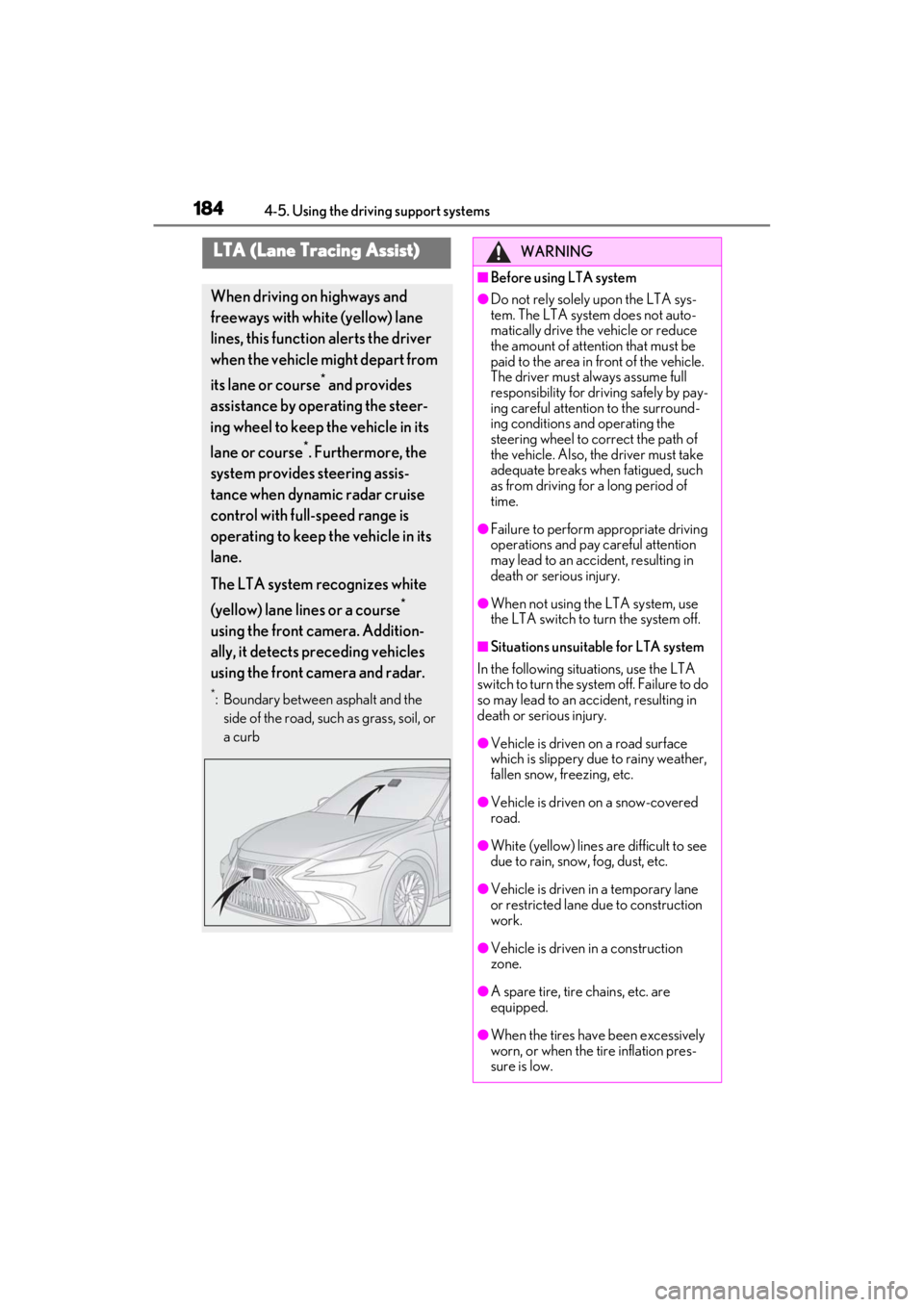
When driving on highways and
freeways with white (yellow) lane
lines, this function alerts the driver
when the vehicle might depart from
its lane or course
* and provides
assistance by operating the steer-
ing wheel to keep the vehicle in its
lane or course
*. Furthermore, the
system provides steering assis-
tance when dynamic radar cruise
control with full-speed range is
operating to keep the vehicle in its
lane.
The LTA system recognizes white
(yellow) lane lines or a course
*
using the front camera. Addition-
ally, it detects preceding vehicles
using the front camera and radar.
*: Boundary between asphalt and the side of the road, such as grass, soil, or
a curb
WARNING
■Before using LTA system
●Do not rely solely upon the LTA sys-
tem. The LTA system does not auto-
matically drive the vehicle or reduce
the amount of attention that must be
paid to the area in front of the vehicle.
The driver must always assume full
responsibility for driving safely by pay-
ing careful attention to the surround-
ing conditions and operating the
steering wheel to correct the path of
the vehicle. Also, the driver must take
adequate breaks when fatigued, such
as from driving for a long period of
time.
●Failure to perform appropriate driving
operations and pay careful attention
may lead to an accident, resulting in
death or serious injury.
●When not using the LTA system, use
the LTA switch to turn the system off.
■Situations unsuitable for LTA system
In the following situations, use the LTA
switch to turn the system off. Failure to do
so may lead to an accident, resulting in
death or serious injury.
●Vehicle is driven on a road surface
which is slippery due to rainy weather,
fallen snow, freezing, etc.
●Vehicle is driven on a snow-covered
road.
●White (yellow) lines are difficult to see
due to rain, snow, fog, dust, etc.
●Vehicle is driven in a temporary lane
or restricted lane due to construction
work.
●Vehicle is driven in a construction
zone.
●A spare tire, tire chains, etc. are
equipped.
●When the tires have been excessively
worn, or when the tire inflation pres-
sure is low.
Page 196 of 464
1964-5. Using the driving support systems
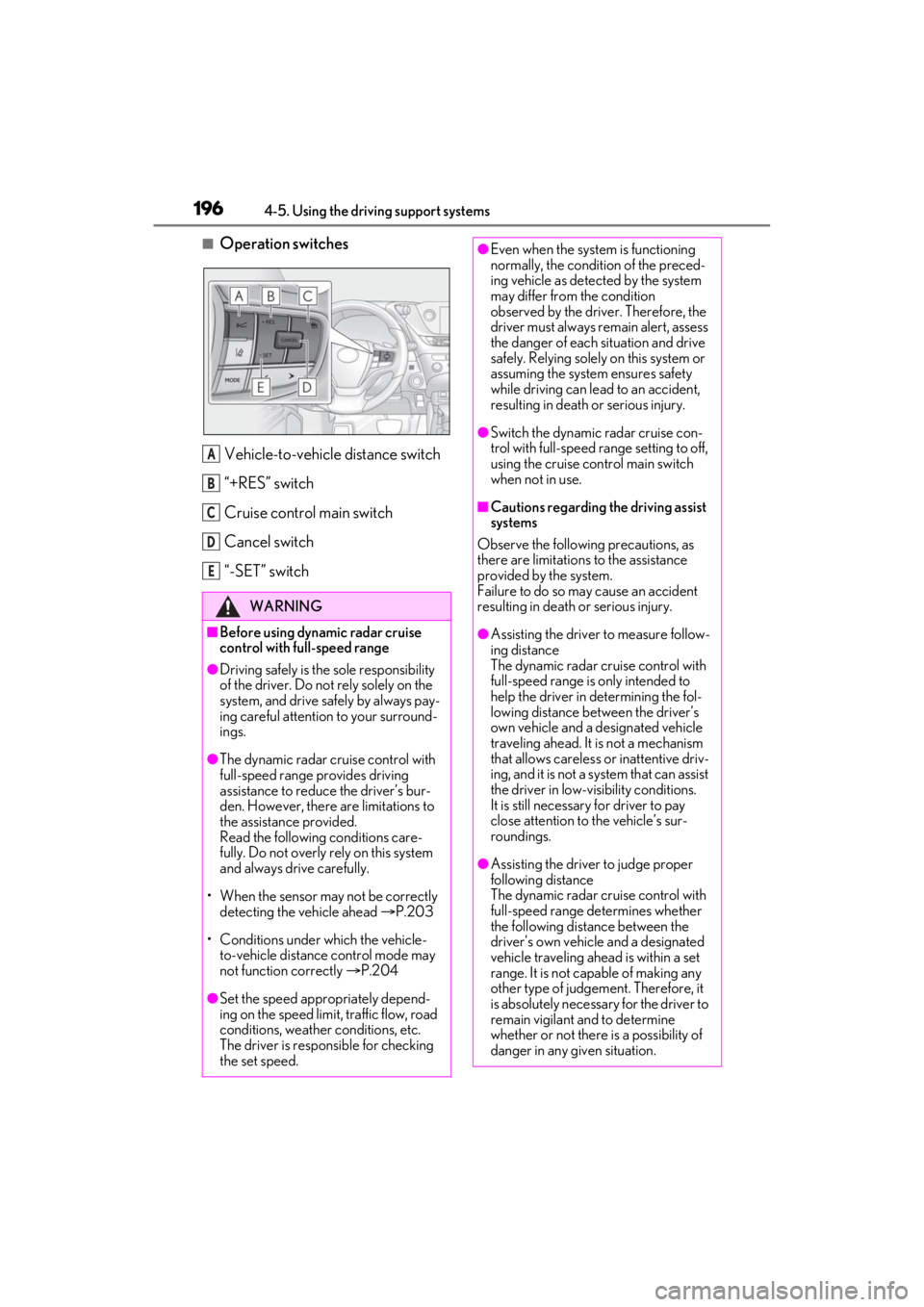
■Operation switchesVehicle-to-vehicle distance switch
“+RES” switch
Cruise control main switch
Cancel switch
“-SET” switch
WARNING
■Before using dynamic radar cruise
control with full-speed range
●Driving safely is the sole responsibility
of the driver. Do not rely solely on the
system, and drive safely by always pay-
ing careful attention to your surround-
ings.
●The dynamic radar cruise control with
full-speed range pr ovides driving
assistance to reduce the driver’s bur-
den. However, there are limitations to
the assistance provided.
Read the following conditions care-
fully. Do not overly rely on this system
and always drive carefully.
• When the sensor ma y not be correctly
detecting the vehicle ahead P.203
• Conditions under which the vehicle- to-vehicle distance control mode may
not function correctly P.204
●Set the speed appropriately depend-
ing on the speed limit, traffic flow, road
conditions, weather conditions, etc.
The driver is responsible for checking
the set speed.
A
B
C
D
E
●Even when the system is functioning
normally, the condition of the preced-
ing vehicle as detected by the system
may differ from the condition
observed by the driver. Therefore, the
driver must always remain alert, assess
the danger of each situation and drive
safely. Relying solely on this system or
assuming the system ensures safety
while driving can lead to an accident,
resulting in death or serious injury.
●Switch the dynamic radar cruise con-
trol with full-speed range setting to off,
using the cruise control main switch
when not in use.
■Cautions regarding the driving assist
systems
Observe the following precautions, as
there are limitations to the assistance
provided by the system.
Failure to do so may cause an accident
resulting in death or serious injury.
●Assisting the driver to measure follow-
ing distance
The dynamic radar cruise control with
full-speed range is only intended to
help the driver in determining the fol-
lowing distance between the driver’s
own vehicle and a designated vehicle
traveling ahead. It is not a mechanism
that allows careless or inattentive driv-
ing, and it is not a system that can assist
the driver in low-visibility conditions.
It is still necessar y for driver to pay
close attention to the vehicle’s sur-
roundings.
●Assisting the driver to judge proper
following distance
The dynamic radar cruise control with
full-speed range determines whether
the following distance between the
driver’s own vehicle and a designated
vehicle traveling ahead is within a set
range. It is not capable of making any
other type of judgement. Therefore, it
is absolutely necessary for the driver to
remain vigilant and to determine
whether or not there is a possibility of
danger in any given situation.
Page 198 of 464
1984-5. Using the driving support systems
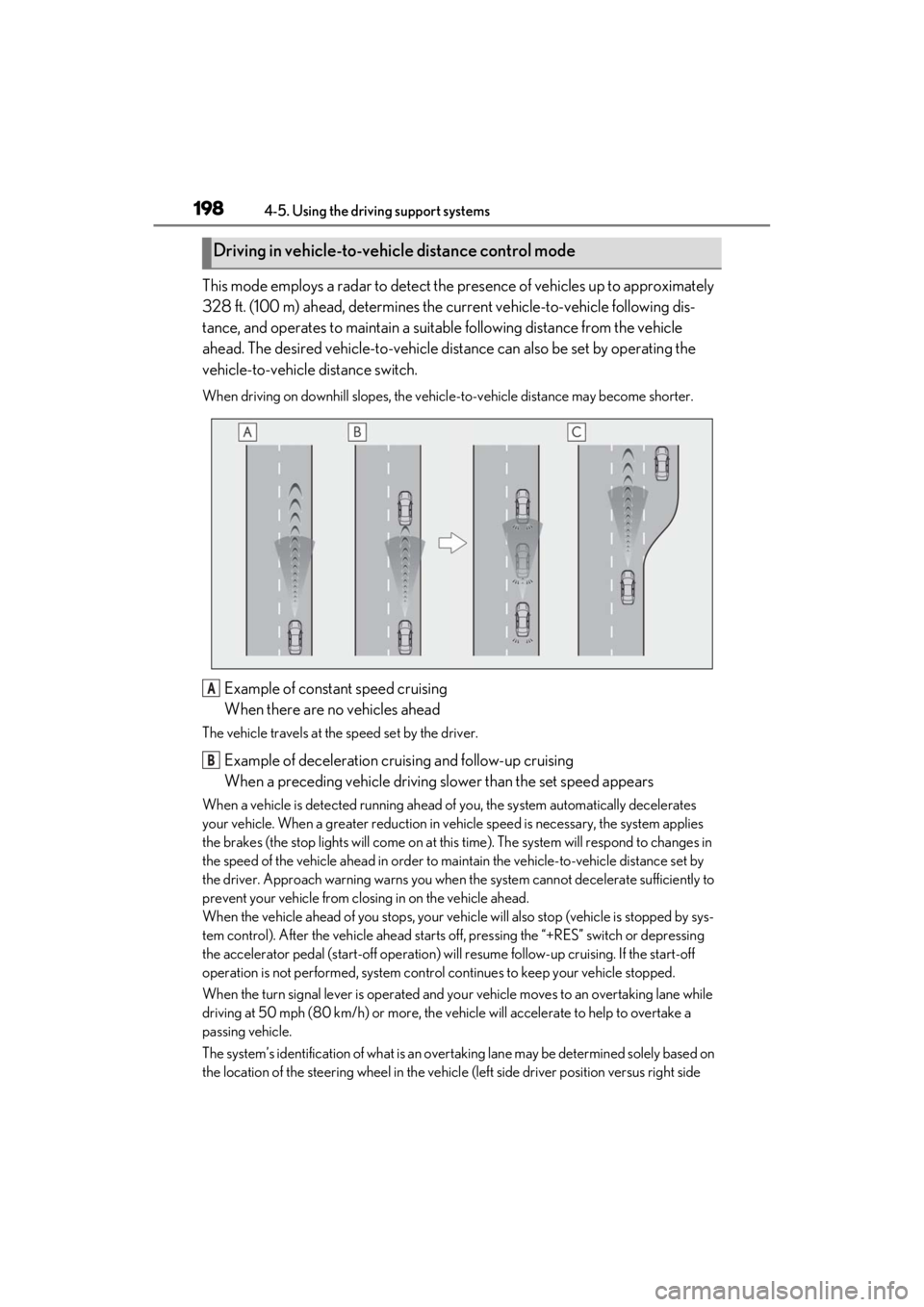
This mode employs a radar to detect the presence of vehicles up to approximately
328 ft. (100 m) ahead, determines the cu rrent vehicle-to-vehicle following dis-
tance, and operates to maintain a suitab le following distance from the vehicle
ahead. The desired vehicle-to-vehicle distance can also be set by operating the
vehicle-to-vehicle distance switch.
When driving on downhill slopes, the vehicl e-to-vehicle distance may become shorter.
Example of constant speed cruising
When there are no vehicles ahead
The vehicle travels at the speed set by the driver.
Example of deceleration cruising and follow-up cruising
When a preceding vehicle driving slower than the set speed appears
When a vehicle is detected running ahead of you, the system automatically decelerates
your vehicle. When a greater reduction in vehicle speed is necessary, the system applies
the brakes (the stop lights will come on at this time). The system will respond to changes in
the speed of the vehicle ahead in order to maintain the vehicle-to-vehicle distance set by
the driver. Approach warning warns you when th e system cannot decelerate sufficiently to
prevent your vehicle from closing in on the vehicle ahead.
When the vehicle ahead of you stops, your vehi cle will also stop (vehicle is stopped by sys-
tem control). After the vehicle ahead starts off, pressing the “+RES” switch or depressing
the accelerator pedal (start-off operation) will resume follow-up cruising. If the start-off
operation is not performed, system contro l continues to keep your vehicle stopped.
When the turn signal lever is operated and yo ur vehicle moves to an overtaking lane while
driving at 50 mph (80 km/h) or more, the vehicle will accelerate to help to overtake a
passing vehicle.
The system’s identification of what is an over taking lane may be determined solely based on
the location of the steering wheel in the vehicl e (left side driver position versus right side
Driving in vehicle-to-vehicle distance control mode
A
B
Page 203 of 464
![LEXUS ES350 2021 Owners Manual 2034-5. Using the driving support systems
4
Driving
ing at below approximately 20 mph [30
km/h], the set speed will be set to
approximately 20 mph [30 km/h].)
■Accelerating after setting the vehic](/img/36/58918/w960_58918-202.png "LEXUS ES350 2021 Owners Manual 2034-5. Using the driving support systems
4
Driving
ing at below approximately 20 mph [30
km/h], the set speed will be set to
approximately 20 mph [30 km/h].)
■Accelerating after setting the vehic")
2034-5. Using the driving support systems
4
Driving
ing at below approximately 20 mph [30
km/h], the set speed will be set to
approximately 20 mph [30 km/h].)
■Accelerating after setting the vehicle
speed
The vehicle can accelerate by operating the
accelerator pedal. After accelerating, the
set speed resumes. However, during vehi-
cle-to-vehicle distance control mode, the
vehicle speed may decrease below the set
speed in order to maintain the distance to
the preceding vehicle.
■When the vehicle stops while follow-up
cruising
●Pressing the “+RES” switch while the
vehicle ahead stops will resume follow-
up cruising if the vehicle ahead starts off
within approximately 3 seconds after the
switch is pressed.
●If the vehicle ahead starts off within 3 sec-
onds after your vehicle stops, follow-up
cruising will be resumed.
■Automatic cancelation of vehicle-to-
vehicle distance control mode
Vehicle-to-vehicle dist ance control mode is
automatically canceled in the following situ-
ations.
●VSC is activated.
●TRAC is activated for a period of time.
●When the VSC or TRAC system is
turned off.
●The sensor cannot detect correctly
because it is covered in some way.
●Pre-collision braking is activated.
●The parking brake is operated.
●The vehicle is stopped by system control
on a steep incline.
●The following are detected when the
vehicle has been stopped by system con-
trol:
• The driver is not wearing a seat belt.
• The driver’s door is opened.
• The vehicle has been stopped for about 3 minutes
If vehicle-to-vehicle distance control mode
is automatically canceled for any reasons
other than the above, there may be a mal- function in the system. Contact your Lexus
dealer.
■Automatic cancelation of constant
speed control mode
Constant speed control mode is automati-
cally canceled in the following situations:
●Actual vehicle speed is more than
approximately 10 mph (16 km/h) below
the set vehicle speed.
●Actual vehicle speed falls below approxi-
mately 20 mph (30 km/h).
●VSC is activated.
●TRAC is activated for a period of time.
●When the VSC or TRAC system is
turned off.
●Pre-collision braking is activated.
If constant speed control mode is automati-
cally canceled for any reasons other than
the above, there may be a malfunction in
the system. Contact your Lexus dealer.
■Brake operation
A brake operation sound may be heard and
the brake pedal response may change, but
these are not malfunctions.
■Warning messages and buzzers for
dynamic radar cruise control with full-
speed range
Warning messages and buzzers are used to
indicate a system malfunction or to inform
the driver of the need for caution while driv-
ing. If a warning messa ge is shown on the
multi-information displa y, read the message
and follow the instructions. ( P.175, P.371)
■When the sensor may not be correctly
detecting the vehicle ahead
In the case of the fo llowing and depending
on the conditions, operate the brake pedal
when deceleration of the system is insuffi-
cient or operate the accelerator pedal
when acceleration is required.
As the sensor may not be able to correctly
detect these types of vehicles, the approach
warning ( P.201) may not be activated.
●Vehicles that cut in suddenly
●Vehicles traveling at low speeds
●Vehicles that are not moving in the same