remote start LEXUS ES350 2022 User Guide
[x] Cancel search | Manufacturer: LEXUS, Model Year: 2022, Model line: ES350, Model: LEXUS ES350 2022Pages: 468, PDF Size: 26.96 MB
Page 109 of 468

1073-2. Opening, closing and locking the doors and trunk
3
Before driving
On
Off
When the trunk opener main switch is off,
the trunk lid cannot be opened even with
the wireless remote control, entry function
or Hands Free Power Trunk Lid (if
equipped).
■When leaving a key to the vehicle with a
parking attendant
P.95
■Antenna location
Antennas outside the cabin
Antennas inside the cabin
Antenna inside the trunk
Antenna outside the trunk
A
B
Smart access system with
push-button start
The following operations can be
performed simply by carrying the
electronic key (including the card
key) on your pers on, for example in
your pocket. The driver should
always carry the electronic key.
Locks and unlocks the doors
( P.96)
Opens the trunk ( P.103)
Starts the engine ( P.144)
A
B
C
D
Page 111 of 468
1093-2. Opening, closing and locking the doors and trunk
3
Before driving
■Battery-saving function
The battery-saving function will be acti-
vated in order to prevent the electronic key
battery and the battery from being dis-
charged while the vehicle is not in operation
for a long time.
●In the following situations, the smart
access system with push-button start may
take some time to unlock the doors.
• The electronic key has been left within
approximately 6 ft. (2 m) of the outside of
the vehicle for 10 minutes or longer.
• The smart access system with push-but-
ton start has not been used for 5 days or
longer.
●If the smart access system with push-but-
ton start has not been used for 14 days or
longer, the doors cannot be unlocked at
any doors except the driver’s door. In this
case, take hold of the driver’s door han-
dle, or use the wireless remote control or
mechanical key, to unlock the doors.
■Turning an electronic key to battery-
saving mode
●When battery-saving mode is set, battery
depletion is minimized by stopping the
electronic key from receiving radio
waves.
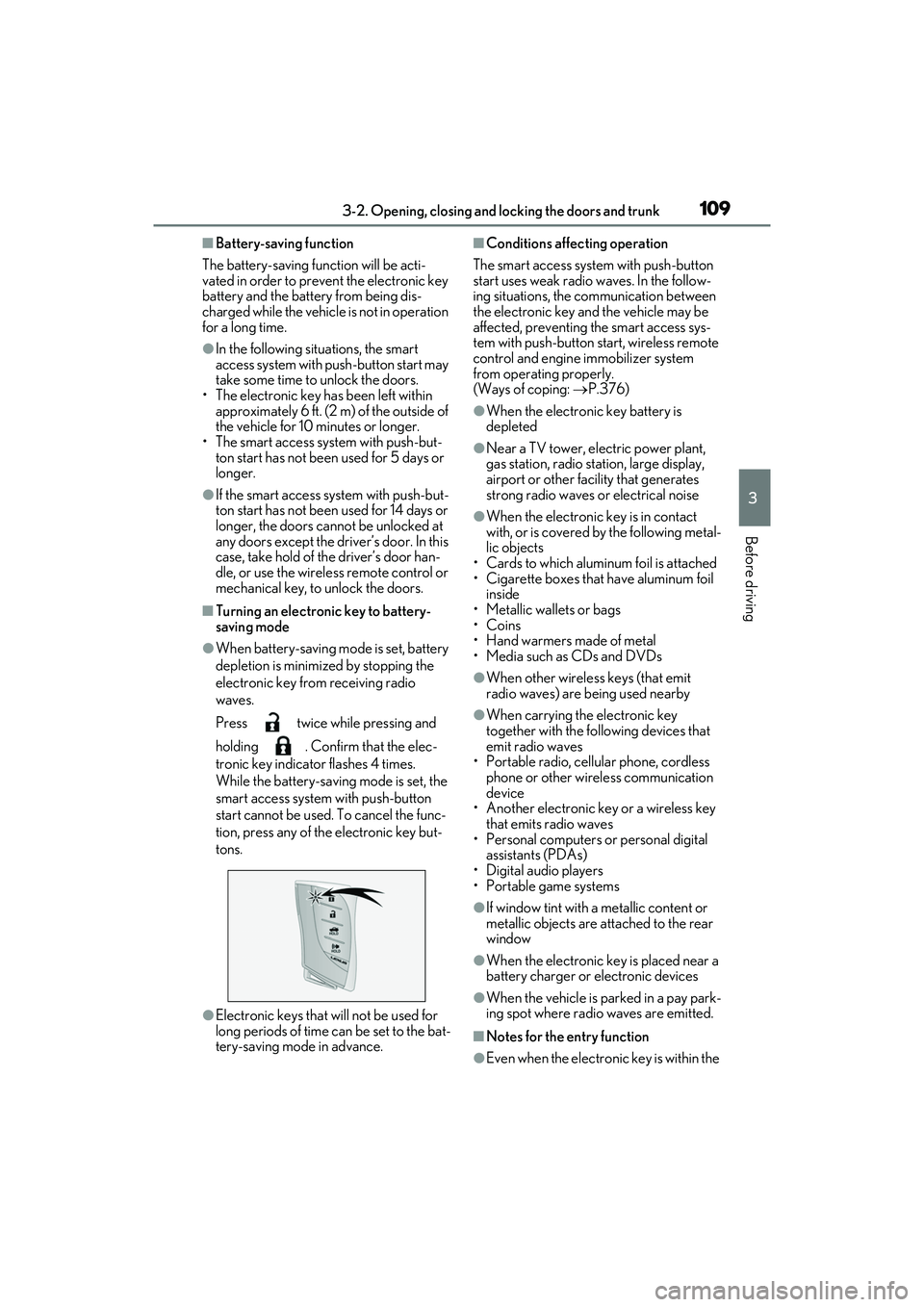
Press twice while pressing and
holding . Confirm that the elec-
tronic key indicator flashes 4 times.
While the battery-saving mode is set, the
smart access system with push-button
start cannot be used. To cancel the func-
tion, press any of the electronic key but-
tons.
●Electronic keys that will not be used for
long periods of time can be set to the bat-
tery-saving mode in advance.
■Conditions affecting operation
The smart access system with push-button
start uses weak radio waves. In the follow-
ing situations, the communication between
the electronic key and the vehicle may be
affected, preventing the smart access sys-
tem with push-button start, wireless remote
control and engine immobilizer system
from operating properly.
(Ways of coping: P.376)
●When the electronic key battery is
depleted
●Near a TV tower, electric power plant,
gas station, radio station, large display,
airport or other facility that generates
strong radio waves or electrical noise
●When the electronic key is in contact
with, or is covered by the following metal-
lic objects
• Cards to which aluminum foil is attached
• Cigarette boxes that have aluminum foil inside
• Metallic wallets or bags
•Coins
• Hand warmers made of metal
• Media such as CDs and DVDs
●When other wireless keys (that emit
radio waves) are being used nearby
●When carrying the electronic key
together with the following devices that
emit radio waves
• Portable radio, cellular phone, cordless phone or other wireless communication
device
• Another electronic key or a wireless key that emits radio waves
• Personal computers or personal digital assistants (PDAs)
• Digital audio players
• Portable game systems
●If window tint with a metallic content or
metallic objects are attached to the rear
window
●When the electronic key is placed near a
battery charger or electronic devices
●When the vehicle is parked in a pay park-
ing spot where radio waves are emitted.
■Notes for the entry function
●Even when the electronic key is within the
Page 112 of 468

1103-2. Opening, closing and locking the doors and trunk
effective range (detection areas), the sys-
tem may not operate properly in the fol-
lowing cases:
• The electronic key is too close to the win- dow or outside door handle, near the
ground, or in a high place when the doors
are locked or unlocked.
• The electronic key is near the ground or in a high place, or too close to the center
of the rear bumper when the trunk is
opened.
• The electronic key is on the instrument
panel, rear package tray or floor, or in the
door pockets or glove box when the
engine is started or engine switch modes
are changed.
●Do not leave the electronic key on top of
the instrument panel or near the door
pockets when exiting the vehicle.
Depending on the radio wave reception
conditions, it may be detected by the
antenna outside the cabin and the doors
will become lockable from the outside,
possibly trapping the electronic key
inside the vehicle.
●As long as the electronic key is within the
effective range, the doors may be locked
or unlocked by anyone. However, only
the doors detecting the electronic key
can be used to unlock the vehicle.
●Even if the electronic key is not inside the
vehicle, it may be possible to start the
engine if the electronic key is near the
window.
●The doors may unlock or lock if a large
amount of water splashes on the door
handle, such as in the rain or in a car
wash, when the electronic key is within
the effective range. (The doors will auto-
matically be locked after approximately
60 seconds if the doors are not opened
and closed.)
●If the wireless remote control is used to
lock the doors when the electronic key is
near the vehicle, there is a possibility that
the door may not be unlocked by the
entry function. (Use the wireless remote
control to unlock the doors.)
●Touching the door lock sensor while
wearing gloves may delay or prevent
lock operation. Remove the gloves and
touch the lock sensor again.
●When the lock operation is performed
using the lock sensor, recognition signals
will be shown up to two consecutive
times. After this, no recognition signals
will be given.
●Unlocking the vehicle may take more
time if another electronic key is within the
effective range.
●If the door handle becomes wet while the
electronic key is within the effective
range, the door may lock and unlock
repeatedly. In this case, follow the follow-
ing correction procedures to wash the
vehicle:
• Place the electronic key in a location 6 ft. (2 m) or more away from the vehicle.
(Take care to ensure that the key is not
stolen.)
• Set the electronic key to battery-saving
mode to disable the smart access system
with push-button start. ( P.109)
●If the electronic key is inside the vehicle
and a door handle becomes wet during a
car wash, a message may be shown on
the multi-information display and a
buzzer will sound outside the vehicle. To
turn off the alarm, lock all the doors.
●The lock sensor may not work properly if
it comes into contact with ice, snow, mud,
etc.
Clean the lock sensor and attempt to
operate it again.
●A sudden approach to the effective
range or door handle may prevent the
doors from being unlocked. In this case,
return the door handle to the original
position and check that the doors unlock
before pulling the door handle again.
■When the vehicle is not driven for
extended periods
●To prevent theft of the vehicle, do not
leave the electronic key within 6 ft. (2 m)
of the vehicle.
●The smart access system with push-but-
ton start can be deactivated in advance.
●Battery-saving mode can reduce the
power consumption of electronic keys.
( P.109)
Page 113 of 468
1113-2. Opening, closing and locking the doors and trunk
3
Before driving
■To operate the system properly
●Make sure to carry the electronic key
when operating the system. Do not get
the electronic key too close to the vehicle
when operating the system from the out-
side of the vehicle.
Depending on the position and holding
condition of the electronic key, the key
may not be detected correctly and the
system may not operate properly. (The
alarm may go off accidentally, or the door
lock prevention function may not oper-
ate.)
●Do not leave the electronic key inside the
trunk.
The key confinement prevention function
may not operate, depending on the loca-
tion of the key (close to a spare tire, the
inside edge of the trunk), conditions
(inside a metal bag, close to metallic
objects) and the radio waves in the sur-
rounding area. (P.104)
■If an electronic key does not work prop-
erly
●If the doors cannot be locked or
unlocked and the trunk cannot be
opened, perform the following.
• Bring the electronic key close to the door
handle and perform a lock or unlock
operation.
• Bring the electronic key close to the but-
ton on the trunk ( P.103) and press the
button.
• Use the wireless remote control.
If the doors cannot be locked or unlocked
by perform the above, use the mechanical
key. ( P.376)
For Canada: However, if the mechanical
key is used while the alarm system is set, the
warning will sound. ( P.60)
●If the engine cannot be started, refer to
P.378
■Customization
Settings (e. g. smart access system with
push-button start) can be changed.
(Customizable features: P.408)
If the smart access system with push-button
start has been deactivated in a customized
setting, refer to the explanations for the fol- lowing operations.
●Locking and unlocking the doors and
opening the trunk:
Use the wireless remote control or
mechanical key. (
P.96, 103, 376)
●Starting the engine and changing engine
switch modes: P.378
●Stopping the engine: P.146
WARNING
■Caution regarding interference with
electronic devices
●People with implantable cardiac pace-
makers, cardiac resynchronization
therapy-pacemakers or implantable
cardioverter defibrillators should keep
away from the smart access system
with push-button start antennas.
( P.107)
The radio waves may affect the opera-
tion of such devices. If necessary, the
entry function can be disabled. Ask
your Lexus dealer for details, such as
the frequency of radio waves and tim-
ing of the emitted radio waves. Then,
consult your doctor to see if you
should disable the entry function.
●Users of any electrical medical device
other than implantable cardiac pace-
makers, cardiac resynchronization
therapy-pacemakers or implantable
cardioverter defibrillators should con-
sult the manufacturer of the device for
information about its operation under
the influence of radio waves.
Radio waves could have unexpected
effects on the operation of such medi-
cal devices.
Ask your Lexus dealer for details on dis-
abling the entry function.
Page 117 of 468

1153-3. Adjusting the seats
3
Before driving
■Registering procedure
Record your driving position to button
“1”, “2” or “3” before performing the
following:
Carry only the key you want to regis-
ter, and then close the driver’s door.
If 2 or more keys are in the vehicle, the
driving position cannot be recorded
properly.
1 Check that the shift lever is in P.
2 Turn the engine switch to IGNI-
TION ON mode.
3 Recall the driving position that you
want to record.
4 While pressing the recalled button,
press and hold the door lock switch
(either lock or unlock) until the
buzzer sounds.
If the button could not be registered, the
buzzer sounds continuously for approxi-
mately 3 seconds.
■Cancelation procedure
1 Carry only the key you want to can-
cel and then close the driver’s door.
If 2 or more keys are in the vehicle, the
driving position cannot be canceled prop-
erly.
2Check that the shift lever is in P.
3 Turn the engine switch to IGNI-
TION ON mode.
4 While pressing the “SET” button,
press and hold the door lock switch
(either lock or unlock) until the
buzzer sounds twice.
If the button could not be canceled, the
buzzer sounds continuously for approxi-
mately 3 seconds.
■Recall procedure
1 Make sure that the doors are
locked before recalling the driving
position. Carry the electronic key
that has been registered to the driv-
ing position, and then unlock and
open the driver’s door using the
smart access system with push-but-
ton start or wireless remote control.
The driving position will move to the
recorded position (not including the steer-
ing wheel and head-up display [if
equipped]). However, the seat will move to
a position slightly behind the recorded
position in order to make entering the
vehicle easier.
If the driving position is in a position that
has already been recorded, the seat and
outside rear view mirrors will not move.
2Turn the engine switch to ACCES-
SORY mode or IGNITION ON
mode, or fasten a seat belt.
The seat, steering wheel and head-up dis-
play (if equipped) will move to the
recorded position.
■Recalling the driving position using the
memory recall function
●Different driving positions can be regis-
tered for each electronic key. Therefore,
Registering/cancel ing/recall a
driving position to an electronic
key (including a card key) (mem-
ory recall function)
Page 126 of 468

1243-5. Opening and closing the windows and moon roof
If you release the switch while the side win-
dow is moving, start again from the begin-
ning.
If the side window reverses and cannot be
fully closed or opened, have the vehicle
inspected by your Lexus dealer.
■Door lock linked window operation
●The power windows can be opened and
closed using the mechanical key.*
( P.377)
●The power windows can be opened using
the wireless remote control.* ( P.96)
●The alarm may be triggered if the alarm is
set and the power window is closed using
the door lock linked power window oper-
ation function. ( P.60)
*: These settings must be customized at
your Lexus dealer.
■Power windows open warning buzzer
The buzzer sounds and “Window Open” is
shown on the multi-information display
when the engine switch is turned off and the
driver’s door is opened with the power win-
dows open.
■Customization
Settings (e.g. linked door lock operation)
can be changed.
(Customizable features: P.408)
This function can be used to prevent
children from accidentally opening or
WARNING
Observe the following precautions.
Failure to do so may result in death or
serious injury.
■Closing the windows
●The driver is responsible for all the
power window operations, including
the operation for the passengers. In
order to prevent accidental operation,
especially by a child, do not let a child
operate the power windows. It is possi-
ble for children and other passengers
to have body parts caught in the power
window. Also, when riding with a child,
it is recommended to use the window
lock switch. ( P.124)
●Check to make sure that all passen-
gers do not have any part of their body
in a position where it could be caught
when a window is being operated.
●When using the wireless remote con-
trol or mechanical key and operating
the power windows, operate the
power window after checking to make
sure that there is no possibility of any
passenger having any of their body
parts caught in the window. Also do
not let a child operate window by the
wireless remote control or mechanical
key. It is possible for children and other
passengers to get caught in the power
window.
●When exiting the vehicle, turn the
engine switch off, carry the key and
exit the vehicle along with the child.
There may be accidental operation,
due to mischief, etc., that may possibly
lead to an accident.
■Jam protection function
●Never use any part of your body to
intentionally activat e the jam protec-
tion function.
●The jam protection function may not
work if something gets jammed just
before the window is fully closed. Be
careful not to get any part of your body
jammed in the window.
■Catch protection function
●Never use any part of your body or
clothing to intentionally activate the
catch protection function.
●The catch protection function may not
work if something gets caught just
before the window is fully opened. Be
careful not to get any part of your body
or clothing caught in the window.
Preventing accidental opera-
tion (window lock switch)
Page 131 of 468

1293-5. Opening and closing the windows and moon roof
3
Before driving
Closes the panoramic moon roof
The panoramic moon roof will fully
close automatically.
■The panoramic moon roof can be oper-
ated when
The engine switch is in IGNITION ON
mode.
■Operating the panoramic moon roof
after turning the engine off
The panoramic moon roof and electronic
roof sunshade can be operated for approxi-
mately 45 seconds after the engine switch
is turned to ACCESSORY mode or turned
off. It cannot, however, be operated once
the driver’s door is opened.
■Jam protection function
If an object is detected between the pan-
oramic moon roof and the frame in the fol-
lowing situations, travel is stopped and the
panoramic moon roof opens slightly:
●The panoramic moon roof is closing or
tilting down.
●The electronic roof sunshade is closing.
■Closing both the panoramic moon roof
and electronic roof sunshade
Slide the switch forward.
The electronic roof sunshade will close to
the half-open position and pause. The pan-
oramic moon roof will then fully close. Then
the electronic roof sunshade will fully close.
■Door lock linked panoramic moon roof
operation
●The panoramic moon roof can be
opened and closed using the mechanical
key.
* ( P.377)
●The panoramic moon roof can be
opened using the wireless remote con-
trol.
* ( P.96)
●The alarm may be triggered if the alarm is
set and the panoramic moon roof is
closed using the door lock linked pan-
oramic moon roof operation function.
( P.60)
*: These settings must be customized at
your Lexus dealer.
■When the panoramic moon roof or elec-
tronic roof sunshade does not close nor-
mally
Perform the following procedure:
1 Stop the vehicle.
2 Turn the engine switch to IGNITION
ON mode.
3 Slide and hold the switch or
switch forward. Continue press-
ing the switch for approximately 10 sec-
onds after the panoramic moon roof or
electronic roof sunshade closes and
reopens. The panoramic moon roof and
electronic roof sunshade will start to
close.
*
4 Check that the panoramic moon roof
and electronic roof sunshade are fully
closed and release the switch.
*: If the switch is released at the incorrect
time, the procedure will have to be per-
formed again from the beginning.
Page 320 of 468
3186-3. Do-it-yourself maintenance
■Before recharging
When recharging, the battery produces
hydrogen gas which is flammable and
explosive. Therefore, observe the following
precautions before recharging:
●If recharging with the battery installed on
the vehicle, be sure to disconnect the
ground cable.
●Make sure the power switch on the char-
ger is off when connecting and discon-
necting the charger cables to the battery.
■After recharging/reconnecting the bat-
tery
●The engine may not start.
Follow the procedure below to initialize
the system.
1 Shift the shift lever to P.
2 Open and close any of the doors.
3 Restart the engine.
●Unlocking the doors using the smart
access system with push-button start may
not be possible immediately after recon-
necting the battery. If this happens, use
the wireless remote control or the
mechanical key to lock/unlock the doors.
●Start the engine with the engine switch in
ACCESSORY mode. The engine may
not start with the engine switch turned off.
However, the engine will operate nor-
mally from the second attempt.
●The engine switch mode is recorded by
the vehicle. If the battery is reconnected,
the vehicle will return the engine switch
mode to the status it was in before the
battery was disconnected. Make sure to
turn off the engine switch before discon-
nect the battery. Take extra care when
connecting the battery if the engine
switch mode prior to discharge is
unknown.
If the engine will not start even after multiple
attempts at all methods above, contact your
Lexus dealer.
WARNING
■Chemicals in the battery
Battery contains poisonous and corro-
sive sulfuric acid and may produce
hydrogen gas which is flammable and
explosive. To reduce the risk of death or
serious injury, take the following precau-
tions while working on or near the bat-
tery:
●Do not cause sparks by touching the
battery terminals with tools.
●Do not smoke or light a match near the
battery.
●Avoid contact with eyes, skin and
clothes.
●Never inhale or swallow electrolyte.
●Wear protective safety glasses when
working near the battery.
●Keep children away from the battery.
■Where to safely charge the battery
Always charge the battery in an open
area. Do not charge the battery in a
garage or closed room where there is
insufficient ventilation.
■Emergency measures regarding
electrolyte
●If electrolyte gets in your eyes
Flush your eyes with clean water for at
least 15 minutes and get immediate
medical attention. If possible, continue
to apply water with a sponge or cloth
while traveling to the nearest medical
facility.
●If electrolyte gets on your skin
Wash the affected area thoroughly. If
you feel pain or burning, get medical
attention immediately.
●If electrolyte gets on your clothes
It can soak through clothing on to your
skin. Immediately take off the clothing
and follow the procedure above if nec-
essary.
Page 335 of 468
3336-3. Do-it-yourself maintenance
6
Maintenance and care
■If the electronic key battery is depleted
The following symptoms may occur:
●The smart access system with push-but-
ton start and wireless remote control will
not function properly.
●The operational range will be reduced.
■When the card key battery needs to be
replaced (if equipped)
The battery for the card key is available only
at Lexus dealers. Your Lexus dealer can
replace the battery for you.
Prepare the following before replacing
the battery:
Flathead screwdriver
Small flathead screwdriver
Lithium battery CR2032
■Use a CR2032 lithium battery
●Batteries can be purchased at your Lexus
dealer, local electrical appliance shops or
camera stores.
●Replace only with the same or equivalent
type recommended by the manufacturer.
●Dispose of used batteries according to
the local laws.
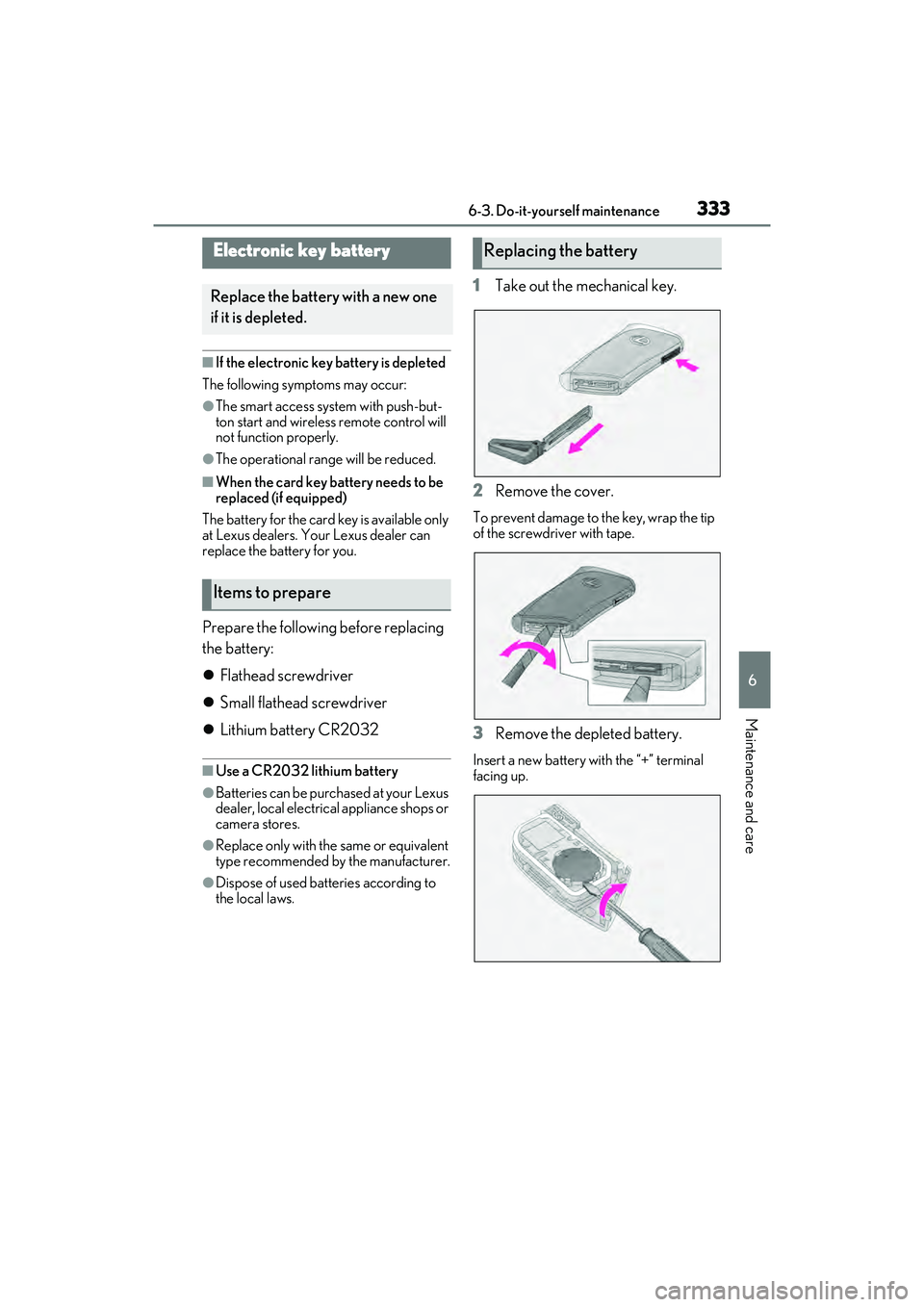
1 Take out the mechanical key.
2 Remove the cover.
To prevent damage to the key, wrap the tip
of the screwdriver with tape.
3Remove the depleted battery.
Insert a new battery with the “+” terminal
facing up.
Electronic key battery
Replace the battery with a new one
if it is depleted.
Items to prepare
Replacing the battery
Page 378 of 468
3767-2. Steps to take in an emergency
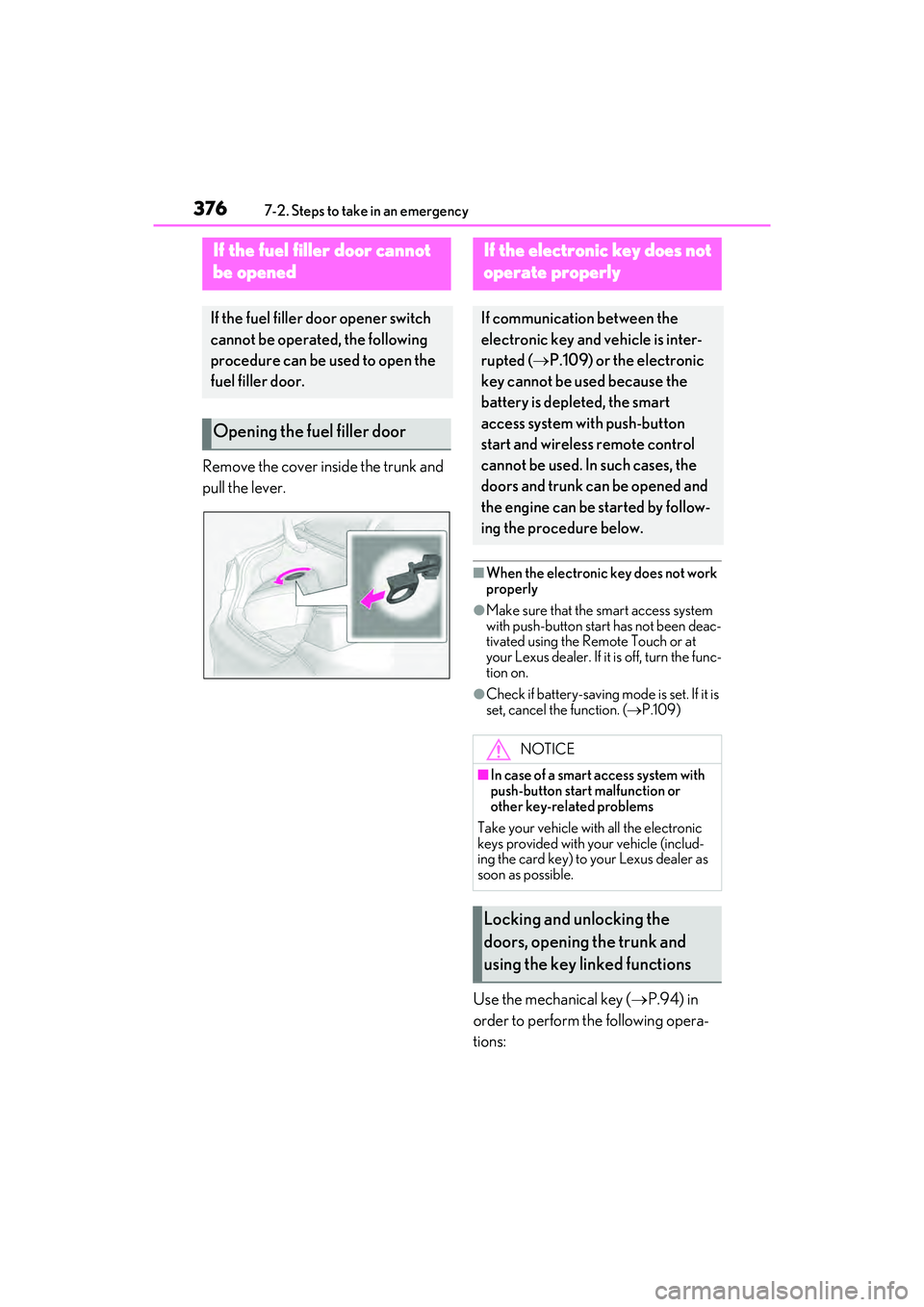
Remove the cover inside the trunk and
pull the lever.
■When the electronic key does not work
properly
●Make sure that the smart access system
with push-button start has not been deac-
tivated using the Remote Touch or at
your Lexus dealer. If it is off, turn the func-
tion on.
●Check if battery-saving mode is set. If it is
set, cancel the function. (P.109)
Use the mechanical key ( P.94) in
order to perform the following opera-
tions:
If the fuel fi ller door cannot
be opened
If the fuel filler door opener switch
cannot be operated, the following
procedure can be used to open the
fuel filler door.
Opening the fuel filler door
If the electronic key does not
operate properly
If communication between the
electronic key and vehicle is inter-
rupted ( P.109) or the electronic
key cannot be used because the
battery is depleted, the smart
access system with push-button
start and wireless remote control
cannot be used. In such cases, the
doors and trunk ca n be opened and
the engine can be started by follow-
ing the procedure below.
NOTICE
■In case of a smart access system with
push-button start malfunction or
other key-related problems
Take your vehicle with all the electronic
keys provided with your vehicle (includ-
ing the card key) to your Lexus dealer as
soon as possible.
Locking and unlocking the
doors, opening the trunk and
using the key linked functions