change time Lexus GS200t 2015 Owner's Manual
[x] Cancel search | Manufacturer: LEXUS, Model Year: 2015, Model line: GS200t, Model: Lexus GS200t 2015Pages: 668, PDF Size: 177.56 MB
Page 8 of 668
8
GS350_200t_GS F_OM_OM30E87E_(EE)
For your information
Please note that this manual applies to all models and explains all equipment, including
options. Therefore, you may find some expl anations for equipment not installed on your
vehicle.
All specifications provided in this manual are current at the time of printing. However,
because of the Lexus policy of continual product improvement, we reserve the right to
make changes at any time without notice.
Depending on specifications, the vehicle show n in the illustrations may differ from your
vehicle in terms of color and equipment.
Both genuine Lexus and a wide variety of other spare parts and accessories for Lexus
vehicles are currently available on the market. Should it be determined that any of the
genuine Lexus parts or accessories supplied with the vehicle need to be replaced, Lexus
recommends that genuine Lexus parts or accessories, be used to replace them. Other
parts or accessories of matching quality can also be used. Lexus cannot accept any liabil-
ity or guarantee spare parts and accessories which are not genuine Lexus products, nor
for replacement or installation involving such parts. In addition, damage or performance
problems resulting from the use of non-genuine Lexus spare parts or accessories may
not be covered under warranty.
Main Owner’s Manual
Accessories, spare parts and modification of your Lexus
Page 111 of 668
1112. Instrument cluster
2
Instrument cluster
GS350_200t_GS F_OM_OM30E87E_(EE)
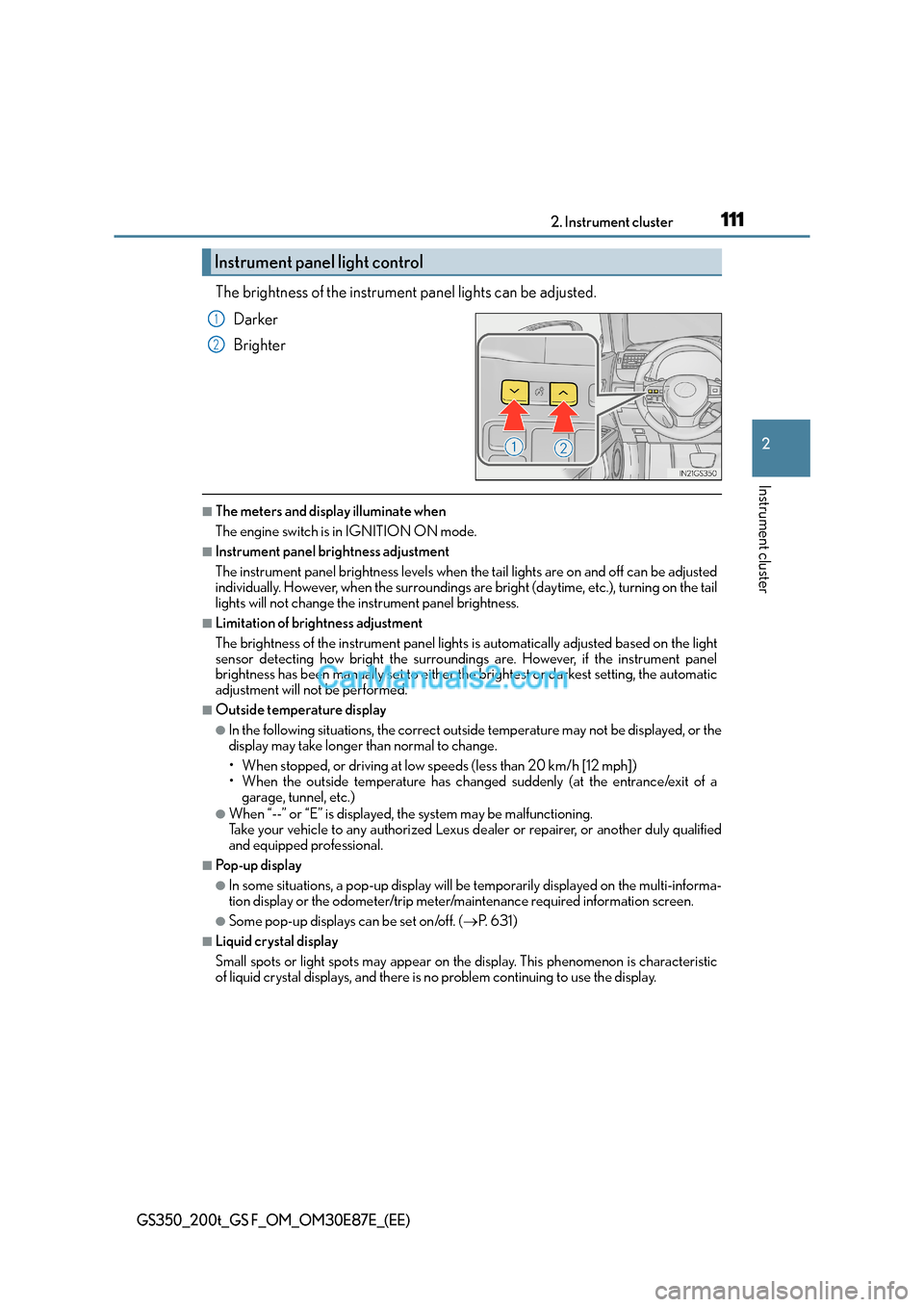
The brightness of the instrument panel lights can be adjusted.Darker
Brighter
■The meters and display illuminate when
The engine switch is in IGNITION ON mode.
■Instrument panel brightness adjustment
The instrument panel brightness levels when the tail lights are on and off can be adjusted
individually. However, when the surroundings ar e bright (daytime, etc.), turning on the tail
lights will not change the in strument panel brightness.
■Limitation of brightness adjustment
The brightness of the instrument panel lights is automatically adjusted based on the light
sensor detecting how bright the surroundings are. However, if the instrument panel
brightness has been manually set to either the brightest or darkest setting, the automatic
adjustment will not be performed.
■Outside temperature display
●In the following situations, the correct outside temperature may not be displayed, or the
display may take longer than normal to change.
• When stopped, or driving at low speeds (less than 20 km/h [12 mph])
• When the outside temperature has changed suddenly (at the entrance/exit of a
garage, tunnel, etc.)
●When “--” or “E” is displayed, the system may be malfunctioning.
Take your vehicle to any authorized Lexus de aler or repairer, or another duly qualified
and equipped professional.
■Po p - u p d i s p l a y
●In some situations, a pop-up display will be temporarily displayed on the multi-informa-
tion display or the odometer/trip meter/maintenance required information screen.
●Some pop-up displays can be set on/off. ( →P. 6 3 1 )
■Liquid crystal display
Small spots or light spots may appear on the display. This phenomenon is characteristic
of liquid crystal displays, and there is no problem continuing to use the display.
Instrument panel light control
1
2
Page 112 of 668
1122. Instrument cluster
GS350_200t_GS F_OM_OM30E87E_(EE)
■Clock settings
■Customization
The meter display can be customized on the multi-information display.
(Customizable features: →P. 6 2 8 )
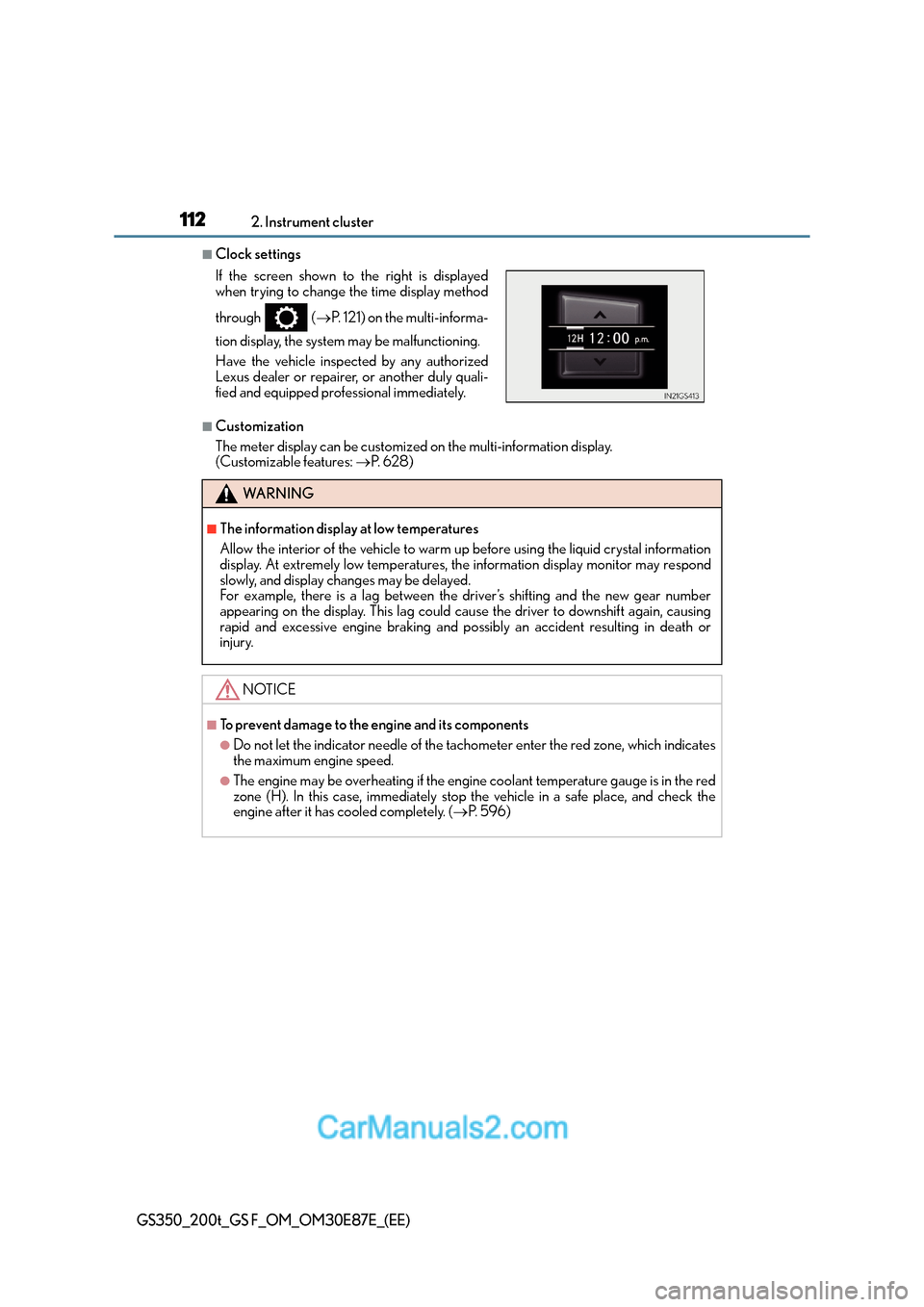
If the screen shown to the right is displayed
when trying to change the time display method
through (
→P. 121) on the multi-informa-
tion display, the system may be malfunctioning.
Have the vehicle inspected by any authorized
Lexus dealer or repairer, or another duly quali-
fied and equipped professional immediately.
WA R N I N G
■The information display at low temperatures
Allow the interior of the vehicle to warm up before using the liquid crystal information
display. At extremely low temperatures, the information display monitor may respond
slowly, and display changes may be delayed.
For example, there is a lag between the driver’s shifting and the new gear number
appearing on the display. This lag could cause the driver to downshift again, causing
rapid and excessive engine braking and possibly an accident resulting in death or
injury.
NOTICE
■To prevent damage to the engine and its components
●Do not let the indicator needle of the tachometer enter the red zone, which indicates
the maximum engine speed.
●The engine may be overheating if the engine coolant temperature gauge is in the red
zone (H). In this case, immediately stop the vehicle in a safe place, and check the
engine after it has cooled completely. ( →P. 5 9 6 )
Page 119 of 668
1192. Instrument cluster
2
Instrument cluster
GS350_200t_GS F_OM_OM30E87E_(EE)
■Instrument panel brightness adjustment
The instrument panel brightness levels when the tail lights are on and off can be adjusted
individually. However, when the surroundings ar e bright (daytime, etc.), turning on the tail
lights will not change the in strument panel brightness.
■Dimming the analog speedometer lighting
The analog speedometer lighting will be dimme d when the ambient light is bright, such
as during the daytime, and SPORT S or SPORT S+ mode is selected.
■Outside temperature display
●In the following situations, the correct outside temperature may not be displayed, or the
display may take longer than normal to change.
• When stopped, or driving at low speeds (less than 20 km/h [12 mph])
• When the outside temperature has changed suddenly (at the entrance/exit of a
garage, tunnel, etc.)
●When “ − −” or “E” is displayed, the system may be malfunctioning.
Take your vehicle to any authorized Lexus de aler or repairer, or another duly qualified
and equipped professional.
■Po p - u p d i s p l a y
●In some situations, such as when a switch operation is performed, a pop-up display will
be temporarily displayed on the multi-information display.
●Some pop-up displays can be set on/off. ( →P. 6 3 1 )
■Liquid crystal display
Small spots or light spots may appear on the display. This phenomenon is characteristic
of liquid crystal displays, and there is no problem continuing to use the display.
■Customization
The meter display can be customized on the multi-information display. ( →P. 6 2 8 )
WA R N I N G
■The information display at low temperatures
Allow the interior of the vehicle to warm up before using the liquid crystal information
display. At extremely low temperatures, the information display monitor may respond
slowly, and display changes may be delayed.
For example, there is a lag between the driver’s shifting and the new gear number
appearing on the display. This lag could cause the driver to downshift again, causing
rapid and excessive engine braking and possibly an accident resulting in death or
injury.
Page 123 of 668
1232. Instrument cluster
2
Instrument cluster
GS350_200t_GS F_OM_OM30E87E_(EE)
■Average speed (after reset*2/a f t e r s t a r t )*1
Displays the average vehicle speed since the function was reset and the
engine was started, respectively
■Elapsed time (after reset*2/a f t e r s t a r t )*1
Displays the elapsed time since the function was reset and the engine was
started, respectively
■Distance (range/after start)*1
Displays the estimated maximum distance that can be driven with the quantity
of fuel remaining and the distance driven after the engine was started respec-
tively.
• This distance is computed based on your average fuel consumption. As a result,the actual distance that can be driven may differ from that displayed.
• When only a small amount of fuel is added to the tank, the display may not be
updated.
When refueling, turn the engine switch off. If the vehicle is refueled without turning
the engine switch off, the display may not be updated.
■Eco Driving Indicator Zone Display
→ P. 1 0 6
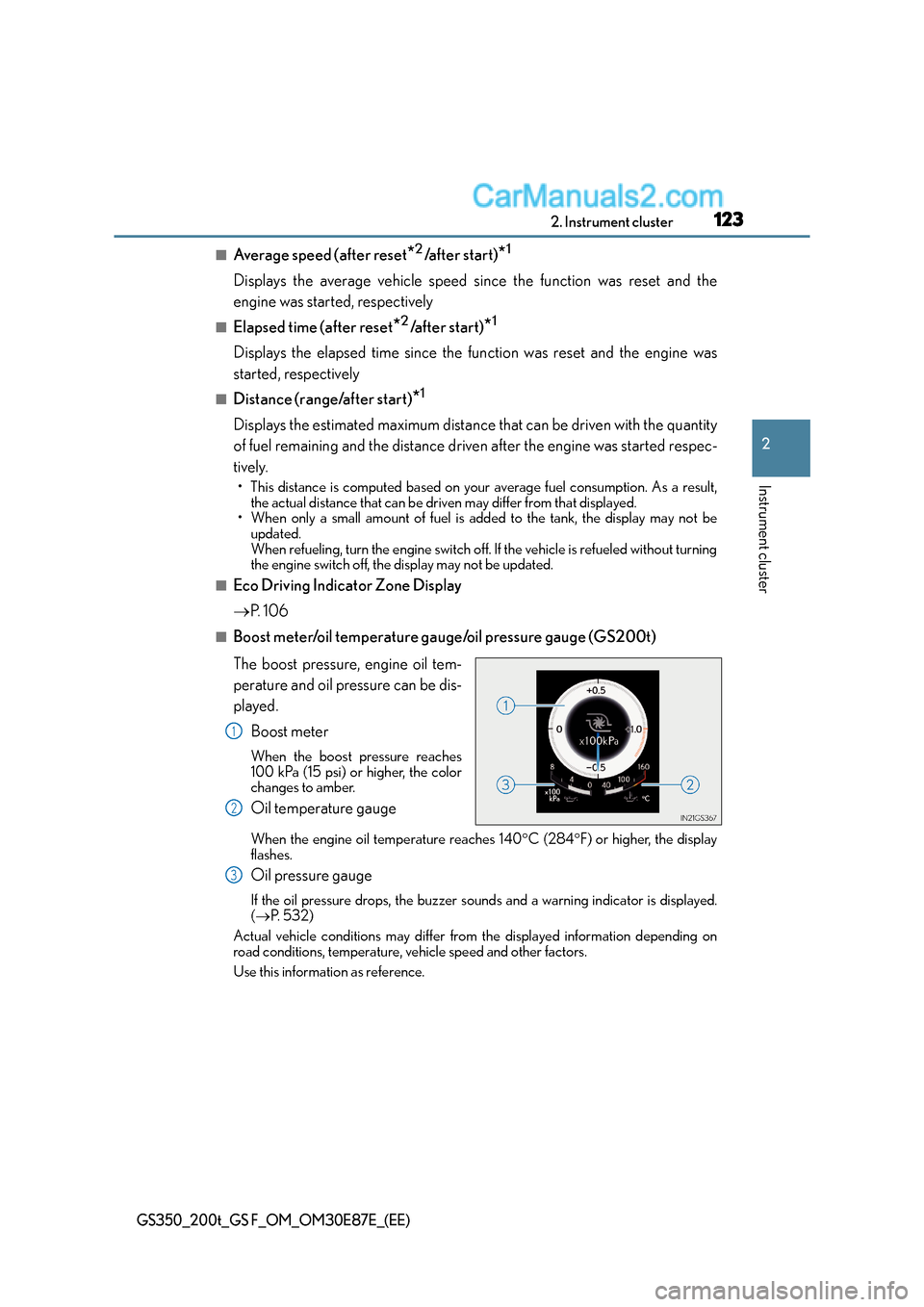
■Boost meter/oil temperature gauge/oil pressure gauge (GS200t)
The boost pressure, engine oil tem-
perature and oil pressure can be dis-
played.
Boost meter
When the boost pressure reaches
100 kPa (15 psi) or higher, the color
changes to amber.
Oil temperature gauge
When the engine oil temperature reaches 140 °C (284 °F) or higher, the display
flashes.
Oil pressure gauge
If the oil pressure drops, the buzzer so unds and a warning indicator is displayed.
( → P. 5 3 2 )
Actual vehicle conditions may differ from the displayed information depending on
road conditions, temperature, vehicle speed and other factors.
Use this information as reference.
1
2
3
Page 125 of 668
1252. Instrument cluster
2
Instrument cluster
GS350_200t_GS F_OM_OM30E87E_(EE)
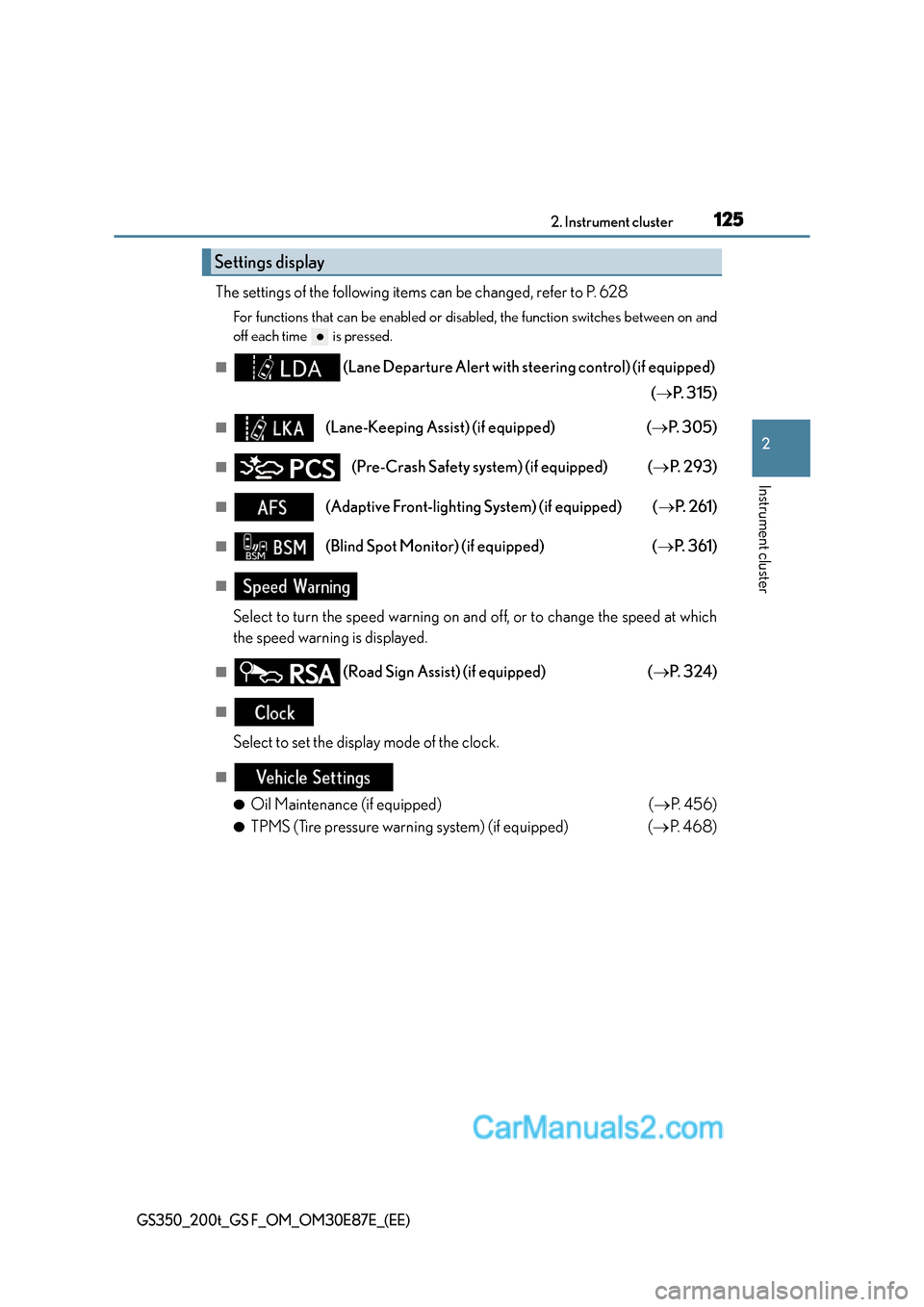
The settings of the following items can be changed, refer to P. 628
For functions that can be enabled or disabled, the function switches between on and
off each time is pressed.
■(Lane Departure Alert with steering control) (if equipped)
(→ P. 3 1 5 )
■(Lane-Keeping Assist) (if equipped) ( →P. 3 0 5 )
■(Pre-Crash Safety sy stem) (if equipped) ( →P. 2 9 3 )
■(Adaptive Front-lighting System) (if equipped) ( →P. 2 6 1 )
■(Blind Spot Monitor) (if equipped) ( →P. 3 6 1 )
■
Select to turn the speed warning on and off, or to change the speed at which
the speed warning is displayed.
■(Road Sign Assist) (if equipped) ( →P. 3 2 4 )
■
Select to set the display mode of the clock.
■
●
Oil Maintenance (if equipped) ( →P. 4 5 6 )
●TPMS (Tire pressure warning system) (if equipped) ( →P. 4 6 8 )
Settings display
Page 132 of 668

1322. Instrument cluster
GS350_200t_GS F_OM_OM30E87E_(EE)
■Lap timer
Measures and displays current lap time and previous lap times
●Reading the display
Measured lap times since the timer was last reset are displayed as follows:
• Multi-information display Total lap time
Pa s t l a p t i m e s
Fastest lap (marked with a star)
•Main meter
Current lap time
Most recent lap time
Lap time for the most recently
completed lap.
●Operating the meter control switches
Press: Start/stop lap timer
Press and hold: Reset : Mark off one lap
: Change displayed content
While a lap time is being mea-
sured, the display can be changed
to show the following content:• Torque distribution (if equipped)
•G-force
• Tire pressure
●Resetting/saving measured lap times
After stopping the lap timer, press and hold .
When a confirmation screen is displayed, select to reset/save the mea-
sured lap times.
When saved, the lap time data will be displayed on the history screen. ( →P. 1 3 3 )
“F” content
Multi-information display
Main meter1
2
3
4
5
1
2
Page 137 of 668

1372. Instrument cluster
2
Instrument cluster
GS350_200t_GS F_OM_OM30E87E_(EE)
The settings of the following items can be changed, refer to P. 628
For functions that can be enabled or disabled, the function switches between on and
off each time is pressed.
■(Lane Departure Alert with steering control) (if equipped)
(→ P. 3 1 5 )
■(Pre-Crash Safety system) (if equipped) ( →P. 2 9 3 )
■
Select to turn the speed warning on and off, or to change the speed at which
the speed warning is displayed.
■(Road Sign Assist) (if equipped) ( →P. 3 2 4 )
■(Blind Spot Monitor) (if equipped) ( →P. 3 6 1 )
■
• Display of the indicator can be turned on or off.
• The speed at which the indicator is displayed can be set.
Selectable speed range:
Except for United Kingdom: 50 km/h to 200 km/h (30 mph to 125 mph)
*
For United Kingdom: 50 km/h to 160 km/h (30 mph to 100 mph)*
*
: Always observe the legal speed limit when driving on public roads.
■
TPMS (Tire pressure warning system) ( →P. 4 6 8 )
■
●
Language
Select to change the language on the display.
●Units
Select to change the unit of measure
●Eco Driving Indicator Light
Select to activate/deactivate the Eco Driving Indicator Light
Settings display
Page 139 of 668

1392. Instrument cluster
2
Instrument cluster
GS350_200t_GS F_OM_OM30E87E_(EE)
■Start-up display
When the engine is started, the name of the vehicle is displayed on the multi-information
display.
While the start-up display is being displayed, the meter display cannot be changed even
if the drive mode is changed. When the start-up display is finished, the meter display for
the currently selected mode will be displayed.
■Torque distribution display (if equipped)
Torque distribution may not be displayed correc tly in some cases, such as when the vehi-
cle passes over road expansion joints.
■G-force display
●The G-force values may not be zero even when the vehicle is parked, such as when it is
parked on an incline.
●The steering amount, accelerator pedal input, and brake fluid pressure displays are dis-
abled until the engine has warmed up (the variable red zone of the tachometer has
retracted to 7300 r/min.).
After the engine has warmed up, these displays will be enabled.
●Depending on the vehicle usage conditions, the brake fluid pressure display may not
reach its maximum reading even though the brake pedal is fully depressed.
●If a battery terminal is disconnected and reconnected, the steering amount display may
be disabled temporarily. After driving the ve hicle for a while, the display will be enabled.
■Suspension of the settings display
In the following situations, operation of the settings display will be temporarily sus-
pended.
●When a warning message appears on the multi-information display
●When the vehicle begins to move
■Tire inflation pressure
●It may take a few minutes to display the tire inflation pressure after the engine switch is
turned to IGNITION ON mode. It may also take a few minutes to display the tire infla-
tion pressure after inflation pressure has been adjusted.
●“---” may be displayed if the tire position information cannot be determined due to
unfavorable radio wave conditions.
●Tire inflation pressure changes with temperature. The displayed values may also be dif-
ferent from the values measured using a tire pressure gauge.
■When disconnecting and reconnecting battery terminals
The following information data will be reset:
●Lap timer: Measured lap times, history
●G-force: Record of the maximum G-forces
■Using the lap timer
If the engine is stopped while a lap is being timed, the lap timer will stop and the lap time
up to that point will be recorded.
■Liquid crystal display
→ P. 1 1 1
Page 146 of 668
1462. Instrument cluster
GS350_200t_GS F_OM_OM30E87E_(EE)
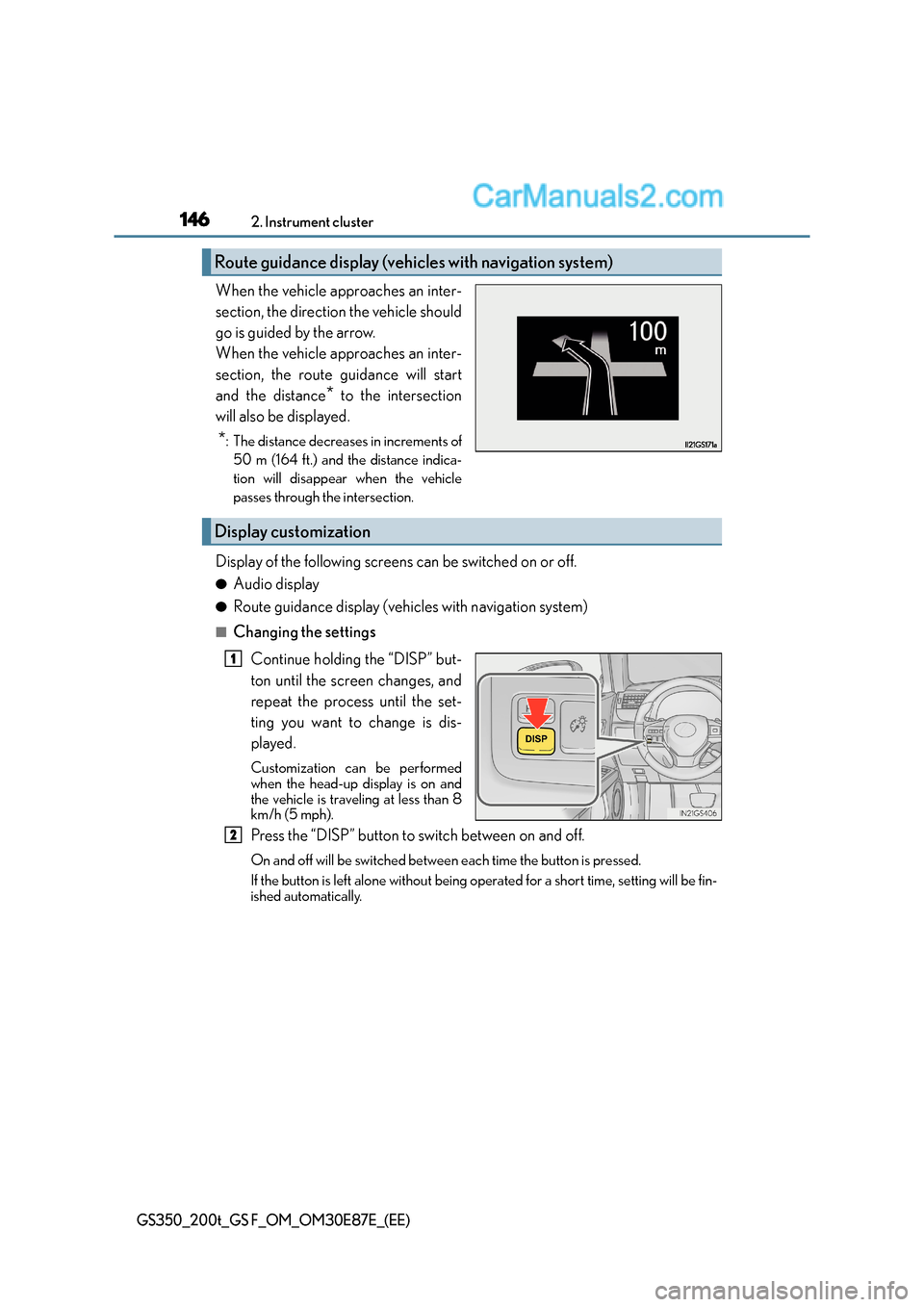
When the vehicle approaches an inter-
section, the direction the vehicle should
go is guided by the arrow.
When the vehicle approaches an inter-
section, the route guidance will start
and the distance
* to the intersection
will also be displayed.
*: The distance decreases in increments of 50 m (164 ft.) and the distance indica-
tion will disappear when the vehicle
passes through the intersection.
Display of the following screens can be switched on or off.
●Audio display
●Route guidance display (vehicles with navigation system)
■Changing the settings
Continue holding the “DISP” but-
ton until the screen changes, and
repeat the process until the set-
ting you want to change is dis-
played.
Customization can be performed
when the head-up display is on and
the vehicle is traveling at less than 8
km/h (5 mph).
Press the “DISP” button to switch between on and off.
On and off will be switched between each time the button is pressed.
If the button is left alone without being op erated for a short time, setting will be fin-
ished automatically.
Route guidance display (vehicles with navigation system)
Display customization
1
2