AUTO Lexus GS250 2012 Owner's Manual
[x] Cancel search | Manufacturer: LEXUS, Model Year: 2012, Model line: GS250, Model: Lexus GS250 2012Pages: 914, PDF Size: 53.04 MB
Page 495 of 914
4845-3. Using the audio system
GS350/250_EE (OM30C36E)
Setting menu language
Select “Menu language” on the “DVD settings” screen.
Select the desired language to be read on the “Menu language”
screen.
If you cannot find the desired language, select “Other” and input the
desired language code. (P. 485)
Setting angle mark
If the DVD has angle options, you can turn the angle mark on or
off.
Select “Angle mark” on the “DVD settings” screen.
Select “On” or “Off”.
Setting parental lock
Select “Parental lock” on the “DVD settings” screen.
Input the 4-digit personal code on the “Key code” screen.
If you enter wrong numbers, select to delete the numbers.
Select a parental level (1-8) on the “Select restriction level”
screen. (P. 491)
Setting the auto start
Discs that are inserted while the vehicle is in motion will auto-
matically start playing.
Select “Auto start” on the “DVD settings” screen.
Select “On” or “Off”.
Setting sound dynamic range
The difference between the lowest volume and the highest vol-
ume can be adjusted.
Select “Sound dynamic range” on the “DVD settings” screen.
Select “MAX”, “STD” or “MIN”.
1
2
1
2
1
2
3
1
2
1
2
Page 501 of 914
4905-3. Using the audio system
GS350/250_EE (OM30C36E)
Discs that can be used
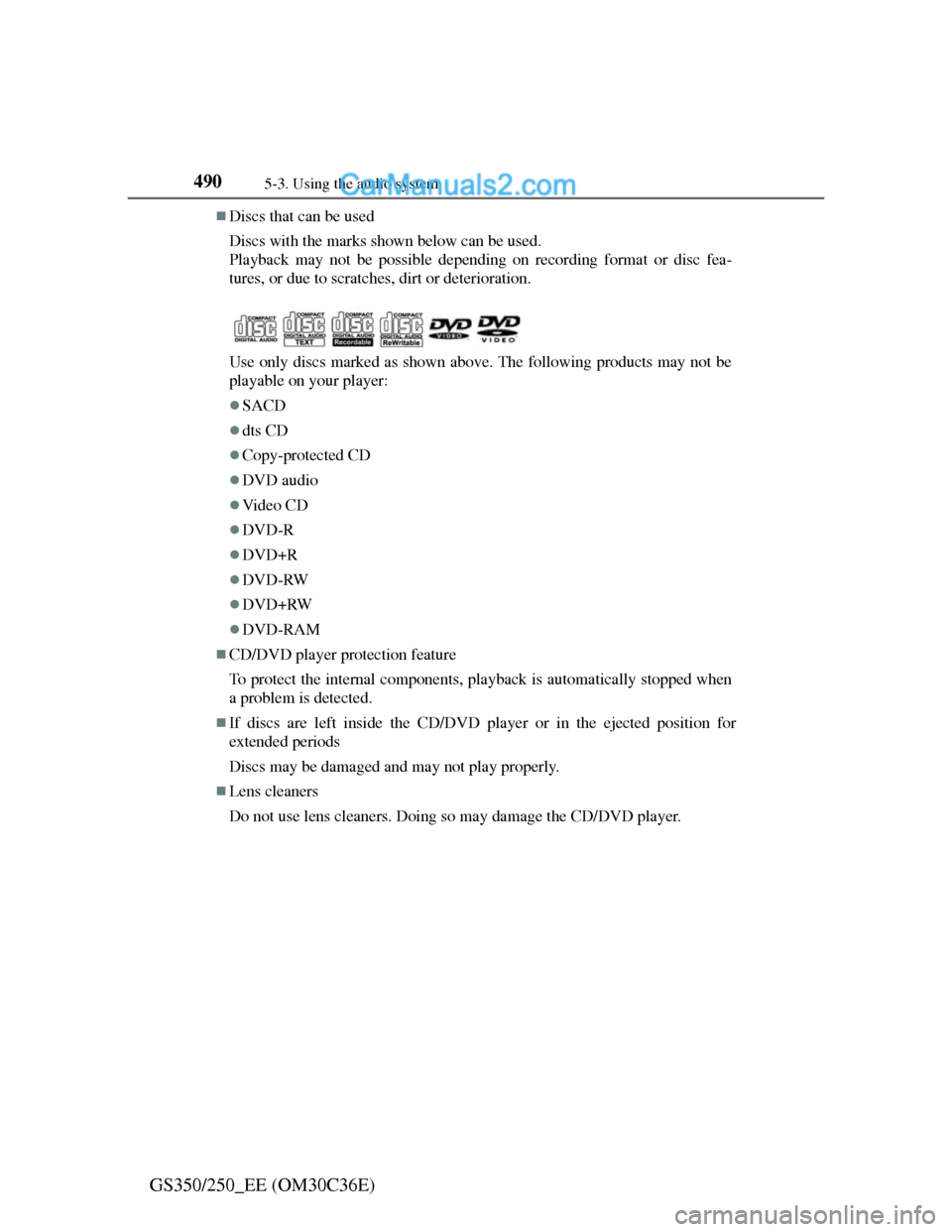
Discs with the marks shown below can be used.
Playback may not be possible depending on recording format or disc fea-
tures, or due to scratches, dirt or deterioration.
Use only discs marked as shown above. The following products may not be
playable on your player:
SACD
dts CD
Copy-protected CD
DVD audio
Vi d e o C D
DVD-R
DVD+R
DVD-RW
DVD+RW
DVD-RAM
CD/DVD player protection feature
To protect the internal components, playback is automatically stopped when
a problem is detected.
If discs are left inside the CD/DVD player or in the ejected position for
extended periods
Discs may be damaged and may not play properly.
Lens cleaners
Do not use lens cleaners. Doing so may damage the CD/DVD player.
Page 512 of 914
5015-3. Using the audio system
5
Interior features
GS350/250_EE (OM30C36E)To use the Bluetooth
® audio system, you need to enter your porta-
ble player into the system. Once registered, you can enjoy your
music on the vehicle’s audio system. (P. 606)
For the operation procedure for the portable player, consult your
player’s accompanying instruction manual.
When “Bluetooth* power” is turned on
When the portable player is on standby for the connection, it will
be automatically connected whenever the engine switch is in
either ACCESSORY or IGNITION ON mode.
When “Bluetooth* power” is turned off
Manually connect the portable player in accordance with the fol-
lowing procedure.
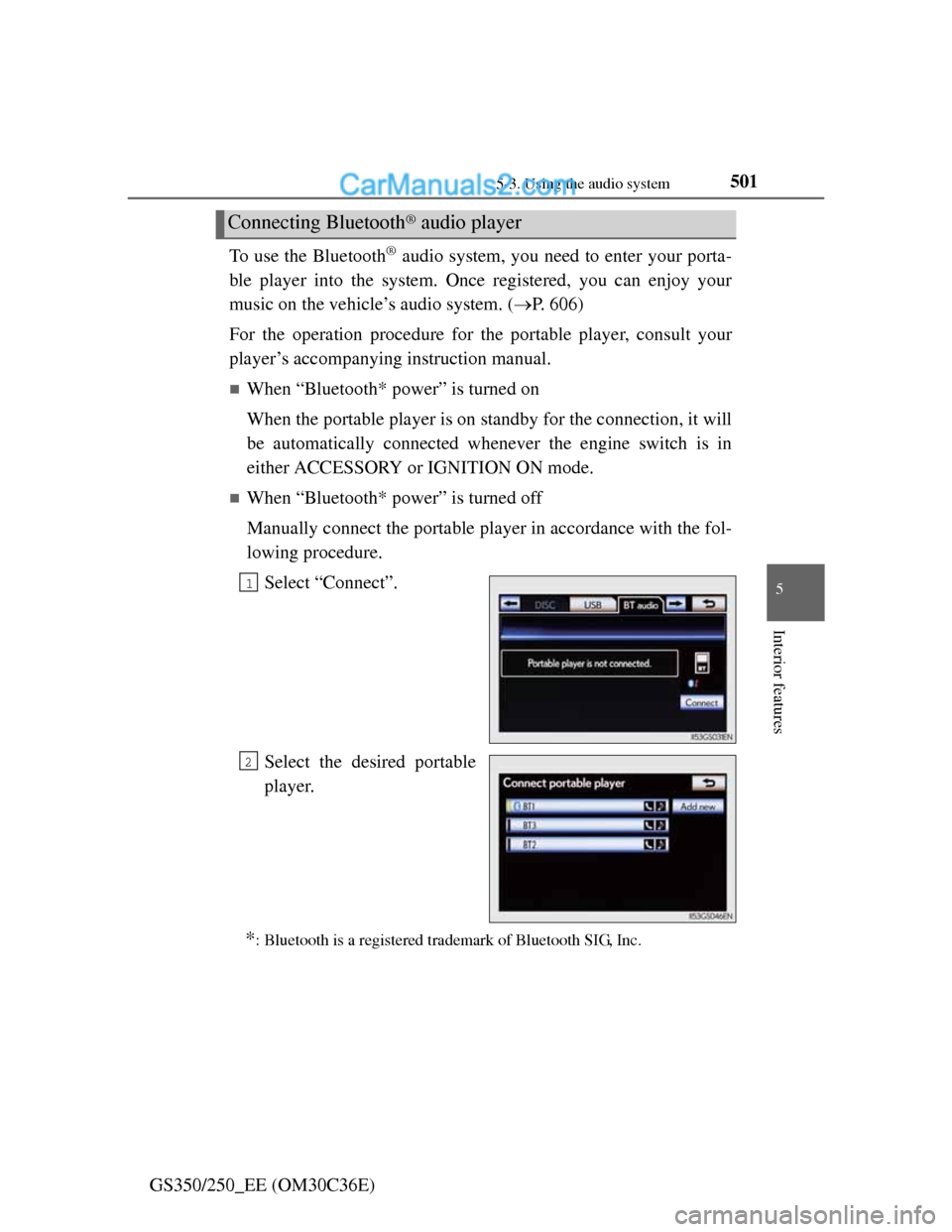
Select “Connect”.
Select the desired portable
player.
*: Bluetooth is a registered trademark of Bluetooth SIG, Inc.
Connecting Bluetooth® audio player
1
2
Page 519 of 914
5085-3. Using the audio system
GS350/250_EE (OM30C36E)
About Bluetooth®
Compatible models
Portable players must correspond to the following specifications:
Bluetooth® specification
Ver. 1.1 or higher
(Recommended: Ver. 2.1+EDR or higher)
Profile
• A2DP (Advanced Audio Distribution Profile) Ver. 1.0 or higher
(Recommended: Ver. 1.2 or higher)
• AVRCP (Audio/Video Remote Control Profile) Ver. 1.0 or higher
(Recommended: Ver. 1.4 or higher)
However, please note that some functions may be limited depending on the
type of portable player. Also, the different screen is displayed depending on
which portable player is connecting.
Certification
P. 5 4 9
Reconnecting the portable player
If the portable player is disconnected with a poor reception when the engine
switch is in ACCESSORY or IGNITION ON mode, the system automati-
cally reconnects the portable player.
If you have switched off the portable player yourself, follow the instructions
below to reconnect:
Select the portable player again
Enter the portable player
When transferring ownership of your vehicle
Be sure to remove the registered portable player from the system. (P. 601) Bluetooth is a registered trademark of
Bluetooth SIG. Inc.
Page 545 of 914
5345-3. Using the audio system
GS350/250_EE (OM30C36E)
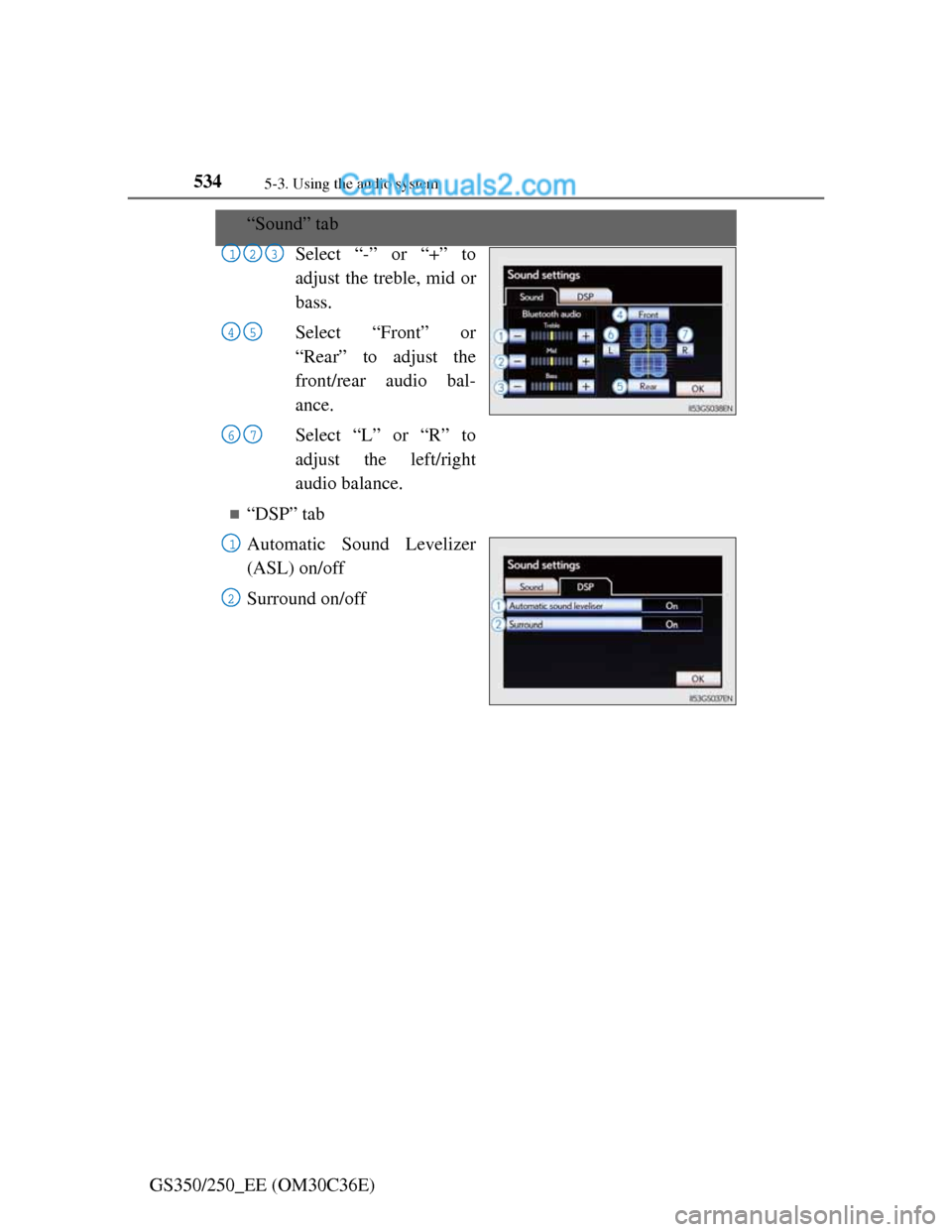
“Sound” tab
Select “-” or “+” to
adjust the treble, mid or
bass.
Select “Front” or
“Rear” to adjust the
front/rear audio bal-
ance.
Select “L” or “R” to
adjust the left/right
audio balance.
“DSP” tab
Automatic Sound Levelizer
(ASL) on/off
Surround on/off
123
45
67
1
2
Page 546 of 914
5355-3. Using the audio system
5
Interior features
GS350/250_EE (OM30C36E)
The sound quality level is adjusted individually
The treble, mid and bass levels can be adjusted for the each audio mode sep-
arately.
About Automatic Sound Levelizer (ASL)
ASL automatically adjusts the volume and tone quality according to the vehi-
cle speed, wind noise or other noise.
Page 574 of 914
5595-4. Using the hands-free phone system (for cellular phone)
5
Interior features
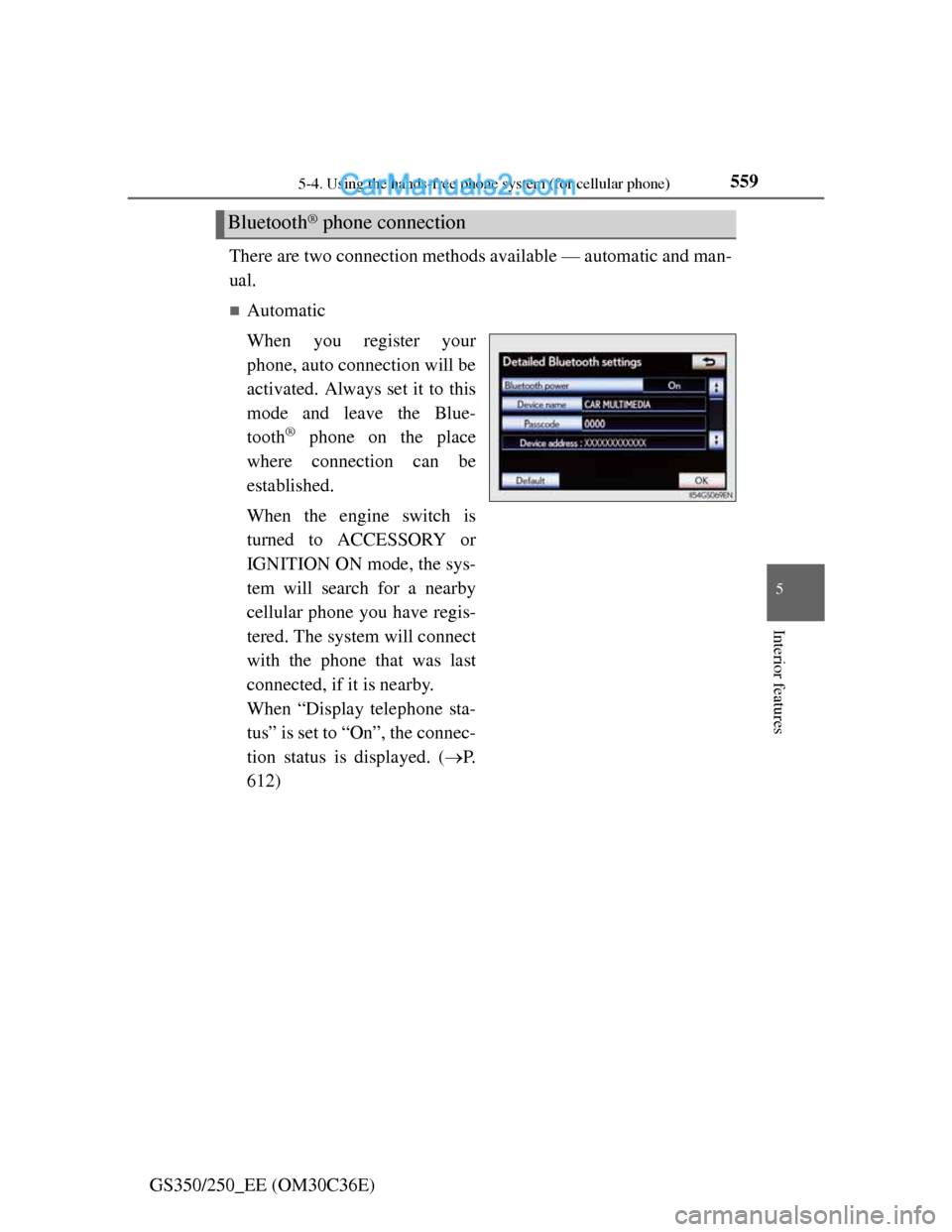
GS350/250_EE (OM30C36E)There are two connection methods available — automatic and man-
ual.
Automatic
When you register your
phone, auto connection will be
activated. Always set it to this
mode and leave the Blue-
tooth
® phone on the place
where connection can be
established.
When the engine switch is
turned to ACCESSORY or
IGNITION ON mode, the sys-
tem will search for a nearby
cellular phone you have regis-
tered. The system will connect
with the phone that was last
connected, if it is nearby.
When “Display telephone sta-
tus” is set to “On”, the connec-
tion status is displayed. (P.
612)
Bluetooth® phone connection
Page 575 of 914
5605-4. Using the hands-free phone system (for cellular phone)
GS350/250_EE (OM30C36E)
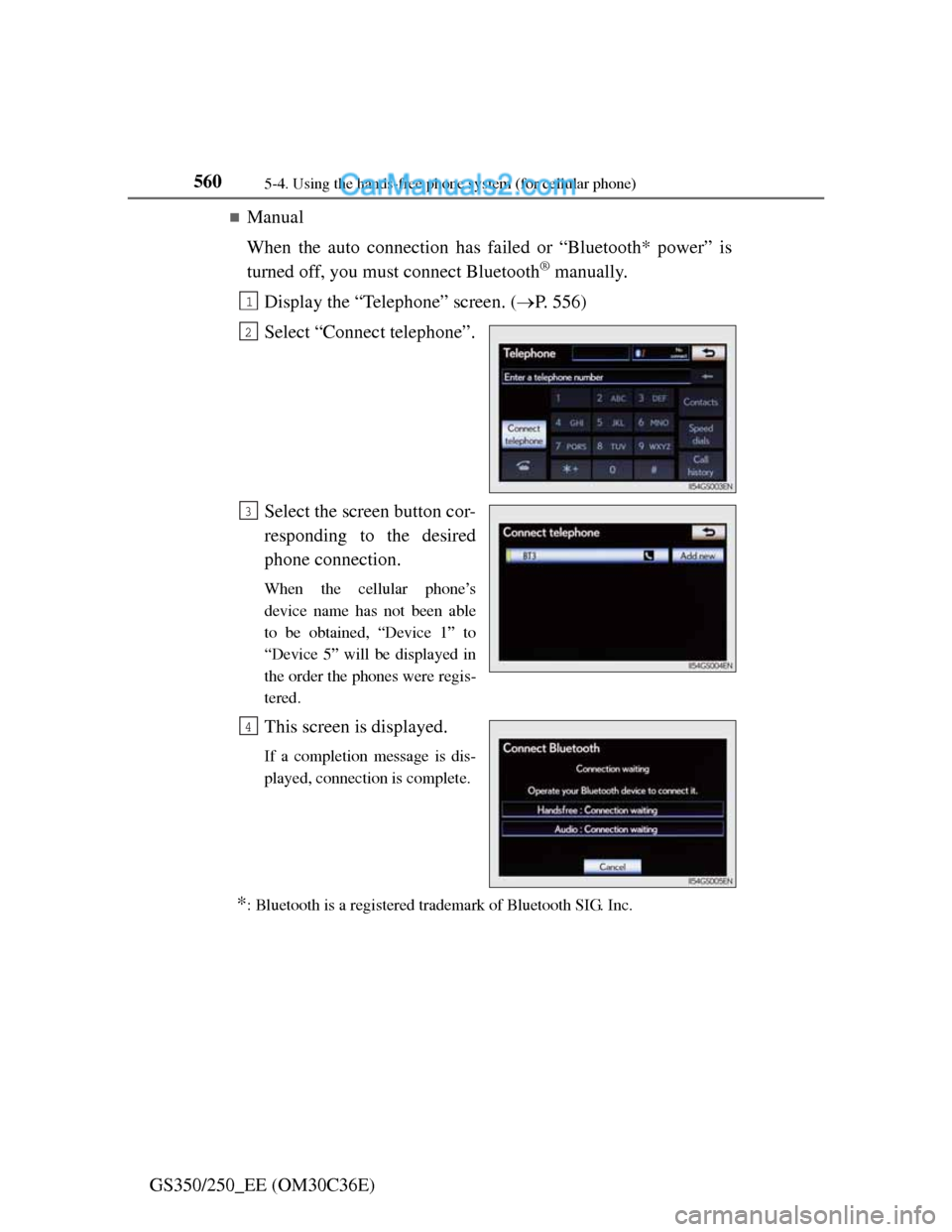
Manual
When the auto connection has failed or “Bluetooth* power” is
turned off, you must connect Bluetooth
® manually.
Display the “Telephone” screen. (P. 556)
Select “Connect telephone”.
Select the screen button cor-
responding to the desired
phone connection.
When the cellular phone’s
device name has not been able
to be obtained, “Device 1” to
“Device 5” will be displayed in
the order the phones were regis-
tered.
This screen is displayed.
If a completion message is dis-
played, connection is complete.
*: Bluetooth is a registered trademark of Bluetooth SIG. Inc.
1
2
3
4
Page 576 of 914
5615-4. Using the hands-free phone system (for cellular phone)
5
Interior features
GS350/250_EE (OM30C36E)
Reconnecting to the Bluetooth® phone
If the system cannot connect due to poor signal strength with the engine
switch in ACCESSORY or IGNITION ON mode, the system will automati-
cally attempt to reconnect.
If the phone is turned off, the system will not attempt to reconnect. In this
case, it must be connected manually, or the phone must be re-selected or re-
entered.
Connecting the phone while Bluetooth® audio is playing
Bluetooth® audio will stop temporarily.
It may take time to connect.
Connecting the phone while another Bluetooth® device is connected
When another Bluetooth
® device is currently connected, a confirmation mes-
sage will be displayed. To disconnect the Bluetooth® device, select “Yes”.
Connecting the phone while 5 Bluetooth® devices have already been regis-
tered
When 5 Bluetooth
® devices have already been registered, a registered device
needs to be deleted. Select “Yes” to delete one or more.
Select the device to be deleted, then select “Remove”, and “Yes”.
If the Bluetooth® phone has a Bluetooth® audio function
When the Bluetooth
® phone to be registered has a Bluetooth® audio function,
this audio function will be registered automatically at the same time and con-
firmation message may be displayed. If this screen is displayed, select “Yes”
to connect the audio function or select “No” to cancel the connection.
Page 590 of 914
575
5 5-4. Using the hands-free phone system (for cellular phone)
Interior features
GS350/250_EE (OM30C36E)
Call waiting
When a connected call is interrupted by the third party, the
incoming call message will be displayed.
To talk with the other party: Select or press on the
steering wheel.
To refuse the call: Select or press on the steering
wheel.
Everytime you select or press on the steering wheel
after a call is interrupted, you will be switched to the other party.
If your cellular phone is not accepted in HFP Ver. 1.5, this func-
tion cannot be used.
Transferring calls
It is not possible to transfer from hands-free to a cellular phone while driv-
ing.
If you transfer from a cellular phone to hands-free, the hands-free screen
will be displayed, and you can operate the system using the screen.
Transfer method and operation may vary according to the cellular phone
used.
For operation of the cellular phone in use, see the phone’s manual.
Repeated tone symbols
When the “p” pause tone is used, after waiting 2 seconds the tone data up
until the next pause tone will be automatically sent. When the “w” pause tone
is used, the tone data up until the next pause tone will be automatically sent
after user operation.
While driving
Key input is unavailable.
Calls can be made by giving a speech command.
Interrupt call operation
Interrupt call operation may differ from depending on your phone company
and the cellular phone.