ABS Lexus GS250 2012 User Guide
[x] Cancel search | Manufacturer: LEXUS, Model Year: 2012, Model line: GS250, Model: Lexus GS250 2012Pages: 914, PDF Size: 53.04 MB
Page 351 of 914
3444-5. Using the driving support
GS350/250_EE (OM30C36E)
Suspension control (if equipped)
When the system determines that a collision is unavoidable, the
operation of AVS (P. 334) optimally controls the damping
force of the shock absorber.
Driver monitor system (if equipped)
When the system determines that there is a possibility of a colli-
sion, and either the driver is not facing forward or the driver’s
eyes are closed, PCS warnings are given in advance to warn the
driver. If the system determines that the conditions to operate
pre-crash alert braking have been met even when the possibility
of a collision increases further, pre-crash alert braking will oper-
ate.
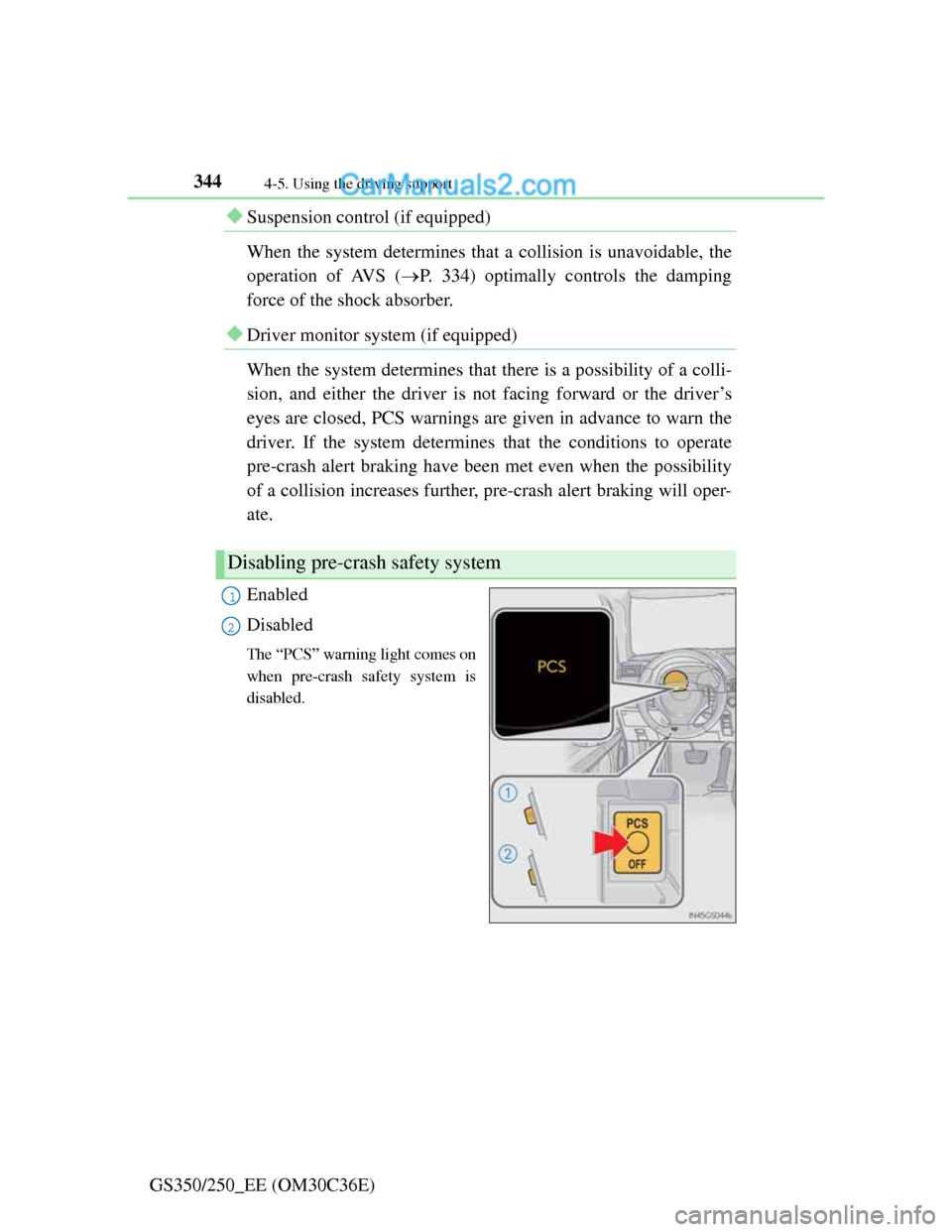
Enabled
Disabled
The “PCS” warning light comes on
when pre-crash safety system is
disabled.
Disabling pre-crash safety system
1
2
Page 360 of 914

3534-5. Using the driving support
4
Driving
GS350/250_EE (OM30C36E)
CAUTION
Cautions regarding the assist contents of the system
By means of alarms and brake control, the pre-crash safety system is
intended to assist the driver in avoiding collisions through the process of
LOOK-JUDGE-ACT. There are limits to the degree of assistance the sys-
tem can provide, so please keep in mind the following important points.
Assisting the driver in watching the road
The pre-crash safety system is only able to detect obstacles directly in
front of the vehicle, and only within a limited range. It is not a mechanism
that allows careless or inattentive driving, and it is not a system that can
assist the driver in low-visibility conditions. It is still necessary for the
driver to pay close attention to the vehicle’s surroundings.
Assisting the driver in making correct judgment
When attempting to estimate the likelihood of a collision, the only data
available to the pre-crash safety system is that from obstacles it has
detected directly in front of the vehicle. Therefore, it is absolutely neces-
sary for the driver to remain vigilant and to determine whether or not there
is a possibility of collision in any given situation.
Assisting the driver in taking action
The pre-crash safety system’s braking assist feature is designed to help
reduce the severity of a collision, and so only acts when the system has
judged that a collision is unavoidable. This system by itself is not capable
of automatically avoiding a collision or bringing the vehicle to a stop
safely. For this reason, when encountering a dangerous situation the driver
must take direct and immediate action in order to ensure the safety of all
involved.
NOTICE
Precautions for cleaning the driver monitor sensor
Gently wipe the sensor with a soft cloth to prevent damage.
Wipe any excess dirt with a cloth dampened with neutral detergent, all liq-
uids having been wringed out of the cloth. After that, wipe again with a
dry cloth.
Do not use benzene, thinner, glass cleaners, wax, etc.
Page 446 of 914
4355-3. Using the audio system
5
Interior features
GS350/250_EE (OM30C36E)
Using cellular phones
Interference may be heard through the audio system’s speakers if a cellular
phone is being used inside or close to the vehicle while the audio system is
operating.
When using the Remote Touch screen
Dimmed screen buttons cannot be operated.
Ta b
Select or , located either side of the screen tabs, to display tabs from
the previous or next page.
About Dolby
Manufactured under license from Dolby Laboratories. Dolby and the double-
D symbol are trademarks of Dolby Laboratories.
CAUTION
Certification for the disc player
This product is a Class 1 laser product classified under the Safety of laser
products, IEC 60825-1:2007, and contains a class 1 M laser module. To
ensure continued safety, do not remove any covers or attempt to gain access
to the inside of the product. Refer all servicing to qualified personnel.
CLASS 1 LASER PRODUCT
CAUTION - CLASS 1 M VISIBLE
AND INVISIBLE LASER RADIA-
TION WHEN OPEN, DO NOT VIEW
DIRECTLY WITH OPTICAL
INSTRUMENTS.
Page 470 of 914
4595-3. Using the audio system
5
Interior features
GS350/250_EE (OM30C36E)
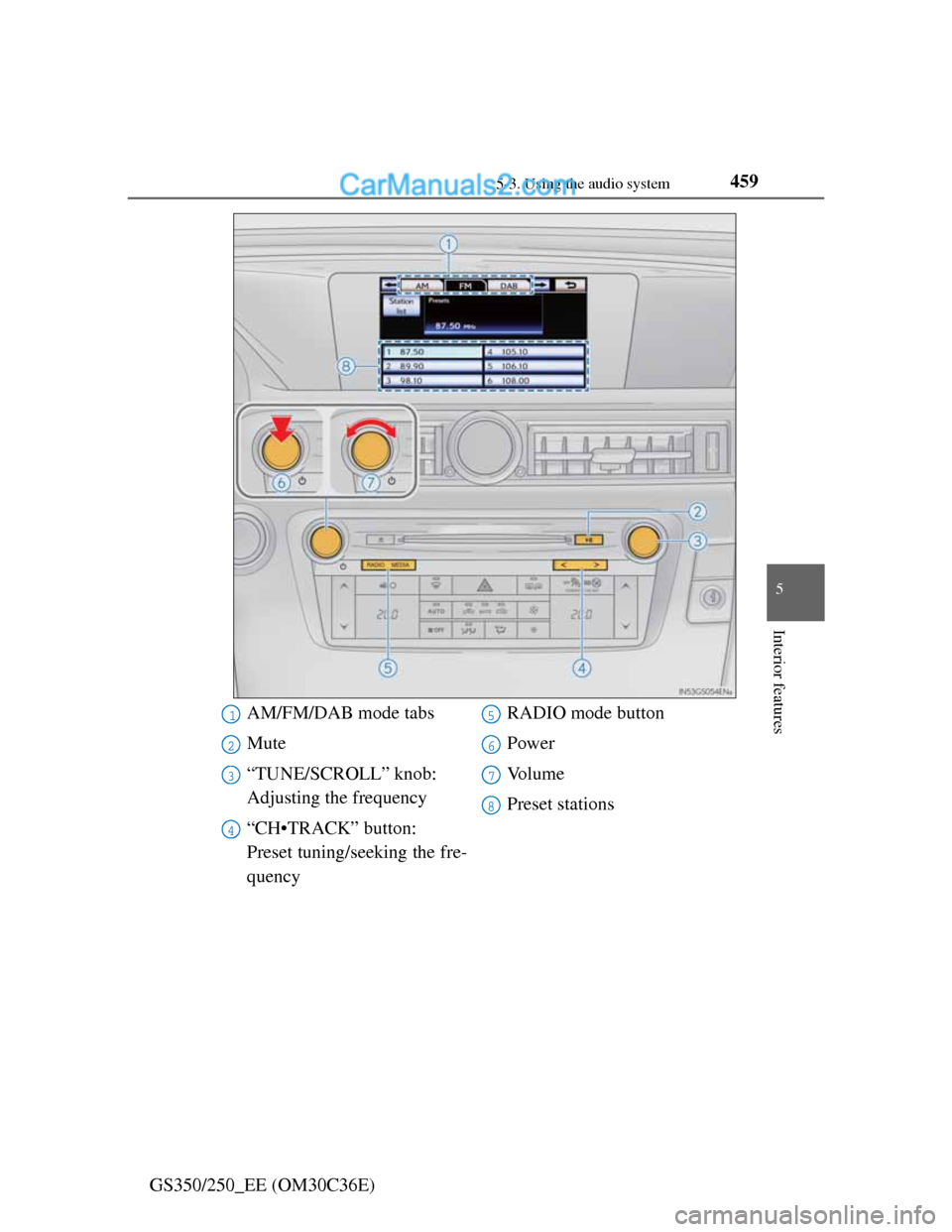
AM/FM/DAB mode tabs
Mute
“TUNE/SCROLL” knob:
Adjusting the frequency
“CH•TRACK” button:
Preset tuning/seeking the fre-
quencyRADIO mode button
Power
Vo l u m e
Preset stations1
2
3
4
5
6
7
8
Page 713 of 914
695
6 6-3. Do-it-yourself maintenance
Maintenance and care
GS350/250_EE (OM30C36E)
Air conditioning filter
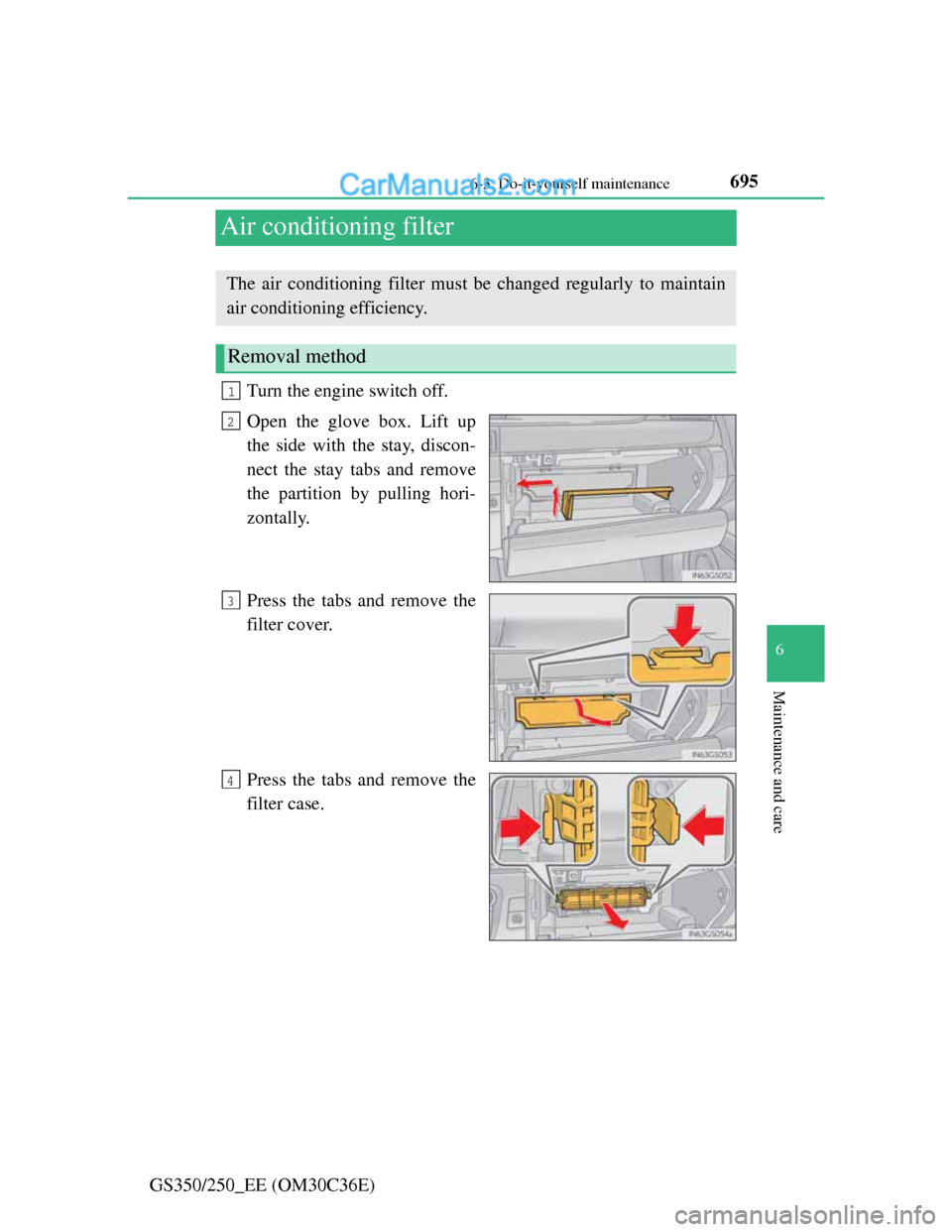
Turn the engine switch off.
Open the glove box. Lift up
the side with the stay, discon-
nect the stay tabs and remove
the partition by pulling hori-
zontally.
Press the tabs and remove the
filter cover.
Press the tabs and remove the
filter case.
The air conditioning filter must be changed regularly to maintain
air conditioning efficiency.
Removal method
1
2
3
4
Page 724 of 914
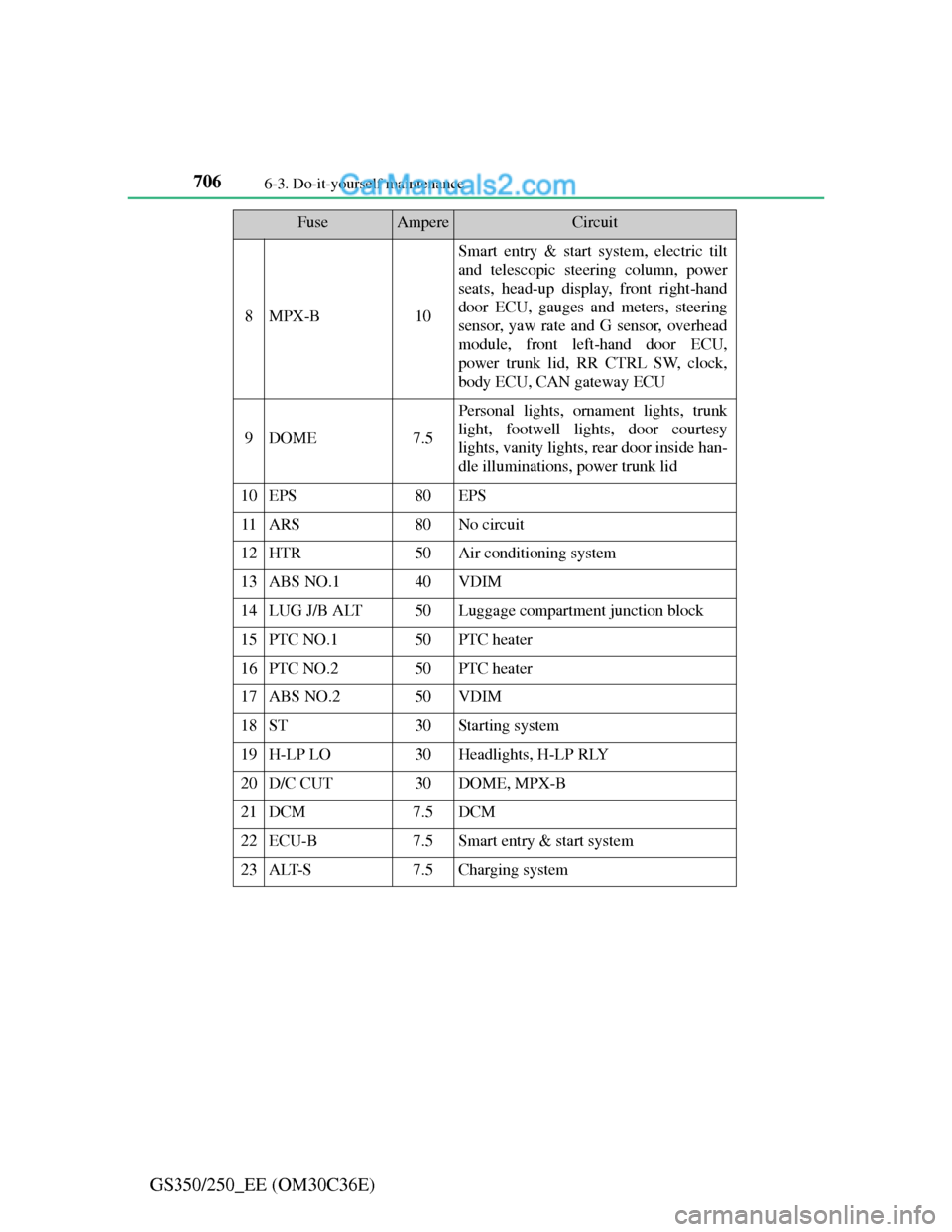
7066-3. Do-it-yourself maintenance
GS350/250_EE (OM30C36E)
8MPX-B10
Smart entry & start system, electric tilt
and telescopic steering column, power
seats, head-up display, front right-hand
door ECU, gauges and meters, steering
sensor, yaw rate and G sensor, overhead
module, front left-hand door ECU,
power trunk lid, RR CTRL SW, clock,
body ECU, CAN gateway ECU
9DOME7.5
Personal lights, ornament lights, trunk
light, footwell lights, door courtesy
lights, vanity lights, rear door inside han-
dle illuminations, power trunk lid
10EPS80EPS
11ARS80No circuit
12HTR50Air conditioning system
13ABS NO.140VDIM
14LUG J/B ALT50Luggage compartment junction block
15PTC NO.150PTC heater
16PTC NO.250PTC heater
17ABS NO.250VDIM
18ST30Starting system
19H-LP LO30Headlights, H-LP RLY
20D/C CUT30DOME, MPX-B
21DCM7.5DCM
22ECU-B7.5Smart entry & start system
23ALT-S7.5Charging system
FuseAmpereCircuit
Page 726 of 914
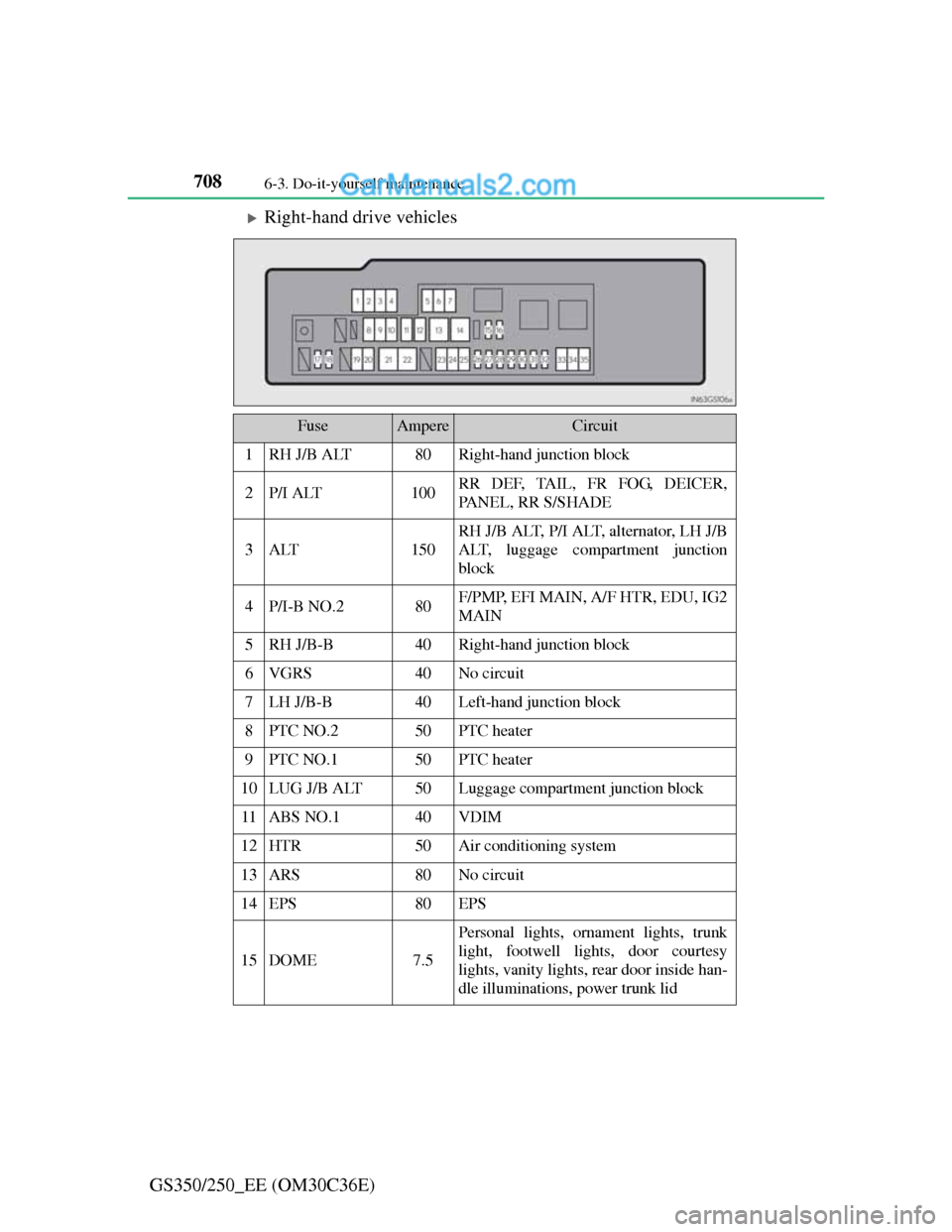
7086-3. Do-it-yourself maintenance
GS350/250_EE (OM30C36E)
Right-hand drive vehicles
FuseAmpereCircuit
1RH J/B ALT80Right-hand junction block
2P/I ALT100RR DEF, TAIL, FR FOG, DEICER,
PANEL, RR S/SHADE
3ALT150
RH J/B ALT, P/I ALT, alternator, LH J/B
ALT, luggage compartment junction
block
4P/I-B NO.280F/PMP, EFI MAIN, A/F HTR, EDU, IG2
MAIN
5RH J/B-B40Right-hand junction block
6VGRS40No circuit
7LH J/B-B40Left-hand junction block
8PTC NO.250PTC heater
9PTC NO.150PTC heater
10LUG J/B ALT50Luggage compartment junction block
11ABS NO.140VDIM
12HTR50Air conditioning system
13ARS80No circuit
14EPS80EPS
15DOME7.5
Personal lights, ornament lights, trunk
light, footwell lights, door courtesy
lights, vanity lights, rear door inside han-
dle illuminations, power trunk lid
Page 727 of 914
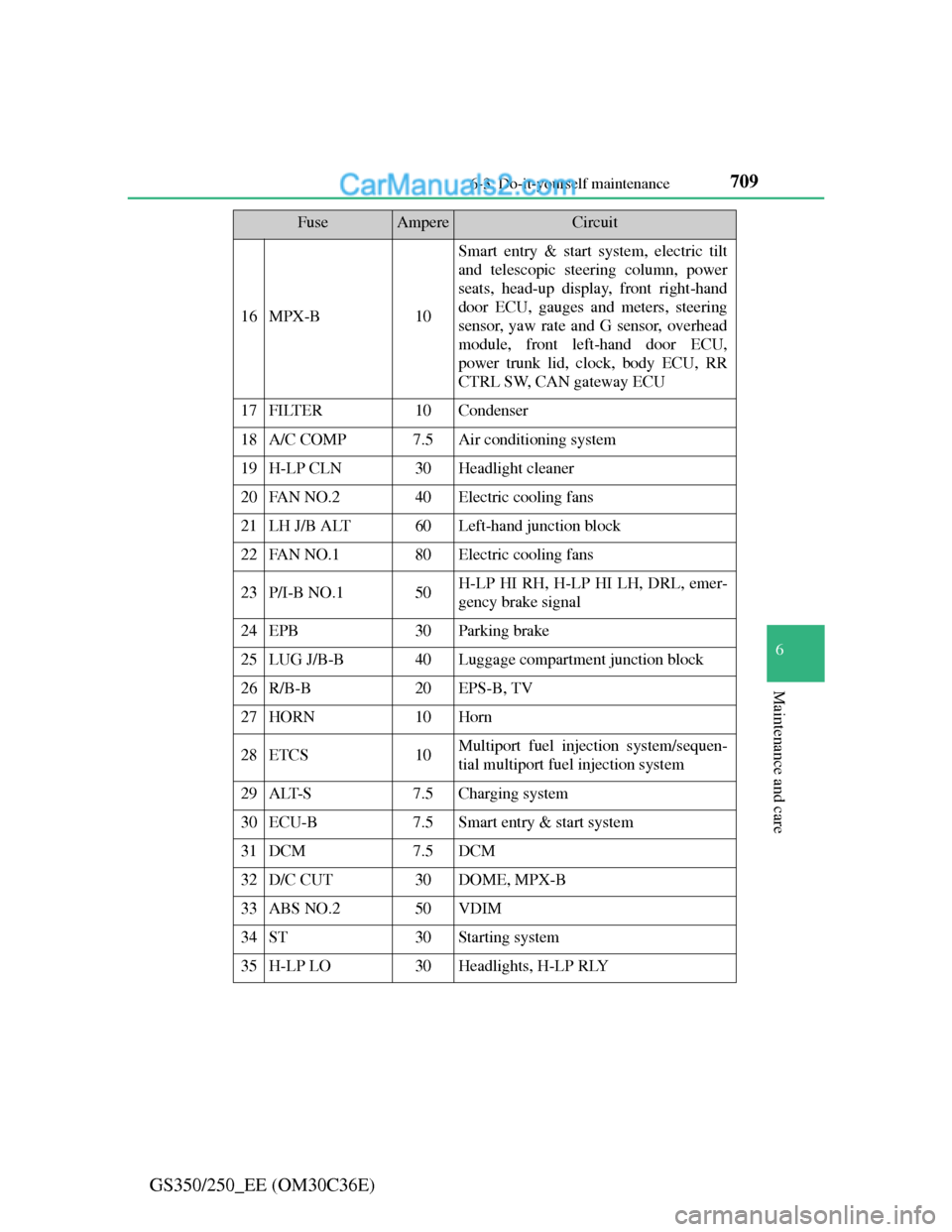
709 6-3. Do-it-yourself maintenance
6
Maintenance and care
GS350/250_EE (OM30C36E)
16MPX-B10
Smart entry & start system, electric tilt
and telescopic steering column, power
seats, head-up display, front right-hand
door ECU, gauges and meters, steering
sensor, yaw rate and G sensor, overhead
module, front left-hand door ECU,
power trunk lid, clock, body ECU, RR
CTRL SW, CAN gateway ECU
17FILTER10Condenser
18A/C COMP7.5Air conditioning system
19H-LP CLN30Headlight cleaner
20FAN NO.240Electric cooling fans
21LH J/B ALT60Left-hand junction block
22FAN NO.180Electric cooling fans
23P/I-B NO.150H-LP HI RH, H-LP HI LH, DRL, emer-
gency brake signal
24EPB30Parking brake
25LUG J/B-B40Luggage compartment junction block
26R/B-B20EPS-B, TV
27HORN10Horn
28ETCS10Multiport fuel injection system/sequen-
tial multiport fuel injection system
29ALT-S7.5Charging system
30ECU-B7.5Smart entry & start system
31DCM7.5DCM
32D/C CUT30DOME, MPX-B
33ABS NO.250VDIM
34ST30Starting system
35H-LP LO30Headlights, H-LP RLY
FuseAmpereCircuit
Page 742 of 914
7246-3. Do-it-yourself maintenance
GS350/250_EE (OM30C36E)
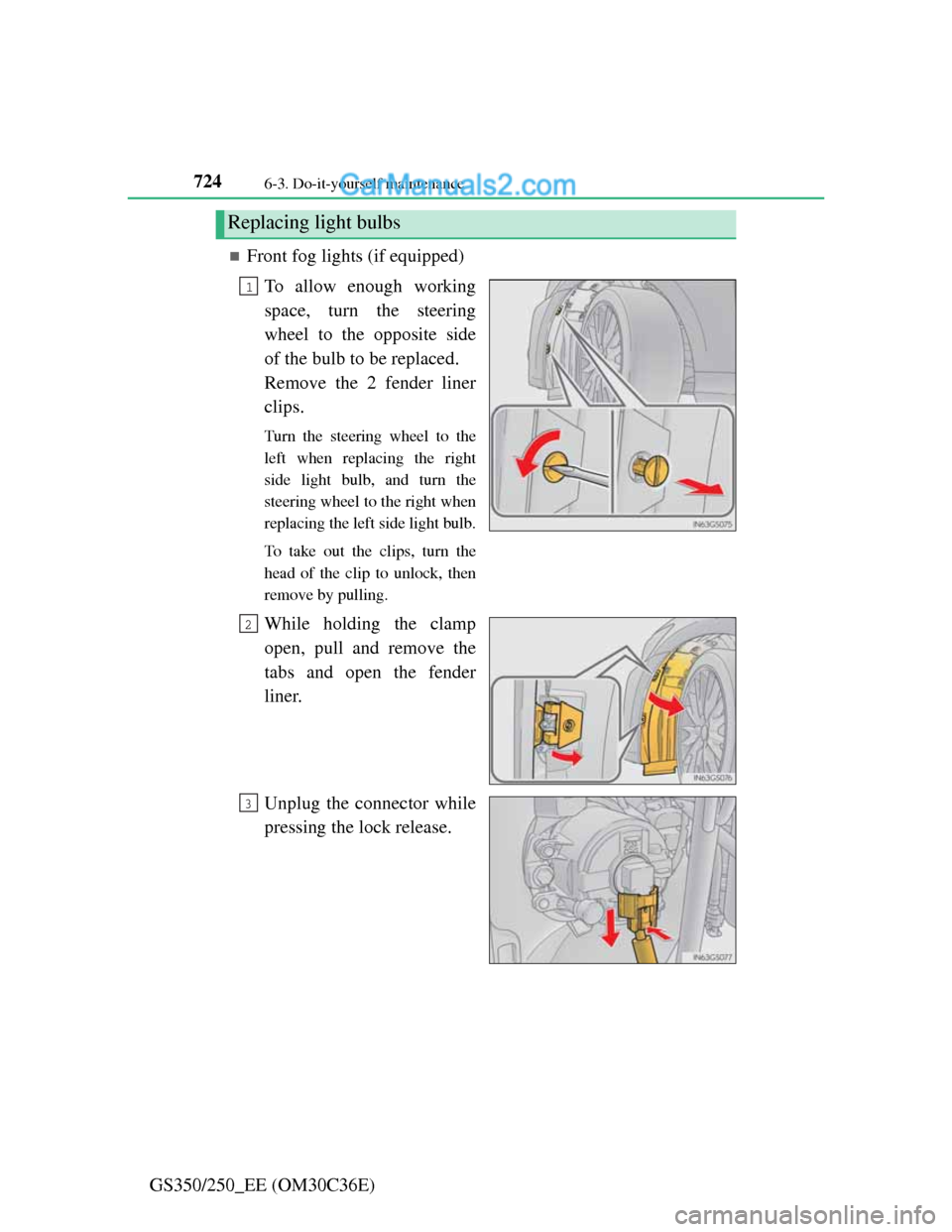
Front fog lights (if equipped)
To allow enough working
space, turn the steering
wheel to the opposite side
of the bulb to be replaced.
Remove the 2 fender liner
clips.
Turn the steering wheel to the
left when replacing the right
side light bulb, and turn the
steering wheel to the right when
replacing the left side light bulb.
To take out the clips, turn the
head of the clip to unlock, then
remove by pulling.
While holding the clamp
open, pull and remove the
tabs and open the fender
liner.
Unplug the connector while
pressing the lock release.
Replacing light bulbs
1
2
3
Page 743 of 914
725 6-3. Do-it-yourself maintenance
6
Maintenance and care
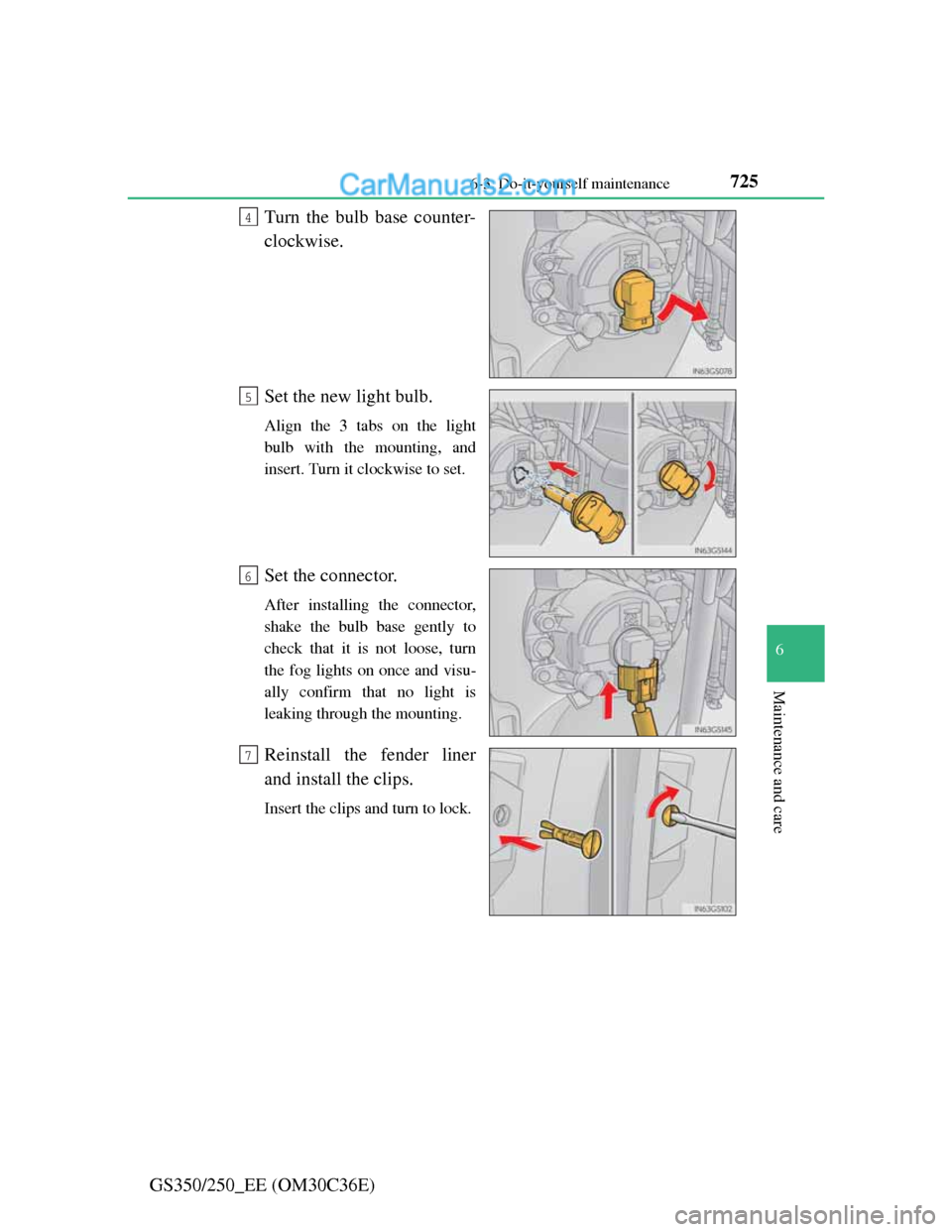
GS350/250_EE (OM30C36E)Turn the bulb base counter-
clockwise.
Set the new light bulb.
Align the 3 tabs on the light
bulb with the mounting, and
insert. Turn it clockwise to set.
Set the connector.
After installing the connector,
shake the bulb base gently to
check that it is not loose, turn
the fog lights on once and visu-
ally confirm that no light is
leaking through the mounting.
Reinstall the fender liner
and install the clips.
Insert the clips and turn to lock.
4
5
6
7