Eps Lexus GS250 2012 User Guide
[x] Cancel search | Manufacturer: LEXUS, Model Year: 2012, Model line: GS250, Model: Lexus GS250 2012Pages: 914, PDF Size: 53.04 MB
Page 340 of 914
3334-5. Using the driving support
4
Driving
GS350/250_EE (OM30C36E)
Driving assist systems
ABS (Anti-lock Brake System)
Helps to prevent wheel lock when the brakes are applied sud-
denly, or if the brakes are applied while driving on a slippery
road surface
Brake assist
Generates an increased level of braking force after the brake
pedal is depressed when the system detects a panic stop situation
VSC (Vehicle Stability Control)
Helps the driver to control skidding when swerving suddenly or
turning on slippery road surfaces
VSC+ (Vehicle Stability Control+)
Provides cooperative control of the ABS, TRC, VSC and EPS.
Helps to maintain directional stability when swerving on slippery
road surfaces by controlling steering performance.
TRC (Traction Control)
Helps to maintain drive power and prevent the drive wheels from
spinning when starting the vehicle or accelerating on slippery
roads
Hill-start assist control
P. 341
To help enhance driving safety and performance, the following
systems operate automatically in response to various driving situa-
tions. Be aware, however, that these systems are supplementary
and should not be relied upon too heavily when operating the vehi-
cle.
Page 341 of 914
3344-5. Using the driving support
GS350/250_EE (OM30C36E)
EPS (Electric Power Steering)
Employs an electric motor to reduce the amount of effort needed
to turn the steering wheel
AVS (Adaptive Variable Suspension system) (if equipped)
By independently controlling the damping force of the shock
absorbers for each of the 4 wheels according to the road and driv-
ing conditions, this system combines riding comfort with supe-
rior steering stability, and ensures good vehicle posture. (P.
328)
VDIM (Vehicle Dynamics Integrated Management)
Provides integrated control of the ABS, brake assist, TRC, VSC,
hill-start assist control and EPS systems
Helps to maintain vehicle stability when swerving on slippery
road surfaces by controlling the brakes, engine output, steering
assist, and steering ratio
PCS (Pre-Crash Safety system) (if equipped)
P. 343
Emergency brake signal
When the brakes are applied suddenly, the stop lights automati-
cally flash to alert the vehicle behind.
Page 344 of 914
3374-5. Using the driving support
4
Driving
GS350/250_EE (OM30C36E)
When the message is displayed on the multi-information display showing that
TRC has been disabled even if the VSC OFF switch has not been pressed
TRC cannot be operated. Contact any authorized Lexus dealer or repairer, or
another duly qualified and equipped professional.
Sounds and vibrations caused by the ABS, brake assist, VSC and TRC sys-
tems
A sound may be heard from the engine compartment when the engine is
started or just after the vehicle begins to move. This sound does not indicate
that a malfunction has occurred in any of these systems.
Any of the following conditions may occur when the above systems are
operating. None of these indicates that a malfunction has occurred.
• Vibrations may be felt through the vehicle body and steering.
• A motor sound may be heard after the vehicle comes to a stop.
• The brake pedal may pulsate slightly after the ABS is activated.
• The brake pedal may move down slightly after the ABS is activated.
EPS operation sound
When the steering wheel is operated, a motor sound (whirring sound) may be
heard. This does not indicate a malfunction.
Reactivation of the TRC/VSC systems
Even after the TRC/VSC systems have been turned off, turning the engine
off and then on again will automatically reactivate the TRC/VSC systems.
Page 345 of 914
3384-5. Using the driving support
GS350/250_EE (OM30C36E)
Reactivation of the TRC system linked to vehicle speed
When only the TRC system is turned off, the TRC system will turn on when
vehicle speed increases. However, when both TRC and VSC systems are
turned off, the systems will not turn on even when vehicle speed increases.
Reduced effectiveness of the EPS system
The effectiveness of the EPS system is reduced to prevent the system from
overheating when there is frequent steering input over an extended period of
time. The steering wheel may feel heavy as a result.
* Should this occur,
refrain from excessive steering input or stop the vehicle and turn the engine
off. The effectiveness will improve after a short while.
*: If the LKA (Lane-Keeping Assist) system cannot operate in this case, a
warning message will be shown on the multi-information display.
Operating conditions of emergency brake signal
When the following three conditions are met, the emergency brake signal
will operate:
The emergency flashers are off.
Actual vehicle speed is over 55 km/h (35 mph).
The brake pedal is depressed in a manner that cause the system to judge
from the vehicle deceleration that this is a sudden braking operation.
Automatic system cancelation of emergency brake signal
The emergency brake signal will turn off in any of the following situations:
The emergency flashers are turned on.
The brake pedal is released.
The system judges from the vehicle deceleration that is not a sudden brak-
ing operation.
Page 596 of 914
5815-4. Using the hands-free phone system (for cellular phone)
5
Interior features
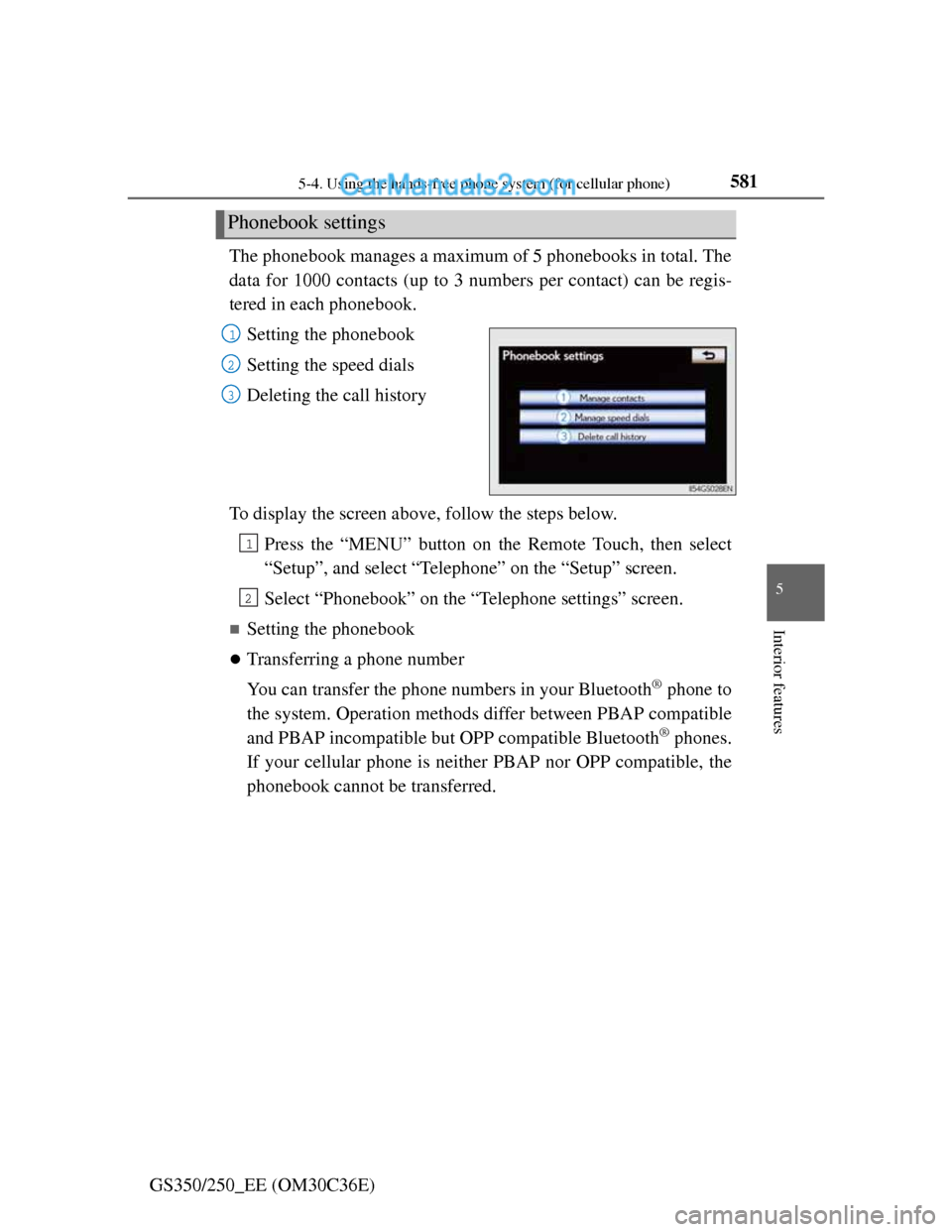
GS350/250_EE (OM30C36E)The phonebook manages a maximum of 5 phonebooks in total. The
data for 1000 contacts (up to 3 numbers per contact) can be regis-
tered in each phonebook.
Setting the phonebook
Setting the speed dials
Deleting the call history
To display the screen above, follow the steps below.
Press the “MENU” button on the Remote Touch, then select
“Setup”, and select “Telephone” on the “Setup” screen.
Select “Phonebook” on the “Telephone settings” screen.
Setting the phonebook
Transferring a phone number
You can transfer the phone numbers in your Bluetooth
® phone to
the system. Operation methods differ between PBAP compatible
and PBAP incompatible but OPP compatible Bluetooth
® phones.
If your cellular phone is neither PBAP nor OPP compatible, the
phonebook cannot be transferred.
Phonebook settings
1
2
3
1
2
Page 603 of 914
5885-4. Using the hands-free phone system (for cellular phone)
GS350/250_EE (OM30C36E)
Follow the steps “Editing the phonebook data” from step . (P. 585)
From “Call history” screen
Display the “Telephone” screen. (P. 556)
Select “Call history” on the “Telephone” screen.
Choose the desired data from the list.
Select “Add contact” or “Update contact” on the “Call history” screen.
If you select “Add contact”, follow the steps “Editing the phonebook data”
from step . (P. 585)
If you select “Update contact”, follow the steps “Editing the phonebook
data” from step . (P. 585)
Deleting the phonebook data in a different way (PBAP incompatible but OPP
compatible models)
Display the “Telephone” screen. (P. 556)
Select “Contacts” on the “Telephone” screen.
Choose the desired data from the list.
Select “Options” on the “Contact data” screen.
Select “Delete contact” on the “Contact data” screen.
A confirmation message will be displayed. If everything is correct, select
“Yes”.
When a Bluetooth® phone is deleted.
The phonebook data will be deleted at the same time.
Registering the speed dial
You can register the desired phone number from the phonebook.
Up to 18 numbers per phone can be registered.
Display the “Phonebook settings” screen. (P. 581)
Select “Manage speed dials” on the “Phonebook settings”
screen.
Setting the speed dials
65
1
2
3
4
5
5
4
1
2
3
4
5
6
1
2
Page 606 of 914
5915-4. Using the hands-free phone system (for cellular phone)
5
Interior features
GS350/250_EE (OM30C36E)
Registering the speed dial in a different way
From “Speed dial” screen
Display the “Telephone” screen. (P. 556)
Select “Speed dials” on the “Telephone” screen.
Select “(empty)” on the “Select speed dial location” screen.
Select “Yes” to on the “Speed dial” screen set new speed dial.
Choose the desired data from the list.
Select the desired phone number.
Follow the steps “Registering the speed dial” from step . (P. 588)
From “Contact” screen
Display the “Telephone” screen. (P. 556)
Select “Contacts” on the “Telephone” screen.
Choose the desired data from the list.
Select “Options” on the “Contact data” screen.
Select “Set speed dial” on the “Contact data” screen.
Select the desired phone number.
Follow the steps “Registering the speed dial” from step . (P. 588)
1
2
3
4
5
6
76
1
2
3
4
5
6
76
Page 608 of 914
5935-4. Using the hands-free phone system (for cellular phone)
5
Interior features
GS350/250_EE (OM30C36E)
Deleting call history in a different way
Display the “Telephone” screen. (P. 556)
Select “Call history” on the “Telephone” screen.
Select “Delete” on the “Call history” screen.
Follow the steps “Deleting call history” from step . (P. 592)
Deleting after call history has been displayed
Display the “Telephone” screen. (P. 556)
Select “Call history” on the “Telephone” screen.
Select the desired history to delete.
Select “Delete”. A confirmation message will be displayed. If everything is
correct, select “Yes”.
1
2
3
44
1
2
3
4
Page 609 of 914
5945-4. Using the hands-free phone system (for cellular phone)
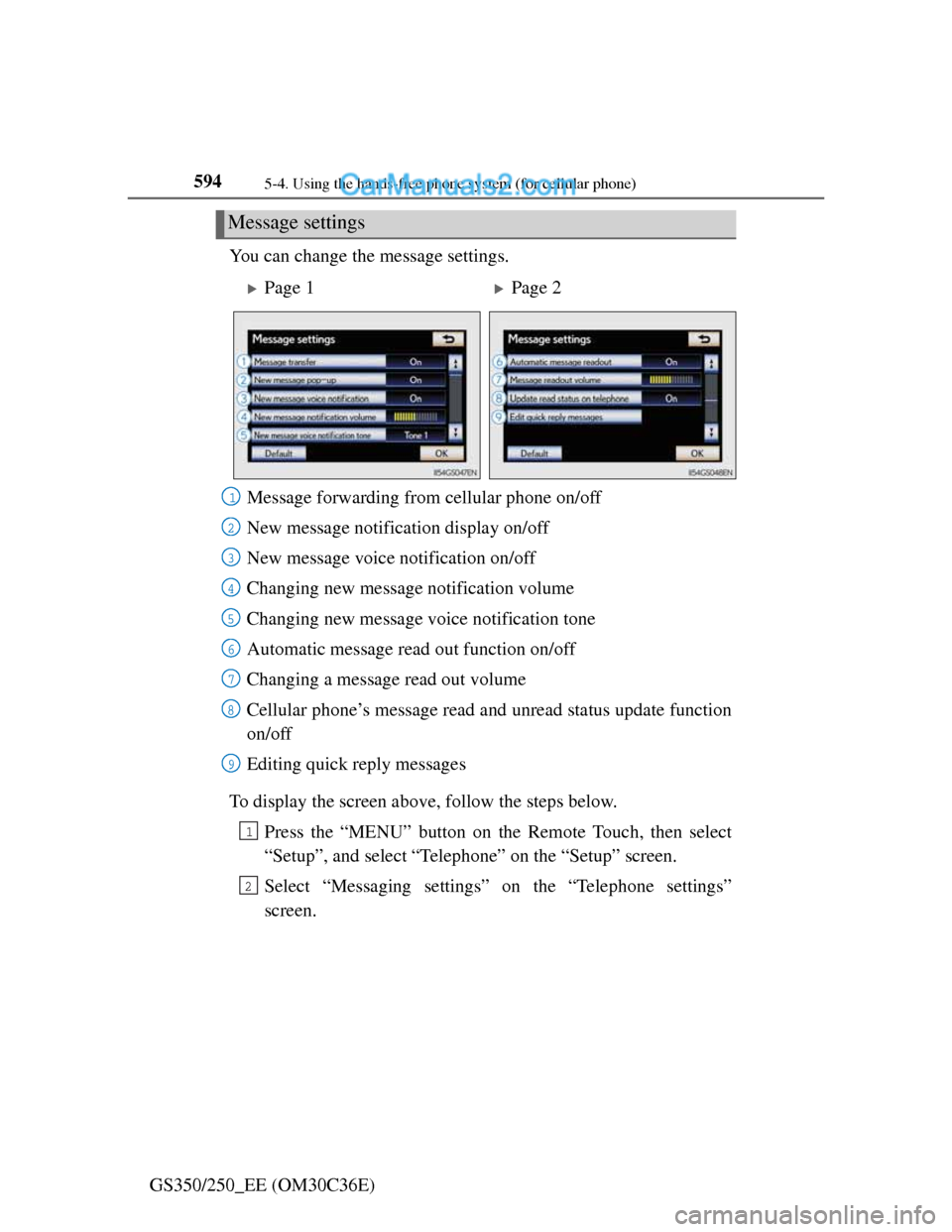
GS350/250_EE (OM30C36E)You can change the message settings.
To display the screen above, follow the steps below.
Press the “MENU” button on the Remote Touch, then select
“Setup”, and select “Telephone” on the “Setup” screen.
Select “Messaging settings” on the “Telephone settings”
screen.
Message settings
Page 1Page 2
Message forwarding from cellular phone on/off
New message notification display on/off
New message voice notification on/off
Changing new message notification volume
Changing new message voice notification tone
Automatic message read out function on/off
Changing a message read out volume
Cellular phone’s message read and unread status update function
on/off
Editing quick reply messages
1
2
3
4
5
6
7
8
9
1
2
Page 613 of 914
5985-4. Using the hands-free phone system (for cellular phone)
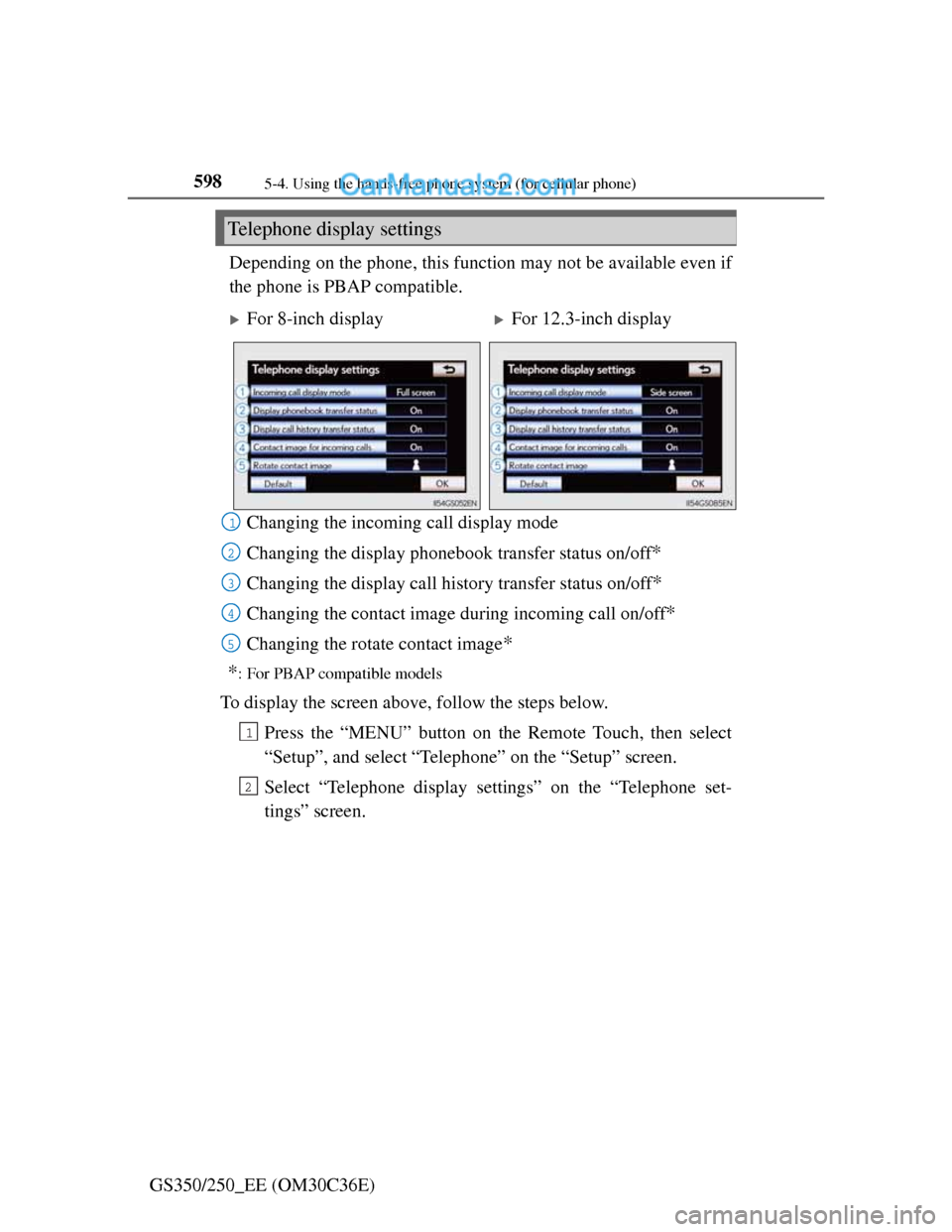
GS350/250_EE (OM30C36E)Depending on the phone, this function may not be available even if
the phone is PBAP compatible.
Changing the incoming call display mode
Changing the display phonebook transfer status on/off
*
Changing the display call history transfer status on/off*
Changing the contact image during incoming call on/off*
Changing the rotate contact image*
*
: For PBAP compatible models
To display the screen above, follow the steps below.
Press the “MENU” button on the Remote Touch, then select
“Setup”, and select “Telephone” on the “Setup” screen.
Select “Telephone display settings” on the “Telephone set-
tings” screen.
Telephone display settings
For 8-inch displayFor 12.3-inch display
1
2
3
4
15
1
2