Lexus GS250 2012 Owner's Guide
GS250 2012
Lexus
Lexus
https://www.carmanualsonline.info/img/36/13052/w960_13052-0.png
Lexus GS250 2012 Owner's Guide
Page 625 of 914
6105-4. Using the hands-free phone system (for cellular phone)
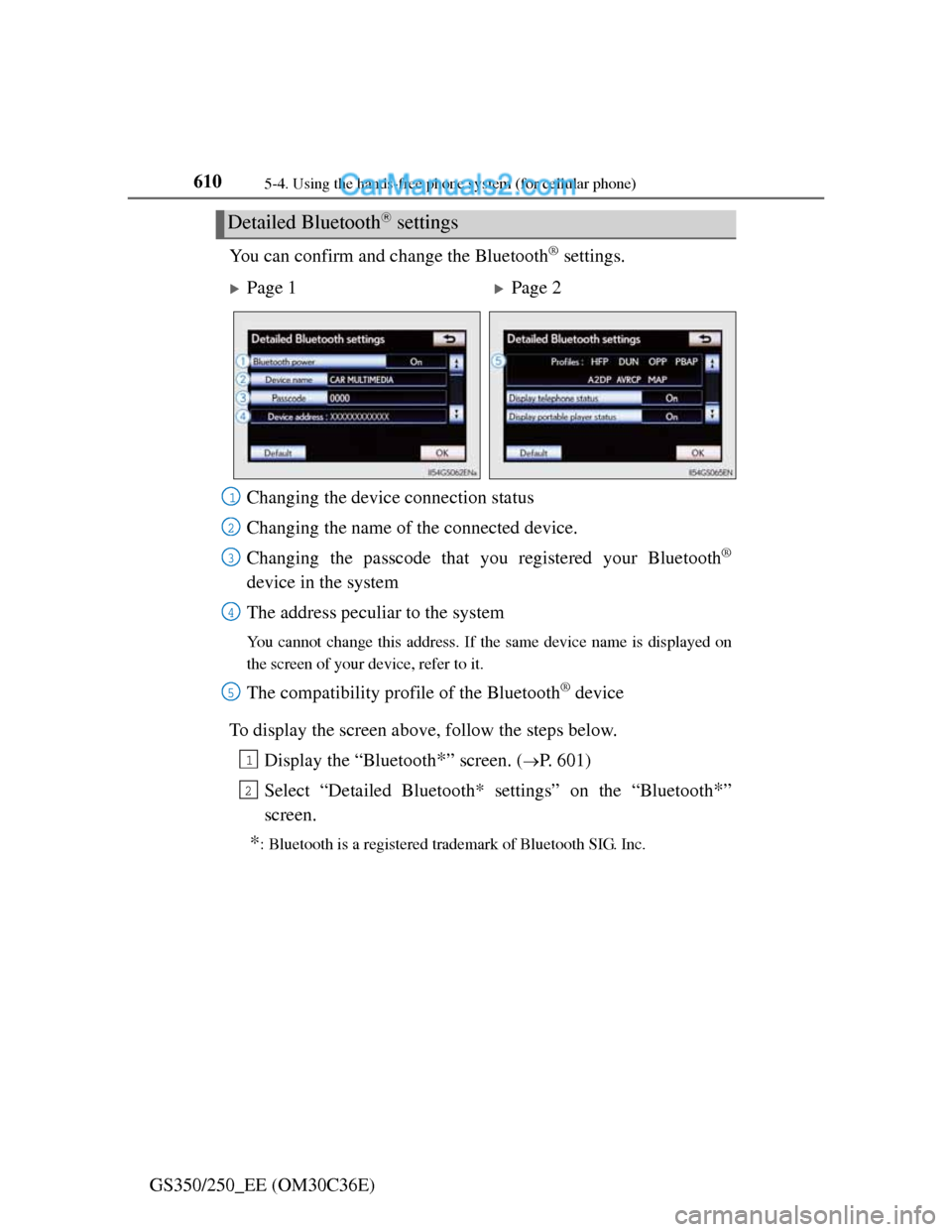
GS350/250_EE (OM30C36E)You can confirm and change the Bluetooth
® settings.
To display the screen above, follow the steps below.
Display the “Bluetooth
*” screen. (P. 601)
Select “Detailed Bluetooth* settings” on the “Bluetooth
*”
screen.
*: Bluetooth is a registered trademark of Bluetooth SIG. Inc.
Detailed Bluetooth settings
Page 1Page 2
Changing the device connection status
Changing the name of the connected device.
Changing the passcode that you registered your Bluetooth
®
device in the system
The address peculiar to the system
You cannot change this address. If the same device name is displayed on
the screen of your device, refer to it.
The compatibility profile of the Bluetooth® device
1
2
3
4
5
1
2
Page 724 of 914
7066-3. Do-it-yourself maintenance
GS350/250_EE (OM30C36E)
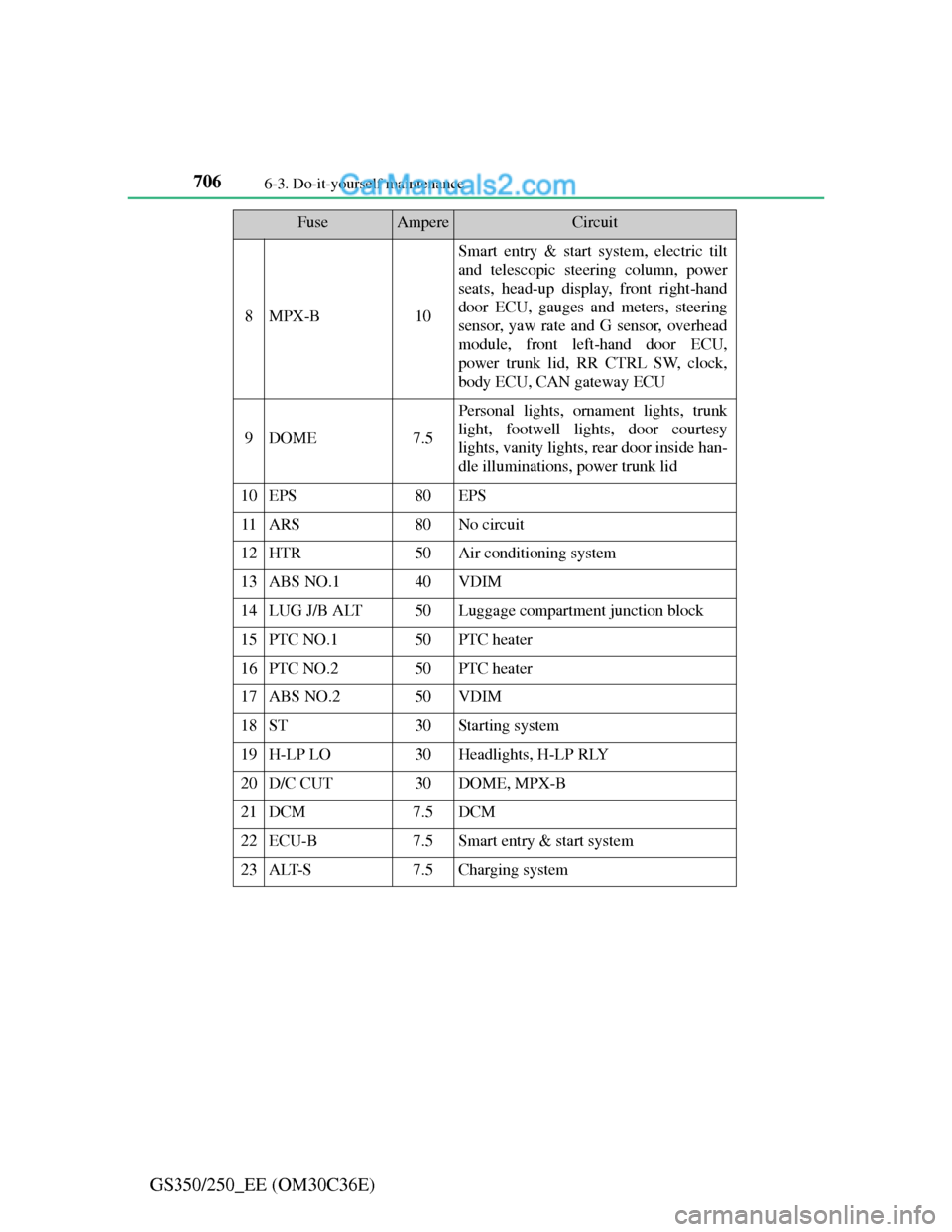
8MPX-B10
Smart entry & start system, electric tilt
and telescopic steering column, power
seats, head-up display, front right-hand
door ECU, gauges and meters, steering
sensor, yaw rate and G sensor, overhead
module, front left-hand door ECU,
power trunk lid, RR CTRL SW, clock,
body ECU, CAN gateway ECU
9DOME7.5
Personal lights, ornament lights, trunk
light, footwell lights, door courtesy
lights, vanity lights, rear door inside han-
dle illuminations, power trunk lid
10EPS80EPS
11ARS80No circuit
12HTR50Air conditioning system
13ABS NO.140VDIM
14LUG J/B ALT50Luggage compartment junction block
15PTC NO.150PTC heater
16PTC NO.250PTC heater
17ABS NO.250VDIM
18ST30Starting system
19H-LP LO30Headlights, H-LP RLY
20D/C CUT30DOME, MPX-B
21DCM7.5DCM
22ECU-B7.5Smart entry & start system
23ALT-S7.5Charging system
FuseAmpereCircuit
Page 725 of 914
707 6-3. Do-it-yourself maintenance
6
Maintenance and care
GS350/250_EE (OM30C36E)
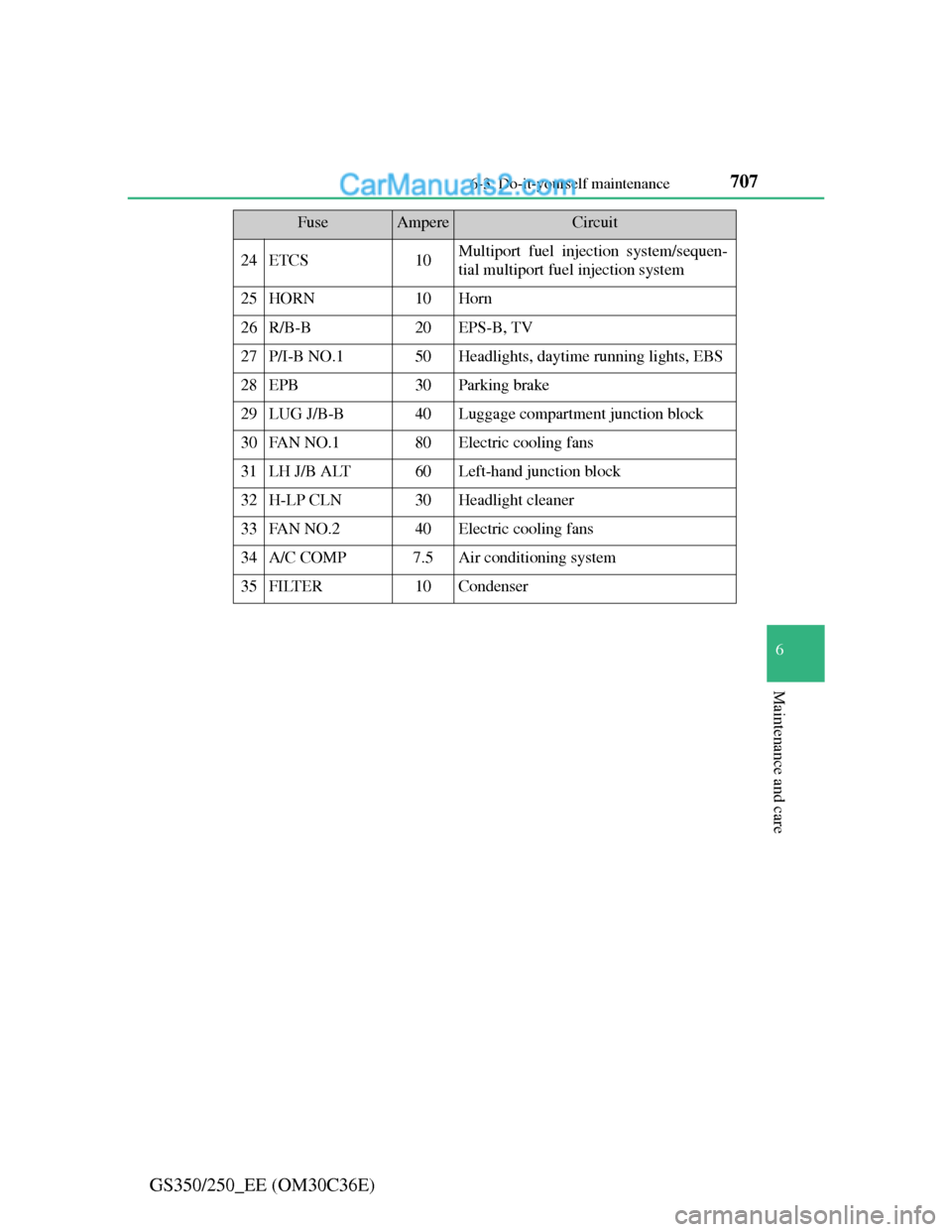
24ETCS10Multiport fuel injection system/sequen-
tial multiport fuel injection system
25HORN10Horn
26R/B-B20EPS-B, TV
27P/I-B NO.150Headlights, daytime running lights, EBS
28EPB30Parking brake
29LUG J/B-B40Luggage compartment junction block
30FAN NO.180Electric cooling fans
31LH J/B ALT60Left-hand junction block
32H-LP CLN30Headlight cleaner
33FAN NO.240Electric cooling fans
34A/C COMP7.5Air conditioning system
35FILTER10Condenser
FuseAmpereCircuit
Page 726 of 914
7086-3. Do-it-yourself maintenance
GS350/250_EE (OM30C36E)
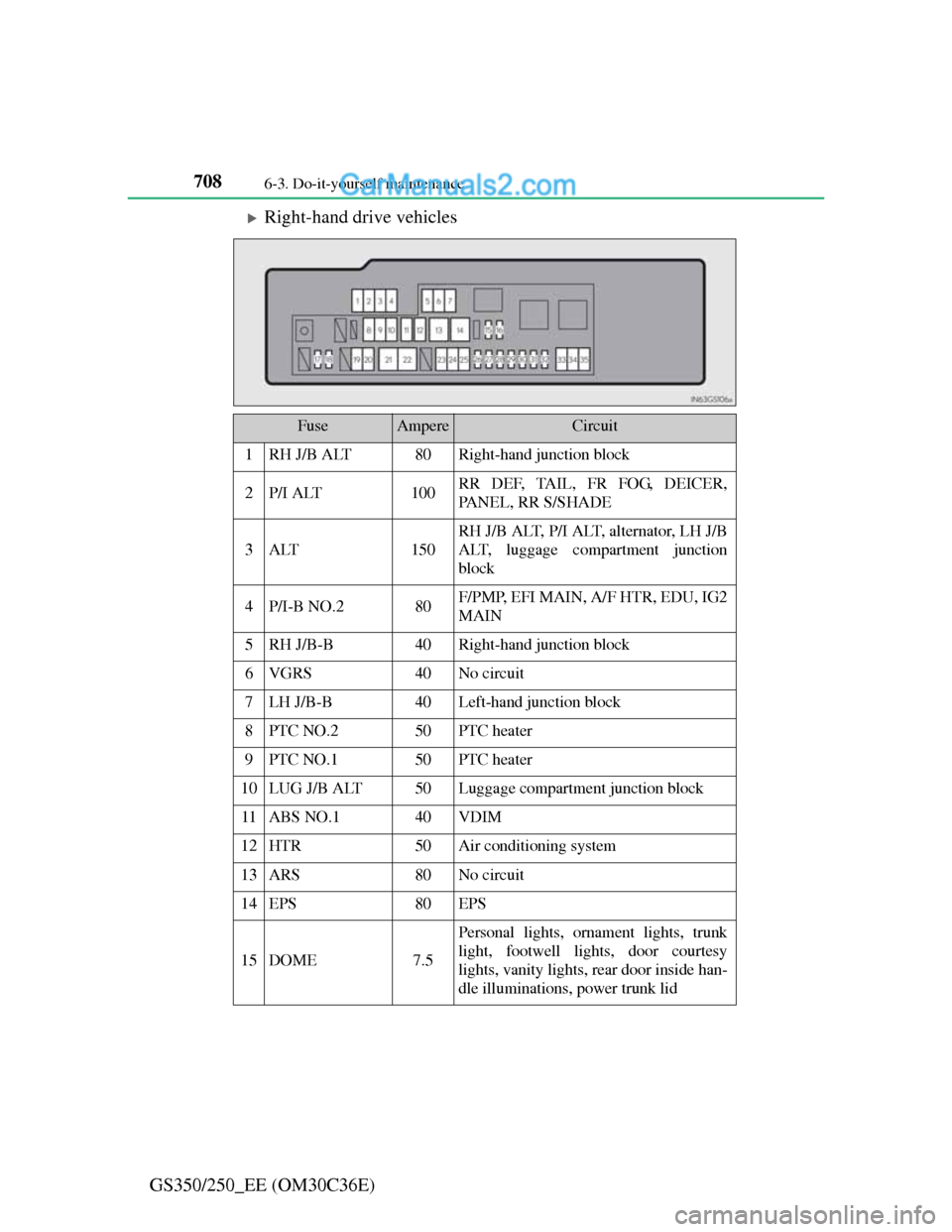
Right-hand drive vehicles
FuseAmpereCircuit
1RH J/B ALT80Right-hand junction block
2P/I ALT100RR DEF, TAIL, FR FOG, DEICER,
PANEL, RR S/SHADE
3ALT150
RH J/B ALT, P/I ALT, alternator, LH J/B
ALT, luggage compartment junction
block
4P/I-B NO.280F/PMP, EFI MAIN, A/F HTR, EDU, IG2
MAIN
5RH J/B-B40Right-hand junction block
6VGRS40No circuit
7LH J/B-B40Left-hand junction block
8PTC NO.250PTC heater
9PTC NO.150PTC heater
10LUG J/B ALT50Luggage compartment junction block
11ABS NO.140VDIM
12HTR50Air conditioning system
13ARS80No circuit
14EPS80EPS
15DOME7.5
Personal lights, ornament lights, trunk
light, footwell lights, door courtesy
lights, vanity lights, rear door inside han-
dle illuminations, power trunk lid
Page 727 of 914
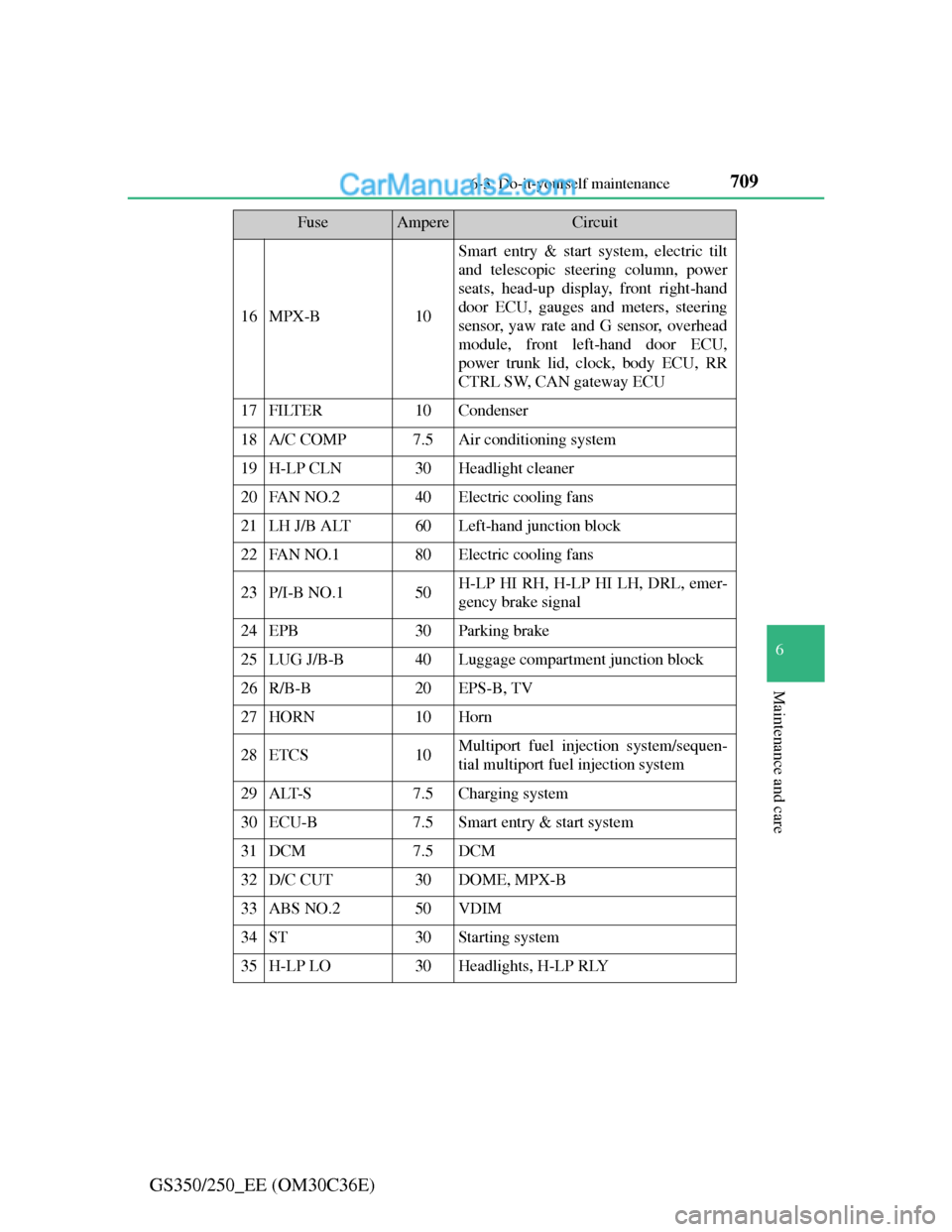
709 6-3. Do-it-yourself maintenance
6
Maintenance and care
GS350/250_EE (OM30C36E)
16MPX-B10
Smart entry & start system, electric tilt
and telescopic steering column, power
seats, head-up display, front right-hand
door ECU, gauges and meters, steering
sensor, yaw rate and G sensor, overhead
module, front left-hand door ECU,
power trunk lid, clock, body ECU, RR
CTRL SW, CAN gateway ECU
17FILTER10Condenser
18A/C COMP7.5Air conditioning system
19H-LP CLN30Headlight cleaner
20FAN NO.240Electric cooling fans
21LH J/B ALT60Left-hand junction block
22FAN NO.180Electric cooling fans
23P/I-B NO.150H-LP HI RH, H-LP HI LH, DRL, emer-
gency brake signal
24EPB30Parking brake
25LUG J/B-B40Luggage compartment junction block
26R/B-B20EPS-B, TV
27HORN10Horn
28ETCS10Multiport fuel injection system/sequen-
tial multiport fuel injection system
29ALT-S7.5Charging system
30ECU-B7.5Smart entry & start system
31DCM7.5DCM
32D/C CUT30DOME, MPX-B
33ABS NO.250VDIM
34ST30Starting system
35H-LP LO30Headlights, H-LP RLY
FuseAmpereCircuit
Page 729 of 914
711 6-3. Do-it-yourself maintenance
6
Maintenance and care
GS350/250_EE (OM30C36E)
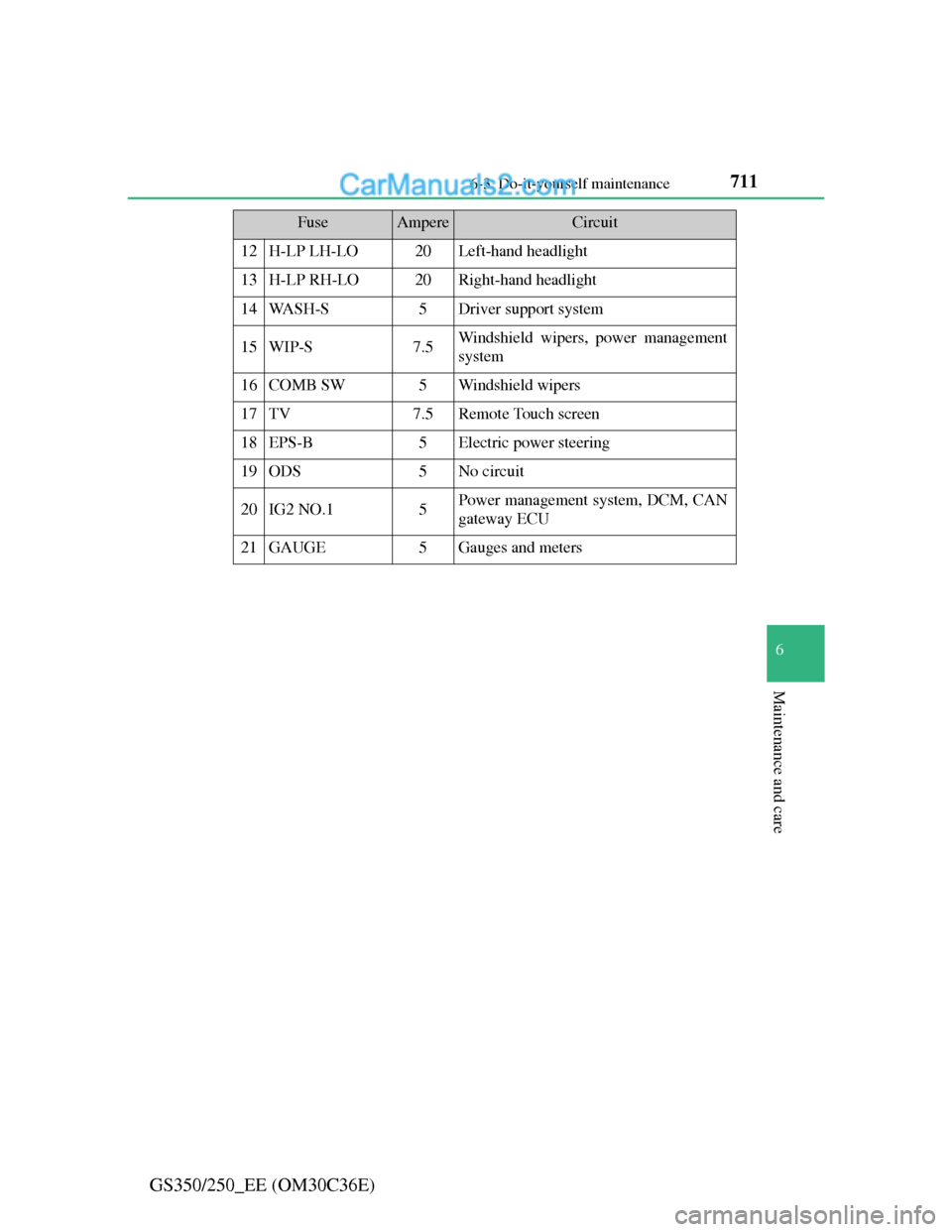
12H-LP LH-LO20Left-hand headlight
13H-LP RH-LO20Right-hand headlight
14WA S H - S5Driver support system
15WIP-S7.5Windshield wipers, power management
system
16COMB SW5Windshield wipers
17TV7.5Remote Touch screen
18EPS-B5Electric power steering
19ODS5No circuit
20IG2 NO.15Power management system, DCM, CAN
gateway ECU
21GAUGE5Gauges and meters
FuseAmpereCircuit
Page 738 of 914
7206-3. Do-it-yourself maintenance
GS350/250_EE (OM30C36E)
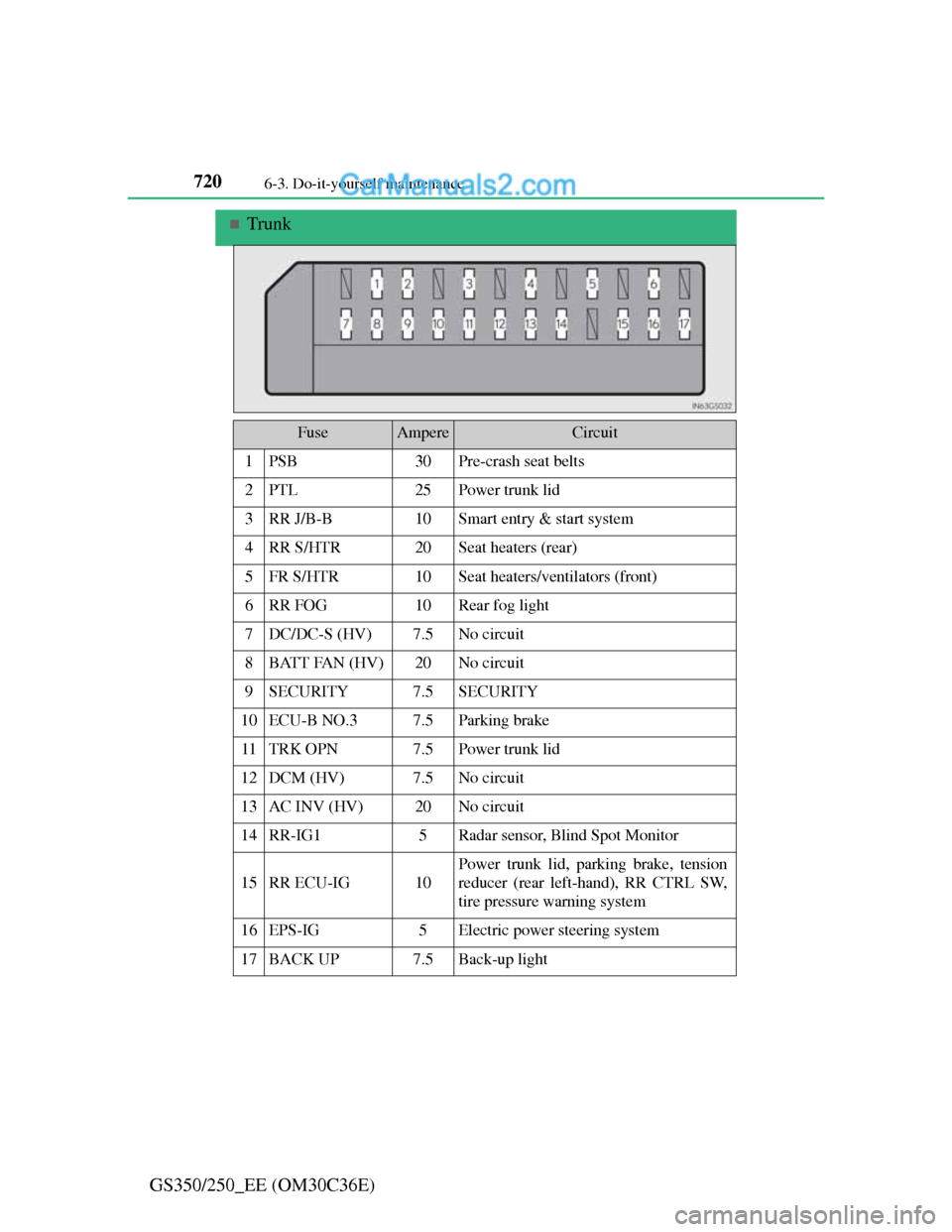
Trunk
FuseAmpereCircuit
1PSB30Pre-crash seat belts
2PTL25Power trunk lid
3RR J/B-B10Smart entry & start system
4RR S/HTR20Seat heaters (rear)
5FR S/HTR10Seat heaters/ventilators (front)
6RR FOG10Rear fog light
7DC/DC-S (HV)7.5No circuit
8BATT FAN (HV)20No circuit
9SECURITY7.5SECURITY
10ECU-B NO.37.5Parking brake
11TRK OPN7.5Power trunk lid
12DCM (HV)7.5No circuit
13AC INV (HV)20No circuit
14RR-IG15Radar sensor, Blind Spot Monitor
15RR ECU-IG10
Power trunk lid, parking brake, tension
reducer (rear left-hand), RR CTRL SW,
tire pressure warning system
16EPS-IG5Electric power steering system
17BACK UP7.5Back-up light
Page 745 of 914
727 6-3. Do-it-yourself maintenance
6
Maintenance and care
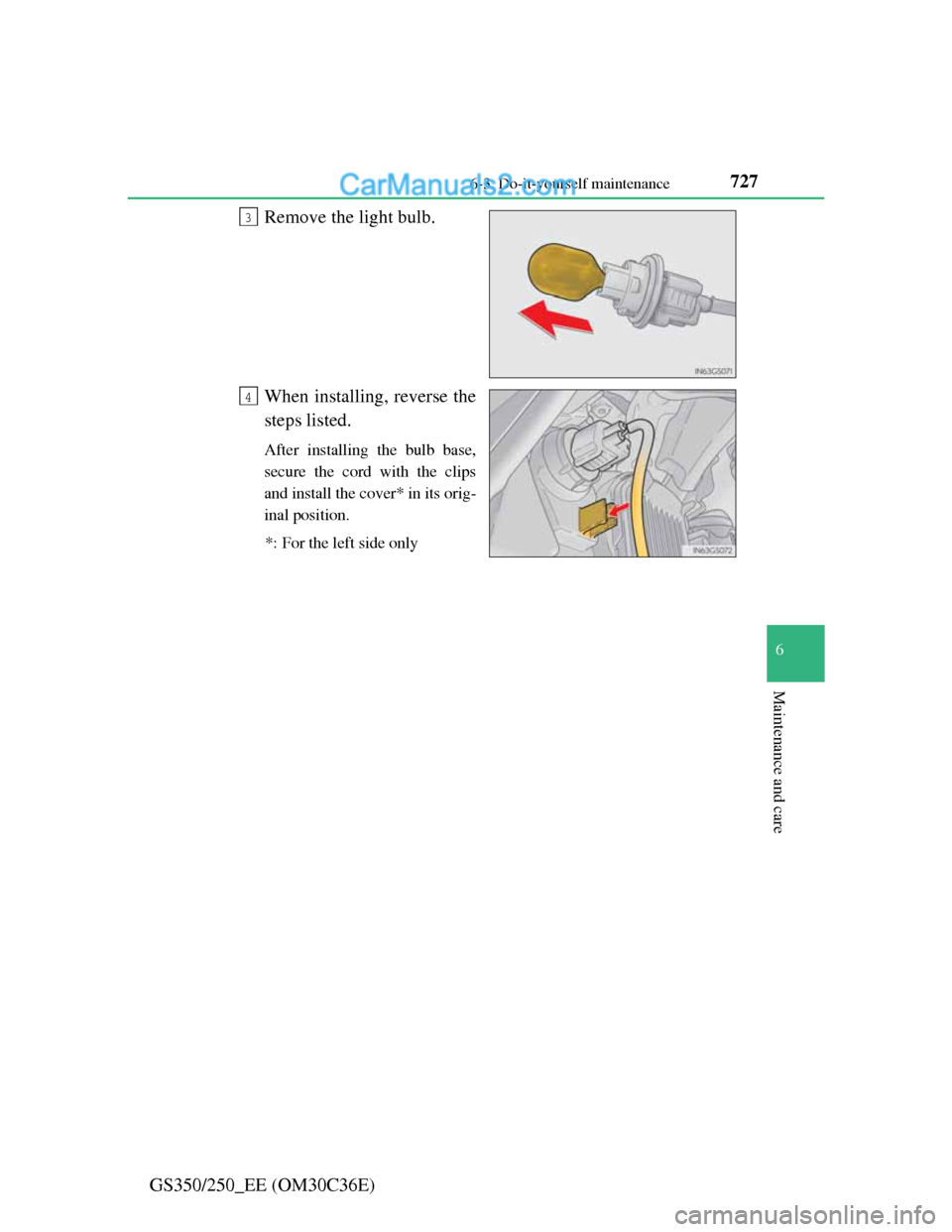
GS350/250_EE (OM30C36E)Remove the light bulb.
When installing, reverse the
steps listed.
After installing the bulb base,
secure the cord with the clips
and install the cover* in its orig-
inal position.
*: For the left side only
3
4
Page 746 of 914
7286-3. Do-it-yourself maintenance
GS350/250_EE (OM30C36E)
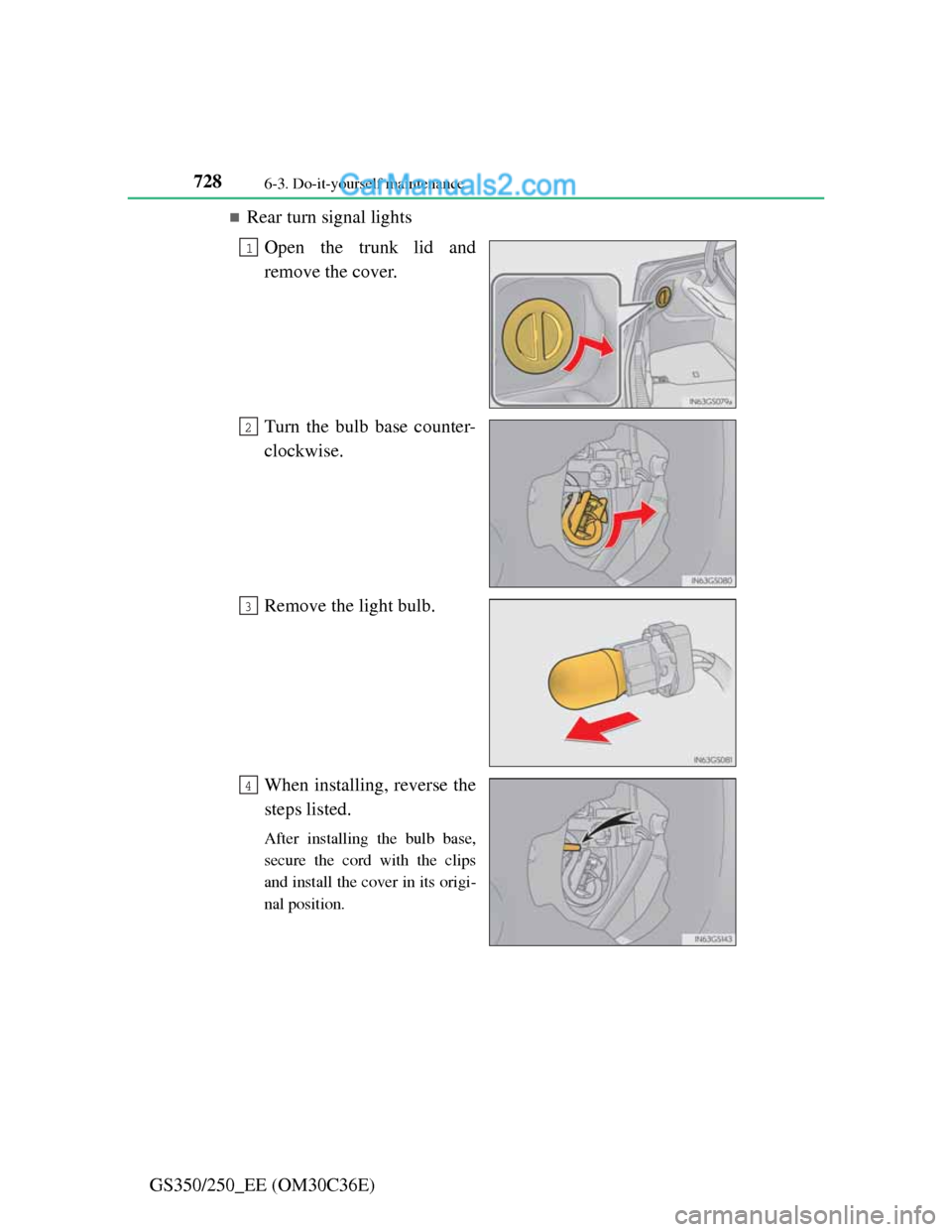
Rear turn signal lights
Open the trunk lid and
remove the cover.
Turn the bulb base counter-
clockwise.
Remove the light bulb.
When installing, reverse the
steps listed.
After installing the bulb base,
secure the cord with the clips
and install the cover in its origi-
nal position.
1
2
3
4
Page 748 of 914
7306-3. Do-it-yourself maintenance
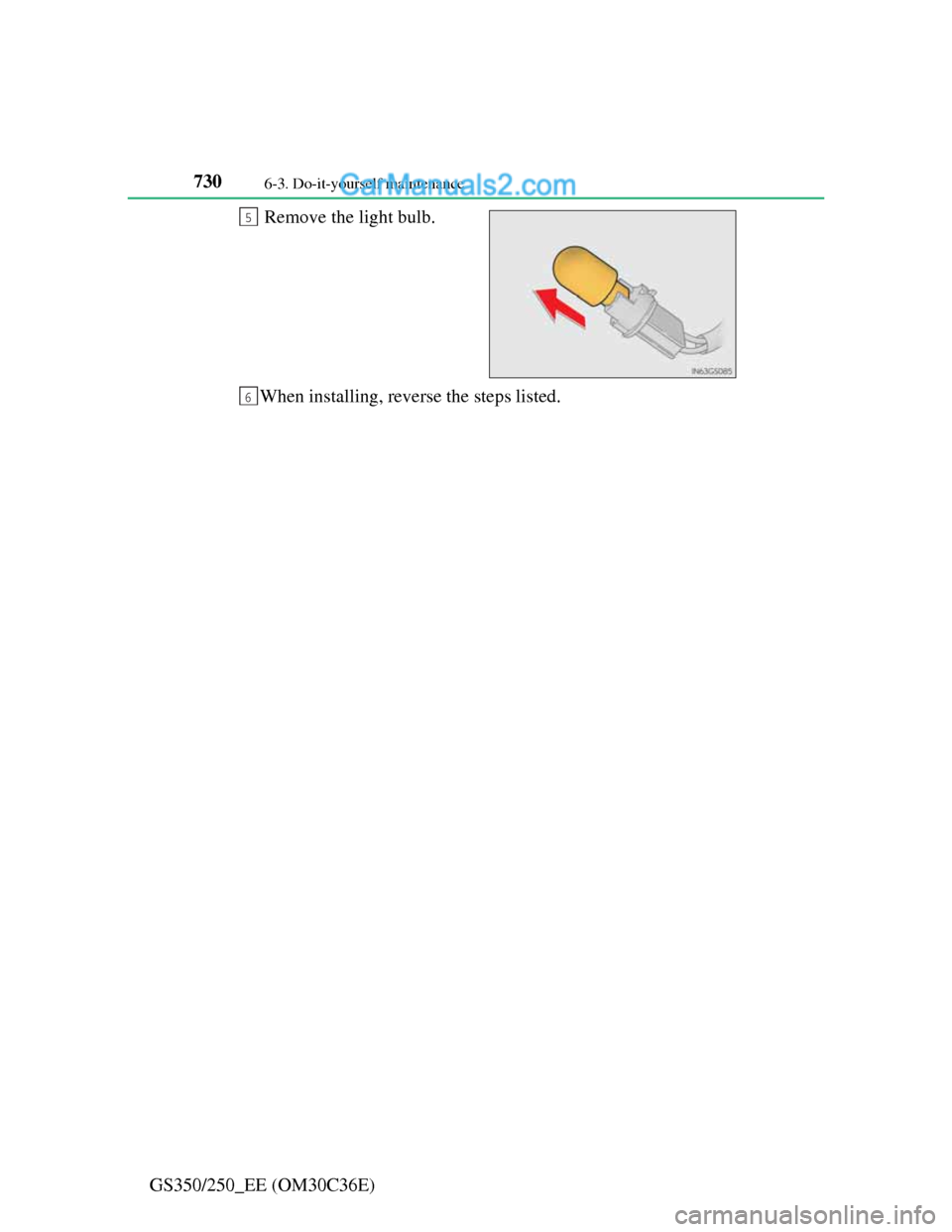
GS350/250_EE (OM30C36E)Remove the light bulb.
When installing, reverse the steps listed.
5
6