Video Lexus GS250 2012 User Guide
[x] Cancel search | Manufacturer: LEXUS, Model Year: 2012, Model line: GS250, Model: Lexus GS250 2012Pages: 914, PDF Size: 53.04 MB
Page 506 of 914
4955-3. Using the audio system
5
Interior features
GS350/250_EE (OM30C36E)
Playback
• To play MP3 files with steady sound quality, we recommend a fixed bit
rate of at least 128 kbps and a sampling frequency of 44.1 kHz.
• CD-R or CD-RW playback may not be possible in some instances,
depending on the characteristics of the disc.
• There is a wide variety of freeware and other encoding software for MP3
and WMA files on the market, and depending on the status of the encod-
ing and the file format, poor sound quality or noise at the start of play-
back may result. In some cases, playback may not be possible at all.
• When files other than MP3 or WMA files are recorded on a disc, it may
take more time to recognize the disc and in some cases, playback may
not be possible at all.
• Microsoft, Windows, and Windows Media are the registered trademarks
of Microsoft Corporation in the U.S. and other countries.
CAUTION
DVD video precaution
Conversational speech on some DVDs is recorded at a low volume to
emphasize the impact of sound effects. If you adjust the volume assuming
that the conversations represent the maximum volume level that the DVD
will play, you may be startled by louder sound effects or startled when you
change to a different audio source.
Loud sounds may have a significant impact on the human body or pose a
driving hazard. Keep this in mind when you adjust the volume.
Page 519 of 914
5085-3. Using the audio system
GS350/250_EE (OM30C36E)
About Bluetooth®
Compatible models
Portable players must correspond to the following specifications:
Bluetooth® specification
Ver. 1.1 or higher
(Recommended: Ver. 2.1+EDR or higher)
Profile
• A2DP (Advanced Audio Distribution Profile) Ver. 1.0 or higher
(Recommended: Ver. 1.2 or higher)
• AVRCP (Audio/Video Remote Control Profile) Ver. 1.0 or higher
(Recommended: Ver. 1.4 or higher)
However, please note that some functions may be limited depending on the
type of portable player. Also, the different screen is displayed depending on
which portable player is connecting.
Certification
P. 5 4 9
Reconnecting the portable player
If the portable player is disconnected with a poor reception when the engine
switch is in ACCESSORY or IGNITION ON mode, the system automati-
cally reconnects the portable player.
If you have switched off the portable player yourself, follow the instructions
below to reconnect:
Select the portable player again
Enter the portable player
When transferring ownership of your vehicle
Be sure to remove the registered portable player from the system. (P. 601) Bluetooth is a registered trademark of
Bluetooth SIG. Inc.
Page 541 of 914
5305-3. Using the audio system
GS350/250_EE (OM30C36E)
iPod cover art
Depending on the iPod and the songs in the iPod, iPod cover art may be dis-
played. This function can be changed to “On” or “Off”. (P. 524)
It may take time to display iPod cover art, and the iPod may not be operated
while the cover art display is in process.
Only iPod cover art that is saved in JPEG format can be displayed.
iPod functions
When the iPod connected to the system includes iPod video, the system can
only output the sound by selecting “Video” on the “iPod” screen.
Depending on the iPod, the video sound may not be able to be heard.
When an iPod is connected and the audio source is changed to iPod mode,
the iPod will resume play from the same point in which it was last used.
Depending on the iPod that is connected to the system, certain functions
may not be available. If a function is unavailable due to a malfunction (as
opposed to a system specification), disconnecting the device and reconnect-
ing it once again may resolve the problem.
When using an iPod
You maybe unable to use the instrument panel power outlet if the iPod is con-
nected to the USB port at the same time.
Battery charge
When an iPod is connected using a genuine iPod cable, the iPod starts
charging its battery.
Error messages for iPod
“iPod error”:
This indicates a problem in the iPod or its connection.
“No music files found.”:
This indicates that there is no music data in the iPod.
“Please check the iPod firmware version.”:
This indicates that the software version is not compatible. Perform the iPod
firmware updates and try again.
“iPod authorization failed.”:
This indicates that it failed to authorize the iPod. Please check your iPod.
Page 542 of 914
5315-3. Using the audio system
5
Interior features
GS350/250_EE (OM30C36E)
Compatible models
The following iPod
®, iPod nano®, iPod classic®, iPod touch® and iPhone®
devices can be used with this system.
Made for
• iPod touch (4th generation)
• iPod touch (3rd generation)
• iPod touch (2nd generation)
• iPod touch (1st generation)
• iPod classic
• iPod with video
• iPod nano (6th generation)
• iPod nano (5th generation)
• iPod nano (4th generation)
• iPod nano (3rd generation)
• iPod nano (2nd generation)
• iPod nano (1st generation)
• iPhone 4
• iPhone 3GS
• iPhone 3G
• iPhone
Depending on differences between models or software versions etc., some
models might be incompatible with this system.
Page 544 of 914
533
5 5-3. Using the audio system
Interior features
GS350/250_EE (OM30C36E)
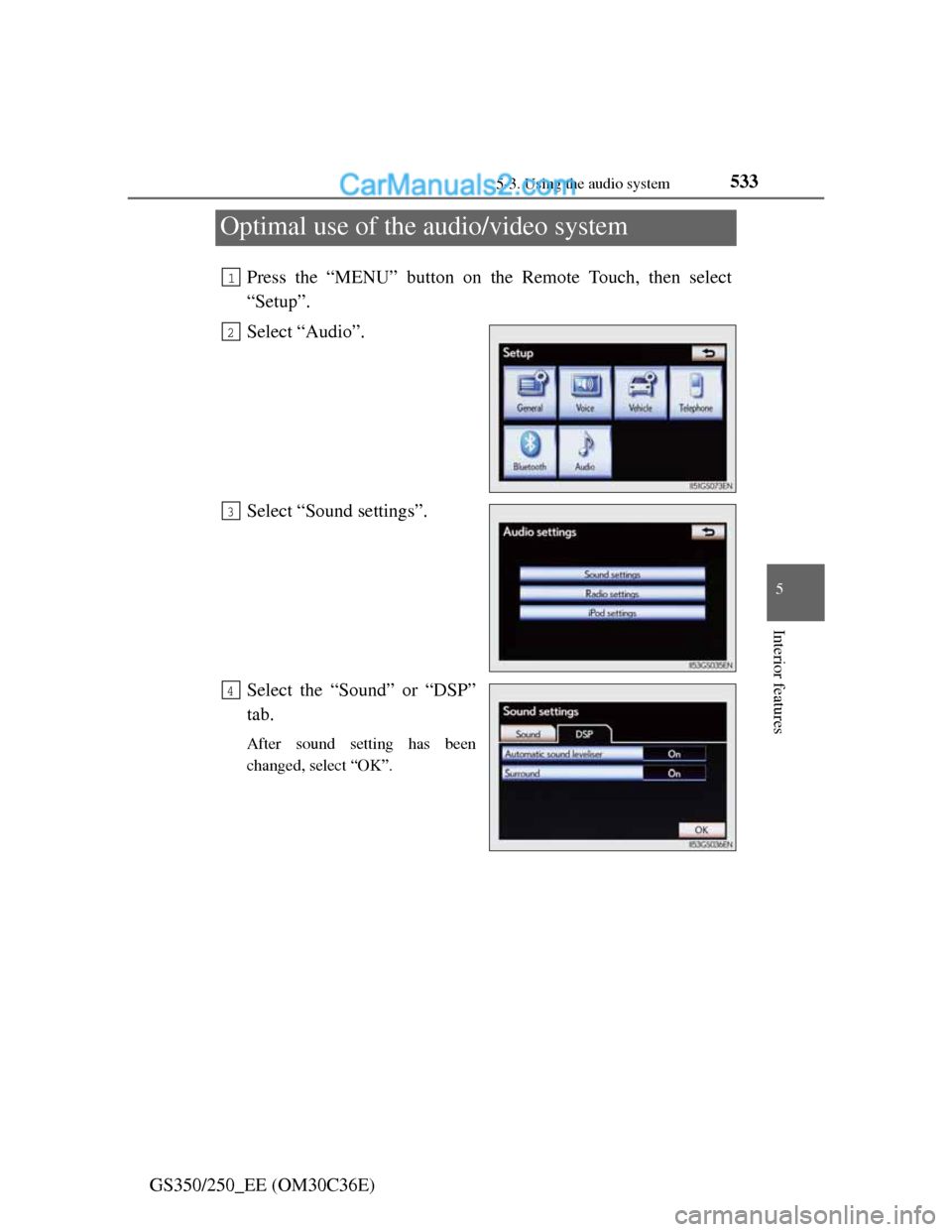
Optimal use of the audio/video system
Press the “MENU” button on the Remote Touch, then select
“Setup”.
Select “Audio”.
Select “Sound settings”.
Select the “Sound” or “DSP”
tab.
After sound setting has been
changed, select “OK”.
1
2
3
4
Page 552 of 914
5415-3. Using the audio system
5
Interior features
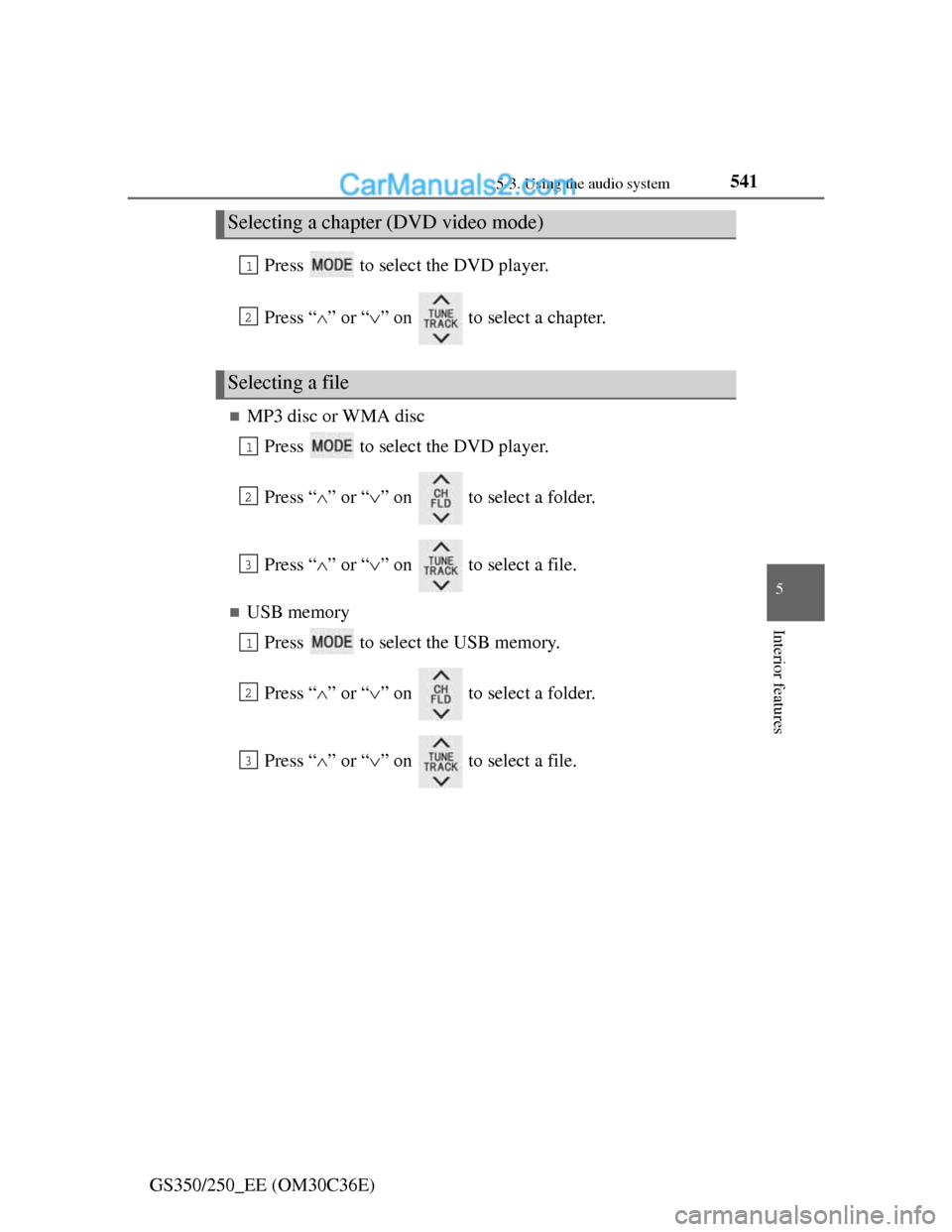
GS350/250_EE (OM30C36E)Press to select the DVD player.
Press “” or “” on to select a chapter.
MP3 disc or WMA disc
Press to select the DVD player.
Press “” or “” on to select a folder.
Press “” or “” on to select a file.
USB memory
Press to select the USB memory.
Press “” or “” on to select a folder.
Press “” or “” on to select a file.
Selecting a chapter (DVD video mode)
Selecting a file
1
2
1
2
3
1
2
3
Page 899 of 914
877Alphabetical index
GS350/250_EE (OM30C36E)
Anti-lock Brake System (ABS) .333
Function ................................333
Warning light........................750
Warning message..................761
Approach warning (dynamic
radar cruise control) ................264
Armrest ......................................635
Armrest door .............................639
Ashtrays.....................................626
Assist grip..................................641
Audio input................................536
Audio system .............................432
Audio input ...........................536
AUX port/
USB port ............536, 512, 524
Bluetooth
® audio ..................498
CD/DVD player ....................467
CD/DVD player information 488
DVD video ...........................475
iPod.......................................522
MP3/WMA disc ...................469
Optimal use...........................533
Portable music player ...........536
Radio ....................................458
Rear seat audio controls........537
Steering wheel audio switch .543
USB memory ........................510
Automatic headlight leveling
system ....................................231
Automatic High Beam ..............233
Automatic light control system 228Automatic transmission ............ 215
If the shift lever cannot be
shifted from P .................... 818
M mode ................................ 219
Paddle shift switches ........... 218
AUX port .................................. 536
Auxiliary boxes ........................ 620
AVS (Adaptive Variable
Suspension system) ................ 334
Back-up light
Replacing light bulb............. 729
Wattage ................................ 853
Battery ...................................... 667
Battery checking .................. 667
If the vehicle has discharged
battery................................ 825
Preparing and checking
before winter ..................... 359
Warning light ....................... 750
Blind Spot Monitor (BSM) ...... 354
Bluetooth
®
Audio system ....................... 498
Hands-free system
(for cellular phone)............ 542
Brake
Fluid ..................................... 849
Parking brake ....................... 225
Warning light ............... 749, 751
Warning message................. 757
B