Video Lexus GS250 2012 Owner's Manual
[x] Cancel search | Manufacturer: LEXUS, Model Year: 2012, Model line: GS250, Model: Lexus GS250 2012Pages: 914, PDF Size: 53.04 MB
Page 4 of 914
TABLE OF CONTENTS4
GS350/250_EE (OM30C36E)
5-1. Remote Touch screen
Remote Touch ................... 368
Remote Touch screen ........ 370
Set up screen ..................... 382
Speech command system .. 401
5-2. Using the air conditioning sys-
tem and defogger
Front automatic air conditioning
system..............................409
Rear air conditioning sys-
tem...................................425
Rear window and outside rear
view mirror defoggers.......430
Windshield wiper de-icer .. 4315-3. Using the audio system
Audio system type ............. 432
Using the radio .................. 457
Using the CD/DVD
player................................465
Playing an audio CD and MP3/
WMA discs.......................467
Playing DVD video ........... 473
CD/DVD player and DVD
video disc information.......486
Listening to Bluetooth
audio.................................496
Listening to a USB mem-
ory......................................508
Listening to an iPod .......... 519
Optimal use of the audio/video
system................................530
Using the AUX port .......... 533
Using the rear seat audio con-
trols....................................534
Using the steering wheel audio
switches.............................539
5-4. Using the hands-free phone sys-
tem (for cellular phone)
Hands-free system (for cellular
phone)..............................542
Using a Bluetooth®
(phone).............................556
Setting the hands-free system
(for cellular
phone)..............................575
Setting the Bluetooth®...... 598
5Interior features
Page 376 of 914
366
GS350/250_EE (OM30C36E)
5-1. Remote Touch screen
Remote Touch ................... 368
Remote Touch screen ........ 370
Set up screen ..................... 382
Speech command system .. 401
5-2. Using the air conditioning
system and defogger
Front automatic
air conditioning system ... 409
Rear
air conditioning system ... 425
Rear window and outside rear
view mirror defoggers..... 430
Windshield wiper de-icer .. 4315-3. Using the audio system
Audio system type ............ 432
Using the radio.................. 457
Using the CD/DVD
player .............................. 465
Playing an audio CD and
MP3/WMA discs ............ 467
Playing DVD video .......... 473
CD/DVD player and DVD
video disc information .... 486
Listening to
Bluetooth
® audio ............ 496
Listening to
a USB memory ............... 508
Listening to an iPod .......... 519
Optimal use of
the audio/video system ... 530
Using the AUX port.......... 533
Using the rear seat
audio controls ................. 534
Using the steering wheel
audio switches ................ 539
Page 382 of 914
3725-1. Remote Touch screen
GS350/250_EE (OM30C36E)The contrast and brightness of the screen display and the image the
camera displays can be adjusted. (For information regarding audio/
video screen adjustment: P. 480)
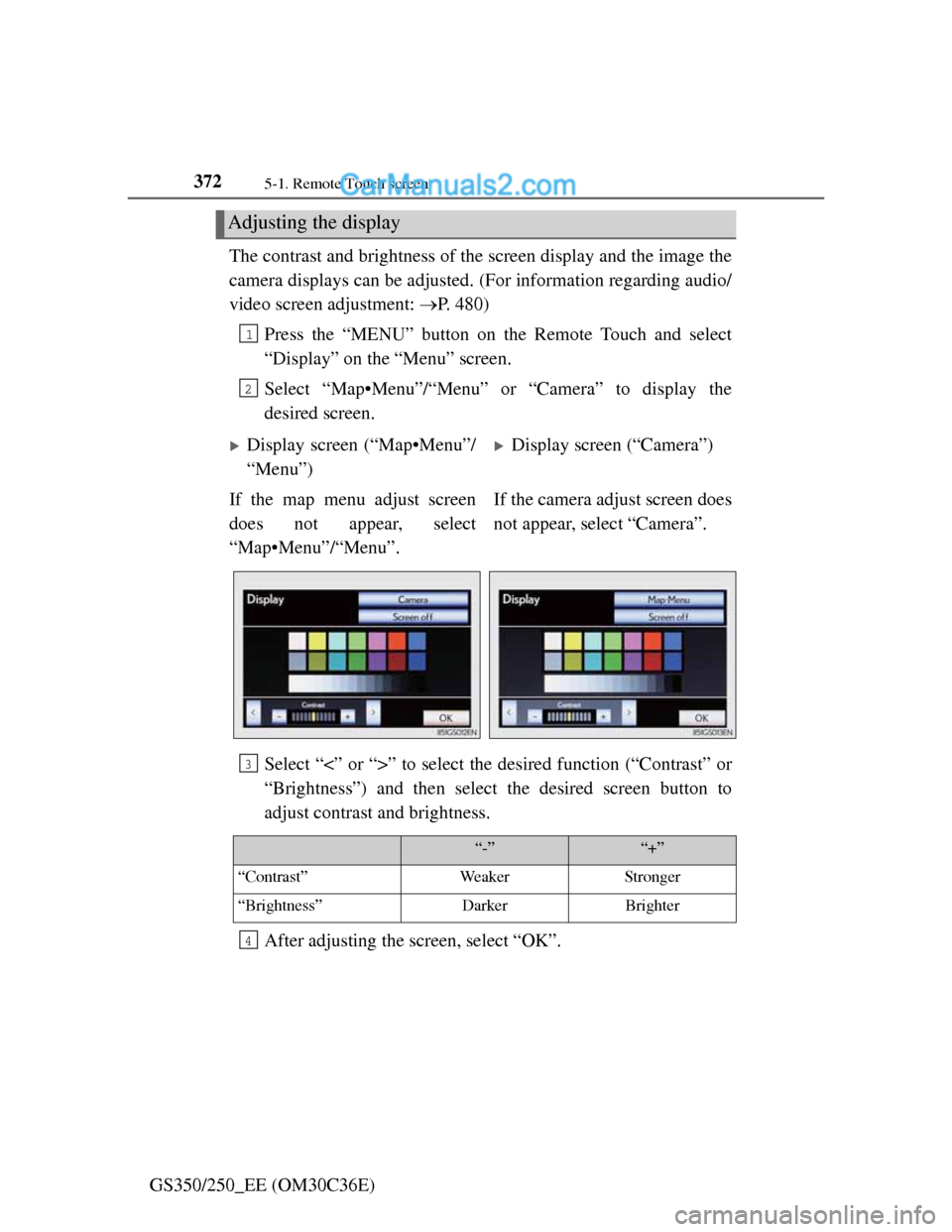
Press the “MENU” button on the Remote Touch and select
“Display” on the “Menu” screen.
Select “Map•Menu”/“Menu” or “Camera” to display the
desired screen.
Select “<” or “>” to select the desired function (“Contrast” or
“Brightness”) and then select the desired screen button to
adjust contrast and brightness.
After adjusting the screen, select “OK”.
Adjusting the display
1
2
Display screen (“Map•Menu”/
“Menu”)Display screen (“Camera”)
If the map menu adjust screen
does not appear, select
“Map•Menu”/“Menu”.If the camera adjust screen does
not appear, select “Camera”.
3
“-”“+”
“Contrast”WeakerStronger
“Brightness”DarkerBrighter
4
Page 445 of 914
4345-3. Using the audio system
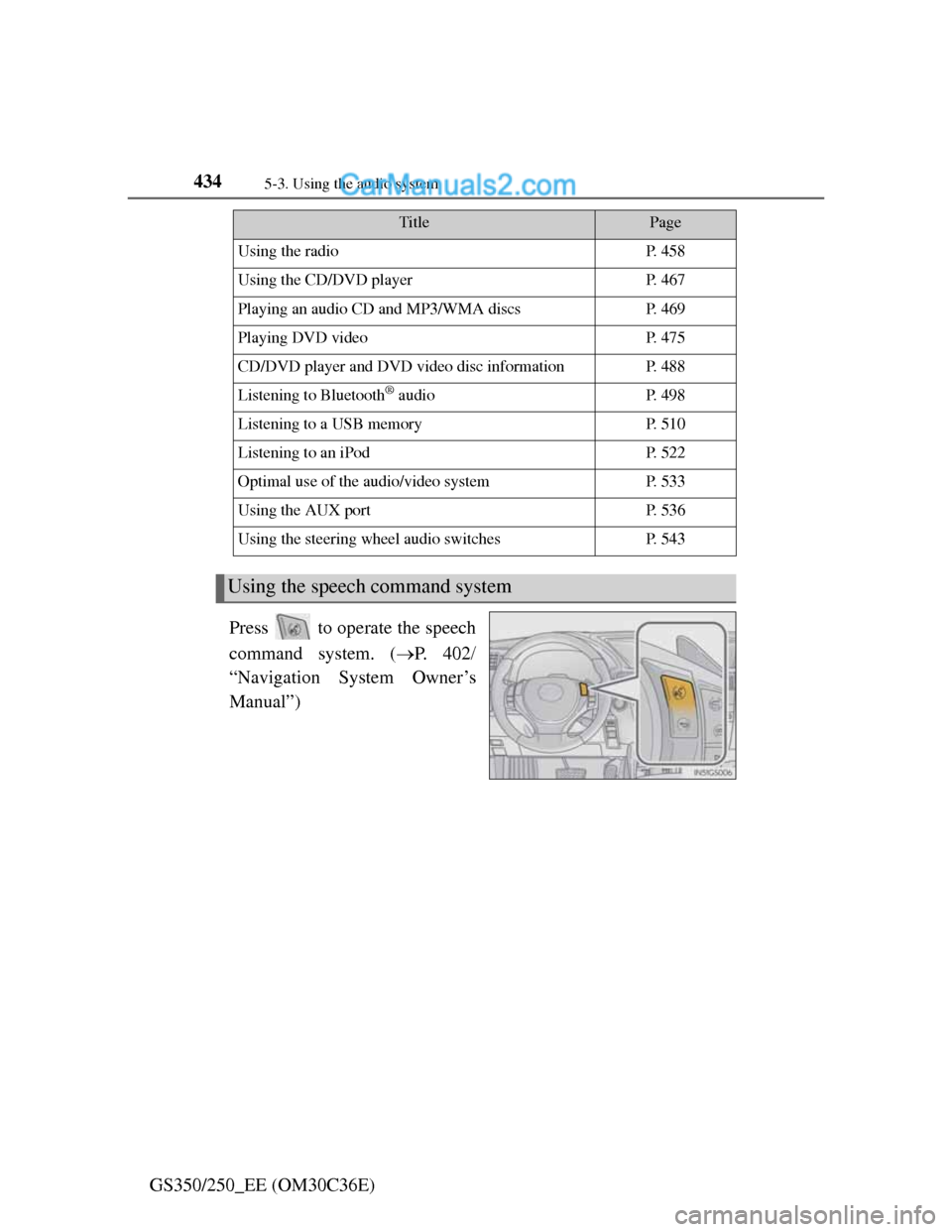
GS350/250_EE (OM30C36E)Press to operate the speech
command system. (P. 4 0 2
“Navigation System Owner’s
Manual”)
TitlePage
Using the radioP. 4 5 8
Using the CD/DVD playerP. 4 6 7
Playing an audio CD and MP3/WMA discsP. 4 6 9
Playing DVD videoP. 4 7 5
CD/DVD player and DVD video disc informationP. 4 8 8
Listening to Bluetooth® audioP. 4 9 8
Listening to a USB memoryP. 5 1 0
Listening to an iPodP. 5 2 2
Optimal use of the audio/video systemP. 5 3 3
Using the AUX portP. 5 3 6
Using the steering wheel audio switchesP. 5 4 3
Using the speech command system
Page 486 of 914
4755-3. Using the audio system
5
Interior features
GS350/250_EE (OM30C36E)
Playing DVD video
For safety reasons, you can enjoy the visual contents of discs only
when the vehicle is completely stopped with the engine switch in
ACCESSORY or IGNITION ON mode and the parking brake
applied. While driving in DVD video mode, only the DVD’s audio
can be heard.
When a DVD video disc is inserted while driving, the audio con-
tents of the main feature will automatically be played. However,
some discs may not be played from the main story.
Press the “MEDIA” button if a disc has already been loaded in the
disc slot.
Select the “DISC” tab or press the “MEDIA” button repeatedly
until the “DISC” tab is selected.
Page 487 of 914
4765-3. Using the audio system
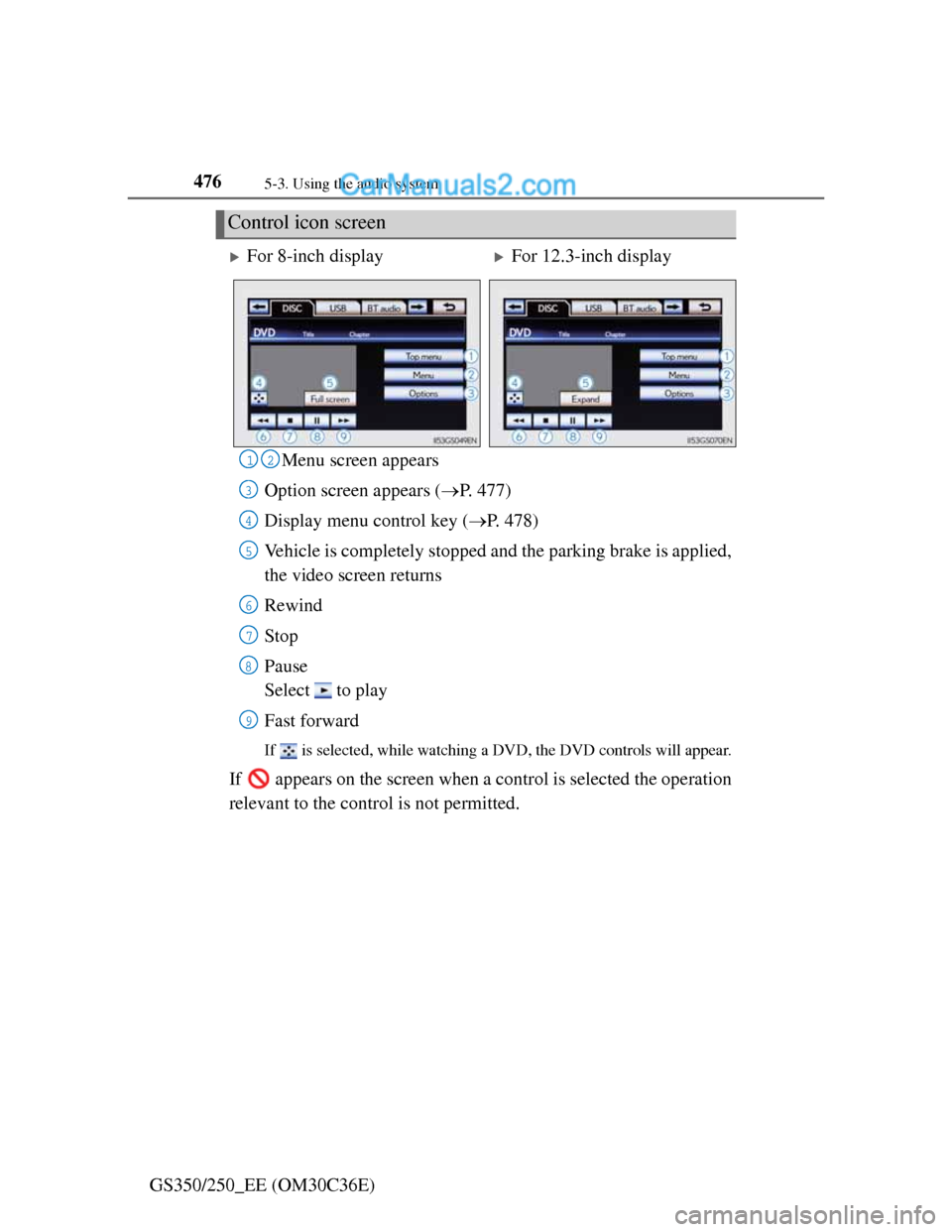
GS350/250_EE (OM30C36E)Menu screen appears
Option screen appears (P. 477)
Display menu control key (P. 478)
Vehicle is completely stopped and the parking brake is applied,
the video screen returns
Rewind
Stop
Pause
Select to play
Fast forward
If is selected, while watching a DVD, the DVD controls will appear.
If appears on the screen when a control is selected the operation
relevant to the control is not permitted.
Control icon screen
For 8-inch displayFor 12.3-inch display
12
3
4
5
6
7
8
9
Page 499 of 914
4885-3. Using the audio system
GS350/250_EE (OM30C36E)
CD/DVD player and DVD video disc information
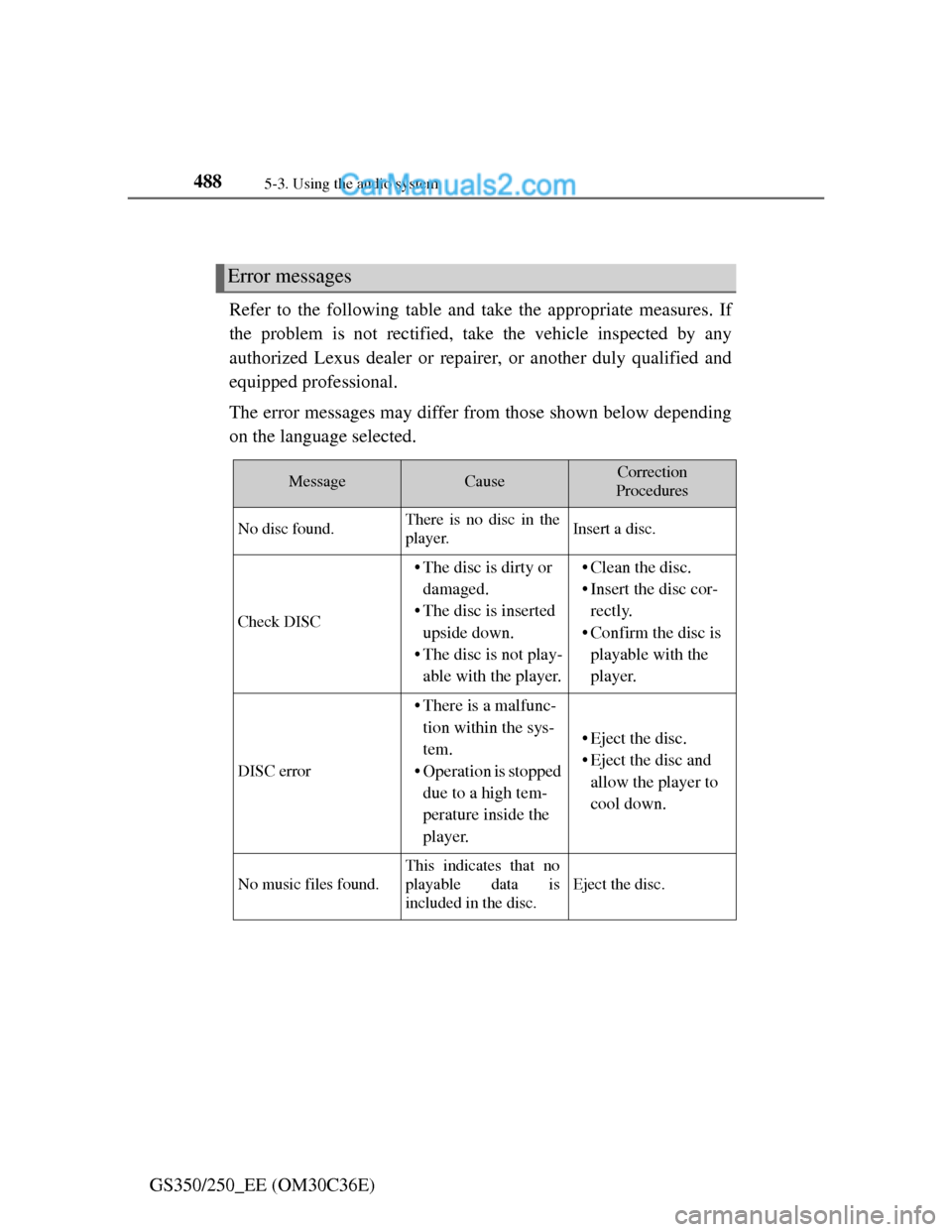
Refer to the following table and take the appropriate measures. If
the problem is not rectified, take the vehicle inspected by any
authorized Lexus dealer or repairer, or another duly qualified and
equipped professional.
The error messages may differ from those shown below depending
on the language selected.
Error messages
MessageCauseCorrection
Procedures
No disc found.There is no disc in the
player.Insert a disc.
Check DISC
• The disc is dirty or
damaged.
• The disc is inserted
upside down.
• The disc is not play-
able with the player.• Clean the disc.
• Insert the disc cor-
rectly.
• Confirm the disc is
playable with the
player.
DISC error
• There is a malfunc-
tion within the sys-
tem.
• Operation is stopped
due to a high tem-
perature inside the
player.
• Eject the disc.
• Eject the disc and
allow the player to
cool down.
No music files found.
This indicates that no
playable data is
included in the disc.
Eject the disc.
Page 500 of 914
4895-3. Using the audio system
5
Interior features
GS350/250_EE (OM30C36E)
The DVD player conforms to PAL/NTSC color TV formats.
Region code: Some DVD video discs have a region code indi-
cating the region in which you can use the DVD video disc. If
the DVD video disc is not labeled as “ALL”, “2” or “5”, you
cannot use it on this DVD player. If you attempt to play an
inappropriate DVD video disc on this player, “Region code
error” appears on the screen. Even if the DVD video disc does
not have a region code, you may not be able to use it.
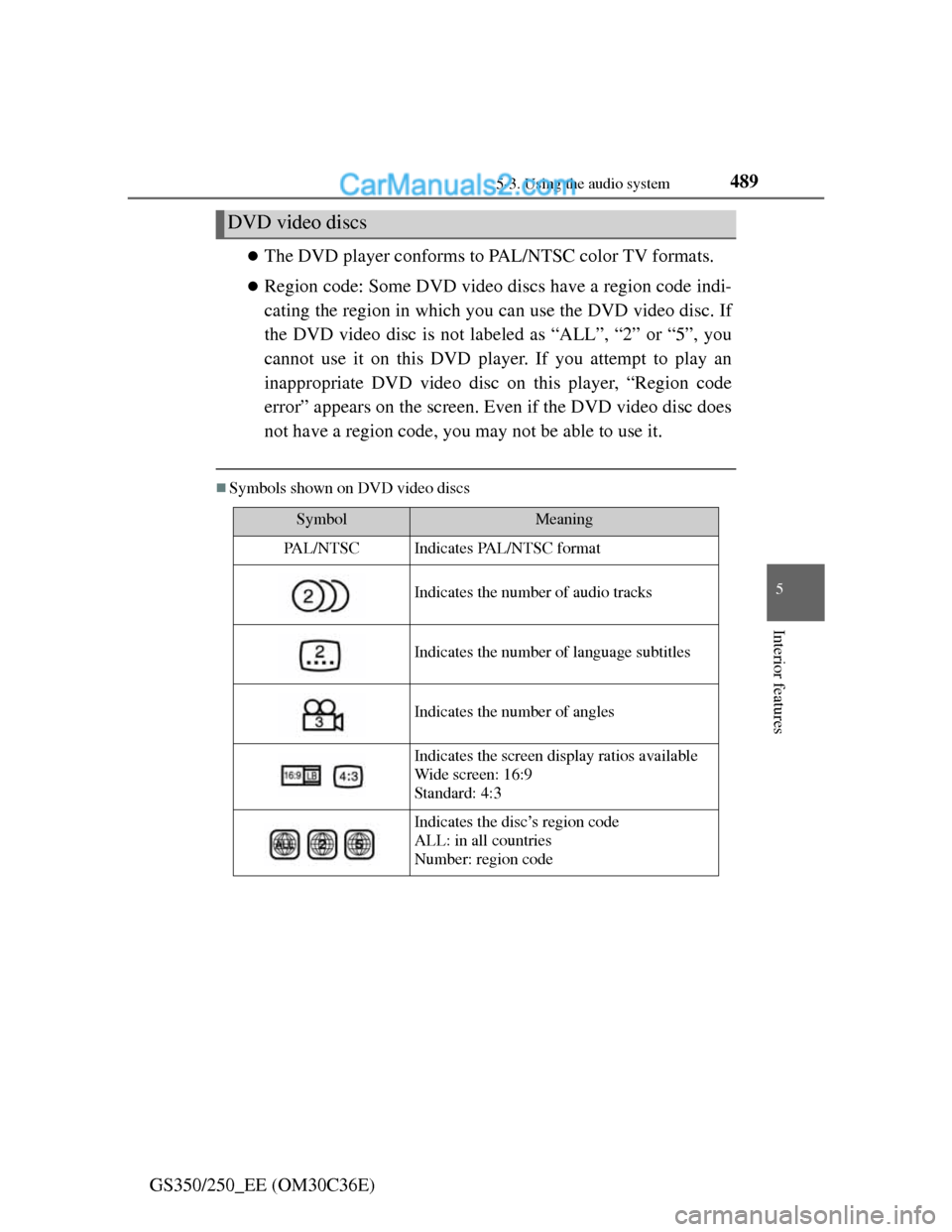
Symbols shown on DVD video discs
DVD video discs
SymbolMeaning
PA L / N T S CIndicates PAL/NTSC format
Indicates the number of audio tracks
Indicates the number of language subtitles
Indicates the number of angles
Indicates the screen display ratios available
Wide screen: 16:9
Standard: 4:3
Indicates the disc’s region code
ALL: in all countries
Number: region code
Page 502 of 914
4915-3. Using the audio system
5
Interior features
GS350/250_EE (OM30C36E)
DVD video disc information
DVD video discs
A DVD video disc is a Digital Versatile Disc that holds video. DVD video
discs have adopted “MPEG2”, one of the world standards of digital com-
pression technologies. The picture data is compressed by 1/40 on average
and stored. Variable rate encoded technology in which the volume of data
assigned to the picture is changed depending on the picture format has also
been adopted. Audio data is stored using PCM and Dolby Digital, which
enables higher quality of sound. Furthermore, multi-angle and multi-lan-
guage features will also help you enjoy the more advanced technology of
DVD video.
Viewer restrictions
This feature limits what can be viewed in conformity with the level of
restrictions of the country. The level of restrictions varies depending on the
DVD video disc. Some DVD video discs cannot be played at all, or violent
scenes are skipped or replaced with other scenes.
Level 1: DVD video discs for children can be played.
Level 2-7: DVD video discs for children and G-rated movies can be
played.
Level 8: All types of DVD video discs can be played.
Multi-angle option
You can enjoy the same scene from different angles.
Multi-language option
You can select the subtitle and audio languages.
Region codes
The region codes are provided on DVD players and DVD discs. If the DVD
video disc does not have the same region code as the DVD player, you can-
not play the disc on the DVD player. (P. 489)
Audio
This DVD player can play linear PCM, Dolby Digital and MPEG audio for-
mat DVDs. Other decoded types cannot be played.
Page 503 of 914
4925-3. Using the audio system
GS350/250_EE (OM30C36E)
Title and chapter
Video and audio programs stored in DVD video discs are divided into parts
by title and chapter.
Title: The largest unit of the video and audio programs stored on DVD
video discs. Usually, one movie, one album, or one audio program is
assigned as a title.
Chapter: A title is comprised of one or more chapters.
Sound
Dolby Digital
Manufactured under license from Dolby Laboratories. Dolby and the double-
D symbol are trademarks of Dolby Laboratories.
MP3 and WMA files
MP3 (MPEG Audio LAYER 3) is a standard audio compression format.
Files can be compressed to approximately 1/10 of their original size by using
MP3 compression.
WMA (Windows Media Audio) is a Microsoft audio compression format.
This format compresses audio data to a size smaller than that of the MP3 for-
mat.
There is a limit to the MP3 and WMA file standards that can be used and to
the media/formats on which the files are recorded.
MP3 file compatibility
• Compatible standards
MP3 (MPEG1 LAYER3, MPEG2 LSF LAYER3)
• Compatible sampling frequencies
MPEG1 LAYER3: 32, 44.1, 48 (kHz)
MPEG2 LSF LAYER3: 16, 22.05, 24 (kHz)
• Compatible bit rates (compatible with VBR)
MPEG1 LAYER3: 32, 64, 80, 96, 112, 128, 160, 192, 224, 256, 320
(kbps)
MPEG2 LSF LAYER3: 8, 32, 64, 80, 96, 112, 128, 144, 160 (kbps)
• Compatible channel modes: stereo, joint stereo, dual channel and monau-
ral