phone Lexus GS250 2012 User Guide
[x] Cancel search | Manufacturer: LEXUS, Model Year: 2012, Model line: GS250, Model: Lexus GS250 2012Pages: 914, PDF Size: 53.04 MB
Page 410 of 914
4005-1. Remote Touch screen
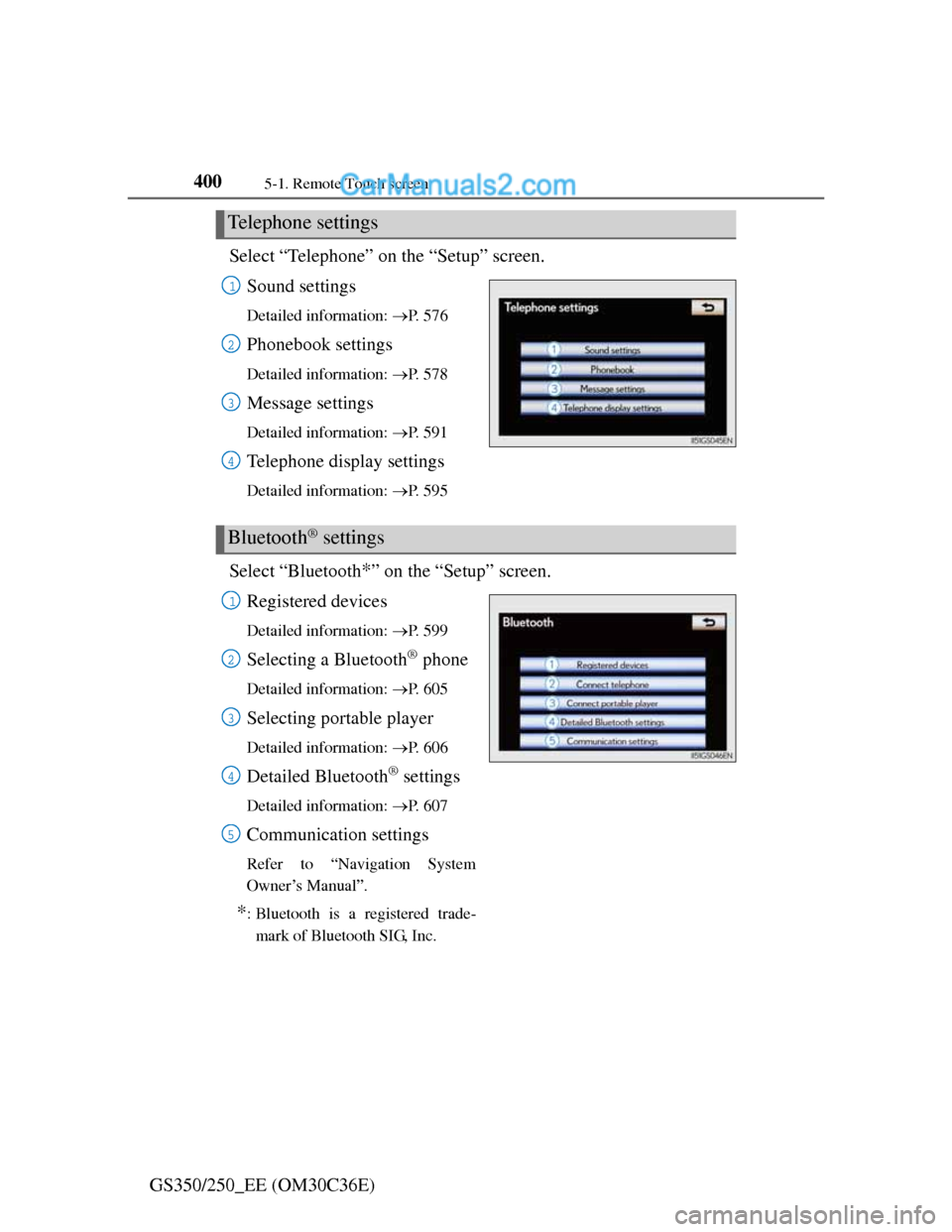
GS350/250_EE (OM30C36E)Select “Telephone” on the “Setup” screen.
Sound settings
Detailed information: P. 5 7 6
Phonebook settings
Detailed information: P. 5 7 8
Message settings
Detailed information: P. 5 9 1
Telephone display settings
Detailed information: P. 5 9 5
Select “Bluetooth*” on the “Setup” screen.
Registered devices
Detailed information: P. 5 9 9
Selecting a Bluetooth® phone
Detailed information: P. 6 0 5
Selecting portable player
Detailed information: P. 6 0 6
Detailed Bluetooth® settings
Detailed information: P. 6 0 7
Communication settings
Refer to “Navigation System
Owner’s Manual”.
*: Bluetooth is a registered trade-
mark of Bluetooth SIG, Inc.
Telephone settings
1
2
3
4
Bluetooth® settings
1
2
3
4
5
Page 413 of 914
4035-1. Remote Touch screen
5
Interior features
GS350/250_EE (OM30C36E)
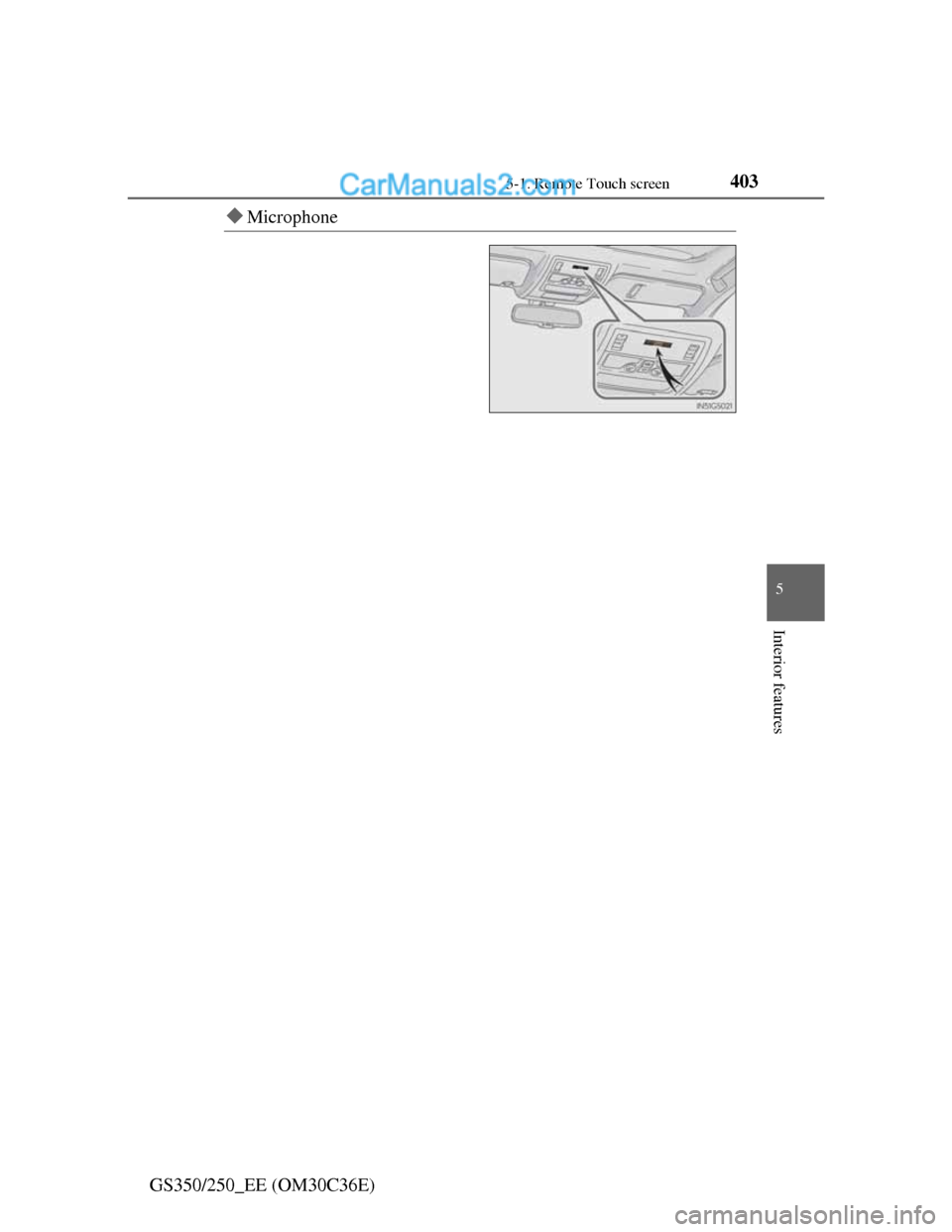
Microphone
Page 416 of 914
4065-1. Remote Touch screen
GS350/250_EE (OM30C36E)Recognizable speech commands and their actions are shown below.
For devices that are not installed in the vehicle, the related com-
mands will not be displayed in the “Shortcuts” screen. Also,
according to conditions, other commands may not be displayed
in the “Shortcuts” screen.
Voice recognition language can be changed. (P. 386)
Commands that have a “O” in the “Shortcuts” column in the fol-
lowing table can be recognized from the “Shortcuts” screen.
Calling a Telephone (P. 561)
Command list
CommandActionShortcuts
“Call
Calls made by saying a name from
the phonebook.
For example: Say “Call John Smith”,
“Call John Smith, mobile” etc.
O
“Dial
Calls made by saying the Telephone
number.
For example: Say “Dial
0123456789” etc.
O
Page 419 of 914
4095-1. Remote Touch screen
5
Interior features
GS350/250_EE (OM30C36E)
When using the microphone
It is unnecessary to speak directly into the microphone when giving a com-
mand.
Wait for the confirmation beep before speaking a command.
Speech commands may not be recognized if:
• Spoken too quickly.
• Spoken at a low or high volume.
• The roof or windows are open.
• Passengers are talking while speech commands are spoken.
• The air conditioning speed is set high.
• The air conditioning vents are turned towards the microphone.
In the following conditions, the system may not recognize the command
properly and using speech commands may not be possible:
• The command is incorrect or unclear. Note that certain words, accents or
speech patterns may be difficult for the system to recognize.
• There is excessive background noise, such as wind noise.
When searching for a track
A USB memory or iPod must be connected to enable track searching and
playback. (P. 510, 521)
When a USB memory or iPod is connected, recognition data is created so
tracks can be searched using speech commands.
Recognition data is updated under the following conditions:
• When the USB memory or iPod data has changed.
• When the voice recognition language is changed. (P. 386)
While the recognition data is being created or being updated, a track search
cannot be performed using a speech command.
When “Play music” is dimmed in the “Shortcuts” screen, it is not possible
to search for a track using a speech command. In this situation, reduce the
amount of music data in the USB memory or iPod and update the recogni-
tion data to enable searching by speech command.
Page 446 of 914
4355-3. Using the audio system
5
Interior features
GS350/250_EE (OM30C36E)
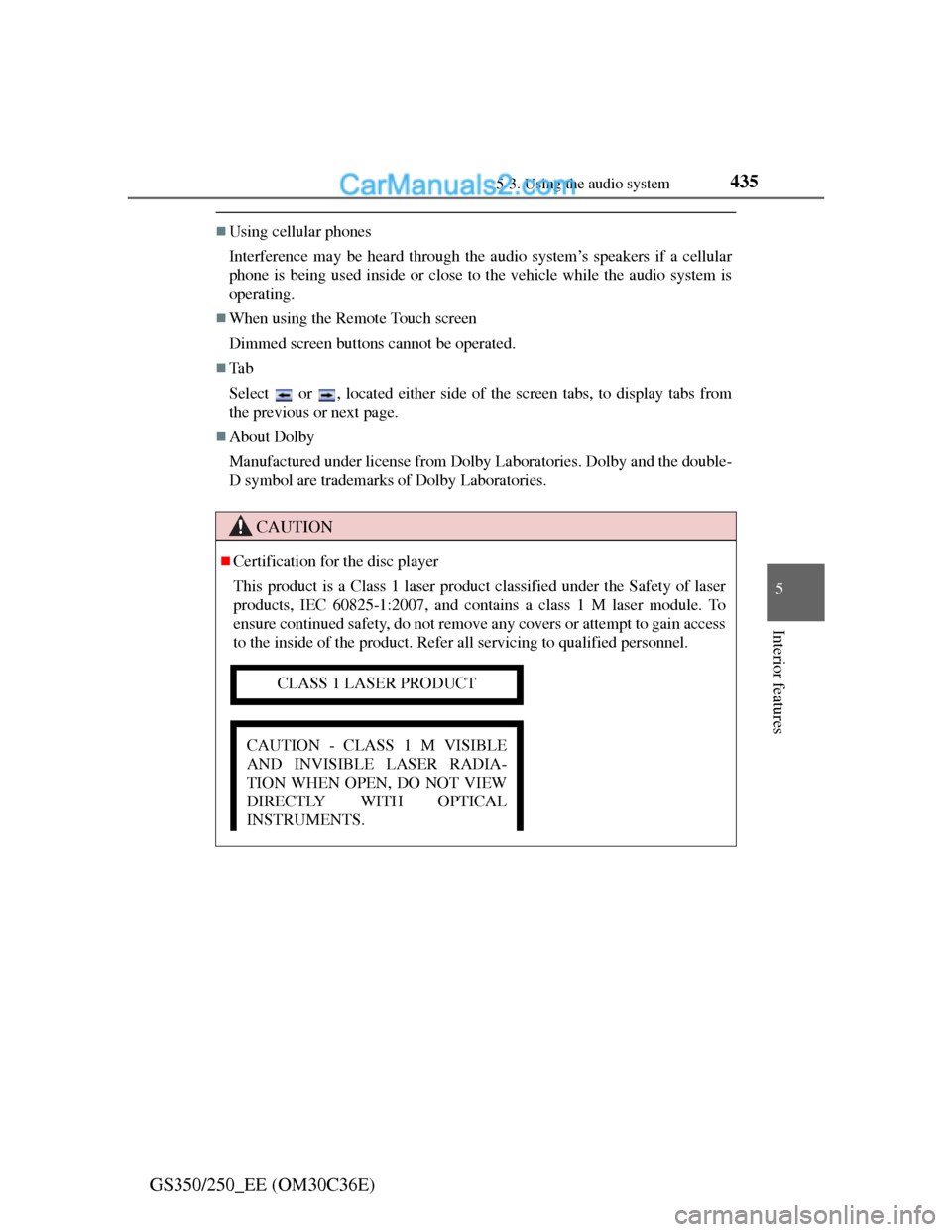
Using cellular phones
Interference may be heard through the audio system’s speakers if a cellular
phone is being used inside or close to the vehicle while the audio system is
operating.
When using the Remote Touch screen
Dimmed screen buttons cannot be operated.
Ta b
Select or , located either side of the screen tabs, to display tabs from
the previous or next page.
About Dolby
Manufactured under license from Dolby Laboratories. Dolby and the double-
D symbol are trademarks of Dolby Laboratories.
CAUTION
Certification for the disc player
This product is a Class 1 laser product classified under the Safety of laser
products, IEC 60825-1:2007, and contains a class 1 M laser module. To
ensure continued safety, do not remove any covers or attempt to gain access
to the inside of the product. Refer all servicing to qualified personnel.
CLASS 1 LASER PRODUCT
CAUTION - CLASS 1 M VISIBLE
AND INVISIBLE LASER RADIA-
TION WHEN OPEN, DO NOT VIEW
DIRECTLY WITH OPTICAL
INSTRUMENTS.
Page 448 of 914
4375-3. Using the audio system
5
Interior features
GS350/250_EE (OM30C36E)
Open source license
This product uses the following open source software.
T- K e r n e l
This Product uses the Source Code of T-Kernel under T-License granted
by the T-Engine Forum (www.t-engine.org
).
C Library
This product includes software developed by the University of California,
Berkeley and its contributors. This product includes software developed by
the University of California, Lawrence Berkeley Laboratory.
Copyright © 1982, 1985, 1993 The Regents of the University of California.
All rights reserved.
Copyright © 1982, 1986, 1993 The Regents of the University of California.
All rights reserved.
Copyright © 1982, 1986, 1989, 1993 The Regents of the University of
California. All rights reserved.
© UNIX System Laboratories, Inc. All or some portions of this file are
derived from material licensed to the University of California by American
Telephone and Telegraph Co. or Unix System Laboratories, Inc. and are
reproduced herein with the permission of UNIX System Laboratories, Inc.
Copyright © 1982, 1986, 1991, 1993, 1994 The Regents of the University of
California. All rights reserved.
© UNIX System Laboratories, Inc. All or some portions of this file are
derived from material licensed to the University of California by American
Telephone and Telegraph Co. or Unix System Laboratories, Inc. and are
reproduced herein with the permission of UNIX System Laboratories, Inc.
Copyright © 1983, 1990, 1993 The Regents of the University of California.
All rights reserved.
© UNIX System Laboratories, Inc. All or some portions of this file are
derived from material licensed to the University of California by American
Telephone and Telegraph Co. or Unix System Laboratories, Inc. and are
reproduced herein with the permission of UNIX System Laboratories, Inc.
Copyright © 1983, 1993 The Regents of the University of California. All
rights reserved.
Page 449 of 914
4385-3. Using the audio system
GS350/250_EE (OM30C36E)
Copyright © 1987, 1991, 1993 The Regents of the University of California.
All rights reserved.
Copyright © 1987, 1993 The Regents of the University of California. All
rights reserved.
Copyright © 1988 Regents of the University of California. All rights
reserved.
Copyright © 1988 University of Utah.
Copyright © 1992, 1993 The Regents of the University of California. All
rights reserved. This code is derived from software contributed to Berkeley
by the Systems Programming Group of the University of Utah Computer
Science Department and Ralph Campbell.
Copyright © 1988, 1993 The Regents of the University of California. All
rights reserved.
Copyright © 1988, 1993 The Regents of the University of California. All
rights reserved. This code is derived from software contributed to Berkeley
by Arthur David Olson of the National Cancer Institute.
Copyright © 1989 The Regents of the University of California. All rights
reserved.
Copyright © 1989 The Regents of the University of California. All rights
reserved.
© UNIX System Laboratories, Inc. All or some portions of this file are
derived from material licensed to the University of California by American
Telephone and Telegraph Co. or Unix System Laboratories, Inc. and are
reproduced herein with the permission of UNIX System Laboratories, Inc.
Copyright © 1989, 1993 The Regents of the University of California. All
rights reserved.
Copyright © 1989, 1993 The Regents of the University of California. All
rights reserved.
© UNIX System Laboratories, Inc. All or some portions of this file are
derived from material licensed to the University of California by American
Telephone and Telegraph Co. or Unix System Laboratories, Inc. and are
reproduced herein with the permission of UNIX System Laboratories, Inc.
Copyright © 1990, 1993 The Regents of the University of California. All
rights reserved.
Page 450 of 914
4395-3. Using the audio system
5
Interior features
GS350/250_EE (OM30C36E)
This code is derived from software contributed to Berkeley by Chris Torek.
Copyright © 1991, 1993 The Regents of the University of California. All
rights reserved.
Copyright © 1991, 1993 The Regents of the University of California. All
rights reserved.
This code is derived from software contributed to Berkeley by Berkeley
Software Design, Inc.
Copyright © 1992, 1993 The Regents of the University of California. All
rights reserved.
Copyright © 1992, 1993 The Regents of the University of California. All
rights reserved.
This code is derived from software contributed to Berkeley by Ralph
Campbell.
Copyright © 1992, 1993 The Regents of the University of California. All
rights reserved.
© UNIX System Laboratories, Inc. All or some portions of this file are
derived from material licensed to the University of California by American
Telephone and Telegraph Co. or Unix System Laboratories, Inc. and are
reproduced herein with the permission of UNIX System Laboratories, Inc.
Copyright © 1992, 1993 The Regents of the University of California. All
rights reserved.
This software was developed by the Computer Systems Engineering group at
Lawrence Berkeley Laboratory under DARPA contract BG 91-66 and
contributed to Berkeley. All advertising materials mentioning features or use
of this software must display the following acknowledgement: This product
includes software developed by the University of California, Lawrence
Berkeley Laboratory.
Copyright © 1992, 1993 The Regents of the University of California. All
rights reserved.
This code is derived from software contributed to Berkeley by Ralph
Campbell. This file is derived from the MIPS RISC Architecture book by
Gerry Kane.
Copyright © 1993 The Regents of the University of California. All rights
reserved.
Copyright © 1994 The Regents of the University of California. All rights
reserved.
Page 518 of 914
5075-3. Using the audio system
5
Interior features
GS350/250_EE (OM30C36E)
If you select
The display returns to the previous screen.
Connecting Bluetooth® audio player
Selecting “Connect portable player” on the “Bluetooth*” screen also con-
nects a Bluetooth® audio player. (P. 606)
When none of the selectable portable players have been registered, a screen
confirming registration is displayed. The registration method is the same as
phone registration. (P. 599)
When the currently connected portable player is selected, a screen confirm-
ing the selected player’s disconnection is displayed. (P. 599)
If connection fails once, a changing connection method confirmation screen
is displayed. If connection fails 2 or more times, a message will be dis-
played. When this message is displayed, try again.
*: Bluetooth is a registered trademark of Bluetooth SIG. Inc.
When using the Bluetooth® audio system
In the following conditions, the system may not function.
• The portable player is turned off
• The portable player is not connected
• The portable player battery is low
There may be a delay if phone connection is carried out during Bluetooth®
audio play.
Depending on the type of portable player that is connected to the system,
operation may differ slightly and certain functions may not be available.
Bluetooth® antenna
The antenna is built into the instrument panel. If the portable player is behind
the seat or in the glove box or console box, or is touching or covered by
metal objects, connection status may deteriorate.
Battery charge/signal status
This display may not correspond exactly with the portable player, and this
system does not have a charging function.
Page 540 of 914
5295-3. Using the audio system
5
Interior features
GS350/250_EE (OM30C36E)
If you select
The display returns to the previous screen.
About iPod
“Made for iPod” and “Made for iPhone” mean that an electronic accessory
has been designed to connect specifically to iPod, or iPhone, respectively,
and has been certified by the developer to meet Apple performance stan-
dards.
Apple is not responsible for the operation of this device or its compliance
with safety and regulatory standards. Please note that the use of this acces-
sory with iPod or iPhone may affect wireless performance.
iPhone, iPod, iPod classic, iPod nano and iPod touch are trademarks of
Apple Inc., registered in the U.S. and other countries.