Disp Lexus GS250 2012 Owner's Guide
[x] Cancel search | Manufacturer: LEXUS, Model Year: 2012, Model line: GS250, Model: Lexus GS250 2012Pages: 914, PDF Size: 53.04 MB
Page 107 of 914
1062. Instrument cluster
GS350/250_EE (OM30C36E)
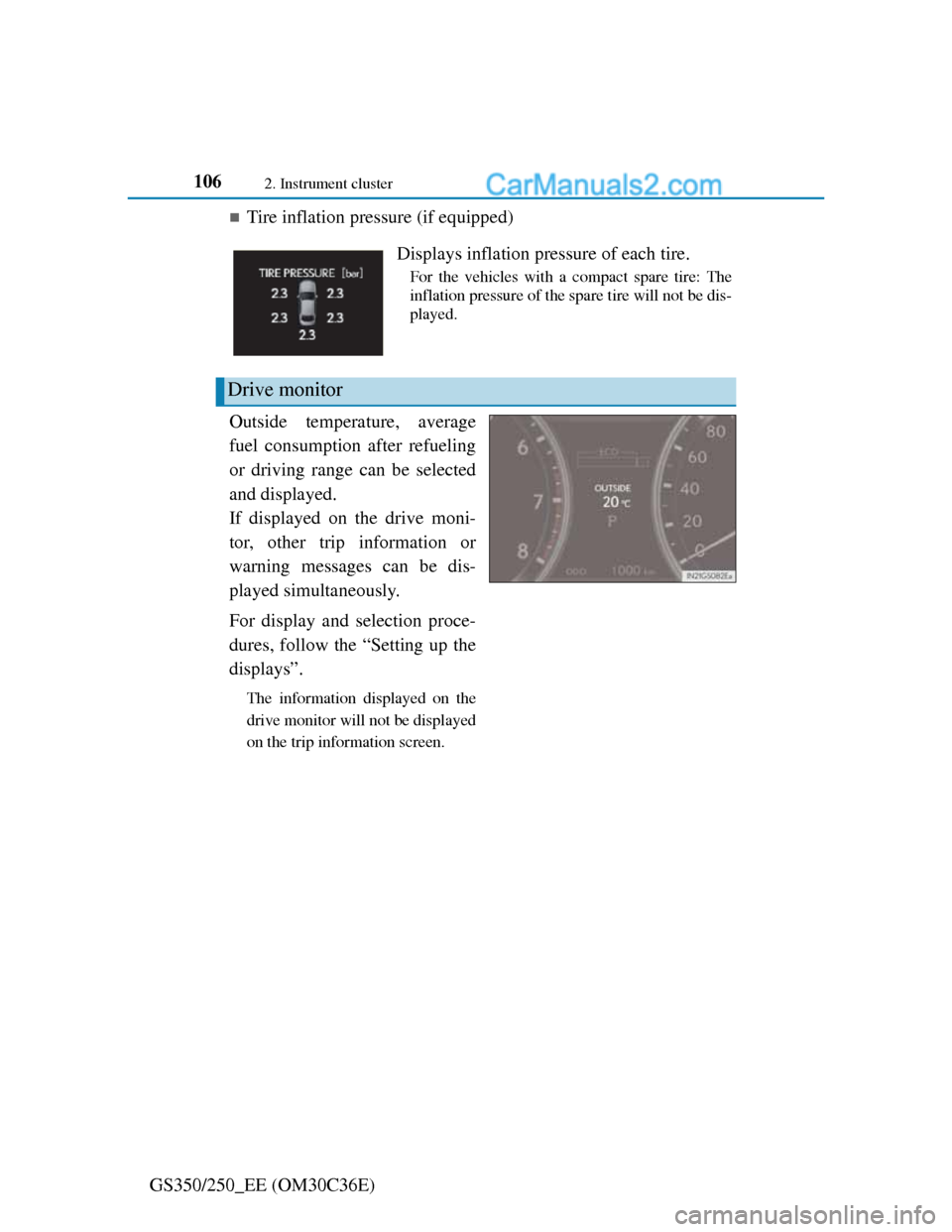
Tire inflation pressure (if equipped)
Outside temperature, average
fuel consumption after refueling
or driving range can be selected
and displayed.
If displayed on the drive moni-
tor, other trip information or
warning messages can be dis-
played simultaneously.
For display and selection proce-
dures, follow the “Setting up the
displays”.
The information displayed on the
drive monitor will not be displayed
on the trip information screen.
Displays inflation pressure of each tire.
For the vehicles with a compact spare tire: The
inflation pressure of the spare tire will not be dis-
played.
Drive monitor
Page 108 of 914
1072. Instrument cluster
2
Instrument cluster
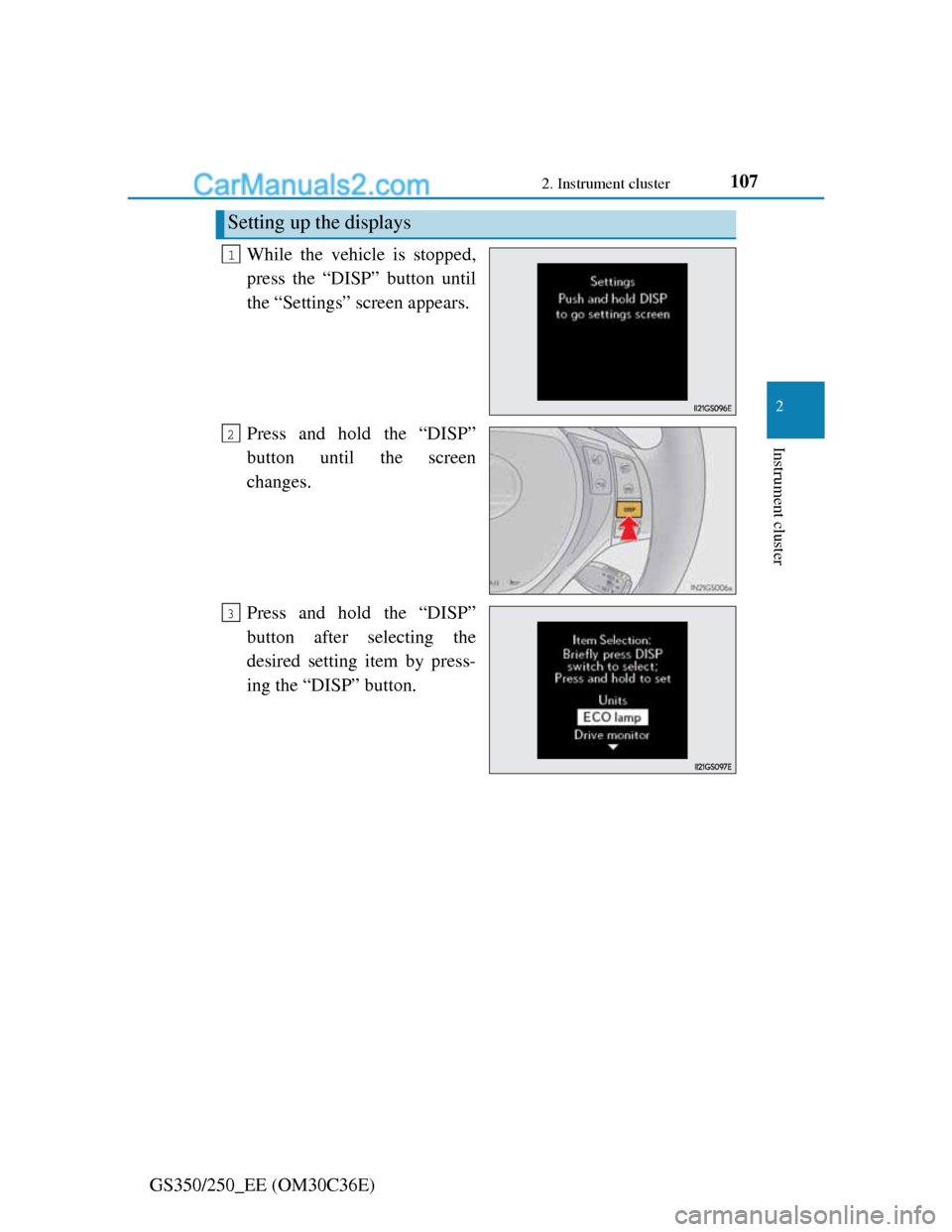
GS350/250_EE (OM30C36E)While the vehicle is stopped,
press the “DISP” button until
the “Settings” screen appears.
Press and hold the “DISP”
button until the screen
changes.
Press and hold the “DISP”
button after selecting the
desired setting item by press-
ing the “DISP” button.
Setting up the displays
1
2
3
Page 109 of 914
1082. Instrument cluster
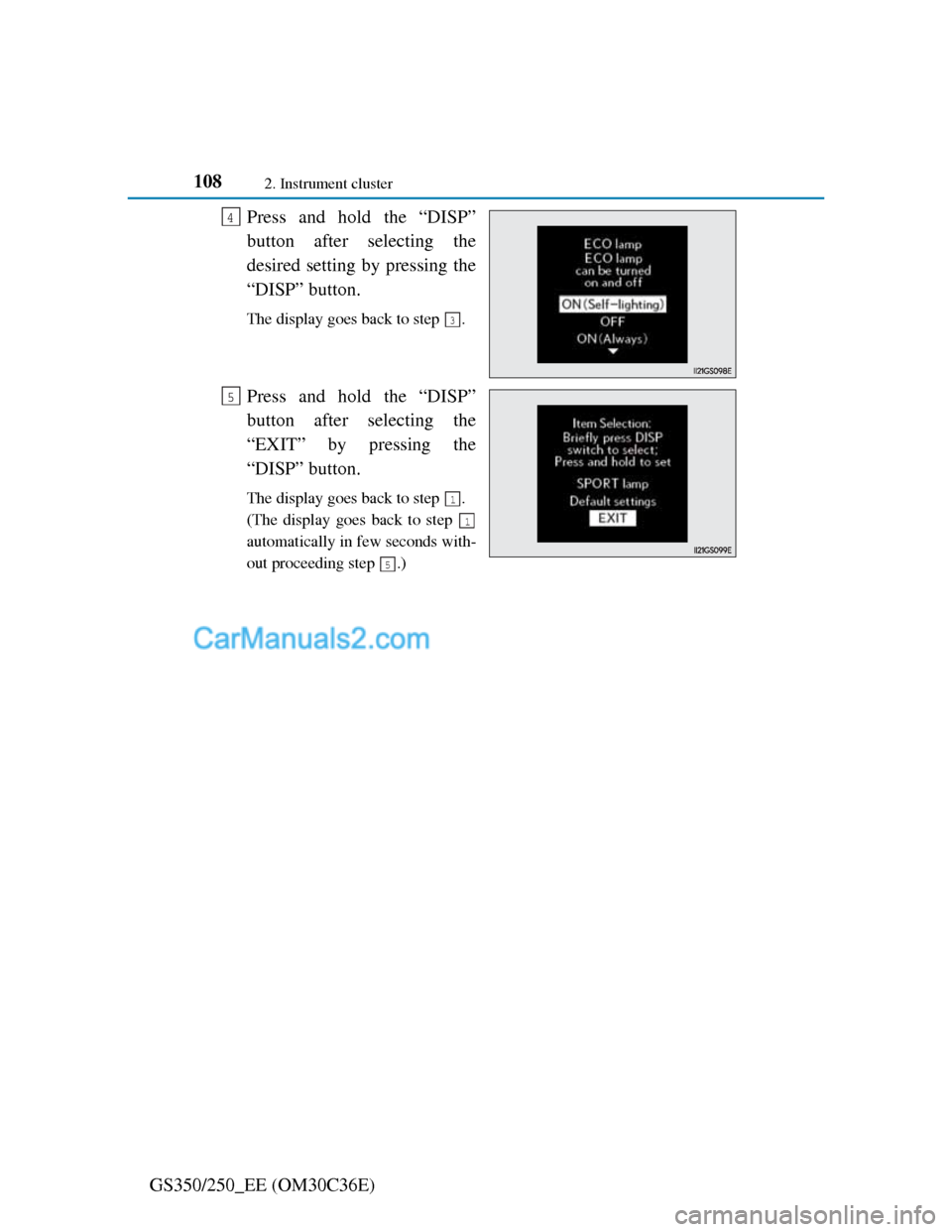
GS350/250_EE (OM30C36E)Press and hold the “DISP”
button after selecting the
desired setting by pressing the
“DISP” button.
The display goes back to step .
Press and hold the “DISP”
button after selecting the
“EXIT” by pressing the
“DISP” button.
The display goes back to step .
(The display goes back to step
automatically in few seconds with-
out proceeding step .)
4
3
5
1
1
5
Page 110 of 914
109
2 2. Instrument cluster
Instrument cluster
GS350/250_EE (OM30C36E)
System check display
After turning the engine switch to IGNITION ON mode, “SYSTEM
CHECK” is displayed while system operation is checked.
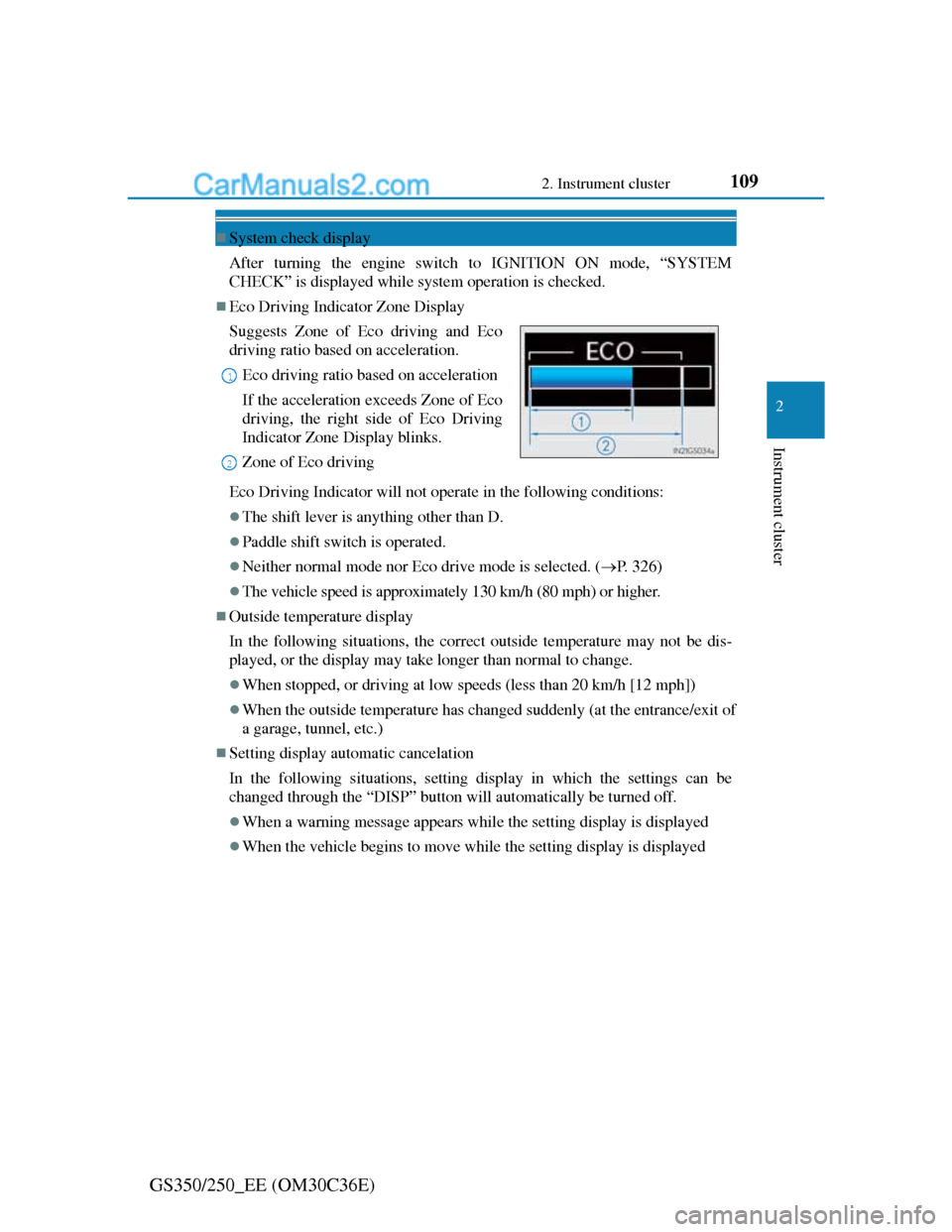
Eco Driving Indicator Zone Display
Eco Driving Indicator will not operate in the following conditions:
The shift lever is anything other than D.
Paddle shift switch is operated.
Neither normal mode nor Eco drive mode is selected. (P. 326)
The vehicle speed is approximately 130 km/h (80 mph) or higher.
Outside temperature display
In the following situations, the correct outside temperature may not be dis-
played, or the display may take longer than normal to change.
When stopped, or driving at low speeds (less than 20 km/h [12 mph])
When the outside temperature has changed suddenly (at the entrance/exit of
a garage, tunnel, etc.)
Setting display automatic cancelation
In the following situations, setting display in which the settings can be
changed through the “DISP” button will automatically be turned off.
When a warning message appears while the setting display is displayed
When the vehicle begins to move while the setting display is displayed Suggests Zone of Eco driving and Eco
driving ratio based on acceleration.
Eco driving ratio based on acceleration
If the acceleration exceeds Zone of Eco
driving, the right side of Eco Driving
Indicator Zone Display blinks.
Zone of Eco driving
1
2
Page 111 of 914
1102. Instrument cluster
GS350/250_EE (OM30C36E)
Tire inflation pressure (if equipped)
It may take a few minutes to display the tire inflation pressure after the
engine switch is turned to IGNITION ON mode. It may also take a few
minutes to display the tire inflation pressure after inflation pressure has
been adjusted.
“---” may be displayed if the tire position information cannot be determined
due to unfavorable radio wave conditions.
Tire inflation pressure changes with temperature. The displayed values may
also be different from the values measured using a tire pressure gauge.
Liquid crystal display
Small spots or light spots may appear on the display. This phenomenon is
characteristic of liquid crystal displays, and there is no problem continuing to
use the display.
Customization
Setting of available languages can be changed. (Customizable features P.
857)
CAUTION
The information display at low temperatures
Allow the interior of the vehicle to warm up before using the liquid crystal
information display. At extremely low temperatures, the information dis-
play monitor may respond slowly, and display changes may be delayed.
For example, there is a lag between the driver’s shifting and the new gear
number appearing on the display. This lag could cause the driver to down-
shift again, causing rapid and excessive engine braking and possibly an
accident resulting in death or injury.
Cautions during setting up the display
As the engine needs to be running during setting up the display, ensure that
the vehicle is parked in a place with adequate ventilation. In a closed area
such as a garage, exhaust gases including harmful carbon monoxide (CO)
may collect and enter the vehicle. This may lead to death or a serious health
hazard.
Page 112 of 914
1112. Instrument cluster
2
Instrument cluster
GS350/250_EE (OM30C36E)
NOTICE
During setting up the display
To prevent battery discharge, ensure that the engine is running while setting
up the display features.
Page 113 of 914
1122. Instrument cluster
GS350/250_EE (OM30C36E)
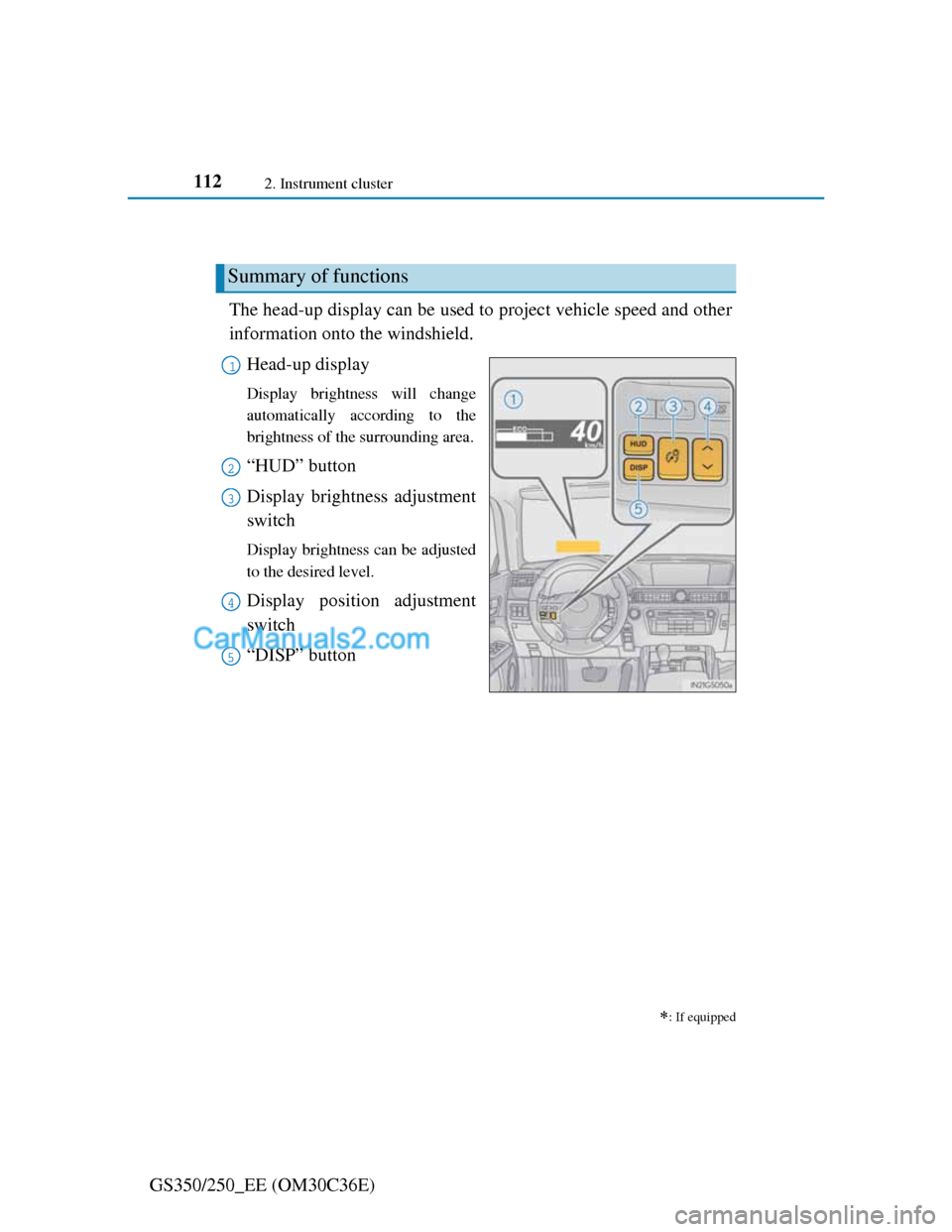
Head-up display
The head-up display can be used to project vehicle speed and other
information onto the windshield.
Head-up display
Display brightness will change
automatically according to the
brightness of the surrounding area.
“HUD” button
Display brightness adjustment
switch
Display brightness can be adjusted
to the desired level.
Display position adjustment
switch
“DISP” button
: If equipped
Summary of functions
1
2
3
4
5
Page 114 of 914
1132. Instrument cluster
2
Instrument cluster
GS350/250_EE (OM30C36E)
Vehicle speed
Tachometer
Shift position and shift range
Displays the selected shift position or selected shift range (P. 214)
Eco Driving Indicator (P. 109)
Audio display
Displays audio information for approximately 3 seconds when the audio
system is operated
Route guidance display (vehicles with navigation system)
(P. 116)
When approaching an intersection while the navigation system is giving
route guidance, an arrow will automatically be displayed to indicate the
direction of travel.
Lane departure warning display (LKA [Lane-Keeping Assist])
(if equipped) (P. 767)
Approach warning display (dynamic radar cruise control) (if
equipped)
(P. 767)
Pre-crash braking warning message (pre-crash safety system)
(if equipped) (P. 767)
Head-up display contents
Page 115 of 914
1142. Instrument cluster
GS350/250_EE (OM30C36E)
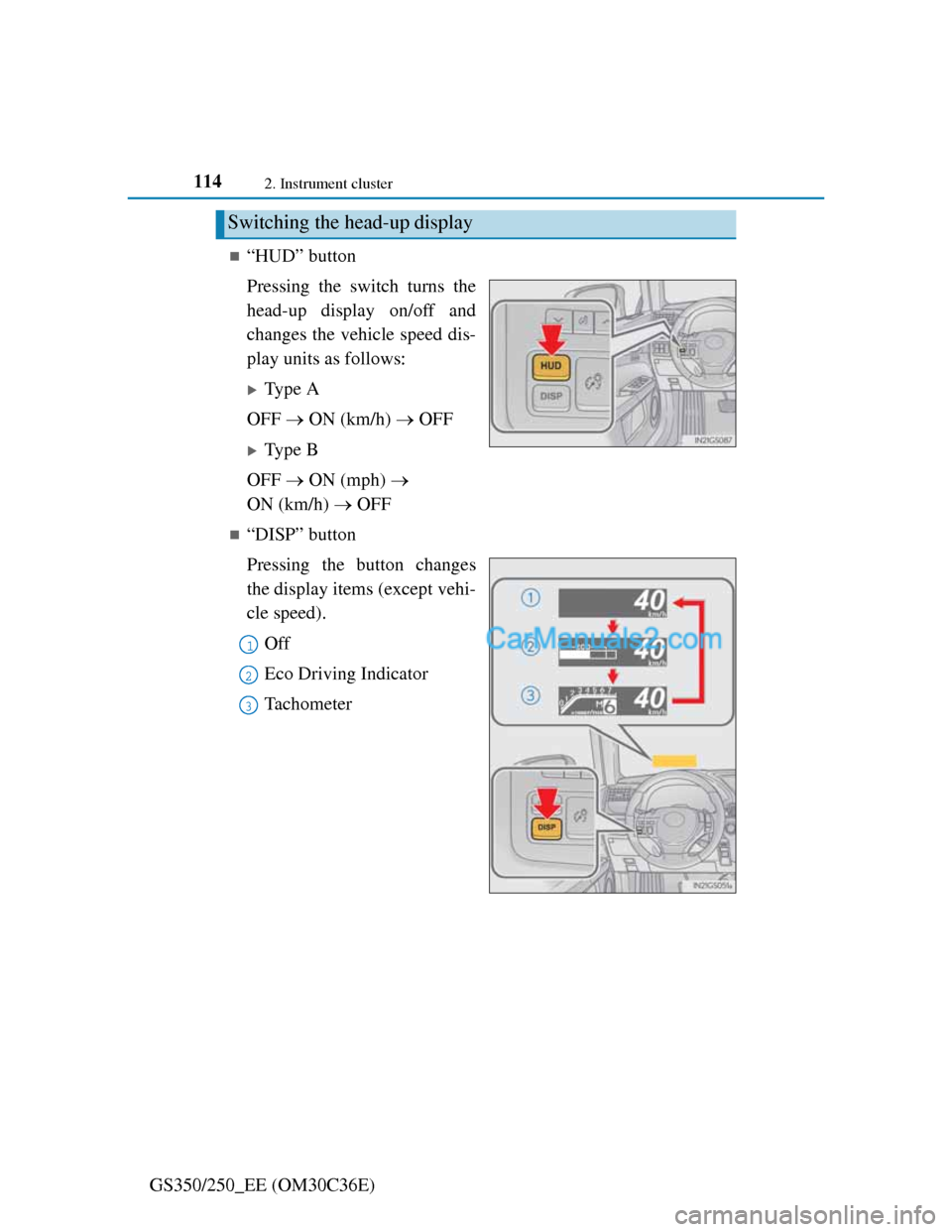
“HUD” button
Pressing the switch turns the
head-up display on/off and
changes the vehicle speed dis-
play units as follows:
Type A
OFF ON (km/h) OFF
Type B
OFF ON (mph)
ON (km/h) OFF
“DISP” button
Pressing the button changes
the display items (except vehi-
cle speed).
Off
Eco Driving Indicator
Tachometer
Switching the head-up display
1
2
3
Page 116 of 914
1152. Instrument cluster
2
Instrument cluster
GS350/250_EE (OM30C36E)
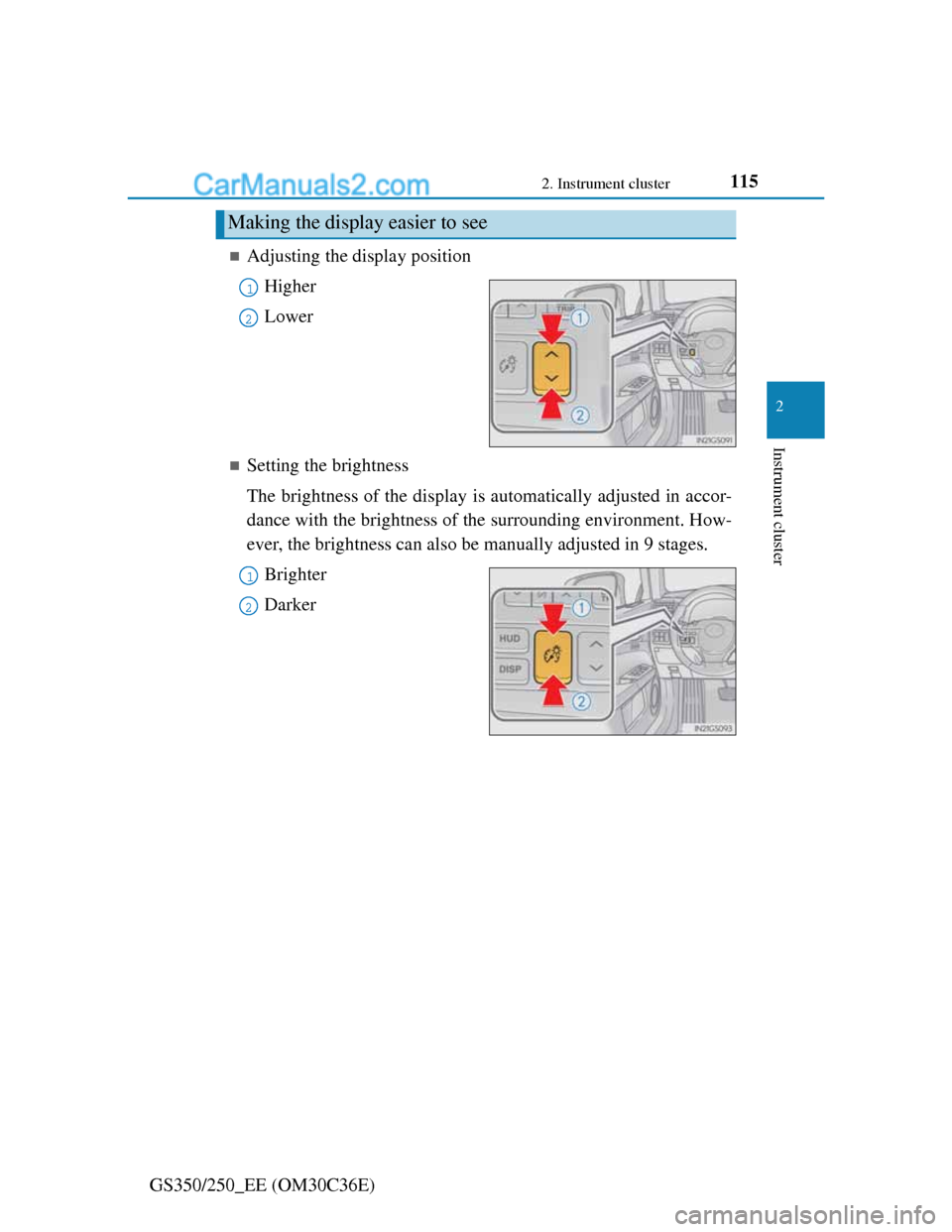
Adjusting the display position
Higher
Lower
Setting the brightness
The brightness of the display is automatically adjusted in accor-
dance with the brightness of the surrounding environment. How-
ever, the brightness can also be manually adjusted in 9 stages.
Brighter
Darker
Making the display easier to see
1
2
1
2