Disp Lexus GS250 2012 Service Manual
[x] Cancel search | Manufacturer: LEXUS, Model Year: 2012, Model line: GS250, Model: Lexus GS250 2012Pages: 914, PDF Size: 53.04 MB
Page 216 of 914
2104-2. Driving procedures
GS350/250_EE (OM30C36E)If the engine is stopped with the shift lever in a position other than
P, the engine switch will not be turned off but instead be turned to
ACCESSORY mode. Perform the following procedure to turn the
switch off:
Check that the parking brake is set.
Shift the shift lever to P.
Check that “POWER ON” and “Turn Power OFF” are displayed
alternately on the multi-information display and then press the
engine switch once.
Check that “POWER ON” and “Turn Power OFF” on the multi-
information display are off.
When stopping the engine with the shift lever in a position
other than P
1
2
3
4
Page 217 of 914
2114-2. Driving procedures
4
Driving
GS350/250_EE (OM30C36E)
Auto power off function
If the vehicle is left in ACCESSORY mode for more than 20 minutes or
IGNITION ON mode (the engine is not running) for more than an hour with
the shift lever in P, the engine switch will automatically turn off. However,
this function cannot entirely prevent battery discharge. Do not leave the vehi-
cle with the engine switch in ACCESSORY or IGNITION ON mode for long
periods of time when the engine is not running.
Electronic key battery depletion
P. 1 3 4
Conditions affecting operation
P. 1 3 0
Notes for the entry function
P. 1 3 1
If the engine does not start
The engine immobilizer system may not have been deactivated. (P. 8 0 )
Contact any authorized Lexus dealer or repairer, or another duly qualified
and equipped professional.
Check that the shift lever is securely set in P. The engine may not start if the
shift lever is displaced out of P. “Shift to P position to Start” will be dis-
played on the multi-information display.
Steering lock
After turning the engine switch off and opening and closing the doors, the
steering wheel will be locked due to the steering lock function. Operating the
engine switch again automatically cancels the steering lock.
Page 218 of 914
2124-2. Driving procedures
GS350/250_EE (OM30C36E)
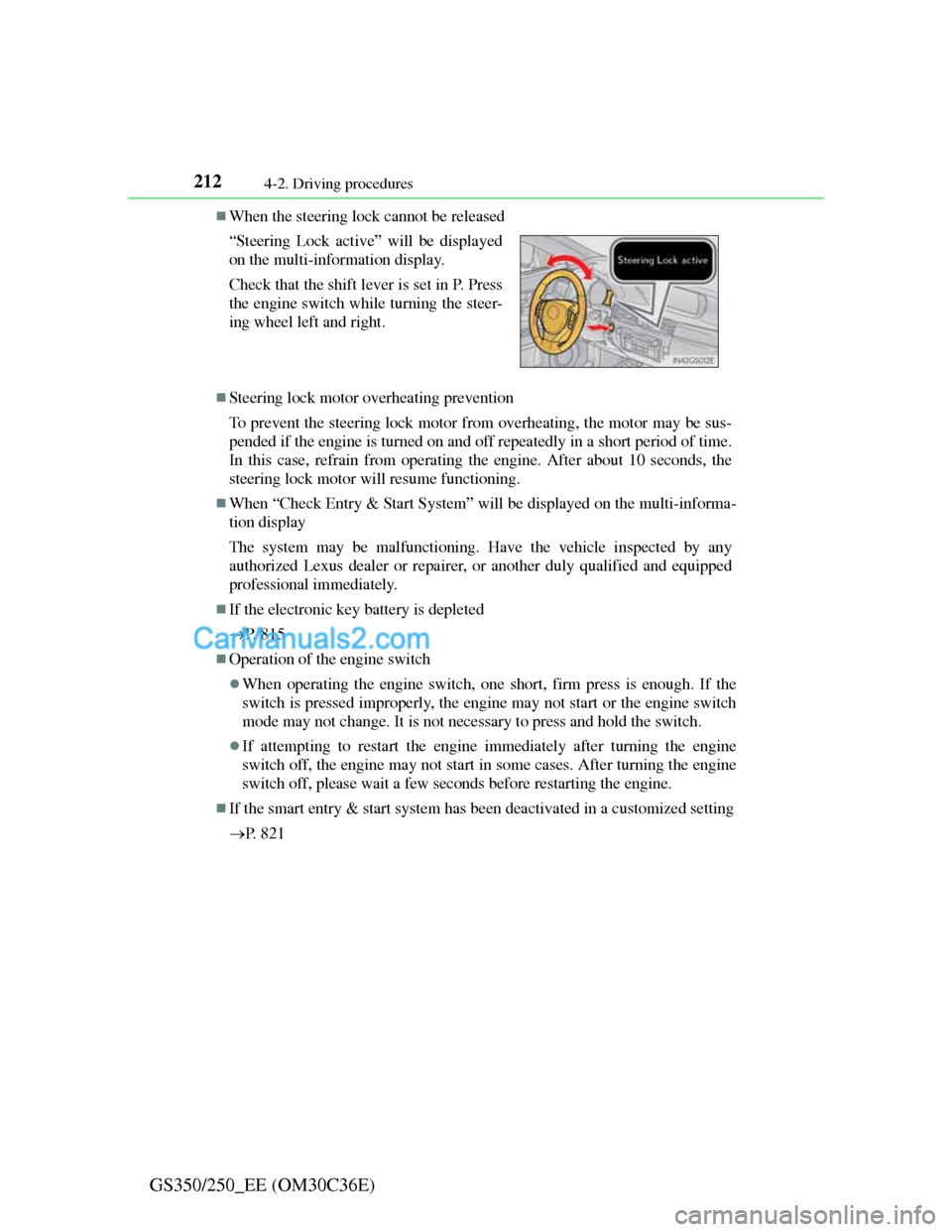
When the steering lock cannot be released
Steering lock motor overheating prevention
To prevent the steering lock motor from overheating, the motor may be sus-
pended if the engine is turned on and off repeatedly in a short period of time.
In this case, refrain from operating the engine. After about 10 seconds, the
steering lock motor will resume functioning.
When “Check Entry & Start System” will be displayed on the multi-informa-
tion display
The system may be malfunctioning. Have the vehicle inspected by any
authorized Lexus dealer or repairer, or another duly qualified and equipped
professional immediately.
If the electronic key battery is depleted
P. 8 1 5
Operation of the engine switch
When operating the engine switch, one short, firm press is enough. If the
switch is pressed improperly, the engine may not start or the engine switch
mode may not change. It is not necessary to press and hold the switch.
If attempting to restart the engine immediately after turning the engine
switch off, the engine may not start in some cases. After turning the engine
switch off, please wait a few seconds before restarting the engine.
If the smart entry & start system has been deactivated in a customized setting
P. 8 2 1 “Steering Lock active” will be displayed
on the multi-information display.
Check that the shift lever is set in P. Press
the engine switch while turning the steer-
ing wheel left and right.
Page 220 of 914
2144-2. Driving procedures
GS350/250_EE (OM30C36E)
NOTICE
To prevent battery discharge
Do not leave the engine switch in ACCESSORY or IGNITION ON mode
for long periods of time without the engine running.
If “POWER ON” is displayed on the multi-information display, the
engine switch is not off. Exit the vehicle after turning the engine switch
off.
Do not stop the engine when the shift lever is in a position other than P. If
the engine is stopped in another shift lever position, the engine switch will
not be turned off but instead be turned to ACCESSORY mode. If the vehi-
cle is left in ACCESSORY mode, battery discharge may occur.
When starting the engine
Do not race a cold engine.
If the engine becomes difficult to start or stalls frequently, have your vehi-
cle checked by any authorized Lexus dealer or repairer, or another duly
qualified and equipped professional immediately.
Symptoms indicating a malfunction with the engine switch
If the engine switch seems to be operating somewhat differently than usual,
such as the switch sticking slightly, there may be a malfunction. Contact
any authorized Lexus dealer or repairer, or another duly qualified and
equipped professional immediately.
Page 224 of 914
2184-2. Driving procedures
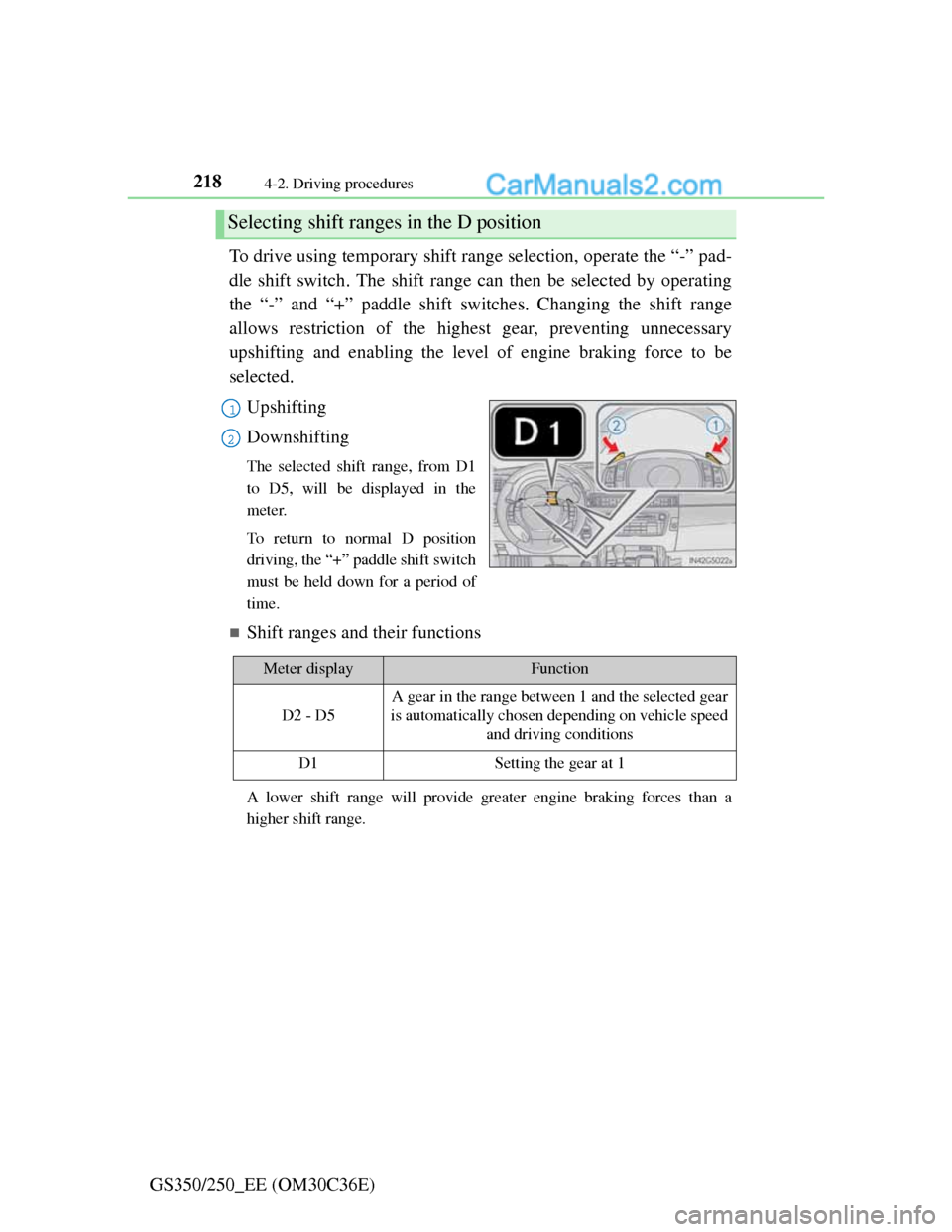
GS350/250_EE (OM30C36E)To drive using temporary shift range selection, operate the “-” pad-
dle shift switch. The shift range can then be selected by operating
the “-” and “+” paddle shift switches. Changing the shift range
allows restriction of the highest gear, preventing unnecessary
upshifting and enabling the level of engine braking force to be
selected.
Upshifting
Downshifting
The selected shift range, from D1
to D5, will be displayed in the
meter.
To return to normal D position
driving, the “+” paddle shift switch
must be held down for a period of
time.
Shift ranges and their functions
A lower shift range will provide greater engine braking forces than a
higher shift range.
Selecting shift ranges in the D position
1
2
Meter displayFunction
D2 - D5
A gear in the range between 1 and the selected gear
is automatically chosen depending on vehicle speed
and driving conditions
D1Setting the gear at 1
Page 225 of 914
2194-2. Driving procedures
4
Driving
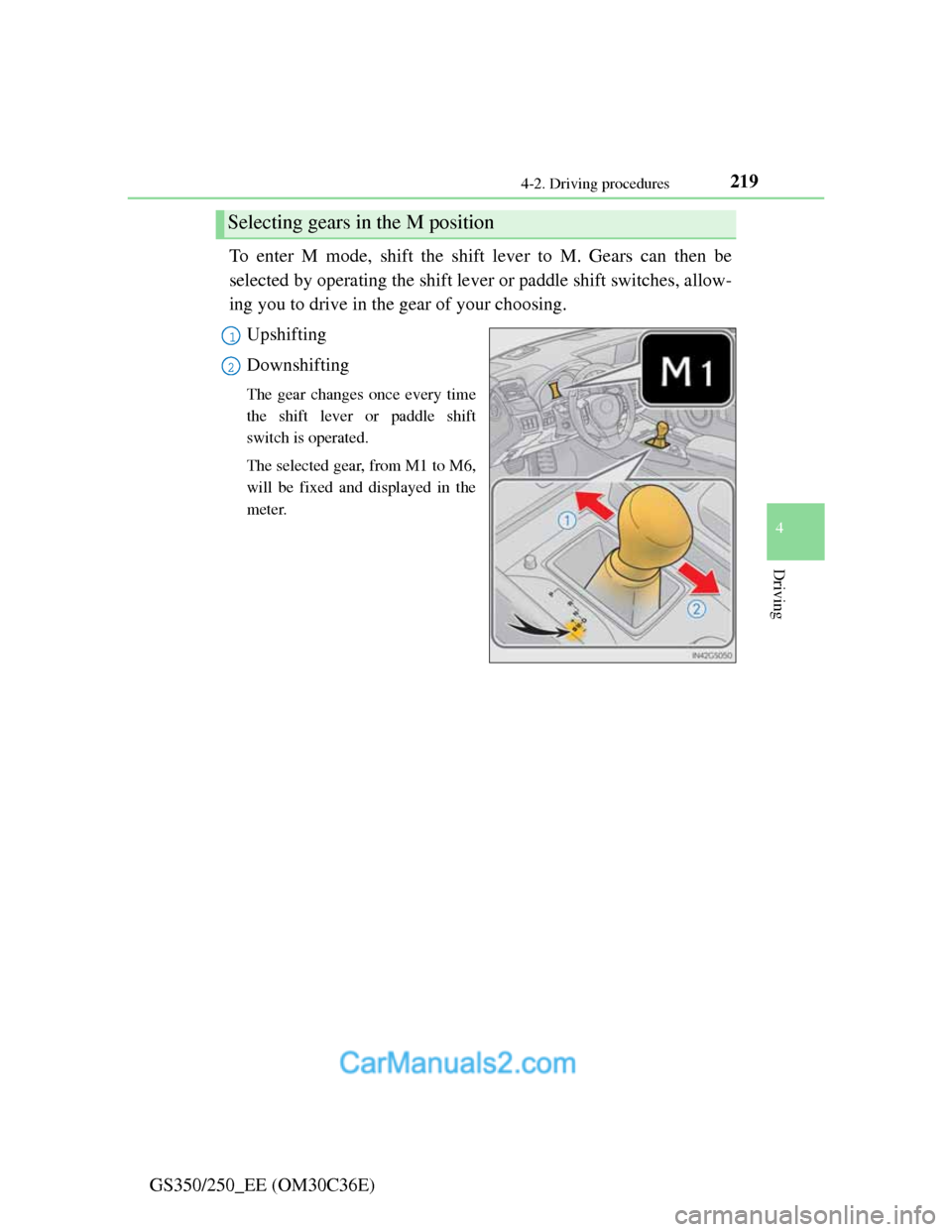
GS350/250_EE (OM30C36E)To enter M mode, shift the shift lever to M. Gears can then be
selected by operating the shift lever or paddle shift switches, allow-
ing you to drive in the gear of your choosing.
Upshifting
Downshifting
The gear changes once every time
the shift lever or paddle shift
switch is operated.
The selected gear, from M1 to M6,
will be fixed and displayed in the
meter.
Selecting gears in the M position
1
2
Page 226 of 914
2204-2. Driving procedures
GS350/250_EE (OM30C36E)When in the M position, the gear will not change unless the shift
lever or paddle shift switches are operated.
However, even when in the M position, the gears will be auto-
matically changed in the following situation:
When vehicle speed drops (downshift only).
When the automatic transmission fluid or engine coolant tem-
perature is low.
When automatic transmission fluid temperature is high.
When the needle of the tachometer is in the red zone (the range
which exceeds the allowable revs of the engine).
In the following situations, the gear will not shift even if the shift
lever or paddle shift switches are operated.
“1st Gear not available due to slippery road surface” is dis-
played on the multi information display.
The vehicle speed is low (upshift only).
Page 227 of 914
2214-2. Driving procedures
4
Driving
GS350/250_EE (OM30C36E)
When the “-” paddle shift switch is operated in the D position
A shift range will be automatically selected. The highest gear of the first shift
range will be one gear lower than the gear in use during normal D position
driving.
Automatic deactivation of shift range selection in the D position
Shift range selection in the D position will be deactivated in the following
situations:
When the vehicle comes to a stop
If the “+” paddle shift switch is operated when the shift range is in range 5
If the accelerator pedal is depressed for more than a certain period of time
When the shift lever is shifted to other than D
To protect automatic transmission
“Transmission Fluid High Temperature” is displayed on the multi-informa-
tion display and a function is adopted that automatically selects a higher shift
range when the fluid temperature is high. Have the vehicle inspected by any
authorized Lexus dealer or repairer, or another duly qualified and equipped
professional.
Downshifting restrictions warning buzzer
To help ensure safety and driving performance, downshifting operation may
sometimes be restricted. In some circumstances, downshifting may not be
possible even when the shift lever or paddle shift switch is operated. (A
buzzer will sound twice.)
Snow mode automatic deactivation
Snow mode is automatically deactivated if the engine switch is turned off
after driving in snow mode.
If the shift lever cannot be shifted from P
P. 8 1 7
Page 263 of 914
2564-5. Using the driving support
GS350/250_EE (OM30C36E)
Cruise control can be set when
The shift lever is in D.
Range 4 or higher of D has been selected by using the paddle shift.
Vehicle speed is above approximately 40 km/h (25 mph).
Accelerating after setting the vehicle speed
The vehicle can be accelerated normally. After acceleration, the set speed
resumes.
Even without canceling the cruise control, the set speed can be increased by
first accelerating the vehicle to the desired speed and then pushing the lever
down to set the new speed.
Automatic cruise control cancelation
Cruise control will stop maintaining the vehicle speed in any of the following
situations.
Actual vehicle speed falls more than approximately 16 km/h (10 mph)
below the preset vehicle speed.
At this time, the memorized set speed is not retained.
Actual vehicle speed is below approximately 40 km/h (25 mph).
VSC is activated.
TRC is activated for a period of time.
When the VSC or TRC system is turned off by pressing the VSC OFF
switch.
If the warning message for the cruise control is shown on the multi-informa-
tion display
Press the “ON-OFF” button once to deactivate the system, and then press the
button again to reactivate the system.
If the cruise control speed cannot be set or if the cruise control cancels imme-
diately after being activated, there may be a malfunction in the cruise control
system. Have the vehicle inspected by any authorized Lexus dealer or
repairer, or another duly qualified and equipped professional.
Page 265 of 914
2584-5. Using the driving support
GS350/250_EE (OM30C36E)
Dynamic radar cruise control
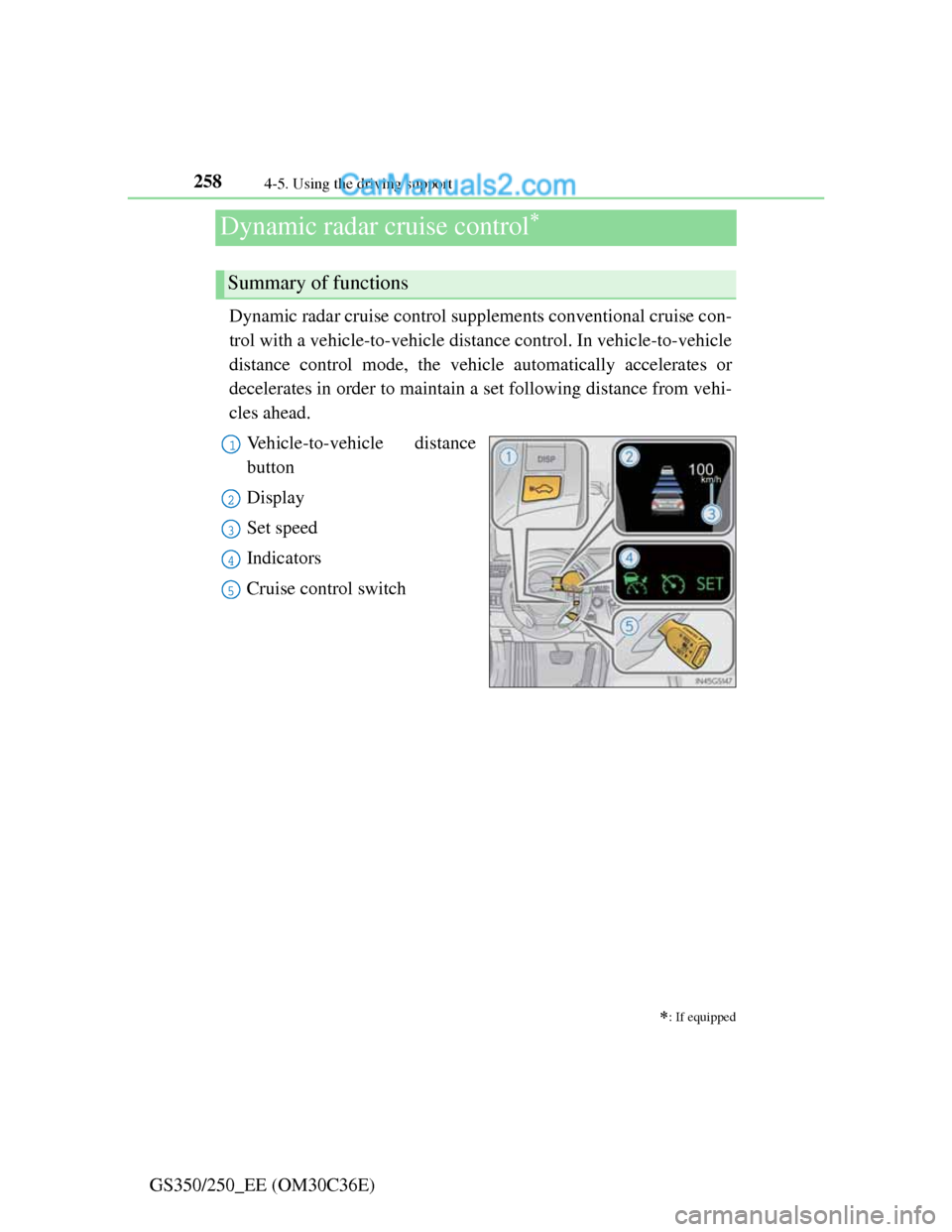
Dynamic radar cruise control supplements conventional cruise con-
trol with a vehicle-to-vehicle distance control. In vehicle-to-vehicle
distance control mode, the vehicle automatically accelerates or
decelerates in order to maintain a set following distance from vehi-
cles ahead.
Vehicle-to-vehicle distance
button
Display
Set speed
Indicators
Cruise control switch
: If equipped
Summary of functions
1
2
3
4
5